
Flexa Extra – Product Options, Variation Swatches & Pricing for WooCommerce
| 开发者 | flexatech |
|---|---|
| 更新时间 | 2026年10月6日 17:11 |
| PHP版本: | 8.1 及以上 |
| WordPress版本: | 7.1 |
| 版权: | GPLv2 or later |
| 版权网址: | 版权信息 |
详情介绍:
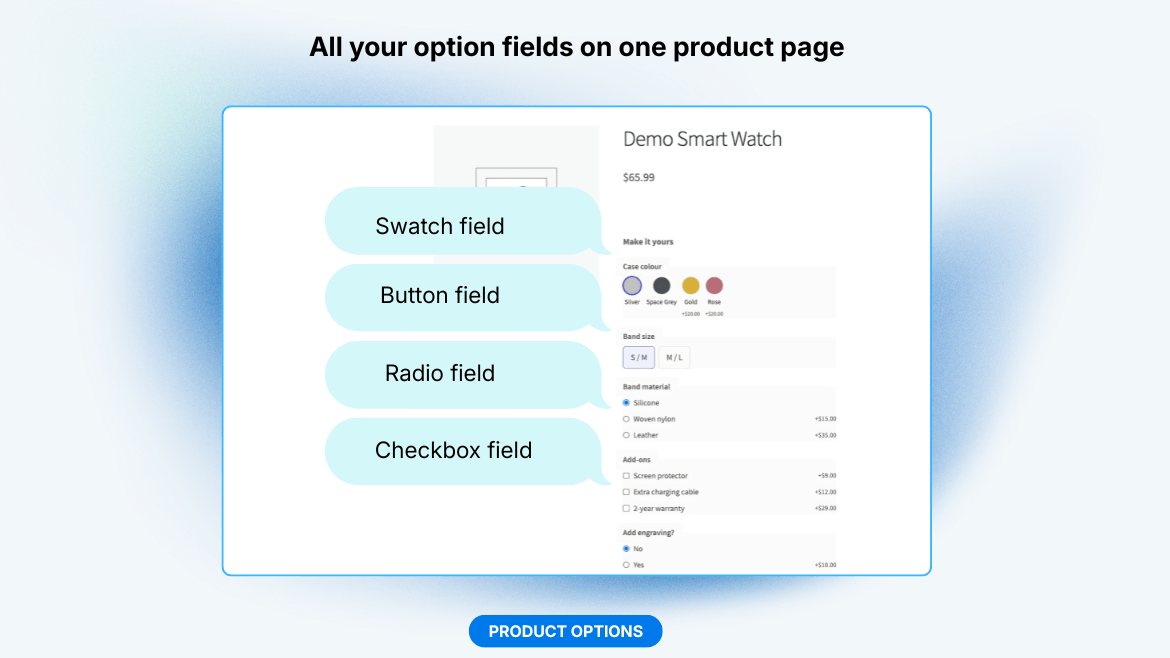
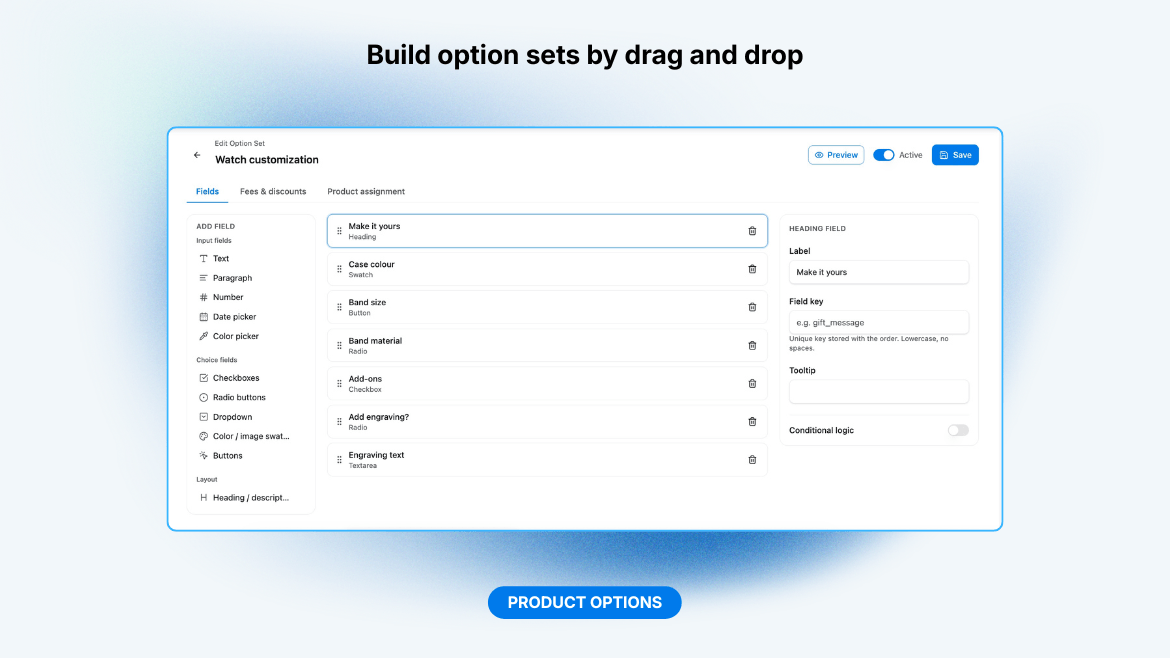
- Text and textarea, with email, URL, phone or custom-regex validation
- Number and range slider (min/max/step)
- Date picker, time picker, date & time picker, and colour picker
- Checkbox, radio, dropdown
- Colour/image swatches
- Button group
- Heading / description block
- Minimum and maximum number of choices on any multi-select field
- Per-field or per-option surcharge
- Fixed amount, a percentage of the product price, or a safe arithmetic formula
- Formula prices use
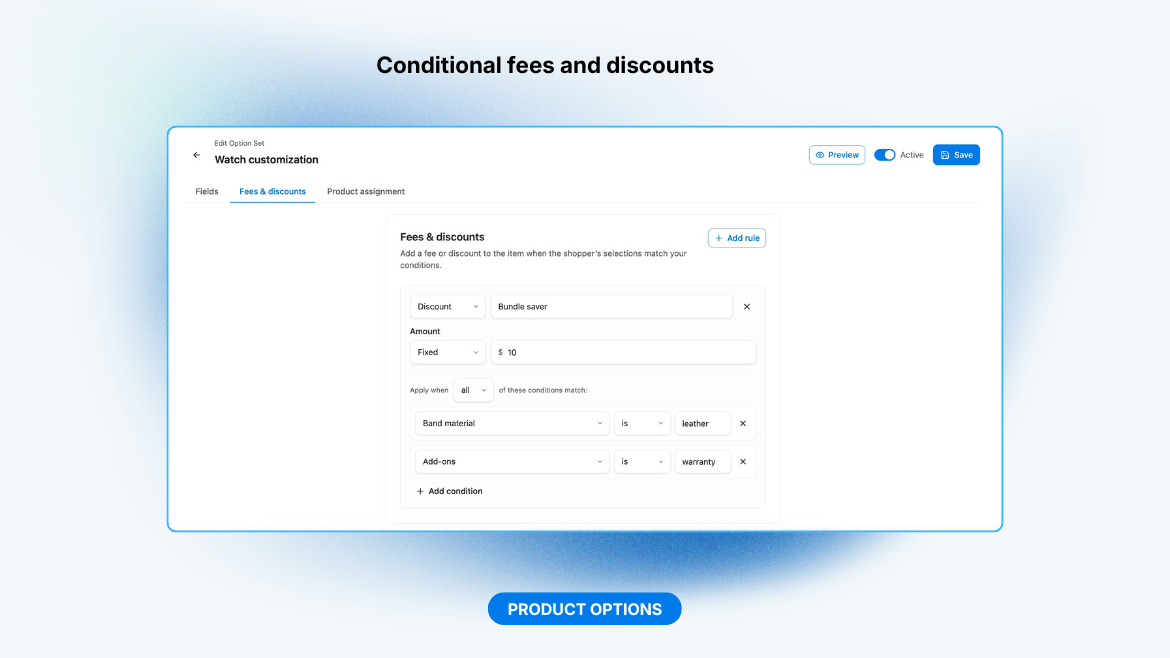
base,qtyand other fields' values with+ - * / ( )andround(),min(),max()(noeval), for per-unit and volume-tiered pricing - Conditional fees and discounts applied to the item when selections match a rule
- Optional stock limit per choice option: sold-out options are disabled, over-selling is blocked at add-to-cart, and paid orders draw the stock down (restored on cancel or refund)
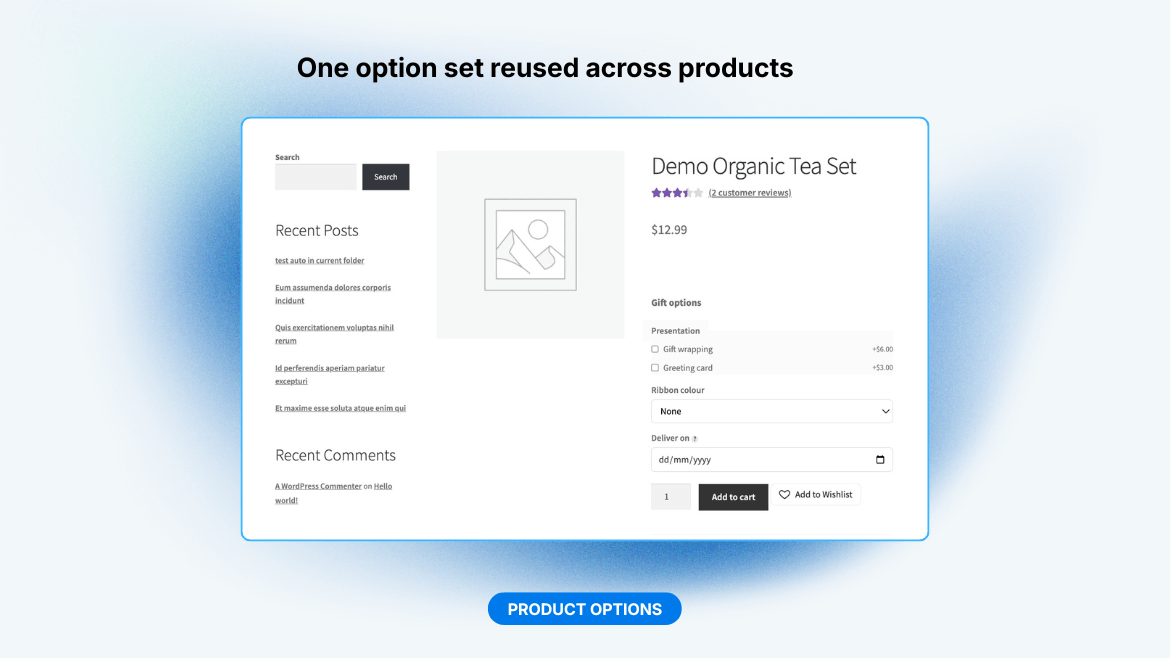
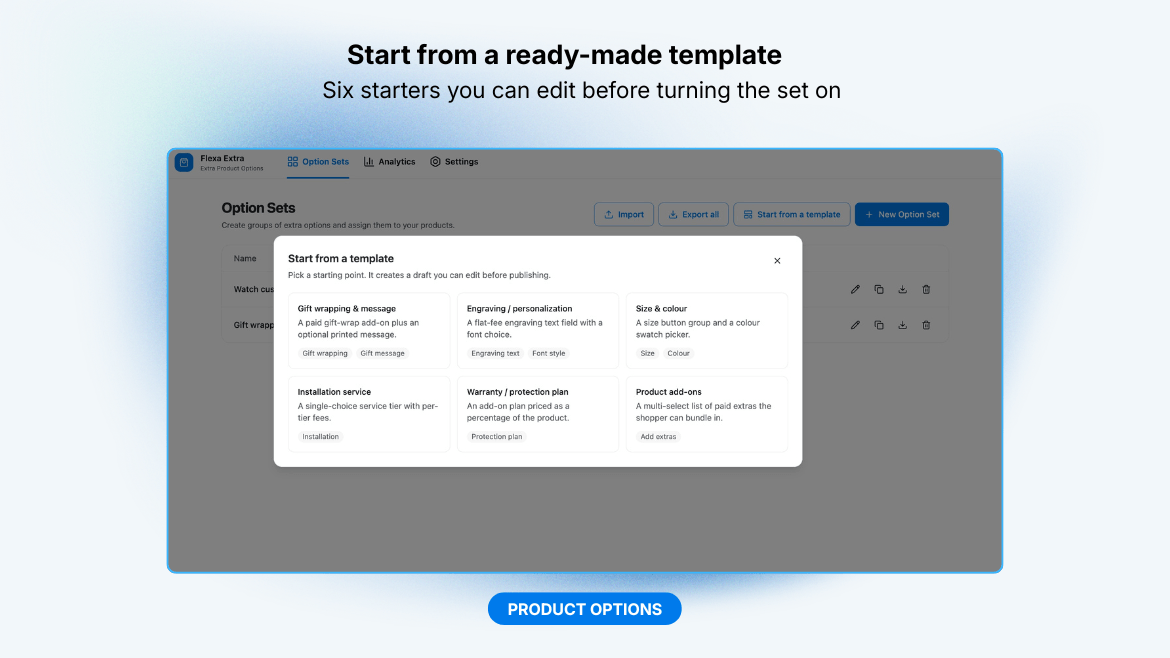
- Start from a template: pick a ready-made starter (gift wrapping, engraving, size & colour, installation service, warranty plan, product add-ons) and it creates an option set, switched off, that you can edit before turning it on
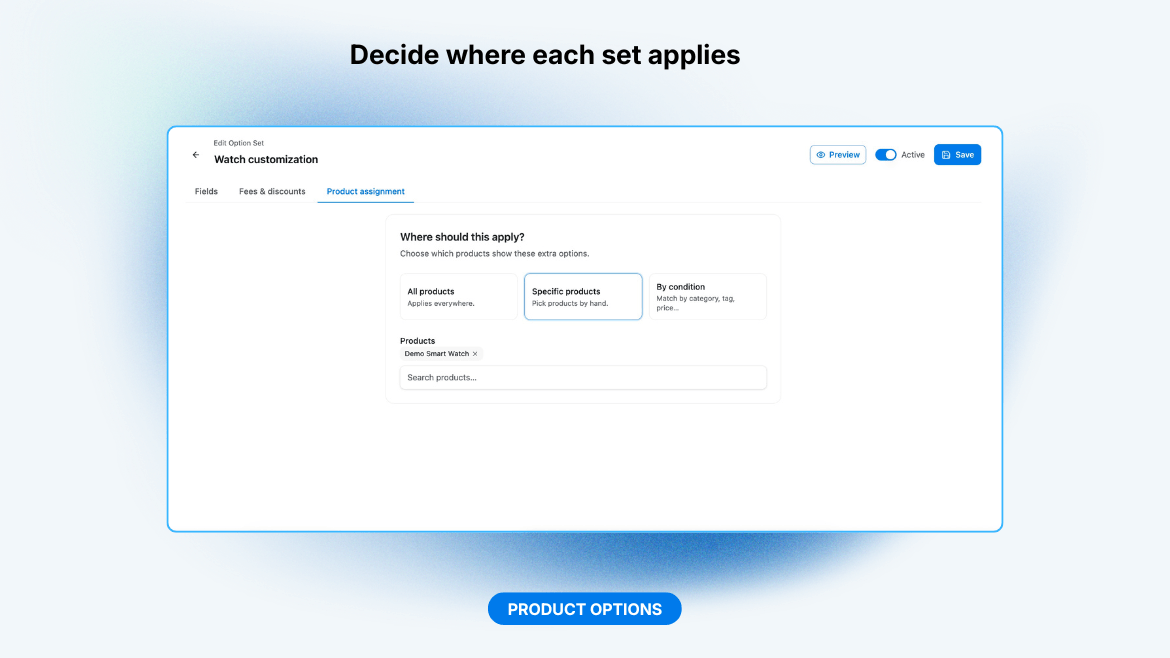
- Target all products, a manual list, or conditions (category, tag, product, price, stock)
- Conditional logic to show/hide fields based on other selections
- Duplicate an option set, and import or export sets as a JSON file
- Live preview in the builder: see the option set render (and price) exactly as the storefront will, updating as you edit
- Analytics screen ranking which options and choices sell, and the add-on revenue they bring, filterable by date range and order status
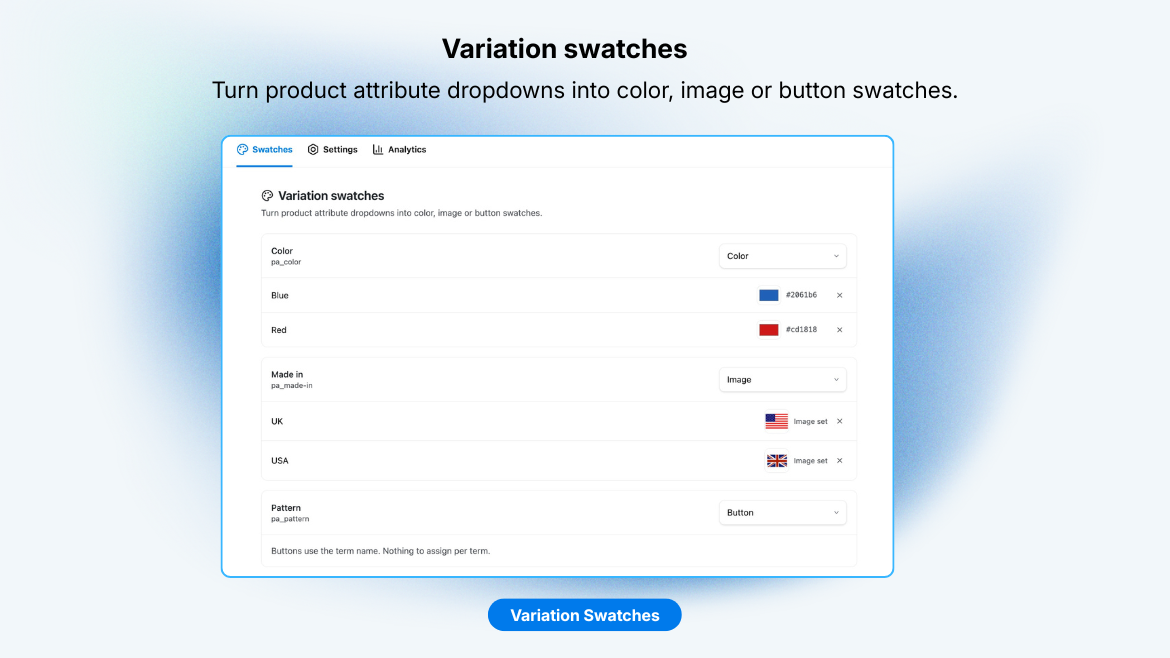
- Turn WooCommerce variation attribute dropdowns into colour, image or button swatches on variable products, with its own admin screen to assign a colour or image to each attribute term (no extra plugin required)
- The native variation
<select>stays in place (hidden) and remains the source of truth: clicking a swatch drives WooCommerce's own variation logic, so price, stock and gallery image update exactly as before, unavailable combinations are dimmed, and keyboard selection works - Size, shape, custom width/height, button font size, selected-ring and unavailable-strike colours, and an optional hover tooltip, all from the Style settings
- Show the selected value as an "Attribute: Value" line, render attributes with no swatch type as buttons, and show a loading spinner while the variation updates
- Choose how unavailable or out-of-stock swatches behave (dim and strike, hide, or show as normal), and optionally clear the choice by clicking the selected swatch again
- Limit how many swatches show per attribute with a "+N more" toggle, and show per-swatch stock ("N left" on low stock, "Out of stock" when a combination is sold out)
- Show swatches in the shop and category loop too: each links to the product with that option preselected
- Only applies to global attributes (
pa_*) that have terms; custom product-level attributes have no term to attach a colour/image to. If a dedicated plugin like Woo Variation Swatches is active, Flexa Extra steps aside automatically to avoid double rendering
- Show targeted badges on product thumbnails, in the shop and category loop and on the single product page: give each a label, background and text colour, a corner (top-left, top-right, bottom-left, bottom-right) and a priority
- Target the same way pricing rules do: all products, a manual list (searched with an async product/category/tag picker), or by brand, attribute or price range
- Dynamic targets that read live product state: on sale, new (published recently), featured, low stock and out of stock, each of which can be inverted
- Badges stack per corner in priority order, and the whole module has an on/off switch. It sits on the product image, separate from the pricing sale flash, so both can show at once
- Off by default: it takes over the product gallery, so you switch it on under Flexa > Gallery when you want it, and existing product pages are left alone until then
- Replaces the single product gallery with a slider: thumbnail strip (bottom, left, right or hidden), slide or fade transitions, arrows, dots (dots, lines, numbers or none) and drag/swipe on touch
- Zoom on the main image, on hover or on click, at 1.5× to 3×, and a fullscreen lightbox with keyboard navigation and pinch-zoom
- Optional autoplay with its own interval, which stops for good the moment the shopper touches the slider
- One video slide per product from a self-hosted
.mp4, YouTube or Vimeo URL, set on the product edit screen and placed first or last in the gallery - Picks up variation images: choosing a variation moves the slider to that image, or adds it when it is not already in the gallery
- Square, 4:3, 3:4, 16:9 or the image's own aspect ratio, plus arrow, dot and overlay colours
- No JavaScript dependency, and no JavaScript required to shop: without it every image stays visible and links to its full size. WooCommerce's own flexslider, zoom and PhotoSwipe scripts are dropped while the module is on, and come back when it is off
- Gutenberg "Flexa Extra Configurator" block to show an option set with live pricing on any page or post (display only, does not add to cart)
- Public read-only REST API for decoupled/headless storefronts: fetch a product's option sets, prices, and logic to render the same configurator and subtotal elsewhere. Open by default, closable with a filter
- Edit a line's options straight from the cart: the product page reopens with the saved selections filled in, and re-adding replaces the line instead of stacking a duplicate
- Position fields before or after the add-to-cart button
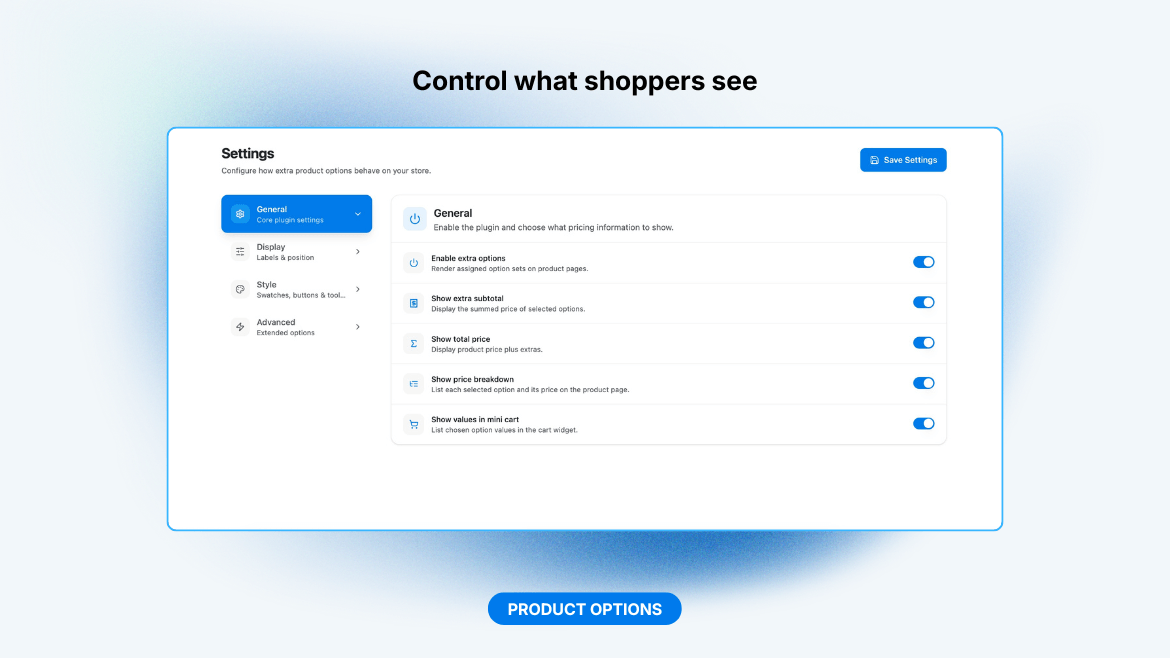
- Live "extra subtotal" and "total price" readouts
- Itemized price breakdown: each selected option and conditional fee/discount listed with its own price, updating live
- Swatch size/shape and button colour styling
- Accessible markup (fieldset/legend groups,
aria-required, keyboard focus), responsive, and reduced-motion aware
安装:
- Upload the plugin to
/wp-content/plugins/flexa-extraor install it through the Plugins screen. - Activate it. WooCommerce must be active.
- On activation a short quick-start guide points you at the template gallery so you can build your first Option Set in a couple of minutes. It is skippable, and you can replay it later from Advanced settings.
- Open Flexa Extra in the admin menu to configure settings and build Option Sets.
屏幕截图:


常见问题:
Does it require WooCommerce?
Yes. Flexa Extra stays inactive (with an admin notice) until WooCommerce is active.
Can a customer tamper with the surcharge?
No. The extra price is recomputed server-side from your stored option definitions on add-to-cart and on every cart totals pass; the posted values are sanitized against the field schema.
Is it compatible with High-Performance Order Storage (HPOS)?
Yes. The plugin declares HPOS compatibility.
Does it work with the cart and checkout blocks?
Yes, and the plugin says so to WooCommerce, so the plugins screen no longer lists it as uncertain. Under the blocks the chosen options are listed beneath each cart line, the surcharge is part of the line price the Store API returns, the cart checks still run before checkout, and the options are written onto the order line exactly as they are in the classic cart. Three small touches are drawn by the classic cart and checkout only, because the blocks have no filter to hang them on: the "Edit options" link on a cart line, the spend-more nudge from the Pricing add-on, and the tooltip that explains a checkout fee. Prices, fees and discounts are the same either way.
Can developers extend it?
Yes, see docs/HOOKS.md for the available actions and filters.
Can I style individual fields with my own CSS?
Yes. Each field is wrapped in a <div> with class hooks: flexa-extra-field on every wrapper, flexa-extra-field--<type> for all fields of a type, and flexa-extra-field--id-<field_id> for one specific field (plus data-field-id and data-field-type attributes). You can also add your own class per field in the builder: select the field and fill the "CSS class" box in the Inspector. See docs/HOOKS.md for examples.
Can I import from another options plugin?
Yes. The Import screen reads option sets from YayExtra, ThemeHigh "Extra Product Options" (free), WooCommerce Product Add-Ons, Acowebs "Custom Product Addons for WooCommerce", and YITH WooCommerce Product Add-Ons (free), and re-creates them in Flexa Extra, switched off. They appear in the Option Sets list for review; the storefront ignores them until you turn each one on. Field types, per-option prices, swatches and product assignment are mapped where an equivalent exists; anything that cannot be mapped 1:1 is listed per set so you can re-create it. Keep the source plugin active during the import so its data is readable.
Can I use it with a headless or decoupled front end?
Yes. Two open, read-only REST routes (/wp-json/flexa-extra/v1/public/config and /public/product/{id}) return the option sets, prices, and logic a front end needs to render the configurator and compute the live subtotal. They expose only what the on-page configurator already ships, and you can close the API with the flexa_extra/public_api/enabled filter. Add-to-cart and the final price are always recomputed server-side.
How do the variation swatches work, and what are the limits?
On a variable product, Flexa Extra can replace each attribute dropdown with colour, image or button swatches. It hides the native <select> but keeps it as the source of truth, so clicking a swatch uses WooCommerce's own variation logic for price, stock and the product gallery. Assign colours/images per attribute term under Flexa Extra → Variation Swatches. It works only with global attributes (pa_*) that have terms; custom product-level attributes have no term to attach to. If a dedicated swatches plugin (for example Woo Variation Swatches) is active, Flexa Extra defers to it automatically to avoid rendering swatches twice.
更新日志:
- Fix: on a product page, a variable product in the "Related products" row could come out broken, its swatch images stacked down the card at full width and the size labels run together as one line of text. The swatch stylesheet was only being loaded on the shop and category pages. It now loads anywhere the swatches appear, including upsells, cross-sells, the [products] shortcode and the product blocks.
- Fix: loop swatches were printed inside the card's own product link, which HTML does not allow and which made the browser rearrange the card around them. They now print just after the link closes, still under the price and above the add-to-cart button.
- The date and time field now opens the plugin's own calendar instead of the browser's blue datetime box, so it looks like the date field beside it. A time row sits under the calendar, and the hours and minutes it offers follow the earliest and latest moment the field allows.
- A date and time choice reads as a proper date on the cart and order lines ("October 14, 2026 3:05 pm"), in the site's own date and time formats, instead of the raw value the browser posts.
- Fix: the Product Gallery fell apart on the product page, showing a row of loose images beside a sliver of a thumbnail strip. WooCommerce's own gallery images were being printed inside the slider by the overlay hook restored in 1.15.2, and they are now kept out of it.
- Fix: a thumbnail strip set to "Left" appeared on the right of the image, and "Right" on the left. Both sides now match the setting, in the live preview too.
- Fix: a badge or sale ribbon in a corner of the gallery landed on a thumbnail when the strip was beside the image. Overlays are now positioned against the product image itself.
- Fix: the close and next/previous buttons in the gallery lightbox showed as blank circles with no icon. The theme's own button padding was squeezing the icon out; the buttons now set their own spacing.
- Fix: on a block theme (Twenty Twenty-Four and the like), a badge in a corner of the product gallery landed on a thumbnail instead of on the product image. Block themes take a different rendering path, which had the same problem the classic one did.
- Fix: the quantity-discount table on a product page showed its heading row and nothing under it. The tier rows and the table title are back; the table has been empty since the pricing engine was merged in, in 1.6.0.
- Fix: on a block theme, every product carried two identical badges, one stacked on the other. WooCommerce replays the classic badge hooks inside its block templates, and the plugin was painting for both the replay and the block itself.
- Fix: with the Product Gallery module on, badges vanished from the single product page. The slider replaces WooCommerce's gallery, and it now keeps the hook that badges (and other overlay plugins) attach to.
- Fix: WooCommerce no longer warns that the plugin may be incompatible with the cart and checkout blocks. The option lines, the surcharge, the cart checks and the order meta all already worked under the blocks; what was missing was the declaration WooCommerce reads. HPOS is declared the same way, from the same place.
- The readme now says which three touches the classic cart and checkout draw and the blocks do not: the "Edit options" link on a cart line, the spend-more nudge, and the fee tooltip.
- Developer: the badge customer conditions are now an add-on seam too.
flexaExtra.badges.conditionTypesadds a type to the picker on the Badges screen, matching theflexa_extra/badges/condition_typesandflexa_extra/badges/condition_passesfilters that already existed on the PHP side. Free's own two conditions, customer role and login state, cannot be replaced or removed. Nothing changes without an add-on listening.
- New: three more conditional-logic operators. "contains" matches part of what the shopper typed, ignoring case, and "greater than" / "less than" compare numbers. They work in field logic and in the set-level fee and discount rules.
- Fix: a multi-select dropdown now respects its "Minimum / maximum choices" setting in the browser, instead of letting the shopper pick past the maximum and only refusing at add-to-cart. An out-of-stock choice also stays unselectable once the maximum is reached.
- Fix: in the builder preview, a price using the "left with space" or "right with space" currency position is spaced the way WooCommerce spaces it, so the preview matches the product page.
- Developer: nine new hooks for add-ons, covering cart item data and stacking, order line meta, a free-form meta bag on an option line, the gallery slide list, the option-set resolution cache key, and the pricing engine's custom stage. Documented in docs/HOOKS.md. Nothing changes without an add-on listening.
- Fix: the "Gallery video URL" field on the product edit screen could not be reached on a variable product. The General tab it sits in was hidden along with the pricing fields that move to the variations, taking the field with it.
- Fix: a video slide no longer opens the lightbox as a blank frame. The video now plays inside the lightbox, and stops when you leave the slide or close it.
- The video thumbnail was a plain grey square with nothing to say it was a video. It now shows the product image behind a play badge, and the video slide itself opens on that image instead of a black frame.
- New: Product gallery. A slider replaces the single product gallery, with a thumbnail strip (bottom, left, right or hidden), slide or fade transitions, arrows, dots, and drag or swipe on touch. It is off until you switch it on, so updating changes nothing on your product pages.
- Zoom the main image on hover or on click at 1.5× to 3×, and open a fullscreen lightbox with keyboard navigation and pinch-zoom.
- Optional autoplay that stops for good as soon as the shopper touches the slider.
- Add one video slide per product from a self-hosted
.mp4, YouTube or Vimeo URL on the product edit screen, placed first or last. - Choosing a variation moves the slider to that variation's image, or adds it when it is not already in the gallery.
- Shopping still works without JavaScript: every image stays visible and links to its full size. WooCommerce's flexslider, zoom and PhotoSwipe scripts are dropped while the module is on and return when it is off.
- Settings live under Flexa > Gallery, with a live preview, aspect ratio and arrow, dot and overlay colours, and an on/off switch for the whole module.
- Fix: on a cached page, the sale flash that loads for each shopper now comes from WooCommerce's own sale-flash template, so a theme's custom sale flash and its translation stay in place.
- Clears the WordPress.org Plugin Check report: the page cache request input is sanitized after it is decoded, and false positives on other plugins' purge hooks are annotated.
- New: page cache compatibility. Prices that depend on the cart, the customer's role or login state (rule prices, pricing tables, sale countdowns, the cart nudge, the configurator total) and badges with customer conditions now load for each shopper after the page appears. A cached page no longer shows one shopper's discount to the next. Pages with nothing shopper-specific make no extra request.
- A new Page cache compatibility setting under Settings > Advanced: Auto (the default) turns it on when a page cache is found, Always on covers host and CDN caches that cannot be detected, and Off disables it.
- Auto detects WP Engine, Kinsta, Pantheon, GoDaddy and Pressable, the Flexa Cache, WP Rocket, LiteSpeed Cache, W3 Total Cache, WP Super Cache, WP Fastest Cache, Breeze, WP-Optimize and NitroPack plugins, and any other
advanced-cache.phpdrop-in. The setting shows which cache it found, and adds a note when the site sits behind Cloudflare or relies on WP-Cron. - Cached pages are cleared when you save or delete a pricing rule or badge, change plugin settings, option sets or swatches, when a scheduled rule or badge starts or ends, and when a rule reaches its usage limit. This works with Flexa Cache, WP Rocket, LiteSpeed Cache, W3 Total Cache, WP Super Cache, WP Fastest Cache, Breeze, WP-Optimize and SiteGround Optimizer.
- Fix: in the option set builder, removing or reordering a field while editing it could leave a blank "Untitled field" row behind, after which Save quietly did nothing. The builder now shows a message when the form cannot be saved, and an error instead of an empty form when an option set fails to load.
- Developer: new hooks for add-ons (Flexa Extra Pro) to register pricing rule types, option field and price types, badge and swatch types, and admin screen sections. Page cache hooks:
flexa_extra/cache/fragments_enabled,flexa_extra/cache/page_cache_detected,flexa_extra/cache/purge,flexa_extra/cache/schedule_boundariesandflexa_extra/pricing/rule/exhausted.
- Fix: the headless public product endpoint no longer returns price or option-set data for a draft, pending, private or trashed product; it now only serves published products.
- Fix: the demo-import command now validates the store URL before requesting it, so it can no longer be pointed at an internal or private network address.
- New: demo content import for site builders. A
wp flexa-extra demo import --template=<id> --store=<url>command pulls a template store's catalog (products and variations, categories, tags, global attributes and their terms, reviews, images and the matching Flexa option sets) into a fresh site, reusing a matching slug instead of creating a-2copy on a second run.wp flexa-extra demo removetakes it all back out, leaving anything you created yourself untouched. Everything imported is stamped, so removal is exact. - The same import and remove actions are available on a Demo Content admin screen, hidden unless you define
FLEXA_EXTRA_DEMO_ADMINas true inwp-config.php. The screen is a developer tool and stays out of the way on a normal store.
- Fix: the deactivation feedback survey no longer opens more than one "Before you go" dialog. With several Flexa plugins active at once, each bundled its own copy of the survey script and every copy added a handler to the Deactivate link, so the dialog stacked and needed one click to dismiss each copy. Each Deactivate link now opens a single dialog.
- Product Badges screen has a single sticky action bar at the bottom instead of duplicating Add badge and Save badges at the top and bottom. The bar stays in view while you scroll, and holds Add badge, Save badges and the Expand all / Collapse all switch.
- Variation swatches are easier to set up. After you create a global attribute or its terms on WooCommerce's own screens, a banner there now links straight back to the Flexa swatches manager, so you no longer have to hunt for the menu. Each attribute card also links to its exact term editor, and a short summary shows how many terms still need a color or image.
- Each attribute now collapses to a one-line header on the swatches screen, so a store with many attributes stays compact. Click a card to slide it open, or use Expand all / Collapse all.
- Product badges now appear on block-based shop grids and single product pages. A render_block filter mirrors the classic loop and gallery hooks for the woocommerce/product-image and woocommerce/product-image-gallery blocks, so badges show on the WooCommerce Product Collection block and block themes, not just classic PHP templates.
- Product Badges screen is easier to manage with many badges: each badge card now collapses to a one-line summary (label, position, on/off) and slides open when you click it. Existing badges start collapsed; a badge you just added opens ready to edit.
- Add badge and Save badges are now available in a toolbar at the top of the list, not only at the bottom, so you no longer have to scroll to save. Add badge at the top inserts the new badge at the top; the bottom button still appends.
- Added an Expand all / Collapse all switch for the whole list.
- New option field types: a range slider (with min/max/step and a live value), a time picker, and a combined date & time picker. All three carry an optional field price and can drive formula prices.
- Text fields gain a Phone format that shows the phone keypad on mobile and marks the input as a telephone number.
- Time, date & time, and range fields support minimum and maximum bounds, checked again on the server at add-to-cart so a hand-crafted request cannot slip past the limits.
- Product badges can now be scheduled: give a badge an optional start and end time and it only shows within that window. Leave a bound empty to leave that end open.
- Product badges can be limited to specific customers: match by user role (is / is not one of the roles you pick) and by login state (logged-in customers or guests), combined with any/all. A badge with no conditions shows to everyone, as before.
- Badge style presets: pick a shape (rounded, pill, square) and a size (small, medium, large) per badge. Existing badges keep their current look.
- New corner ribbon badge shape: a diagonal band across the badge's corner instead of a chip, available in any of the four corners.
- The Product Badges screen now has its own header, and every add-on screen shows a loading placeholder while it opens instead of a blank page.
- Fixed: on the single product page badges now sit on the product image in every corner. A right or bottom badge (such as the corner ribbon) previously drifted to the edge of the summary column.
- Fixed: a pricing rule can no longer be saved with its end date before its start date, a window that would never apply.
- Fixed: the product and term search dropdowns in the rule and badge editors are no longer clipped by the card edge.
- Badge targeting now searches for products, categories and tags with an async picker (selected entries show as removable chips) instead of typed comma-separated IDs. The same picker is used on the Option Sets assignment screen, and the lookup route is paginated with a "Load more" row. Existing badges keep working with no migration. Brands and attributes still use the manual ID field.
- Four more badge targets that read live product state: new (published in the last 30 days, adjustable with the flexa_extra/badges/new_days filter), featured, low stock and out of stock, on top of the existing "on sale" target. Each can be inverted.
- Fixed: "Add badge" failed with a JavaScript error on sites served over plain HTTP (a non-secure context), because new badge IDs relied on crypto.randomUUID(), which the browser only exposes over HTTPS or localhost. New IDs now use a context-independent generator, so the button works everywhere.
- New Product Badges add-on: a feature under the Flexa menu (and a card on the Flexa home screen) that shows targeted badges on product thumbnails in the shop loop and on the single product page. Give each badge a label, background and text colour, a corner and a priority. Target them the same way pricing rules do (all products, a manual list, or by product, category, tag, brand, attribute or price range) plus an "on sale" target. Badges stack per corner in priority order.
- The Product Badges add-on has an on/off switch in its Settings. Turn it off and no storefront hooks, overlay markup or CSS are added. The badge sits on the product image, separate from the pricing sale flash, so both can show at once.
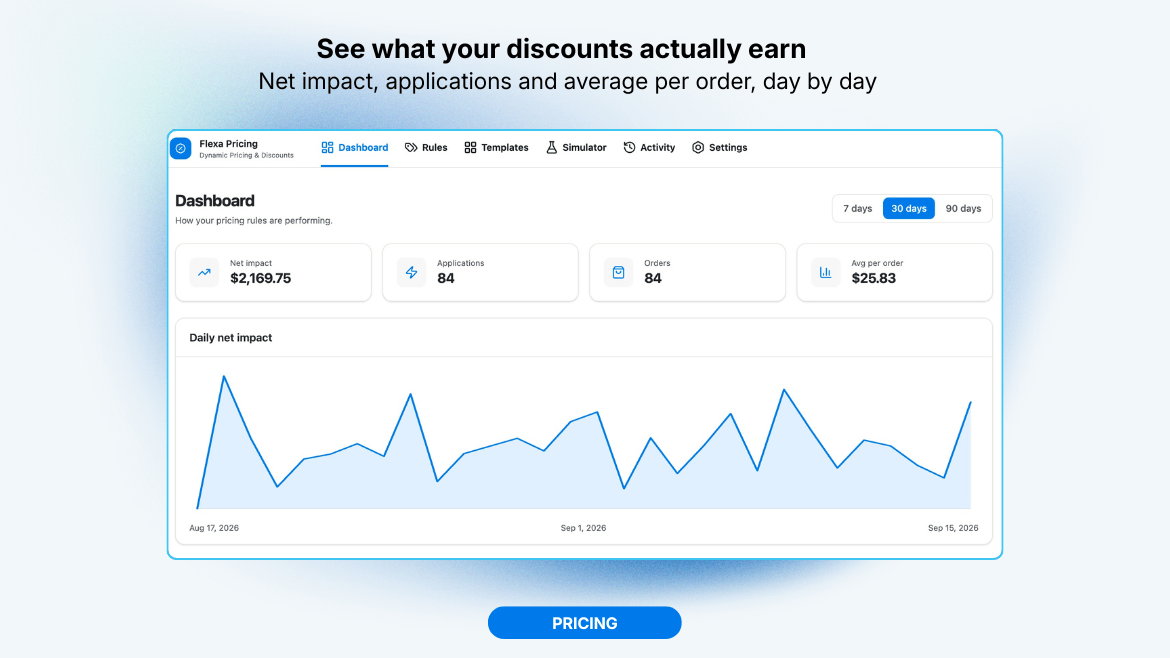
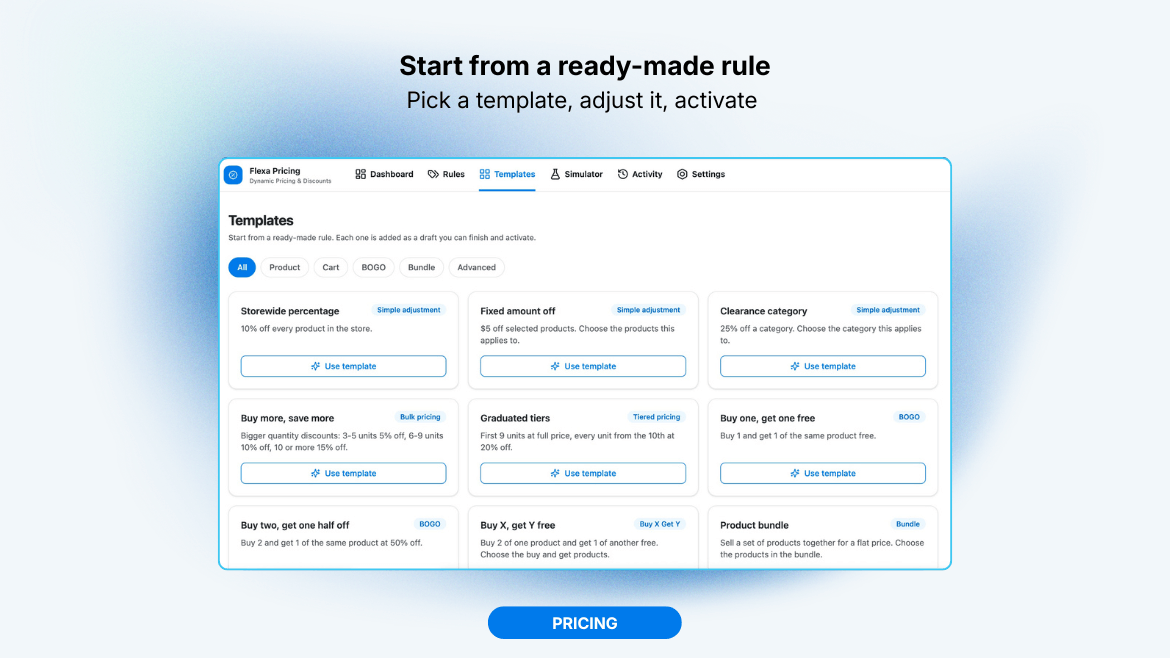
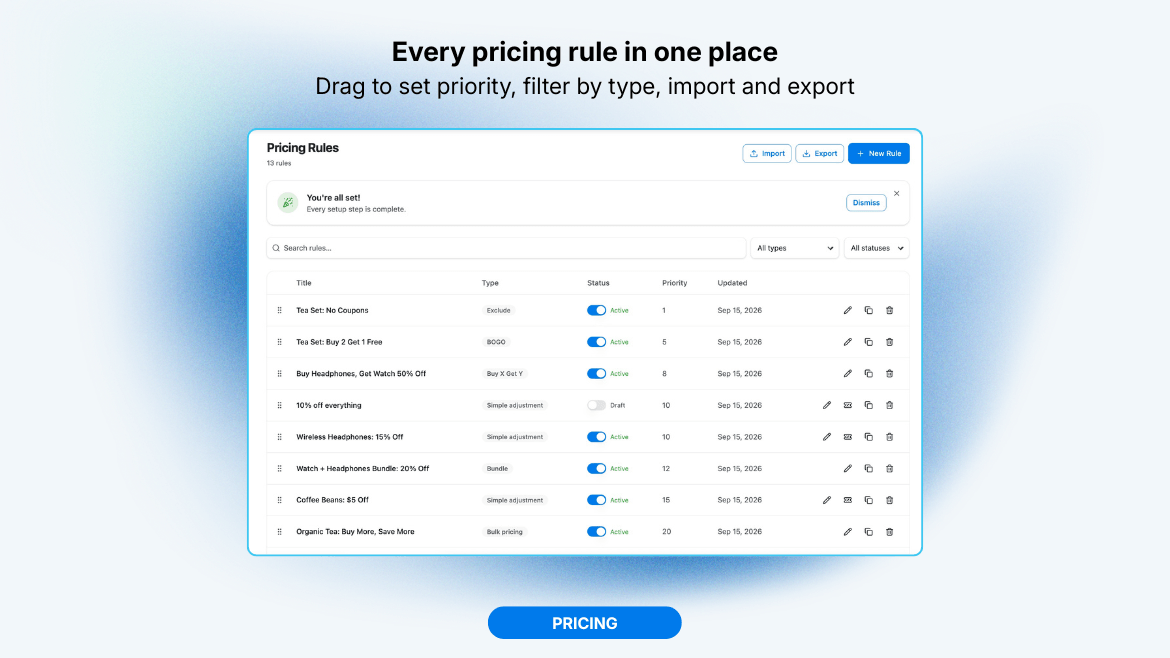
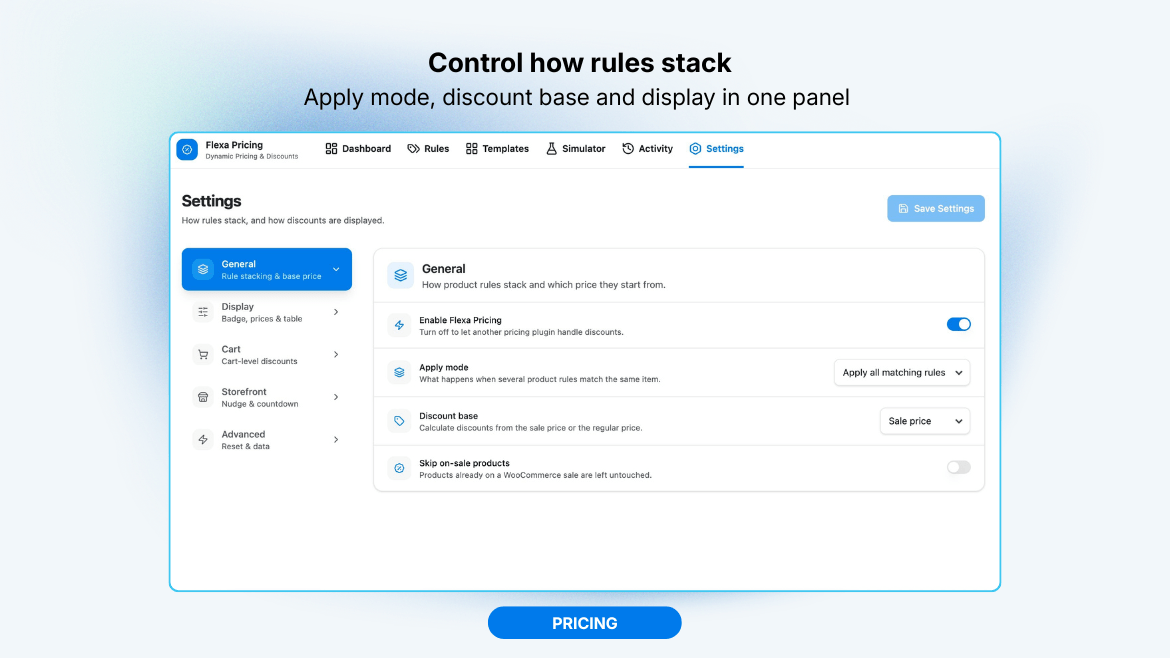
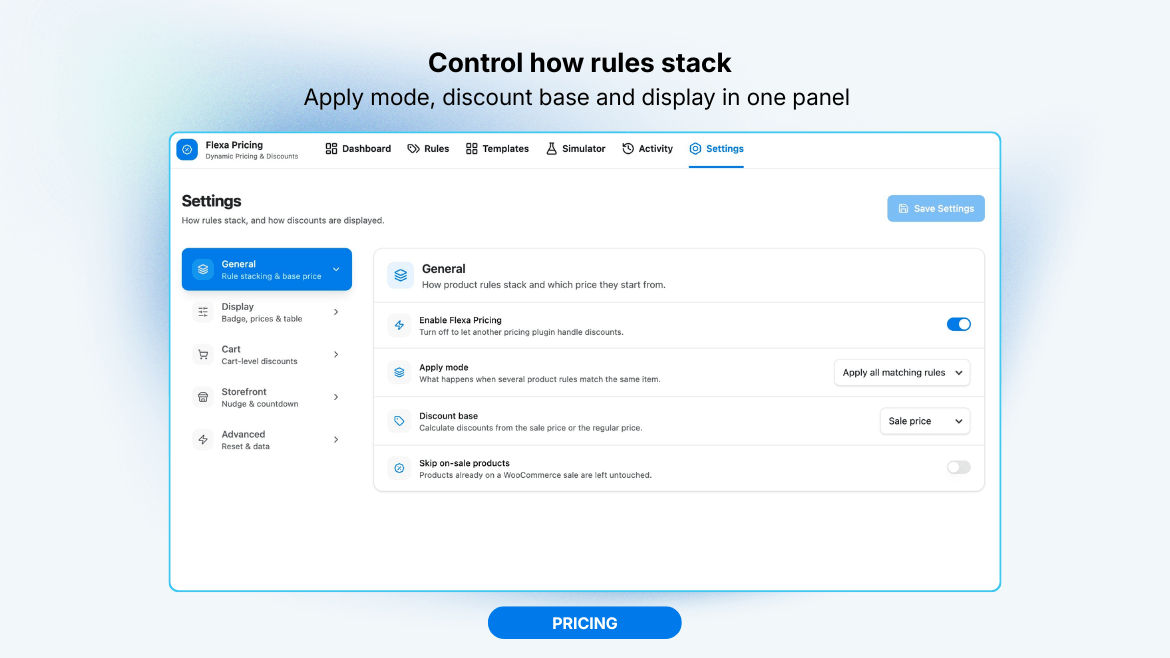
- New Pricing add-on: a third feature under the Flexa menu (and a card on the Flexa home screen) that adds dynamic pricing and discount rules to WooCommerce, bulk and tiered pricing, BOGO / buy X get Y, bundles, cart discounts and checkout fees, with conditions (cart totals, quantity, user role, country and more), sale badges, strike-through prices, a quantity discount table, a spend-more nudge and a countdown timer. Prices are recomputed on the server so a client-submitted amount is never trusted.
- The Pricing add-on has an on/off switch in its Settings. Turn it off to leave every WooCommerce price hook untouched so another pricing plugin can take over cleanly.
- Requires PHP 8.1 or newer (the pricing engine uses PHP 8.1 language features).
- Deactivation feedback: when you deactivate Flexa Extra, a short optional survey on the Plugins screen asks why, so we can prioritise fixes and the features people miss. It never blocks or delays deactivation, sends only anonymous data (a random per-site id, plus WordPress/PHP version and locale unless you turn that off), and can be switched off entirely with a filter. See the "External services" section for exactly what is sent and how to disable it.
- Swatch analytics: a new Analytics tab under Variation Swatches shows which attribute values shoppers actually buy, with the times bought and revenue for each, and the swatch colour or image next to it. It reads your existing orders, so no extra tracking is added and past orders count too.
- Added two screenshots covering the Variation Swatches admin screen and swatches on the product page.
- Variation Swatches settings now use the same left-hand tab layout as the Product Options settings screen: General, Display, Appearance, Availability and Shop pages, instead of one long scrolling column. No settings or behaviour changed.
- Packaging: the distributed plugin now contains only the compiled admin bundle. The TypeScript build source is published in the public GitHub repository instead of being bundled in the download, so the zip is smaller. No functional changes.
- Variation swatches: turn WooCommerce variation attribute dropdowns into colour, image or button swatches on variable products, with a new Variation Swatches admin screen to assign a colour or image to each attribute term. The native
<select>stays as the source of truth, so price, stock and gallery image update through WooCommerce's own logic; unavailable combinations are dimmed and keyboard selection works. Works with global attributes (pa_*) that have terms; if a dedicated swatches plugin like Woo Variation Swatches is active, Flexa Extra defers to it automatically. - Swatch display options: show the selected value as an "Attribute: Value" line, render attributes with no swatch type as buttons, and show a loading spinner while the variation updates.
- Swatch appearance: custom width, height and button font size, plus selected-ring and unavailable-strike colours and a choice of registered image size for image swatches, on top of the existing size, shape and tooltip options.
- Swatch availability: choose how unavailable or out-of-stock swatches behave (dim and strike, hide, or show as normal), and optionally clear the choice by clicking the selected swatch again.
- Limit visible swatches: cap how many swatches show per attribute and fold the rest behind a "+N more" toggle (the selected swatch always stays visible).
- Stock per swatch: show "N left" on low-stock swatches and "Out of stock" when every matching variation is sold out, read from WooCommerce's own variation data.
- Shop and category swatches: optionally render swatches under products in the loop, each linking to the product with that option preselected.
- Flexa hub: the Flexa menu landing page lists only the modules that ship in this plugin for now (Product Options and Variation Swatches). The wider flexatech ecosystem is kept hidden (behind a filter) until more modules are ready; when shown, not-installed modules are dimmed so the active ones stand out.
- Import from more plugins: the Import screen now also reads option sets from WooCommerce Product Add-Ons, Acowebs "Custom Product Addons for WooCommerce", and YITH WooCommerce Product Add-Ons (free), alongside the existing YayExtra and ThemeHigh sources. Field types, per-option prices (fixed, percentage, and increase/decrease), swatches and product/category assignment are mapped where an equivalent exists; anything that cannot be mapped 1:1 is listed per set. As before, imported sets are added switched off for you to review before turning them on.
- Import screen: only lists plugins that actually have option sets to import (present on the site, with at least one set), instead of always showing every supported plugin with an empty row.
- Formula prices: a price can be a safe arithmetic formula (on field prices, per-option prices and fee/discount rules) using
base,qtyand other fields' values, the operators+ - * / ( ), andround(),min(),max(). The result is the per-unit surcharge, soqtyis for volume tiers likemax(2, 10 - qty)rather than a plain per-unit charge. Evaluated with a hand-written parser (nevereval); a bad formula is worth 0 and never errors. The builder validates as you type. - Custom controls: checkboxes and radios now use clean custom-styled controls (with a subtle checked animation) instead of the raw browser widget, so they look consistent across browsers and themes. The colour field shows a swatch with its hex value and opens the colour picker on click. Selected values, validation, keyboard focus and form behaviour are unchanged, and the styling is scoped so it will not clash with your theme.
- Date picker: the date field now opens a lightweight, localized calendar (month names, weekday order and first day of week follow your site language) instead of the raw browser control. Works with keyboard and touch, and the calendar styling is scoped so it will not clash with your theme.
- Date field options: set an earliest and latest selectable date and a list of blocked dates. These are validated again on the server at add-to-cart. The stored value format (YYYY-MM-DD) is unchanged.
- Date display format: chosen dates now show in your site's date format (Settings, General) on the product page and in the cart/order, with an optional per-field override. Previously the cart showed the raw YYYY-MM-DD value.
- Per-field styling hooks: every field wrapper now carries
flexa-extra-field--<type>andflexa-extra-field--id-<field_id>classes so you can target a field type or one specific field from CSS. - New "CSS class" box in the field Inspector to add your own class(es) to a field wrapper.
- Fixed: YayExtra import brought nothing over. Field types (and per-option names) are stored by YayExtra as
{ value, label }pairs, not the flatfieldTypekey the converter expected, so every field was skipped and each set dropped as empty. The real saved shape is now read, with the older flat form still accepted. - Fixed: conditional product assignment is now migrated from YayExtra instead of falling back to "all products". Category and tag names are resolved to term IDs and each "is one of" list becomes one targeting rule per term; anything that cannot be mapped is reported per set.
- Fixed: plain button fields no longer import as colour swatches. Colour and image are now carried only for swatch field types, per option according to its swatch type.
- Import option sets from YayExtra and ThemeHigh "Extra Product Options" (free): auto-detected, added switched off through the schema sanitizer, with a per-set report of anything that could not be mapped 1:1.
- Headless read API: two open, read-only REST routes (
/public/configand/public/product/{id}) so a decoupled front end can render the configurator and compute the subtotal. Closable with theflexa_extra/public_api/enabledfilter. - Sales analytics screen: rank options/choices by picks and add-on revenue, filterable by date range and order status (HPOS-safe).
- Gutenberg "Flexa Extra Configurator" block: show an option set with live pricing on any page or post (display only).
- Live preview in the builder: render and price an option set as the storefront will, updating as you edit.
- Conditional fees and discounts: set-level rules that add a fixed or percentage fee or discount when selections match (a discount never drops the line below zero).
- Per-option stock: give a choice a limited quantity; sold-out options are disabled, over-selling is blocked, and paid orders draw stock down (restored on cancel or refund).
- Min and max choices per multi-select field, enforced again on the server at add-to-cart.
- Edit options in cart: reopen the product page with the saved selections and replace the line instead of stacking a duplicate.
- Template library: start a new option set from a ready-made starter.
- Itemized price breakdown on the product page, listing each option and fee or discount with its own price.
- First-run quick-start guide, replayable from Advanced settings.
- Date picker and colour picker field types.
- Duplicate an option set, and import or export sets as JSON.
- Fixed: admin dropdown arrows no longer crowd the text.
- Security: escape swatch image URLs for the CSS
url()context on the product page and in the cart, preventing CSS injection through crafted URLs. - Removed the "Tested up to" line from the main plugin file so compatibility is declared only in readme.txt.
- Initial release: option-set builder with text, number, date picker, colour picker, choice, swatch and button fields; storefront render engine; server-authoritative pricing/cart engine; UX & style settings; and a two-tier automated test suite.