
Flexa MailBridge
| 开发者 | flexatech |
|---|---|
| 更新时间 | 2026年10月5日 11:43 |
| PHP版本: | 8.2 及以上 |
| WordPress版本: | 7.1 |
| 版权: | GPLv2 or later |
| 版权网址: | 版权信息 |
详情介绍:
Flexa MailBridge is the email delivery layer for your WordPress site. It sits between
wp_mail() and your mail provider, so every message your site sends (order emails, password resets, form notifications, newsletters) goes out through a real mailer instead of the default mail() that so often lands in spam.
Around that core it adds the parts a dependable delivery pipeline needs: a fallback mailer for when the primary one fails, an optional background queue that retries temporary failures, a full log of everything sent, open and click tracking, and delivery reports.
Dashboard
The landing screen pulls everything together in one view: whether WordPress can send email right now, the last few days of delivery stats (sent, failed, open rate, click rate), an activity chart, your most recent sends, and the top reasons messages fail. Each panel links straight to the matching tab when you want the detail.
Routing and fallback
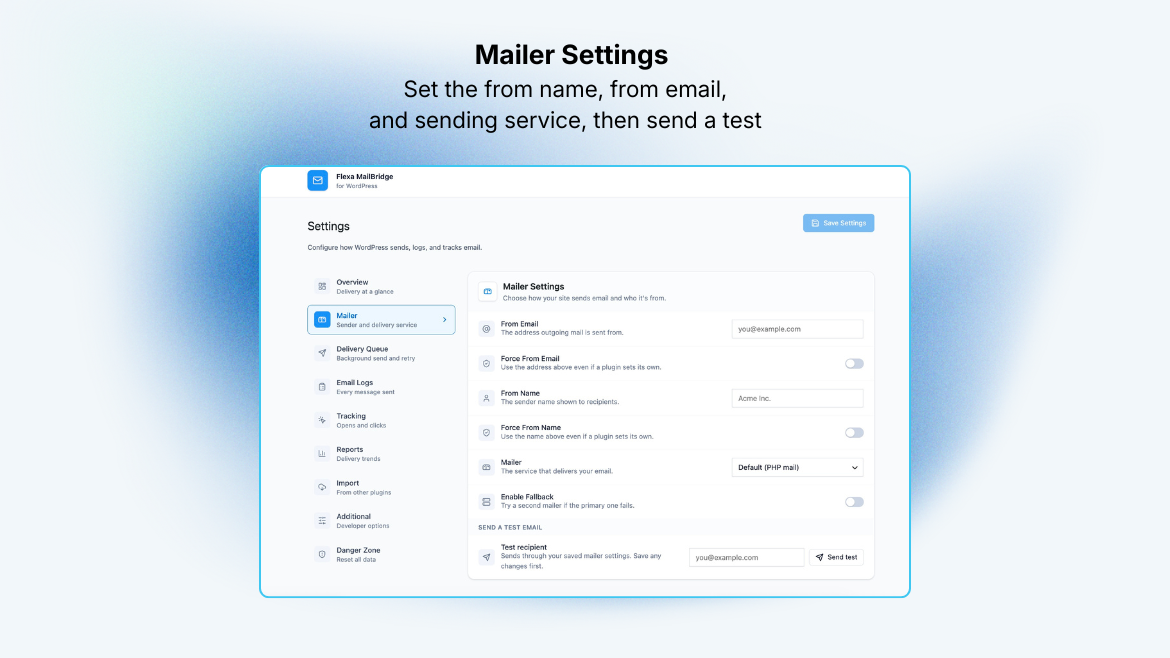
Set the From name and address (with optional force overrides), pick a primary mailer, and choose a fallback that takes over automatically if the primary fails. Eighteen transports are supported:
- Custom SMTP (any host)
- SendGrid, Mailgun, Brevo (Sendinblue), Postmark, Mailjet, SparkPost, SMTP.com, SendPulse, Pepipost, Mandrill, Amazon SES, Yournotify
- IONOS
- Gmail / Google Workspace, Outlook / Microsoft 365, and Zoho Mail (OAuth: connect with a click, no password stored)
- WordPress default (
mail())
wp flexa-mailbridge log list: list and filter the email log (status, mailer, search, date range; table/csv/json output)wp flexa-mailbridge log get <id>: show one entry in fullwp flexa-mailbridge test <to>: send a test email through the active mailerwp flexa-mailbridge reset: wipe all Flexa MailBridge data
安装:
- Upload the
flexa-mailbridgefolder to/wp-content/plugins/. - Activate the plugin through the Plugins menu in WordPress.
- Go to Flexa MailBridge in the admin menu, choose your mailer, enter its credentials (or connect via OAuth), and send a test email.
屏幕截图:


常见问题:
Will sending email slow down my site?
Not if you enable the delivery queue. With the queue on, wp_mail() hands the message off and returns right away, and the actual send happens in the background on WP-Cron, with automatic retries for temporary failures.
Are my API keys and passwords safe?
Yes. Every secret credential and OAuth token is encrypted with AES-256-GCM before it is stored, and secrets are masked (never sent in plain text) when the settings screen loads.
Does tracking require logging?
Yes. Open/click tracking is recorded against the email log, so email logging must be enabled for tracking to work.
Can I use it with WP-CLI?
Yes. See the WP-CLI commands listed in the description.
更新日志:
1.0.4
- Fix: with another Flexa plugin active, the FormFlow suggestion could show up twice on the Dashboard, and turning it down in one plugin left the other one still asking. Only one card appears now, and a single "not interested" retires the suggestion across every Flexa plugin you have installed.
- New: an introduction to Flexa FormFlow, our free form builder with a visual email designer and workflows built in. It shows as a Dashboard notice and as a banner on the MailBridge screen, only if FormFlow is not already installed. Dismissing either one hides both for good.
- New: a Dashboard landing screen that brings email health, recent delivery stats, an activity chart, recent sends, and the top failure causes into one view, each linking to its full tab. The former Overview is now "Health check".
- New: an optional deactivation feedback survey. If you deactivate the plugin, a short survey asks why, so we know what to improve. It is entirely optional, admin-only, and never blocks or delays deactivation. See the External services section for exactly what is sent and how to turn it off.
- First stable release.
- 18 mailers: custom SMTP, 13 API providers, 3 OAuth providers (Gmail/Outlook/Zoho), IONOS, and WordPress default, with a configurable fallback mailer.
- Optional background delivery queue with automatic retry of temporary failures.
- Email logging with search/filter, per-message detail, CSV export, and automatic retention.
- Open and click tracking.
- Delivery reports (dashboard widget, Reports tab, weekly/monthly digests).
- Import of settings and logs from five other SMTP plugins.
- WP-CLI:
log list,log get,test,reset. - All secrets encrypted at rest (AES-256-GCM); OAuth and tracking endpoints use HMAC-signed tokens.