Flexible Custom Post Type Order
| 开发者 |
satishnavjivan1
satishnavjivan |
|---|---|
| 更新时间 | 2026年11月15日 12:13 |
| PHP版本: | 7.2 及以上 |
| WordPress版本: | 6.7 |
| 版权: | GPLv2 |
| 版权网址: | 版权信息 |
详情介绍:
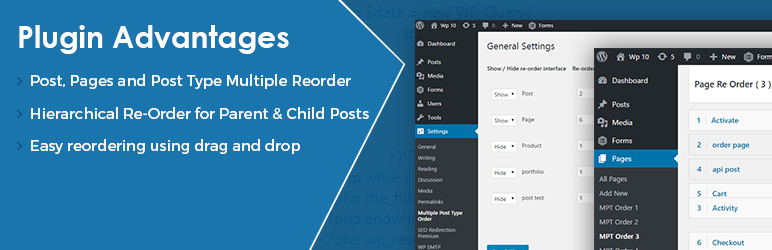
- Drag and Drop Sorting: Easily sort and rearrange posts, pages, and custom post types with smooth drag & drop functionality.
- Multiple Re-ordering Interfaces: Create multiple separate sorting orders for the same post type (e.g., Order 1, Order 2, Order 3).
- Hierarchical Post Type Support: Reorder parent posts as well as individual child posts (sub-pages / child items) effortlessly.
- Child Post Ordering: Re-order child posts directly from within their parent post structure.
- Any Custom Post Type (CPT): Works with standard Posts, Pages, WooCommerce Products, Portfolio, Testimonials, Team Members, Events, Services, and any custom registered post type.
- Developer-Friendly Query Integration: Easily apply your custom sorting order into standard
WP_Queryloops using simplemeta_keyparameters. - Lightweight & Fast: Clean, optimized code with zero bloat. Loads only necessary admin scripts without slowing down your site.
- 100% Gutenberg & Classic Editor Compatible: Built to work seamlessly with modern WordPress standards and block themes.
- Multiple Display Orders: Set different sorting orders for different templates, shortcodes, and pages.
- Easy Administration: Accessible directly via WordPress Admin under Settings and each post type menu.
- Reset with 1-Click: Need to start fresh? A built-in "Reset Order" option ensures you never lose control of your data.
安装:
- Upload the
flexible-custom-post-type-orderfolder to your/wp-content/plugins/directory (or install via Plugins > Add New in WordPress Admin). - Activate the plugin through the Plugins menu in WordPress.
- Navigate to Settings > Multiple Post Types Order to configure which post types you want to enable reordering for.
- Click on the MPT Order links that appear under your post types menu in the admin dashboard to start drag-and-drop reordering.
屏幕截图:


常见问题:
How do I reorder custom post types using drag and drop?
Once activated, go to Settings > Multiple Post Types Order and enable ordering for your desired post types. Then navigate to that post type's admin menu (e.g., Posts, Pages, Products) and click on the MPT Order link. You can simply drag and drop the items into your desired position and click "Save Order".
Can I create different sorting orders for the same post type?
Yes! This is the main highlight of Flexible Custom Post Type Order. You can configure multiple order sets (Order 1, Order 2, etc.) and apply different sorting to different sections of your website.
Does this plugin support hierarchical post types (parent and child posts)?
Yes. It fully supports hierarchical post types like Pages or hierarchical custom post types. When you reorder a parent post, its child posts move along with it, and you can also reorder child posts individually.
How do I apply custom ordering to my frontend theme queries?
Simply add 'orderby' => 'meta_value_num' and 'meta_key' => 'fcpto_order_1' (or your corresponding order number) to your WP_Query parameters. The plugin also provides pre-generated query code right inside the admin screen for quick copying.
Does it work with WooCommerce products?
Yes. You can reorder WooCommerce products and custom shop items just like standard WordPress posts.
What if my desired order is not displaying on the frontend?
If your front-end order does not reflect the admin sorting immediately, go to the re-ordering screen, click "Reset Order", arrange the items again, and click "Save Order".
Does this plugin affect default WordPress queries automatically?
The plugin keeps your default queries safe and gives you complete control over where and when your custom orders are applied via WP_Query.
更新日志:
- Added high-resolution assets (Icons & Banners) for WordPress Plugin Directory.
- Optimized search tags, short description, and full description for enhanced SEO and discoverability.
- WordPress 6.7 compatibility verified.
- SEO enhancements and keyword optimization.
- Tested compatibility with WordPress 6.7.
- Improved drag and drop sort performance.
- Enhanced documentation and query code examples.
- Minor bug fixes and UI improvements in admin reordering.
- Gutenberg block editor compatibility fixes.
- Initial release of Flexible Custom Post Type Order.