
Floyi Connect
| 开发者 | floyi |
|---|---|
| 更新时间 | 2026年8月21日 23:41 |
| PHP版本: | 7.4 及以上 |
| WordPress版本: | 7.0 |
| 版权: | GPLv2 or later |
| 版权网址: | 版权信息 |
详情介绍:
- One-click publishing from Floyi to WordPress (single articles or bulk)
- Supports draft, publish, and scheduled post statuses
- Posts and pages supported
- Automatic SEO metadata mapping (Yoast SEO, Rank Math, AIOSEO, SEOPress)
- Category and tag assignment
- Author assignment
- Featured image sideloading
- Content auto-converts to Gutenberg blocks or Classic HTML
- Secure HMAC-SHA256 authenticated API communication
- Connection health monitoring
- Webhook-based status sync with retry queue
- Install and activate Floyi Connect on your WordPress site
- Go to Settings > Floyi in your WordPress admin
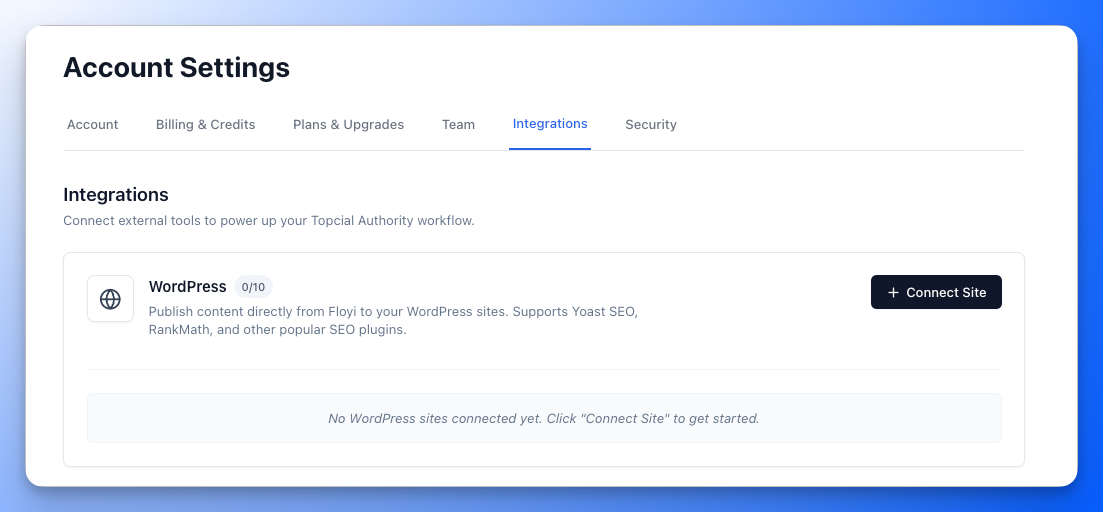
- In Floyi, navigate to Settings > Integrations > WordPress
- Click "Connect Site" to generate a connection code
- Enter the code in your WordPress admin to establish the secure connection
- Start publishing from Floyi — articles appear in your WordPress dashboard
- WordPress 5.8 or higher
- PHP 7.4 or higher
- A Floyi account (floyi.com)
- HTTPS enabled on your WordPress site
- During connection setup: site URL, site name, WordPress site ID, admin email, site capabilities (post types, categories, tags, authors), detected SEO plugin
- During publishing: post content, title, slug, excerpt, categories, tags, author, featured image URL, SEO metadata
- Post status change notifications (via webhooks): post ID, old/new status, Floyi article ID
安装:
- Upload the
floyifolder to the/wp-content/plugins/directory, or install directly from the WordPress plugin directory. - Activate the plugin through the 'Plugins' menu in WordPress.
- Go to Settings > Floyi to configure the connection.
- In Floyi (app.floyi.com), go to Settings > Integrations > WordPress and click "Connect Site."
- Enter the connection code shown in Floyi into your WordPress admin.
- The connection is established — you can now publish from Floyi.
屏幕截图:
常见问题:
Do I need a Floyi account?
Yes. Floyi Connect requires an active Floyi account to function. Visit floyi.com to sign up.
Which SEO plugins are supported?
Floyi Connect automatically detects and maps SEO metadata for:
- Yoast SEO
- Rank Math
- All in One SEO (AIOSEO)
- SEOPress
Is my data secure?
Yes. All communication between Floyi and your WordPress site uses HMAC-SHA256 authenticated requests with timestamp validation and nonce-based replay prevention. HTTPS is required for all connections.
Can I publish to multiple WordPress sites from Floyi?
Yes. You can connect multiple WordPress sites to your Floyi team. The number of connected sites depends on your Floyi plan.
What content types can I publish?
Floyi Connect supports publishing to any public post type on your WordPress site, including posts and pages. Custom post types registered by your theme or other plugins are also detected and available.
Can I schedule posts from Floyi?
Yes. When publishing from Floyi, you can choose to publish immediately, save as a draft, or schedule for a future date and time.
What happens if I disconnect my site?
Previously published content remains on your WordPress site. Only the connection between Floyi and WordPress is removed. You can reconnect at any time.
Does the plugin modify my existing content?
No. Floyi Connect only creates and updates posts that were published through Floyi. It tracks these posts using the _floyi_article_id meta field and does not touch your existing content.
What happens if a webhook fails?
Floyi Connect includes a retry queue for webhook notifications. Failed webhooks are retried up to 3 times with increasing intervals (1 minute, 5 minutes, 15 minutes). You can monitor the queue from Settings > Floyi in your WordPress admin.
Does the plugin work with the block editor (Gutenberg)?
Yes. Content published from Floyi is automatically converted to native Gutenberg blocks. If your site uses the Classic Editor, content is delivered as standard HTML. The block editor also includes a "Floyi Structured Data" panel where you can view, edit, and validate the post's JSON-LD schema.
更新日志:
- Fixed structured data disappearing or breaking the page when a value contained the text "</script" — the sequence is now escaped before the tag is rendered
- Affected posts whose schema quoted script tags, most often articles about schema markup itself
- Added a "Floyi Structured Data" panel in the block editor to view, edit, and validate a post's JSON-LD schema
- Panel validates JSON and structure, warns on missing recommended fields, and can fill the author and featured image from the post
- Added a "Test in Google Rich Results" link and a Clear action to the panel
- Schema is now stored in a normalized form so edits made in the editor render correctly
- Structured data can be edited in WordPress and preserved on re-publish when "Include structured data" is left unchecked in Floyi
- Fixed unescaped output warning in JSON-LD rendering — now uses wp_print_inline_script_tag for WordPress Plugin Check compliance
- Added JSON-LD structured data support — Floyi can now push schema markup to WordPress
- Schema is rendered in the page head via wp_head hook for SEO and AI search engines
- Floyi JSON-LD meta field visible in Custom Fields panel for viewing and manual editing
- Registered _floyi_json_ld post meta for all public post types via REST API
- Preserve link target and rel attributes when publishing from Floyi (fixes "open in new tab" links losing target="_blank" after publishing)
- Added webhook notification for permanent post deletions so Floyi cleans up publish records
- Hooks into
before_delete_postto detect when Floyi-managed posts are permanently removed
- Initial release
- Secure handshake connection flow with HMAC-SHA256 authentication
- Post creation, update, and deletion via REST API
- Support for posts, pages, and custom post types
- Draft, publish, and scheduled post statuses
- SEO plugin integration (Yoast SEO, Rank Math, AIOSEO, SEOPress)
- Category and tag assignment
- Author assignment
- Featured image sideloading
- Gutenberg block conversion and Classic HTML support
- Webhook queue with retry mechanism (3 retries, increasing intervals)
- Admin settings page with connection management and health monitoring
- Full internationalization support