
FluentComments - AJAX Comments, Anti-Spam & Comment Email Notifications
| 开发者 |
techjewel
wpmanageninja |
|---|---|
| 更新时间 | 2026年9月1日 13:44 |
| PHP版本: | 7.4 及以上 |
| WordPress版本: | 7.1 |
| 版权: | GPLv2 or later |
| 版权网址: | 版权信息 |
详情介绍:
- AJAX comments. Post a comment or a reply with no page reload.
- Comment spam protection. Signed tokens, a honeypot, a timing check and rate limits, with no CAPTCHA for your readers.
- Threaded replies that follow your WordPress discussion depth.
- "Load more" pagination instead of 400 comments in one request.
- Five comment notification emails. Each one can be edited, previewed and switched off.
- An email template designer. Your logo, your colors, your footer and your From address, shared by all five.
- Block (FSE) theme support with a real block, plus a
[fluent_comments]shortcode for page builders. - Cache friendly. There is no security nonce anywhere in the plugin, so a cached comment form never expires.
- Light, dark and system appearance for the admin screen.
- Developer friendly. A small, documented set of actions and filters.
- 100% free and open source, GPLv2.
- Post a comment or a reply without reloading the page
- Threaded replies that follow your WordPress discussion depth setting
- "Load more" pagination instead of dumping 400 comments into one request
- Gravatar avatars, relative timestamps and a clean, modern card layout
- Fully responsive, and styled with CSS custom properties so your theme can restyle every part of it
- The whole interface is translatable
- Signed submission tokens. Every comment needs a short lived, HMAC signed token that is issued in a separate request. A bot that posts blindly at your site never gets one.
- Single use tokens, bound to a session cookie. A token cannot be replayed, or lifted from another visitor's page.
- A honeypot field whose name comes from your site's own salt. It is different on every install, so it cannot be hard coded against.
- A timing check. A form submitted faster than a human could type is scored as suspicious.
- Rate limiting, keyed per session first and per IP only as a backstop. An office or a CDN exit address is never counted as one person.
- Native form rejection. Once FluentComments handles a post type, anything posted to the default WordPress endpoint without our fields is refused. Bots that skip your page and POST straight to
wp-comments-post.phpget nothing. - Every threshold can be adjusted with a filter, and Akismet keeps working alongside it.
- A held comment was approved. Sent by FluentComments to the commenter.
- Someone replied in their thread. Sent to everyone above the reply.
- A comment landed on their post. Sent to the post author.
- A comment was posted. WordPress's own notice, rewritten.
- A comment is waiting for review. WordPress's own moderation notice, rewritten.
- Switch each one on or off from its own row. The switch takes effect immediately, with no save button.
- Edit the subject and body in a real WordPress editor. Smartcodes like
{{comment.author}},{{post.title}},{{receiver.name}}and{{comment.content}}are filled in when the mail goes out. - Preview an email against a real comment from your site before you send anything.
- A shared template designer for your logo, your colors, your footer text, and the From and Reply-To addresses.
- WordPress's own two notices are left completely alone until you explicitly ask to replace them. Upgrading the plugin never quietly changes an email your site was already sending.
- A FluentComments block for the Site Editor, with its own title, avatar, color and border radius controls
- A
[fluent_comments]shortcode that works anywhere, including page builders - On a classic theme it takes over
comments_templateautomatically, so there is nothing to place - On a block theme the plugin never rewrites your templates for you. Instead, the settings screen works out which template each of your post types renders through, follows its template parts and patterns, and tells you exactly which post types still need the block placed
- Nothing visitor specific is ever printed into the HTML. No identity, no token, and no security nonce anywhere in the plugin, so a comment form served from cache can never fail with a stale security token.
- The first page of comments is rendered into the page itself, so a visitor who only reads never triggers an uncached request.
- Everything per visitor is fetched on intent, when someone actually goes to comment.
fluent_comments/form_fields: render your own fields into the formfluent_comments/validate_submission: reject a submission with aWP_Errorfluent_comments/comment_data: adjust the comment before it reaches WordPressfluent_comments/spam_score: nudge the score up or downfluent_comments/before_processandfluent_comments/after_added_comment: act around the insert
wp_handle_comment_submission(), the same function wp-comments-post.php uses, so core's validation, moderation rules and comment_post hook all behave exactly as they always did.
100% free, forever
No pro version. No locked features. No "upgrade to unlock". Every feature described on this page is in the plugin you are about to install, and the source is on GitHub under GPLv2.
Contribute on GitHub
FluentComments is fully open source. If you want to contribute, or just report a bug, you are very welcome. The repository is on GitHub.
Other plugins by the WPManageNinja team
- FluentCart - Simple and Powerful eCommerce Plugin for WordPress
- Fluent Forms - Fastest Contact Form Builder Plugin for WordPress
- FluentSMTP - The Most Advanced SMTP, SES Plugin for WordPress
- FluentCRM - Email Marketing Automation and CRM Plugin for WordPress
- Ninja Tables - Best WP DataTables Plugin for WordPress
安装:
- Install FluentComments from the WordPress.org plugin directory, or upload the plugin folder to
/wp-content/plugins/. - Activate FluentComments from the Plugins page.
- Go to Comments › FluentComments and pick the post types it should handle. That is the whole setup.
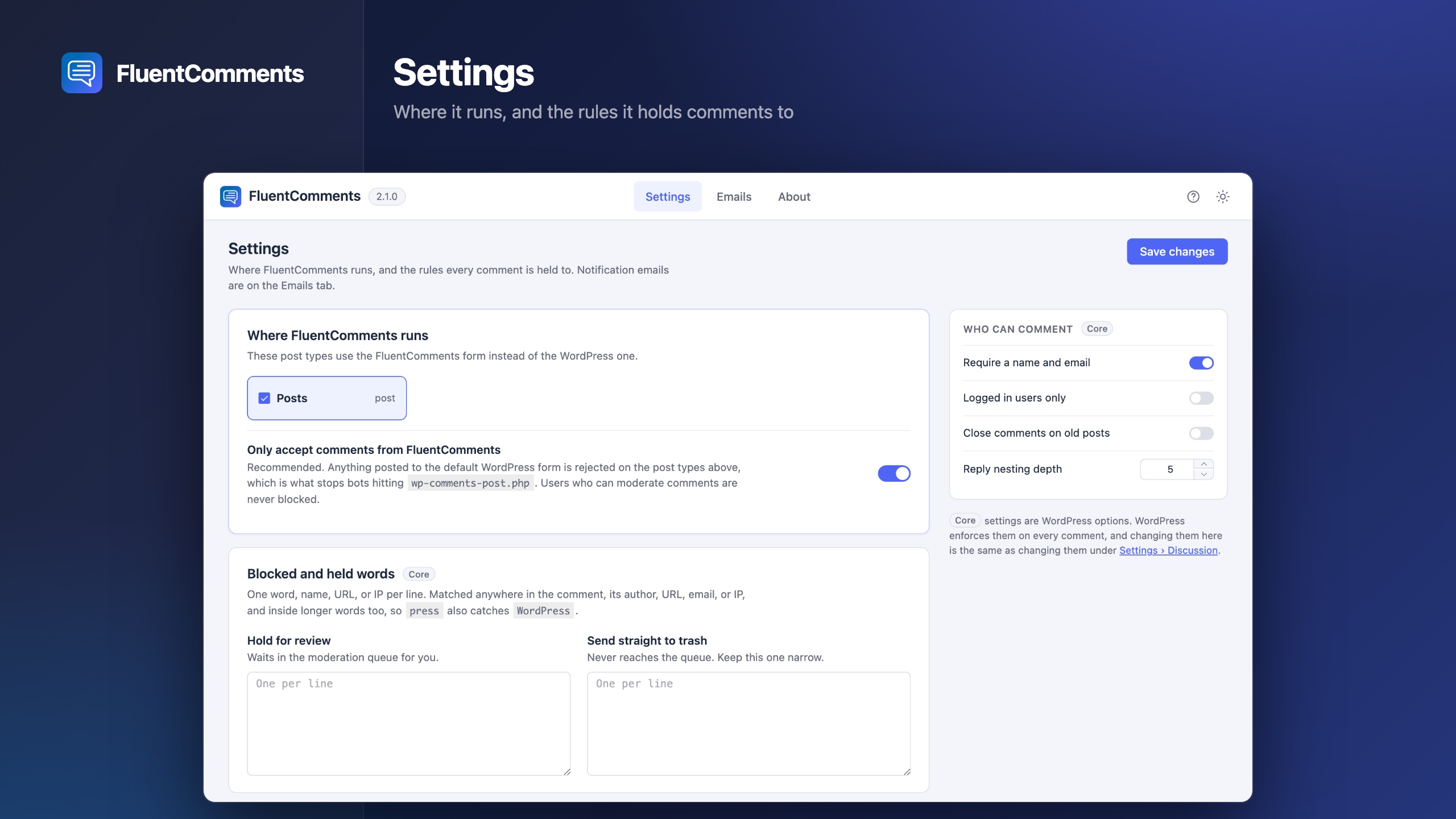
[fluent_comments] shortcode wherever you want comments. The settings screen checks this for you and tells you which post types still need it.屏幕截图:


常见问题:
Is FluentComments really free? Is there a pro version?
It is free, and there is no pro version. Every feature listed on this page is in the free plugin: the spam protection, all five emails, the template designer and the block. Nothing is held back, and the whole thing is GPLv2 open source on GitHub.
How does FluentComments stop comment spam without a CAPTCHA?
By making the submission itself expensive to fake. Posting a comment requires a short lived, cryptographically signed token that is issued in a separate request and tied to a session cookie, so it cannot be replayed or reused. On top of that there is a honeypot field with an install specific name, a minimum time between opening the form and submitting it, and rate limiting keyed per session with a per IP backstop. Anything posted straight to the default WordPress endpoint without our fields is refused outright. Suspicious submissions are scored and held for moderation rather than thrown away, and every threshold can be changed with a filter.
Do I still need reCAPTCHA or a CAPTCHA plugin?
No. FluentComments is built so your readers never have to prove they are human. The checks happen between the browser and your server, not in front of the person trying to leave a comment.
Does it work with Akismet?
Yes. Akismet inspects the comment itself and needs nothing from the form, so it runs normally alongside FluentComments.
What if I use another anti-spam or CAPTCHA plugin on my comment form?
FluentComments renders its own comment form, so a field another plugin wants to add, like a CAPTCHA or an extra question, is never printed on the page. Because nobody could fill that field in, running its validator anyway would reject every comment on your site. So those validators are skipped for the duration of a FluentComments submission. If you want to keep another plugin's check, add its callback to the fluent_comments/allowed_comment_hooks filter and render its field with the fluent_comments/form_fields action.
Does it work with block (FSE) themes?
Yes. Add the FluentComments block in the Site Editor, or use the [fluent_comments] shortcode. The plugin never edits your templates on your behalf. But the settings screen does work out which template each post type renders through, looks inside it and its template parts, and tells you which ones still need the block.
Does it work with Elementor, Divi, Bricks and other page builders?
Yes. Drop the [fluent_comments] shortcode into any builder's shortcode or text widget and the full comment list and form render there.
Will it work with my caching plugin?
Yes, and it is designed for it. Nothing visitor specific is printed into the page, so a cached comment form is still a valid one. There is no security nonce anywhere in the plugin, which means a form served from cache can never fail with the "your session has expired" error that nonce based forms hit. Everything per visitor is fetched on demand, only when someone actually goes to comment.
Will it slow down my site?
No. The first page of comments is rendered into the page itself, so a visitor who only reads never triggers an extra request. There is no webfont, no external service and no third party script. Comments load in pages rather than all at once.
Can I keep my existing comments?
Yes. FluentComments uses the normal WordPress comments table and the normal WordPress comment functions. Nothing is migrated, copied or moved. These are your existing comments, displayed and protected better. Deactivate the plugin and your comments are still exactly where they were.
Can I restyle the comments to match my theme?
Yes. Every color, spacing value and radius is a CSS custom property, so a handful of --fcom-* overrides in your theme will restyle the whole thing. The block also exposes its title, avatars, colors and border radius in the editor sidebar.
Does it respect my WordPress Discussion settings?
Yes, with one exception. Threading depth, moderation keywords, disallowed keywords, the link limit, "comment author must have a previously approved comment", "users must be registered and logged in": all of them are real WordPress options that FluentComments reads and writes in place. The most useful ones are surfaced on the FluentComments screen so you do not have to go hunting for them. The exception is "Comment author must fill out name and email", which FluentComments always applies to its own form whatever that box is set to. See the question below for why.
Can I customize the comment notification emails?
Yes, all five of them. Rewrite the subject and body of any email, use smartcodes like {{comment.author}} and {{post.title}}, preview it against a real comment from your site, and set a shared logo, color scheme, footer and From/Reply-To address for all of them. WordPress's own two notices are left untouched unless you explicitly choose to replace them.
Can I add my own fields to the comment form?
Yes. Use the fluent_comments/form_fields action to render them and fluent_comments/validate_submission to check them. They work identically on the block, the shortcode and the classic template. Because fields ship with the per request session payload rather than the cached page, anything time sensitive in them stays fresh.
Do commenters have to give a name and email address?
Yes, unless they are logged in. FluentComments always asks a logged out commenter for both, and it does not follow the WordPress "Comment author must fill out name and email" setting, which is why that option is not on our settings screen. The reason is the notification emails: every one of them is addressed by the commenter's email, so an anonymous comment quietly opts its author out of the reply notifications everybody else in the thread receives, and leaves you nothing to moderate on. Logged in commenters are never asked, because WordPress already has both from their account. The WordPress setting itself is untouched and still applies to any post type FluentComments is not handling.
My site is behind Cloudflare or a load balancer. Do I need to do anything?
Usually not. Most managed hosts, and the Cloudflare plugin, put the visitor's real address into REMOTE_ADDR for you, and FluentComments reads it from there.
If yours does not, every visitor looks like the same address. The limit that matters follows a per visitor cookie rather than the IP, so nobody gets locked out, but the loose per IP ceiling then applies to the whole site at once. You can opt into reading proxy headers:
add_filter('fluent_comments/trust_proxy_headers', '__return_true');
Only do that when your origin server cannot be reached directly, bypassing the proxy. This setting trusts the header rather than verifying the proxy sent it, so on a directly reachable origin a visitor could set the header themselves and sidestep the per IP limit. It is also worth narrowing fluent_comments/proxy_ip_headers to the one header your proxy actually sets.
更新日志:
- Fixed: UI color issues for the Radio Buttons.
- Fixed: UI Flickering issues for the comment forms.
- New: an Emails screen. All five comment notification emails can be edited, previewed against a real comment, and switched on or off from one place.
- New: a shared email template designer for your logo, colors, footer text and From address.
- New: a FluentComments block for block (FSE) themes. The settings screen tells you which post types still need it.
- New: comments load in pages with a "Load more" button instead of all at once.
- New: the most useful WordPress Discussion settings now sit on the FluentComments screen.
- New: a rebuilt admin screen with light, dark and system appearance modes.
- Improved: much stronger spam protection, and a suspicious comment is now held for moderation instead of being turned away.
- Improved: comments are now written into the page itself instead of being fetched by JavaScript after it loads, so search engines and link previews can read them.
- Improved: the whole front end is translatable. Previously it was hard coded English.
- Changed: a name and email address are now always required from commenters who are not logged in, whatever the WordPress "Comment author must fill out name and email" setting says. That setting has been removed from the FluentComments screen; it still applies to any post type FluentComments is not handling. Every notification email is addressed by the commenter's email, so an anonymous comment quietly opts its author out of the replies everyone else in the thread receives.
- Fixed: comments that WordPress or Akismet marked as spam or trash could still trigger notification emails containing their contents.
- Fixed: re-approving a comment sent its notifications a second time.
- Fixed: pingbacks and trackbacks were emailed as if somebody had left a comment.
- Fixed: comments could be submitted on post types FluentComments was not switched on for.
- Fixed: on a cached site, the comment form could be served to the wrong visitor - showing a logged in reader the login notice, or leaving an anonymous one without the name and email fields.
- Fixed: comment times were saved in server time instead of UTC.
- Fixed: post authors got two emails for the same comment.
- Fixed: the comment form showed on posts with comments closed.
- Fixed: reply depth ignored your WordPress discussion settings.
- Fixed: the block's "Show Avatars" option had no effect.
- Fixed: pingbacks and trackbacks appeared in the comment list.
- Please note: if you use another anti-spam or CAPTCHA plugin on your comment form, its check no longer runs on the FluentComments form. Akismet is not affected and keeps working.
- Added support for FSE themes
- Added email notifications for admins, authors and commenters
- Added an option to enable or disable email notifications
- Advanced spam protection with cryptographic tokens
- Added shortcode support for FSE themes
- Fixed minor CSS issues
- Checking logged in requirement for the comment form
- Initial release