
Flux Media Optimizer – Image & Video Optimization by Flux Plugins
| 开发者 | edaniels |
|---|---|
| 更新时间 | 2026年9月30日 17:38 |
| PHP版本: | 8.1 及以上 |
| WordPress版本: | 7.1 |
| 版权: | GPLv2 or later |
| 版权网址: | 版权信息 |
详情介绍:
- Modern image formats – WebP and/or AVIF based on your Settings (both enabled by default)
- Video optimization – Convert library videos to modern formats with quality and size controls
- Automatic & bulk processing – Optimize on upload or process the existing media library in one pass
- Savings you can see – Overview totals and per-attachment comparisons show how much weight you removed
- Media Library status – Optimization column and filters (Optimized, Pending, Failed, Disabled, Unprocessed)
- Per-file controls – Disable, convert, or re-convert individual attachments
- GIF & HEIC/HEIF – Animated GIFs and supported iPhone-style stills when your server can decode them
- Works with WordPress – Galleries, responsive images, Gutenberg, and WooCommerce product media
- No usage credits – Optimize within your server's (or optional cloud) capacity — no per-image metering in the free plugin
- Optional Flux Suite cloud & CDN – Offload heavy jobs and serve optimized assets globally when licensed
- Reduce server load – Move demanding image and video conversions to Flux cloud, avoiding local CPU, memory, and timeout limits
- Deliver media faster worldwide – Serve optimized files through a global CDN powered by Google Cloud
- Achieve better compression – Use advanced cloud optimization to create smaller files while preserving visual quality
- Unlock the complete Flux Suite – One subscription includes premium hosted features across Flux plugins, including AI alt text, accessibility tools, and WordPress admin productivity features
- WebP (lossy) – often about 25–34% smaller than comparable JPEG
- WebP (lossless) – often about 26% smaller than comparable PNG
- AVIF – often up to ~50–60% smaller than comparable JPEG or PNG
- Overall library – many sites see roughly 50–70% less media transfer weight after optimization
- Overview – aggregate original vs optimized bytes and savings percentage
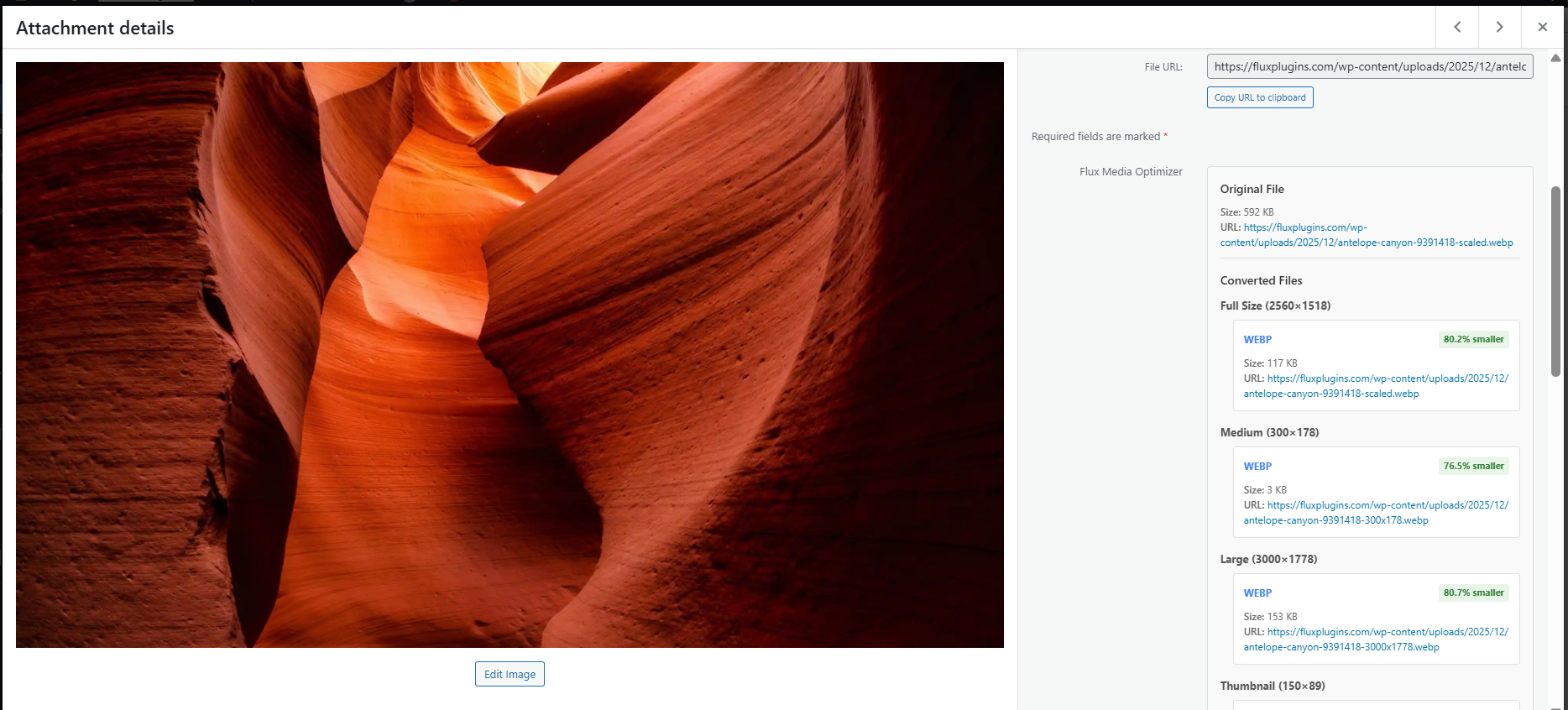
- Attachment details – per-size original vs WebP/AVIF (or video formats) with savings badges
- Media Library – status so you can find Optimized, Pending, and Failed items
- Bloggers and content creators who want faster sites
- E-commerce stores needing better Core Web Vitals scores
- Anyone serious about website performance and SEO
- Local libraries – Image formats depend on GD/Imagick on the server. Video and some animated pipelines need FFmpeg. The Overview page reports what your host can do.
- Serving – By default the plugin replaces media URLs with optimized versions. An optional experimental hybrid
<picture>mode exists in Settings (off by default). - HEIC/HEIF – Static files need Imagick HEIC decode (libheif 1.18.2+ recommended for modern iPhone HDR/gain-map photos). Rare animated HEIF sequences need FFmpeg + WebP enabled for animated WebP; otherwise first-frame static output. Apple Live Photos (HEIC + MOV) are not merged as one asset.
- Cloud / CDN – Optional; requires a valid Flux Suite license, explicit enablement, and secure webhooks. Turn off anytime to return to local-only processing.
屏幕截图:


常见问题:
Does this plugin work with any WordPress theme?
Yes. It hooks into WordPress core media/image APIs, so themes and plugins that use standard WordPress image functions work without theme changes.
Will my original images and videos be deleted?
No. Originals stay on your server as fallbacks. The plugin creates optimized copies (or cloud/CDN URLs when that service is enabled). You can keep serving or restoring from the originals.
Will this break my existing images or videos?
No. Optimized versions are added alongside originals. Untouched originals remain available for unsupported browsers or if you disable optimization for a file.
How much will I save? Disk space vs download size?
Download / page weight: Optimized outputs are commonly 50–70% smaller to transfer than the source files. Format-level ranges are summarized under “File size savings” in the Description. Overview and attachment panels show your byte totals and percentages. Disk space: Originals are kept, so server storage is not reduced by default. Savings are about faster pages and less bandwidth for visitors — not freeing upload-directory capacity.
Will optimization use a lot of server CPU?
Conversion (especially video) is CPU-intensive while jobs run. Work is queued in the background so front-end browsing stays responsive, but a busy bulk run can still load the server. If CPU is limited, enable optional Flux Suite cloud processing so heavy conversion runs off-site, or process the library in smaller batches.
Do I need FFmpeg?
Local video optimization and some animated HEIF → animated WebP paths need FFmpeg on the server. Image-only WebP/AVIF conversion uses GD/Imagick and does not require FFmpeg. Overview shows whether FFmpeg is detected. Without FFmpeg, use Flux Suite cloud processing for video (when licensed and enabled), or stick to images locally.
Does my server need AVIF support?
Local AVIF output needs a library stack that can encode AVIF (typically a capable Imagick/libheif build). The plugin detects capabilities and only offers formats your server can produce. If local AVIF is missing, keep WebP local, or use optional Flux Suite cloud processing to generate formats on Flux infrastructure.
What about privacy? Do my media files leave my server?
Default: processing is local — media files are not uploaded to Flux for optimization. Optional cloud/CDN: only after you activate a license and enable the external service. Then media (and related metadata) may be sent for processing and CDN delivery. License validation and compatibility checks may send limited site/plugin metadata (see External services below). Newsletter signup sends email only if an admin opts in on the settings form. Full policy: https://fluxplugins.com/privacy-policy/
Can I cancel or turn off cloud / CDN later?
Yes. Disable external/cloud processing in plugin settings anytime to return to local-only optimization; new work stays on your server. CDN URLs stop being used for new delivery according to your settings once cloud is off (existing CDN-hosted assets may remain on Flux until cleaned up per service terms). Billing or license cancellation for a paid Flux Suite subscription is managed on fluxplugins.com (the plugin cannot cancel a store subscription by itself).
How does the CDN behave?
With a valid license and cloud/CDN enabled, optimized (and optionally other) media can be stored on Flux's global CDN and served over HTTPS from allowlisted hosts. Core local optimization does not require the CDN. CDN is opt-in, intended for faster worldwide delivery and to pair with offloaded processing — not a replacement for keeping originals locally unless you choose that workflow.
External services
This plugin can optionally use the Flux Plugins API for license validation and for optional cloud media processing / CDN delivery. Local image and video optimization works without any external service, license, or outbound media upload.
- Service: Flux Plugins API. Default base URL:
https://api.fluxplugins.com. - When requests occur: license activate/validate; shared-library compatibility checks; and when you explicitly enable optional Flux cloud processing with a valid license (uploads, conversion jobs, webhooks, CDN URLs).
- Data sent may include: license key (when provided), account ID (UUID), site URL/domain, plugin version, and media files/metadata only when optional cloud processing is enabled.
- Optional cloud processing and CDN are opt-in. Enable the setting with a valid license; turn off anytime for local-only processing.
- Service endpoint:
https://fluxplugins.com/wp-admin/admin-ajax.php?action=tnp&na=s - When: only when an administrator submits the Stay Updated form with email and privacy acceptance
- Data sent: email address and newsletter consent flag
- Privacy policy: https://fluxplugins.com/privacy-policy/
- Terms of use: https://fluxplugins.com/terms-of-service/
Advanced: can I override the API URL or timeouts?
Yes, via wp-config.php constants when needed (staging, custom endpoints): FLUX_MEDIA_OPTIMIZER_EXTERNAL_SERVICE_URL / FLUX_PLUGINS_COMMON_EXTERNAL_SERVICE_URL (common wins if both are set), and the matching *_EXTERNAL_SERVICE_TIMEOUT constants. Most sites never need these.
Does this work with existing images and videos?
Yes. Use settings to bulk-convert the media library. Pages that hard-coded old file URLs may need a refresh or re-save so they pick up optimized URLs.
Can I see which media files are optimized?
Yes. Media Library list view: Optimization column plus filters for Optimized, Pending, Failed, Disabled, and Unprocessed. Attachment details show per-size savings. Overview shows library-wide totals.
What if my server doesn't support WebP or AVIF?
The plugin detects server capabilities and only creates supported formats. For missing encoders, enable optional Flux Suite cloud processing (licensed) so conversion runs on Flux servers, or use whichever local formats are available (often WebP when AVIF is missing).
Does this work with animated GIFs?
Yes. With Imagick available, animated GIFs can be converted while preserving animation. Static GIFs are handled as still images.
Does this work with HEIC/HEIF (including iPhone photos)?
Yes when the server can decode the file. Static HEIC/HEIF needs Imagick HEIC support; libheif 1.18.2+ is recommended for modern iOS HDR/gain-map photos. Output follows your WebP/AVIF settings. Rare animated HEIF sequences need FFmpeg and WebP enabled for animated WebP; otherwise you get static first-frame output. Apple Live Photos (HEIC + paired MOV) are not supported as a single combined asset. Undecodable files show as Failed in the Media Library.
Can I control the quality of the optimized images?
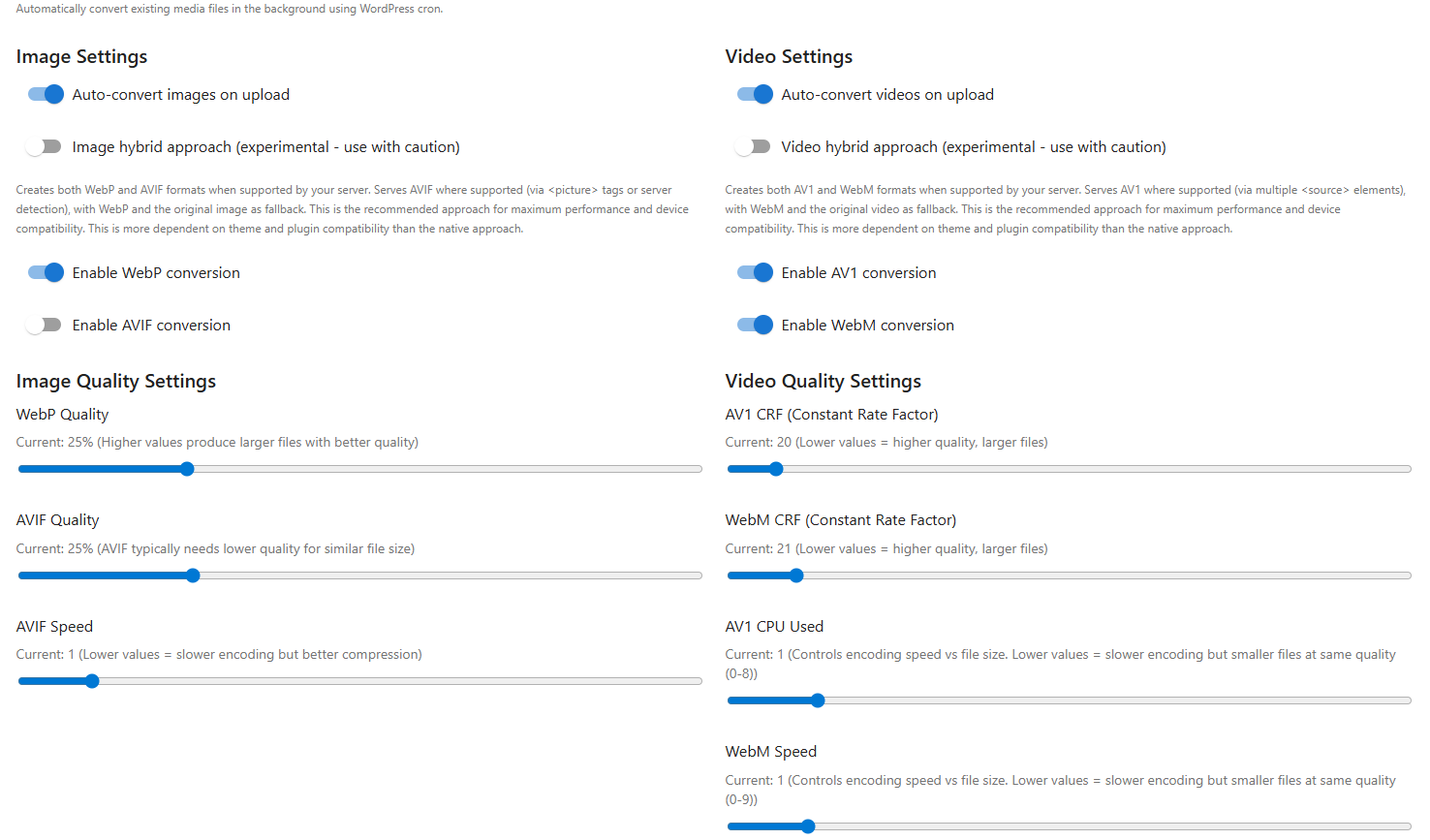
Yes. Separate WebP and AVIF quality settings let you balance size and visual quality.
Does this work with WooCommerce?
Yes. Product images go through the media library, so on-upload and bulk optimization apply like other attachments.
What video formats are supported?
Locally (with FFmpeg): convert to AV1 in an MP4 container and/or WebM, with bitrate/quality controls. Jobs run in the background. Without FFmpeg, use optional cloud processing when licensed, or optimize images only.
更新日志:
- Fix: Plugins → Delete no longer calls WP_Filesystem(), so FTP/SSH hosts can remove the plugin folder. Converted files are deleted best-effort with wp_delete_file; attachment meta is still removed.
- Fix: Media Library delete uses wp_delete_file after an uploads-path check and does not prompt for filesystem credentials.
- Fix: Bulk enable only schedules discovery. The first convert waits at least 10 seconds instead of running inside the settings request.
- Fix: Bulk eligible count uses NOT EXISTS SQL and a 2-minute cache. Local bulk is limited to optimizable image/video MIME types. Cloud bulk includes every attachment.
- Fix: Pending convert count is the real Action Scheduler total. Overdue next batch shows Due now.
- Feature: Local soft skips are marked ineligible so they leave the bulk queue. Manual Re-convert clears that flag.
- Feature: Bulk conversion status on Settings and Overview (remaining eligible, queued actions, next discovery, state) via GET /bulk/stats.
- Feature: Enabling bulk conversion schedules Action Scheduler discovery immediately; disabling unschedules discovery (queued converts still finish).
- Fix: Bulk discovery only queues image/video MIME types; unsupported types are skipped instead of marked Failed.
- Fix: Overview failed Media Library link opens list view (
mode=list). - Update: Settings helper text correctly describes Action Scheduler (not WordPress cron).
- Update: Removed unused conversion/cleanup REST client stubs from the admin JS bundle.
- Fix: Optimized videos no longer break Media Library list thumbnails (video URLs were incorrectly used as image sources).
- Fix: Duplicate completed/failed cloud webhooks are acknowledged idempotently (HTTP 200) to stop retry noise and warning spam.
- Update: WordPress.org zip includes JS source (
assets/js/src,src/assets/common/js/src) per Guideline 4; maps/tests/node remain excluded. - Update: Flux Suite Logs Level filter is All / Debug / Warning / Error (grouped severities).
- Tested up to WordPress 7.1.
- Feature: Welcome modal on first activation shows local image and video processing availability, site-level missing capability chips (formats no local processor can provide), and a subtle CDN/cloud upsell when unlicensed.
- Feature: Once-ever review prompt on Overview after meaningful download-bandwidth savings, with WordPress.org review and support links; suppressed while welcome is showing or optimizations have failed.
- Feature: Need help links on Overview failed-optimizations notice and attachment details error alerts.
- Deprecated: VideoConverter::get_conversion_stats() stub; use ConversionTracker for live conversion statistics.
- Feature: Local HEIC/HEIF conversion with Imagick decode (libheif 1.18.2+ recommended for modern iOS photos), optional animated HEIF-to-WebP via FFmpeg, and separate HEIC capability reporting.
- Feature: Unified Action Scheduler retries for local and cloud failures (3 automatic attempts with progressive backoff), with processing routed by current license/settings and Flux logging on failures.
- Feature: Redesigned attachment details panel with async REST loading, compact skeleton placeholder, MUI Grid responsive layout that stays within the WordPress container, size accordion, format URLs, and a license-aware CDN upsell.
- Feature: Attachment details poll every 15 seconds while Pending (including locally deferred video conversions) and refresh Convert/Disable/Enable actions in place without a full page reload.
- Feature: Attachment details show only formats enabled and supported by the active media converter (WebP/AVIF for images, AV1/WebM for videos), with per-size savings badges compared to the same-size original.
- Feature: Attachment details and conversion controls use WordPress
edit_postattachment capabilities. - Fix: External processing activation requires a valid license; uninstall removes the correct option keys while preserving shared suite account ID; safer database table-drop SQL; external operations builder hardening.
- Fix: Image conversion publishes files and metadata/statistics together (no partial meta on multi-size failure); skipped retries no longer consume the retry budget; plugin/common external API URL constants stay aligned.
- Feature: Media Library shows optimization status and filter options (Optimized, Pending, Failed, Disabled, Unprocessed). Conversion stats API now reports failed external job counts. New constants added: FLUX_MEDIA_OPTIMIZER_STALE_JOB_THRESHOLD, FLUX_MEDIA_OPTIMIZER_FAILED_JOB_RETRY_LIMIT, FLUX_MEDIA_OPTIMIZER_CLEANUP_BATCH_SIZE.
- Feature: Daily cleanup cron recovers stale external jobs, automatically retries failed jobs with a set limit, and cleans expired admin notices.
- Security: Harden external webhook endpoint (account ID verification, job-state checks, CDN host allowlist, rate limiting).
- Security: Register webhook route only when external service is enabled and license is valid.
- Fix: Remove duplicate admin AJAX handler registration for attachment actions.
- Security: Avoid exposing raw exception messages in plugin REST error responses.
- Removed legacy plugin logs REST API; suite logs use flux-plugins-common.
- Guard against php 8.0 - we support php 8.1>.
- Removed some unused code and minor cleanup.
- Tested up to WordPress 7.0.
- Updating dependency to be compatible with php 8.
- Updated build scripts and added link on settings page.