
Folders4Gravity - Folders for Gravity Forms and GravityView
| 开发者 | eitanatbrightleaf |
|---|---|
| 更新时间 | 2026年2月19日 22:39 |
| PHP版本: | 8.0 及以上 |
| WordPress版本: | 6.9 |
| 版权: | GPLv2 |
| 版权网址: | 版权信息 |
详情介绍:
- Create, rename, reorder, and delete folders for Gravity Forms
- Create, rename, reorder, and delete folders for GravityView
- Drag-and-drop folder ordering
- Drag-and-drop item ordering inside folders
- Bulk assignment of forms to folders
- Bulk assignment of views to folders
- Separate folder structures for Forms and Views
- One-click access to Edit, Settings, Entries, Preview, Import/Export
- Optional dashboard widget for instant folder navigation
- No setup required; works immediately on activation
- Lightweight, clean, and optimized for large form libraries
- 100% admin-only; no impact on the front end
- Compatible with Gravity Forms 2.5+ and GravityView
- Requires WordPress 6.5+ and PHP 8.0+
- Keeps your admin dashboard clean and organized
- Speeds up editing, reviewing, and form management
- Helps categorize forms by client, project, campaign, or workflow
- Simplifies complex WordPress operations environments
- Improves onboarding for new team members
- Supports multi-team form management without confusion
- Reduces admin clutter when working with large Gravity Forms libraries
- Mirrors real-world organizational structures
- Prevents losing track of forms and views in long unorganized lists
- Agencies managing many client installations
- Ops teams using Gravity Forms for intake, tracking, CRM, or internal workflows
- Nonprofits running multi-program form structures
- Enterprise WordPress environments with departmental forms
- Multisite networks maintaining separate sets of forms and views
- WordPress implementers needing quick access to specific forms
- Internal teams organizing form-based tasks, workflows, and campaigns
- High-volume GravityView installations with large sets of Views
- Sites needing a visual structure for form libraries at scale
- Quickly switch between forms grouped by folder
- Organize views by project, team, or workflow
- Add items into the correct folder quickly and easily
- Increase operational clarity for complex form ecosystems
- Keep each department’s or client’s forms grouped cleanly
- Improve navigation speed for high-volume Gravity Forms workloads
- Maintain a tidy dashboard even as your form count grows
- Fully compatible with WordPress admin styling
- Designed for speed on large installations
- Does not modify form data, IDs, or display settings
- Works seamlessly with Gravity Forms and GravityView defaults
- Safe for multisite and multi-team environments
- Built for long-term maintainability and low overhead
安装:
- Upload the
folders4gravityplugin folder to the/wp-content/plugins/directory, or install the plugin through the WordPress Plugins screen. - Activate the plugin through the Plugins menu in WordPress.
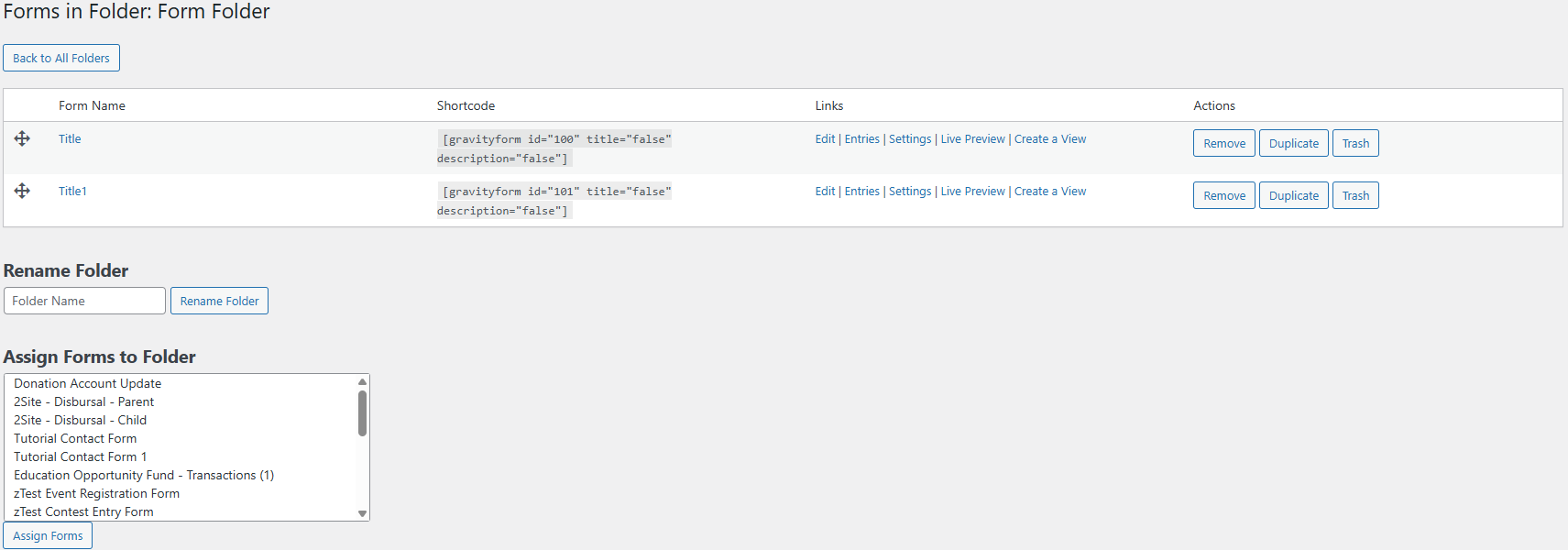
- Go to Forms → Form Folders to begin creating folders and organizing your Gravity Forms.
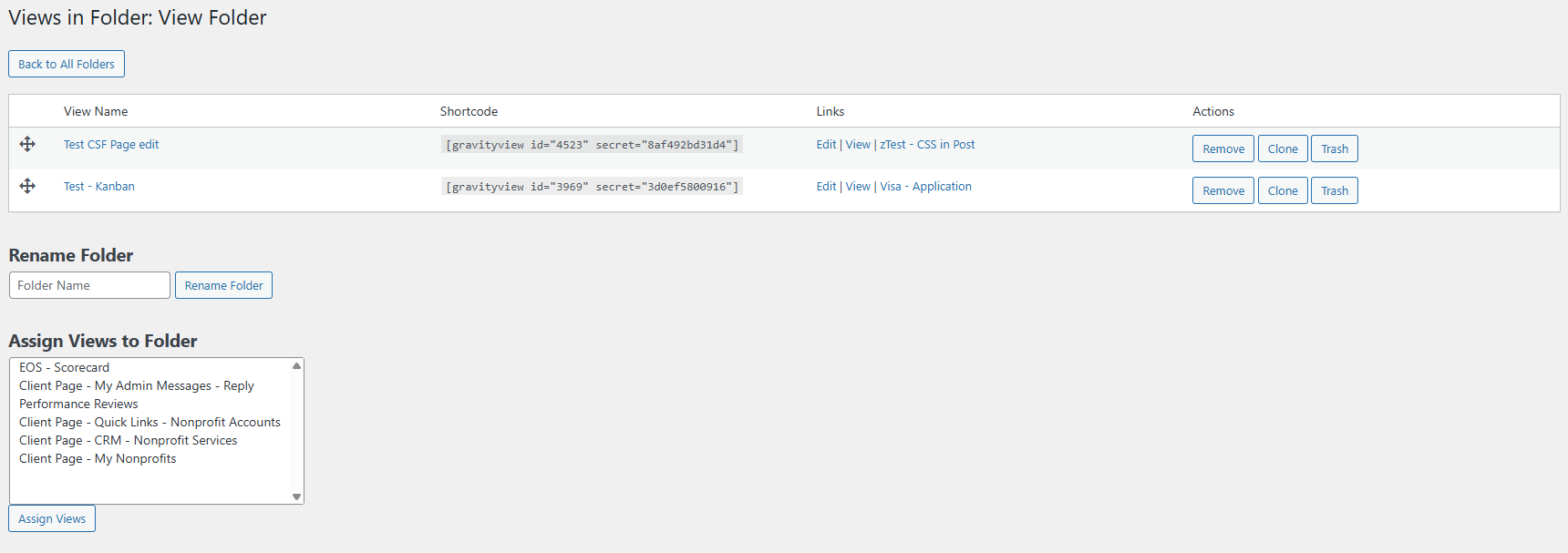
- If you have GravityView installed, go to GravityKit → View Folders to organize your Views.
- Start creating folders and assigning forms or views using drag-and-drop or bulk actions.
屏幕截图:
常见问题:
Does Folders4Gravity change anything about how my forms or views work?
No. Folders4Gravity is 100% admin-side only. It does not modify form settings, IDs, entries, confirmations, notifications, or front-end display. It simply provides a clean, structured folder interface to organize Gravity Forms and GravityView items.
How do I create my first folder?
After activating the plugin, go to Forms → Form Folders or GravityKit → View Folders (if GravityView is installed). Click “Add Folder,” name it, and start dragging your forms or views into place. You can also bulk-assign items to new or existing folders.
Can I drag and drop forms into folders?
Yes. Drag-and-drop is fully supported for both folders and items. You can reorder folders, reorder the forms inside them, and reorganize your workspace instantly.
Can I bulk assign multiple forms or views to a folder?
Yes. Use the bulk selector to choose several items at once and assign them to a folder with a single action. This works for both Gravity Forms and GravityView Views.
Does Folders4Gravity support GravityView?
Yes. If GravityView is installed, the plugin automatically adds a parallel folder system under GravityKit → View Folders so you can organize Views by project, workflow, client, or campaign without any setup.
Will this help me manage a large number of forms?
Absolutely. Folders4Gravity is designed for sites with large Gravity Forms libraries, multi-team environments, agencies, and multisite installations. It reduces admin clutter, speeds up navigation, and provides a structured dashboard for high-volume form management.
Can I reorder folders and items?
Yes. Both folders and the items inside them support drag-and-drop ordering. You can maintain a custom hierarchy that mirrors your organizational structure—client, project, department, or workflow.
Will this help organize GravityView Views for client or project work?
Yes. You can group Views by client, project, team, or campaign, making it much easier to navigate complex GravityView setups.
Does this plugin affect front-end performance?
No. All folder operations occur in the WordPress admin and do not affect front-end performance or user-facing behavior.
Does this plugin require configuration?
No configuration is required. Install, activate, and start creating folders immediately. Folders4Gravity integrates seamlessly with the existing Gravity Forms and GravityView admin pages.
Will Folders4Gravity work on a multisite?
Yes. It improves form and view organization across multisite environments and is lightweight enough for large networks.
Is this plugin useful for agencies or internal operations teams?
Yes. Agencies and internal teams benefit from folder-based organization that reduces clutter, supports multi-team workflows, and keeps form structures clear for everyone involved.
Does it support one-click shortcode copying?
Yes. You can copy the form shortcode directly from the folder view for faster implementation in your WordPress pages.
Does each item have to belong to a folder?
No—placing forms or views in folders is optional. Unassigned items remain visible in the default list until you move them.
Does deleting a folder delete my forms or views?
No. Deleting a folder only removes the folder container. All your forms and views remain untouched and return to the main list.
Is this plugin lightweight?
Yes. Folders4Gravity is intentionally lightweight, fast, and optimized for large and complex Gravity Forms setups.
更新日志:
- Fixed a bug showing update versions for uninstalled plugins.
- Updated dependencies
- Fixed uninstall process to properly clear everything
- Updated core GravityOps library to improve the update plugin process among other small fixes
- Improved styling and UI to match branding
- Bumped version of core GravityOps library to fix some bugs regarding the plugin admin menus and integrate TrustedLogin
- Fixed a critical error caused by last release
- Fixed a bug with new admin menu