Form Plant
| 开发者 | reiji-sato |
|---|---|
| 更新时间 | 2026年9月21日 07:55 |
| PHP版本: | 8.0 及以上 |
| WordPress版本: | 7.1 |
| 版权: | GPLv2 or later |
| 版权网址: | 版权信息 |
详情介绍:
Form Plant is a WordPress contact form plugin built around three pillars: practical defaults, layered spam protection, and strong Japanese-locale support.
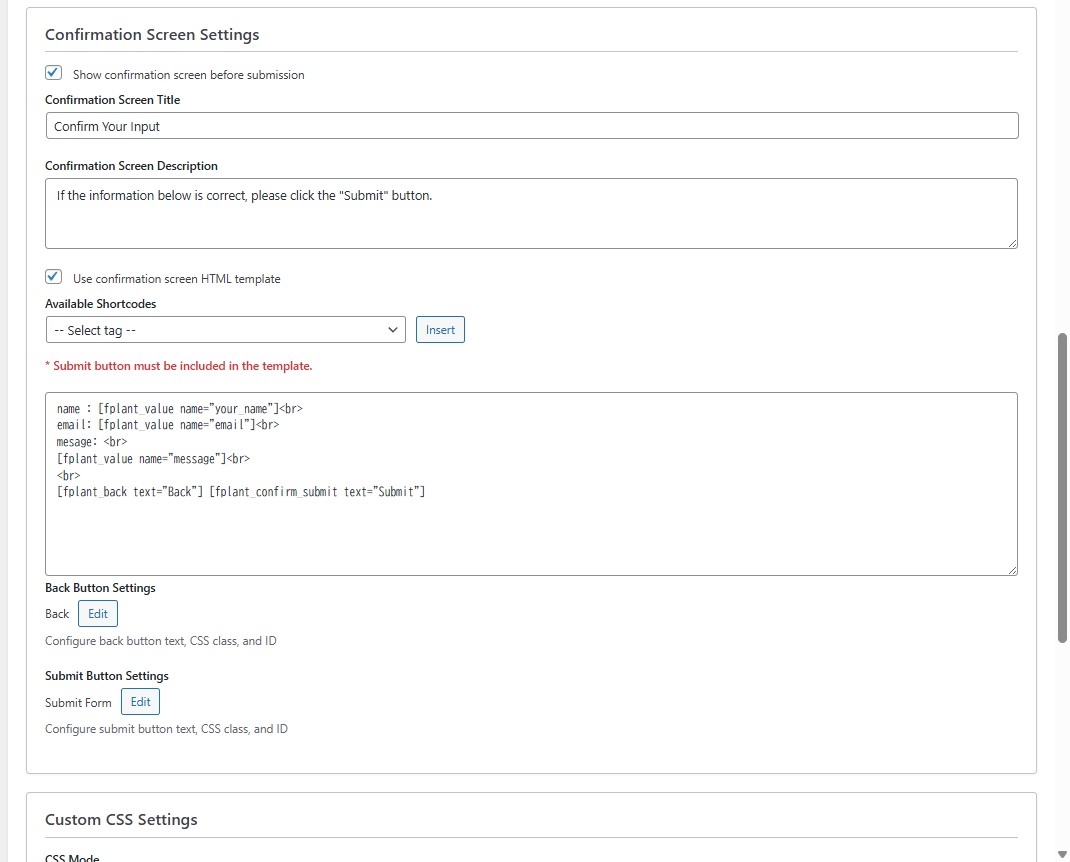
Ready out of the box — Confirmation screen, submission storage, and CSV export are standard features, not paid add-ons. Publish a working form in minutes.
Spam protection in depth — Combine honeypot, time-based validation, IP rate limiting, disposable email blocking, Google reCAPTCHA (v2/v3), and Cloudflare Turnstile. Start with the lightweight defaults that work without any account setup; add reCAPTCHA or Turnstile only when you need them.
Built for Japanese sites — Postal code lookup with address auto-fill, per-part name/kana validation, and Japan-specific address templates. Moving from MW WP Form? A built-in migration tool imports your existing forms — fields, validation rules, and mail settings — so you can switch without rebuilding from scratch.
Many form plugins require extra extensions for confirmation pages or data management. Form Plant includes these essentials from the start.
Why Form Plant?
- Confirmation screen included — Let users review their input before submitting. No extra plugin needed.
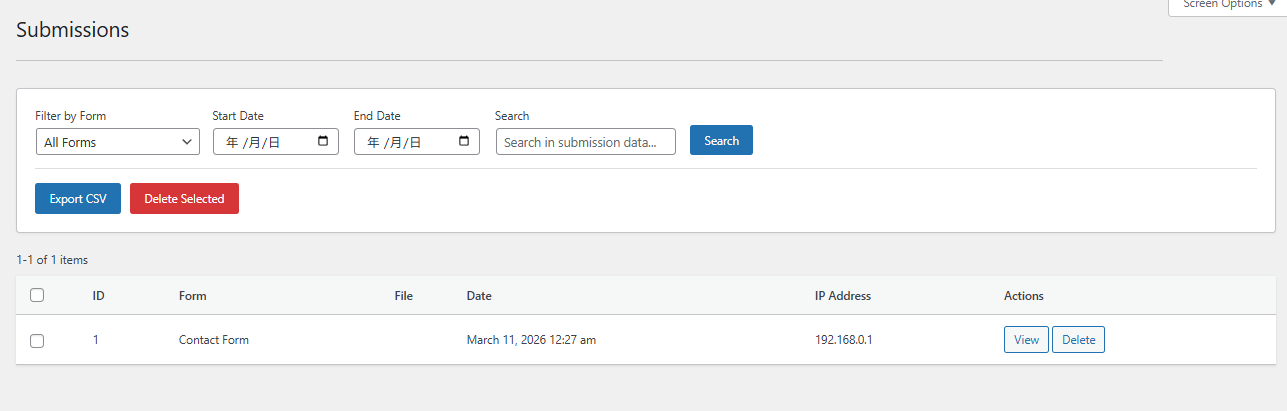
- Submission data storage — All form entries are saved in the database and manageable from the admin panel.
- CSV export — Download submission data anytime for reporting or backup.
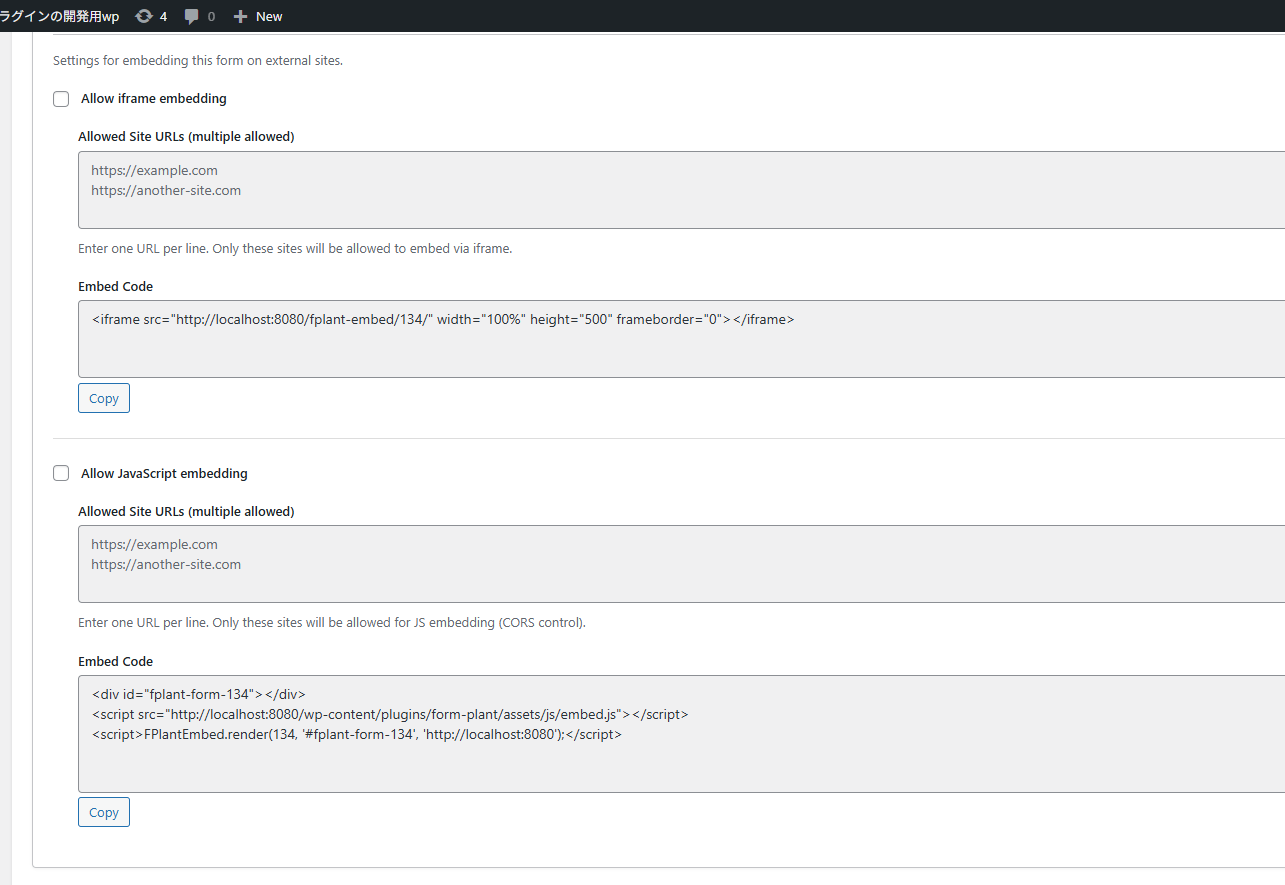
- Embed on external sites — Display your forms on any website via iframe or JavaScript snippet, not just within WordPress.
- Webhooks — Send submissions to Zapier, Make, or your own API as signed JSON, with delivery logging and automatic retry.
- Quick setup — An intuitive ACF-style accordion editor lets you build forms without touching code.
- Flexible customization — Custom HTML templates, validation messages, and post-submission actions give you full control when you need it.
- Intuitive ACF-style accordion UI for field configuration
- Block editor (Gutenberg) integration — pick a form from a dropdown using the dedicated "Form Plant" block
- MW WP Form migration tool — convert existing MW WP Form forms (fields, validation rules, admin and auto-reply mail settings, and merge tags) into Form Plant forms, with a warning report for items that need manual review (shown when MW WP Form is active)
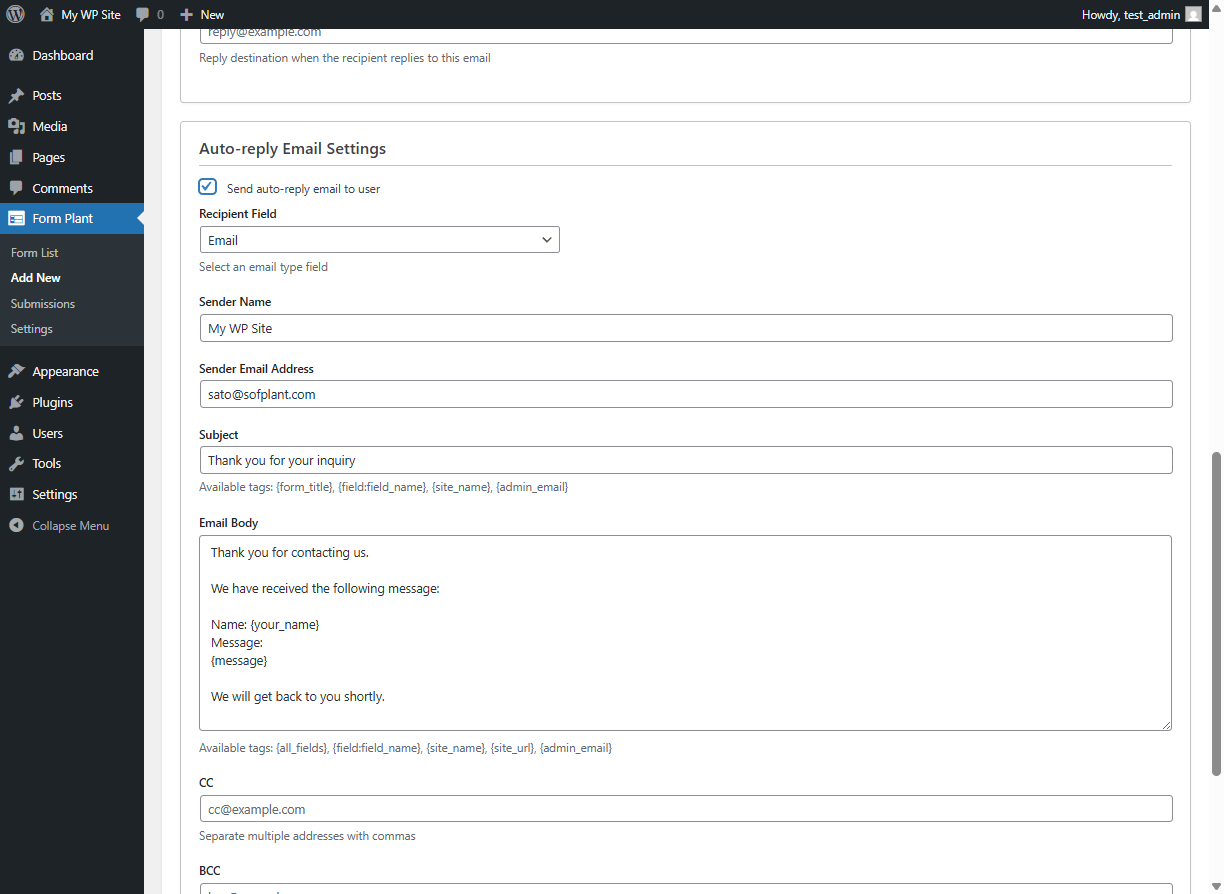
- Email notifications (admin notification and auto-reply)
- Webhooks — send each submission as signed JSON (HMAC-SHA256) to external URLs, with automatic retry and per-submission delivery log
- Acceptance (consent) field with a linked label for privacy policy / terms agreement
- Custom HTML template support
- Confirmation screen before submission
- Custom validation messages
- Post-submission actions (message / custom HTML / redirect)
- Two types of date input (calendar / dropdown)
- Postal code lookup that auto-fills address fields (Japan)
- Multiple spam protection options: honeypot, time-based check, IP rate limit, disposable email blocking, Google reCAPTCHA v2/v3, Cloudflare Turnstile
- External site embedding via iframe / JavaScript
- Multiple custom CSS file uploads and design presets
- Submission data storage and management
- CSV export of submission data
- File upload support
- Text
- Textarea
- Phone
- Number
- URL
- Name (parts)
- Name (Kana)
- Postal Code (with address auto-fill)
- Address (Japan / international)
- Prefecture
- Date (Calendar)
- Date (Dropdown)
- Time
- Password (with optional strength meter)
- Select
- Checkbox
- Radio
- Acceptance (consent checkbox with a linked label, e.g. privacy policy)
- File Upload
- Hidden
- HTML
- Service: Google reCAPTCHA
- API Documentation (v2): https://developers.google.com/recaptcha/docs/display
- API Documentation (v3): https://developers.google.com/recaptcha/docs/v3
- Terms of Use: https://policies.google.com/terms
- Privacy Policy: https://policies.google.com/privacy
- Load the reCAPTCHA JavaScript library from Google's servers (https://www.google.com/recaptcha/api.js)
- Send form submission data to Google for spam analysis
- Include user's IP address and browser information in the request reCAPTCHA is disabled by default and requires explicit activation by the site administrator.
- Service: Cloudflare Turnstile
- API Documentation: https://developers.cloudflare.com/turnstile/
- Terms of Use: https://www.cloudflare.com/terms/
- Privacy Policy: https://www.cloudflare.com/privacy/
- Load the Turnstile JavaScript library from Cloudflare's servers
- Send form submission tokens to Cloudflare for verification
- Include user's IP address and browser information in the request Turnstile is disabled by default and requires explicit activation by the site administrator.
- Service: zipcloud (郵便番号検索 API)
- API Endpoint: https://zipcloud.ibsnet.co.jp/api/search
- Service Information: https://zipcloud.ibsnet.co.jp/doc/api
- Terms of Use: https://zipcloud.ibsnet.co.jp/rule/api
- Source: disposable-email-domains
- License: CC0 1.0 Universal (Public Domain)
- Usage: Emails from disposable/temporary email services are automatically blocked during form submission
安装:
- Upload the plugin folder to the
/wp-content/plugins/directory - Activate the plugin through the 'Plugins' menu in WordPress
- Create a form from the 'Form Plant' menu
屏幕截图:


常见问题:
How do I display a form?
Use the shortcode [fplant id="YOUR_FORM_ID"] in your post or page content.
Can I customize the form appearance?
Yes, you can add custom CSS through the form settings, or use custom HTML templates for complete control over the layout.
Does it support file uploads?
Yes, the File Upload field type allows users to upload files with configurable size limits and file type restrictions.
更新日志:
1.5.2
- Fixed: HTML fields were not rendered in iframe and JavaScript embeds. With the default layout they appeared only when the form was placed with the shortcode or the block.
- Fixed: Hidden fields were not output at all with the default layout. They worked only when placed with
[fplant_field]in an HTML template. - Fixed: The
allow_htmloption of a setting registered throughfplant_custom_settings_fieldshad no effect when the form was saved from the editor — the tags were stripped before the setting was stored. The built-in HTML settings were not affected. - Developer: New
fplant_form_outputfilter (replace the rendered form HTML or add to it;$contextisshortcode,iframeorrest),fplant_form_unavailable_messagefilter (the text shown when a form does not accept submissions), andfplant_submission_gatefilter (reject a submission with aWP_Errorafter validation and right before it is saved — for capacity limits, duplicate entries, or a check against an external service). - Developer: New
fplant_layout_field_typesfilter withFPLANT_Field_Manager::get_layout_field_types()/is_layout_type(). A field type registered as a layout type holds no value, so it is skipped by validation, CSV export, emails,{all_fields}, webhooks and the email tag list, and is rendered without a label or error area — the treatment the built-in HTML field already had. - Developer: New
fplant_html_setting_keysfilter withFPLANT_Form_Manager::get_html_setting_keys()— the form settings whose value may contain HTML.fplant_form_is_submittablenow receives a third$is_previewargument, true for a validation-only submission from the form preview. - Developer: New front-end API
window.fplant.validateField( formId, fieldName )(validate a single field and show its error), and a newfplant:validationErrorevent (detail.sourceisclientorserver) that fires even when the HTML template contains no[fplant_errors]element. - Developer: New style-only class
fplant-submit-button-style. A button carrying it gets the same appearance as the submit button, including the design presets and the Design adjustments settings. It adds no behavior.
- Security: Fixed an issue where a crafted submission to a form with an optional file upload field could attach an arbitrary server-side file to the admin notification email. File information is now produced only by the upload handler, and outgoing attachments are restricted to the plugin's own upload directory (
wp-content/uploads/fplant_uploads/). Sites using a file upload field should update. - Fixed: Date (dropdown) fields lost their value. The three selects never combined into the submitted value, so a required date dropdown could not be submitted at all and an optional one was saved empty. Existing forms work again after updating; no settings change is needed.
- Fixed: The file size limit checked in the browser was always 2MB regardless of the field's setting, so a file larger than 2MB was rejected before upload even when a larger limit was configured.
- Fixed: A file chosen in a disabled file field (for example one hidden by an add-on) is no longer uploaded.
- Fixed: Postal code fields with no address auto-fill configured no longer call the external postal code lookup service — the result was being discarded.
- Developer: Form output now keeps
data-*and the commonaria-*attributes on form controls, allows the<template>tag, and can be extended with the newfplant_allowed_form_htmlfilter. The two Fixed items above were caused by these attributes being stripped. - Developer: New
fplant_submission_detail_value_htmlfilter (replace one value cell in the submission detail) andfplant_admin_email_attachmentsfilter (attach extra files, restricted to the plugin's upload directory). The submission file download endpoint accepts optionalrow/subparameters for files inside structured values.fplant_format_submission_valuenow also receives the submission ID, and the all-forms CSV export passes field definitions. - Developer: A field whose type is not registered — for example when the add-on that provided it is deactivated — is now skipped by validation and not saved, instead of blocking submissions, and the field editor keeps its type instead of clearing it.
FPLANT_Template_Loader::get_allowed_field_types()returns the effective list. - Developer:
FPLANT_Validator::validate_field_type()/validate_file()andFPLANT_Submission_Manager::upload_file_entry()are now public so add-ons can reuse the built-in validation and upload handling for their own sub-fields.
- New: Completion screens now expand the same tags as emails —
{submission_id}(use it as a reference number),{field:field_name},{all_fields},{form_title}and the other system tags work in the success message and the completion page HTML. Password values are always masked there. - New:
[fplant_complete id="123"]shortcode. Redirect to a thank-you page and still show the completion screen (reference number, submitted values) there. Enable "Use the completion shortcode on the redirect page" in the form's redirect settings. The completion screen appears only right after a submission (once; not on reload), and visitors who open the page directly are sent back to the page that contains the form (or a URL you specify), so conversion tags on the thank-you page fire only after a real submission. The Form Plant block offers it as "Form name (Completion)". - New: The success message and completion page HTML settings now list the value tags of the form's own fields.
- Fixed: iframe and JavaScript embeds now render the same completion screen as the shortcode / block (template values, tags, and extension filters were skipped on the embed API).
- Fixed: The
{field_name}shorthand tag now masks password values when "mask in emails" is enabled, the same as{field:field_name}. - Developer:
fplant_submission_resultfilter (switch the completion action based on the submitted data) andfplant_display_fieldsfilter (drop fields from the confirmation screen and{all_fields}for a submission), both required by Form Plant Pro.FPLANT_Email_Handler::replace_tags()is now public static. Newfplant_complete_shortcode_htmlandfplant_complete_token_ttlfilters.
- New: WordPress shortcodes are now expanded in the confirmation screen HTML template, the same as in the input screen HTML template. Shortcodes typed into form fields by visitors are shown as plain text and never executed.
- New: The
fplant_template_valuesfilter ({{key}}placeholders) now also works in iframe and JavaScript embeds — previously it only worked for forms placed with the shortcode or block. - New: Prefill fields from a post via URL. With "Allow initial values from URL parameters" enabled, open the form page with
?post_id=123and a field whose default value is{post_title},{post_name},{post_date},{post_excerpt},{post_content},{ID}or{your_custom_field}is prefilled from that post (equivalent of MW WP Form's querystring feature). Only publicly viewable posts are read, and protected meta (_-prefixed keys) is never exposed. - Fixed: With "Allow initial values from URL parameters" enabled, an unresolved
{placeholder}default value is no longer rendered as-is into the field. - Fixed: Removed stray whitespace inside the submit / back / confirm button tags. On themes that style buttons with
white-space: pre-wrap(or similar), it could shift the button label. If you have copiedtemplates/confirmation.phportemplates/form-fields/submit.phpinto your theme, update your copies as well.
- New: Webhooks. Send each submission as JSON to external services (Zapier, Make, Google Apps Script, or your own API) from the new Integrations tab. Up to 3 HTTPS URLs per form, an HMAC-SHA256 signature header (
X-FPlant-Signature) for verification, one automatic retry on failure, delivery results shown with the saved submission, and a test-send button. - New: Acceptance field — a consent checkbox with a linked label for privacy policy / terms agreement. Always required to submit; showing it on the confirmation screen, in emails, and in saved submissions is configurable (all off by default). When saved, the submission records the exact consent wording the user agreed to.
- Developer: Webhook customization filters —
fplant_webhook_should_send,fplant_webhook_payload,fplant_webhook_request_args, andfplant_webhook_allow_http. - Developer: Extension APIs for add-ons — new
fplant_sanitize_field_valuefilter (custom field types keep array values; previously they were flattened on save), form configuration passed tofplant_complete_message/fplant_redirect_url/fplant_success_html, submission data passed tofplant_admin_email_subject/fplant_user_email_subject, a new front-endfplant:fieldChangeevent with publicwindow.fplant.getFieldValue()/getFormData()accessors, andfplant:successnow bubbles like other events. - Developer: Structured field values for add-ons — bracket-style input names (
field[0][sub]) are now collected as nested values on the front end (also returned bygetFormData()), stored as JSON with the submission, and rendered as plain text through the newfplant_format_submission_valuefilter in confirmation screens, emails, CSV export, and the admin detail view.
- New: Redesigned field editor. Fields now open inline as an accordion with Basic / Validation / Advanced tabs, replacing the modal dialog.
- New: Field type picker with icons for faster field creation.
- New: Design adjustments. Customize the form frame, field labels, inputs, and buttons (colors, sizes, spacing, shadows) from the new Design tab with a live preview — no CSS required.
- New: Per-field descriptions. Show help text below the label, above the input, and below the input (HTML allowed), configurable on the field's Advanced tab. Text color and size are adjustable in Design adjustments.
- New: Form preview now renders in your theme context, with desktop / tablet / mobile viewport switching and zoom. Preview submissions run validation only and are never saved or emailed.
- Change: The submit button is rendered through a template and can be overridden from your theme (
form-plant/form-fields/submit.php). - Developer: Field types are filterable via
fplant_field_types, and the field editor exposes an extension socket (window.fplant.fields.registerTab) for add-ons.
- Fix: The 3-part phone number and split postal code fields (added for MW WP Form migration) now follow the form's theme design. Previously the input boxes kept the plain default style and the field container's gray background and border leaked around them.
- Fix: Required phone number and postal code fields now show the red error border like other fields when submitted empty.
- Important: Forms now respect their publish status. Private, draft, and pending forms are no longer shown to or submittable by visitors; only users who can edit a form can preview and test-submit it. Published forms are unaffected. To restore the previous behavior, use the new
fplant_form_is_viewable/fplant_form_is_submittablefilters. - New: The forms list now shows a colored status badge (published, private, draft, pending) next to each form title.
- Change: Migrating from MW WP Form now creates the new form as published with Form Plant's standard design, so it works right after placing the shortcode. The MW WP Form layout is still saved as an HTML template but is disabled by default; enable it from the layout settings to use the original layout.
- Fix: Forms embedded via iframe could not be submitted when the time-based spam check was enabled, because the form timestamp field was missing from the iframe template.
- Developer: Added
fplant_form_is_viewable,fplant_form_is_submittable, andfplant_preview_noticefilters to control front-end visibility, submission, and the editor preview notice per form.
- New: MW WP Form migration tool. Convert existing MW WP Form forms — fields, validation rules, admin and auto-reply mail settings, and merge tags — into Form Plant forms, with a warning report for items that need manual review. Available under Form Plant → Tools while MW WP Form is active.
- New: Custom Mail Tag field type. Embed a dynamic value (supplied via the
fplant_custom_mail_tag_value_*filter) into the form, the saved submission, and the email body. - New: Added rows/cols/maxlength settings for textarea fields and size/maxlength settings for email, url, and password fields in the form editor.
- Fix: Custom Mail Tag fields are now rendered on the front end so their value reaches the submission data and email.
- Fix: Validation errors are now displayed on forms that use an HTML template without a confirmation screen.
- Developer: Added filters and actions for MW WP Form-equivalent extensibility — dynamic field values/choices, custom validation, email subject/body/recipient customization and conditional skipping, post-submission integration, redirect and completion-page control, attachment save path/filename, custom form settings, and CSV export encoding.
- Fix: Changed the source strings in
block.json(block description and keywords) from Japanese to English so that English-locale sites display the correct text.
- New: Layered spam protection — added time-based validation, IP rate limiting, disposable email domain blocking, Google reCAPTCHA v2 Checkbox, and Cloudflare Turnstile (in addition to existing honeypot and reCAPTCHA v3).
- New: Postal code lookup that auto-fills address fields for the Japanese locale, using the zipcloud API.
- New: JavaScript hook API (
window.fplant.addValidator,removeValidator, and form lifecycle events) for custom validation and behavior. - New: Password field type with optional strength meter.
- New: Form settings export/import for migration and backup.
- New: Added a Contact Form 7 style form selector block. From the block inserter, choose "Form Plant" and pick a form from the dropdown to embed it.
- New: Added REST API endpoint
GET /form-plant/v1/forms(capability: edit_posts) used by the block editor to list available forms. - New: Per-part required validation and custom error messages for the Name (parts) field.
- New: Unified form design settings; multiple custom CSS files can now be uploaded per form.
- New: Added design type presets and a customizable required-field marker.
- New: Split the address template into a Japanese locale version and an international version.
- New: Display a save-completion notice on the settings page.
- Initial release