
FormGhost
| 开发者 | byabdalla |
|---|---|
| 更新时间 | 2026年9月29日 07:25 |
| PHP版本: | 7.4 及以上 |
| WordPress版本: | 7.1 |
| 版权: | GPLv2 or later |
| 版权网址: | 版权信息 |
详情介绍:
- No CAPTCHAs. No "select all the buses." No "I'm not a robot" checkbox.
- No cloud dependency — the spam detection itself makes no external HTTP calls. The only optional exceptions (CAPTCHA verification, MX lookup) are off by default and documented under External services.
- GDPR / DSGVO friendly. IP addresses are hashed with a per-site secret before storage. Form payloads are encrypted (AES-256-GCM) in the vault.
- Ghost Response: bots see a fake success message and walk away thinking the submission worked. You never get the email.
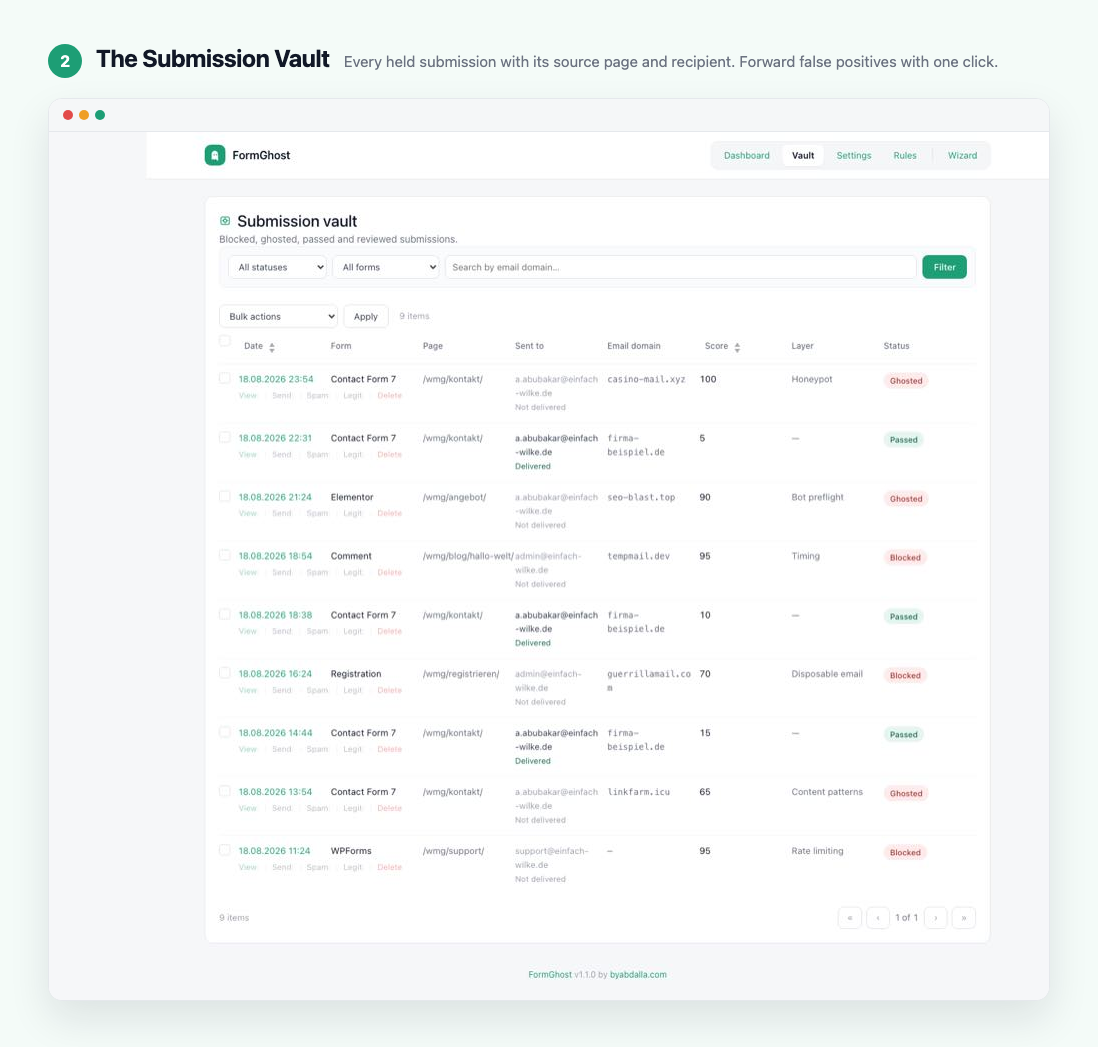
- Blocked something legitimate? Open it in the Vault and forward it to the inbox it was headed to in a couple of clicks.
- Honeypot — Daily-rotated, site-suffixed hidden fields. Different on every FormGhost site; resistant to "fill every field" bots.
- Timing — Encrypted submission timestamp. Submissions that arrive too fast (or with a replayed token) fail this layer.
- Proof-of-Work — Lightweight browser challenge solved by a WebWorker. Stops curl / wget / scripted submissions cold.
- Behavioral fingerprint — Mouse curvature, keystroke variance, scroll, focus and touch signals computed entirely in the browser. Only the resulting score is transmitted.
- Rate limiting — Per-IP limits for each kind of form (contact forms, comments, registration, WooCommerce, password reset) within a time window, a separate failed-login limit per account and per IP address, and whitelisting of single IPs or CIDR ranges.
- Disposable email detection — Curated disposable-domain blocklist (extensible with your own block/allow lists), optional MX heuristic.
- Content patterns — Casino / SEO / pharma phrase detection with a self-learning twist.
- WordPress hardening — Disable XML-RPC, harden the REST users endpoint, generic login errors, optional Application Passwords lockdown.
- Optional CAPTCHA — Turnstile / hCaptcha / ALTCHA on the core WordPress forms you choose (comments, login, registration, password reset) if you want a visible challenge as a last line of defence. Off by default.
- WordPress core comments, login, registration, password-reset
- Contact Form 7
- WPForms
- Gravity Forms
- Elementor Pro Forms
- WooCommerce checkout & registration
- Fluent Forms
- Ninja Forms
- Formidable Forms
- Forminator
- HTML Forms
- Jetpack Forms
- Bricks Builder forms
- Kadence Blocks forms
- Divi contact forms
- BuddyPress signup & activity
- bbPress topics & replies
wp-admin/admin-post.php or wp-admin/admin-ajax.php are picked up automatically by the generic adapter.
The Vault
Blocked submissions are stored encrypted for 30 days (configurable). Review them in the admin: see what was blocked, which page it was submitted from, and which inbox the notification was headed to. Mark false positives as legitimate and forward them by email in a couple of clicks — the sender's address becomes the Reply-To, so answering in your mail client reaches the person who filled the form. The forwarded email treats the submission as untrusted: links and addresses in it are broken up so they cannot be clicked by accident. Passed (legitimate) submissions are logged too, so you can audit both sides of every decision.
Self-learning
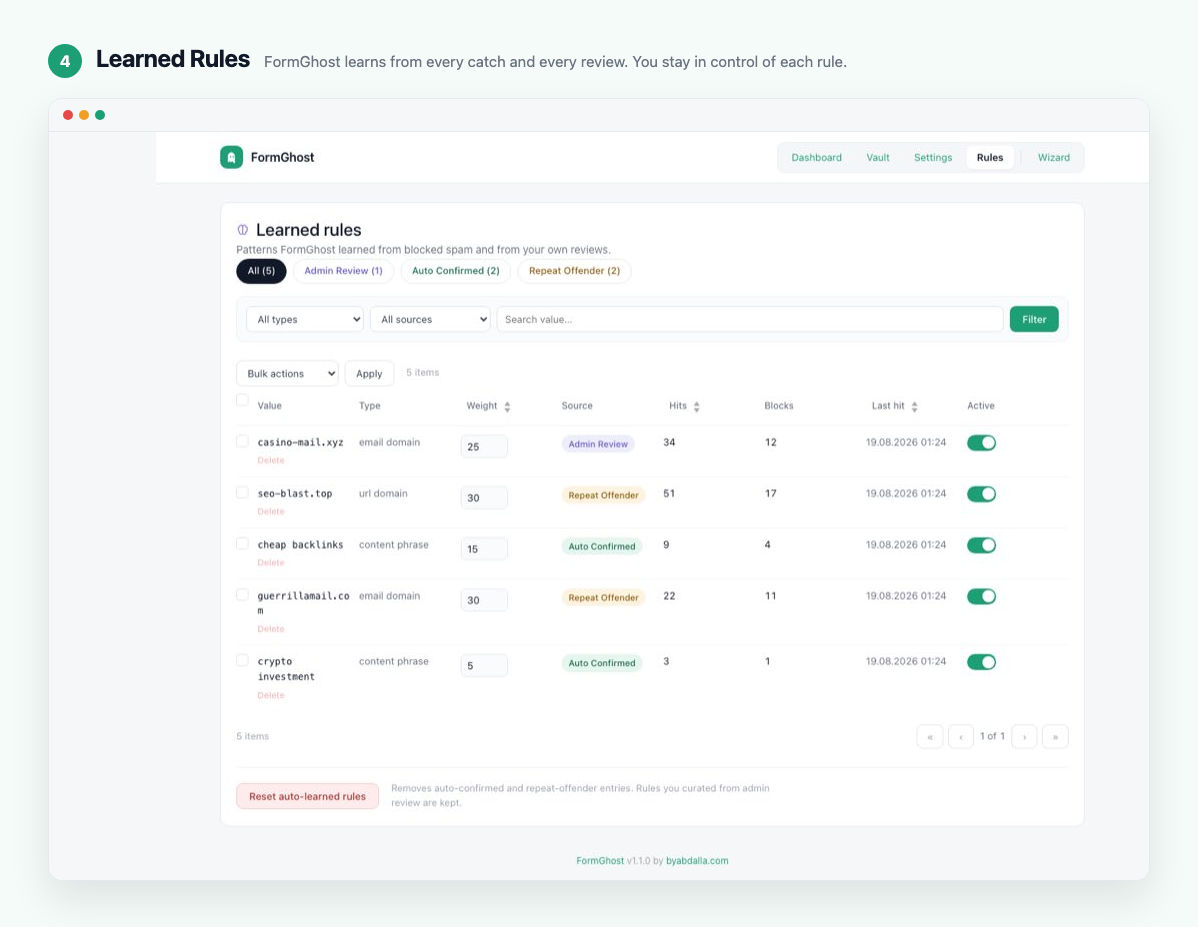
When you mark a Vault entry as "spam" the engine extracts the sender's address, the email domain, the domains of links in the message and distinctive phrases (and the hashed IP address), and stores them in a learned-rules table with a score modifier. Marking an entry as legitimate does the opposite: that sender and the matching signals get negative weights. Future submissions matching those signatures get extra points, automatically. Auto-confirmed rules from repeat offenders are added too. Decay over time keeps the rule set fresh. Review, re-weight, deactivate or delete every learned rule from the Learned Rules screen.
Privacy
- The nine detection layers, the Vault and the self-learning system run entirely on your server. Two optional, off-by-default features talk to the outside: CAPTCHA verification (Cloudflare Turnstile / hCaptcha) and the DNS MX check — see "External services" below.
- IPs are stored only as
sha256(site_secret + "|" + ip), never as the address itself. The secret is kept in the same database, so the hash stops anyone from simply reading an address; someone with a full copy of the database could still work an IPv4 address out by trying every possible one. - Vault payloads are encrypted at rest with AES-256-GCM (authenticated encryption).
- Uninstalling the plugin removes every option, every table and every cron event. Nothing is left behind.
安装:
- Upload the
formghostfolder towp-content/plugins/(or install through the Plugins screen). - Activate FormGhost on the Plugins screen.
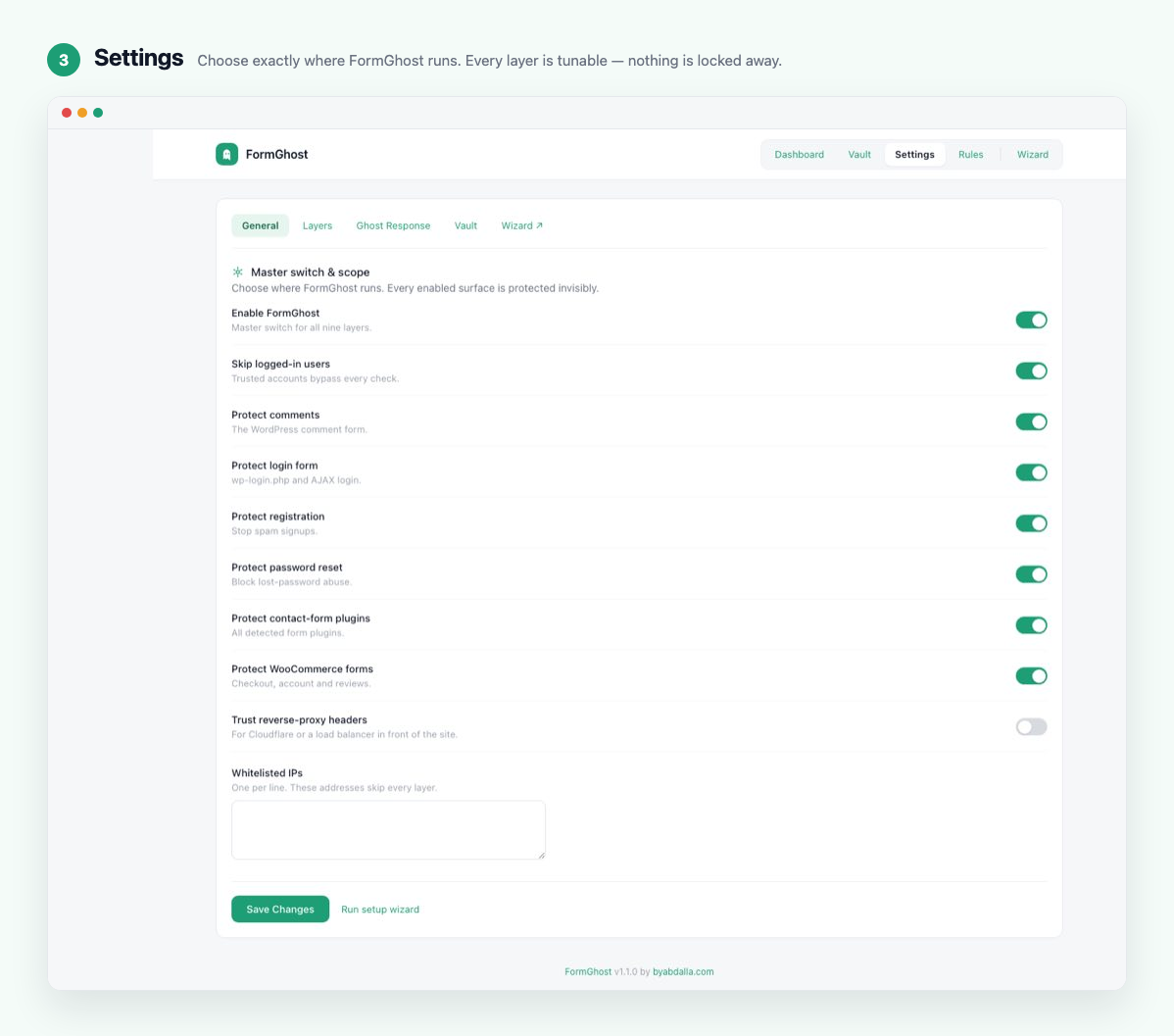
- Run the one-time wizard that appears on activation — toggle the surfaces to protect and pick a sensitivity profile; FormGhost sets timing, proof-of-work and detection sensitivity to match.
- Done. Real users keep submitting; bots stop arriving.
屏幕截图:
常见问题:
Is FormGhost really completely free?
Yes. All nine layers, the Vault, the self-learning system, Ghost Response — everything ships in the free plugin. There is no Pro tier and no license key.
Will it break my real forms?
No. FormGhost is invisible — no CAPTCHA, no extra fields visible to humans, no JavaScript prompts. The honeypot fields are hidden via multiple CSS techniques and aria-hidden. The timing token and proof-of-work fields are injected by JavaScript with no UI footprint.
Does it work without JavaScript?
Partly. The WordPress comment, login, registration and password-reset forms work without JavaScript as long as "Allow visitors without JavaScript" is on (the default). Forms from form plugins need JavaScript: FormGhost adds its checks to them with JavaScript, so a submission without it looks like a bot and is held. Turning the setting off makes the core forms strict too.
Does it send data to your servers?
No — FormGhost has no servers of its own and its spam detection never leaves your site. The only outbound calls the plugin can make are the optional, off-by-default Turnstile / hCaptcha token verification and the DNS MX lookup, both described under "External services" below.
How does the wizard configure my site?
Choose which surfaces to protect (comments, login, registration, contact forms, WooCommerce, password reset) and a sensitivity profile — Low, Medium or High. FormGhost applies a curated recipe of timing thresholds, proof-of-work difficulty and pattern aggressiveness. You can fine-tune everything afterwards in Settings, and re-run the wizard any time.
I marked a legitimate submission as blocked. What now?
Open the Vault, click Legit on the entry, then Send and Send email to forward it to the inbox it was originally headed to. FormGhost learns from your correction: that sender's address and the matching domains and phrases get negative weights, so similar messages are less likely to be held.
Can I see why a submission was held?
Yes. The Vault detail view shows the score, the layer that held it and its reason code, the page the form was submitted from, and the inbox the notification was headed to.
Does it work with caching plugins?
Yes. The honeypot CSS is inline, and the timing token, proof-of-work challenge and Behavioral layer nonce are fetched fresh from a no-cache endpoint when the page loads, so cached pages still work. Heavy page caching does not weaken FormGhost.
Is it compatible with WP Rocket / W3 Total Cache / Cloudflare?
Yes. Everything that must be fresh is fetched after the page loads, and the plugin sends nocache_headers() on its own AJAX endpoint. On a Cloudflare-fronted site, also see the rate-limit question below.
How do I switch FormGhost off if I cannot log in?
Add this line to wp-config.php, above the line that says "That's all, stop editing!":
define( 'FORMGHOST_DISABLE', true );
FormGhost then does nothing at all — no checks, no scripts, no hooks — while staying activated, so your settings are kept. Log in, fix the setting that caused the problem, and remove the line to switch FormGhost back on.
Why does the login CAPTCHA let some logins through unchecked?
On the login form the CAPTCHA is a bot deterrent, not an authentication control. If it cannot be checked — the widget did not load, the provider could not be reached, or it rejected your secret key — FormGhost lets the login continue instead of locking you out of your own site. Every other FormGhost check and the login rate limit still apply to that attempt, so a bot that simply leaves the CAPTCHA out gains nothing it could use against an account it does not already have the password for. A token the provider actually rejects still blocks the login. When a successful login gets through unchecked, or the provider cannot be reached, or your secret key is rejected, FormGhost shows an admin notice so a broken setup does not go unnoticed. Comments, registration and password reset do not fail open.
How does the login rate limit work?
Only failed logins count. By default, one IP address can fail 10 times on the same account, and 30 times across all accounts, within 15 minutes. After that FormGhost blocks further login attempts from that address until the 15 minutes are up — the correct password included, so a password-guessing bot gets nowhere. A successful login clears that account's failures, so someone who mistypes a few times still gets in. Developers can change the numbers with the ratelimit_limits setting.
My site is behind Cloudflare. Does the rate limit lock out everyone at once?
Not on Cloudflare. With "Trust reverse-proxy headers" off, WordPress sees Cloudflare's addresses instead of your visitors', and many visitors share each one. FormGhost recognises Cloudflare's published addresses and uses the visitor address Cloudflare reports for the login rate limit, so one person's typos do not lock others out. Behind other proxies — nginx, a load balancer, Docker — FormGhost cannot safely trust the forwarded address on its own, so everyone behind the proxy shares one limit until you act. In both cases wp-admin shows a notice: turn on "Trust reverse-proxy headers" under FormGhost → Settings → General, which also lets every other check tell your visitors apart.
Where are blocked submissions stored?
In a {prefix}formghost_vault table you control, encrypted with AES-256-GCM against a per-site secret stored in formghost_site_secret. Default retention is 30 days; configurable; uninstall removes the table entirely.
I run a forum / membership / e-commerce site — what do you recommend?
Run the wizard once and enable the registration / WooCommerce scopes that match your attack surface, with the Medium sensitivity profile. Layers 4 (Behavioral), 5 (Rate limit) and 6 (Email) add the most uplift against modern bots and are on by default.
更新日志:
- Privacy fix: visitor IP addresses were stored in plain text. Update now if FormGhost protects your WordPress comments.
- What was stored: the visitor's IP address and browser identification (user agent), as plain text inside the stored copy of the submission in the Vault. The Vault encrypts that copy by default (not if you switched encryption off), but the key is kept in the same database. This readme said IP addresses were only ever kept as hashes; for these entries that was wrong.
- Which sites: every site where FormGhost protects WordPress comments ("Protect comments", on by default). WordPress hands the commenter's IP address and browser to plugins together with the comment, and FormGhost stored all of it. This affects every comment FormGhost held back and kept in the Vault, in every version from 1.0.0 to 1.2.5 (on WordPress.org: 1.2.4 and 1.2.5), and, when "Store passed submissions and learn from reviews" is on (the default), every comment it let through, since 1.1.0.
- Also affected: Jetpack contact forms that FormGhost checked through Jetpack's own spam check, which happens for forms that do not submit in the background (for example forms with a custom redirect), since 1.2.0. There the stored copy also held the IP address, the browser and the request headers, which can include forwarded IP addresses.
- How long: as long as the entry stayed in the Vault — 30 days by default, or indefinitely if you set "Retention days" to 0.
- What 1.2.6 does: it no longer stores IP addresses, browser identification or request headers anywhere in the Vault, only the keyed hashes this readme describes. After the update, a background task removes them from every entry already stored. It starts with the first visits after the update and needs no action from you. An entry FormGhost can no longer decrypt (for example after the site's FormGhost key was deleted) is left as it is; FormGhost cannot read it either, and the Vault's retention deletes it.
- What 1.2.6 cannot change: copies outside the Vault, such as database backups made before the update.
- The Vault also no longer stores FormGhost's own technical fields (the behavior score and its one-time nonce, CAPTCHA answers) or password fields. Entries saved by earlier versions are cleaned by the same background task.
- Self-learning now learns only from what a visitor actually wrote. Hidden fields that a form fills in by itself — the page address, where the visitor came from, tracking tags — no longer teach FormGhost anything and no longer add to the spam score. Before, such a field could turn a link shortener, a search engine or your own website into a penalty for real visitors.
- Self-learning never learns your own website or common search, social and link-shortener addresses (Google, Bing, X, Facebook, LinkedIn and others). Rules it had already learned for these are switched off, not deleted. Rules you created yourself by reviewing entries are left alone, and wp-admin points you to them.
- Fixed: someone who took more than 30 minutes to fill in a form could be treated as a bot. The page now renews its check in the background before it runs out.
- A learned rule now counts a hit only when it helped hold a submission, so rules that only ever match real visitors fade out as intended.
- Updates now finish their database work in the background instead of during a visitor's page load, and two visitors arriving at the same moment right after an update no longer both try to create the same table.
- For developers: new filters
formghost/fields/internal_keys,formghost/fields/context_keysandformghost/learning/never_learn_domains; newFormGhost_Settings::sanitize_all(); theformghost/vault/createdaction now receives the payload as stored.
- Fixed a lockout. If you had switched on the optional CAPTCHA, FormGhost rejected every login and comment — including your own login with the correct password. The CAPTCHA answer is now read correctly on every form that uses it (login, comments, registration, password reset).
- The login page can no longer lock you out because of the CAPTCHA. If the CAPTCHA widget does not load, the CAPTCHA service cannot be reached, or your secret key is wrong, the login goes ahead (every other check still applies) and wp-admin warns you instead. A CAPTCHA answer that is actually wrong still blocks the login. Comments, registration and password reset stay strict.
- New wp-admin warning when the login CAPTCHA could not do its job in the last 7 days: how many logins, since when and why. You can dismiss it; it comes back if it happens again. Bots that skip the CAPTCHA and fail to log in are logged but do not trigger it.
- When FormGhost blocks a login, the message now says so instead of claiming your password was wrong. It reads the same whether or not the password was right, so it gives an attacker nothing.
- Reworked login rate limit: only failed logins count — by default 10 per account and 30 per IP address in 15 minutes — and a successful login clears your own mistakes, so a few typos no longer lock you out while password guessing is still stopped. A burst of simultaneous guesses can no longer slip past the limit.
- Fixed: "Skip logged-in users" no longer applies to the login, registration and password-reset forms. Before, anyone with an account — for example a subscriber on a site with open registration — could get past FormGhost there.
- Behind Cloudflare with "Trust reverse-proxy headers" off, the login rate limit now tells your visitors apart instead of treating them as one. When FormGhost sees any reverse proxy with that setting off, wp-admin suggests turning it on.
- New emergency switch:
define( 'FORMGHOST_DISABLE', true );in wp-config.php turns FormGhost off completely without deactivating it. See the FAQ. - Fixed: search boxes no longer get FormGhost's hidden fields, so these no longer show up in search URLs.
- Redesigned the email you get when you forward a submission from the Vault: the message first, the details below, a plain-text version, dark-mode support, and no images, links or tracking. It only says "marked legitimate" when you really marked it.
- Forwarded submissions are treated as possibly dangerous: links, web addresses and email addresses in them are broken up (for example
hxxps[:]// example[.] com) so nothing can be clicked by accident, and FormGhost's own hidden fields are no longer shown. - Fixed: forwarding a Vault entry from WP-CLI or a scheduled task crashed.
- WordPress.org review: the release package no longer contains the directory artwork folder or other non-runtime files.
- Elementor Pro preflight now respects the master switch, the contact-form scope toggle, the IP whitelist and the
formghost/skip_formfilter, so a disabled FormGhost never intercepts an Elementor submission. - Layer 9 CAPTCHA can now actually be switched on: new per-form toggles (comments, login, registration, password reset) and the widget container is printed on those core forms automatically.
- "Store passed submissions" now controls whether passed submissions are stored in the Vault (they are still counted when off).
- Programmatic settings saves (setup wizard) no longer reset developer-managed array settings.
- Uninstall also removes the per-user "items per page" screen options.
- Honeypot CSS is delivered once: the stylesheet WordPress prints in the page head now carries a marker, and the front-end script only injects its own copy when that stylesheet is missing.
- Documentation: FAQ and Privacy sections corrected (optional external calls, what learned rules can contain); stale development notes removed from code comments.
- WordPress.org review: the generic interceptor now classifies admin-ajax.php / admin-post.php requests via core's own signals (
wp_doing_ajax(),$pagenow) instead of matching the request URI, so non-standard wp-admin locations work. - WordPress.org review: settings tab selection now travels inside the Settings API's nonce-verified option input; the Contact Form 7 adapter no longer falls back to reading the raw request; the Elementor recipient resolver receives the validated page ID from the adapter instead of reading the request itself.
- WordPress.org review: POST field names in the Kadence and Divi adapters are sanitized before use; nested array values in the generic interceptor are recursively sanitized before scoring.
- Hardened Vault and Rules admin write paths: explicit capability check before any action, nonce checks untangled into standalone conditions, and row actions validated against a closed list. Rules row-action nonces are now bound to the individual rule ID.
- Token issuance (timing token, proof-of-work challenge, behavior nonce, ALTCHA challenge) is now fully stateless — HMAC-signed with the expiry embedded — so anonymous bootstrap requests write nothing to the database; single-use markers are written only when a token is actually consumed by a submission.
- When "behind reverse proxy" mode is enabled, the client IP is now taken from the right-most public X-Forwarded-For hop (the one vouched for by the trusted proxy) instead of the left-most, which a client can spoof.
- Ghost Response success messages are sanitized at the source and HTML-escaped in every per-plugin JSON envelope.
- The version constant is a literal instead of re-parsing the plugin header on every request.
- WordPress.org review: removed leftover cleanup code from the pre-1.1 licensing system and the retired Ghost Network source; the plugin contains no gating code of any kind — every feature is free.
- Inline
<style>blocks (dashboard widget, honeypot) moved to enqueued stylesheets. - Translations now come from translate.wordpress.org language packs; the bundled compiled files and the
load_plugin_textdomain()call were removed. - readme: full "External services" disclosure for the optional Turnstile / hCaptcha verification calls and the optional DNS MX lookup.
- Improved: marking a Vault entry as spam is now decisive — the sender's exact address (+50) and hashed IP (+30) are learned alongside the content signals, so the next message from that sender is ghosted; marking as legitimate (-50 on the address) guarantees a wrongly held sender passes. Learned rules now also apply to submissions without free text.
- Fixed: Contact Form 7 submissions arrive through the REST API, where the timing, proof-of-work and behavior layers and the bot preflight were skipped — only the honeypot and content patterns judged them. They now run for CF7 exactly as for a page POST. New filter
formghost/engine/rest_browser_form_typesfor other JS-driven REST forms. - New: cross-layer check — a submission that passed the timing or proof-of-work check but carries no behavior data (which the tracker injects into every form) is scored as a bot (
missing_after_js). - New: identity-churn detection — one email address submitting under changing names, or one IP sending as many different people, within seven days. The Vault stores keyed hashes only (never the address). Toggle under Layer 5.
- New: the Learning layer now tracks the full sender address as a rule type ("Email address"), so a mailbox reused by a bot escalates as a repeat offender even on gmail.com / mail.ru.
- Improved: content patterns learn lead-generation, "website traffic", directory-listing, newsletter-bombing and advance-fee scam vocabulary; new structural signals — unsubscribe boilerplate, a third-party link carrying this site's own domain, "Hello Owner" greetings, repeated links, emoji bait, throwaway hosting (vercel.app, netlify.app, workers.dev, …) and 19 more URL shorteners, matched by host.
- New: adapters for six more form plugins — Forminator, HTML Forms, Jetpack Forms, Bricks Builder, Kadence Blocks, and Divi contact forms.
- New: complete Arabic translation, with right-to-left admin support.
- Everything is free: all nine layers, self-learning, Learned Rules screen and Ghost Response now ship free of charge. The former activation screen was removed.
- New: "Passed" card on the dashboard — see the submissions that were NOT blocked and click through to review them.
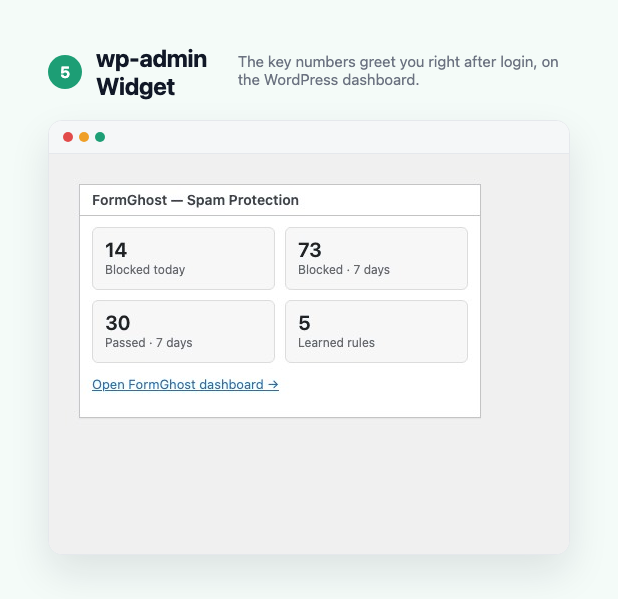
- New: FormGhost widget on the main wp-admin dashboard with blocked/passed counts and quick links.
- New: dashboard stat cards link into the filtered Vault views.
- Improved: "Blocked today" now follows the site's timezone instead of UTC.
- Improved: ghost-response counting is exact — it no longer under-counts when ghost logging is off or entries are reviewed/purged.
- Improved: email domains in the Vault are shown in full, and the search box matches partial domains.
- Improved: the IP whitelist now honours CIDR ranges in every layer, including the engine's early skip.
- Improved: Vault filters cover every supported form plugin (Fluent, Ninja, Formidable, BuddyPress, bbPress, custom forms, password reset).
- Fixed: default settings are now merged on front-end requests too, so a partially saved settings option can never silently disable a layer.
- Fixed: the "Protect contact-form plugins" toggle now also covers custom forms caught by the generic interceptor.
- Initial public release.