
Foureyed Shortcode Control
| 开发者 | mryudha |
|---|---|
| 更新时间 | 2026年5月14日 11:55 |
| 捐献地址: | 去捐款 |
| PHP版本: | 7.4 及以上 |
| WordPress版本: | 6.9 |
| 版权: | GPLv2 or later |
| 版权网址: | 版权信息 |
详情介绍:
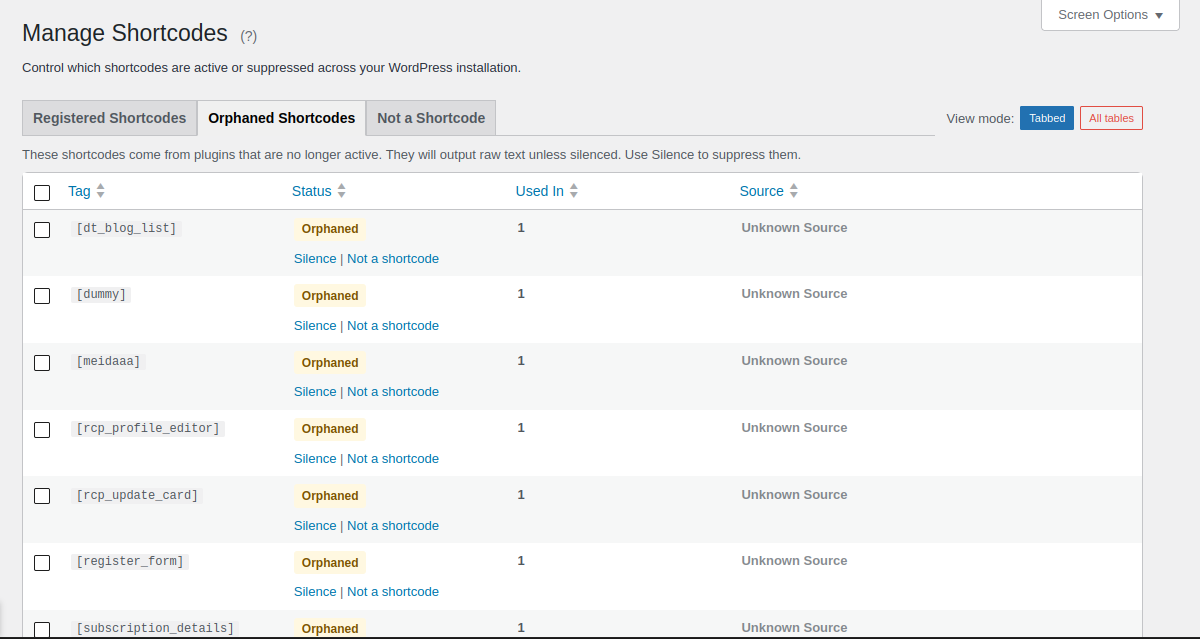
- Find Every Shortcode: See a complete list of all registered shortcodes and instantly know which plugin, theme, or WordPress core created each one.
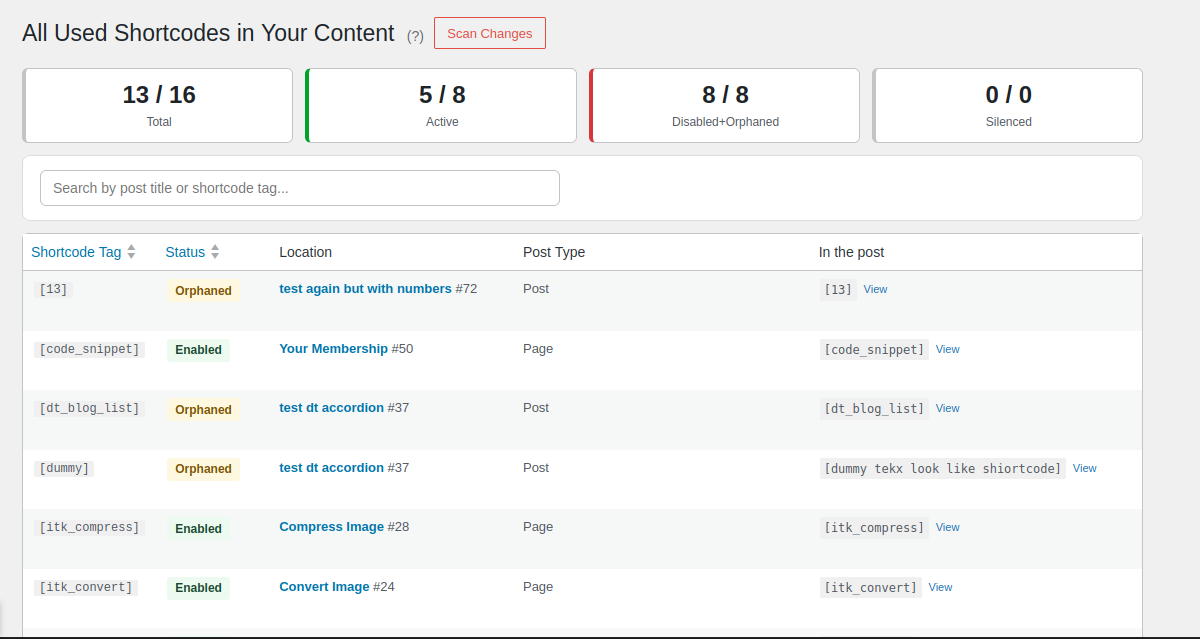
- Scan Your Content: Scan your entire post library to find orphaned shortcodes left behind by deleted plugins — see exactly which posts are affected.
- Enable, Disable, or Silence: Disable a shortcode to let it pass through as raw text, or Silence it so it outputs nothing at all. One click, fully reversible.
- Manage Orphaned Shortcodes: Silence orphaned shortcodes from removed plugins so they stop cluttering your content.
- Lightning Fast: Zero impact on your website visitors. The plugin only runs in your admin area — no front-end overhead.
安装:
- Upload the
foureyed-shortcode-controlfolder to/wp-content/plugins/ - Activate it from the Plugins menu
- Click Foureyed Shortcode Control in your WordPress sidebar to get started
屏幕截图:
常见问题:
Is this safe to use?
Yes. Shortcode Control only adds a management interface — it doesn't modify your plugins or themes. Everything is reversible with one click.
Will this slow down my website?
No. The plugin only runs in your WordPress admin. On the front-end, there's zero performance impact. Your visitors won't notice it's installed.
What if I silence a shortcode I need?
Just restore it instantly. No data is deleted, no settings are lost. It takes one click to fix.
Can I see where a shortcode is used?
Yes. Use the Scanner to find every post and page where a shortcode appears. See exactly which content needs attention before making changes.
Does this work with custom shortcodes?
Yes. Shortcode Control discovers all registered shortcodes — core, plugin-created, theme-created, and custom. If WordPress knows about it, Shortcode Control can show it and manage it.
What about shortcodes in widgets or custom post types?
The Scanner finds shortcodes in all post types. Widget content and custom fields may need to be checked manually.
Will it find all shortcodes from every theme and plugin?
Not always. Shortcode Control discovers shortcodes by reading the WordPress shortcode registry at the time the admin loads. If a plugin or theme registers shortcodes the standard way, they will appear. However, if a developer placed the registration behind conditional logic that isn't triggered during an admin page load, those shortcodes won't be in the registry and won't be visible here.
更新日志:
- Improve: Scanner migrated to WP_List_Table — native WP styling, checkboxes for future bulk actions, consistent with Manager
- Improve: Scanner rows grouped by tag — checkbox, status, and source appear on the first row of each group; location on every row
- Improve: Scanner menu title renamed to "All Used Shortcodes"; page title "All Used Shortcodes in Your Content"
- Improve: CSS consolidated into shared.css — WP 6.x badge palette, consistent table card style; duplicates removed from scanner.css and manager.css
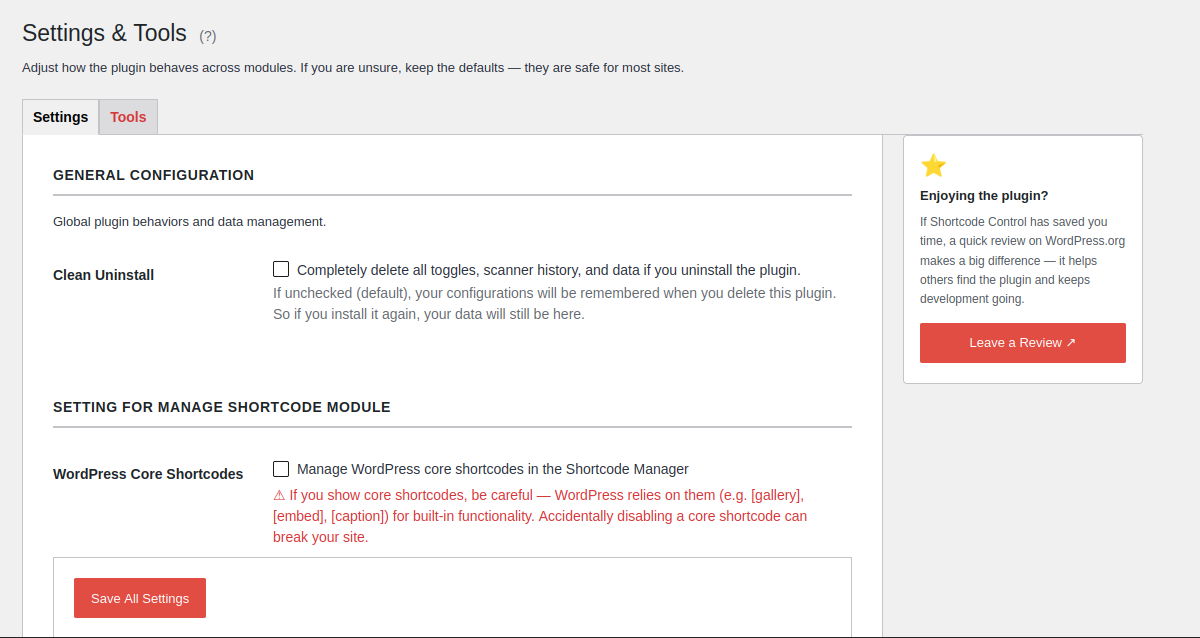
- Improve: Settings page sidebar added — non-dismissible Rate & Review card in a 240px right column
- Improve: DataRegistry::get_db_defaults() added as single source of truth for all option defaults; DataInitializer and all get_option() fallbacks now derive from it
- Fix: Scan batch size override removed — user's Posts Per Batch setting is now fully respected; default raised from 10 to 50
- Fix: Settings page description for Posts Per Batch updated to explain 50 is a good default
- Feature: Scanner shows all matched shortcode instances per post with per-instance View links and visual post grouping
- Refactor: Flatten module directories — removed AdminUi/, Core/, Rest/, Api/ subdirs; each feature module is now a single flat folder
- Refactor: Settings migrated from WP Settings API to REST — removed SettingsRegistrar, replaced with SettingsRestController
- Refactor: Maintenance actions (scanner reset, shortcode reset, factory reset) unified into SettingsRestController via /reset REST endpoint
- Refactor: PluginDefaults renamed to DataInitializer and moved to includes/ alongside DataRegistry
- Refactor: get_settings_defaults() moved into DataRegistry; dead get_defaults_map() removed
- Improve: Settings tab persistence via ?tab= GET param — correct tab rendered from first paint, no JS flash on load
- Improve: Tools tab confirmation dialogs replaced with inline two-step confirm UI (no browser confirm() popups)
- Improve: Unified toast notification (full-width bottom bar) replaces all separate inline status messages
- Improve: Factory reset restores Settings fields from defaults without page reload
- Fix: Save Settings button stuck disabled after click due to stale saveStatus reference
- Cleanup: Removed dead SETTINGS_GROUP and POST_META_LOCK_PREFIX constants from DataRegistry
- Feature: Silenced filter tab on Scanner page (Silenced = any shortcode with granular status "hidden", regardless of live status)
- Improve: "Hide"/"Hidden" terminology renamed to "Silence"/"Silenced" across Manager and Scanner for clarity
- Improve: Status badge tooltips on Manager and Scanner — plain-language explanation of what each status means on the front-end plus technical detail in parentheses
- Improve: Start Here scanner stats row expanded to 5 cards (added Silenced); "Active" renamed to "Enabled" to match Scanner tab labels
- Improve: Start Here stat cards all converted to anchor links (consistent hover/pointer behaviour)
- Improve: Start Here section subtitles explain what each stats row is counting (unique tags vs. content usages)
- Fix: Silenced shortcodes (granular_status=hidden) now correctly counted and filtered under Silenced tab, not Disabled or Orphaned
- Feature: Scan exception — exclude Gutenberg block types (Custom HTML, Code, Preformatted, Verse) from scanner to reduce false positives
- Improve: Manager redesign — two-table layout (Registered / Orphaned) with unified filter tabs and search
- Improve: Manager filter tabs now on left, search field on right (consistent with Scanner)
- Improve: Start Here stats card shows all 5 status counts (All, Enabled, Disabled, Hidden, Orphaned)
- Improve: Start Here stats respect the "hide core shortcodes" setting, matching Manager counts
- Fix: Manager source column shows "Unknown Source" for numeric/unknown orphan tags instead of wrong plugin name
- Fix: Scanner silenced orphan shows "Silenced" badge instead of "Orphaned"
- Fix: Strip Gutenberg block comments before scanning to prevent false positive numeric shortcode matches
- Fix: Infinite reload loop in Manage Shortcodes page after cache reset (transient-based guard)
- Fix: Run scan link in Manager table intercepted by toggle JS
- Fix: Sync plugin header Version field
- Improve: Settings & Tools page — rename, merge tabs from 4 to 2
- Improve: Manager table uses native WP list table styles
- Improve: Scanner page declutter with tooltips on button and action links
- Improve: Scanner shows hint for hidden core shortcodes instead of broken Manage link
- i18n: Add translators comments for sprintf placeholder strings
- Refactor: Implement Api Facade pattern for strict module isolation
- Refactor: Consolidate core layer - merge thin wrapper classes for cleaner architecture
- Refactor: Centralize all DB keys and constants through DataRegistry
- Refactor: Rebrand all constants to FOUREYED_SHORTCODE_CONTROL_ prefix
- Refactor: Move orphan adoption logic into unified ShortcodesDataProvider
- Improve: Enhanced module isolation and extensibility for future Pro features
- Fix: WordPress.org review feedback addressing
- Fix: unadopt removes tag from disabled list
- Fix: wpdb prepare argument order in get_existing_result
- Initial public release on WordPress.org
- Complete registered shortcode discovery and listing
- One-click toggle to enable/disable any registered shortcode
- Database scanner to find orphaned and broken shortcodes
- Adopt broken shortcode to disable it
- Zero front-end performance impact
- Tested on WordPress 6.9