
Fresh Plugins Content Audit
| 开发者 | freshplugins |
|---|---|
| 更新时间 | 2026年11月4日 16:30 |
| PHP版本: | 8.0 及以上 |
| WordPress版本: | 7.1 |
| 版权: | GPLv2 or later |
| 版权网址: | 版权信息 |
详情介绍:
- Age — how long since the post was meaningfully updated
- References — whether the statistics, sources and links it depends on have gone stale
- Depth — whether the coverage still holds up against what the topic now demands
- AI-powered freshness scoring — every post scored on age, references and depth, with a reason for each sub-score
- No API key required — scoring runs through a managed service. Nothing to sign up for, no key to store on your site, no per-token billing to monitor
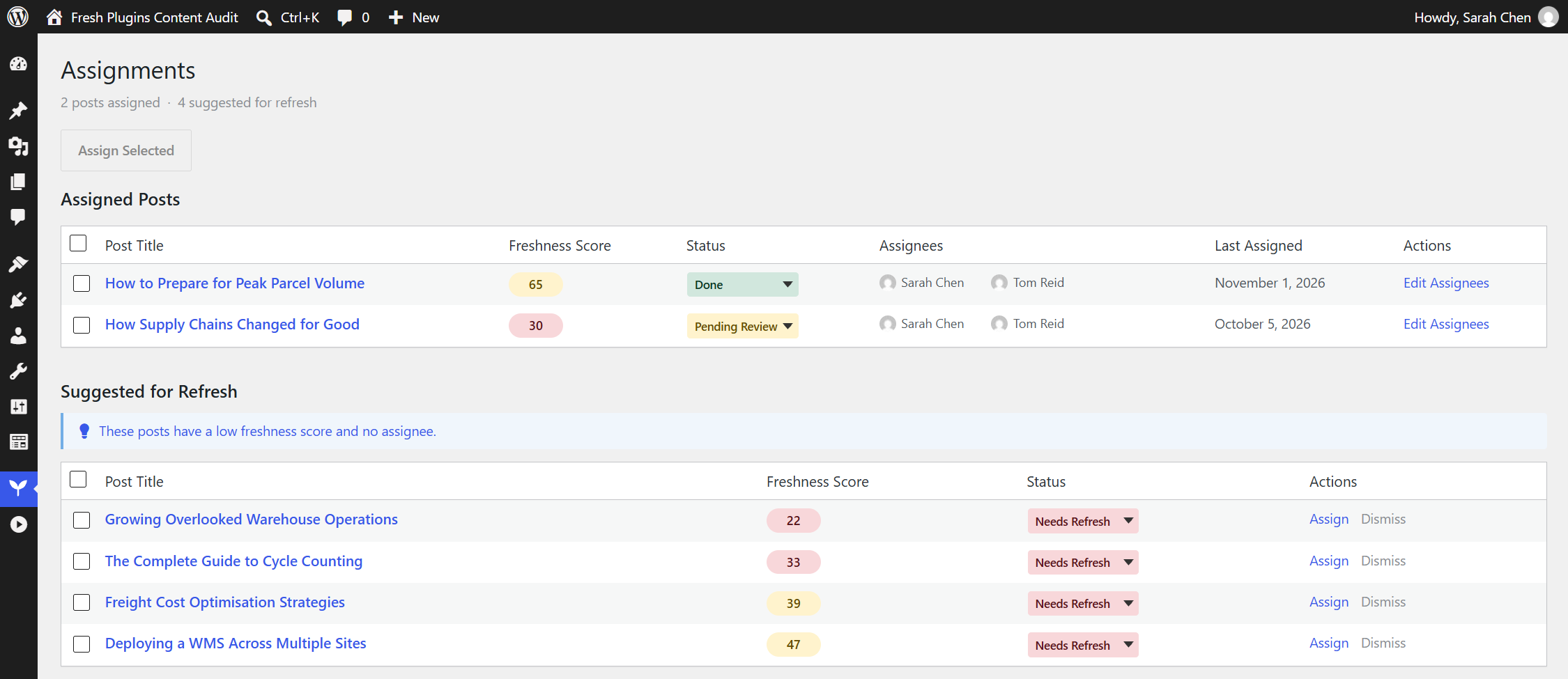
- Team assignment — assign posts to team members, track status, bulk-assign across a selection
- Workflow tracking — follow refresh progress from flagged through to done
- Custom field and ACF support — reads content from Advanced Custom Fields, including flexible content and repeater layouts, so page-builder sites score accurately
- Configurable weighting — tune how much age, references and depth each contribute
- Weekly automatic rescoring — opt in, and Fresh Plugins Content Audit re-scores anything whose score has gone stale once a week. Available on every tier
- Free tier — 25 scores per month. Pro removes the cap. Every feature is available on the free tier; plans differ only in how many scores you can run each month
- WordPress 6.2 or higher
- PHP 8.0 or higher
- An outbound HTTPS connection (see External services below)
安装:
- Upload the
freshplugins-content-auditfolder to the/wp-content/plugins/directory, or install it from Plugins > Add New - Activate the plugin through the 'Plugins' menu in WordPress
- Open Content Audit in the admin menu — your published posts are enrolled automatically as you publish them, and you can enrol existing posts from the dashboard
- Adjust scoring weights and which post types are tracked under Content Audit > Settings
- Score a post from the dashboard to see its freshness breakdown
屏幕截图:
常见问题:
Do I need an API key?
No. Scoring runs through a managed service, so there is no account to create, no key to store on your site, and no per-token bill to watch. Usage limits are applied per plan by that service.
What is the free tier limit?
The free tier includes 25 scores per month. The dashboard shows how many of those you have used. There is no limit on how many posts Fresh Plugins Content Audit tracks — only on how many scores you run each month. Pro removes the monthly limit.
How does the AI scoring work?
When you score a post, Fresh Plugins Content Audit sends the post title, the word count, up to the first 3,000 characters of its text content, and an age score it calculates locally from the post's modified date, to the Fresh Plugins API — a Cloudflare Worker operated by Fresh Plugins. That service forwards the title, word count and content excerpt to Anthropic's Claude API, which returns a score and a written reason for the references and depth dimensions. Your site combines those with its own age score, using your configured weights, into the overall freshness score, and stores the result. Content is sent only when scoring runs. See the External services section for the full disclosure.
Does this work with Advanced Custom Fields?
Yes. Many sites keep their real body content in ACF fields rather than the post editor, and a plugin that only reads post_content will score those posts as empty. Fresh Plugins Content Audit detects your ACF field structure and reads content from it directly, including flexible content and repeater layouts nested several containers deep. Plain post content and standard custom fields are supported as well — ACF is not required.
How is this different from WordPress 7.0's built-in AI connectors?
Core AI Connectors let a plugin talk to an AI provider using a key that you supply and pay for. Fresh Plugins Content Audit instead routes scoring through a managed service operated by Fresh Plugins, so there is no key to obtain, store or rotate, and no usage bill to reconcile. Plan limits and Pro entitlement are enforced at that service rather than trusted from your site. If you would prefer to bring your own provider account, a connector-based tool will suit you better.
Is my content stored by the AI provider?
Fresh Plugins Content Audit does not store your content on the scoring service. Handling of data by Anthropic is governed by its own privacy policy, linked in the External services section above.
Can I stop content being sent externally?
Yes. Scoring is the only feature that transmits content. If you do not score posts, and you leave weekly automatic rescoring switched off, no post content leaves your site. The assignment and workflow features run entirely locally.
Which posts does Fresh Plugins Content Audit track?
By default, published posts and pages. You can change which post types are tracked under Content Audit > Settings. Posts are enrolled automatically as you publish them, and existing posts can be enrolled in bulk from the dashboard.
更新日志:
- Initial release
- AI freshness scoring across age, references and depth, with a written reason for every sub-score
- Reads content from Advanced Custom Fields, including flexible content and repeater layouts nested several containers deep
- Team assignment and workflow tracking, with bulk assignment across a selection
- Configurable scoring weights
- Free tier of 25 scores per month, with usage reported by the scoring service. Enrolment is uncapped on every tier — only scoring is metered
- A one-time data disclosure shown before the first score, with the same detail repeated under Settings > Data & Privacy
- Full External services disclosure covering the Fresh Plugins API, Anthropic, Google, Freemius, Cloudflare and Gravatar