FreshRank - Instant Feedback for Better Content
| 开发者 | themeisle |
|---|---|
| 更新时间 | 2026年5月26日 01:46 |
| PHP版本: | 7.4 及以上 |
| WordPress版本: | 7.0 |
| 版权: | GPLv2 or later |
| 版权网址: | 版权信息 |
详情介绍:
安装:
- In your WordPress admin, go to Plugins > Add New
- In the Search field type “FreshRank”
- Under “FreshRank” click the Install Now link
- Once the process is complete, click the Activate Plugin link
- Now, you’re able to use FreshRank and set up your OpenAI API key. The settings can be found under FreshRank AI > Settings.
屏幕截图:
常见问题:
Does it work in other languages besides English?
Yes! FreshRank works in any language that GPT-5 supports. That includes 50+ languages like Spanish, French, German, Portuguese, Italian, Japanese, Chinese, Korean, Arabic, and many more. The AI analyzes and generates drafts in your content’s original language.
Do I need my own API keys?
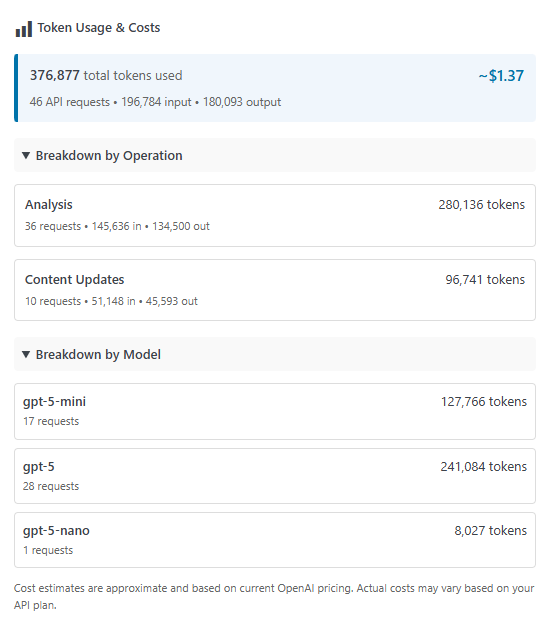
Yes, FreshRank uses your own OpenAI API key. This gives you full control and transparency. We provide detailed setup guides and cost estimation tools in the dashboard.
Does the plugin store my content on external servers?
Your content is temporarily sent to OpenAI’s API for analysis and updates, but FreshRank doesn’t permanently store your content on external servers. All your articles, drafts, and analysis results are stored securely in your WordPress database on your own server. When you enable Google Search Console integration, only performance metrics are retrieved—not your content. Your API keys are also stored securely in your WordPress database and never shared with third parties.
更新日志:
- Improved compatibility with WP 7.0
- Fixed variable sanitization issues for improved data security
- Analysis Details modal now shows creation date timestamp
- Enhanced translation compatibility
- Cleaned up unused code for better performance
- Fixed crash when free and pro versions were both active
- Fixed compatibility issue with PHP 7.4
- Fixed article row display on mobile and smaller screens
- Pro version now supports GPT-5.2 model with OpenAI
- Initial release