
Frontend File Explorer
| 开发者 | itsmeshafat |
|---|---|
| 更新时间 | 2026年4月17日 23:49 |
| 捐献地址: | 去捐款 |
| PHP版本: | 7.4 及以上 |
| WordPress版本: | 6.9 |
| 版权: | GPLv2 or later |
| 版权网址: | 版权信息 |
详情介绍:
Frontend File Explorer is a modern, Windows Explorer–inspired file manager for WordPress. It gives you a clean admin interface to organize and share files plus a responsive frontend explorer powered by a simple shortcode.
Use it to create download areas for courses, client file portals, or resource libraries — without relying on heavy external file management tools.
The plugin provides a seamless experience for both administrators and frontend users:
- Explorer-style UI: Navigate with breadcrumbs, toolbar actions, pagination, and Material Icons.
- Dedicated Directory: Files are stored in a secured
wp-content/uploads/downloadsdirectory. - Admin Management: Create folders, upload files, delete items, and download ZIPs directly from the admin dashboard.
- Frontend Integration: Embed the explorer anywhere using the
[frontend_file_explorer]shortcode. - AJAX-Powered: Fast, smooth navigation and pagination without page reloads.
- Translation Ready: Fully localized with the
frontend-file-explorertext domain.
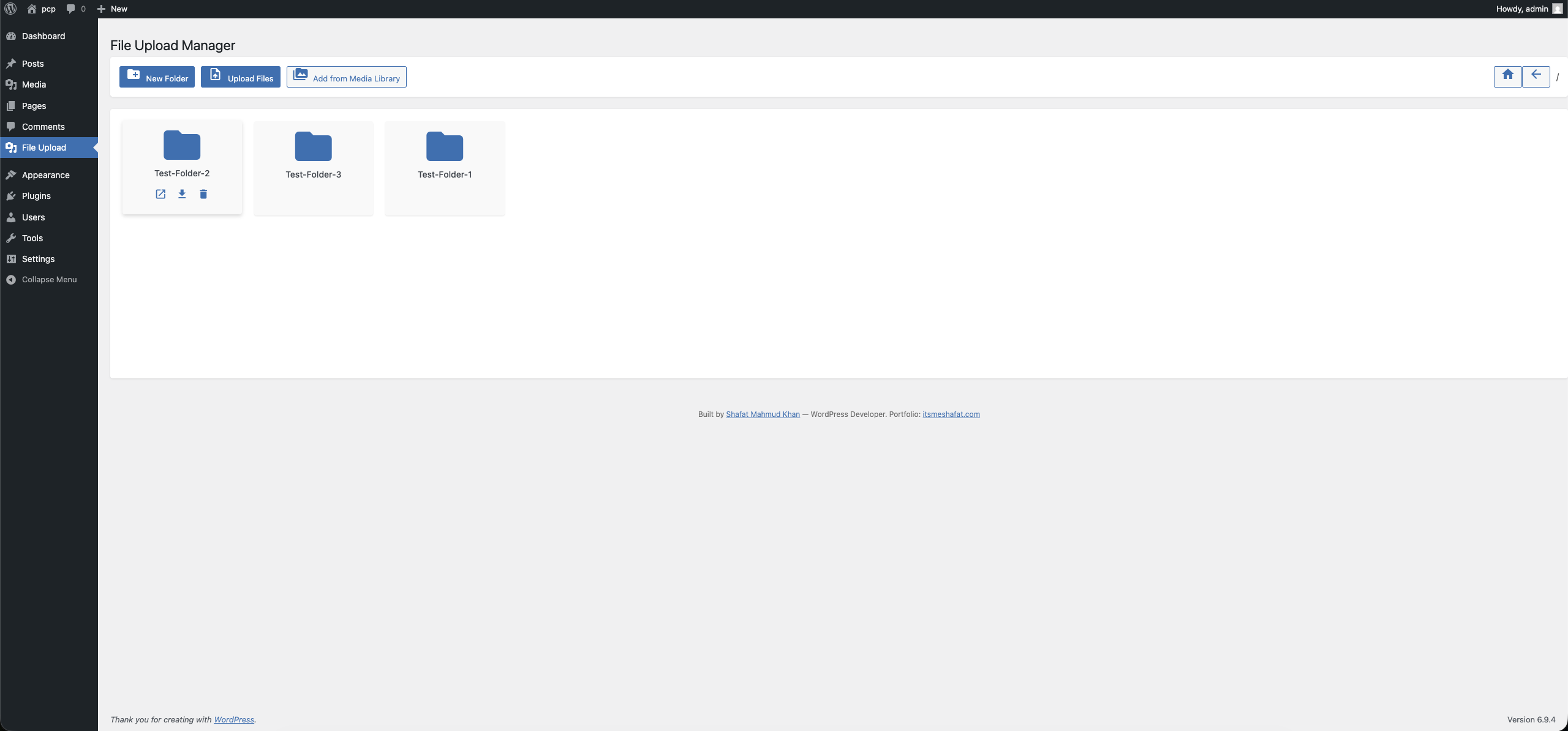
- Admin Interface: Navigate to File Upload in your WordPress admin sidebar. From this dedicated dashboard, administrators can create nested folders, upload bulk files (featuring multi-select and drag-and-drop), import existing Media Library assets, delete items, and download entire directories as ZIP archives.
- Frontend Shortcode: Embed the user-facing explorer interface on any Page, Post, or Custom Post Type using the following shortcode setup:
[frontend_file_explorer]
(Renders the explorer starting at the root storage directory)
Advanced Shortcode Usage:
You can explicitly define the starting folder path relative to the root uploads/downloads directory by using the folder attribute:
[frontend_file_explorer folder="/course-materials"]
[frontend_file_explorer folder="/clients/acme-corp"]
- Frontend Capabilities: Visitors browsing the frontend can view contents, click files to download them, and copy direct sharing links.
- Security: Destructive or mutating actions (like file upload, folder creation, or deletion) remain strictly hidden and blocked from public visitors. They are only accessible to logged-in users who possess the WordPress
upload_filescapability.
- Course creators who need a simple, branded downloads area.
- Agencies and freelancers who share files with clients.
- Site owners who want a lightweight, Explorer-like file manager in WordPress.
安装:
Installation from within WordPress
- Visit Plugins > Add New.
- Search for Frontend File Explorer.
- Install and activate the Frontend File Explorer plugin.
- On activation, the plugin will create
wp-content/uploads/downloads.
- Upload the plugin folder to the
/wp-content/plugins/directory. - Visit Plugins.
- Activate the Frontend File Explorer plugin.
屏幕截图:
常见问题:
Can I point the explorer to a different base folder?
Yes. You can override the constants in a custom mu-plugin before File Explorer loads, or use filters/hooks (e.g. on wp_loaded) to adjust the base path/URL. This is an advanced customization and should be done carefully.
Does the plugin work in multisite?
Yes. Each site manages its own uploads/downloads directory. You can network-activate the plugin for consistency across sites.
Are file types restricted?
By default, allowed file types are defined via options during activation. You can adjust the allowed extensions by updating the plugin options (e.g., file_explorer_allowed_file_types).
How do I translate the UI?
The plugin is fully localization-ready and uses the frontend-file-explorer text domain. You can use tools like Loco Translate or Poedit to create translations and drop .mo files in the languages/ directory.
更新日志:
1.0.5
- Security: Added comprehensive array structure validation for
$_FILESsuperglobal before accessing elements. - Security: Moved
is_uploaded_file()validation to immediately after accessing tmp_name for improved security. - Security: Removed PHPCS ignore comment and implemented proper sanitization for file upload handling.
- Standards: Replaced
$_REQUESTwith$_POSTfor AJAX POST requests per WordPress coding standards. - Standards: Replaced PHP
basename()with WordPresswp_basename()for i18n compatibility with multibyte characters.
- Security: Sanitized and validated all
$_FILESupload fields individually (name, type, tmp_name, error, size). - Security: Added
is_uploaded_file()guard against path injection on file uploads. - Standards: Fixed unordered placeholders in translatable strings per WordPress i18n guidelines.
- Security: Fixed unauthenticated file downloads, arbitrary PHP uploads, XSS via eval(), and server path disclosure.
- Standards: Migrated all filesystem operations to WP_Filesystem API, bundled Material Icons locally, added proper nonce verification and capability checks to all AJAX endpoints.
- Standards: Renamed classes to use WordPress underscore convention (Frontend_File_Explorer, Frontend_File_Explorer_Ajax).
- Standards: Removed discouraged load_plugin_textdomain() call, added proper prefixing to all handles and identifiers.
- Fix: Resolved a critical bug causing the frontend explorer to execute filesystem deletion logic instead of listing directory contents.
- Fix: Repaired the "Download as ZIP" mechanism to eliminate
ERR_INVALID_RESPONSEfailures by safely building ZipArchive temp files and explicitly managing PHP output buffers and Safari download headers. - Feature: Fully integrated the missing backend endpoints required for the UI, enabling seamless frontend and backend folder creation, file uploads, and Media Library imports.
- Security & Standards: Swept codebase for strict WordPress PHPCS warnings. Corrected all variable unslashing, resolved missing nonce verification checks, migrated deprecated filesystem functions to
WP_Filesystem, and reinforcedesc_html__translation domain strings and translators comments.
- Rename plugin to "Frontend File Explorer"
- Align text domain and translation loading with slug
frontend-file-explorer - Improve README and readme.txt descriptions and screenshots