
Frontierline Forms – Confirmation & Multi-Step for Contact Form 7
| 开发者 |
frontierline2015
freemius |
|---|---|
| 更新时间 | 2026年10月24日 15:16 |
| PHP版本: | 7.4 及以上 |
| WordPress版本: | 7.1 |
| 版权: | GPLv2 or later |
| 版权网址: | 版权信息 |
详情介绍:
- Multi-step forms — Split a single Contact Form 7 form into multiple steps using a
[step]tag. No limit on the number of steps. - Confirmation screen — Add an "input -> confirm -> submit" flow that Contact Form 7 does not provide out of the box.
- Completion screen — Replace the form with a custom completion message on success, or redirect to a thank-you page (useful for GA4 conversion tracking).
- Conditional logic — Show or hide fields based on what the visitor enters, using simple HTML data attributes. No limit on the number of rules.
- Progress bar — Three styles (numbered steps, bar, dots).
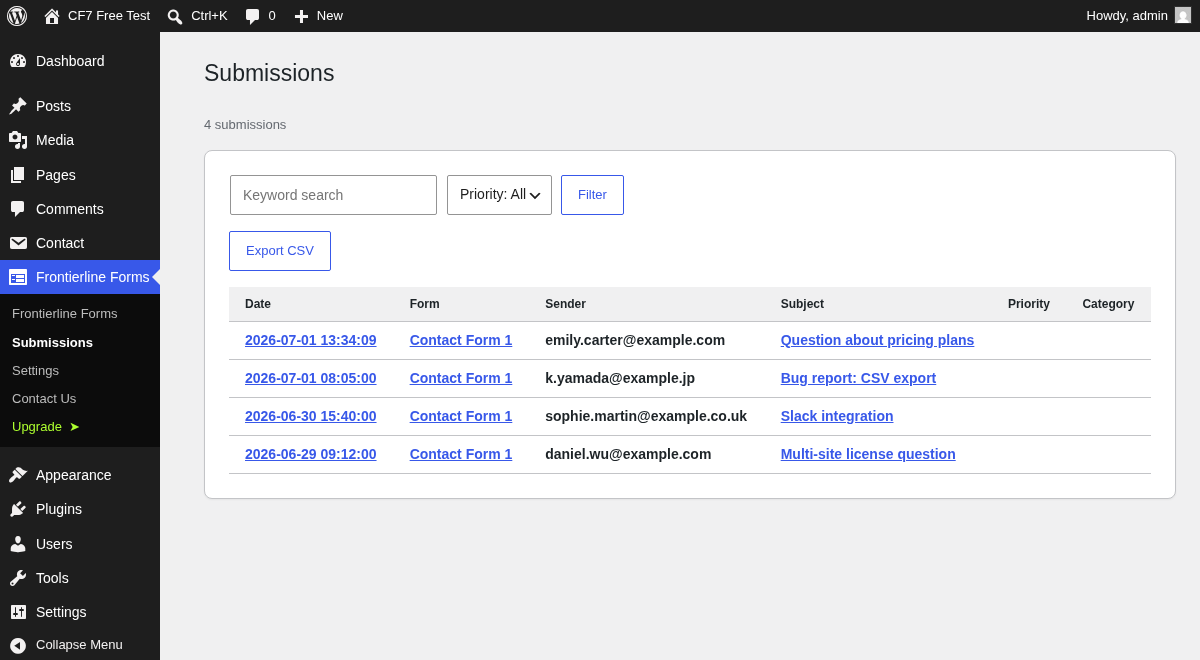
- Submission history — Every submission is saved to your own WordPress database and can be browsed, searched, and viewed in the admin screen.
- CSV export — Export your saved submissions to a CSV file (UTF-8 with BOM, Excel-friendly).
- Honeypot — Built-in spam protection, enabled automatically.
- MW WP Form migration — Convert your MW WP Form forms to Contact Form 7 with one click. Fields, validation rules, mail settings, and the confirmation flow are migrated automatically, with a report of anything that needs manual review.
- Brand colors — Set primary/secondary colors, border radius, and font family to match your site's design.
- Contact Form 7 5.7 or later
- WordPress 6.0 or later
- PHP 7.4 or later
安装:
- Make sure Contact Form 7 is installed and active.
- In your WordPress admin, go to Plugins -> Add New, search for "Frontierline Forms", then install and activate it.
- Open the "Frontierline Forms" menu in the admin sidebar to configure it.
[step] tag at each step boundary:
`[step "Basic info"]
[text your-name]
[email your-email]
[step "Your message"]
[textarea your-message]
[step "Confirm" confirmation]
Please review your input and submit.
[submit "Send"]`
Using conditional logic
Wrap the fields you want to toggle with HTML data attributes:
`
[text estimate-amount placeholder "Budget"]
`屏幕截图:
![Set up in minutes: add a [step] tag in the Contact Form 7 editor and enable the confirmation screen.](https://cdn.jsdelivr.net/wp/frontierline-forms/assets/screenshot-2.png)


常见问题:
Do I need Contact Form 7?
Yes. Contact Form 7 5.7 or later must be installed and active. This plugin is an add-on for it.
Is the confirmation screen on by default?
No. Enable it under Settings -> General. It is off by default.
Where are submissions stored?
In your own WordPress database, in tables created by this plugin. Nothing is sent to an external service.
Premium: where is the encryption key stored, and what should I do when moving servers?
By default the premium version creates the key with the first encrypted submission and saves it in the WordPress options table as cf7mp_encryption_key. Since 2.2.0 you can keep the key outside the database instead: add define( 'FRONTIERLINE_FORMS_ENCRYPTION_KEY', 'a-long-random-string' ); to wp-config.php, or set an environment variable with the same name. Settings > Security shows where the key is, re-encrypts existing entries with the new key, and deletes the database copy once nothing depends on it (also available as wp frontierline-forms encryption status|reencrypt). When moving servers, move the key together with the database (or keep the same wp-config.php line). Encrypted entries cannot be decrypted without the key, not even by us. Only the submitted fields are encrypted; the IP address, user agent and referrer are stored as plain text.
Can I migrate from MW WP Form?
Yes. Open Frontierline Forms -> MW WP Form Migration and convert each form with one click. Fields, validation rules, mail settings, and the input -> confirm -> submit flow are converted to Contact Form 7 automatically, and a report lists anything that needs manual review. The premium version can also import your saved MW WP Form inquiry data and convert all forms at once.
Does the plugin keep what a visitor typed in their browser?
By default, no. Nothing is written to cookies or to localStorage. Temporary saving of entries is off by default. If you turn it on under Settings -> General, entries are held in sessionStorage only: they are removed as soon as the browser tab is closed, discarded after the time limit you set, and cleared once the form is submitted. Moving back from the confirmation screen keeps the entries either way, because the values simply stay in the form.
Does it work with file uploads?
Yes. Use Contact Form 7's [file] tag as usual. The confirmation screen lists the selected file names, and the file is sent with the submission in the normal Contact Form 7 way. For security reasons browsers never let a script re-attach a file, so an uploaded file is not part of the temporary save.
Do I need to exclude the form page from page caching?
The form itself is rendered by Contact Form 7, which handles caching plugins on its own. If your cache plugin serves the page to logged-out visitors from a static copy, exclude the pages that contain the form so that each visitor receives a fresh security token.
Is my data removed when I delete the plugin?
No. Deactivating or deleting the plugin keeps your saved submissions and settings, so nothing is lost by accident. To remove everything, back up your database first, then delete the tables whose names start with your table prefix followed by cf7mp_ (for example wp_cf7mp_submissions) and the options whose names start with cf7mp_.
更新日志:
- Security: updated the bundled Freemius SDK to 2.13.5. It adds a permission check before opt-in and escapes values shown in admin notices.
- Tested with PHP 8.5.
- New: Settings > Design > "Base field style" gives text fields, selects, checkboxes, radio buttons and the submit button a clean default look (full-width fields, 16px text so phones do not zoom in, a visible focus ring). It is on for new installs and off for existing sites, so updating does not change how your forms look. Your theme's form styles always take priority.
- New: add class:cf7mp-field--s or class:cf7mp-field--m to a form tag to make that field shorter (for example a postal code or a name split into two fields).
- Fixed: the corner radius and font family set in Settings > Design are now applied to the buttons, the confirmation screen and the fields.
- Fixed: the spam trap (honeypot) now works on every form layout. On multi-step forms it was silently ignored by Contact Form 7. Pro: the same fix applies to blocked IPs, blocked words, the rate limit and reCAPTCHA.
- Fixed: when Contact Form 7 rejects a submission (for example an invalid email address or a missing required checkbox), the form now jumps to the step that has the error and shows the message. Required checkbox groups, the acceptance checkbox and email/URL formats are also checked before moving to the next step.
- Fixed: pressing Enter in a text field no longer skips the remaining steps or the confirmation screen.
- Fixed: with nested conditional fields, inputs inside a hidden outer group are no longer sent.
- Fixed: submissions are saved (and Pro notifications are sent) even when Contact Form 7 fails to send the email.
- Fixed: internal values (conditional-logic control values, CAPTCHA tokens) are no longer saved or shown in the submission details, search and CSV, including entries saved earlier.
- Improved: the CSV export now includes every submitted field as its own column and follows the current search. Values that start with =, +, - or @ are prefixed so spreadsheet apps do not run them as formulas.
- Improved: the sender IP address is taken from the X-Forwarded-For header only when the site is behind a local reverse proxy (filter: cf7mp_trust_proxy_headers). Overlong UTM values no longer prevent a submission from being saved.
- Improved: the dashboard counts use the site's time zone, compare with the same point last month, and no longer show a fixed 0.0% conversion rate.
- Fixed (Pro): reCAPTCHA v3 now sends its token (it was never attached, so submissions failed or were not checked).
- Fixed (Pro): importing saved inquiries from MW WP Form now imports the submitted values. Inquiries imported by 2.1.x without their values are repaired when you run the import again (no duplicates).
- Fixed (Pro): an invalid CIDR line in the blocked IP list no longer blocks everyone or stops submissions; IPv6 addresses and ranges are supported.
- Improved (Pro): Slack, Chatwork and Google Sheets requests time out sooner so a slow service does not make the form look like it failed.
- Improved (Pro): scheduled auto-replies store only the submission ID, so no personal data is kept in the WordPress schedule. Unknown [tags] typed into the auto-reply text are kept; only empty form fields are removed.
- Improved (Pro): form analytics work with page caching, are limited per visitor, count a drop-off once per visit, and records older than about 13 months are removed daily.
- Improved (Pro): notifications and the weekly report are in English on non-Japanese sites.
- Removed: unused payment integration code from the package.
- New (Pro): the encryption key can be set outside the database with
FRONTIERLINE_FORMS_ENCRYPTION_KEYin wp-config.php or as an environment variable. Without it, the key stays in the database as before. - New (Pro): Settings > Security shows where the key is stored, how many entries use each key, re-encrypts existing entries with the current key (100 at a time, each entry verified, resumable), and deletes the database copy of the key once no entry needs it.
- New (Pro): WP-CLI commands
wp frontierline-forms encryption statusandwp frontierline-forms encryption reencrypt. - New (Pro):
FRONTIERLINE_FORMS_ENCRYPTION_KEY_PREVIOUSkeeps an old key readable while you rotate keys. - Improved (Pro): new entries are encrypted with AES-256-GCM (authenticated encryption with a full 256-bit key). Entries saved by earlier versions are still read and can be converted with the re-encryption tool.
- Improved (Pro): Site Health reports when the key is stored in the database or is too short.
- Fixed (Pro): sites that switched from the free version to Pro without reactivating the plugin now get the analytics, IP block and rate-limit tables automatically (previously analytics events failed with a database error).
- Updated: Freemius SDK 2.13.4.
- Note (Pro): entries saved or re-encrypted by 2.2.0 cannot be read by 2.1.x or earlier, so downgrading is not supported.
- Fixed: the keyword search on the Submissions screen now filters entries. It searches the date, form name and submitted values, including encrypted entries in Pro.
- Fixed: settings turned on with a checkbox (confirmation screen, temporary saving of entries) can be turned off again.
- Removed: the "Data retention (days)" setting. It never deleted anything; entries are kept until you delete them.
- Removed: the Priority and Category columns and the priority filter on the Submissions screen, which showed the same value for every entry. The CSV export is unchanged.
- Changed (Pro): the auto-reply to the submitter is now off by default. Turn it on under Settings > Email, where the subject and body can now be edited ([field-name] and [_site_title] tags are supported). Previously every form with an email field sent a fixed reply, which could duplicate a Contact Form 7 Mail (2) reply.
- Fixed (Pro): auto-reply sending hours were offset by the site's time zone. Overnight hours (for example 22:00 to 06:00) now work, and leaving the hours empty sends replies immediately.
- Fixed (Pro): the personal data encryption setting can be turned off again.
- Improved (Pro): the weekly report can be turned off, and its recipient field is labelled clearly.
- Fixed (Pro): with encrypted storage enabled, Slack, Chatwork and Google Sheets notifications now include the submitted fields.
- Fixed (Pro): reading encrypted entries no longer creates a new encryption key when none is found, so existing encrypted data cannot be orphaned by an accidental key reset.
- Fixed (Pro): internal values such as CAPTCHA tokens (Cloudflare Turnstile, reCAPTCHA, hCaptcha) and the spam-trap field are no longer included in Slack, Chatwork and Google Sheets notifications.
- Fixed: on multi-step forms the Next button could look unresponsive. When a required field was empty the step refused to advance without saying why; empty fields are now highlighted, a message is shown, and focus moves to the first one.
- Fixed: required fields hidden by conditional logic no longer block the step, so forms that use conditional rules can always be completed.
- Changed: entries are no longer stored in localStorage. Temporary saving of entries is now off by default; when enabled it uses sessionStorage with a time limit, so nothing a visitor typed survives closing the browser tab. Drafts left behind by earlier versions are deleted on update.
- Added: a setting for temporary saving of entries, with a configurable time limit.
- Improved: the confirmation screen now lists uploaded file names instead of the browser's fake path, and ships with readable default styling.
- Improved: Next / Back and the confirmation and completion labels are translatable, and fall back to Japanese on Japanese sites until translations are published.
- Improved: tested with WordPress 7.1.
- Updated the plugin listing (name, description) and product links. No functional changes.
- New: MW WP Form migration wizard. Convert MW WP Form forms to Contact Form 7 with one click — fields, validation rules, mail settings, and the confirmation flow are migrated automatically, with a Japanese/English report of anything to review manually.
- Improved: encrypted submission storage is now decoded with a fixed-length header, making decryption robust for all stored records.
- Improved: corrupted legacy records are skipped with a notice during data import (premium) so they can be re-imported after repair.
- Added a "Free vs Pro" comparison and upgrade overview to the plugin's own dashboard screen.
- Internal hardening (safer module loading) and small admin style additions.
- Fixed: the multi-step progress bar, Back/Next buttons, and confirmation/completion text now follow the site language instead of always showing Japanese.
- The admin interface is now in English by default, with a bundled Japanese translation. Additional languages can be contributed on translate.wordpress.org.
- Added an optional review request shown only on the plugin's own admin screens. It appears after the plugin has been used and is permanently dismissible.
- Added a "Complete" step to the progress bar so multi-step and confirmation forms show the standard Input -> Confirm -> Complete (3-step) flow.
- The progress bar now stays visible on the completion screen with the final step highlighted.
- Renamed the plugin and made all built-in features fully functional with no usage limits.
- Multi-step forms and conditional logic are now unlimited.
- Submission history and CSV export available with no limits.
- Removed the arbitrary custom-CSS input; brand styling is now done with discrete color/typography settings.
- Moved all admin scripts to properly enqueued assets and added nonce verification to the CSV export.
- Documented external services.