
Frontpagely
| 开发者 | parameterllc |
|---|---|
| 更新时间 | 2026年11月18日 00:42 |
| PHP版本: | 8.1 及以上 |
| WordPress版本: | 7.1 |
| 版权: | GPLv2 or later |
| 版权网址: | 版权信息 |
详情介绍:
- Site adapter. A hardened REST API under
/wp-json/frontpagely/v1/*, authenticated with a per-site Bearer key you generate, so Frontpagely can create, update, publish, and unpublish articles. Writes use optimistic concurrency (If-Match / ETag) and idempotent retries (Idempotency-Key), and a post edited by a person is never overwritten by an automated write. - SEO edits. Optional, individually toggled, reversible, and logged:
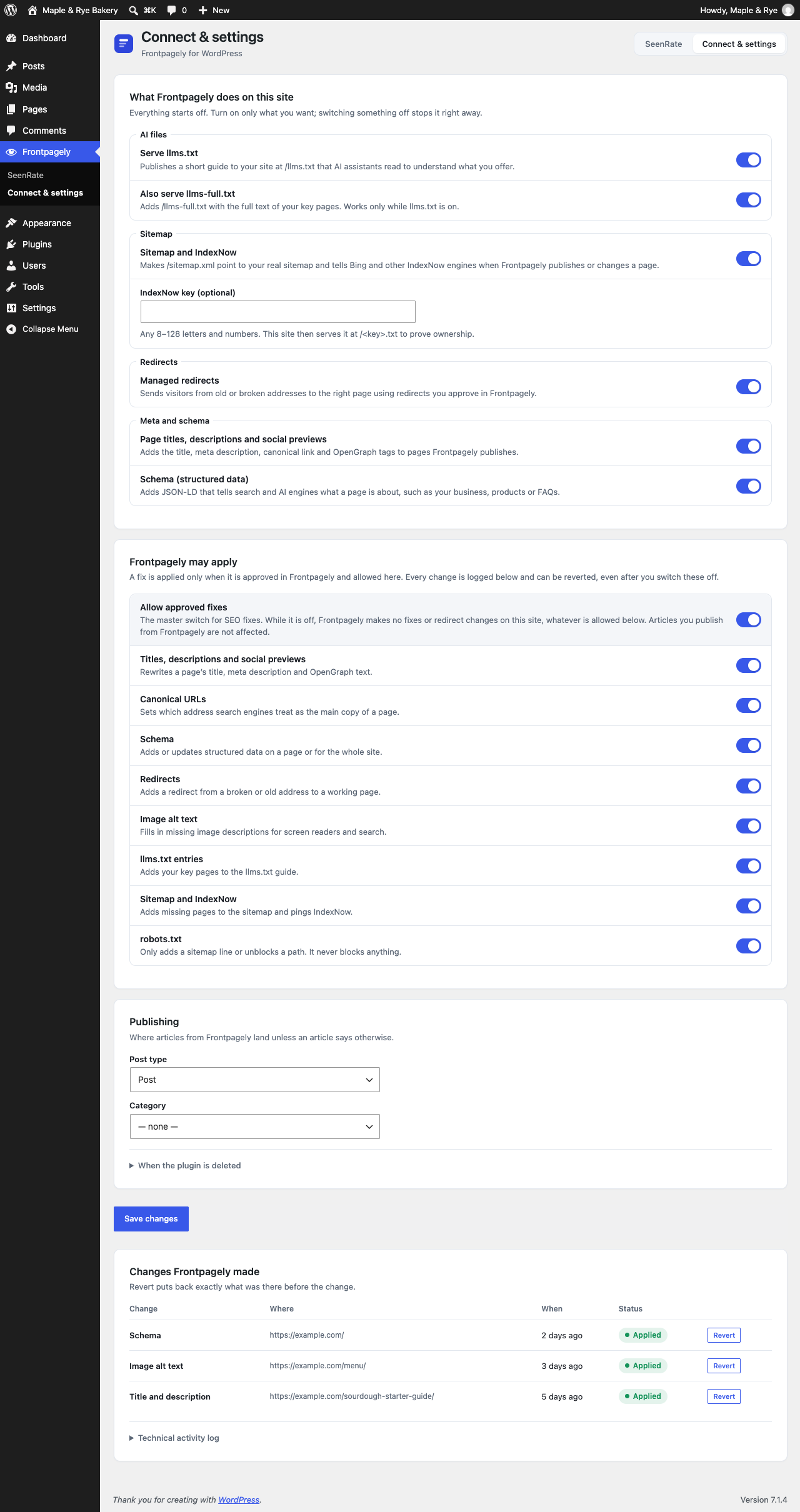
llms.txt/llms-full.txt, sitemaplastmodplus IndexNow pings, managed 301/302 redirects with loop protection, and per-page meta description, canonical, and OpenGraph tags. It works alongside Yoast SEO and Rank Math: it defers to them where they own a field and only fills the gaps. - Fix application. Authenticated
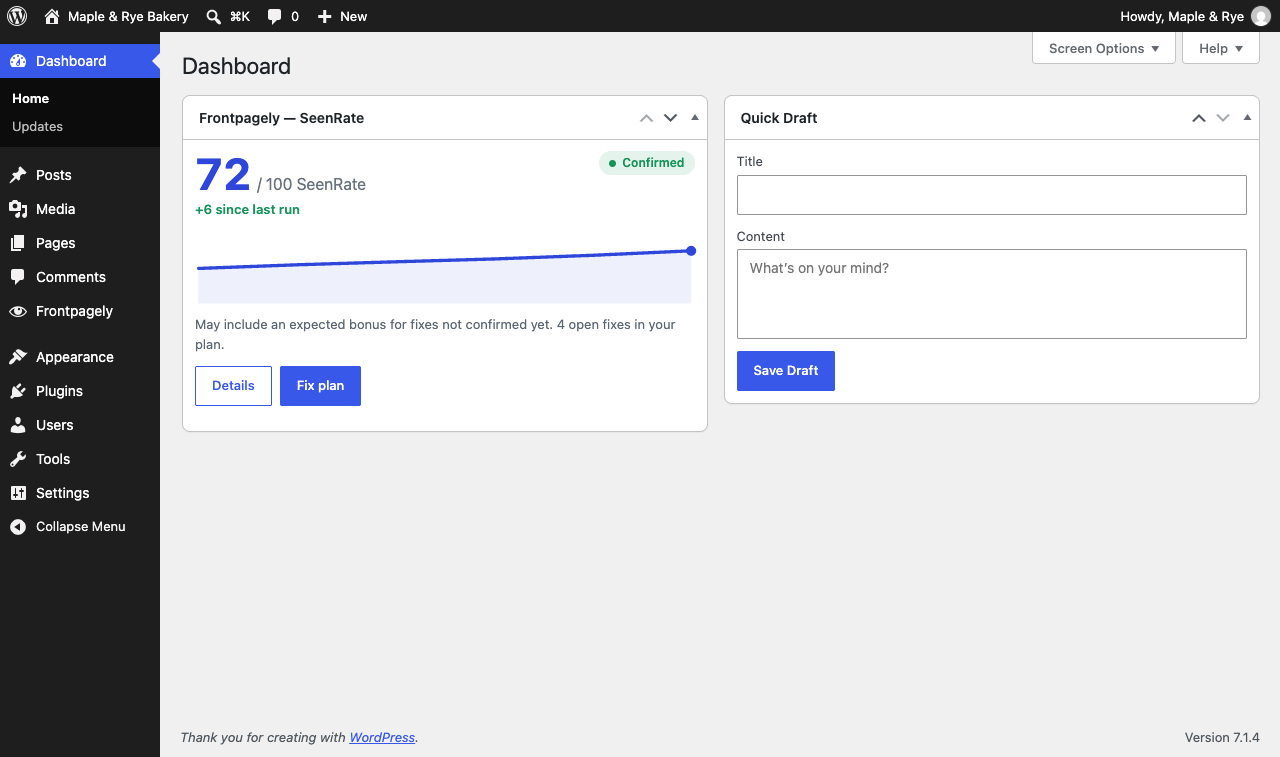
/apply/*routes preview, apply, verify, and revert scoped title/meta, canonical, schema, redirect, image alt-text, llms.txt, sitemap, and additive robots.txt changes. Every apply is idempotent and returns a rollback token, and every change can be reverted from Frontpagely → Settings. Nothing is written until you turn on the master permission and each fix type you allow. - Metrics. A dashboard widget and a Frontpagely admin page show your current SeenRate with a confidence badge, a trend line, per-engine scores, and a link to your fix plan in the Frontpagely app. Read-only.
安装:
- In wp-admin go to Plugins → Add New, search for "Frontpagely", and click Install Now, or upload the zip under Plugins → Add New → Upload Plugin.
- Activate the plugin.
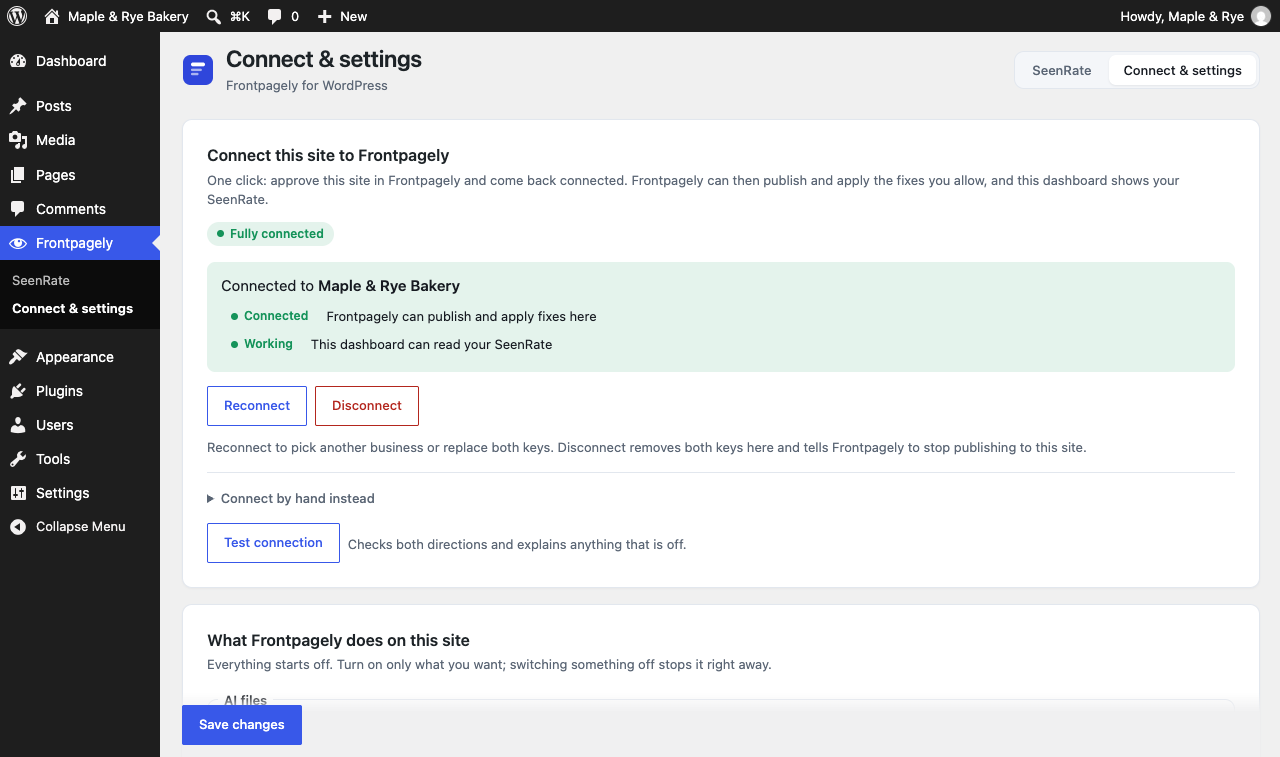
- Go to Frontpagely → Connect & settings and press Connect to Frontpagely. Sign in to Frontpagely if asked, pick your business (it is pre-selected when its website matches this site) and press Approve. You land back here, connected, with both checks run. No keys to copy.
- Prefer to do it by hand? Open Connect by hand instead on the same card: make a site key here and paste it into Frontpagely > Connections, then paste the tracked entity id and plugin key from there.
- Turn on the features you want (all are off by default). Test connection checks both directions and explains anything that is off in plain words.
屏幕截图:
常见问题:
Do I need a Frontpagely account?
Yes. The plugin is the WordPress connector for the Frontpagely service. Without an account and a connected site it stays idle and changes nothing.
Will this delete my posts if I uninstall it?
No. Uninstalling never deletes posts. It removes the plugin's tables, options,
and _frontpagely_* post meta only if you opted in with the "On uninstall" setting.
Does it conflict with Yoast SEO or Rank Math?
No. It detects them and defers meta and schema output to them, adding tags only where they leave a gap.
Can Frontpagely change my site without my permission?
No. Fix application is off until you enable the master permission and each fix type under Frontpagely → Settings. Every applied fix is logged with the exact before state and can be reverted with one click.
What happens if someone edits a Frontpagely-published post by hand?
The post is marked as edited by a person. An automated write that does not match the current revision is rejected with a 412 conflict instead of overwriting it.
Does the plugin call ChatGPT or other AI services from my server?
No. Measurement happens on Frontpagely's servers. Your site only receives articles and fixes, and reads your scores back from the Frontpagely API.
更新日志:
- Default author: pick who new Frontpagely articles are published as, under Connect & settings > Publishing. Only users who can publish posts are listed. Left on the first option, articles keep using the admin who connected the site.
- Plugin API responses also send Vary: * so caches that ignore Cache-Control on /wp-json/ (nginx, Varnish, CDN edges) never keep or share them.
- The ETag header is now quoted ("r_..."), as HTTP requires. nginx dropped the bare value when it compressed the response. X-Revision-Id and the body's revision_id carry the same bare value, and If-Match accepts either form.
- Plugin API responses now tell host page caches not to store them. On hosts that cache /wp-json/ (Kinsta, for example), a cached article read returned an old revision, so every update after an edit in wp-admin was refused as a conflict.
- Article bodies sent as Markdown are rendered to HTML (headings, lists, links, bold and italic, quotes, code and tables). Bodies sent as HTML are stored as before.
- The admin header and the SeenRate empty state show the current Frontpagely mark (three bars on the indigo square), the same mark as frontpagely.com, the app and the plugin directory icon.
- All plugin names now use the full frontpagely_ prefix (functions, classes, constants, options, tables, post meta and hooks). Existing settings, tables and post meta move over automatically on the first load after the update.
- Redirect changes through the Frontpagely API now need both "Allow approved fixes" and the redirect fix permission, like every other fix.
- The /sitemap.xml alias and the robots.txt Sitemap line use the core sitemap URL from WordPress, so they also work with plain permalinks.
- The request path is sanitized before use.
- Articles Frontpagely publishes now carry an author: the admin who connected the site (while that user can still publish posts). Before, they were saved with no author, so themes showed no byline and the Article schema had no author.
- Disconnect: a Disconnect button next to Reconnect on Connect & settings. It tells Frontpagely to drop this site and revoke the plugin key, then forgets both keys and the business here. Feature switches, fix permissions and the change log (with Revert) are kept.
- Disconnecting the site from Frontpagely Connections now also ends the plugin key, so the SeenRate panel never looks connected to a site Frontpagely no longer publishes to.
- One-click connect: press Connect to Frontpagely, approve the business in Frontpagely, and come back connected. The site key and the plugin key are exchanged server to server; nothing to copy or paste.
- Fixed: the SeenRate panel and Test connection now read with the plugin key from Frontpagely (frontpagely_live_pk_…). Before, it was sent to the wrong endpoint and failed with "missing the entities:read scope".
- Connecting by hand is still available under Connect by hand instead.
- New admin design in Frontpagely's look, still WordPress-native: works with every admin color scheme, the keyboard and screen readers, and at phone width.
- Connect card: a two-step checklist with a live state for each key, copy buttons, the new site key shown once in a clear box, direct links to Frontpagely Connections, and Test connection results in plain words.
- Step 1 now shows "Connected" once Frontpagely has called the site with the current key.
- SeenRate page: score, confidence, change since the last run, trend and per-engine scores as cards, plus your top fixes and a link to the fix plan; a friendly empty state before connecting.
- Features and fix permissions are switches with one sentence each on what they change, grouped, with the master permission on top and notes on what defers to Yoast SEO or Rank Math.
- Plugin keys (pk_) from Frontpagely Connections now work for the SeenRate widget.
- The change log uses plain labels and keeps one-click Revert.
- Added dry-run, apply, verification receipt, and rollback routes for eight remediation kinds.
- Added site-side apply permissions, a durable apply ledger, human-edit protection, and one-click admin reverts.
- Hardened database queries (identifier placeholders) and request input handling for WordPress.org review.
- Initial release: SiteAdapter REST contract, SEO edits, and the SeenRate admin surface.