FTMPUB Product Import from CSV
| 开发者 | ftmpub |
|---|---|
| 更新时间 | 2026年6月11日 18:33 |
| PHP版本: | 7.4 及以上 |
| WordPress版本: | 7.0 |
| 版权: | GPLv2 or later |
| 版权网址: | 版权信息 |
详情介绍:
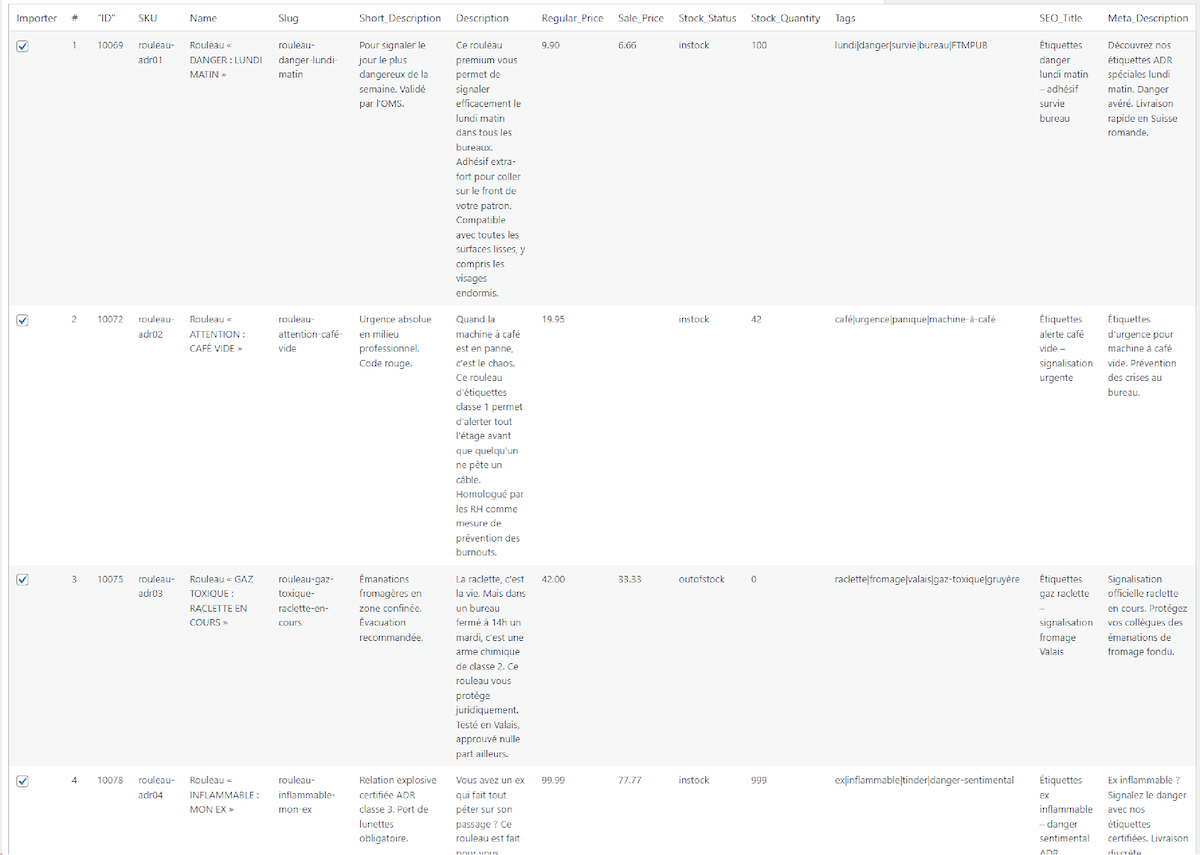
- Preview before import — review every row before a single product is touched
- Selective import — check/uncheck individual rows or use Select All / None
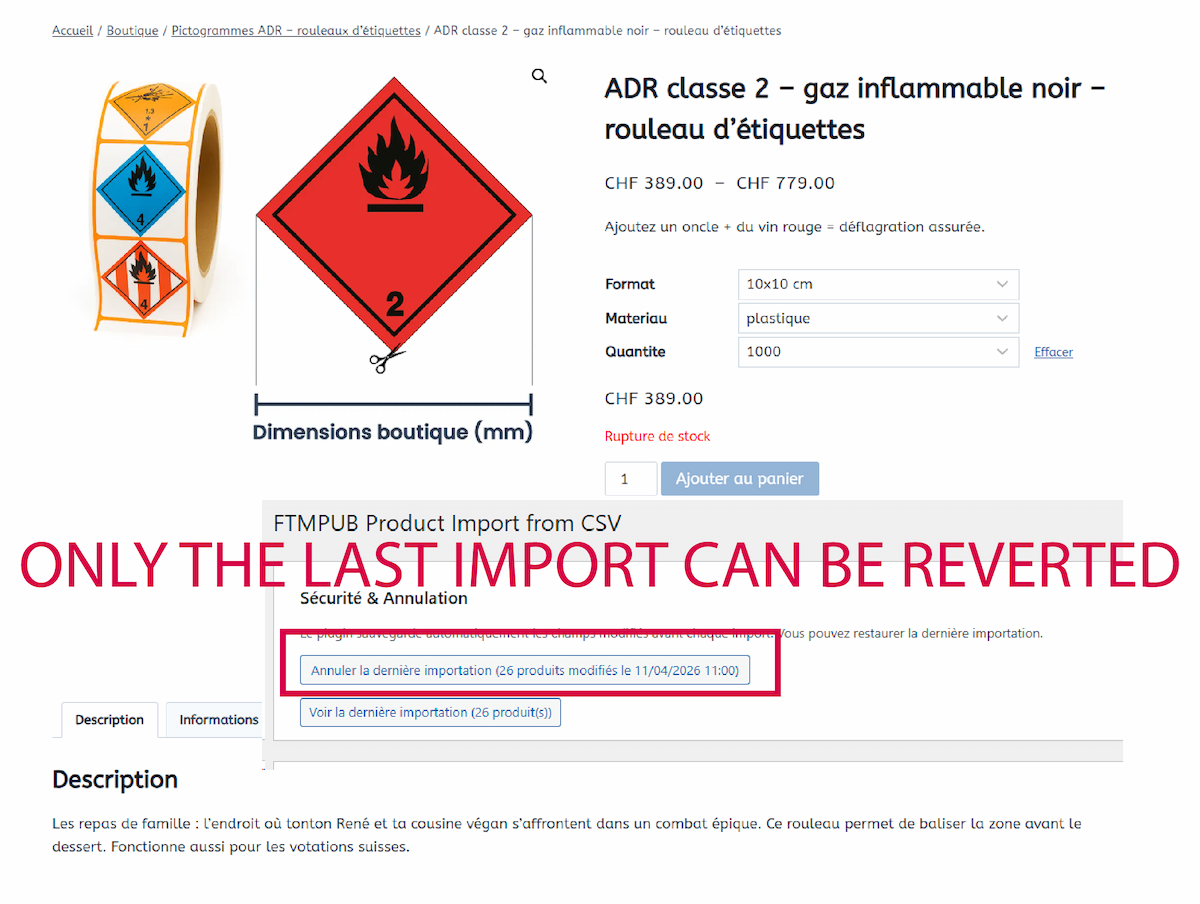
- One-click rollback — instantly restore all modified products to their previous state
- Auto-detect delimiter — semicolon, comma, tab, or pipe detected automatically
- Flexible product matching — match by ID, SKU, Slug, or Auto (ID → SKU → Slug)
- Post-import report — updated / ignored / failed counts with per-row failure details
- Downloadable CSV template — prefilled with your product data structure
- Multi-tab collision prevention — unique session token per preview
- Security-first — nonces, capability checks, sanitized inputs, safe redirects
- 100% free — no account required, no lock-in
- Short Description (post excerpt)
- Description (post content, full HTML)
- Slug (URL key, auto-deduplicated by WordPress)
- Yoast SEO Title (
_yoast_wpseo_title) - Yoast Meta Description (
_yoast_wpseo_metadesc)
- SEO managers who need to update dozens or hundreds of product meta descriptions at once
- Catalogue managers importing content from an external PIM or spreadsheet
- Developers who need a safe, auditable bulk-edit tool for client sites
- Agencies managing multiple WooCommerce stores
id | product_id |
| sku | (standard column name) |
| short_description | short, shortdesc, excerpt |
| description | desc, content |
| slug | post_name, permalink, url_key |
| seo_title | yoast_title, title_seo |
| meta_description | yoast_metadesc, meta_desc, metadesc |
Column names are case-insensitive and accent-insensitive. Spaces and hyphens are treated as underscores.
Supported delimiters: ; (semicolon), , (comma), \t (tab), | (pipe). Use Auto (recommended) to let the plugin detect automatically.
A downloadable CSV template with a sample row is available directly from the plugin interface.
Limits
- Maximum file size: 10 MB
- Maximum rows loaded in preview: 20 000
- Backup stored for up to 5 000 products per import run
- Serialized preview data must not exceed 4 MB (split large files if needed)
- Requires WooCommerce (tested up to WC 9.x)
- Compatible with WooCommerce HPOS (High-Performance Order Storage)
- Yoast SEO fields are updated if Yoast is active — no error if Yoast is not installed
- Compatible with WordPress multisite (per-site activation)
安装:
- In the WordPress admin, go to Plugins → Add New.
- Search for "FTMPUB Product Import from CSV".
- Click Install Now, then Activate.
- Go to Tools → FTMPUB Product Import from CSV and upload your first CSV.
- Download the plugin ZIP from FTMPUB.ch or WordPress.org.
- Go to Plugins → Add New → Upload Plugin.
- Upload the ZIP file and click Activate.
- Go to Tools → FTMPUB Product Import from CSV to get started.
屏幕截图:
常见问题:
Which CSV delimiters are supported?
Semicolon (;), comma (,), tab (\t) and pipe (|). Choose Auto (recommended) to let the plugin detect the delimiter automatically by sampling the first 4 KB of the file.
What happens if a product is not found?
The row is counted as ignored and listed in the post-import failure report with the lookup key and reason. No data is modified for that row.
Can I undo an import?
Yes. The plugin saves a snapshot of the original field values before each import. Click Undo last import in the Security & Rollback panel to restore all affected products to their previous state in one click. The backup covers up to 5 000 products per run.
Does it work without Yoast SEO?
Yes. The SEO Title and Meta Description columns are simply ignored if Yoast SEO is not active. No error is thrown.
Is WooCommerce required?
Yes. The plugin checks for WooCommerce at activation and on every admin page load. A warning notice is displayed if WooCommerce is missing or inactive.
How large can my CSV be?
The upload limit is 10 MB and the preview loads up to 20 000 rows. For very large catalogues, split your CSV into multiple files.
Where can I find documentation and support?
Full documentation, tutorials, and support are available on FTMPUB.ch.
更新日志:
- PHP 8.4 compatibility: explicit escape parameter on all CSV read/write calls (SplFileObject::fgetcsv, fputcsv) — no more deprecation notices
- Compatibility verified with WordPress 7.0 (Tested up to: 7.0)
- New informational admin notice on the plugin screen when Yoast SEO is inactive — SEO columns are still written to the database but remain unused until Yoast SEO is active
- Initial release
- Preview interface with row-level selection before import
- One-click rollback — full snapshot of modified fields before each run
- Auto-detect CSV delimiter (semicolon, comma, tab, pipe)
- Product matching by ID, SKU, Slug, or Auto (ID → SKU → Slug)
- Post-import report with per-row failure details
- Downloadable CSV template with sample row
- Multi-tab collision prevention via unique UUID session token
- Transient and option size guard — serialized size checked before write
- Failures array capped at 500 entries with truncation indicator
- WooCommerce HPOS compatibility declared
- Plugin Check (PHPCS) compliance: EscapeOutput, NonceVerification, AlternativeFunctions, InputNotSanitized, DiscouragedFunctions
- CSV parsing via SplFileObject (no direct fopen/fclose)
- Developer hooks: ftmpprim_column_aliases, ftmpprim_template_columns, ftmpprim_max_preview_rows, ftmpprim_import_row