Fullworks Active Users Monitor
| 开发者 |
fullworks
alanfuller |
|---|---|
| 更新时间 | 2026年10月1日 05:03 |
| 捐献地址: | 去捐款 |
| PHP版本: | 7.4 及以上 |
| WordPress版本: | 7.1 |
| 版权: | GPLv2 or later |
| 版权网址: | 版权信息 |
详情介绍:
- Real-Time Tracking - Uses WordPress session tokens for accurate online/offline status
- Comprehensive Audit Trail - Track all login/logout events with detailed logging
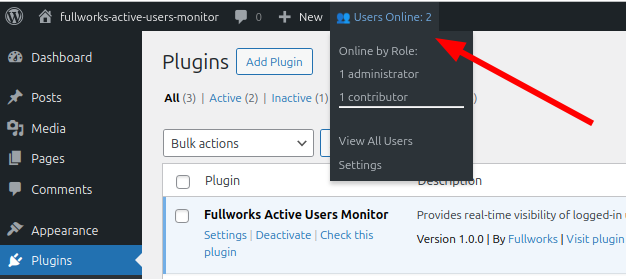
- Admin Bar Widget - Quick overview of online users with role breakdown
- Enhanced Users List - Visual indicators, status columns, and filtering options
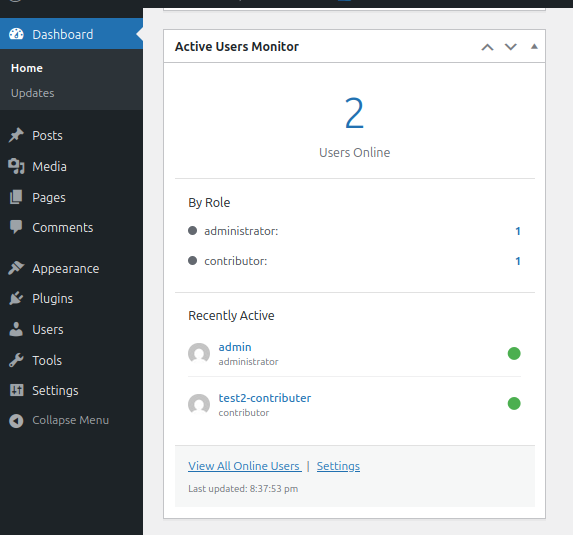
- Dashboard Widget - At-a-glance view of active users on your dashboard
- Audit Log Export - Export user activity to CSV, JSON, or Excel formats
- Auto-Refresh - Configurable automatic updates without page reload
- Role-Based Display - Color-coded indicators for different user roles
- WP-CLI Support - Command line tools for monitoring and management
- Performance Optimized - Smart caching and efficient queries
- Fully Translatable - Ready for localization
- Green status dots for online users
- Gold/orange borders for administrators
- Color-coded role indicators
- Animated pulse effects (optional)
- "ONLINE" badges in user lists
- Last seen timestamps for offline users
- Membership sites monitoring user activity
- Educational platforms tracking student engagement
- Multi-author blogs coordinating content creation
- Support teams managing customer interactions
- Any site requiring user activity insights
- Clean, well-documented code
- Action and filter hooks for customization
- WP-CLI commands for automation
- Follows WordPress coding standards
- Compatible with multisite installations
安装:
- Go to Plugins > Add New in your WordPress admin
- Search for "Fullworks Active Users Monitor"
- Click "Install Now" and then "Activate"
- Configure settings under Settings > Active Users Monitor
- Download the plugin ZIP file
- Upload to
/wp-content/plugins/directory - Extract the ZIP file
- Activate through the Plugins menu in WordPress
- Configure under Settings > Active Users Monitor
- Visit Settings > Active Users Monitor to configure options
- Check the admin bar for the online users counter
- View the Users page to see enhanced status indicators
- Optional: Add the dashboard widget for quick monitoring
屏幕截图:
常见问题:
How does the plugin determine if a user is online?
The plugin uses WordPress's built-in WP_Session_Tokens class to check for active session tokens. This ensures accurate detection regardless of the authentication method used (standard login, SSO, 2FA, etc.). A user counts as online from the moment they log in until they log out or their session expires. WordPress sessions last 2 days, or 14 days with "Remember Me", so a user who closes the browser without logging out stays online until then.
Does this plugin create custom database tables?
Yes, one table (wp_fwaum_audit_log) for the audit trail, created on activation. Nothing is written to it unless you enable the audit trail. The online-status monitoring uses WordPress's existing session data and needs no custom tables. The table is removed when the plugin is deleted.
Can I customize which roles can see online status?
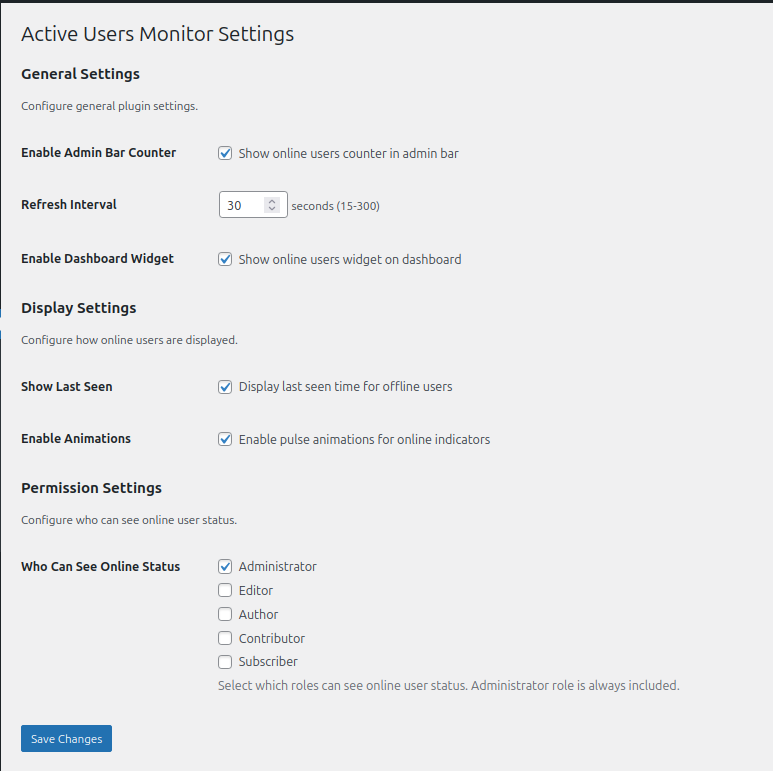
Yes. In the plugin settings, you can choose which user roles can see online status in the admin bar and dashboard widget. Administrators always can. The status column on the Users page additionally needs the ability to list users. Developers can override the check with the fwaum_current_user_can_view filter.
How often does the plugin update the online status?
The refresh interval is configurable from 15 to 300 seconds. The default is 30 seconds. You can adjust this in Settings > Active Users Monitor.
My site is behind a proxy or CDN and the audit log shows the proxy's IP address
By default only the connecting address (REMOTE_ADDR) is trusted, because headers such as X-Forwarded-For can be forged by anyone. If your site sits behind a proxy you control, list the header it sets with the fwaum_client_ip_headers filter, for example array( 'HTTP_CF_CONNECTING_IP', 'REMOTE_ADDR' ) behind Cloudflare.
Is this plugin compatible with caching plugins?
Yes. The plugin uses AJAX for real-time updates, which works independently of page caching. The plugin also implements its own transient caching for optimal performance.
Can I use this with multisite?
Yes. On multisite each site shows its own members who are online, and each site keeps its own audit trail.
Does it work with custom user roles?
Yes. The plugin automatically detects and supports all custom user roles in addition to WordPress default roles.
How can I style the online indicators differently?
Every element has its own CSS class, so you can override the styles in your theme's CSS.
Is WP-CLI support included?
Yes. The plugin includes comprehensive WP-CLI support with commands for monitoring, automation, and scripting. See the WP-CLI Commands section below for details.
Will this slow down my site?
No. The plugin is optimized for performance with smart caching, efficient queries, and optional features you can disable if needed.
更新日志:
- Security: an expired login cookie could crash the request through infinite recursion in the audit logger; only genuine expired sessions are now logged, once each
- Security: CSV exports can no longer carry spreadsheet formulas from usernames or user agents
- Security: the audit log records the real connecting IP by default; trust a proxy header with the new fwaum_client_ip_headers filter
- New: personal data export and erasure for the audit log, plus suggested privacy policy text
- Fixed: "Who Can See Online Status", "IP Address Privacy" and "Track Failed Logins" settings now take effect
- Fixed: online users are found in one query and counted on sites of any size; refreshes reuse the cache
- Fixed: with the Two Factor plugin, logins are recorded when the second factor succeeds and only 2FA logins are tagged Two Factor
- Fixed: role names show as "Administrator" rather than "administrator"
- Fixed: audit log times, retention and IP anonymization respect the site timezone
- Fixed: valid Excel export, sanitised export filenames, translatable JavaScript text
- Fixed: daily cleanup is removed on deactivation; uninstall scales to large sites and networks
- Removed: keyboard shortcuts on the audit pages that overrode the browser's Ctrl/Cmd+F and Ctrl/Cmd+E
- Full details in CHANGELOG.md on GitHub
- Added comprehensive audit trail functionality to track user login/logout events
- New audit log table under Users menu with advanced filtering and search
- Export audit logs to CSV, JSON, or Excel formats
- Track login methods (standard, social, two-factor, API, etc.)
- Monitor session durations and failed login attempts
- Configurable retention periods and privacy settings
- Database migration support for existing user data
- Updated minimum WordPress version to 6.2 for enhanced security features
- Fully compliant with WordPress Coding Standards
- Fixed contributor name and donation link
- Added WordPress Playground blueprint for easy preview
- Added plugin assets to readme
- Minor documentation improvements
- Initial release
- Real-time user monitoring using session tokens
- Admin bar counter with role breakdown
- Enhanced users list with visual indicators
- Dashboard widget for quick overview
- Configurable auto-refresh intervals
- WP-CLI command support
- Comprehensive settings page
- Full internationalization support