Gain Commerce NMI Payment Gateway for WooCommerce
| 开发者 |
allan.casilum
gaincommerce forkanhossain |
|---|---|
| 更新时间 | 2026年10月23日 09:53 |
| PHP版本: | 6.8 及以上 |
| WordPress版本: | 7.1 |
| 版权: | GPLv2 or later |
| 版权网址: | 版权信息 |
详情介绍:
- One-Click Mobile Checkout: Native support for Apple Pay and Google Pay to boost mobile conversions.
- Zero PCI Friction: Uses NMI Collect.js tokenization—card data never touches your web server.
- Modern Checkout Ready: Built natively for WooCommerce Checkout Blocks and traditional legacy checkouts.
- Bot & Card-Testing Defense: Built-in protection via Google reCAPTCHA v3 or Cloudflare Turnstile to block automated attacks.
- Built-in Surcharging: Offset transaction costs by adding flat or percentage-based credit card surcharges directly at checkout.
- Express Digital Wallets: Native support for Apple Pay and Google Pay.
- PCI-DSS Compliant Tokenization: Secure Collect.js integration ensures zero sensitive card storage on your server.
- Bot Defense: Block card-spinning scripts using Google reCAPTCHA v3 or Cloudflare Turnstile.
- Credit Card Surcharges: Automatically pass processing fees to buyers via flexible flat or percentage rules.
- Full Order Dashboard Control: Process Authorize, Capture, Partial/Full Refunds, and Voids directly from the WooCommerce order screen.
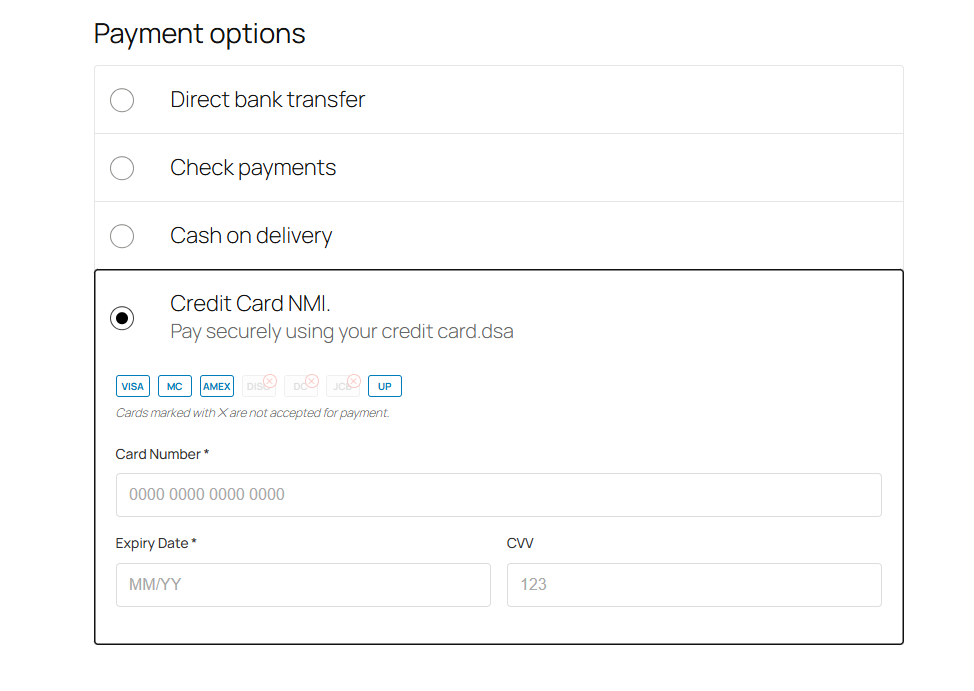
- Card Brand Restrictions: Restrict or allow specific card brands (Visa, Mastercard, Amex, Discover) based on your merchant agreement.
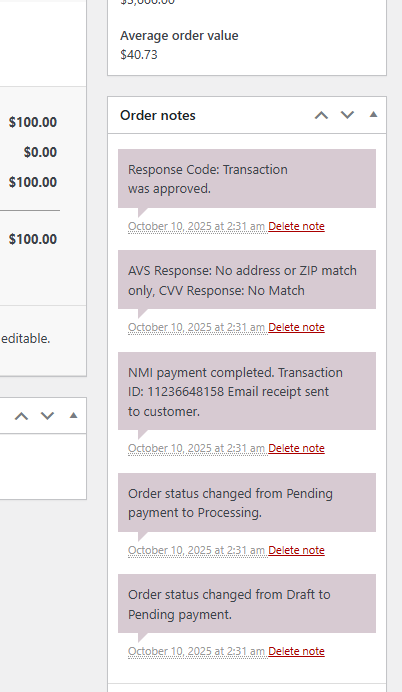
- Fraud & Ledger Sync: Log AVS/CVV response codes to order notes and auto-sync WooCommerce shipping data to NMI.
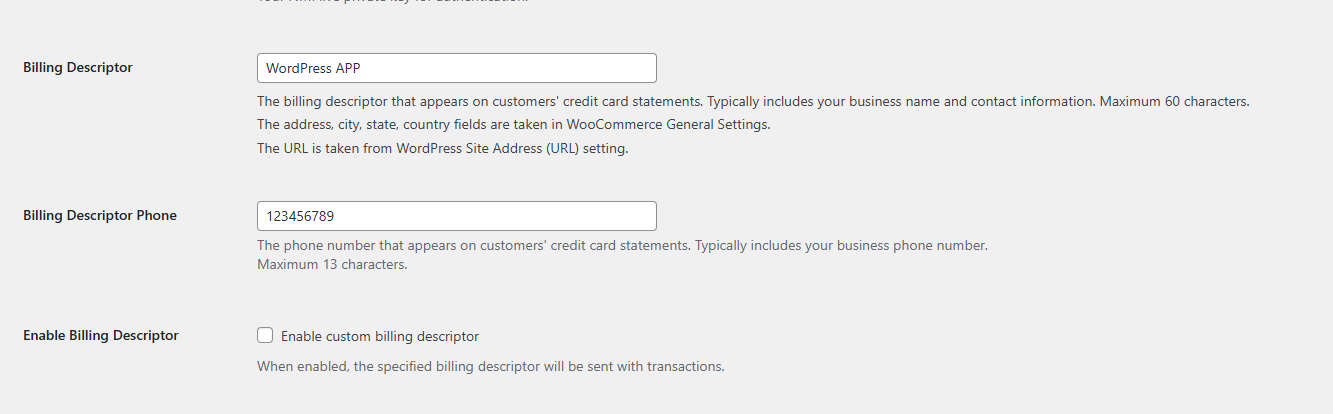
- Dynamic Descriptors: Set custom statement descriptors passed directly to customer credit card statements.
安装:
- Upload the
gaincommerce-nmi-payment-gateway-for-woocommercefolder to/wp-content/plugins/, or search and install via Plugins > Add New in WordPress. - Activate the plugin through the Plugins menu.
- Navigate to WooCommerce > Settings > Payments > Gain Commerce NMI Payment Gateway.
- Enter your NMI API credentials (Private Security Key and Public Security Key).
- (Optional) Configure Bot Protection (reCAPTCHA/Turnstile) and Credit Card Surcharging.
- Set Environment to Live or Test Mode and save changes.
- Visa:
4111 1111 1111 1111 - Mastercard:
5431 1111 1111 1111 - American Express:
3411 1111 1111 1111 - Discover:
6011 0009 9130 0009 - Expiration Date: Any valid future date (e.g.,
12/28) - CVV Code: Any 3 digits (4 digits for Amex)
屏幕截图:
常见问题:
Does this plugin require a WooCommerce installation?
Yes. WooCommerce 8.0 or higher must be installed and active on your WordPress site.
Does this plugin require an active NMI account?
Yes. An active NMI payment gateway account is required. Contact Allied Payments, our preferred provider, to set up your merchant account.
Is this plugin PCI Compliant?
Yes. Utilizing NMI's Collect.js script to tokenize payment data in the browser, sensitive credit card numbers never touch or pass through your web server, keeping your store fully PCI-DSS compliant.
Is an SSL Certificate required?
Yes. A valid SSL certificate is required on your website to maintain PCI-DSS compliance and ensure end-to-end security during customer checkout.
Does the free plugin store customer credit card details?
No. Credit card numbers are tokenized in real time by NMI and are never stored on your WordPress server. Storing cards securely in the NMI Customer Vault for returning customers is available when paired with our Premium Add-on.
How does credit card surcharging work?
You can enable surcharging in gateway settings to pass a flat fee or a percentage-based processing charge to your customers at checkout. The fee dynamically updates on the checkout page so customers see a transparent disclosure before placing their order.
How does bot protection defend against card testing?
You can supply your own Google reCAPTCHA v3 or Cloudflare Turnstile API keys in the settings. Once enabled, the system automatically checks checkout attempts to block automated card-spinning scripts from testing stolen card lists on your store.
Where can I get support or integration assistance?
You can visit our official support portal at gaincommerce.com/support for documentation and help desk assistance.
更新日志:
- Add an "NMI Settings" tab to WooCommerce > Settings, directly after Payments, so the gateway settings are easier to find and manage. It edits the same settings as Payments > Manage.
- Change the "Settings" link on the Plugins screen to open the new NMI Settings tab.
- Fix a cancelled Apple Pay sheet on the Checkout Block placing an order with an empty payment token (declined by NMI with "Payment token is empty"). A cancelled sheet now returns the shopper to checkout with no order created.
- Fix a failed Apple Pay / Google Pay token update on the Checkout Block placing an order with an incomplete token. The shopper now sees "Your Apple Pay / Google Pay payment could not be completed and you have not been charged" and no order is created.
- Fix an empty wallet block and the "or pay with card" divider showing on the Checkout Block when no wallet is available. Google Pay is now shown only once Google confirms it is ready on the shopper's device.
- Fix Cloudflare Turnstile logging an "Unknown parameter ?ver" warning by loading its script without a version parameter.
- Add the Bot Protection, debug console and trace scripts to the BulletProof Security Pro whitelist, so a plugin firewall no longer blocks them with a 403.
- Fix PHP warning "Undefined array key "default"" shown at the top of admin pages, and written to the PHP error log, until the gateway settings were saved for the first time. The warning also pushed the footer into the middle of the WooCommerce settings screen.
- Change the gateway to be enabled by default until the settings are first saved. Sites that have already saved their gateway settings are not affected.
- Change Test Mode to be off by default until the settings are first saved. Sites that have already saved their gateway settings are not affected.
- Fix the WooCommerce Checkout Block not using the "enabled" default before the gateway settings were first saved.
- Add a "Get Enterprise" link on the Plugins screen. It is hidden when the Enterprise add-on is active.
- Add optional Bot Protection setting (Google reCAPTCHA v3 or Cloudflare Turnstile) to help block automated card-testing ("card spinning") attempts at checkout. Disabled by default.
- Add dynamic surcharge label to the Credit Card payment option at checkout — shows "(Includes $X surcharge)" or "(Includes X% surcharge)" based on the configured Processing Fee, updating automatically with the fee setting.
- Rename the "Processing Fee" settings section to "Credit Card Surcharge" with updated description text.
- Change card processing fee setting to a dropdown: No Processing Fee, Percentage Fee, or Flat Rate Fee.
- Add flat rate processing fee option, in addition to the existing percentage-based fee.
- Add live card-type highlighting at checkout: as the customer types their card number, the accepted-card icons narrow down to the matching brand.
- Improve the Restrict Card Types setting to use a proper multi-select picker with clear "click to remove" tags, and clarify that leaving it empty accepts all card types.
- Fix card processing fee not being applied on the WooCommerce Checkout Block (it previously only appeared on the classic checkout).
- Fix new card entry occasionally resetting mid-checkout on the Checkout Block, caused by the Apple Pay / Google Pay amount sync re-initializing the card fields more often than necessary.
- Fix extra blank space shown on checkout below the saved payment method option.
- Fix card type icons to display as real card logos instead of text placeholders.
- Fix Apple Pay / Google Pay showing the original cart total after a coupon, shipping change, or fee updated the order total.
- Add optional card processing fee (percentage-based surcharge) for card payments, configurable in gateway settings.
- Improve Apple Pay / Google Pay reliability so wallet payments are still recognized correctly even if a supporting script fails to load.
- Updated with WordPress Latest Version
- Fix issue on JS checkout both legacy and block.
- Maintenance
- Fix issue in NMI timeout
- Support NMI Digital wallet payment, Google Pay and Apple Pay.
- Add WooCommerce Subscriptions support for automatic recurring payments. Requires WooCommerce Subscriptions plugin and Premium Add-on.
- Maintenance
- Fix checkout issue in loading NMI in legacy and block base.
- Fix UI fields in checkout page both in legacy and block base.
- Maintenance.
- Added support for 3D Secure (3DS) authentication when the Premium Add-on plugin is installed. The free plugin now enables 3DS for enhanced security, but requires the Premium plugin to activate this feature.
- Fix and replace deprecated reduced_stock_qty to wc_reduce_stock_levels
- Add ability for customers to store payment method for future transactions in card vault by choosing “Save Payment Method” during checkout. Available only in Premium Plugin
- Choose "Saved Payment Method" stores card account in secure PCI-Compliant environment. Customer can replace card in checkout process by choosing “Save Payment Method”.
- Test to latest WooCommerce version 10.4.3
- Test to latest WordPress 6.9 version.
- Test to latest WooCommerce 10.4.2
- Add Description for premium plugin in readme file.
- Add Shipping Fields from WooCommerce order to NMI merchants.
- Ability to enable Dynamic Descriptor and pass descriptor data.
- Add AVS/CVV notes in order.
- Add additional order notes as Response code and NMI payment status.
- Integrate restrict card type in block checkout
- Integrate restrict card type in legacy checkout
- Integrate CollectJS into WC checkout blocks
- Integrate WC blocks
- Add CollectJS to legacy checkout
- WooCommerce Legacy checkout work on NMI
- Add Auth Feature and when changed to order processing or complete then capture
- Add Gateway Class
- Add Logger Class
- Add API class for NMI
- Add API Factory
- Add API Credit Card Sale
- Add API Refund
- Add API Void
- Add API Auth, Capture and Auth + Capture
- Initial release