
GetShouting
| 开发者 | getshouting |
|---|---|
| 更新时间 | 2026年5月21日 02:57 |
| PHP版本: | 7.4 及以上 |
| WordPress版本: | 6.9 |
| 版权: | GPL v2 or later |
| 版权网址: | 版权信息 |
详情介绍:
- ✅ One-Click Connection - Connect your store in seconds (no manual API key generation required)
- ✅ Automatic Product Sync - Your products are automatically synced to Get Shouting
- ✅ Real-Time Updates - Inventory changes and new products sync automatically via webhooks
- ✅ Order Tracking - Track product performance and sales analytics
- ✅ Abandoned Cart Recovery - Hourly scanner detects idle carts and triggers your Get Shouting recovery journey (new in 1.1.0)
- ✅ TCPA-Aligned SMS Consent - Native checkbox on both the classic and Block-based checkout (new in 1.1.0)
- ✅ Inventory Alerts - Get notified about low stock and slow-moving products
- ✅ Secure - Enterprise-grade encryption for all data transmission
- Install and activate the plugin
- Go to WooCommerce → Get Shouting in your WordPress admin
- Click "Connect to Get Shouting"
- Log in to your Get Shouting account (or create one)
- Select which brand to connect
- Done! Your products will automatically sync
- Create professional social media posts from your products
- Schedule posts across multiple platforms
- Track performance and analytics
- Identify slow-moving inventory for promotions
- Automate product launches and sales announcements
- WordPress 5.8 or higher
- WooCommerce 8.9 or higher (for the Block-based checkout SMS-consent field; classic checkout works on any version)
- PHP 7.4 or higher
- HTTPS enabled (required for secure API communication)
- Pretty permalinks enabled (Settings → Permalinks)
- WP-Cron enabled (required for the hourly abandoned-cart scanner — DISABLE_WP_CRON must not be set, or you must configure a system cron)
- Product data (titles, descriptions, prices, images, inventory) is synced to Get Shouting.
- Order data is synced for performance tracking, journey enrollment, and revenue analytics.
- Customer email and phone are transmitted when:
- The customer ticks the SMS-marketing consent checkbox at checkout (express written consent for TCPA), AND/OR
- The customer abandons a logged-in cart (so Get Shouting can send the recovery message). Email/phone only — no addresses, IP addresses, or payment data.
- No customer addresses, IP addresses, user-agent strings, or payment details are transmitted.
- All data transmission uses HTTPS encryption.
- GDPR
customers/redact-style requests anonymize the customer's record on the Get Shouting side while preserving anonymized aggregate analytics (lifetime spend, order count) — see Get Shouting's data retention policy. - You can disconnect at any time and optionally delete all synced data.
安装:
- Log in to your WordPress admin panel
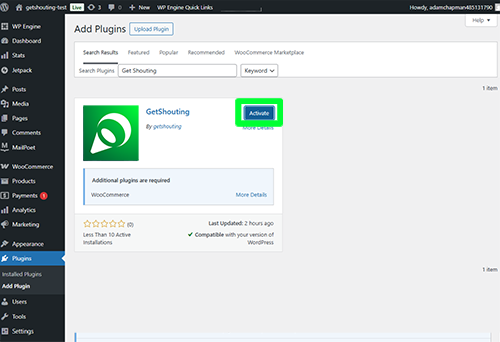
- Go to Plugins → Add New
- Search for "Get Shouting" (or "GetShouting")
- Click "Install Now" and then "Activate"
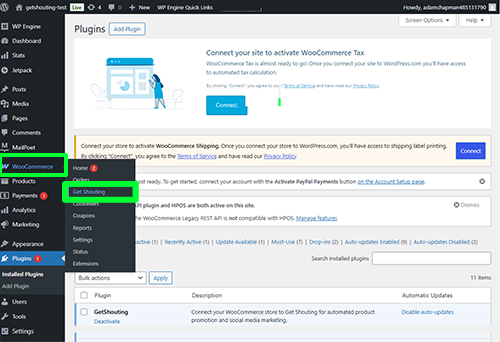
- After activation, go to WooCommerce in the left navigation menu
- Click "Get Shouting" under the WooCommerce menu
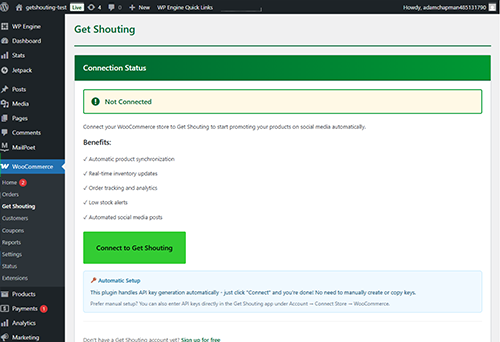
- Click "Connect to Get Shouting" button
- You'll be redirected to the Get Shouting website to complete your store connection
- Log in or create your Get Shouting account
- Select which brand to connect to this store
- Once connected, you can create posts or ads directly from your store items in Get Shouting
- Download the plugin ZIP file
- Log in to your WordPress admin panel
- Go to Plugins → Add New → Upload Plugin
- Choose the ZIP file and click "Install Now"
- Click "Activate Plugin"
- After activation, go to WooCommerce in the left navigation menu
- Click "Get Shouting" under the WooCommerce menu
- Click "Connect to Get Shouting" button
- You'll be redirected to the Get Shouting website to complete your store connection
- Log in or create your Get Shouting account
- Select which brand to connect to this store
- Once connected, you can create posts or ads directly from your store items in Get Shouting
- Navigate to WooCommerce → Get Shouting in your WordPress admin
- Click "Connect to Get Shouting" button
- You'll be redirected to the Get Shouting website to complete your store connection
- Log in or create your Get Shouting account
- Select which brand to connect to this store
- You'll be redirected back to WordPress
- Your products will start syncing automatically!
- Once connected, you can create posts or ads directly from your store items in Get Shouting
屏幕截图:
常见问题:
Do I need a Get Shouting account?
Yes, you'll need a Get Shouting account to use this plugin. You can sign up for free at getshouting.app.
Is this plugin free?
Yes, the plugin is completely free. Get Shouting has various pricing plans, including a free tier to get started.
Will this slow down my WooCommerce store?
No. The plugin uses webhooks for real-time synchronization, which means it doesn't add any load to your store's frontend or checkout process.
What data is synced to Get Shouting?
- Product information (titles, descriptions, prices, images, SKUs)
- Inventory levels
- Order data for performance tracking and journey enrollment (line items, totals, currency)
- Customer email only when the customer ticks the SMS-marketing consent checkbox or abandons a logged-in cart
- Customer phone only when the customer ticks the SMS-marketing consent checkbox (TCPA prior express written consent)
- No customer addresses, IP addresses, user-agent strings, or payment details are synced
Can I disconnect at any time?
Yes! You can disconnect your store at any time from the WooCommerce → Get Shouting page. You can also choose to delete all API keys when disconnecting.
Does this work with product variations?
Yes! The plugin fully supports WooCommerce variable products and their variations.
What happens if I deactivate the plugin?
If you deactivate the plugin, the connection to Get Shouting will stop working, but your data will remain. If you uninstall the plugin, you can choose to delete all API keys and connection data.
Do I need to manually sync my products?
No! After the initial connection, all product updates, new products, and inventory changes are automatically synced in real-time via webhooks.
What if I have thousands of products?
No problem! The initial sync handles large catalogs efficiently with pagination. After that, only changes are synced via webhooks.
Is HTTPS required?
Yes, HTTPS is required for secure API communication. Most modern WordPress hosting includes free SSL certificates.
What are "Pretty Permalinks"?
Pretty permalinks are required for the WooCommerce REST API to work. You can enable them in WordPress Settings → Permalinks. Choose any option except "Plain".
更新日志:
- NEW: SMS marketing consent checkbox on the WooCommerce Block-based checkout (WC 8.9+). The classic shortcode checkout was already supported in 1.0.x; this release reaches the block-based checkout that is now the WC default.
- NEW: Updated SMS consent disclosure to TCPA-aligned copy ("Msg & data rates may apply. Reply STOP to cancel.").
- NEW: Hourly abandoned-cart scanner. When a logged-in customer's cart is idle for 30+ minutes (configurable via the
getshouting_abandoned_cart_idle_minutesfilter), the plugin fires aaction.getshouting_abandoned_cartcustom-topic webhook that Get Shouting forwards into your abandoned-cart journey. - NEW: Plugin version is reported on connect, so Get Shouting's journey-trigger picker can correctly enable WooCommerce abandoned-cart only on stores running this plugin or newer.
- NEW: Plugin deactivation now clears the scheduled WP-Cron hook so no orphan entries remain.
- CHANGED: Bumped minimum WooCommerce version to 8.9 (required for the Block-based checkout SMS field). Classic shortcode checkout still works on older WC versions.
- CHANGED: Privacy disclosure updated to accurately describe what data is transmitted (email/phone when the customer opts in; addresses/IP/payment details never).
- Updated plugin slug to "getshouting" (was "getshouting-connector")
- Updated plugin name to "GetShouting" (was "GetShouting for WooCommerce")
- Updated text domain to "getshouting" throughout all files
- Updated menu slug and page references to match new plugin slug
- Added "Requires Plugins: woocommerce" header for proper dependency declaration
- Confirmed proper use of wp_enqueue_script() and wp_enqueue_style() functions
- CRITICAL FIX: Removed extra spaces after asterisks in plugin header (WordPress.org parser requirement)
- Plugin headers now match exact format from WordPress.org documentation
- Fixed text domain consistency across all files
- Ensured complete WordPress.org header compliance
- Verified all translation functions use correct text domain
- Fixed plugin header formatting for WordPress.org submission
- Updated license format to GPL v2 or later (WordPress.org standard)
- Added Domain Path for internationalization support
- Improved build verification and debugging tools
- Initial release
- One-click connection to Get Shouting
- Automatic API key generation
- Real-time product synchronization via webhooks
- Order tracking integration
- Secure credential management
- GDPR compliant