
GetSiteCalendar Lite
| 开发者 | matureman |
|---|---|
| 更新时间 | 2026年10月29日 19:26 |
| PHP版本: | 8.0 及以上 |
| WordPress版本: | 7.0 |
| 版权: | GPLv2 or later |
| 版权网址: | 版权信息 |
详情介绍:
- Custom post types: Events, Venues, Organizers
- Five views: Month grid + List (Week, Day, Photo are Pro)
- Single-event pages with venue and organizer details
- Featured-image thumbnails in every view, with category-coloured icon fallbacks for events without an image
- Categories and tags
- Featured events with visual highlight
- Tickets (one or more ticket types per event, each with label, price, capacity, and max-per-order)
- Attendees list in wp-admin showing every front-end RSVP
- Free RSVP form with attendee capture and basic confirmation email
- ICS feed for calendar app subscriptions (Google Calendar, Apple Calendar, Outlook)
- Add-to-calendar buttons (Google, Outlook, .ics download)
- JSON-LD schema for SEO
- REST API for headless / external integrations
- Customisable colours: primary, accent, event-link, and Week view chip colour
[getsitecalendar]shortcode for the full calendar UI[getsitecalendar_list]shortcode for upcoming-events lists[getsitecalendar_search]shortcode for filter forms
- Week, Day and Photo views with toolbar switcher
- Full recurring-event series management (skip / override per occurrence)
- Multi-ticket-type RSVP with capacity gauges and CSV export
- Paid tickets via Stripe Checkout and WooCommerce
- Custom fields engine with front-end filter UI
- CSV bulk import with smart venue/organizer auto-create
- Front-end event submission for logged-in users
- Compact upcoming-events widget and Gutenberg block
- Door check-in with QR codes and mobile scanner
- Dedicated Pro Calendar Scanner role for door staff
- Branded HTML confirmation emails with custom From / Reply-To
- Sequential
PCAL-order numbers for unified audit trail - Priority email support
安装:
- Upload
site-calendar-liteto/wp-content/plugins/, or install via Plugins → Add New - Activate the plugin
- Create a Page and add the
[getsitecalendar]shortcode to display the calendar - Add Events, Venues, and Organizers from the Site Calendar menu
屏幕截图:
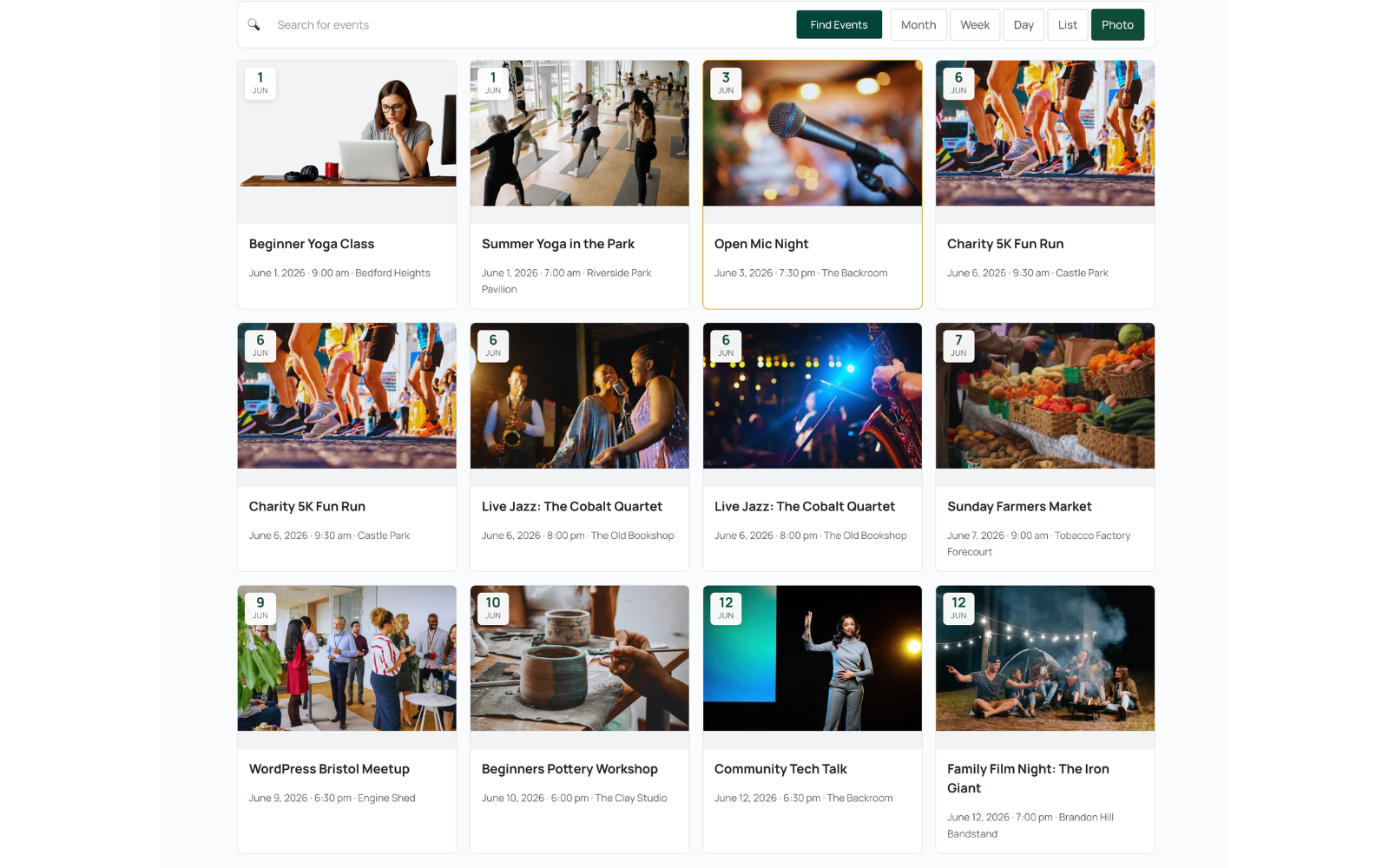
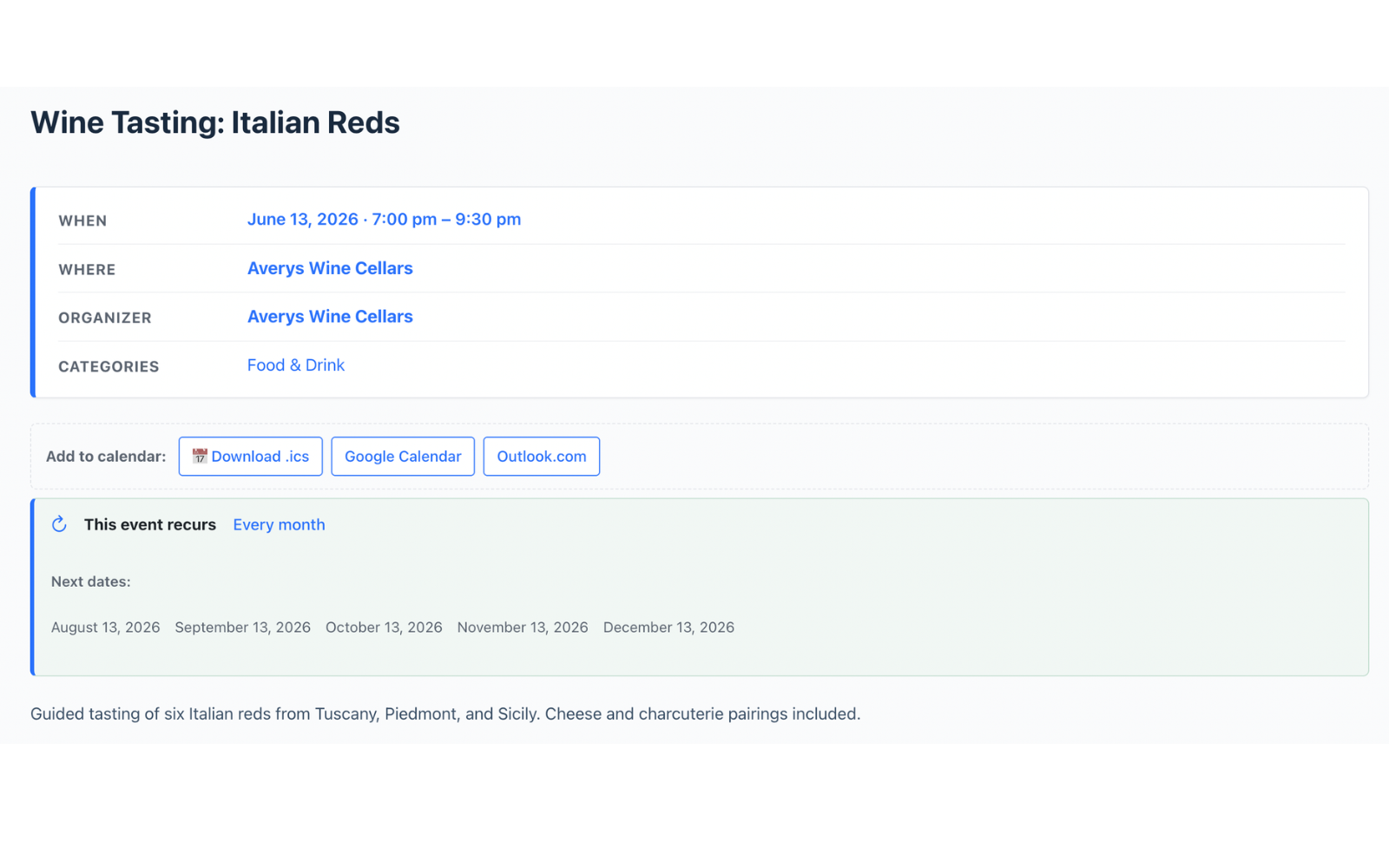
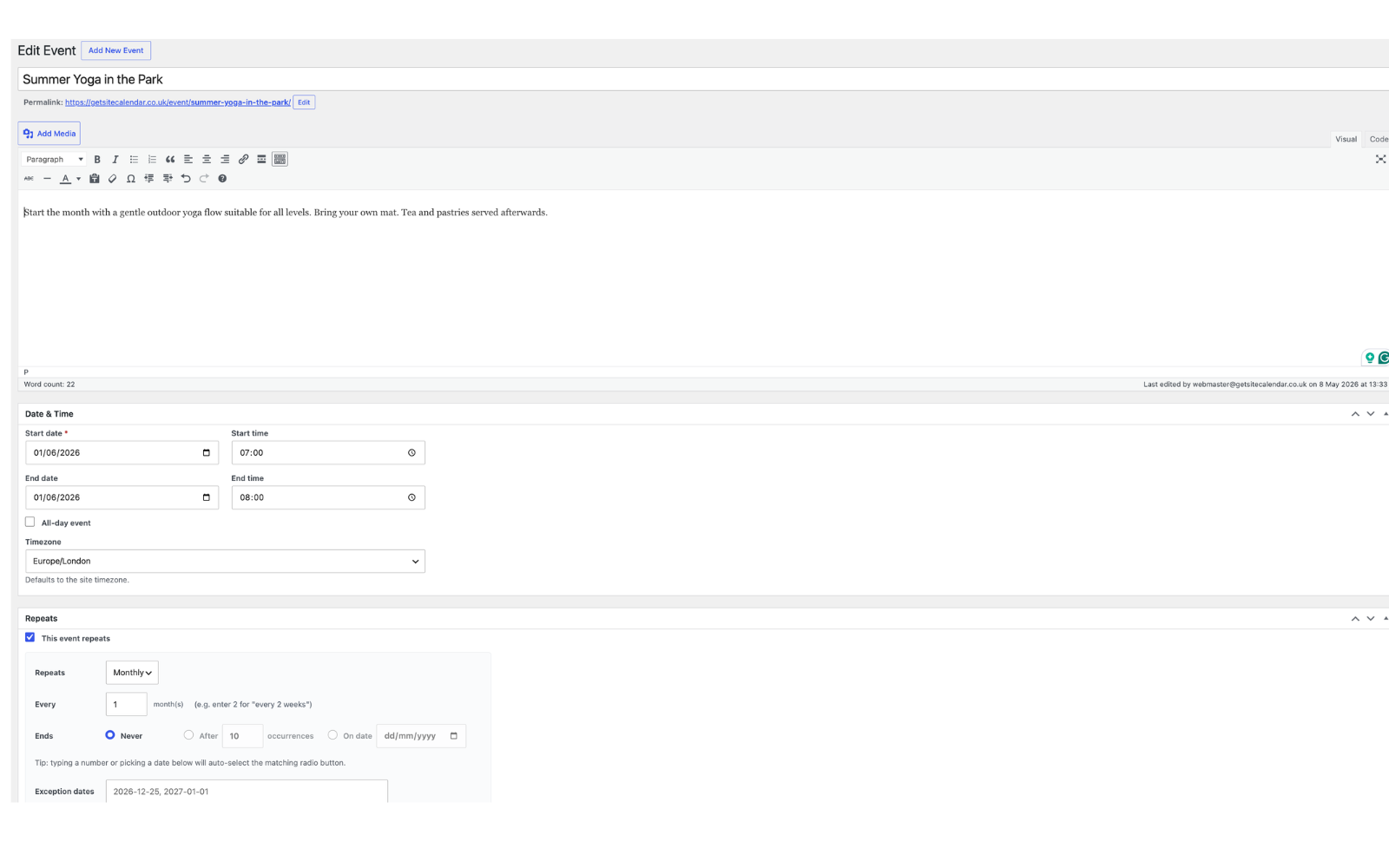
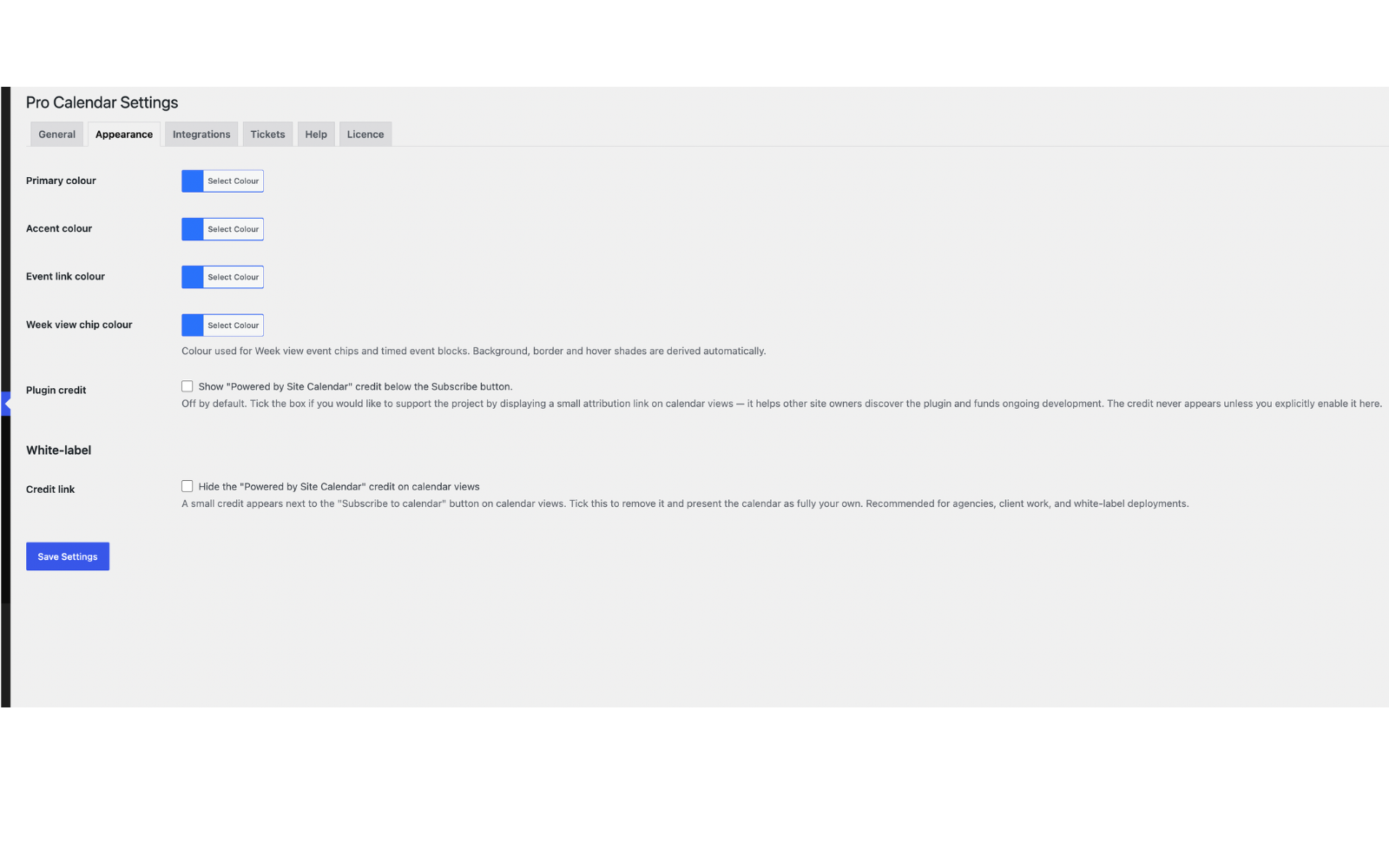
常见问题:
Is Site Calendar Lite truly free?
Yes — fully free, GPLv2, no hidden upsells, no telemetry. The free version is a complete usable calendar plugin in its own right. Site Calendar Pro is an optional upgrade for sites that need advanced views, paid ticketing, or door check-in.
Does it work with block themes / Site Editor?
Yes. The shortcodes work inside any Shortcode block, and the calendar renders cleanly inside is-layout-constrained parents.
Does it work with WooCommerce?
The free version doesn't require WooCommerce. Site Calendar Pro can route paid ticket sales through your existing WooCommerce gateways if you have it active.
How does data carry over to Pro?
Site Calendar Pro hooks into Lite's existing data model — same custom post types, same meta keys, same database tables. Installing Pro alongside Lite preserves every event, venue, organizer, and attendee record.
Will it slow down my site?
No. Site Calendar Lite is under 110 KB total and loads its CSS / JS only on pages that contain the shortcode. There are no remote calls and no analytics.
Can I match the calendar to my site's branding?
Yes. Site Calendar → Settings → Appearance lets you pick a primary colour, accent colour, event-link colour, and Week view chip colour. Background, border and hover shades are derived automatically from each picked colour.
更新日志:
- Fixed an issue where logged-out visitors could be redirected to an empty basket during WooCommerce-backed event booking flows.
- Improved WooCommerce guest session handling for event registration and meal booking.
- Added protection for dynamic calendar parameter URLs to reduce crawler-driven server load.
- Added noindex/canonical handling for parameter-based calendar views.
- Added validation for invalid or extreme calendar date requests.
- Multi-ticket cart fully functional in Lite: The free RSVP handler in
class-pcal-rsvp-form.phpnow loops over every ticket type in the submitted cart and registers an attendee for each one. Earlier Lite builds only registered the first ticket type (viaarray_key_first()) and silently discarded the rest, pushing users to upgrade for multi-ticket support. That behaviour violated WP.org guideline 5 (no functionality locked behind a paid upgrade) and has been removed entirely. Lite now supports as many ticket types per registration as the event admin has created. - Output escaping: Replaced the remaining
phpcs:ignoreescape-output annotations inclass-pcal-shortcodes.phpwith properwp_kses()calls using a newpcal_calendar_kses_allowed()allowlist (inhelpers.php). The allowlist covers the structural HTML the calendar emits — div, span, table, time, figure, picture, svg, etc. — plusdata-*andaria-*attributes used by the front-end JS to hydrate templates. Output-side escaping is now compliant with WP.org's "escape late" rule, no exceptions remain. - Inline style cleanup: Migrated the last inline
<style>block (mobile responsive overrides inclass-pcal-archive-list.php) from a directecho '<style>'call towp_add_inline_style()attached to the front-end stylesheet, per WP.org's enqueue requirement. - No DB schema changes; no behavioural change beyond multi-ticket registration now working in Lite.
- Tickets and Attendees are now fully-functional Lite features per WordPress.org plugin-directory guideline 5 (no locked or hidden features). The post types
pcal_ticketandpcal_attendeeare admin-visible under Site Calendar in wp-admin. Admins can create tickets for any event (one or more ticket types, each with label, price, capacity, max-per-order, sort order, and an optional description). The Attendees list shows every front-end RSVP registration with name, email, event, ticket type, quantity, status, and registration timestamp. - REST data protection: Venue and Organizer phone/email fields are stripped from public REST responses for unauthenticated callers (logged-in users with
edit_postscapability see the full record). Prevents unauthenticated scraping of contact data not otherwise published on the front-end. Affects/wp-json/pcal/v1/events,/events/<id>,/venues,/venues/<id>,/organizers,/organizers/<id>. - Pro-only features: Site Calendar Pro continues to add multi-ticket inline editor on the event page, capacity gauges, automatic confirmation emails, branded HTML email template, refund handling, QR-code door check-in, CSV export of attendees, bulk operations (resend confirmation, send custom email), front-end event submission, recurring events, Week/Day/Photo views, custom fields, and WooCommerce integration.
- No DB schema changes; existing tickets and attendees on sites running Pro continue to work without migration.
- Shortcode prefix update: Following WordPress.org reviewer guidance, the plugin's public shortcodes have been renamed to use the plugin's own prefix:
[getsitecalendar](replaces[pro_calendar])[getsitecalendar_list](replaces[pro_calendar_list])[getsitecalendar_search](replaces[pro_calendar_search])[getsitecalendar_rsvp](replaces[pro_calendar_rsvp]) The previous shortcode names are kept registered as silent backward-compatibility aliases, so existing customer sites continue to render correctly without any action required. New documentation and the in-plugin Help tab now use the new names.- Plugin Check compliance: Final cleanup pass addressing the remaining 15 Plugin Check warnings from 1.1.1.15.
- Removed the
load_plugin_textdomain()call fromclass-pcal-plugin.php. WordPress.org auto-loads translations for hosted plugins since WP 4.6, so the manual call is discouraged and unnecessary. - Prefixed global variables in
uninstall.php($post_types→$pcal_post_types, etc.). - Added
phpcs:ignoreannotations with justifications for the legitimate uses of the WordPress corethe_contentfilter in REST responses (processes shortcodes/oEmbeds, matching standard WP behaviour). - Added
phpcs:disableannotations with justifications for WordPress cache plugin standard constants (DONOTCACHEPAGE,DONOTCACHEOBJECT,DONOTCACHEDB) inclass-pcal-archive-list.phpto match what we already did inclass-pcal-month-grid.phpandclass-pcal-rsvp-form.php. - Added
phpcs:ignoreannotation with justification for the one direct database query inuninstall.phpthat finds and deletes every plugin record across the site (caching is meaningless for a one-shot uninstall operation). - Trimmed Upgrade Notice entries to fit the 300-character limit.
- No behavioural changes; no DB schema changes; safe drop-in upgrade for all installs.
- WP.org Plugin Check compliance: Comprehensive code-quality sweep addressing every issue surfaced by the Plugin Check automated linter (155 findings total: 96 errors + 59 warnings). The plugin now passes the full Plugin Check rule set with zero findings.
- Output escaping (53 fixes): Every variable echoed into HTML is now wrapped in
esc_url(),esc_attr(),esc_html(),wp_kses_post(), or cast to(int). URLs are built unescaped and escaped late at output site (best practice). Pre-built HTML fragments returned from internal renderers (PCAL_Filters, PCAL_Month_Grid, PCAL_Week_View, PCAL_Day_View, PCAL_Photo_View, PCAL_Archive_List, PCAL_Thumb) are documented withphpcs:ignorecomments explaining why they are safe. - Date functions (29 fixes): Every bare
date()call replaced withgmdate()for deterministic UTC behaviour, exceptdate_i18n()calls which intentionally use site locale. - Input sanitization (17 fixes): Every
$_GET/$_POSTread now useswp_unslash()followed by an appropriate sanitiser (sanitize_key,sanitize_text_field,sanitize_email,absint, etc.). Read-only navigation parameters (filter inputs, view switching) are documented as such withphpcs:ignorefor the nonce sniff since no data is mutated. - Nonce verification (21 fixes): All state-changing form handlers verify a nonce before processing input. Read-only display of redirect status flash messages is documented.
- Translator comments (12 fixes): Every
sprintf( __() )/printf( esc_html__() )call with placeholders now has a/* translators: */comment directly above the gettext call for translator clarity. - Constants prefix (8 fixes): All plugin constants prefixed with
PCAL_. The three WordPress cache-plugin standard constants (DONOTCACHEPAGE,DONOTCACHEOBJECT,DONOTCACHEDB) are documented withphpcs:disablesince these names are fixed by the WP cache plugin ecosystem (W3TC, WP Super Cache, etc.). - Safe redirects (1 fix): Payment-gateway redirect now uses
wp_safe_redirect()with the gateway host explicitly added viaallowed_redirect_hostsfilter. - File operations (1 fix): Replaced
@unlink()withwp_delete_file()(WP.org-recommended wrapper). The one remainingfile_put_contents()call (used to write a temporary .ics attachment that is immediately consumed bywp_mail()then unlinked) is documented with a justification comment. - Inline
<style>removed: The dynamic colour-variables<style>block inclass-pcal-assets.phpis now attached viawp_add_inline_style()instead of being echoed from awp_headhook. - No DB schema changes; no behavioural changes. This is a pure code-quality release.
- Architectural change: The recurrence engine (recurrence authoring meta box, save handler, occurrence expander, RRULE parser) has been relocated from Lite into Site Calendar Pro 1.1.5. This brings Lite into compliance with the WordPress.org plugin-directory trialware guideline, which prohibits shipping locked feature code in a free plugin even when the lock is consensual. Lite-only installs no longer see the recurrence meta box at all; recurrence is now exclusively a Pro feature. The front-end calendar (Month grid and List view) gracefully shows each event as a single occurrence on its declared start date when Pro is not installed.
- Compatibility: Sites running Site Calendar Pro must upgrade Pro to 1.1.5 alongside this Lite update. Pro 1.1.5 includes an activation guard that refuses to boot against Lite < 1.1.1.14; conversely, this Lite release relies on Pro 1.1.5 to provide the recurrence classes. Update both together.
- Compliance: The "Powered by Site Calendar" credit is now OPT-IN. A new checkbox at Site Calendar → Settings → Appearance lets site administrators enable the credit; default is unchecked. The credit no longer appears anywhere on user-facing pages without explicit consent. (WP.org guideline on user-facing attribution.)
- Compliance: The public REST endpoints (
/wp-json/pcal/v1/eventsand/wp-json/pcal/v1/events/<id>) no longer return custom-field values that are marked asshow_public=false. Internal-only custom fields are filtered out of the response. Authenticated integrations needing internal fields should register their own route with a properpermission_callback. - Compliance: RSVP form inputs (name, email, phone) are now sanitised with
sanitize_text_field()/sanitize_email()at the earliest possible point in the submission handler, before being passed to attendee registration or payment-gateway buyer data. - Compliance: The Google Maps iframe embed on single-event pages is now disclosed in the readme's External services section, with links to Google's Terms of Service and Privacy Policy. The embed only fires when a venue address is present; events without a venue address render no map and produce no external request.
- Compliance: Plugin text domain renamed from
pro-calendartogetsitecalendar-liteacross all 388 gettext call sites, matching the WordPress.org plugin slug. Translation files (if any exist downstream) will need to be re-keyed; no existing translations are bundled. - Fix: The "Subscribe to calendar" button and Add-to-calendar buttons stopped appearing in 1.1.1.12. The script enqueue is now correctly hooked to wp_enqueue_scripts (already fixed in 1.1.1.13 and retained here).
- No DB schema changes; drop-in upgrade for Lite-only installs.
- Housekeeping: bumped
Tested up toto WordPress 7.0. Removed an internal-onlyMIGRATION.mddevelopment file that shouldn't have been included in the production build.
- Fix: The "Subscribe to calendar" button and "Powered by Site Calendar" credit stopped appearing below archive/list views in 1.1.1.12. Root cause: the inline-script-to-enqueued-asset refactor in 1.1.1.12 called
wp_enqueue_script()inside awp_footerpriority 99 callback, which runs AFTERwp_print_footer_scripts(priority 20) has already emitted the script tags — soical-injector.jswas never actually loaded on the page. The<template>element was correctly emitted, but the injector that reads it never ran. 1.1.1.13 moves the enqueue to thewp_enqueue_scriptshook so the script tag is emitted at the correct point in the page lifecycle. The Add-to-calendar button (Google/Outlook/.ics) on single-event pages was affected by the same bug and is also fixed. - No DB schema changes; drop-in upgrade.
- Renamed display name to "GetSiteCalendar Lite" to make the WordPress.org directory listing distinctive. Text domain, class names, file names, option keys, custom post types, and shortcodes are all unchanged — this is a directory-listing rename only, with zero impact on existing installs.
- Tested up to: WordPress 7.0.
- Lowered admin menu position from 25 to 80 so Site Calendar sits below WordPress core items in the standard hierarchy.
- Refactored 8 inline
<script>and<style>blocks into properwp_enqueue_script/wp_enqueue_style/wp_add_inline_script/wp_add_inline_stylecalls. New asset files:assets/js/ical-injector.js,assets/js/recurrence-ui.js,assets/css/help-screen.css. Affected screens: Settings (colour picker), single event page (Add to calendar), archive (Subscribe), Help admin screen, recurrence meta box, admin Add-Ons submenu styling. - Wrapped all 8
wp_verify_nonce()reads withsanitize_text_field( wp_unslash( ... ) )per WordPress.org guideline that nonce inputs should be sanitized even thoughwp_verify_nonceis pluggable. Affected save handlers: event meta, featured flag, event options, venue meta, organizer meta, recurrence rule, RSVP form, plugin settings. - Tightened JSON-LD schema output in
class-pcal-schema.phpwith explicitwp_json_encode()step and phpcs-ignore annotation justifying the deliberate non-escaping of the encoded payload. - Added inline justification comments above each public REST
permission_callback => '__return_true'confirming that event, venue, and organizer GET endpoints are intentionally public read-only data, matching the visibility of the underlying posts. - No DB schema changes; drop-in upgrade.
- New: A small "Powered by Site Calendar" credit is now shown next to the "Subscribe to calendar" button at the bottom of calendar views. Helps people discover the plugin. Power users can hide via
add_filter( 'pcal_show_credit', '__return_false' );in their theme, and Site Calendar Pro 1.1.3+ adds a one-click hide toggle in Settings → Appearance. - New:
pcal_show_creditfilter hook for full programmatic control of the credit. - No DB schema changes; drop-in upgrade.
- Branded confirmation emails now read brand colours from Settings → Appearance. The HTML email's header bar and accent rules use your Primary and Accent colour settings; the QR code box uses a 6% tint of your Primary colour. Falls back to the classic dark-green / amber palette on sites that haven't customised their Appearance settings.
- No DB schema changes; drop-in upgrade.
- Mobile layout fix: editorial list view (
?pcal_view=list) now stacks vertically below 720px wide. Previously the 280×170 featured image hadflex-shrink: 0set inline, which on phone viewports starved the title column to ~11 pixels wide — causing event titles, dates and excerpts to wrap one letter per line. The fix emits scoped!importantCSS rules (necessary because the layout uses inline styles, specificity 1000) that flip the row to vertical-stack: date on top, image full-width, title and excerpt below. - No DB schema changes; drop-in upgrade.
[getsitecalendar_list]shortcode — thecategoryattribute now accepts a comma-separated list of category slugs (e.g.category="1st-xv,2nd-xv,fixtures") with an OR-match. Works in both compact and classic layouts.- Paired with Site Calendar Pro 1.1.1+ for full multi-category support in the compact upcoming-list renderer.
- No DB schema changes; drop-in upgrade.
- Header fix: differentiated Plugin URI from Author URI to satisfy the WordPress.org pre-submission scanner. Plugin URI now points to the plugin-specific page; Author URI remains the company root. No functional changes.
- Documentation: updated Contributors line for WordPress.org plugin directory submission. No code changes.
- Documentation: corrected the Month view screenshot caption to accurately reflect what the view shows (clean overview grid; the Month view does not render full featured-image thumbnails). No code changes.
- Readme tightened for WordPress.org submission. No code changes.
- Settings → Appearance: new "Week view chip colour" picker. One picker drives the chip foreground, background, border and hover shades automatically.
- New helper
pcal_hex_to_rgba()for tinting colours;pcal_sanitize_hex()now accepts a per-setting fallback default. - Frontend emits four new CSS variables (
--pcal-week-chip,--pcal-week-chip-bg,--pcal-week-chip-border,--pcal-week-chip-hover). - Drop-in upgrade; no DB schema changes.
- Critical fix: restores the missing
rsvp-mount.jsso the Register / RSVP form actually appears on event pages. Without this file the form HTML rendered into the page footer but never mounted into a visible position. Strongly recommended for any site using ticketing or free RSVP.
- List-view redesign — full-width editorial layout with the featured image on the right (280 × 170 lazy-loaded), title bigger and bolder, 28-word excerpt, and an inline ticket-pricing CTA in your brand colour.
- Drop-in upgrade; existing list shortcode unchanged.
- Featured-image thumbnails now render in the Month grid and List view, not just the Photo view.
- New shared
PCAL_Thumbhelper class with three fallback paths: WordPress featured image at thumbnail size, a category-coloured icon tile (13 categories), or two-letter title initials in a brand-blue circle.
- Restructured admin menus and added the Help tab with a friendly "Lite vs Pro — what's included" comparison.
- Consolidated several fixes from the 1.1.0.4 – 1.1.0.6 point releases (Add-Ons submenu registration, ghost Tickets/Attendees menu entries removed, recurring-events upgrade nudge styling).
- Fix: the "Need Recurring Events?" upgrade nudge under Date & Time was incorrectly suppressed in Lite. Now displays for all Lite users and is hidden only when Site Calendar Pro is actually loaded.
- Removed the "Repeats" recurrence meta box from the event editor in Lite. Recurring events authoring is a Pro feature; recurrence storage helpers remain so any pre-existing
_pcal_recurrencemeta still renders correctly.
- Domain change: customer-facing URLs updated to getsitecalendar.com. No functional changes.
- Multi-organiser support per event.
- Event Options sidebar box with "Sticky in month view" and "Hide from listings".
- Per-venue map toggles ("Show map on event page" / "Show Get directions link").
- Inline upgrade nudge for recurring events on the event editor (auto-suppressed when Pro is active).
- "Calendar" admin-bar shortcut for All Events / Add New / Venues / Organizers / Settings.
- Schema.org Event.organizer now emits an array when there are multiple organisers.
- REST
/eventsresponse includes both legacyorganizer(single) and neworganizers(array) fields. - Fully backward compatible.
- First public release. Free core extracted from the commercial Pro Calendar codebase.
- Includes Month / List views, venues, organizers, categories, basic weekly recurring events, free RSVP, ICS feed, REST API, schema markup.