getSync – Staging to Live Content Sync
| 开发者 | mariosmode |
|---|---|
| 更新时间 | 2026年10月5日 19:06 |
| PHP版本: | 7.4 及以上 |
| WordPress版本: | 7.1 |
| 版权: | GPLv2 or later |
| 版权网址: | 版权信息 |
详情介绍:
- Pair two sites with a guided connection (application password + a shared secret that signs every request).
- Push posts, pages and registered custom post types, one at a time or in bulk, immediately or on a schedule.
- Bring along the featured image and all media - uploaded into the target library, deduplicated by file hash, and re-linked automatically, including inside Gutenberg block attributes and reusable blocks.
- Custom fields travel: all post meta syncs with structure preserved and staging URLs rewritten.
- Sync categories, tags and custom taxonomies with hierarchy, descriptions and term meta.
- Adopt existing content: the first push can update the same-slug item on the target instead of duplicating it.
- SEO data transfer for Rank Math, Yoast SEO, All in One SEO and SEOPress - including social images and primary categories.
- WooCommerce products with variations, global attributes, gallery and linked products (live stock is never overwritten by a re-push).
- WPML translation sync for posts and taxonomy terms, with a one-click per-language group push.
- Polylang post languages and translation groups.
- ACF field values and ACF Blocks with reference remapping, and automatic creation of missing field groups.
- Elementor pages, with image references remapped and Elementor's CSS regenerated on arrival.
- Idempotent re-pushing: an item always maps back to the same item on the target.
- Preview (dry run) before you commit a change.
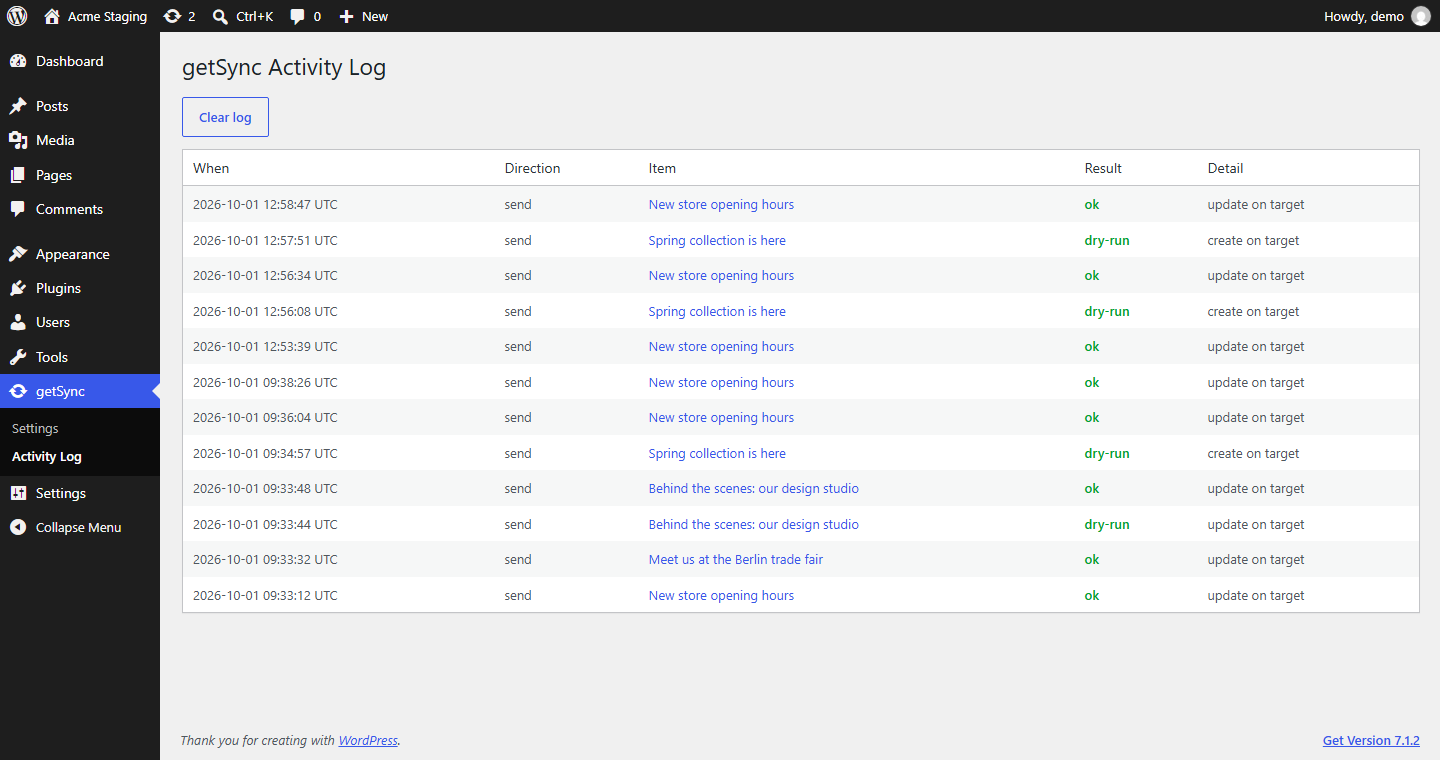
- Activity log, automatic cache purging on the receiver (LiteSpeed, WP Rocket, W3TC, WP Super Cache, Elementor CSS), and an instant "stop accepting syncs" kill switch.
安装:
- Install and activate getSync on BOTH sites: the staging site where you write content, and the live site that receives it.
- On the live site, open getSync > Settings and choose "Live site". Tick "Accept incoming syncs", enter your staging site's address under "Only accept syncs from", click "Generate new shared secret" and save. Then pick or create a user with the Editor role and add an Application Password on that user's profile.
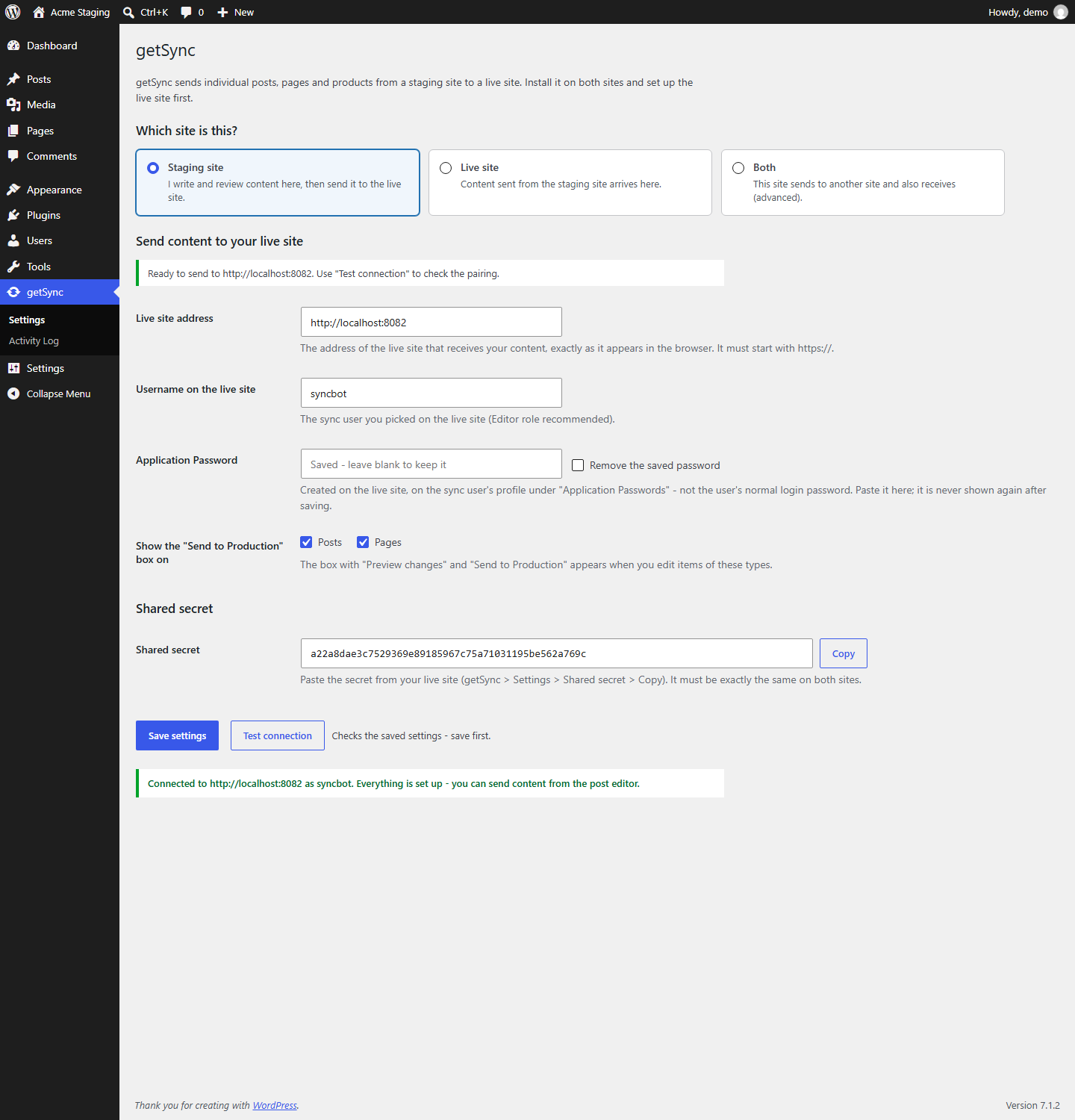
- On the staging site, open getSync > Settings and choose "Staging site". Enter the live site address, that username and the Application Password, paste the shared secret (use "Copy" on the live site), save, and click "Test connection".
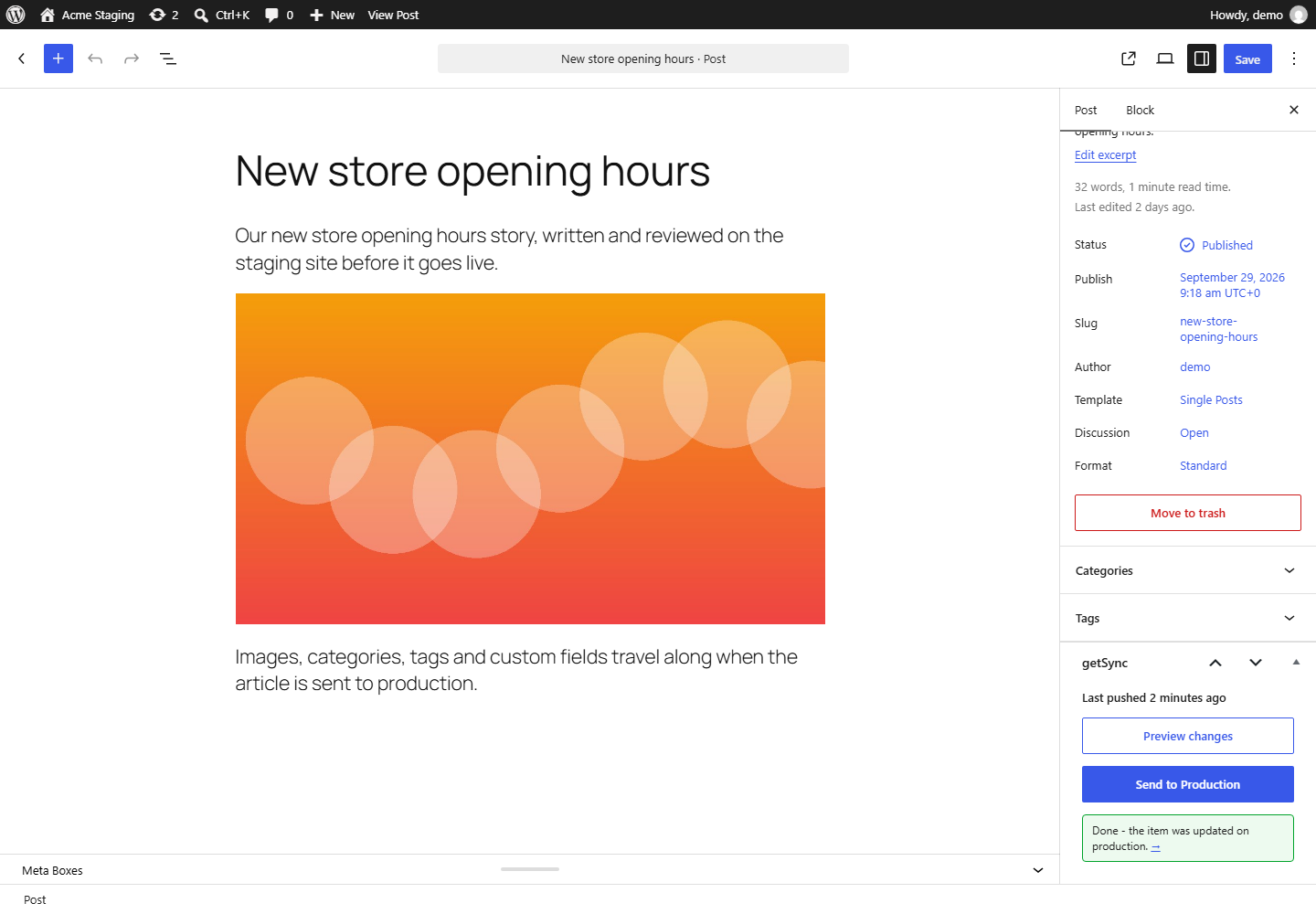
- Edit any post or page and use the getSync box: "Preview changes", then "Send to Production".
屏幕截图:
常见问题:
Does it copy the whole database?
No. getSync moves one item at a time, with its media and taxonomies. It never touches unrelated content or settings.
Will pushing the same article twice create duplicates?
No. Each item remembers where it came from, so a second push updates the existing copy.
Does it transfer SEO data or WooCommerce products?
Yes - both are built in. SEO data syncs for Rank Math, Yoast SEO, All in One SEO and SEOPress; WooCommerce products sync with variations and attributes.
Does it work with Elementor or other page builders?
Elementor works: the design data travels, URLs are rewritten, embedded image references are remapped to the target's media library, and Elementor's CSS is regenerated on arrival. Builders that store everything in the post content (classic editor, Gutenberg) work too. Beaver Builder and Oxygen are not supported yet.
Does it support Polylang?
Yes - post language and translation-group linking sync (an existing language assignment on the target is never changed). Term languages are not synced yet. WPML is also supported, including term languages and a one-click group push.
Is there a limit on how many items I can push?
No. getSync has no push limit and no paid version - every feature is in the free plugin.
Is there a file size limit?
Yes. Files travel inside the push request, which costs several times their size in server memory, so files larger than 32 MB (less on servers with a low PHP memory limit) are not sent. The preview and the push result name each skipped file, and the activity log records it - upload those files to the live site by hand. Developers can change the limit with the gtsync_max_file_bytes filter (on both sites).
Does it push theme or plugin files?
No. getSync only moves content, never executable code.
更新日志:
- Clearer settings screen: choose whether this is the staging site, the live site or both, and only the matching settings are shown, with step-by-step help that says which site each value comes from. The shared secret has a Copy button.
- "Test connection" and pushes explain problems in plain words and say what to fix where: wrong secret, wrong Application Password, receiving switched off, getSync missing on the live site, a server firewall blocking the request, and more. A version mismatch between the two sites is pointed out.
- If a server firewall blocks saving the settings, the screen now explains it instead of showing a bare "403 Forbidden" page. The staging address can be entered without https://, which such firewalls usually let through.
- "Only accept syncs from" compares the host only, so it works whether the staging site uses https:// or http://, and requests that do not say where they come from are refused.
- FIX: the plugin script did not load on the getSync settings and log screens, so "Test connection" did nothing.
- The plugin is now called getSync (text domain: getsync). Options, hooks, filters, meta keys and the REST route (gtsync/v1) use the unique prefix gtsync - developers using the old filter names need to rename them.
- Sites that ran an earlier version under the former name keep everything: on activation, getSync moves the settings, pairing, activity log, scheduled pushes and the origin stamps that link synced items, so re-pushes still update instead of duplicating.
- Install getSync on BOTH sites, then deactivate and delete the earlier plugin. Both sites must run getSync to talk to each other.
- Removed the notice about the former separate add-on.
- The live site refuses pushes the sync user could not make in wp-admin: creating or editing the item, publishing it, uploading its files and creating the synced patterns it uses. The preview reports the refusal before anything is written.
- Assigning an item to another author needs the right to edit others' posts; new terms need the right to manage that taxonomy (existing ones are still assigned). WooCommerce global attributes need the right to manage product terms.
- Templates, template parts, global styles, navigation menus, fonts, WooCommerce orders and other core bookkeeping types are never written by a push (filter: gtsync_blocked_post_types).
- Page templates are only assigned when the live theme has them. Core bookkeeping meta (attachment file paths, menu item data and similar) is never written.
- HTML inside JSON meta values (page builder data) is now filtered for sync users without unfiltered_html. Before, these values skipped filtering entirely.
- On the staging site, only users who may publish an item can push or schedule it. Contributors see a note instead of the buttons (filter: gtsync_user_can_push).
- The optional daily push limit (GTSYNC_FREE_DAILY_LIMIT constant, gtsync_daily_limit filter) is gone: getSync never limits pushes.
- Renamed the internal hooks and meta left over from the old add-on.
- FIX: pages built only from ACF Blocks now have their block images and references remapped. Before, block data kept the staging IDs, which on the live site point at a different file or none. A block image that did not arrive is emptied and logged instead.
- FIX: SEO meta keys with uppercase letters (e.g. Rank Math's rank_math_schema_Article) now sync. SEO settings removed on staging (noindex switched off, canonical cleared, social image removed) are now removed on live too.
- FIX: custom fields deleted on staging are deleted on live on the next push. Only fields that came from a push are removed - data that exists only on the live site is never touched.
- FIX: WPML group push with every language unticked no longer pushes all languages.
- FIX: when an incoming file matches an existing live file, the live file's title, alt text, caption and description are kept; only empty fields are filled.
- FIX: an updated media file is checked against its file type before it replaces the existing one.
- FIX: an "id" attribute on a non-media block (a form, a plugin widget) no longer ships whatever attachment has that number.
- File size limit: files over 32 MB (less on servers with a low PHP memory limit; filter: gtsync_max_file_bytes) are no longer read into memory - which could crash the push with a blank error. They are skipped, and the preview, the push result and the activity log name each one so it can be uploaded by hand. The live site applies the same limit to incoming files.
- The activity log names and links the item each entry is about, on both sites. After a push the box now says "the item was created/updated on production".
- Settings: the saved application password is never shown again (leave the field blank to keep it); the target URL must use https (plain http only for local development hosts); a shared secret that would not survive copying exactly is refused instead of silently altered.
- Translation template regenerated; tested up to WordPress 7.1.
- FIX: terms are matched within the language being pushed. A translation carrying a category slug that also exists in another language was filed under that other language's term, and the language pass afterwards would not correct it - so the translated archive stayed empty while the post appeared in the original language's archive. A same-slug term from another language is never reused; the translation is created instead and the choice is logged.
- FIX: a translated page no longer attaches to the original language's parent. Parents usually keep one slug across languages, and parent resolution ignored language entirely. When several candidates remain, the item keeps its current parent instead of a guess.
- FIX: an item whose translation group changed on the sending site no longer repoints its local marker, which used to drag unrelated items into the wrong group on the next push. The divergence is logged for a human to resolve.
- FIX: translation-group markers on terms are scoped per sending site - group ids are per-site numbers, so two staging sites pushing to one live site could otherwise link unrelated terms as translations of each other.
- Bulk pushes send originals before their translations, as group pushes already did; a group push that leaves the original language unselected now says so.
- FIX: items in the trash on the target are found again. Identity matching excluded trashed posts, so re-pushing an item the target had trashed created a SECOND live copy - for products, a second copy with the same SKU. A trashed target is now updated in place and stays trashed; a sync never resurrects content someone removed from the live site.
- FIX: the preview no longer promises a status it will not keep. With "Same status as on staging" the report claimed the live status was kept while the push would apply the source status - a staging draft could unpublish a live page. The preview now resolves the status exactly as the push does and warns explicitly when a live item would change status.
- FIX: pushing an item that is in the trash on the sending site is refused, and a trashed status in a payload is never applied.
- FIX: adoption no longer guesses when several candidates share the same parent context (typically all top level, common on multilingual sites) - it refuses, as it already did for other ambiguities. Add-on matchers are told about a refusal, and WooCommerce SKU matching now honours it, checks the candidate's language, and logs the adoption.
- FIX: unresolvable upsells, cross-sells and grouped children no longer erase the shop's own curated lists.
- FIX: stock management settings (manage stock, backorders, low stock threshold, sold individually) are preserved on the live shop like the stock number already was - overwriting them silently disabled inventory tracking.
- FIX: failed media imports are logged on the target and reported back to whoever pushed, instead of leaving a live page with missing images and both sites reporting success.
- FIX: chunked uploads keep their file data when the target rejects a file, so it can still travel with the main push.
- FIX: a WooCommerce attribute that cannot be created is logged instead of quietly leaving a variable product unbuyable.
- FIX: ACF fields in repeater and flexible-content rows whose group has plain-name keys are recognised again (0.9.4 only covered top-level fields).
- Scheduled pushes: a source moved to the trash is skipped, the editor box reflects whether the event actually exists, deactivation clears stale schedule markers, and sites with WP-Cron disabled are told scheduled pushes need a server cron.
- FIX: absolute links to the sending site inside ACF field values (URL, text and WYSIWYG fields, including nested repeater and flexible-content rows) are now rewritten to the target site. Post content, WooCommerce and SEO data were already rewritten; ACF values were not, so a button or in-text link could still point visitors at the staging site. Re-push an affected item to correct it.
- FIX: a group push ("Send selected languages") now applies first-push adoption to sibling languages that were never pushed themselves. Previously the adopt setting came solely from the metabox checkbox - which does not exist once the open post has been pushed - so an unpushed sibling whose live counterpart predates getSync arrived as a broken "-2" duplicate instead of updating it.
- FIX (WPML/Polylang): newly created items now receive the payload's language. WPML assigns the default language to every new post before getSync runs, and the "never re-language production content" protection mistook that automation for curated data - fresh translations arrived labeled in the default language and unlinked. Updates remain protected exactly as before.
- Hardening: the origin URL identifying the sending site is now language-neutral (raw home option), immune to multilingual home_url filtering that could otherwise vary it per admin language context and break stamp matching wholesale.
- FIX: ACF fields whose stored reference is a plain name instead of a field_ key (the residue of damaged field-group imports - ACF itself tolerates them) were not recognised, so image and relationship values crossed the sites as raw IDs pointing at the wrong or missing attachments. The classifier now falls back to resolving such fields by name, exactly as ACF does, ships their files and remaps them; unresolvable pairs keep travelling verbatim. Re-push an affected item to correct it.
- FIX: author mapping. An item whose author had no matching user on the target was silently attributed to the sync user - and every re-push reasserted that, undoing manual corrections. Authors now match by email first and login second; without a match, an update keeps the author the live item already has, only a brand-new item falls back to the sync user (logged in the Activity Log). The dry-run preview warns about unmatchable authors before anything is written.
- FIX (Polylang): pushing a translation no longer unlinks translations that exist only on the live site. Polylang stores a translation group as a complete set, and the arriving item rebuilt that set from its own (empty) associations, so a live French page could silently drop out of the group. WPML was never affected.
- FIX: a payload that carries no date can no longer re-date an existing live item to "now".
- Development: getSync now has an automated regression test suite (WordPress PHPUnit) running on every push against PHP 7.4/8.1/8.3 and WordPress 6.0/latest. The Polylang bug above was found by that suite on its first run.
- FIX: ampersands and other entities are no longer altered on the target. Text such as "Plus & IMX95" arrived as "Plus & IMX95" and showed the raw & on the live site, because HTML filtering was applied even to values containing no HTML. Filtering now runs only where it can do something (values with tags, and only when the sync user may not post raw HTML). Affected custom fields, excerpts, term descriptions, media captions and product data. Re-push an affected item to correct it.
- ACF values keep their type: numbers and booleans are no longer cast to text.
- FIX (critical): multilingual bookkeeping taxonomies (Polylang's language / post_translations and friends) are excluded from term sync and from deletion propagation - previously a push could re-language a live post or damage its translation links. Filterable via gtsync_internal_taxonomies.
- FIX: first-push adoption now disambiguates by language and parent context; when several items share a slug and none can be disambiguated, getSync creates a new item instead of guessing (and logs why).
- FIX: an image edited or replaced on the source (same ID, new file) now refreshes the live copy - previously the stale file was kept forever.
- FIX: failed media imports no longer empty ACF image/gallery fields or the product gallery - production values are left untouched and the failure is logged.
- FIX: a variation that fails to apply is no longer mistaken for a deleted variation (orphan cleanup is skipped for safety); each variation's lookup-table row is now rebuilt.
- FIX: WPML never changes the language of existing live content (posts or terms) - mismatches are logged instead.
- FIX: deep term hierarchies are created in the right order; a term name collision with a different slug now reuses the existing term instead of dropping the assignment.
- FIX: sized image URLs (image-1024x683.jpg) in content are rewritten for newly imported media.
- FIX: structured JSON meta (e.g. Elementor data) is never corrupted by HTML filtering; WooCommerce serialized meta keeps its value types.
- Security: new gtsync_force_kses filter to enforce HTML filtering regardless of the sync user's capabilities; the dry-run flag is now inside the signed request body; replay protection is atomic; readme documents sync-user hardening.
- Housekeeping: post_date_gmt travels (no more timezone shift), media titles keep backslashes, deactivation/uninstall clean up scheduled pushes, ACF field names with uppercase letters sync correctly.
- Visual dry-run report: Preview now shows a checklist of exactly what a push will do - update or create (and where), how many images will be reused vs newly uploaded, which terms and field groups will be created, what each integration (SEO, ACF, WooCommerce, WPML, Polylang) will sync - before anything is written. Add-ons can contribute lines via the gtsync_dry_run_report filter.
- ACF: user fields are now remapped by email; ACF Blocks are fully supported - field values inside block markup ship their images, remap references (image, file, gallery, post object, relationship, user) on arrival, and their field groups join the automatic group creation.
- Chunked media transfer: when a push's media exceeds a size threshold (filter: gtsync_chunk_threshold_bytes, default 6 MB), files upload in separate requests first and the main push travels light - no more one-giant-request failures against body/WAF limits. Dry runs no longer transfer file bytes at all, making previews fast.
- Deletions propagate: a removed featured image, emptied taxonomy, emptied product gallery or cleared linked-products list now clears on the target on the next push.
- Elementor: attachment IDs inside the design data are remapped to the target's media library (new module).
- Polylang: post language and translation-group linking sync, production-wins (new module).
- WooCommerce: first-push adoption falls back to matching by SKU when no slug match exists, preventing duplicate SKUs. New gtsync_adopt_match filter for custom matchers.
- Every integration module (SEO transfer, WooCommerce, WPML, ACF, bulk push, scheduling) now ships built in, and the daily push limit is gone. One plugin, one zip.
- Custom fields now travel: all post meta syncs (multi-value safe, serialized structures preserved), minus site-local noise; filterable via gtsync_meta_blocked_keys / gtsync_meta_blocked_prefixes. Source-site URLs inside meta values (including JSON-escaped ones, e.g. Elementor data) are rewritten to the target.
- Gutenberg: attachment IDs inside block markup are remapped on arrival - wp-image classes and block attributes (image/cover/video/audio/file id, gallery ids, media-text mediaId).
- Reusable blocks / synced patterns referenced by the content are shipped as wp_block posts, created or updated on the target, and their refs remapped. Nested references supported.
- Elementor: page data now travels via the meta transport with URLs rewritten, and Elementor's CSS cache is regenerated after receiving. (Attachment IDs inside Elementor data are not remapped yet.)
- IMPORTANT: update BOTH sites to 0.5.0 together - older receivers sanitize the new meta payload destructively.
- Internal links and file URLs in the content and excerpt that still point at the source site are rewritten to the target site on arrival.
- Caches are purged on the receiving site after every sync (LiteSpeed Cache, WP Rocket, W3 Total Cache, WP Super Cache, plus a gtsync_purge_cache action for custom setups).
- Taxonomy terms now travel with their description and term meta. Image meta (e.g. product category thumbnails, filterable via gtsync_term_image_meta_keys) ships the file and remaps it. Existing terms on the target are only filled additively - values already set there always win.
- Readme: feature list now reflects exactly what is built (Polylang, Squirrly and Meta Box removed until they exist).
- New gtsync_metabox_buttons action lets add-ons append actions to the getSync box.
- FIX: updating an existing item no longer resets fields that are not part of the sync (page parent, comment/ping status, password). A nested page keeps its URL when updated.
- Page hierarchy now travels: the parent is remapped on the target by origin stamp or slug. If the parent cannot be resolved, an update keeps the target's existing parent.
- The first-push "update the item with this slug" option is now checked by default. If no matching item exists on the target, a new one is created as before.
- No more duplicate images: incoming media is matched against the target's library by filename and file hash. A byte-identical file that already exists is reused (and linked for future syncs) instead of being imported again.
- Adopt existing content: when pushing an item for the first time, a new checkbox lets you update the item with the same slug on the target (instead of creating a copy). The two are then linked permanently, so future pushes update it as usual. Ideal when both sites already have the same pages.
- Settings footer now says "unlimited pushes" when an add-on lifts the daily limit, instead of "up to 0 pushes per day".
- The gtsync_after_receive action now passes a fourth argument: 'create' or 'update'. Lets add-ons treat first-time syncs differently from re-pushes.
- The "Incoming items arrive as" setting now applies to newly created items only. Re-pushing an item that already exists on the target keeps its current status - a published article stays published.
- New setting: choose which post types show the "Send to Production" box (defaults to Posts and Pages). Custom post types can now be synced without code.
- Initial release: site pairing, signed push, posts/pages/CPT sync, media sideloading with ID remapping, taxonomy sync, dry run, activity log, daily limit.