
GfDesigns
| 开发者 |
GfDesigns
gfdesigns |
|---|---|
| 更新时间 | 2026年10月28日 00:58 |
| PHP版本: | 7.4 及以上 |
| WordPress版本: | 7.1 |
| 版权: | GPLv2 or later |
| 版权网址: | 版权信息 |
详情介绍:
- Main color: buttons and checked elements use it, and their text color is chosen automatically so it is always readable.
- Dark mode: off, on or automatic (follows the visitor's device).
- Density: compact, regular or comfortable.
- Segmented steps and progress bar for multi-page forms.
- Animated feedback: validation errors shake and show an icon, and the confirmation appears with an animated check. Animations are disabled for visitors who prefer reduced motion.
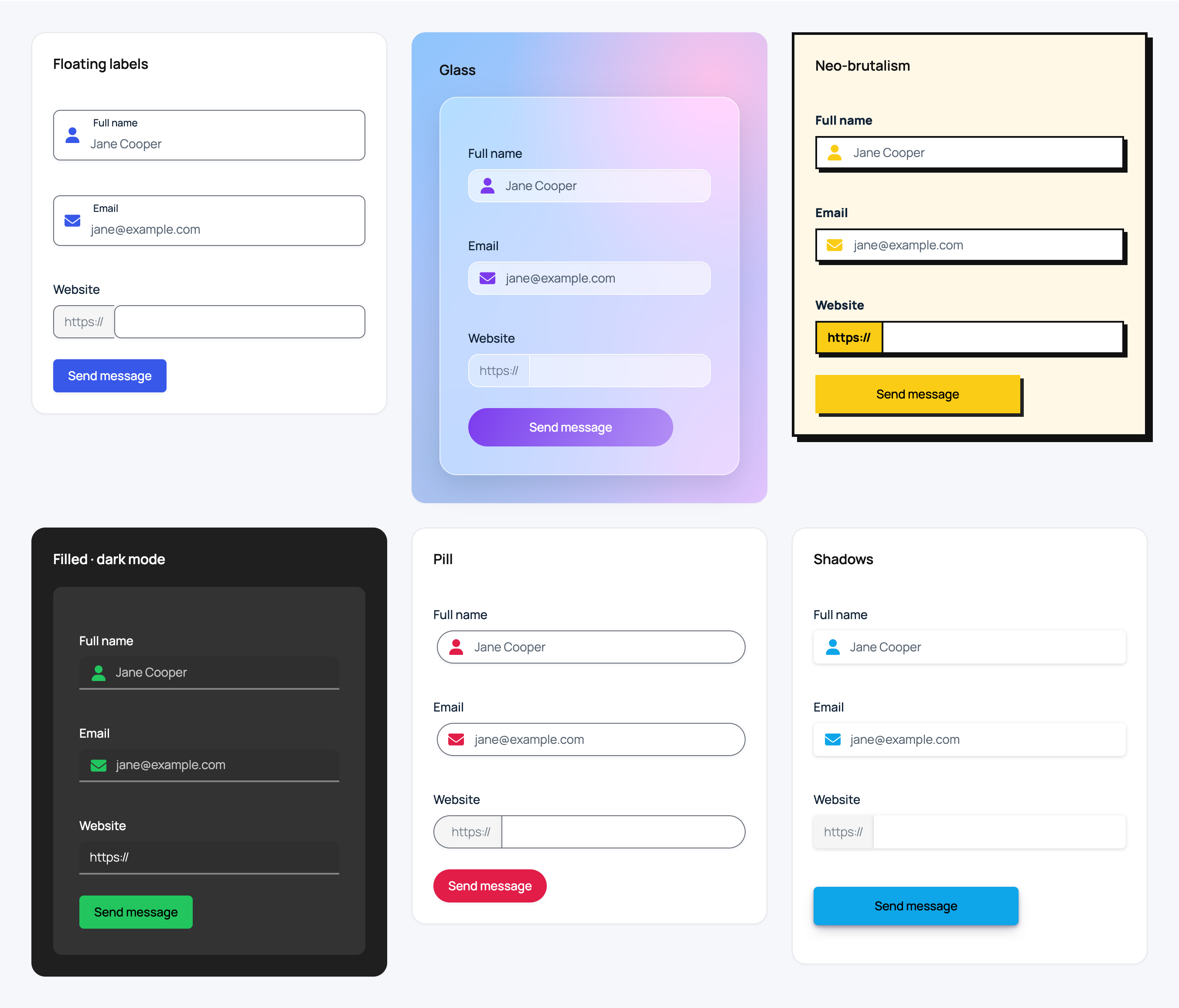
- Fixed pretext at the beginning of text inputs (for example "https://"), saved with the entry.
- Font Awesome icons in text inputs, with a searchable picker in the form editor. The icons are bundled with the plugin: no external requests.
安装:
- Install and activate Gravity Forms.
- Install GfDesigns from Plugins → Add New, or upload the
gfdesignsfolder to/wp-content/plugins/, and activate it. - Edit a form and go to Settings → Designs.
- Turn on "Activate design for this form" and choose your design. The live preview shows the changes as you make them.
屏幕截图:


常见问题:
Can I have a different design for each form?
Yes. Each form has its own design in Settings → Designs.
Nothing changes after installing the plugin. What can I do?
GfDesigns does not change any form until you activate the design in Settings → Designs of that form.
Do I need to know how to code?
No. Every option is a click away and you can see it in the live preview.
Does it work with the Gravity Forms Orbital theme and the block style settings?
Yes. Orbital is the recommended theme: GfDesigns uses its CSS API, so the colors and sizes from the Gravity Forms block keep working. Forms on the "Gravity Forms 2.5" theme are supported in compatibility mode.
How does the automatic dark mode work?
It follows the color scheme of the visitor's device (prefers-color-scheme), so the form is dark when the visitor's system is in dark mode.
Can I use other Gravity Forms styling plugins at the same time?
We do not recommend it: their styles may conflict with each other.
I used GfDesigns PRO. What should I do?
Update GfDesigns to 3.0 or newer, then deactivate and delete GfDesigns PRO. Your designs are kept: they are saved in each form.
更新日志:
- Fixed: the "+" badge of the Avatar file input was cut in half by the circle.
- New: every GfDesigns PRO design is now free and part of GfDesigns. GfDesigns PRO is discontinued: your designs are kept, just deactivate and delete it.
- New: layouts Floating labels, Filled, Pill, Neo-brutalism and Glass.
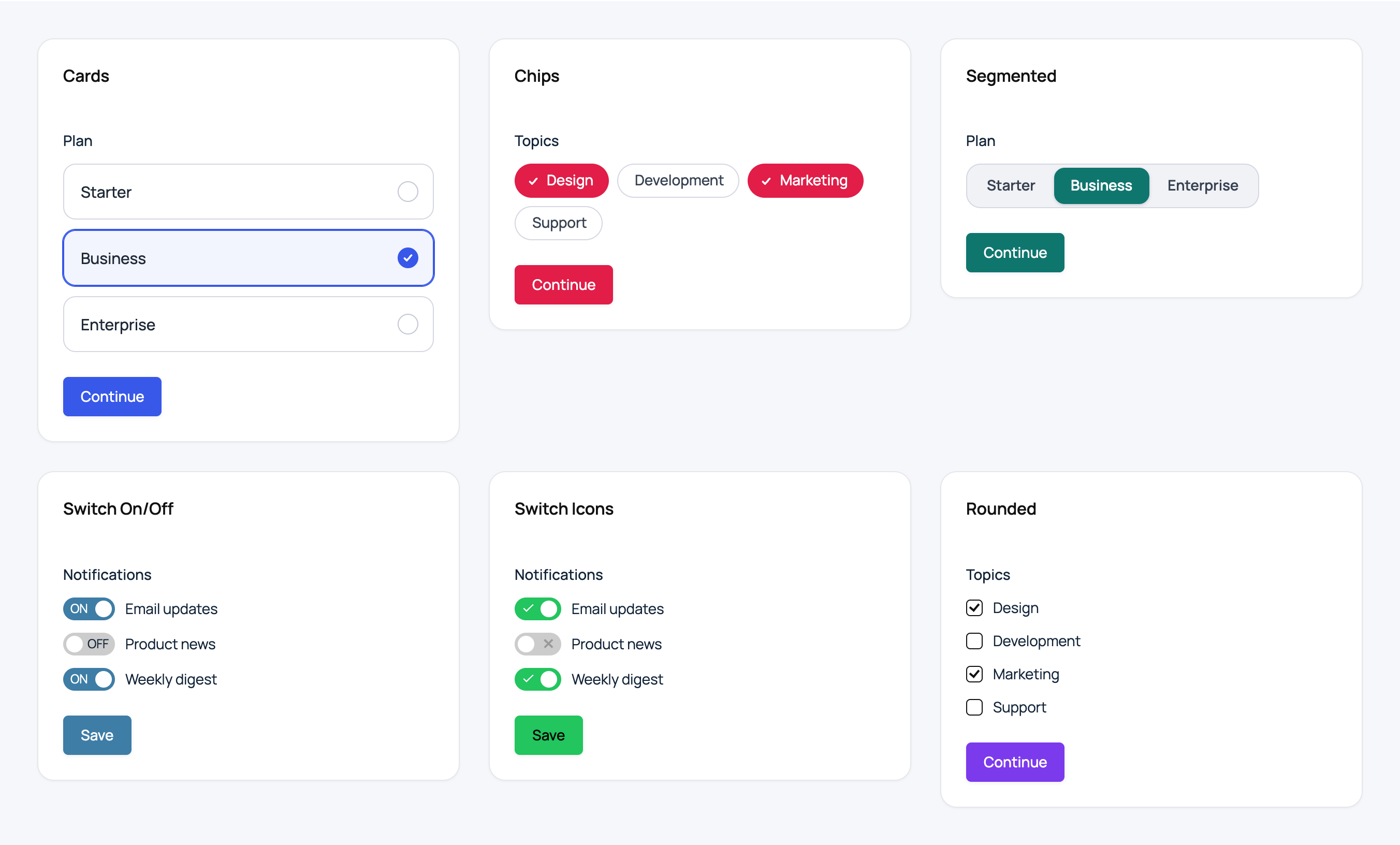
- New: checkboxes & radio buttons styles Cards, Segmented control and Chips.
- New: file upload styles Drop zone (with image preview) and Avatar.
- New: button styles Arrow, Gradient, Glow and Shimmer.
- New: automatic dark mode (follows the visitor's device) and density (compact, regular, comfortable).
- New: segmented steps and progress bar for multi-page forms.
- New: animated validation errors and confirmation (respects reduced motion).
- New: Font Awesome icons with a local, searchable picker in the form editor (no external requests).
- Removed: license key, plugin settings page and external update checks.
- Improved: On/Off switches fill the track with the main color when checked, Blob buttons fill completely on hover Minimal buttons keep straight lines with any button shape, and the knob of the Skew switches is centered in its track.
- New: built the Gravity Forms way: Add-On Framework + Theme Layers (styles, CSS API properties and markup views).
- New: designs work on top of the Orbital theme (the default since Gravity Forms 2.7) using its CSS API, so the block style settings keep working. Forms on the "Gravity Forms 2.5" theme use the previous stylesheets (compatibility mode).
- New: the design no longer forces a form theme nor disables the Gravity Forms CSS on Orbital forms.
- New: Designs settings with the native Gravity Forms settings fields (collapsible sections, visual choices) and a live preview based on the Gravity Forms preview page.
- Improved: the live preview stays visible while scrolling and scrolls to the element being changed.
- Removed: support for Gravity Forms older than 2.8.
- Compatible with Gravity Forms 3.x, WordPress 7.1 and PHP 7.4 – 8.5.
- Fixed: fatal error on every form with Gravity Forms 3.0+ (buttons are now rendered as
<button>). - Fixed: forms without an active design were getting GfDesigns classes.
- Fixed: the upload icon on single file and post image fields with the current Gravity Forms markup.
- Fixed: fields overflowing the form on mobile devices and narrow columns (grid gap), also in dark mode.
- Fixed: the selected file name no longer removes the upload icon and is printed as text.
- Fixed: the Gravity Forms "Preview" button now shows the design with the right form theme.
- Fixed: the fixed pretext is no longer duplicated when an entry is saved again, and is not added to empty values.
- Fixed: the add-on title in the Gravity Forms settings.
- Fixed: a fatal error when GfDesigns and GfDesigns PRO were active at the same time (an admin notice is now shown).
- Security: output escaping and color sanitization hardening.
- Security: full security review. The fixed pretext and the icon are inserted without regex back-references, only bundled icon folders are accepted, the pretext saved with the entry follows the field HTML policy, and the preview frame checks the user capability.
- Requires WordPress 6.5 and PHP 7.4 or newer.
- Compatible up to: Gravity Forms 2.7.3
- Compatible up to: Wordpress 6.2
- Compatible up to: Gravity Forms 2.6.8
- Compatible up to: Wordpress 6.1.1
- Fixed compatibility with webkit browsers
- Fixed button colors and styles bug
- Added Fixed pretext feature
- Added Icon fontawesome to fields
- Added Button styles
- Added More checkboxes and radio styles
- initial version.