
WPBruiser Security - No CAPTCHA Anti-Spam & Login Protection
| 开发者 |
mihche
wpzoom |
|---|---|
| 更新时间 | 2026年11月14日 20:11 |
| PHP版本: | 7.4 及以上 |
| WordPress版本: | 7.1 |
| 版权: | GPLv2 or later |
| 版权网址: | 版权信息 |
标签
下载
详情介绍:
- WordPress login
- WordPress registration
- WordPress lost password
- WordPress comments, with an optional character limit for the comment, name, email and website fields
- WPZOOM Forms: every form you build with it, placed as a block, a shortcode or an Elementor widget
- Ultimate Member: login, registration and password reset forms
- WP-Members: login and registration forms
- Login With Ajax: its AJAX login, registration and lost password forms
- Jetpack: the Jetpack contact form
- MC4WP: Mailchimp for WordPress: every sign-up form you build with it
- HTML Forms: every form you build with it
- wpDiscuz: comments posted through its AJAX comment system
- Limits failed logins: after 5 failed logins (you choose the number) an IP address is locked out for 20 minutes, and for a day if it keeps coming back. Covers the login form, XML-RPC, application passwords and the login forms of WooCommerce, Easy Digital Downloads and other plugins, with a list of current lockouts and a Release button
- Bans usernames such as "admin" and "root": an IP address that tries one that no account uses is locked out at once
- Optional lockdown mode: during a detected attack, accepts logins only from IP addresses each user has logged in from before
- Moves the login page to an address of your choice, so wp-login.php and wp-admin show a "not found" page to visitors
- Closes the REST API to visitors who are not logged in, with a list of plugin namespaces that stay open
- Turns off application passwords, and stops PHP files in the uploads folder from running
- Detects a login brute-force attack in progress and can email you when one starts
- Automatically blocks IP addresses that keep hammering your login
- Optionally rejects login attempts from IP addresses on the bundled lists of known web attackers and anonymous proxies, including Tor exit nodes
- Stops user enumeration through
/?author=Nscans, the oEmbed endpoint and the REST API - Turns off XML-RPC completely (Jetpack's own XML-RPC requests are still allowed), or removes only the pingback methods
- Sends an email whenever an account with administrator rights signs in
- Hides the WordPress version and removes the RSD and Windows Live Writer header links
- Hides the website field and the notes text on the comment form
- Allow list and block list for single addresses and ranges, IPv4 and IPv6
- Finds the visitor's real IP address behind CloudFlare, Incapsula, Amazon CloudFront, AWS ELB, Rackspace and Sucuri, and lets you register other trusted proxy headers
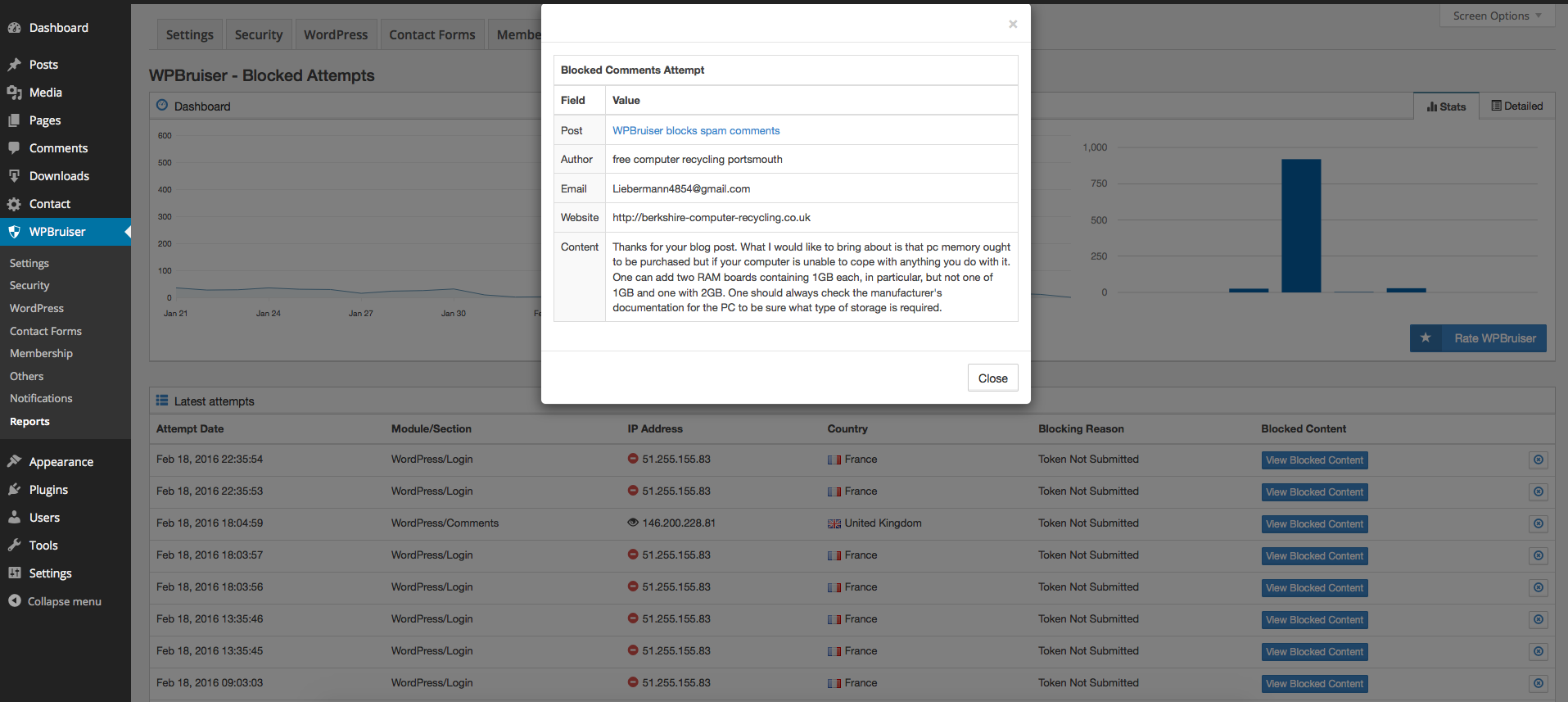
- Every blocked attempt is logged to a database table of its own
- Charts show which forms are attacked most, and a world map shows where attempts come from (the country lookup is done locally)
- See the submitted content of a blocked attempt (optional, kept for the number of days you choose)
- Block or unblock an address straight from the reports screen
- A Dashboard widget with blocked attempts for the last day, week and month, and the forms bots target most
- A weekly or monthly security report by email: what was blocked, the usernames bots tried, and anything that needs your attention
- A weekly check of your plugins against WordPress.org, with a warning for any that were closed (often for a security issue) or abandoned, on the Plugins screen and in Site Health
- Old log entries are deleted automatically after the number of days you choose, or you can turn logging off
- Administrators see a small "protected" note under every form WPBruiser covers, so it is easy to check what is protected (visitors never see it)
- Test Mode, which emails you about every check so you can confirm protection works before you rely on it
- Network admin screens for WordPress Multisite
- Works with full-page caching: the token is requested fresh on every page view
- The front-end script is a single small file, loaded deferred so it doesn't hold up page rendering
- Contact Form 7: blocked messages are marked as spam, so no email is sent
- WPForms (Lite and Pro): blocked submissions stop before an entry is saved or a notification goes out, with or without AJAX submission
- Elementor Pro Form widget, and the Login widget whenever login protection is on
- Gravity Forms: blocked entries go to the form's Spam list
- Fluent Forms, including multi-step forms
- Forminator forms, with or without AJAX submission
- Ninja Forms
- Formidable Forms (Lite and Pro), with or without AJAX submission
- WooCommerce: login (on My Account and at checkout), registration, lost and reset password, product reviews, and account creation at checkout on both the classic checkout and the Checkout block
- Easy Digital Downloads 3.0+: login, registration and lost password forms, login and account creation at checkout, and optional card-testing protection that checks every purchase
- MailPoet subscription forms wherever they appear: widgets, blocks, shortcodes, pop-ups, slide-ins, fixed bars and below posts. No subscriber is created and no confirmation email is sent for a blocked sign-up.
- Country blocking: reject submissions from the countries you choose, or accept them only from the countries you choose. Countries are looked up locally with current IP-to-country data that ships with each release, plus Cloudflare's country header on sites behind Cloudflare. Submissions from unknown countries are never rejected, and the screen warns you if your own country would be blocked.
- Submission rate limits: limit how many protected forms one IP address can submit in a time window (5 every 10 minutes by default). Administrators and IP addresses on your allow list are never limited, and rejected submissions show up in Reports as "Too Many Submissions".
- Every Pro integration is switched on automatically for the plugins you already use, on first activation and after each update
- Blocked attempts from every integration appear in the same Reports screen and Dashboard widget, with the submitted content when you keep it
- Updates and priority support from the WPZOOM team, with a 14-day money-back guarantee
- An active license switches the Pro features on; if it expires, they keep working for 14 more days, then the site keeps the free protection until you renew
- What is sent: the folder names of the plugins installed on your site (for example "contact-form-7"), one request per plugin, to api.wordpress.org. Plugins with an Update URI pointing somewhere other than WordPress.org are not sent. WordPress itself already sends this list to WordPress.org to check for updates.
- When: about once a week per plugin, from the daily WP-Cron event, and when you open WPBruiser's Checkup screen or Tools > Site Health.
- Why: to find plugins that WordPress.org has closed or that haven't been updated in over two years.
- You can turn it off with
add_filter( 'wpbruiser_plugin_health_enabled', '__return_false' );. - WordPress.org privacy policy.
安装:
- In the WordPress admin, open Plugins > Add Plugin.
- Search for "WPBruiser", then click Install Now and Activate.
- Download the plugin ZIP from WordPress.org.
- Either upload it under Plugins > Add Plugin > Upload Plugin, or extract it and copy the
goodbye-captchafolder intowp-content/plugins/on your server. - Activate WPBruiser on the Plugins screen.
- Open the new WPBruiser item in the admin menu.
- On the WordPress screen, check that the login, registration, lost password and comment forms are protected (they are on a new install).
- On the Integrations screen, switch on protection for any supported plugin you use. Integrations for plugins that are already active are switched on for you on a new install.
- Optionally, turn on Test Mode, submit your forms yourself and check the notification emails. Turn Test Mode off when you're done.
- If your site is behind a reverse proxy or CDN that isn't detected automatically, add its header under trusted proxy headers so the correct visitor IP is logged.
屏幕截图:


常见问题:
Will my visitors notice anything?
No. There is nothing to click, type or solve. The check runs quietly in the browser while the form is on screen.
Does it need JavaScript?
Yes. The token that proves a submission came from a real browser is generated by a small script. Visitors who have JavaScript turned off will not be able to submit the forms you protect.
How can I check that it is working?
Turn on Test Mode in the plugin settings. While it is on, nothing is blocked. Instead, the notification address receives an email for each checked submission, so you can try your own forms and see the result. Turn Test Mode off afterwards. From then on, the Reports screen lists every attempt that was blocked.
I use a page caching plugin. Is that a problem?
No. The script requests a fresh token on every page view. If a cached copy of a page carries an expired security key, the script gets a new one first, so you don't have to exclude any pages from your cache.
My site is behind Cloudflare or another proxy. Will the right IP be blocked?
The common proxies and CDNs are recognised automatically. For anything else, add the proxy's HTTP header on the proxy headers settings screen. Otherwise every visitor may appear to have the proxy's IP address.
I locked myself out. What now?
If you mistyped your password too many times, wait for the lockout to end (20 minutes by default) or log in from another connection and press Release on the Security screen. If you moved the login page and lost its address, add define('WPBRUISER_DISABLE_LOGIN_URL', true); to wp-config.php to use wp-login.php again; the address was also emailed to the site admin when you set it.
To avoid both, add your own IP address to the allow list. Allowed addresses skip all checks, including the block list. If you can't reach the dashboard, rename the wp-content/plugins/goodbye-captcha folder over FTP or with your host's file manager to deactivate the plugin. Then sign in, rename it back and add your address to the allow list.
What does WPBruiser Pro add?
Protection for Contact Form 7, WPForms, Elementor Pro forms, Gravity Forms, Fluent Forms, Forminator, Ninja Forms, Formidable Forms, WooCommerce, Easy Digital Downloads and MailPoet, plus country blocking, submission rate limits and priority support. See "WPBruiser Pro" in the description, or the WPBruiser Pro page.
Do I still need the free plugin with Pro?
Yes. WPBruiser Pro is an add-on: it adds integrations and security features to this plugin, which keeps doing the checking, the logging and the reports.
Does WPBruiser Pro call any external service?
Only for the license (activation and a daily check) and updates, which come from wpzoom.com. Every check still runs on your server, and the IP-to-country data ships inside the add-on.
Does it send data to any server?
Nothing about your visitors, ever. The only outside request is the weekly plugin check, which sends the names of your installed plugins to the WordPress.org plugin directory, as WordPress itself does for updates. See "External services" in the description. (The optional WPBruiser Pro add-on contacts wpzoom.com for its license and updates, and, only if you set them up, Slack, Telegram or your webhook for the report.)
Does it replace a full security plugin?
No. WPBruiser handles spam bots, brute-force logins and a few hardening options. It doesn't scan files, run a firewall or check your site's integrity, so you can run it alongside a plugin that does.
I'm upgrading from the original WPBruiser. Will I lose my settings?
No. Your settings, allow and block lists and logs are kept, and the upgrade routines run by themselves the first time the new version loads. Two things no longer load: the old paid add-ons, and the integrations for plugins that are closed or no longer maintained (ZM Ajax Login & Register, PlanSo Forms, UltraCommunity, Seamless Donations and Epoch).
Where do I report security bugs found in this plugin?
Please report security bugs found in the source code of the plugin through the Patchstack Vulnerability Disclosure Program. The Patchstack team will assist you with verification, CVE assignment, and notify the developers of this plugin.
更新日志:
- Improved: each anti-spam token now works for one submission only, so a script can no longer copy one token and send a form over and over with it. The page fetches a new token after every submit, so visitors can still retry after an error or send a second message without reloading.
- Improved: tokens now expire after three hours. Pages left open longer get a new token automatically. Developers can change the lifetime with the
wpbruiser_token_max_agefilter. - New: a "Token Already Used" reason in Reports for replayed submissions.
- Fixed: if the plugin's log table was missing (for example after a site migration), every form submission wrote a database error to the error log. The table is now recreated automatically.
- Security: a successful login no longer cleared every failed login recorded for that IP address, so someone with any account could log in to it between guesses at another account's password and never be locked out. Failed logins are now counted per account as well, and a login forgets only that account's failures.
- Security: failed logins against one account are now also counted across all IP addresses, so guesses spread over several addresses still reach the lockout.
- Fixed: more text couldn't be translated: the Reports screen (box titles, table headers, chart labels and tooltips, the map tooltip, "No records found", Previous/Next and the block menu) and the allowed and blocked IP lists (the accepted formats and "Your IP Address is"). Chart dates now use the site language's month names.
- Fixed: with no blocked attempts, the Reports pagination showed a page "0".
- Fixed: the remaining English-only text can now be translated: the three alert emails, country names (in Reports, the IP lists and the security report), the "Brute Force" and "Country Blocking" names, the XML-RPC "disabled" message apps see, and "N/A". Dates in Reports and in the alert emails now follow the site's language and date format, and the Test Mode help box is written as whole sentences translators can reorder.
- Fixed: deleting the original WPBruiser Pro (sold on CodeCanyon until 2019) also deleted the current plugin's settings and blocked-attempt logs, because both share them. They are now kept.
- Fixed: deleting WPBruiser and the original WPBruiser Pro together could stop with a PHP error.
- For developers: new filter
wpbruiser_module_display_name, so add-ons can translate their module names. - New: a notice when the original WPBruiser Pro is still installed. It bundles an old copy of WPBruiser and is no longer needed, so it can be deactivated and deleted.
- Fixed: with Ultimate Member 2.6.7 or later, every login through an Ultimate Member form was refused once its protection was on. Ultimate Member moved the form's details to a second argument of its validation hooks; WPBruiser now reads them from there (and still works with older versions). A refused submission shows Ultimate Member's own error notice. Thanks to Mykyta Synelnikov of the Ultimate Member team for the patch and the pointers.
- Fixed: on a translated site, links to WPBruiser's screens (on the Checkup screen, in the security report and on the Dashboard widget) led to "Sorry, you are not allowed to access this page". The screens' addresses were built from their translated names; they now stay the same in every language (
wp-bruiser-settingsand so on), and old translated addresses redirect to the new ones. - Fixed: on the Settings screen, the number of days in the log settings and most of the text in the Trusted Proxy Headers box couldn't be translated.
- New: Checkup screen. One page with everything that needs your attention, every WPBruiser protection grouped by area with whether it's on and a link to turn it on, and the status of each installed plugin on WordPress.org.
- New: plugin check. Once a week WPBruiser looks up your installed plugins on the WordPress.org plugin directory and warns you about any that were closed (often for a security issue) or haven't been updated in over two years. Closed plugins no longer get security fixes, and even an inactive one can be a way in. You'll find them on the Checkup screen, under the plugin on the Plugins screen, in Site Health, on the Dashboard widget and in the security report. Premium and custom plugins that aren't in the directory are skipped.
- Improved: the security report also says when other plugins have updates waiting.
- New: a Preview email button next to "Send a test report", which opens the report in a new tab.
- For developers: new filters
wpbruiser_plugin_health_enabled, to turn the plugin check off, andwpbruiser_checkup_protections, to add to the Checkup screen's list.
- New: security report email. Once a week or once a month, WPBruiser emails you what it blocked (with the change from the previous period), the forms bots went for, the IP addresses and usernames they used, and anything that needs your attention: Test Mode left on, an active form plugin that isn't protected, an update waiting or a Pro license about to run out. Choose how often on the Notifications screen, where you can also send a test report. New sites get it weekly; on existing sites it starts off, and a one-time notice offers to turn it on.
- Improved: the attack, administrator sign-in and Test Mode emails have a new, cleaner design that reads well on phones.
- Fixed: the administrator sign-in email greeted "Hi ," when the account had no first or last name.
- The plugin is now called WPBruiser Security, since it covers login security and WordPress hardening as well as spam. Same plugin, same settings.
- For developers: new filters
wpbruiser_report_frequencies,wpbruiser_report_data,wpbruiser_report_checksandwpbruiser_email_recipients, and actionswpbruiser_report_sentandwpbruiser_report_email_sections.
- New: login lockouts. After 5 failed logins in 12 hours (you choose the number), an IP address is locked out for 20 minutes, and for 24 hours after its 4th lockout in a day. They cover the login form, XML-RPC, application passwords and the login forms of other plugins (WooCommerce, Easy Digital Downloads and any plugin that uses WordPress' own login). Allow-listed IP addresses are never locked out, nothing is locked out in Test Mode, and the Security screen lists current lockouts with a Release button. On by default, also on existing sites.
- New: banned usernames. An IP address that tries "admin", "administrator", "root" and similar names that no account on your site uses is locked out at once. You can edit the list.
- New, optional: lock out IP addresses that try any username that doesn't exist, and a lockdown mode that, during a detected brute-force attack, accepts logins only from IP addresses each user has logged in from before.
- New: Reports show lockouts as "Too Many Failed Logins", "Banned Username" and "Login Lockdown".
- New, optional: a custom login URL. wp-login.php and, for visitors who are not logged in, wp-admin show a "not found" page; every login, logout and password reset link follows the new address, and it is emailed to the site admin when you set it.
define('WPBRUISER_DISABLE_LOGIN_URL', true);in wp-config.php turns it off. - New, optional: close the REST API to visitors who are not logged in. oEmbed, Contact Form 7, the WooCommerce Store API, Jetpack, LiteSpeed and Wordfence stay open by default, and you can add other namespaces.
- New, optional: turn off application passwords, and block PHP files in the uploads folder (Apache and LiteSpeed; the rules are removed again when you switch the option off or deactivate WPBruiser).
- Fix: Easy Digital Downloads' lost password form was rejected while WordPress lost password protection was on, because the form never received WPBruiser's token. It does now.
- New: an "Upgrade to Pro" item at the bottom of the WPBruiser menu, and every Pro link now leads to a page made for people already using the free plugin. Both disappear once WPBruiser Pro is active.
- New: a Documentation button in the Support box, linking to the new WPBruiser documentation on wpzoom.com.
- New: an Easy Digital Downloads card on the Integrations screen (protected with WPBruiser Pro).
- New: with WPBruiser Pro active, the sidebar shows that your site is protected: which plugins' forms are checked, attempts blocked in the last 30 days, and whether the Pro license is active. When the license has expired or isn't activated, the box, the Integrations cards and the Security screen say what is switched off and link to renew or activate it.
- New: the Security screen shows WPBruiser Pro's country blocking and submission rate limit settings, locked, so you can see what Pro adds there.
- Improved: a lighter look for the settings screens, with underlined tabs, on/off switches instead of checkboxes and more spacing in the lists of accepted IP formats.
- Fix: the WPBruiser Dashboard widget showed its title at the far end of the header, away from its icon.
- Developer: an integration's form can be marked as opt-in ('EnableByDefault' => false), so it is never switched on automatically or by the card's main switch. When a form ends up with the token field twice, every copy is now filled.
- New: WPZOOM Forms integration, free. Every form is protected whether it is placed as a block, with the
[wpzf_form]shortcode or as an Elementor widget; a blocked submission is stopped before any email is sent or entry is stored, and Reports show its fields under their labels.
- New: protection is on from the start. A new install protects WordPress login, registration, lost password and comments, plus every supported plugin that is already active.
- New: a Dashboard widget with blocked attempts for the last day, week and month, and the forms bots target most.
- New: administrators see a small "protected" note under every form WPBruiser covers, so it is easy to check what is protected. Visitors never see it, and it can be hidden in Settings.
- Fix: about one genuine visitor in ten could be rejected on any protected form. On sites without the old mcrypt extension (every PHP 7.2+ site), the bundled cipher library added no padding when the compressed token filled its last block exactly, and then removed real data from the end while decrypting. Tokens now always decrypt; 10,000 test round trips had no failures.
- New: an Integrations screen. Every integration, free and Pro, is a card that shows whether its plugin is active, with a switch to turn protection on or off (and a switch per form where there are several), plus filters and search. It replaces the separate Contact Forms, Membership, eCommerce and Others screens.
- New: an extension API for add-ons such as WPBruiser Pro. An add-on registers its own protection modules through the
wpbruiser_register_modulesfilter and protects a form withwpbruiser_get_token_field_html(),wpbruiser_is_option_enabled()andwpbruiser_verify_submission(). Each add-on loads its own code; WPBruiser still only loads files from its own folder. - New: the
wpbruiser_loadedaction, and thewpbruiser_country_id_for_ipfilter for supplying your own IP-to-country data. - New: the
wpbruiser_reject_reasonfilter, which lets an add-on reject a submission that passed every other check (WPBruiser Pro uses it for rate limits), and add-on settings boxes on the Security screen. - New:
wpbruiser_get_token_field_names(), so integrations can keep the token fields out of stored submissions, and awpbruiser:tokenbrowser event fired when a form receives its token, for forms that submit as JSON. - Fix: Jetpack contact forms. Blocked submissions kept no fields in Reports, current Jetpack versions (which renamed the form class) were not recognised, and older ones could hit a PHP error on a blocked submission.
- Fix: a lost password request that fails the check now shows an error on the form. It used to redirect to the login page, which also broke WooCommerce's lost password form.
- The Contact Forms, Membership, eCommerce and Others screens now list modules added by add-ons. The eCommerce screen stays hidden until an add-on adds a module to it.
- Removed leftover references to the old paid extensions from the settings screens, the AJAX setup and brute-force login detection.
- New: the WPBruiser ninja, redrawn as a vector icon, on every WPBruiser screen, in the admin menu (tinted to match your admin colour scheme) and in the Dashboard widget.
- New: Settings and Get Pro links on the Plugins screen, and a WPBruiser Pro box in the settings sidebar that lists the Pro integrations and points out which of those plugins are active on your site. Both disappear once WPBruiser Pro is active.
- Audited every third-party integration against the plugin directory and removed those whose plugin is gone: ZM Ajax Login & Register (closed 2023), PlanSo Forms (closed 2021), UltraCommunity (30 installs, last updated 2020) and Seamless Donations (last updated 2024, tested only to 6.4). Support for the Epoch comments iframe was removed as well; that plugin has not been updated since 2015. The readme no longer lists Postmatic and WP User Control, both closed, and now lists HTML Forms and WP-Members, which are supported but were never mentioned.
- Bootstrap updated from 3.2.0 to 3.4.1
- Raphaël updated from 2.1.2 to 2.3.0 (minified build). The bundled morris.js was already the project's final 0.5.1 release under an upstream banner that still read 0.5.0; the banner now states the real version and the file's provenance.
- The client script is now a static file loaded with
wp_enqueue_script()(deferred) and configured withwp_localize_script(). Previous versions printed an inline loader that fetched a PHP-generated script through a?gdbc-client=parameter handled before WordPress had finished loading, which also required includingpluggable.phpby hand. The token endpoint is now a registeredwp_ajax_nopriv_action, and a nonce that has expired in a page-cached copy of a page is refreshed by the script through a second registered action, so page caches need no special handling. - Forms injected by AJAX (Ultimate Member, ZM Ajax Login & Register) are detected with a
MutationObserver; the inline "refresh tokens" scripts that used to travel with their markup are gone. - The brute-force "site under attack" flag is stored as a transient. The plugin no longer writes any files: the file cache (which could fall back to
wp-contentitself), its.htaccess/index.phpguards and seven unused cache back ends were removed. - Every settings callback registered with
register_setting()now runs the submitted values through a whitelist that drops unknown keys and coerces each field by its declared type before any module-specific validation. - Admin styles that were printed inline from the settings partials and the Reports modal moved into the enqueued stylesheet; the Reports map data is localized instead of printed as an inline script.
-
The browser fingerprint posted with each token request is unslashed and validated field by field; nonces are unslashed and sanitised before
wp_verify_nonce(); a dead URL helper that read$_SERVERunsanitised was removed. Fixed - Made an implicitly nullable constructor parameter explicit and replaced a non-canonical cast, both deprecated by PHP 8.4/8.5.
- Upgrade routines and first-run defaults run on the
initaction instead ofplugins_loaded, which removes the last remaining trigger of the "translation loading was triggered too early" notice on brand-new installs. - A fresh installation now creates its attempts table, token secret and module defaults on activation. Table creation used to happen only inside the 1.x-to-2.0 upgrade step, which new installs correctly skip, so a brand-new install ended up with no table at all.
- Fixed an unauthenticated PHP Object Injection vulnerability (CVE-2026-65556). The Ultimate Member integration deserialized attacker-controlled POST data (
custom_fields) without restricting object instantiation, which could be chained with a POP gadget in WordPress, this plugin or another installed component to perform destructive actions or execute code. Reported via Patchstack. - Hardened every remaining deserialization call in the plugin so that PHP objects can never be instantiated from stored, submitted or remotely fetched data.
- Removed all outbound requests to the discontinued vendor service, including a license-activation request that was sent with TLS certificate verification disabled. The plugin no longer contacts any external server.
- Removed the external module-loading code path, which searched other installed plugins' directories and executed PHP files found there. The plugin now only loads code that ships inside its own directory.
- Added direct-access (
ABSPATH) protection to all plugin PHP files. - Escaped all remaining output, including the client user agent shown in test-mode notification emails, which was previously written into the email unescaped. Internationalization
-
Every translatable string now passes a literal
goodbye-captchatext domain instead of a PHP constant. WordPress.org can only extract strings from literal domains, so previously none of the plugin's ~356 strings could be translated at all. - The declared text domain now matches the plugin slug, and bundled translations are loaded from the correct directory. The previous release looked for them in a folder that never existed.
-
Replaced concatenated and interpolated translation strings with
sprintf()placeholders so they can be translated correctly in every language. Removed - The newsletter subscription form, its bundled MailChimp submission library and its AJAX endpoint. The form was already unreachable and pointed at a mailing list that is no longer operated.
- The Extensions and Licenses admin pages, the licensing modules and the self-hosted plugin updater. These supported paid add-ons that are no longer distributed, and every endpoint they used is gone.
- Promotional links to the discontinued vendor website throughout the admin interface, the notification emails and the readme. That domain no longer belongs to the project. Fixed
- PHP 8 notice: "spl_autoload_register(): Argument #2 ($do_throw) has been ignored". The deprecated argument is no longer passed.
- PHP 8 warning: "The magic method MchGdbcBasePublicPlugin::__wakeup() must have public visibility". The method is now public and throws, which both silences the warning and keeps the class from being rebuilt from serialized data.
- WordPress 6.7 notice: "Translation loading for the wp-bruiser domain was triggered too early". Admin page titles and notice messages are now built on the
initaction instead ofplugins_loaded, so no translation function runs beforeinit. - The admin stylesheets no longer restyle
htmlandbody. Previous versions overrode the WordPress admin font, text colour and background on the plugin's screens; admin pages now inherit WordPress' own typography. - Brute force monitoring now starts on the
initaction instead of while the plugin file is still loading. It reached the translated settings metadata, which was the remaining cause of the "translation loading was triggered too early" notice on every request carrying POST data. - Fresh installations no longer run the 1.x to 3.x upgrade routines. The saved version was left unset on a new install, and because an unset version compares lower than every release, every historical migration step ran against a brand new database. This also removes the
version_compare(): Passing nulldeprecation notices on PHP 8.1 and later. - Fixed the Reports screen crashing when a blocked ZM Ajax Login Register attempt was inspected: the handler was an unfinished debug statement that dumped the raw object and stopped the page. Coding standards
- The plugin now passes the WordPress Plugin Check with no outstanding errors or warnings. Where a rule genuinely does not apply — inspecting nonce-less public form submissions, querying the plugin's own custom table, comparing anti-spam tokens byte-for-byte — the exception is annotated in the code with the reason.
- Escaped every remaining output, added the missing
translators:comments, and replaced_e()withesc_html_e()/esc_attr_e(). - Replaced discouraged functions:
date()withgmdate(),strip_tags()withwp_strip_all_tags(),json_encode()withwp_json_encode(),parse_url()withwp_parse_url(),mt_rand()withwp_rand(), andwp_redirect()withwp_safe_redirect(). - Added
wp_unslash()and sanitisation to request data that lacked it, and stopped writing sanitised values back into$_POST. - Removed leftover debug code, including a
print_r()that dumped a raw object and halted the Reports page whenever a blocked ZM Ajax Login Register attempt was viewed. - Removed hidden files and the superseded client script from the package. Maintenance
-
Declared
Requires at least,Requires PHPand the plugin license in the plugin header. - Raised the minimum supported WordPress version to 4.7, which is what the REST API calls in the brute-force module actually need.
- Raised the minimum supported PHP version to 7.0.
- Updated
Tested up tofor current WordPress. - Support links now point to the WordPress.org support forum. The releases below, 3.1.43 and earlier, were published by the plugin's original author, Mihai Chelaru.
- Fixed PHP 7.4 warnings
- Refreshed Country IPs
- Refreshed WebAttackers IPs
- Refreshed Proxy IPs
- Refreshed Incapsula, Amazon and Cloudflare trusted IPs ranges
- Ajax call javascript error
- Refreshed Country IPs
- Refreshed WebAttackers IPs
- Refreshed Proxy IPs
- Refreshed Incapsula, Amazon and Cloudflare trusted IPs ranges
- Compatibility with Mailchimp for WordPress
- PHP 7.4 warnings Improvements
- Refreshed Country IPs
- Refreshed WebAttackers IPs
- Refreshed Proxy IPs
- Refreshed Incapsula, Amazon and Cloudflare trusted IPs ranges
- Refreshed Country IPs
- Refreshed WebAttackers IPs
- Refreshed Proxy IPs
- Refreshed Incapsula, Amazon and Cloudflare trusted IPs ranges
- Compatibility with latest JetPack Contact Form
- Refreshed Country IPs
- Refreshed WebAttackers IPs
- Refreshed Proxy IPs
- Refreshed Incapsula, Amazon and Cloudflare trusted IPs ranges
- Refreshed Incapsula, Amazon and Cloudflare trusted IPs ranges
- The plugin does not have a valid header issue
- Refreshed Incapsula, Amazon and Cloudflare trusted IPs ranges
- Refreshed Country IPs
- Refreshed WebAttackers IPs
- Refreshed Proxy IPs
- Refreshed Incapsula, Amazon and Cloudflare trusted IPs ranges
- Fixed fatal error when using PHP 5.3.x
- Fixed ajax compatibility with Ultra Community - User Profiles & Membership Plugin Improvements
- Introducing new Extension - WPBruiser WPForms Protection
- Refreshed Incapsula, Amazon and Cloudflare trusted IPs ranges
- Refreshed Country IPs
- Refreshed WebAttackers IPs
- Refreshed Proxy IPs
- Compatibility with WordPress 5.1
- Fixed compatibility with version 2.x of Ultra Community - User Profile & Membership Plugin
- Refreshed Country IPs
- Refreshed WebAttackers IPs
- Refreshed Proxy IPs
- Fixed compatibility with UM 2.X
- Fixed PHP 7.1.x warnings and compatibility with PHP 7.2
- Fixed the incompatibility with Gravity Forms Extension
- Integrated with HTML Forms Plugin
- PHP7 warnings Improvements
- Refreshed Country IPs
- Refreshed WebAttackers IPs
- Refreshed Proxy IPs
- Fixed the PHP notice issue reported by @devonostendorf[https://wordpress.org/support/topic/php-notice-wpdbprepare-was-called-incorrectly-generated-in-wp-core-v4-8-3/]
- Added integration with MailChimp Top Bar
- Added integration with Ultra Community Membership plugin Fixes
- A plugin vulnerability reported by Wordfence team
- PHP7 warnings Improvements
- Refreshed Country IPs
- Refreshed WebAttackers IPs
- Refreshed Proxy IPs
- Prevent oEmbed and WP Rest API user enumeration.
- Compatibility with MailChimp for WP version 4.0.4 and up.
- Compatibility with MailChimp for WP version 4.0.6 and up
- Compatibility with WordPress MU Domain Mapping plugin
- Fixed Password reset protection for WooCommerce
- Refreshed Country IPs
- Compatibility with Avada theme
- Refreshed Country IPs
- Refreshed WebAttackers IPs
- Refreshed Proxy IPs
- Fixed the issue when protection for WooCommerce registration form was conflicting with protection for Standard WordPress registration
- Refreshed Country IPs
- Refreshed WebAttackers IPs
- Refreshed Proxy IPs
- Improved loading speed
- Improved detection algorithm
- Improved proxy detection feature
- Refreshed Country IPs
- Refreshed WebAttackers IPs
- Refreshed Proxy IPs
- Ability to register trusted proxy headers
- Email Notification when a user with Admin Capabilities has signed in
- Country Blocking Extension
- Easy Forms for MailChimp Extension
- Easy Digital Downloads Extension
- AffiliateWP
- Refreshed Country IPs
- Refreshed WebAttackers IPs
- Refreshed Proxy IPs
- Fixed JavaScript error - Uncaught TypeError: Cannot read property 'call' of undefined Thanks to James Revillini
- W3TC refresh cache notice - reported by Todd and roxchou
- bbPress menu disappear when WPBruiser is active - reported by N3k0 Additions
- Integration with wpDiscuz
- WooCommerce Extension
- Compatibility with Query Monitor plugin
- Block Web Attackers IPs and Block Anonymous Proxy IPs options are getting deactivated
- Refreshed WebAttackers IPs
- Refreshed Proxy IPs
- Removed jQuery dependency
- Added protection for Ultimate Member Modal Login
- Compatibility with WordPress 4.5 for Max Comments Fields Length
- Refreshed Country IPs
- Refreshed WebAttackers IPs
- Refreshed Proxy IPs
- Ability to set up the Fields Maximum Length for each comment form field
- Added Extensions page
- Added
languagesfolder to support translations - Added a new filter
wpbruiser-scripts-in-head- to explicitly render WPBruiser's script in head or footer
- Added IPv4 to country lookup
- Contact Form 7
- Gravity Forms
- Ninja Forms
- Formidable Forms
- Fast Secure Contact Form
- BuddyPress
- MemberPress
- Removed the MaxMind GeoIP Databases due to the licensing terms violation
- Fixed MySql error reported by WHSajid
- Fixed issue when WPBruiser blocks post requests from some Amazon proxy servers
- Fixed blocked content extra slashes
- Improved Brute Force attacks detection
- Refreshed dangerous IPs lists
- Now GoodByeCaptcha is WPBruiser
- Fixed Disable Trackbacks/Pingbacks issue reported by sixer
- Added compatibility with WP Deferred JavaScripts plugin
- Fixed warning notice reported by Sucuri
- Compatibility with Login With Ajax plugin
- Compatibility with Google Apps Login plugin
- Compatibility with WP-Rocket plugin
- Compatibility with Autoptimize plugin
- Compatibility with Theme My Login plugin
- New admin interface
- Network admin interface
- Brute-Force protection
- White-list IPs
- Black-list IPs
- WordPress tweaks