
GSTLayer
| 开发者 | jasmeetsaini |
|---|---|
| 更新时间 | 2026年11月18日 12:45 |
| PHP版本: | 7.4 及以上 |
| WordPress版本: | 7.1 |
| 版权: | GPLv2 or later |
| 版权网址: | 版权信息 |
详情介绍:
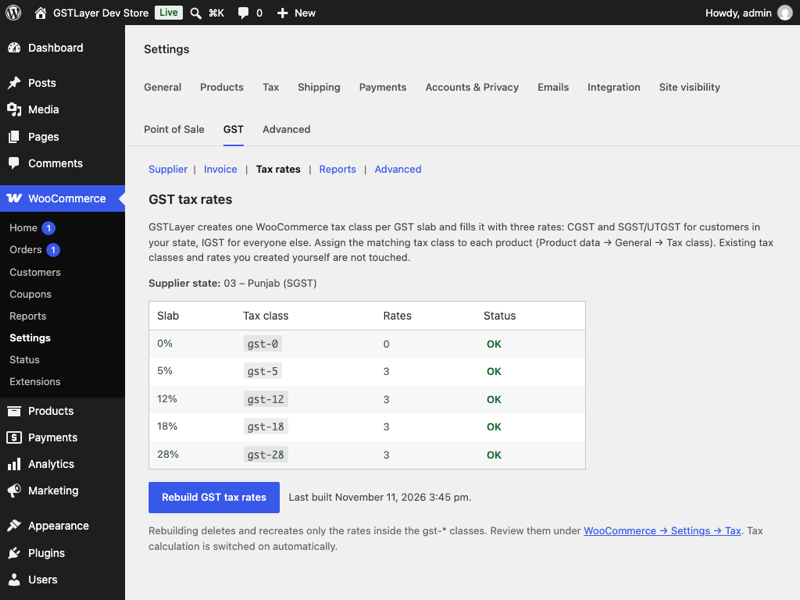
- One-click GST tax rates – creates WooCommerce tax classes for 0 / 5 / 12 / 18 / 28 % (or your own slabs) with CGST + SGST/UTGST for your state and IGST for every other state.
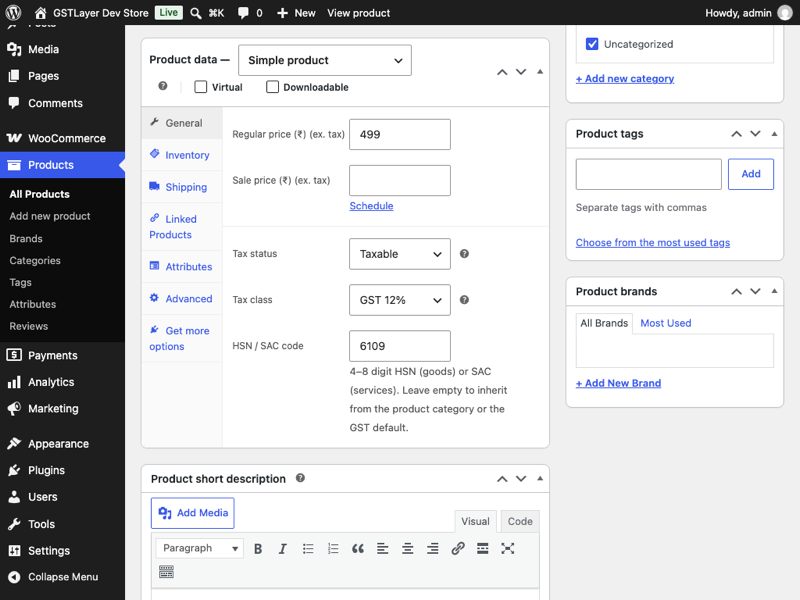
- HSN / SAC codes on products, variations and categories, with sensible inheritance.
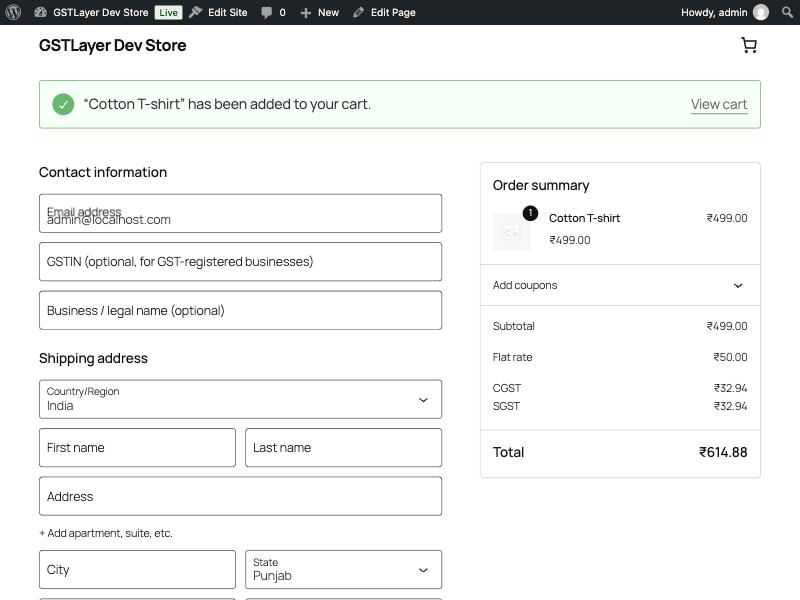
- Buyer GSTIN at checkout – works with both the Checkout block and the classic checkout; format and check-digit validation; stored on the order and the customer profile.
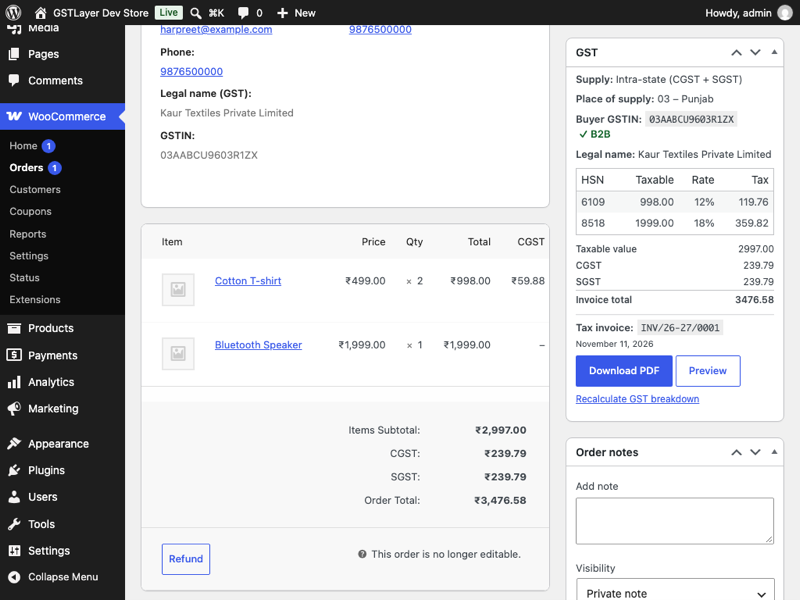
- Place of supply & supply type detected per order (intra-state vs inter-state vs export) with warnings when the charged tax does not match.
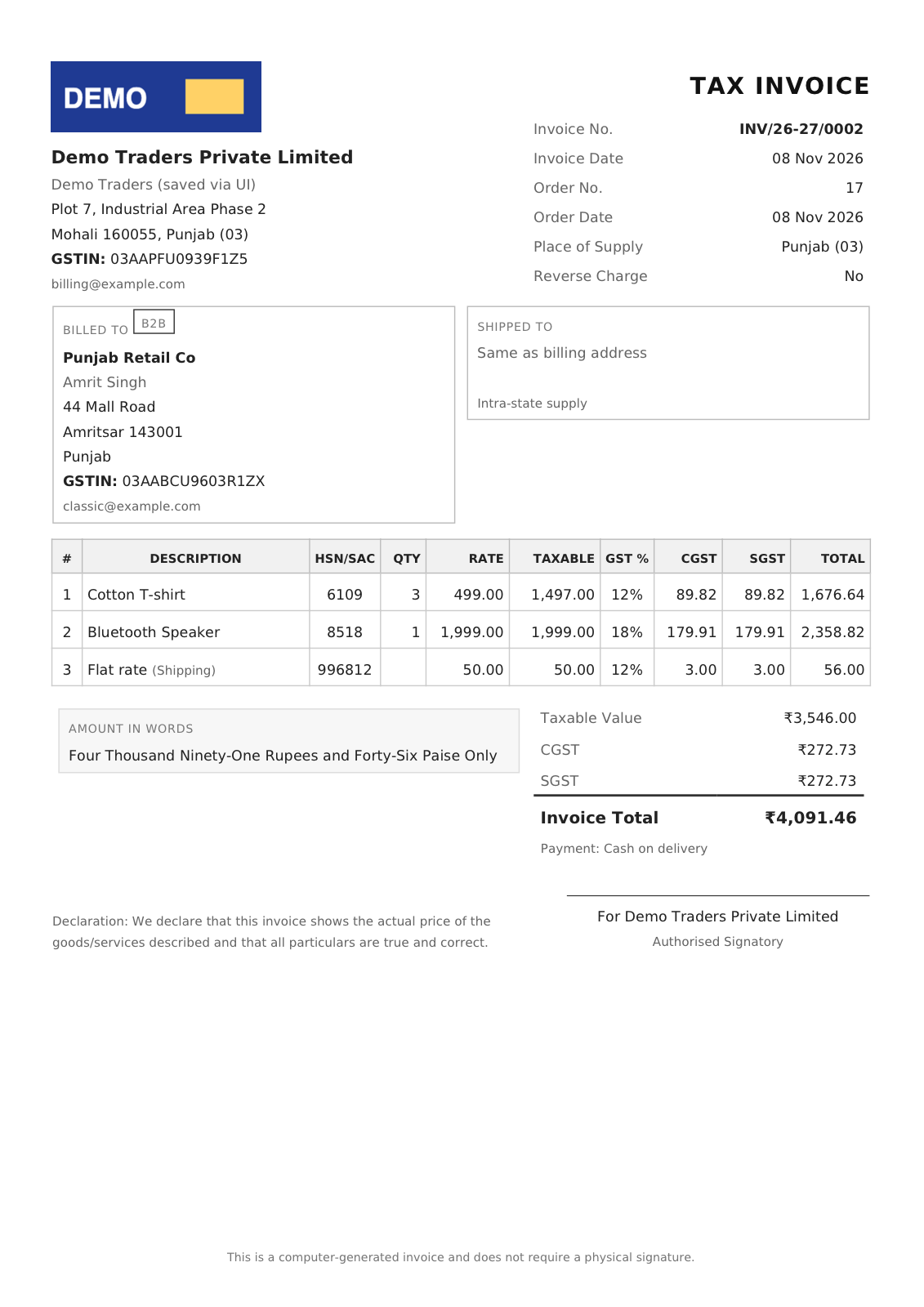
- Sequential tax-invoice numbers per financial year (Rule 46 compliant pattern such as INV/26-27/0001), issued automatically when an order reaches the status you choose and never renumbered.
- PDF tax invoice (Rule 46 layout, your logo, amount in words) attached to order emails, downloadable from the order confirmation page, My Account and the admin order screen.
- GST panel on every order showing taxable value, CGST, SGST/UTGST, IGST, Cess and HSN per line.
- HSN summary report for any date range, exportable as CSV in the GSTR-1 HSN sheet layout.
- Bill of Supply layout for composition-scheme suppliers.
- Privacy first – no external requests, no tracking, no accounts.
vendor/.
安装:
- Upload the plugin or install it from the WordPress plugin directory and activate it. WooCommerce must be active.
- Go to WooCommerce → Settings → GST → Supplier and enter your legal name, GSTIN, address and State / UT.
- Open the Tax rates section and click Create GST tax rates.
- Edit each product: set Tax class to the matching GST slab and enter its HSN / SAC code (or set a default per category).
- Place a test order. The order screen shows the GST panel; the tax invoice number is assigned when the order reaches Processing or Completed.
屏幕截图:
常见问题:
Does this send my orders anywhere?
No. Everything runs inside your WordPress installation. The plugin makes no HTTP requests.
Can I use my existing WooCommerce tax rates?
Yes. GSTLayer only manages rates inside its own gst-* tax classes. Existing rates whose names are CGST, SGST, UTGST or IGST are recognised on invoices and in the HSN report.
Does it work with the new WooCommerce block checkout and HPOS?
Yes. GSTIN and legal-name fields are registered through the Additional Checkout Fields API for the block checkout and as billing fields for the classic checkout. Order data is stored through the WooCommerce CRUD so High-Performance Order Storage is fully supported.
Which supply type is used for Union Territories?
Chandigarh, Ladakh, Lakshadweep, Andaman & Nicobar and Dadra & Nagar Haveli and Daman & Diu levy UTGST; the plugin labels the state component accordingly. Delhi, Puducherry and Jammu & Kashmir use SGST.
Does GSTLayer do e-invoicing (IRN, QR code)?
Not at present. E-invoicing is mandatory above ₹5 crore aggregate turnover; stores below that issue ordinary tax invoices, which GSTLayer generates. An IRP integration is on the roadmap but not promised for a date.
Is this legal or tax advice?
No. GSTLayer applies the GST rules described in its documentation; confirm your setup (place of supply basis, slabs, HSN codes) with your chartered accountant.
更新日志:
- The plugin's website is now https://store.creativesolutiondev.com/, the GSTLayer store on the developer's own domain. No code changes.
- The invoice styles are now a stylesheet file (assets/css/invoice.css) loaded into the PDF engine; the invoice template no longer contains a style block. Themes that override the template keep working; the 'gstlayer_invoice_stylesheet' filter replaces the file.
- Security hardening: product, variation and category HSN fields verify the form nonce and the user's permission themselves; the HSN report's date filter is nonce-protected.
- Result messages of GSTLayer actions are shown once to the user who ran the action, and the "requires WooCommerce" notice appears only on the Plugins screen.
- The customer invoice link always requires the order's secret key.
- Accessibility: tables on the order GST panel, the tax-rate status and the HSN report now have header scopes and captions for screen readers.
- Accessibility: item names in the order GST panel are read out, not only shown on hover; a missing HSN is announced.
- Accessibility: the invoice download and preview links name their document and say when they open a new tab.
- Accessibility: stronger colour contrast for status labels; field help is shown as text instead of hover tooltips.
- Accessibility: the invoice logo picker keeps keyboard focus when the logo is removed and announces changes.
- Accessibility: GSTIN format hint on the classic checkout; descriptive label on the My Account invoice link.
- The plugin website link points to the GSTLayer store.
- Version submitted for WordPress.org review: readme, screenshots, Plugin Check pass.
- Extension points for GSTLayer Pro: generic document issuing (credit notes),
source_idcolumn on the invoice register, reusable GST line computation, template renderer, settings-section filters and an order meta-box hook. - Fix: the "Create GST tax rates", "Issue tax invoice now" and "Recalculate" buttons and the report date filter were nested inside WooCommerce's own form and did not submit; they are now nonce-protected links and buttons.
- Fix: invoice dates printed one day late for invoices issued after 18:30 IST (timezone conversion).
- Fix: export invoices could not be registered (
supply_typecolumn too short for "export"). - Fix: rebuilding GST tax rates no longer loses the rate percentage of earlier orders — the order's own tax lines are used.
- First development release: settings, tax-rate builder, HSN fields, checkout GSTIN, per-order breakdown, invoice numbering, PDF tax invoice with logo, customer downloads and email attachment.