GTranslate Visual Addon
| 开发者 | tuwebmaster |
|---|---|
| 更新时间 | 2026年9月17日 05:09 |
| PHP版本: | 7.4 及以上 |
| WordPress版本: | 7.1 |
| 版权: | GPLv2 or later |
| 版权网址: | 版权信息 |
详情介绍:
- WooCommerce buttons and checkout labels.
- Elementor text widgets.
- Contact forms.
- Custom theme strings.
- Headings, buttons, and calls to action.
- Make sure GTranslate is installed, active, and visible on your site.
- Log in as an administrator and navigate to the frontend of your website.
- Use GTranslate to switch to the language you want to customize.
- Select the specific translated text visually from the page.
- Type your custom translation.
- Save it. Your custom text will override the automatic translation whenever visitors switch to that language.
- Unlimited Visual Elements translated without restrictions.
- All Languages Supported simultaneously.
- CSV Import/Export: Manage thousands of translations in Excel and upload them in seconds.
- SEO Title & Meta Translation: Translate your
<title>and<meta description>tags to rank every language on Google.
安装:
- Go to your WordPress Dashboard -> Plugins -> Add New.
- Search for
GTranslateand ensure it is installed and active. - Upload the
gtranslate-visual-addonfolder to the/wp-content/plugins/directory, or install it directly via the WordPress Plugin Directory. - Activate the plugin through the
Pluginsmenu in WordPress. - Go to the frontend while logged in as an administrator, switch to the target language with GTranslate, and start selecting visual elements to customize.
屏幕截图:

常见问题:
Do I need GTranslate installed for this to work?
Yes. This plugin acts as an addon for GTranslate. GTranslate handles language switching, and this plugin lets you correct selected text manually.
Can I manually fix wrong GTranslate translations?
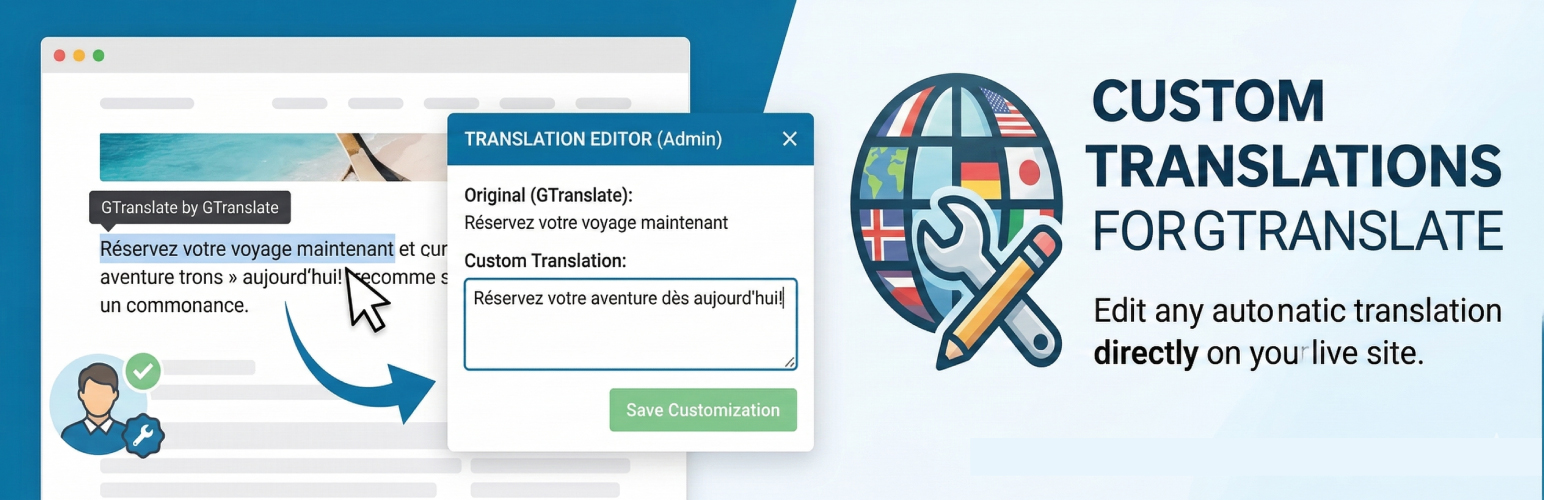
Yes. Log in as an administrator, switch to the target language with GTranslate on the frontend, then select visible translated text and save a manual override.
Can I edit a translation that GTranslate already did?
Yes. If GTranslate's automatic translation is too literal or incorrect, click that text with the visual selector and type your custom translation. Your version will take priority.
Can I use it with WooCommerce or Elementor?
Yes for visible frontend text. It is useful for targeted fixes such as buttons, labels, headings, form text, and checkout wording.
What is included in the free version?
The free version supports up to 10 visual text overrides for 1 target language. It is designed for targeted translation fixes.
How can I get unlimited translations, multiple languages, and CSV Support?
These professional features are available in the separate GTranslate Visual Addon Pro plugin. Click here to learn more about the Pro Version.
更新日志:
- Fixed visual editor language detection with GTranslate 5.0.1 when an old googtrans cookie disagrees with the page language.
- Kept legacy cookie fallback and compatibility with GTranslate 3.1.1.
- Prevented saving when the language changes after opening the editor or cannot be determined.
- Aligned Pro frontend CSV filenames with the active page language; existing translations are preserved.
- Added an optional remembered preference to hide the quick-start guide and floating Translation Mode button.
- Added a per-user backend control to restore the frontend editor helper interface.
- Kept the WordPress admin bar Translation Mode control available when the helper interface is hidden.
- Added a dismiss control to hide the floating Translation Mode interface until the page is refreshed.
- Prevented private translation controls from loading in WordPress administration and visual builder editing contexts.
- Kept the public translation engine active inside builder previews while excluding Elementor, Divi, and other common editor interfaces.
- Added an administrator-only floating Translation Mode control with or without the WordPress admin bar.
- Added a centered, dismissible quick-start guide using the administration brand palette.
- Explained how to finish editing and identify existing custom translations when returning to Translation Mode.
- Added a curved guide line pointing to the floating button and kept the button clickable above the guide overlay.
- Completed an extensive security and compatibility review with successful results.
- Fixed frontend re-editing so an existing custom translation can be updated without deleting it in the dashboard.
- Declared GTranslate as a required plugin using the native WordPress plugin dependency system.
- Added disabled-by-default anonymous telemetry with explicit administrator consent, weekly delivery, and remote deletion on opt-out.
- Added a responsive administration sidebar for Tu WebMaster services, support, privacy information, and telemetry preference.
- Documented external service behavior, collected compatibility fields, retention, and privacy safeguards.
- Redesigned the contextual review invitation with a softer, modern interface aligned with the plugin's brand palette.
- Added a brief, human message explaining how reviews support continued updates and improvements.
- Updated the WordPress admin header and review invitation to use the current GTranslate Visual Addon logo.
- Normalized release file names and line endings for WordPress.org packaging and coding standards.
- Confirmed compatibility with WordPress 7.0 and GTranslate 3.1.1.
- Passed the official WordPress Plugin Check with AI analysis enabled and no errors or warnings across General, Plugin Repository, Security, Performance, and Accessibility checks.
- Confirmed compatibility with WordPress 7.0.
- Added a new reviews module.
- Performed routine maintenance and compatibility updates.
- Improved plugin stability through additional testing.
- Synchronized the internal plugin version.
- Updated product URLs for the Pro version.
- Initial public release on the WordPress Repository.
- Added visual frontend string capturer.
- Integrated base GTranslate bridging system.
- Added feature to override automatic translations.
- Implemented Lite restrictions (10 strings, 1 language).