
Guard Forge – Security, Login Protection, 2FA & Audit Log
| 开发者 | avakodeforge |
|---|---|
| 更新时间 | 2026年10月25日 09:45 |
| PHP版本: | 7.4 及以上 |
| WordPress版本: | 7.1 |
| 版权: | GPLv2 or later |
| 版权网址: | 版权信息 |
详情介绍:
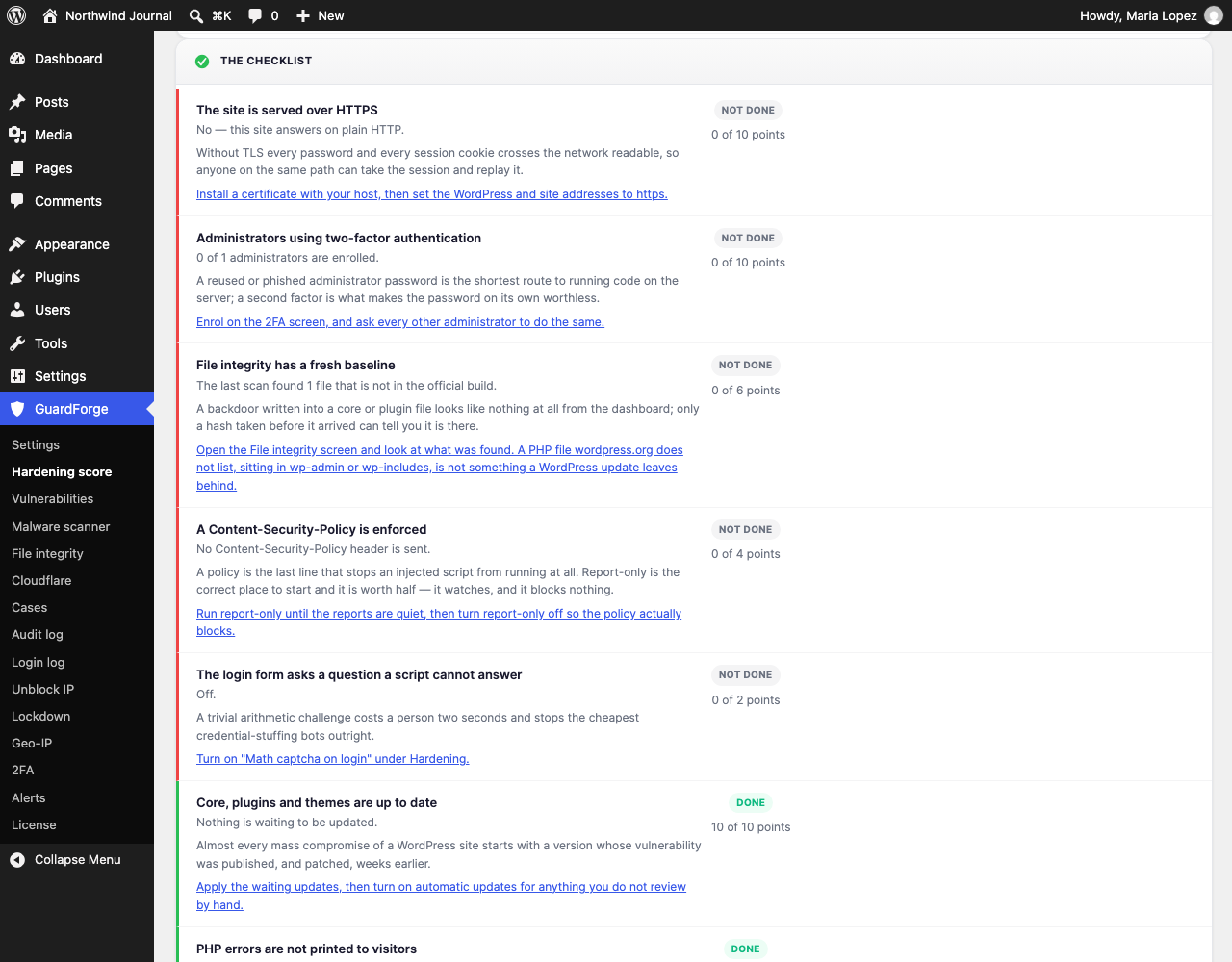
- Hardening score — twenty-one checks of your own installation, scored 0-100, with each row stating exactly how many points it is worth and linking to the screen that fixes it. No outbound request: every check reads this site.
- Staging / development mode — GuardForge notices when it is running on a copy of your site and stops acting on the world: lockouts are recorded but not enforced, and no notification e-mail, alert or firewall rule leaves the copy. Nothing that can switch it on survives a database copy, so a dump from staging can never disarm your live site.
- Login brute-force protection with per-IP lockout and automatic unblock
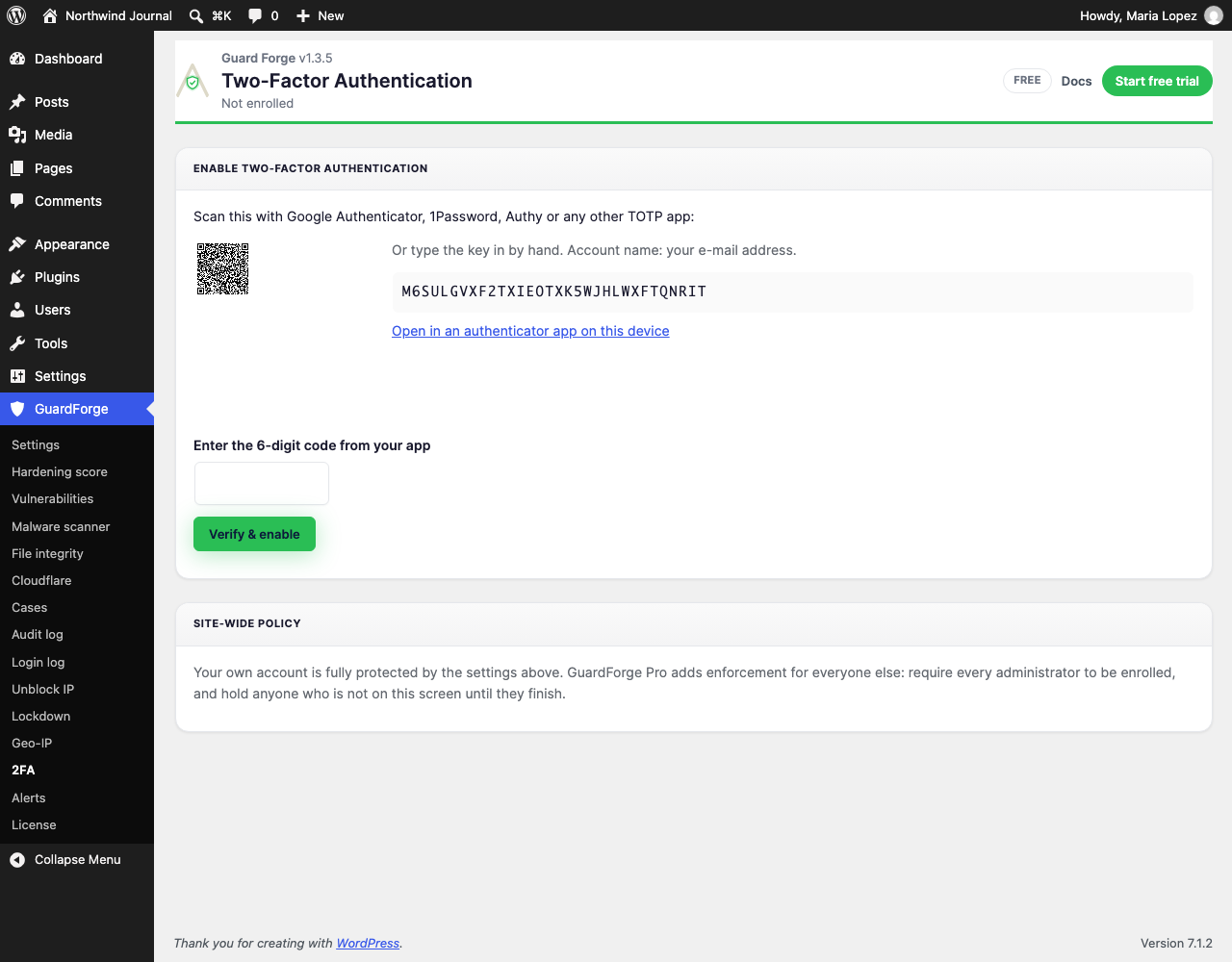
- Two-factor authentication for your own account — TOTP, a login challenge, and single-use recovery codes. Every logged-in user can reach the 2FA screen and protect their own login, not just administrators: editors, authors and shop managers hold accounts worth phishing too. The enrolment QR is drawn on your own server: no image is fetched from anywhere, so your secret never leaves the site.
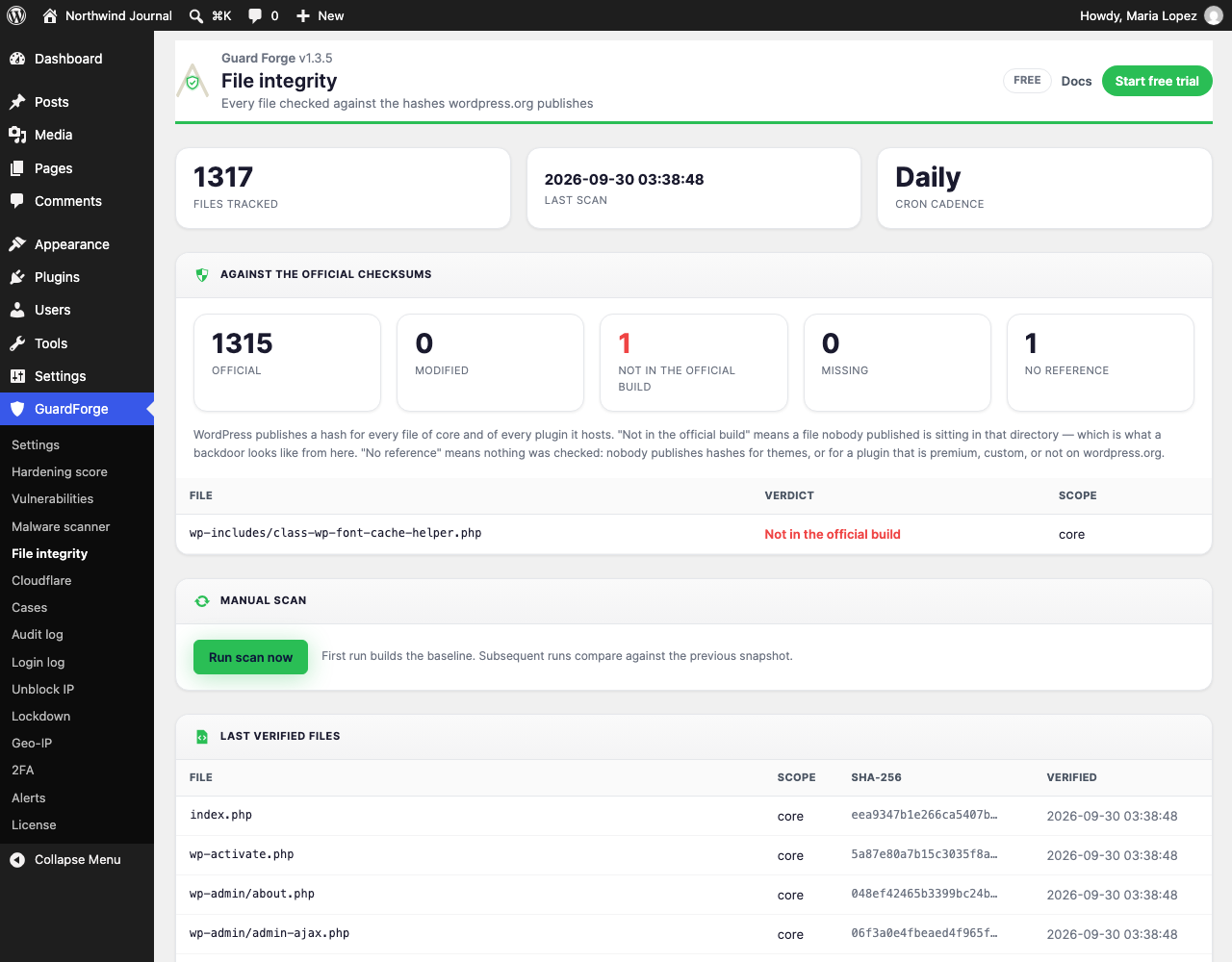
- File integrity against the official checksums — off until you switch the monitor on in Settings, because the comparison asks wordpress.org for the hashes. Once on: every core file, and every plugin hosted on wordpress.org, is compared against the hashes wordpress.org publishes for that exact release. So the screen can say more than "this changed since yesterday": it separates files that are official, modified, missing, and not in the official build at all — which is what a backdoor looks like, and which no scan-to-scan comparison can ever see, because a shell that was already there when the baseline was taken looks like every other unchanged file.
- A premium or custom plugin, and any theme, has no published hashes anywhere. Those files are marked "no reference" and stay on the scan-to-scan comparison. They are never counted as clean — a tick beside something nothing checked is worse than no tick at all.
- A core file that is modified or missing is named on the screen with its verdict, next to a link to Dashboard → Updates: re-installing WordPress is what puts core files back, and this plugin does not write into wp-admin or wp-includes itself.
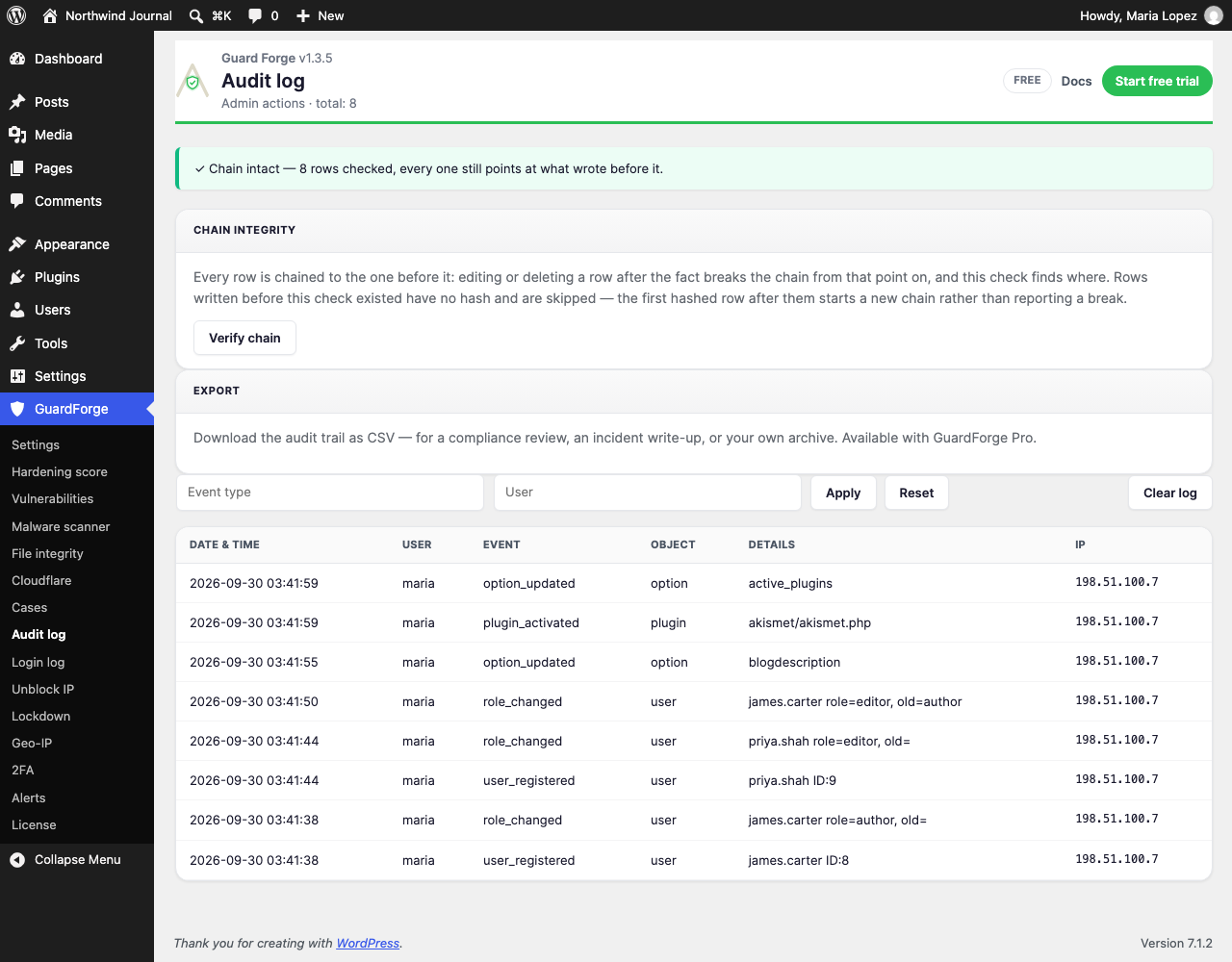
- Audit log, hash-chained — it records logins, failed attempts, option changes, plugin and theme activity, and user and role changes, and every row carries the hash of the row before it. Press "Verify chain" and the table is walked: change one field on one row and that row no longer matches its own hash; delete a row and the next one points at a hash nothing in the table produces. Neither is visible in the table itself, which is the point — an audit log an intruder can tidy up afterwards is decoration. Reading and verifying are free; only streaming it out as CSV is a Pro feature.
- Security hardening: disable XML-RPC, remove version headers, protect wp-config.php via .htaccess
- Content-Security-Policy header — your policy, sent report-only by default so a wrong rule cannot break the site
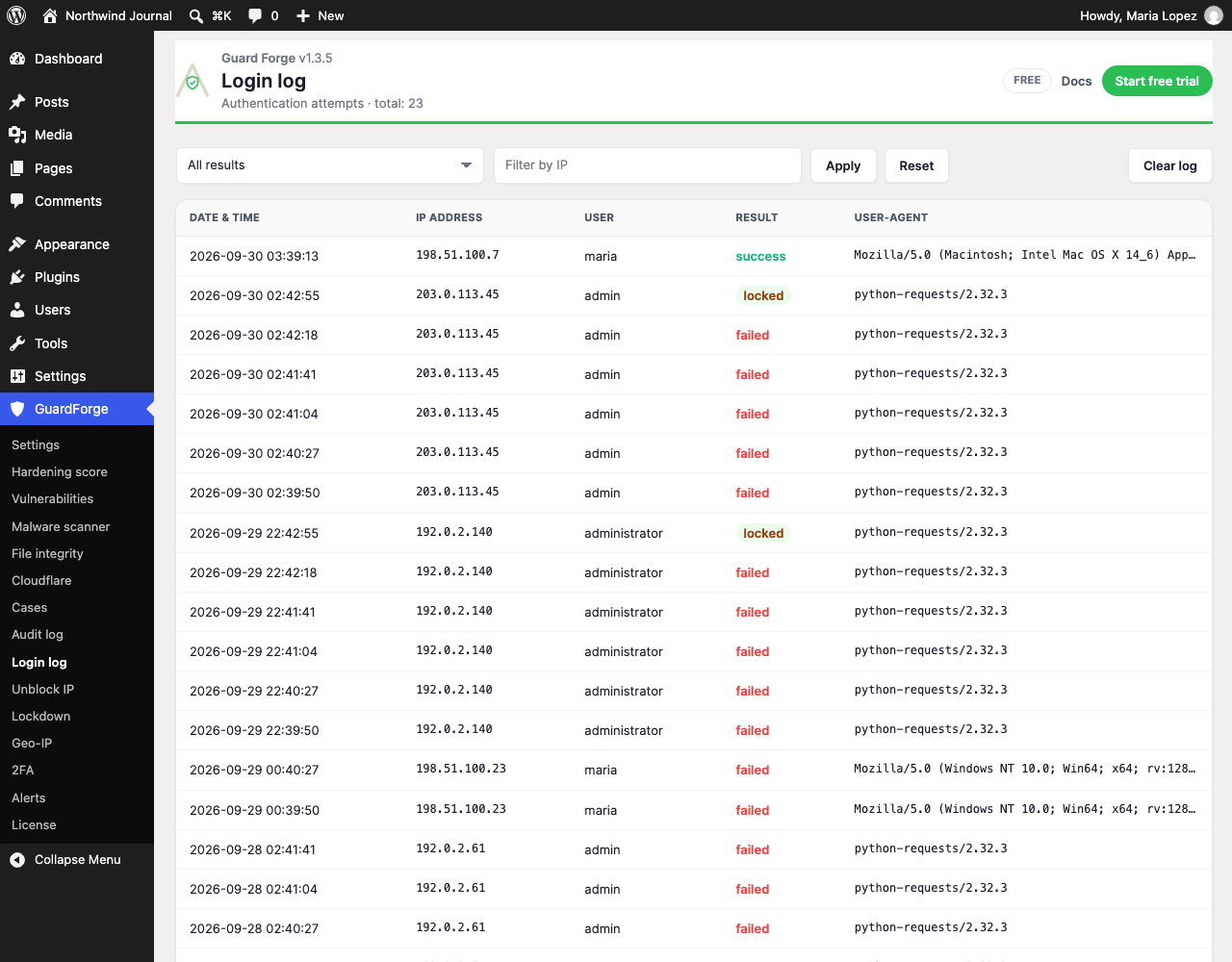
- IP management — allowlist, lift a lockout, login-log browser
- Spam-bot honeypot on the comment form
- WordPress core file protection rules (.htaccess)
- Two-factor enforcement policy — require every administrator to be enrolled before they can use the admin
- Alerts to Telegram, Slack and a signed webhook — a card per channel rather than a box of JSON, each with its own minimum severity, a "Send test" that really sends through the same dispatcher, and a digest you can leave immediate or batch hourly or daily. Quiet hours hold the ordinary traffic until morning, while a lockdown or a malware finding goes straight through them. Bot tokens, Slack URLs and HMAC secrets are encrypted on your own site and the form never prints one back — it shows the last four characters and nothing else
- Lockdown mode — one switch that closes registration, comments, XML-RPC and anonymous REST writes. It can also throw itself, if you ask it to: twenty different addresses locked out inside ten minutes, or a finding from the malware scanner. An automatic lockdown lifts itself after an hour, writes both ends to the audit log, e-mails you, and never fires on a copy of your site
- Vulnerability database — published advisories for WordPress, your plugins and your themes, matched against what is installed here, in real time as they are issued
- Patch by update — off until you switch it on: when an advisory names the version that fixes it and WordPress is offering an update that reaches it, GuardForge installs that update on cron, one plugin per run, with an allow list and a deny list, and tells you by e-mail and in the audit log. Never on a staging copy, never on a plugin directory that is a symbolic link, and never twice in a day after a failure
- Geo-IP blocking — block or allowlist whole countries
- Cloudflare Firewall Sync — push locked IPs into your own Cloudflare zone, with your own scoped token. Cloudflare's published list of edge addresses is refreshed daily, IPv6 included, so a site behind a newer edge does not quietly start logging, counting and geo-locating every visitor as the edge itself
- WAF managed ruleset — in-PHP firewall covering SQLi, LFI, XSS, and PHP injection
- Malware scanner — heuristics + signature-based scanning across wp-content
- AI Threat Analytics — a batched summary of security incidents with recommendations, written by an AI service the add-on calls (the add-on's own readme lists what it sends)
- Audit log export (CSV, streamed — a year of log does not have to fit in memory)
- Priority email support with an active Pro licence
安装:
- Upload the
guardforgefolder to/wp-content/plugins/, or install through Plugins → Add New. - Activate GuardForge through the Plugins menu.
- Open GuardForge → Settings to review the hardening options.
- Visit GuardForge → File integrity to create the initial baseline, and GuardForge → 2FA to protect your own login. Point your other users at GuardForge → 2FA as well — it is the one GuardForge screen every logged-in role can open, and it only ever touches the account of whoever is looking at it.
屏幕截图:
常见问题:
Do I need an account or API key for the free version?
No. Every protection runs on your own server, and the one thing that reaches the network needs no account: the file-integrity scan asks wordpress.org for the official checksums of your WordPress version and your wordpress.org plugins, and says nothing about you. See External services above. Nothing else in this plugin ever leaves your site.
How do I get the Pro features?
Pro features ship in a separate "GuardForge Pro" add-on. Install this free plugin first, then add Pro from https://avakode.com.
Does the Pro add-on send my data anywhere?
Only what each feature needs. Nothing about your site reaches Avakode, the company behind GuardForge, from this plugin at all: its one outgoing request is the integrity scan's checksum lookup, and that goes to wordpress.org. See External services above. GuardForge Pro is a separate plugin; its own readme lists what it sends and where.
How would I know if somebody edited the audit log?
Press "Verify chain" on the audit-log screen. Every row carries the hash of the row before it, so an edited field breaks its own row, and a deleted row leaves the next one pointing at a hash the table cannot produce — the check names the first row that failed. Restoring a database backup over a live log will break it too, for the same honest reason. On a log larger than fifty thousand rows the check covers the oldest part and says plainly that it was truncated, rather than dying half-way and leaving you an empty screen; there is no resume yet, so lower the retention window if your log is routinely that big.
Will the alerts wake me up at three in the morning?
Only for the things that should. Each channel has its own minimum severity and you can batch the traffic into an hourly or a daily digest instead of sending it as it happens. Quiet hours hold ordinary alerts until the hour you name — but a lockdown and a malware finding are let through immediately, which is why every signal carries a category as well as a severity. Alerts are part of the Pro add-on.
Will GuardForge conflict with other security plugins?
GuardForge is designed to coexist with Wordfence, Sucuri, iThemes Security, and similar plugins. If you notice a conflict, please open a support thread.
更新日志:
- Needs GuardForge Pro 1.4.0 or newer if you run the add-on, as before.
- Audit log: moving the site to another address is no longer reported as tampering. New rows are checked against every address Guard has known the site by (a new domain, http to https, a move into or out of a subfolder, a copy from a test site to the live site, an address changed in Settings without a search-and-replace in the database), including rows that visitors wrote before an administrator first signed in. A row changed in any other way is still reported as "Chain broken".
- Rows written before this update still do not match after a move. "Verify chain" now says that a move may be the reason and lets an administrator accept the new start of the chain. Only rows that a move explains are accepted, and only as they are now: a later change to one of them is reported again. Your name is written to the log, and nothing is accepted while the chain is also broken for another reason. Accepting needs the sealed mark that this update sets (where the log began to write rows the new way): if it was removed, or the site's security keys (salts) were changed after the update, the check shows the break, says why, and does not offer to accept.
- A row that the check cannot read to the end (it names more than ten different addresses of the site, or the check has used up its budget of hashes) is shown as "could not be checked": not intact, not broken, and it cannot be accepted. The screen says what such a row is and when the retention clean-up removes it; until then the log stays yellow. All other rows are still checked.
- If the update of the database cannot add its new columns (usually the database user has no ALTER permission), a notice in the admin names the columns, says what each one costs, and gives the statement to run. It goes away by itself once the columns exist.
- "Unblock" in the list of lockouts also lifts a block that the web server counted under the other spelling of an IPv4 address (a.b.c.d and ::ffff:a.b.c.d), and the audit log records each lift.
- With the Pro add-on's tools for AI agents, the audit log no longer adds a row each time the tools rewrite their own call journal. A change to the tools' settings is still logged.
- The form plugin is called Fillin Forge, not Form Forge, in the list of REST routes that stay open and in the label of Forge e-mails.
- The new and changed texts are translated into the fifteen languages the plugin ships.
- Deleting the last Forge plugin or add-on now also removes the settings, journals and rate counters of the AI-agent tools.
- Internal, no change in behaviour: the shared job queue gives back the number of the job it stored and asks WP-Cron to run once, at the end of the request.
- Needs GuardForge Pro 1.4.0 or newer if you run the add-on, as before.
- Vulnerability ranges such as "<=1.2.3" or "<2.0.0" are matched again. They used to be saved with the "<" turned into "<" and never matched, so a site running a vulnerable version looked clean. Ranges are now checked against a strict pattern, and the ones already saved on your site are read correctly without any action from you.
- GuardForge no longer intercepts the second step of the official Two-Factor plugin. Its code page answers only to its own action, so administrators who use both are no longer sent back to the login form. A page that was open before the update still works.
- A successful two-factor code now counts as a login: the login log shows it and the address's failed-attempt counter is cleared. An accepted authenticator code can no longer be used a second time within its validity window, and a wrong code now says so on the code page instead of showing the form again with no explanation.
- "Verify chain" no longer reports a broken chain on the first row left after the nightly clean-up of old rows. The clean-up keeps a signed starting point. If that starting point no longer matches the site's security keys (salts), because the keys were changed since the last clean-up or because the record itself was altered, it cannot be checked: the screen says so in its own words instead of "Chain broken", checks every later row as usual, tells you not to accept the new start if you did not change the keys yourself, and lets an administrator accept it. Who accepted it is written to the log. Changing a row after that point still reports "Chain broken".
- The audit log now records an address being blocked or unblocked, and one row for each plugin or theme an update touched. The licence refresh stamp that add-ons rewrite on their own is no longer logged as an action of user 0.
- The login log records attempts even when brute-force protection is switched off. Repeated application-password requests from an address that is already locked out are no longer counted again.
- The login captcha asks for an answer when the box is left empty and keeps the question, instead of treating it as a wrong answer.
- The "Disable XML-RPC" switch now says what stops working (the Jetpack connection and the WordPress mobile app), and the Guard screen warns when Jetpack, Jetpack Boost or Jetpack Protect is active while XML-RPC is off. The block matches the request path (xmlrpc.php), not words in the query string, and also refuses a request that WordPress itself marks as XML-RPC, whatever its address.
- "Hide WordPress version" now also covers the style and script links on the login page.
- The file-integrity card says so when no list of official checksums was received, instead of reading as an all-clear.
- The Cloudflare page and the first screen show when Cloudflare refused to block an address, so a token that can read the zone but not write rules is no longer shown as healthy.
- A refused administrator action now answers with an access-denied page (403) in every GuardForge screen and action, not a server error (500).
- The logo in the GuardForge admin header is shown again; it had been replaced by a broken image on every GuardForge screen.
- Two-factor sign-in checks the password before the code: a wrong password no longer uses up a code, and the error for a wrong password no longer depends on the code typed.
- Turning on two-factor tells you when the database refused to store it, instead of showing recovery codes for a setup that was not saved. On a database that cannot add the new column, two-factor is still saved; the check against reusing a code starts once the column exists.
- The database upgrade records the new schema version only when the new two-factor column is really there. If the database user may not alter tables, the upgrade is tried again every hour instead of being marked as done.
- Needs GuardForge Pro 1.4.0 or newer if you run the add-on, as before.
- The REST API is no longer closed to visitors by default. Until now GuardForge refused every anonymous REST call outside a short list, which stopped the block-based WooCommerce cart and checkout, Contact Form 7, webhooks and other public REST routes for your visitors. The default protection now keeps only user records private (the REST user list and single user records, and the author name and archive link that an embed answer and the users sitemap give out), for visitors and also for customers and subscribers. Sites that already had "Restrict REST API" switched on with the list of exceptions left as it was are moved to this protection by the update. A site that had written its own list of exceptions keeps the whole REST API closed to visitors, with that list: the new separate setting is switched on for it. Either way a notice in the admin, shown once and closable, says what was chosen and where to change it. Refusing every anonymous REST call is now a separate setting, off by default for everybody else; the Settings screen says what it stops (cart, checkout, forms, webhooks) and which active plugins would be affected.
- The REST address is read the same way with pretty permalinks (/wp-json/) and with plain ones (?rest_route=), so an allowed route is no longer refused on a site with plain permalinks.
- A wrong two-factor code now counts towards the same lockout as a wrong password, so a stolen password cannot be paired with guessed codes without limit. A locked-out address is turned away at the code step too.
- The login lockout now holds on every login form: WooCommerce My Account and other forms that use the standard login, and on REST requests with an application password. Failed application-password attempts count as failed logins (one per request), and a locked-out address is refused even with the right password. An administrator who is signed in by cookie behind a server password prompt (htpasswd) is not mistaken for a guess: the block editor keeps working from a locked-out address.
- The login captcha is now checked only where it is shown. Logging in through WooCommerce My Account or other forms without the captcha field no longer fails every time.
- "Unblock" in the list of lockouts now lifts the block for the address; it used to leave it in place.
- Needs GuardForge Pro 1.4.0 or newer if you run the add-on, as before.
- The plugin is now named "Guard Forge – Security, Login Protection, 2FA & Audit Log", translated in the 15 languages the plugin ships.
- The logo in the GuardForge screens is redrawn.
- Internal, no change in behaviour: the shared job queue names its table in every SQL statement, and the style block of the HTML e-mail carries a wordpress.org advisory mark.
- Needs GuardForge Pro 1.4.0 or newer if you run the add-on, as before.
- Deleting the last Forge plugin or add-on on a site now removes everything Forge stored on the site, on every site of a network: the statistics settings and the install ID, the shared job queue with its scheduled events, and the other settings and caches the Forge plugins share. While another Forge product stays, only this plugin's own share goes.
- A Forge plugin deleted a moment earlier in the same bulk delete is no longer counted as still installed, and a Forge plugin for WooCommerce no longer keeps the shared data on the site for good.
- Needs GuardForge Pro 1.4.0 or newer if you run the add-on, as before.
- This release needs GuardForge Pro 1.4.0 or newer if you run the add-on. The licence class, the License screen, the upgrade prompt and the badge and credit count in the screen header moved out of this plugin into the GuardForge Pro add-on, and so did the Alerts screen. This plugin no longer carries any licence code: it asks only whether the add-on and its features are available. The License and Alerts items in the GuardForge menu now come from the add-on, so a site without it has neither.
- An add-on older than 1.4.0 is not started beside this version, because it would look here for code that has moved. A notice on the GuardForge screens, the plugin list and the dashboard asks for the update and says where to get the package; only users who can update plugins see it. Your logs, baselines and settings are kept.
- On a site without the add-on, the Lockdown, Geo-IP, Malware scanner and Cloudflare screens say that they are part of GuardForge Pro, a separate plugin, and link to its page. Nothing on them is locked or greyed out.
- The Vulnerabilities screen says the same: this package carries no advisory source of its own, and the advisory database is served by the add-on.
- The .htaccess protection is written and removed through WordPress's own insert_with_markers(), between the same BEGIN GuardForge and END GuardForge lines as before, so the block an earlier version wrote is replaced where it stands. If a BEGIN line has no END, the plugin leaves the file alone. The empty pair of lines that deactivation leaves no longer counts as protection in the hardening score.
- Settings: a check that has not run yet, such as the file-integrity scan on a new site, is listed as “Not run yet” with a “Run first scan” button instead of under “Not working”. The “Not working” tile counts only what stopped working: a protection that ships off and that nobody has switched on counts under “Needs a decision”.
- A file-integrity monitor that is switched on but has completed no scan after a day is reported as not working, with a “Run scan now” button that returns to Settings and a note on WP-Cron. A monitor switched on outside Settings (WP-CLI, a deploy script, a database edit) is dated from the moment it is found on, so it can be reported too.
- A finished integrity scan refreshes the hardening score at once, so the “Not working” tile no longer stays red until the next daily capture, and a failure while the score is recalculated no longer breaks “Run scan now” or the Settings save.
- Reactivating the plugin puts the daily integrity scan back on the schedule when the monitor is switched on, and switching the monitor on or off outside Settings moves its schedule with it. A new install still schedules nothing.
- The sentences of the four checks on the first screen are translated into the plugin's fifteen languages instead of showing English.
- Rows that tie on the column they are sorted by now always show in the same order: the Cases list and the first screen, the Login log and Audit log pages (a row could land on two pages or on none), the Unblock IP list, the hardening checklist and the evidence of a login burst.
- With GuardForge Pro 1.3.1 or newer, the notice after “Fetch now” on the Vulnerabilities screen tells a failed download from a refresh and gives the reason.
- Next to the licensed Pro add-on, the first screen reports the add-on's vulnerability feed instead of saying the feed is not part of this version.
- With the Pro add-on's vulnerability database, the refresh card no longer says the database updates every day when the add-on's own daily update is switched off, and it asks for a newer add-on when the installed one has no daily update of its own.
- New option vulndb_pro_updates, on by default: the add-on's new “Keep the vulnerability database up to date” switch is saved through it.
- Deleting the plugin leaves the job queue the Forge plugins share in place while another Forge plugin or add-on is still on the site. The check used to miss add-ons, and Rank Forge installed from wordpress.org, so the queue could be dropped while a neighbour still had jobs in it.
- The new-administrator alert fires however a user becomes an administrator: the profile screen, the Users list, the REST API, WP-CLI, wp_update_user(), set_role(), add_role(), add_cap() or a direct write to the user's capabilities. A promotion through the REST API, add_role() (which is what wp user add-role calls), add_cap() or a direct write used to send no e-mail and no alert. Saving an administrator with the role they already had is not reported as a new one.
- Role changes made through the REST API are written to the audit log as one entry with the roles the user now has and the roles they had, instead of an entry with an empty role. Several roles, and a role taken away, are written in full.
- No change in this package.
- The file-integrity monitor is off until you switch it on, and activation no longer schedules its daily lookup: the comparison asks api.wordpress.org for the official checksums, and no request goes out before you ask for one. "Run scan now" still runs a single scan whenever you press it.
- The Geo-IP screen names the path it actually reads the MaxMind database from, instead of assuming the default uploads folder.
- Generated admin markup — the log pagers, the enrolment QR code, the header logo and the alert channel cards — is escaped against an allowlist where it is printed.
- This plugin no longer writes into WordPress's own directories. A modified or missing core file is reported exactly as before, and the screen now links to Dashboard → Updates: re-installing WordPress is what puts core files back.
- The alerts screen loads its script through WordPress instead of printing it into the page.
- Two standing notices — the warning about an add-on too old for this core, and the staging banner — appear on GuardForge screens, the plugin list and the dashboard instead of on every screen in the admin.
- No change in this package.
- Request input is unslashed and sanitised on every read, queries on the plugin's own tables are prepared, and admin screens escape their output.
- Two-factor and login CAPTCHA keys carry the full guardforge_ prefix. A challenge started before the update still completes, and uninstall now also removes the CAPTCHA transients.
- The plugin's site is now guardforge.app, and the plugin header links there.
- This release needs GuardForge Pro 1.2.0 or newer. An older add-on is switched off whole rather than left running, and here that is the safer half: an add-on from before 1.2.0 has never heard of staging mode, so on a copy of your site it would go on mailing alerts and pushing to Cloudflare while the banner promised silence. Until you update it alerts to Telegram, Slack or a webhook, the Cloudflare firewall push, automatic lockdown, patch by update, the WAF, malware scanning, AI threat analysis, required 2FA and audit export are unavailable. Your logs, baselines and settings are kept. An admin notice names both versions.
- Deleting the last Forge product on a site now clears the job queue the Forge plugins share — its table, its two scheduled events and its version marker. While any other Forge product is still installed, deleting this one leaves the queue exactly as it is, because the pending jobs in those rows are that product's too.
- Brand: new product icon and admin logo.
- New in Pro, off until you switch it on: patch by update. When an advisory matching an installed plugin names the version that fixes it, and WordPress is offering an update that reaches that version, GuardForge installs it — on cron, one plugin per run, never during a page request — then e-mails you and writes it to the audit log. An allow list and a deny list decide what it may touch; a staging copy, a plugin directory that is a symbolic link, and anything that failed in the last twenty-four hours are all left alone. An update that is merely newer is never enough: without a named fixed version the rule does nothing.
- Cloudflare's published edge addresses are now refreshed daily instead of being a snapshot compiled into the plugin, and IPv6 edges are covered for the first time. A stale list is why a site behind a newer Cloudflare edge would log, count and geo-locate every visitor as the edge itself. If the refresh fails the previous list stays in use, and the Cloudflare screen says when it last changed.
- New: the audit log is hash-chained. Every row now carries the hash of the row before it and a hash of its own contents, and a "Verify chain" button walks the table. Edit one field on one row and that row stops matching its own hash; delete a row and the gap shows, because the next row points at a hash nothing in the table produces. Neither was visible before, and an audit log that can be tidied up after the fact is the one piece of evidence an intruder has a reason to touch. Rows written before this release have no hashes and are read as unhashed rather than as a break. Writes are serialised with a real database-level lock, so two events at the same instant cannot fork the chain and have it read afterwards as tampering.
- New in Pro, off until you switch it on: lockdown can throw itself. Twenty different addresses crossing the brute-force threshold inside ten minutes, or — separately, and off by default — a single finding from the malware scanner, and GuardForge closes registration, comments, XML-RPC and anonymous REST writes without waiting for you to read an e-mail. It lifts itself after an hour by default, both ends go into the audit log, you are e-mailed, and it never fires on a copy of your site. The ten-minute window is measured against your site's own clock rather than the database server's, which on a host where the two disagree is the difference between a trigger that fires on the first lockout and one that never fires at all.
- Pro alerts are configurable by a person. The screen was a textarea of raw JSON that printed your bot tokens and HMAC secrets back in clear text; it is now a card per channel — Telegram, Slack or a signed webhook — with an enabled toggle, a minimum severity of its own, and a "Send test" that really sends through the same dispatcher and saves nothing. Secrets are encrypted at rest and shown only as their last four characters; leaving the field empty keeps what is there, so the first save through the new form migrates an old clear-text secret without you touching it. Added with them: a digest you can set to immediate, hourly or daily, and quiet hours in your site's own timezone — which a lockdown or a malware finding bypasses, because those are the two you wanted waking up for.
- New: file integrity against the official checksums. Every core file, and every plugin hosted on wordpress.org, is now compared against the hashes wordpress.org publishes for that exact release, so the screen can say what a scan-to-scan comparison never could: this file is not part of the official build. That is the shape a backdoor has, and it is invisible to a snapshot diff — a shell that was already on disk when the baseline was taken looks exactly like an unchanged core file.
- Each file gets one of five verdicts: official, modified, not in the official build, missing, or no reference. A premium or custom plugin has no published hashes anywhere, and neither does any theme; those files keep the scan-to-scan comparison and are never counted as clean. wordpress.org answers 404 for everything it does not host, and reading that as a pass would put a tick beside the files an attacker is likeliest to be living in.
- The scan asks wordpress.org at most ten times per run and caches every answer, so a site with sixty plugins is covered over a few days rather than in one burst that a cron tick cannot survive. What it could not reach is queued for the next run and the screen names it.
- The hardening score no longer calls a baseline fresh on a site whose own scan found a file nobody published. "File integrity has a fresh baseline — Done" over a web shell located an hour ago was the worst line this plugin could print.
- New: staging / development mode. GuardForge works out whether it is running on a copy — from WP_ENVIRONMENT_TYPE, from a GUARDFORGE_STAGING_MODE constant in wp-config.php, or from a list of staging host names you keep — and then stops acting on the outside world. Lockouts are counted and logged as "soft-locked" but nobody is shut out, the lockout, new-administrator and file-integrity e-mails stop, and with Pro installed the alerts, the Cloudflare firewall push and the credit-spending AI analysis stop too.
- Nothing that can switch staging mode ON is kept in the database. The host list is matched against the address the site is actually served on, so copying a staging database onto your live site stops it matching the instant the domain changes; the only manual on-switch is a wp-config.php constant, which no database dump can carry. Two independent ways to force production exist for the case where a real site is mistaken for a copy.
- While the mode is on it says so on every admin screen and in the admin bar on the front end, names the signal that decided it, and counts what it has held back. The transition on and off is written to the audit log.
- New: a hardening score. Twenty-one checks of your own site, one number out of a hundred, and a checklist where every row states what it is worth and links to the screen that changes it. The weights are published in the readme so the number can be argued with — a score nobody can audit is a score nobody should believe.
- A check that cannot apply to your server leaves the sum instead of scoring zero, so an nginx site is no longer marked down for not having an Apache file, and can still reach 100.
- The score is recorded once a day and kept for a year, so the screen can show whether the site is getting better or quietly drifting.
- New, and off until you ask for it: a public badge. It publishes a letter grade and the month it was checked, worked out only from the eleven things a stranger could already determine by loading your site. Your score and every private check stay private. The link carries an unguessable token, can be reissued or revoked, logs nothing, and does not exist at all until you switch it on.
- Anyone who can log in can now enrol in 2FA. The screen was registered for administrators only, so on a site with one admin and twenty editors, twenty people had no way to switch on a second factor — while the plugin's own handlers had been willing to enrol them the whole time. GuardForge → 2FA is now open to every logged-in role, exactly like WordPress's own profile screen; every other GuardForge page, and the site-wide "require 2FA for administrators" policy, stay administrators-only.
- Staging mode names only the channels the installed add-on actually holds back. The alert and Cloudflare guards live in GuardForge Pro 1.2.0; beside an older add-on the banner and the settings panel stay quiet about them rather than promising a suppression that is not on the disk.
- Two-factor authentication is now part of the free plugin: TOTP enrolment, the login challenge and single-use recovery codes, for your own account. Requiring 2FA of every administrator stays in Pro.
- File-integrity monitoring now covers plugins and themes on the free plugin too — it is a setting, not a licence.
- The 2FA enrolment screen draws its QR code on your own server. It used to fetch the image from a third-party QR service with your TOTP secret in the URL — the whole second factor, handed to somebody else on every page view. GuardForge now ships its own encoder; nothing about enrolment leaves the site.
- Deleting the plugin now cleans up after itself. There was no uninstall routine before this release, so removing GuardForge left all five of its tables in the database — including your two-factor secrets. Enrolments are always removed now; the rest goes only if you ask, with a new setting for it.
- Audit log export moved into the Pro add-on, where its code now lives — the free plugin no longer carries an exporter it will not run.
- Free screens no longer show disabled Pro controls.
- GuardForge Pro 1.1.0 pairs with this release; nothing in the plugin enforces it, so an older add-on keeps running with the features it does not have simply absent.
- Audit log export (CSV, streamed) — the Pro feature the licence already listed.
- Removed two licence entries with no implementation behind them (multisite admin, daily PDF report); they return when built.
- Initial public release. WordPress.org Free core; Pro features delivered by the separate GuardForge Pro add-on.