H-Shipping Multiple Shipping Addresses for WooCommerce
| 开发者 | hplugin |
|---|---|
| 更新时间 | 2026年2月5日 03:06 |
| PHP版本: | 7.2 及以上 |
| WordPress版本: | 6.9.1 |
| 版权: | GPLv2 or later |
| 版权网址: | 版权信息 |
详情介绍:
H-Shipping Multiple Shipping Addresses for WooCommerce solves the problem of customers needing to repeatedly type different shipping addresses for their orders. Whether sending gifts to family or managing deliveries to different office locations, this plugin provides a smooth, integrated experience.
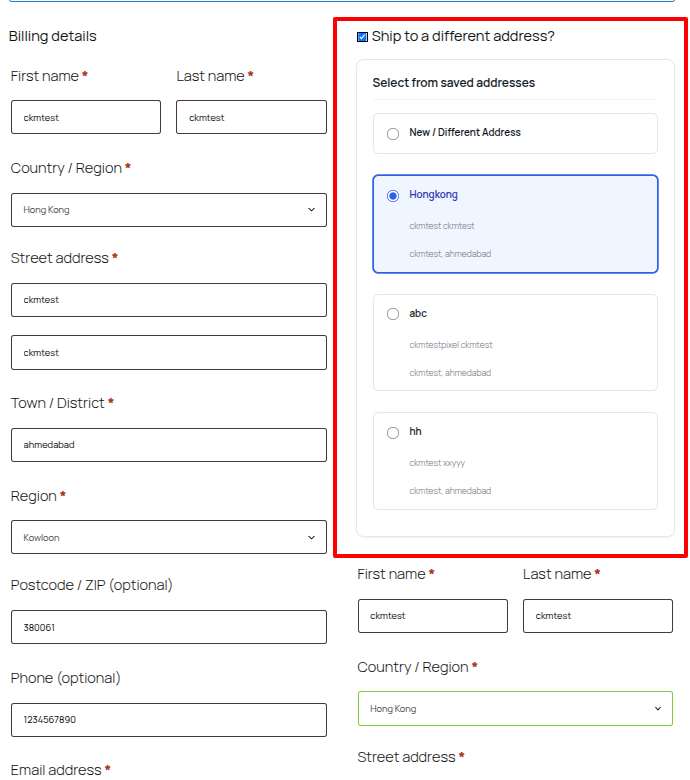
The plugin adds a dedicated "Shipping Addresses" tab to the WooCommerce "My Account" area, where users can add, edit, or delete their preferred shipping destinations. During checkout, users can simply select a saved address with a single click, automatically populating the shipping fields.
Features
- Address Book: Customers can save up to 3 unique shipping addresses.
- My Account Integration: Adds a clean, native-looking "Shipping Addresses" tab to the user account area.
- Seamless Checkout: Displays saved addresses as radio options above the shipping form at checkout.
- One-Click Auto-Fill: Selecting an address instantly populates all shipping fields via AJAX.
- Multisite Ready: Fully compatible with WordPress Multisite networks (activates table creation for all sites).
- Native UI: Designed to match your theme's styling by using standard WooCommerce classes.
- Data Integrity: Strictly focuses on shipping fields—never overwrites billing information.
安装:
Automatic Installation
- Log in to your WordPress Admin dashboard.
- Navigate to Plugins > Add New.
- Search for "H-Shipping Multiple Shipping Addresses for WooCommerce".
- Click Install Now and then Activate.
- Download the plugin zip file.
- Unzip the file and upload the
h-shipping-multiple-addresses-for-woocommercefolder to your/wp-content/plugins/directory. - Go to the Plugins menu in WordPress and activate the plugin.
- For Multisite: You can "Network Activate" to enable it across your entire network.
屏幕截图:
常见问题:
Does this plugin work with guest users?
No, the address book functionality requires a user account to save and retrieve addresses. Guest users will see the standard checkout form.
Can I increase the limit of 3 addresses?
The free version is set to a default limit of 3 addresses. You can adjust this slightly in the settings, but it is capped at 3 for this version.
Does it affect the Billing Address?
No. The plugin is strictly built for Shipping Addresses. It respects WooCommerce settings like "Force shipping to billing address" (in which case shipping options may be hidden by WooCommerce itself).
Is it compatible with custom checkout fields?
The plugin fills standard WooCommerce shipping fields (First Name, Last Name, Company, Address 1/2, City, State, Postcode, Country). Custom fields may need additional integration code.
更新日志:
1.0.3
- Update: Verified compatibility with WordPress 6.9.1.
- Update: Minor fixes and improvements.
- Update: Improved error handling in AJAX requests.
- New: Added Admin Settings page to Enable/Disable plugin.
- New: Added dedicated "Multiple Shipping Addresses" menu in WordPress dashboard.
- Security: Added strict server-side validation for Country/State codes and Max Address limit (3).
- Security: Added access control to redirect users if the plugin is disabled.
- Performance: Added minified CSS and JS assets for better loading speed.
- Update: Improved error handling in AJAX requests.
- Initial release on WordPress.org.
- Feature: Save up to 3 shipping addresses.
- Feature: My Account "Shipping Addresses" tab.
- Feature: Checkout address selection.
- Feature: Multisite support.