
Harvify Database Cleaner
| 开发者 | jethalal |
|---|---|
| 更新时间 | 2026年10月25日 12:54 |
| PHP版本: | 7.4 及以上 |
| WordPress版本: | 7.1 |
| 版权: | GPLv2 or later |
| 版权网址: | 版权信息 |
详情介绍:
Harvify Database Cleaner helps you reclaim wasted database space from post revisions, auto drafts, trashed posts and comments, spam, pingbacks and expired transients, and shows you what is taking up room before anything is removed.
Free features:
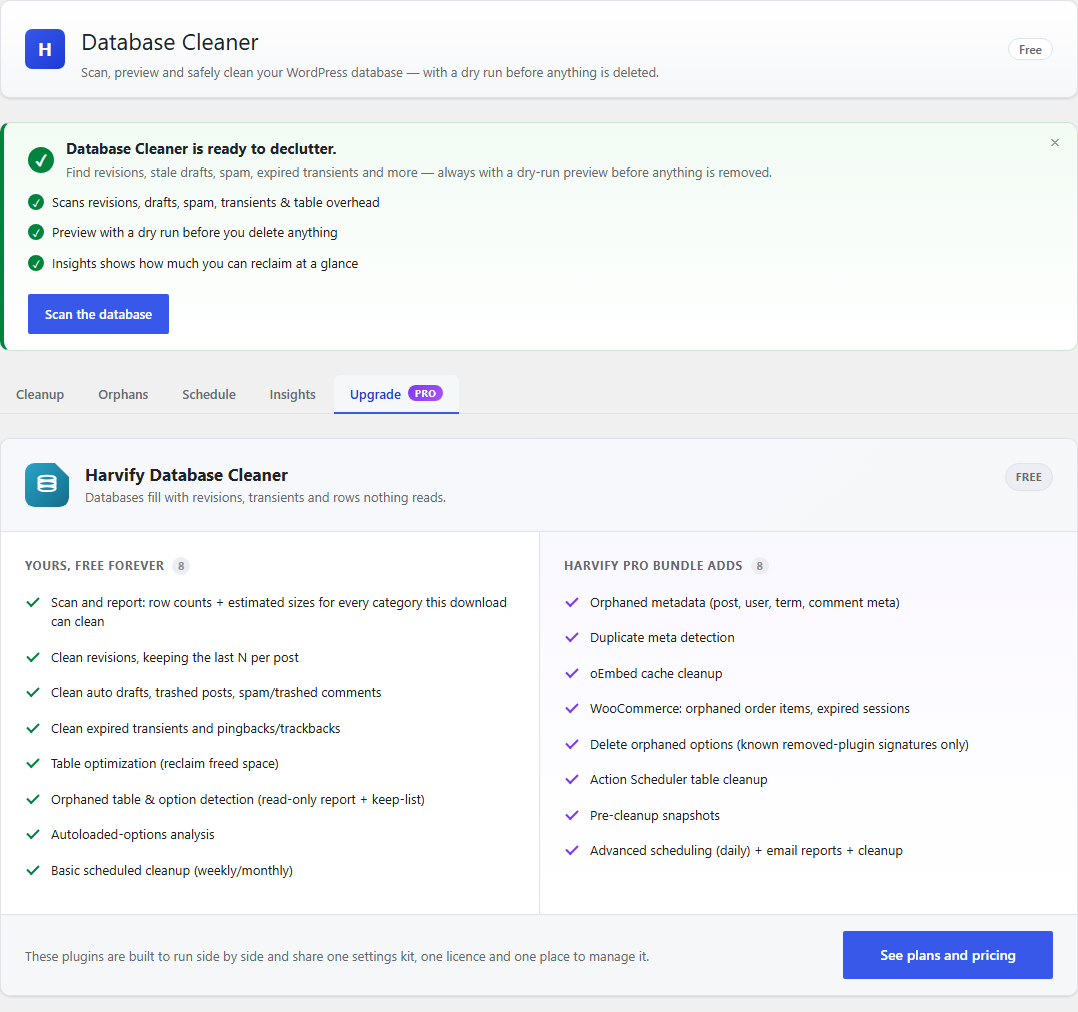
- Scan and report: row counts + estimated sizes for every category this download can clean
- Clean revisions, keeping the last N per post — you choose how many, and zero means delete them all
- Clean auto drafts (more than a day old), trashed posts, spam/trashed comments
- Clean expired transients and pingbacks/trackbacks
- Table optimization (reclaim freed space)
- Orphaned table & option detection (read-only report + keep-list)
- Autoloaded-options analysis — the total size of your autoloaded options against the point where it starts to hurt, and the largest offenders listed by size.
- Basic scheduled cleanup (weekly/monthly)
- Orphaned metadata (post, user, term, comment meta)
- Duplicate meta detection
- oEmbed cache cleanup
- WooCommerce: orphaned order items, expired sessions
- Delete orphaned options (known removed-plugin signatures only)
- Action Scheduler table cleanup — removes completed, failed and cancelled actions older than 30 days, with their log rows; pending work is never touched.
- Pre-cleanup snapshots with one-click rollback
- Advanced scheduling (daily) + email reports + cleanup history log
安装:
- In your dashboard go to Plugins → Add New, search for "Harvify Database Cleaner", then install and activate it (or upload the ZIP under Plugins → Add New → Upload).
- Open Harvify → Database Cleaner. The first time, you are asked whether to share usage data with Freemius; choose Skip to use every free feature without sending anything.
- Back up your database first. Deleted rows cannot be brought back without a backup.
- On the Cleanup tab click Scan database. Each category shows how many rows it would remove and roughly how much space that frees. Nothing is deleted by a scan.
- Tick the categories you want to clean. For post revisions, enter how many to keep in Keep last … revisions per post and click Save (0 removes them all).
- Click Dry run (preview) to see exactly what would be removed, then Clean selected.
- Schedule — tick Enable scheduled cleanup, choose weekly or monthly, pick the categories (scan first so they are listed) and click Save schedule.
- Orphans — tables and options that look left behind by plugins you have removed. It is a report: nothing here is deleted in the free version, and Keep selected (hide) removes an item from the list if you still need it.
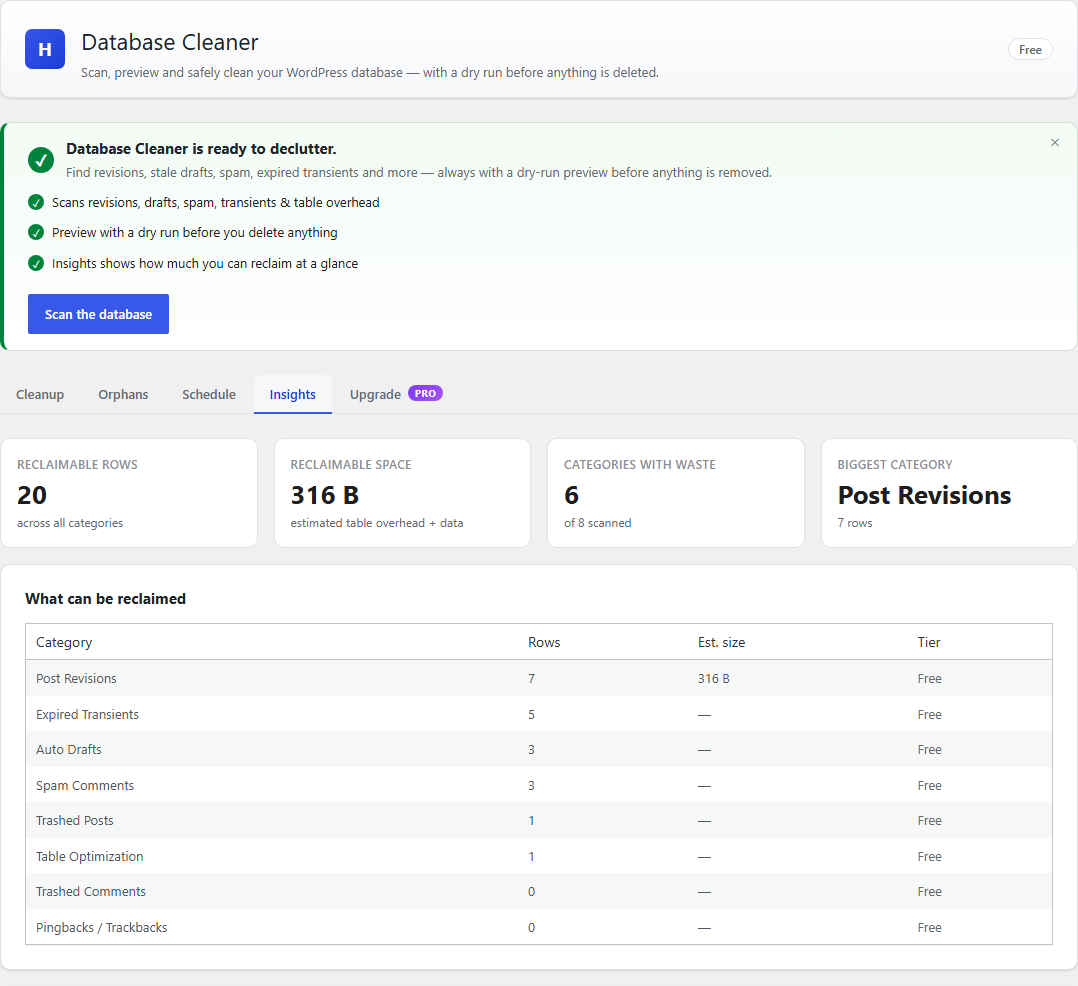
- Insights — after a scan, what takes up the most room, and how large your autoloaded options are.
屏幕截图:
常见问题:
Does a scan delete anything?
No. A scan only counts. Nothing is removed until you click Clean selected, and Dry run (preview) shows exactly what would be removed first.
What does it remove?
Only the categories you tick: post revisions (beyond the number you keep), auto drafts more than a day old, posts and comments already in the trash, spam comments, pingbacks and trackbacks, and expired transients. Published posts and pages, and approved comments other than pingbacks and trackbacks, are not removed. Table optimization reclaims space without deleting rows.
Can I undo a cleanup?
In the free version, only by restoring a backup, so back up before a large cleanup. Pro takes a snapshot before each cleanup and offers one-click rollback.
Does it work with WooCommerce?
Yes. Pro adds WooCommerce cleanup for orphaned order items and expired sessions.
更新日志:
1.0.28
- Fixed, important: "Clean expired transients" left each expired transient's value behind. Only the expiry was deleted, and WordPress treats a transient that has a value and no expiry as permanent -- so a cleaned-up cache entry stopped expiring instead of being removed. The value and the expiry are now removed together.
- If you ran that clean-up on an earlier version, this update repairs it once, automatically. Transient values that lost their expiry are removed; WordPress, or the plugin that owns them, recreates them. Nothing that was meant to be permanent is touched.
- Fixed: cleaning pingbacks and trackbacks left the post's comment count as it was, so a post could show more comments than it had. Counts are recalculated, any that are already wrong are corrected by this update, and the comments' meta is now removed with them.
- Changed: "Clean auto-drafts" leaves auto-drafts less than a day old. WordPress creates one the moment a new post is opened in the editor, and deleting it made that post impossible to save. Auto-drafts are also deleted together with their post meta now, instead of leaving it behind.
- Fixed: a clean-up never said what table optimization had reclaimed. The figures were produced and then left out of the result. The confirmation now gives the number of tables optimized, the total reclaimed and the largest ten, and counts tables as tables rather than as rows.
- Fixed: on MySQL 8, an optimized table went on being listed for optimization, and space freed by a clean-up was not seen until the next day. MySQL 8 keeps table statistics for a day; the plugin now asks for current figures. Row counts and sizes in the Orphans report are current too.
- Fixed: table optimization could include the tables of another WordPress installation
sharing the same database under a similar prefix (
wp_andwp2_). Only this site's tables are listed and optimized now. - Fixed: the "delete this plugin's data when it is deleted" option could not be reached. It is shown on a Settings tab, and this screen had none. There is one now, with the revisions setting on it too.
- Fixed (Pro): with that option on, deleting the plugin removed the snapshot table but left the snapshot files in the uploads folder. They are removed too. New snapshot files get a random name, and the folder tells Apache not to serve them.
- Changed: the Orphans report lists only what nobody's code names. It used to list every option whose name did not contain an active plugin's folder name -- most of an options table, this plugin's own options included. An option is now listed only when no installed plugin, no active theme and not WordPress itself names it in its code. The report also reads your plugins' files once instead of twice, and its Autoload column is right on WordPress 6.6 and later.
- The number shown for Post Revisions is now the number a clean-up would remove with your "Keep last N" setting, not every revision there is.
- Saving "Keep last N revisions" now confirms that it saved.
- Items you hide from the Orphans report are listed, with a button to show them again. Hiding one used to be permanent.
- The confirmation before a clean-up says plainly that it cannot be undone.
- Readme: step-by-step setup and usage instructions, a frequently asked questions section, and a plainer description of what the free and Pro tiers include.
- Fixed: the "Keep last N revisions per post" control now appears on the Cleanup screen in the free tier. 1.0.23 made the setting free and the cleaner honoured it without a licence, but the box to change it was still drawn only for licensed sites, so a free user had no way to set it. It now shows after a scan in every licence state.
- Changed: the External services section now describes the Freemius opt-in screen shown on activation. Until you answer it a fresh install makes no outbound request, and choosing Skip keeps the free tier fully usable and sends nothing.
- "Keep last N revisions per post" is now free. The setting existed and the cleaner that honours it shipped in every download; only a licence check stopped it working, so a free user could not keep a single revision. Set it to 0 to delete them all, as before.
- Changed: the twelve Pro cleaner categories — orphaned and duplicate metadata, orphaned term relationships, oEmbed caches, pending comments, the WooCommerce categories and Action Scheduler cleanup — are supplied by the separately distributed Pro plugin rather than being present-but-inactive in this download. This download scans and cleans the eight categories it owns.
- Changed: daily scheduling is likewise supplied by the Pro plugin. Weekly and monthly scheduling are unchanged and remain free.
- Changed: every identifier this plugin owns has been renamed off its old
three-character
hdc_prefix, which is shorter than WordPress.org accepts. Functions, options and the plugin's own actions and filters are nowharvify_dbclean_*; global constants areHARVIFY_DBCLEAN_*; classes areHarvify_DBClean_*. - Developers: the REST namespace is now
harvify-dbclean/v1. The oldhdc/v1namespace is GONE and there is no compatibility alias — any code calling it will 404 until updated. The admin script and style handlehdc-adminis nowharvify-dbclean-admin, and the localized JavaScript objecthdcSettingsis nowharvifyDbcleanSettings. - Fixed (Pro): "Duplicate post meta" and "Duplicate user meta" no longer delete legitimate values. A duplicate now means the same key AND the same value. The cleaner previously removed every additional value stored under one key — for example all but one of the previous-slug records WordPress keeps so old links still redirect.
- Fixed (Pro): "WooCommerce orphaned order items" no longer matches real orders. On stores using WooCommerce's high-performance order storage it counted — and would have deleted — the line items of every order, and on older storage it also matched refund and subscription line items. An item is now only treated as orphaned when its order no longer exists anywhere.
- Fixed: asking for a cleanup frequency this installation cannot run is now refused with a clear message naming the frequencies that are available. It used to answer "saved" and quietly store weekly instead.
- Fixed: the Schedule screen now shows your saved schedule on every site. Weekly and monthly scheduling are free, but the screen only read the saved schedule when Pro was active, so a free site always showed it as unset.
- Fixed: when the server refuses a request, the screen now shows the reason. Every refusal used to be treated as a success, so a refused save said "Schedule saved." and a refused cleanup reported "Cleaned undefined rows".
- Fixed: when the frequencies a site can run change, the scheduled cleanup is rescheduled to match on the next admin visit or cron run. Your saved frequency is not changed.
- Fixed (Pro): when the Pro licence is not active, the Pro plugin stops running Pro features — its twelve cleaner categories, daily scheduling, pre-cleanup snapshots, cleanup history and email reports. Nothing you saved is removed: the twelve categories stay listed and are still counted by a scan, a daily schedule keeps running weekly, and re-activating the licence restores everything. Asking to clean one of those categories now says why it cannot run instead of reporting zero rows.
- Fixed (Pro): a scheduled cleanup is recorded once in the cleanup history. It used to appear twice, once labelled as a manual cleanup.
- Fixed: Table Optimization reads the free space of the table it names. A table name was matched as a pattern, so a table with nothing to reclaim could be offered because a similarly named table had free space. The size shown for a leftover table uses the same exact match.
- Changed: the plugin's loader no longer creates an unprefixed global variable.
- Fixed: the Schedule screen lists frequencies in order: Daily, Weekly, Monthly.
- Fixed: the upgrade card no longer lists "keep last N revisions" as a Pro feature, and the Plan screen lists it under the free tier, where it is.
- Fixed: the Action Scheduler cleanup (Pro) is described accurately. It removes completed, failed and cancelled actions older than 30 days, with their log rows; it never empties the tables.
- Your settings, your schedule and your scheduled cleanup are migrated onto the new names on the first page load after updating. Your cleanup history and snapshot tables are untouched — those names never changed.
- Added: a single Support entry in the Harvify menu, so you can reach us from inside WordPress. Until now no plugin offered a contact route at all. One entry for the whole suite rather than one per plugin.
- No behaviour changes.
- Added: an External services section to this readme, naming every third-party service the plugin can contact, exactly what is sent, when, and each provider's terms and privacy policy. Required for WordPress.org submission.
- Changed: the
Contributorsfield now names the correct WordPress.org account. - No behaviour changes.
- Fixed: deactivating or deleting the plugin now cancels the scheduled cleanup. The cleanup is queued through Action Scheduler, but the cancellation used the WordPress cron function, which reads an entirely different store -- so it reported success and removed nothing.
- Rebuild: the published 1.0.13 package was generated from an earlier tree. Documentation only; no behaviour changes.
- Added: a single Manage licence link on the Plan screen, so an active customer can deactivate this site, change their licence key or re-check their licence without needing a URL from support. No per-plugin Account tab is added.
- Fixed: opting in to "delete all data on uninstall" now removes hdc_db_version. It was written at runtime but never included in the cleanup, so a user who asked for their data to be deleted kept it.
- Fixed: updating the plugin did not update its database. WordPress only runs a plugin's setup routine when you activate it, never when it updates — so a change to the plugin's own tables never reached sites that had simply updated. On those sites some features failed with a database error. The update now applies itself on the next page load.
- Fixed: a malformed API request returned a PHP error instead of a normal "bad request" response.
- One upgrade link instead of one per plugin. With several Harvify plugins active the menu showed a row called "Upgrade" for each of them, all identically labelled, and it kept saying Upgrade to people who had already bought. They are replaced by a single Plan screen that says what the bundle costs, what it covers, and whether your licence is active.
- The dashboard is quiet again. Each plugin used to add its own "opt in to make this better" notice to the main WordPress dashboard, so five plugins meant five notices. Harvify plugins now share one queue: promotional notices appear only on Harvify's own screens, and only one at a time. Licence and account messages are never held back.
- Fixed: the "Data & uninstall" box covered the page. It was being drawn into the admin footer, which WordPress pins to the bottom of the screen, so it floated on top of whatever was underneath it. It now sits in the page like any other card. Saving it also tells you what it saved, instead of just reloading.
- Fixed: the upgrade screen advertised the wrong number of sites. Several plugins listed the Freelancer and Agency plans as covering 5 and 25 sites. They cover 3 and 10.
- Uninstall no longer destroys your data by default. Deleting the plugin used to remove everything it had stored, with no way to stop it -- so deleting it to troubleshoot took the lot with it. Now the default is to KEEP your data, and a new Data & uninstall control on the plugin's own screen lets you opt in to a full wipe if that is what you want. Scheduled jobs are always tidied up either way, and the wipe works with no internet connection.
- Two long-standing WPCS errors cleared (a
strlen()in a loop condition in the orphan scanner, and a doubled blank line in the Pro scheduler). No behaviour change -- but they were failing the build gate, so the plugin could not be packaged for Freemius at all. - Deleting the plugin left its database tables behind, on every site, since 1.0.0. The main
plugin file used a variable named
$filewhile loading its includes. WordPress runsinclude_onceon that file from INSIDE its ownuninstall_plugin()function, so the assignment overwrote WordPress's$file; core then fired its uninstall action under a nonsense name, the cleanup callback was never reached, and the plugin's tables, options and scheduled events survived deletion forever. The loader variable is now prefixed.
- Fixed: Undo could not always put everything back. The snapshot used to be built from a list of the tables we expected each cleanup to touch. WordPress deletes more than that on our behalf, so four cleanups removed rows the snapshot never saw: Post Revisions destroyed the trash metadata of trashed posts (which is what lets WordPress restore them to their previous status), Trashed Posts destroyed those posts' revisions and their comments' metadata, and Action Scheduler cleanup destroyed the log entries of the tasks it removed. The snapshot is now taken from the deletions themselves, as they happen, so it covers whatever the cleanup actually removes.
- Fixed: "Undo last cleanup" returned an error after a Table Optimization run. Optimising tables deletes no rows, so there was nothing to undo -- it now says so instead of failing.
- Fixed: orphan detection offered options belonging to live plugins for deletion. Plugins bundle each other's libraries, so an option can look abandoned while a plugin that is running right now depends on it. Detection now checks whether any installed plugin or the active theme actually references an option or table before calling it orphaned.
- Fixed: the orphaned-tables report listed tables created by plugins that were installed and running, because a table name rarely contains its plugin's name.
- Your licence is now manageable from the plugin itself. The Account screen was previously hidden, which also hid Deactivate License — so a licence could not be released from one site to move it to another without contacting support. It is visible again, along with the licence key, plan, Sync and Change License.
- Harvify → Tools now opens with a Your licences table: every installed Harvify plugin, the plan it is on, whether Pro features are actually running, and a link to its Account screen. Freemius gives each product its own separate Account page, so this is the one place that answers "what am I on" across the whole bundle.
- The repeated "Opt in to make … better!" admin notice no longer appears. Licence, plan and update notices are unaffected — only the opt-in prompt is suppressed.
- Change: License activation now uses per-plugin key entry — enter your bundle license key on each Pro plugin to unlock Pro. Improves activation reliability.
- New: autoloaded-options analysis in Insights — total autoloaded size (vs the 800 KB Site Health threshold) and the largest autoloaded options with a likely-source guess (core / theme / widgets / transient / plugin, active or removed). Read-only: nothing is deleted from this view; option deletion remains the snapshotted, signature-matched Orphans path.
- New admin design system (Harvify Admin Kit): branded header, first-run onboarding, section navigation (Cleanup, Orphans, Schedule, Insights), skeleton loader, coaching empty states, an at-a-glance Insights panel (reclaimable rows & space, categories with waste, biggest offenders, what-can-be-reclaimed breakdown), and a contextual, dismissible upgrade card. UI layer only — scanning, cleaning, dry-run, snapshots and free/Pro gating are unchanged.
- Fix: Pro features now unlock only on the premium build with a valid license (per-plugin gate). Previously a shared bundle flag could make the free build report Pro when another Harvify plugin was licensed.
- Internal: uninstall cleanup now runs on Freemius's after_uninstall hook (removed uninstall.php) for Freemius Deployment compatibility. What gets removed on uninstall is unchanged.
- Keep-last-N-revisions is now correctly Pro-gated server-side (free deletes all revisions, matching the matrix).
- Clarified the free/Pro split: orphan detection (tables + options) is free and read-only; deleting orphaned options is Pro.
- Initial release.