
Haychdev Forms
| 开发者 | haychdev |
|---|---|
| 更新时间 | 2026年7月21日 13:36 |
| PHP版本: | 7.4 及以上 |
| WordPress版本: | 7.0 |
| 版权: | GPLv2 or later |
| 版权网址: | 版权信息 |
详情介绍:
- Block-based form builder with native field types: text, email, phone, textarea, select, checkbox, and file upload
- File upload field with MIME allow-listing and a max-size limit
- Per-field AES-256-GCM encryption at rest — no key ever leaves your site
- Honeypot and HMAC-signed time-trap spam protection
- REST submit endpoint with server-side validation
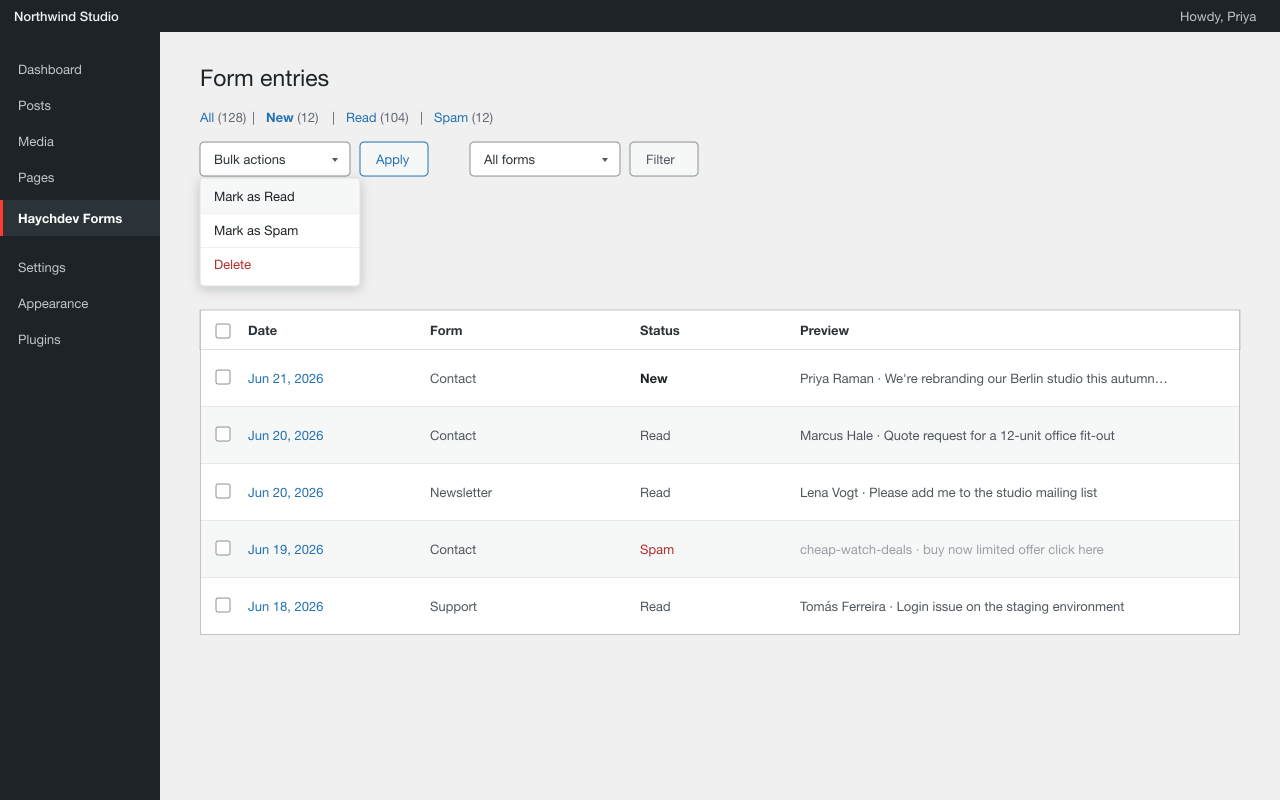
- Admin entry viewer with per-entry detail, status filtering, and bulk actions: delete, mark as read, mark as spam
- Email notifications via wp_mail, sent to a configurable site-wide default address (defaults to your WordPress admin email)
- Auto-delete retention: automatically remove entries older than a number of days you set
- Hashed IP and User-Agent metadata stored — no raw visitor values
- Sensitive fields masked in the entry viewer unless the current user has the required capability
安装:
- Upload the plugin files to
/wp-content/plugins/haychdev-forms/, or install through the WordPress plugins screen directly. - Activate the plugin through the Plugins screen.
- Visit
Haychdev → Forms Settingsto configure the default notification email and retention window.
屏幕截图:
常见问题:
Does it call any third-party APIs?
No. Submissions go straight to your own database, and notification emails use WordPress's own wp_mail. There's no Captcha vendor, no antispam SaaS, and nothing that phones home in the background.
How do I add a form to a page?
Create a new Form from your admin, drag in the fields you want, save it. Then on any page or post, drop in the Form block and pick that form from the dropdown.
Can I export submissions?
The free build includes an admin screen with per-entry detail, single-entry delete, bulk delete, and bulk mark-as-read/mark-as-spam. CSV export and webhooks are planned for a later release.
What happens when I delete a form?
Everything tied to it is deleted with it: the submissions, the uploaded files, the attachments. No orphaned data left lying around.
Can I encrypt submissions?
Yes — encryption is free and built in. Define an HCFORMS_ENCRYPTION_KEY constant in your wp-config.php and enable per-field encryption in the form editor. Existing plain-text entries are unaffected when you turn it on.
How long are submissions kept?
By default, forever. Set "Auto-delete entries after" to a number of days in Forms Settings and a daily task removes entries older than that. Set it to 0 to keep entries indefinitely.
How big is it?
The frontend handler is about 4 KB of plain JavaScript and 1 KB of CSS. No React on the public side, no extra bundles for visitors to download.
更新日志:
- Fix: the Form block is now selectable by clicking it directly in the editor canvas on WordPress 7.0 (previously it could only be selected via the List View). The block now applies
useBlockProps()as required by the current block editor.
- New: redirect visitors after a successful submission. Pick a page (or enter any URL) in the form block's "After submission" panel — the visitor is sent there instead of seeing the inline success message. If the chosen page is later unpublished, the success message is shown again.
- Fixed: the notification email showed an internal upload token for file fields instead of the file. It now shows the uploaded file's name and a link to the file.
- Fixed: form submissions were silently dropped when the anti-spam time-trap was enabled (the default). The front-end script did not send the hidden time-trap fields, so every submission was rejected as spam — no entry was saved and no notification email was sent, even though the visitor saw the success message. The time-trap and honeypot fields are now included in the submission.
- The free build no longer contains any locked, gated, or non-functional settings. The block editor's per-form notification address, per-form retention, per-IP rate limit, and IP/UA metadata-mode controls have been removed entirely, along with all license/add-on detection in the editor JavaScript. Every setting shown in the build is fully functional on its own.
- Notification recipient and entry retention are configured site-wide under Forms → Settings and are honored by the plugin.
- Removed unused schema keys and block attributes that were not acted on by the plugin.
- Renamed an internal transient prefix so every option/transient uses a 4+ character plugin prefix.
- Compliance & hardening pass for the WordPress.org review.
- IP/User-Agent metadata is always stored as a non-reversible SHA-256 hash — raw visitor values are never retained.
REMOTE_ADDRandHTTP_USER_AGENTare sanitised on read.- Admin header styles are now enqueued via
wp_add_inline_style()instead of an inline<style>tag. - File-upload REST endpoint now verifies the target is a published form before accepting an upload.
- Removed an unused
wp-admin/includes/media.phpinclude from the upload handler. - Documented the block source (
blocks/) and build steps in this readme.
- File upload field is now free, including MIME allow-listing and a max-size limit.
- Bulk "mark as read" and "mark as spam" actions in the entry viewer are now free.
- New site-wide default notification email setting (free).
- New auto-delete retention setting: remove entries older than N days, configured site-wide (free).
- AES-256-GCM encryption at rest and honeypot + time-trap spam protection remain free.
- License system removed entirely — no activation, no phone-home, no external requests of any kind.
- SQL hardening: table teardown uses
$wpdb->prepare()with a%iidentifier placeholder.
- Security/hardening:
drop_tables()now uses$wpdb->prepare()with a%iidentifier placeholder for the server-derived table names.
- Initial WordPress.org release.