Headless REST API Security
| 开发者 | rakib417 |
|---|---|
| 更新时间 | 2026年1月21日 02:07 |
| PHP版本: | 7.1 及以上 |
| WordPress版本: | 6.9 |
| 版权: | GPLv2 or later |
| 版权网址: | 版权信息 |
详情介绍:
Headless REST API Security is the "Swiss Army Knife" of API protection for WordPress.
If you are running a Headless WordPress site (Next.js, Gatsby, Nuxt, or Mobile App), your REST API is exposed to the public by default. This leaves your data vulnerable to scrapers, bots, and unauthorized users.
Headless REST API Security solves this instantly. It is the FIRST and ONLY plugin designed specifically to lock down Headless architectures with a "Strict Whitelist" model. We give you the power to disable ALL API routes by default and only allow exactly what your app needs.
📺 Video Tutorial: How to Configure
Watch this step-by-step guide to see how to lock down your API in under 2 minutes:
https://www.youtube.com/watch?v=h4l3c5GRxd4
🛑 STOP unauthorized data scraping.
🔒 SECURE your content and user data.
🚀 BOOST performance by blocking bad requests.
🚀 Why Headless REST API Security is the Best Choice?
We didn't just build a security plugin; we built a Headless Firewall. Unlike generic security plugins that only look for malware, we control the flow of data itself.
- 🛡️ Strict Security Mode (Whitelist): The only plugin that blocks 100% of API requests by default. You choose what to unlock.
- ↩️ Smart Headless Redirects: Automatically redirects visitors who find your backend URL (e.g.,
api.yoursite.com) directly to your frontend (e.g.,www.yoursite.com). - 🔑 API Key Authentication: Secure your mobile apps and frontend fetch requests with a simple, secure
X-API-KEYheader. - ⚡ Blazing Fast Performance: Runs before WordPress loads most core files, ensuring blocked requests don't slow down your server.
- 🕵️ Admin Bypass: Smart detection allows logged-in Administrators to use the WP Dashboard and Gutenberg Block Editor without interruption.
- 1-Click Lockdown: Instantly secure your entire REST API.
- Route-Level Control: Enable specific endpoints like
/wp/v2/postswhile keeping/wp/v2/usershidden. - Smart Grouping: Automatically groups routes (Core vs. Plugins) for easy management.
- Domain Binding: Restrict API access to only your frontend domain.
- Plugin Compatibility: Works perfectly with Rank Math, WooCommerce, Contact Form 7, and ACF.
- Developer Friendly: Clean code, native WordPress hooks, and zero bloat.
- Headless Sites: Next.js, Gatsby, Frontity, Faust.js, Nuxt.js.
- Mobile Applications: React Native, Flutter, iOS, Android.
- Static Sites: Jamstack architectures needing secure dynamic data.
- Intranets: Private internal dashboards.
- Activate the plugin.
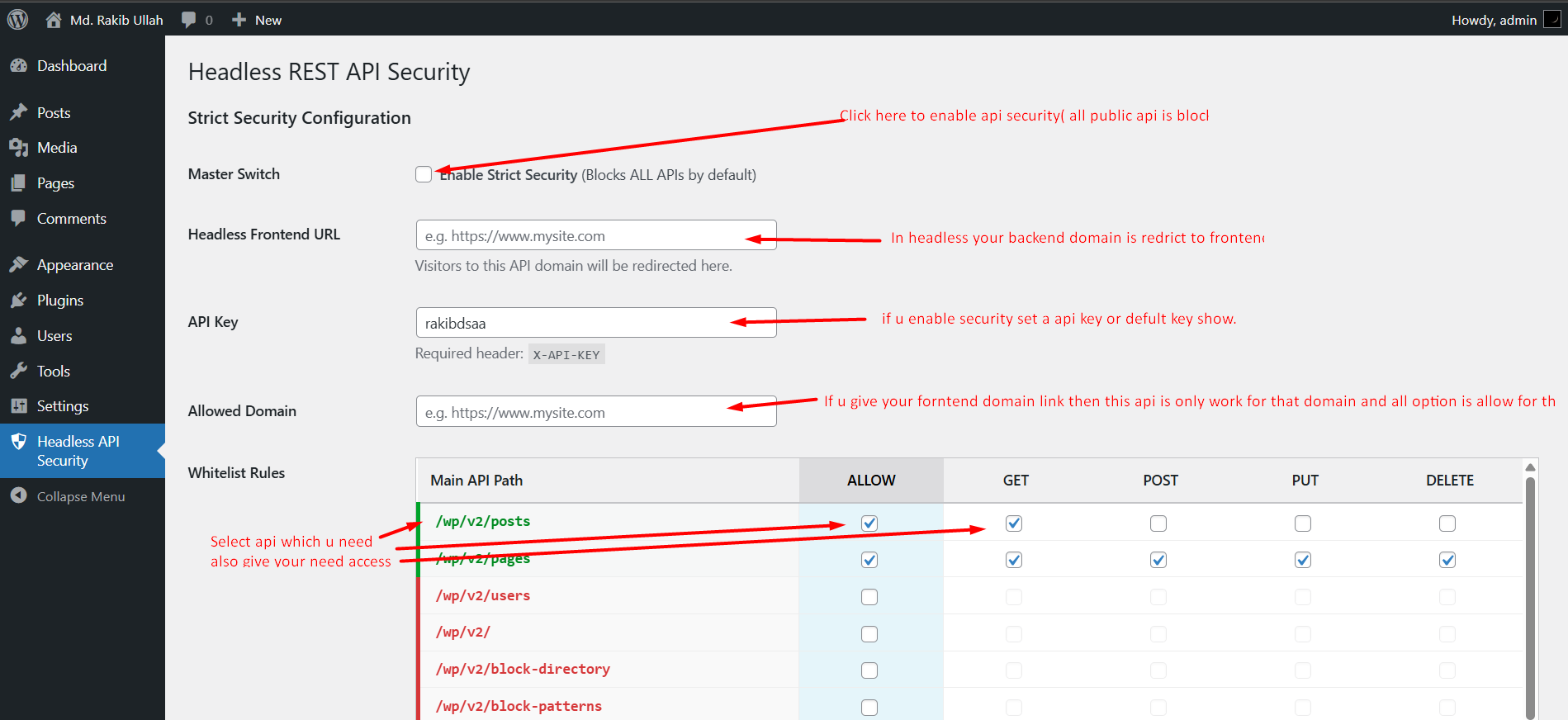
- Turn On the "Master Switch" to block all public access.
- Whitelist only the routes your frontend needs (e.g.,
/wp/v2/posts). - Add your API Key to your frontend environment variables.
- Relax! Your API is now invisible to the rest of the world.
"Security is not an option; it's a necessity. Headless REST API Security makes it simple."❤️ Love Headless REST API Security? If this plugin helped you secure your site, please rate us 5 stars on WordPress.org! It helps us keep updates coming.
安装:
- Upload the
headless-rest-api-securityfolder to the/wp-content/plugins/directory. - Activate the plugin through the 'Plugins' menu in WordPress.
- Go to the Headless Security menu in your dashboard sidebar.
- Enable "Master Switch" to turn on Strict Mode.
- Set your "Headless Frontend URL" to enable redirects.
屏幕截图:
常见问题:
Does this plugin replace WordPress authentication?
No. It adds a security firewall layer before WordPress processes the request. It works alongside existing auth methods (like JWT or Cookies).
Will this break the Block Editor (Gutenberg)?
No. The plugin includes an "Admin Bypass" feature. If you are logged in as an Administrator or Editor, the API restrictions are skipped so you can work normally.
Can I use this with Rank Math, WooCommerce, or CF7?
Yes. The plugin automatically detects routes registered by other plugins. You can see them in the list and whitelist them (e.g., /wc/v3 or /contact-form-7/v1).
What happens if I lose my API Key?
You can view or generate a new key anytime from the settings page.
更新日志:
2.0
- New: Added Headless Redirect to main domain function.
- New: Introduced Strict Security (Whitelist) mode.
- New: Added Smart Grouping for cleaner route management.
- Improvement: Added Admin Bypass for logged-in users.
- Added dynamic REST route detection.
- Added route-level access control.
- Editable API key.
- Domain binding support.
- Initial Release.