
HEIC Support
| 开发者 | salzano |
|---|---|
| 更新时间 | 2026年7月29日 05:31 |
| 捐献地址: | 去捐款 |
| PHP版本: | 5.9 及以上 |
| WordPress版本: | 7.0 |
| 版权: | GPLv2 or later |
| 版权网址: | 版权信息 |
详情介绍:
Add iPhone photos to WordPress without the hassle. HEIC Support lets you upload .heic and .heif images to the Media Library and automatically creates web-friendly .webp, .avif, or .jpg copies, so your photos actually display in every browser.
https://youtu.be/iKW4mIjoVx8
Free forever, and it just works
The plugin is free and works on thousands of sites with no account, no key, and no limits. Most WordPress hosts already run ImageMagick 7 with libheif, which is all that is needed to convert .heic locally. After activating, open Settings → Media → HEIC Support to see a live test conversion for your own server.
- Allows .heic and .heif uploads to the Media Library
- Automatically creates a .webp, .avif, or .jpg copy of every .heic upload
- Optionally replaces the original upload instead of keeping a copy
- Choose your output format: .avif (smallest files), .webp (smaller files), or .jpg (most compatible)
- No configuration required. Just activate and upload
安装:
- Upload the entire
heic-supportfolder to the/wp-content/plugins/directory. - Activate the plugin through the Plugins screen (Plugins → Installed Plugins).
屏幕截图:
更新日志:
2.3.0
- [Added] Adds .avif as an output format option alongside .webp and .jpg.
- [Added] Shows a dismissible warning right in the uploader when a .heic is added on a server that cannot convert locally and does not have cloud conversion set up, so the upload no longer fails silently.
- [Removed] Removes admin notices from the dashboard; feedback now appears in the uploader instead.
- [Fixed] Shows a dismissible notice after a .heic is uploaded on a server that cannot convert locally and does not have cloud conversion set up, so the upload no longer fails silently.
- [Changed] Adds a link to the Privacy Policy in the external services disclosure.
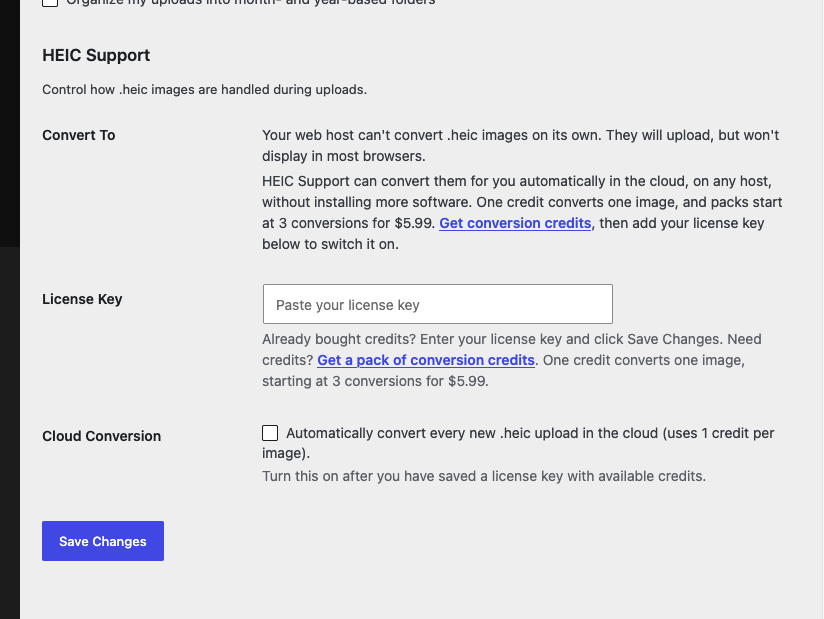
- [Added] Optional, opt-in cloud conversion for servers without ImageMagick/libheif. Enter a license key and enable it at Settings → Media; converts .heic uploads via the Breakfast cloud conversion service using purchased credits. See the External services section.
- [Changed] Changes the tested up to version to 7.0.
- [Fixed] Makes sure the test runs before the settings output is generated.
- [Changed] Changes the tested up to version to 6.8.3.
- [Changed] Changes the tested up to version to 6.6.2.
- [Fixed] Shows better error output when ImageMagick is installed on the server but conversions cannot be completed.
- [Fixed] Uses a unique file name when creating test images in the uploads folder.
- [Changed] Changes the tested up to version to 6.4.0.
- [Added] Adds a screenshot of the plugin settings.
- [Fixed] Fixes a bug in the replace feature that prevented it from working in certain environments. See https://wordpress.org/support/topic/replace-does-not-work-because-of-file-type/
- [Changed] Changes the tested up to version to 6.3.2.
- [Added] Adds .jpg support. Adds a setting to toggle whether images are converted to webp or jpg. Defaults to webp.
- [Added] Show the settings section at Settings → Media even if ImageMagick is not installed. Explain to users that their host does not provide the library.
- [Fixed] Removes layers from the icon .svg file.
- [Changed] Changes the tested up to version to 6.3.1.
- [Added] Add filters around the webp format and image/webp mime type strings so they can be changed by other developers.
- [Added] Adds an optional feature to replace .heic images rather than create a copy. A switch enables the feature at Settings → Media.
- [Fixed] Updates an error message to stop mentioning a specific minimum version of ImageMagick. It was not accurate, and other dependencies like libheif could be missing that prevent conversions from working.
- [Changed] Moves all plugin settings from Media → HEIC Support to Settings → Media.
- [Changed] Changes the tested up to version to 6.2.0.
- [Removed] Removes the menu at Media → HEIC Support.
- [Fixed] Fixes a bug that caused a parse error in PHP versions less than or equal to 7.2.
- [Changed] Changes the tested up to version to 6.1.1.
- [Added] First public version. Adds
.heicsupport to WordPress. If ImageMagick 7 or above is installed, creates.webpcopies of.heicimages uploaded to the Media Library.