
Hermes Conector
| 开发者 | hermesadv |
|---|---|
| 更新时间 | 2026年10月16日 21:04 |
| PHP版本: | 7.4 及以上 |
| WordPress版本: | 7.1 |
| 版权: | GPLv2 or later |
| 版权网址: | 版权信息 |
详情介绍:
- SEO fields over REST - registers the Yoast SEO and Rank Math title and description fields in the REST API, so the values Hermes sends are saved instead of silently discarded.
- Article read counts - while the site is connected to Hermes, a tiny inline script on single posts records one read per visit: post, time, referrer domain, utm_source and utm_medium, device type, operating system, a truncated network prefix (never the full IP address) and the country sent by Cloudflare, when present. No cookies and nothing stored on the visitor's device. Logged-in users, bots and browsers that send Global Privacy Control or Do Not Track are not counted.
- Google Search Console verification - prints the verification meta tag (and serves the matching verification file) so that the firm's own Google account becomes the verified owner of the site.
- Search engine visibility - only tells Hermes whether "Discourage search engines from indexing this site" is checked, so Hermes can warn the firm and hold scheduled posts. The plugin never changes this or any other site setting: an administrator changes it in Settings > Reading.
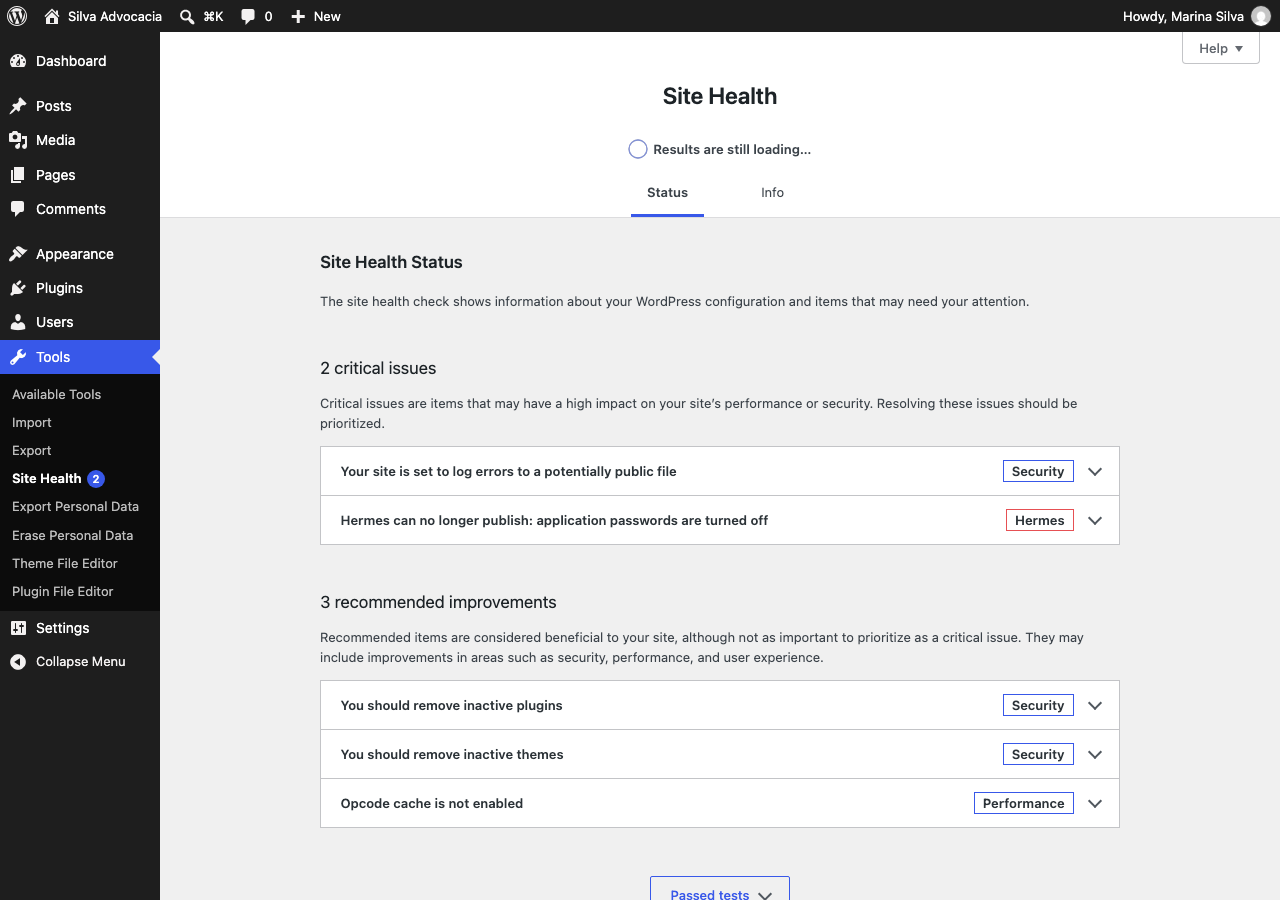
- Connection status - Settings > Hermes and Tools > Site Health show whether Hermes can sign in, how many reads arrived and what to fix.
安装:
- In Hermes, connect your WordPress site (one click, using WordPress Application Passwords).
- Install and activate this plugin from Plugins > Add New.
- That's it. Settings > Hermes shows the connection status. We recommend turning on automatic updates for this plugin in the Plugins list.
屏幕截图:
常见问题:
Do I need this plugin to publish with Hermes?
No. Hermes publishes with the core REST API. The plugin adds read counts, Search Console verification and the Yoast/Rank Math fields.
Will it slow down my site?
No. While the site is connected to Hermes, it adds a small inline script to single posts, loads no external files, sets no cookies and sends one small request to your own site per read. Reads are stored in a small table in your own database and deleted after 180 days.
Do I need a cookie banner for it?
The script sets no cookies and stores nothing on the visitor's device. A suggested paragraph for your privacy policy is available under Settings > Privacy > Policy Guide. If your site has visitors in the European Union and uses a consent plugin compatible with the WP Consent API, reads wait for consent to the "statistics" category.
How do I turn read counting off?
Untick "Count article reads" in Settings > Hermes, or add add_filter( 'hermes_conector_contar_leituras', '__return_false' );.
Hermes cannot sign in, or my security plugin blocks it
Wordfence turns application passwords off by default: Wordfence > All Options > Brute Force Protection > untick "Disable WordPress application passwords". If a plugin blocks the REST API for visitors, allow /wp-json/blog-juridico/v1/batida, or reads will not be counted. If an optimization plugin delays JavaScript, exclude hermes-conector-leitura. Tools > Site Health shows what is wrong.
My site is behind a CDN other than Cloudflare
Reads are still counted, but the approximate city may come out wrong, because every visitor seems to come from the CDN. Developers can add the CDN's address ranges with the hermes_conector_proxies_confiaveis filter.
What happens if I deactivate or delete the plugin?
Publishing keeps working. Read counting stops and the Search Console verification tag goes away, so Google may eventually stop recognizing you as the verified owner; reinstalling fixes it. Deactivating erases the network prefixes and the reload hashes right away. Deleting the plugin also deletes the stored reads and the verification codes.
I see two copies of Hermes in the Plugins list
Only one copy works at a time. A notice on the Plugins screen (and on Settings > Hermes) links to deactivating the extra copy; then delete it. Your data is kept. The notice can be dismissed.
更新日志:
- Removed the remote search-visibility route; the plugin no longer changes site settings. Hermes only reads whether the site is visible; the administrator changes it in Settings > Reading.
- Notices appear only on the Plugins screen and on Settings > Hermes, and can be dismissed.
- Translations now come from translate.wordpress.org (no bundled language files).
- First release on WordPress.org (previously distributed as a zip named "Hermes" 0.6.0 and "Conector Blog Jurídico").
- Reading script loaded through the WordPress script API; respects Global Privacy Control, Do Not Track and the WP Consent API.
- Reads counted, and the script added, only while connected to Hermes; on/off switch in Settings > Hermes.
- No full IP stored; the daily reload hash is erased after one day; rate limits and Origin check on the public route.
- Google verification accepts the full meta tag; verification file served only for valid Google file names, also in subfolder installs.
- Authenticated REST responses marked as not cacheable for page-cache plugins.
- Site Health test, privacy policy suggestion, clean uninstall.
- Brazilian Portuguese translation included.
- The old plugin is no longer deactivated automatically; a notice explains what to do.
- Renamed to "Hermes"; zip with its own folder.