
Highlight and Share – Unobtrusive and Lightweight Content Sharing
| 开发者 | ronalfy |
|---|---|
| 更新时间 | 2026年3月10日 12:52 |
| 捐献地址: | 去捐款 |
| PHP版本: | 6.5 及以上 |
| WordPress版本: | 7.0 |
| 版权: | GPLv2 or later |
| 版权网址: | 版权信息 |
标签
下载
详情介绍:
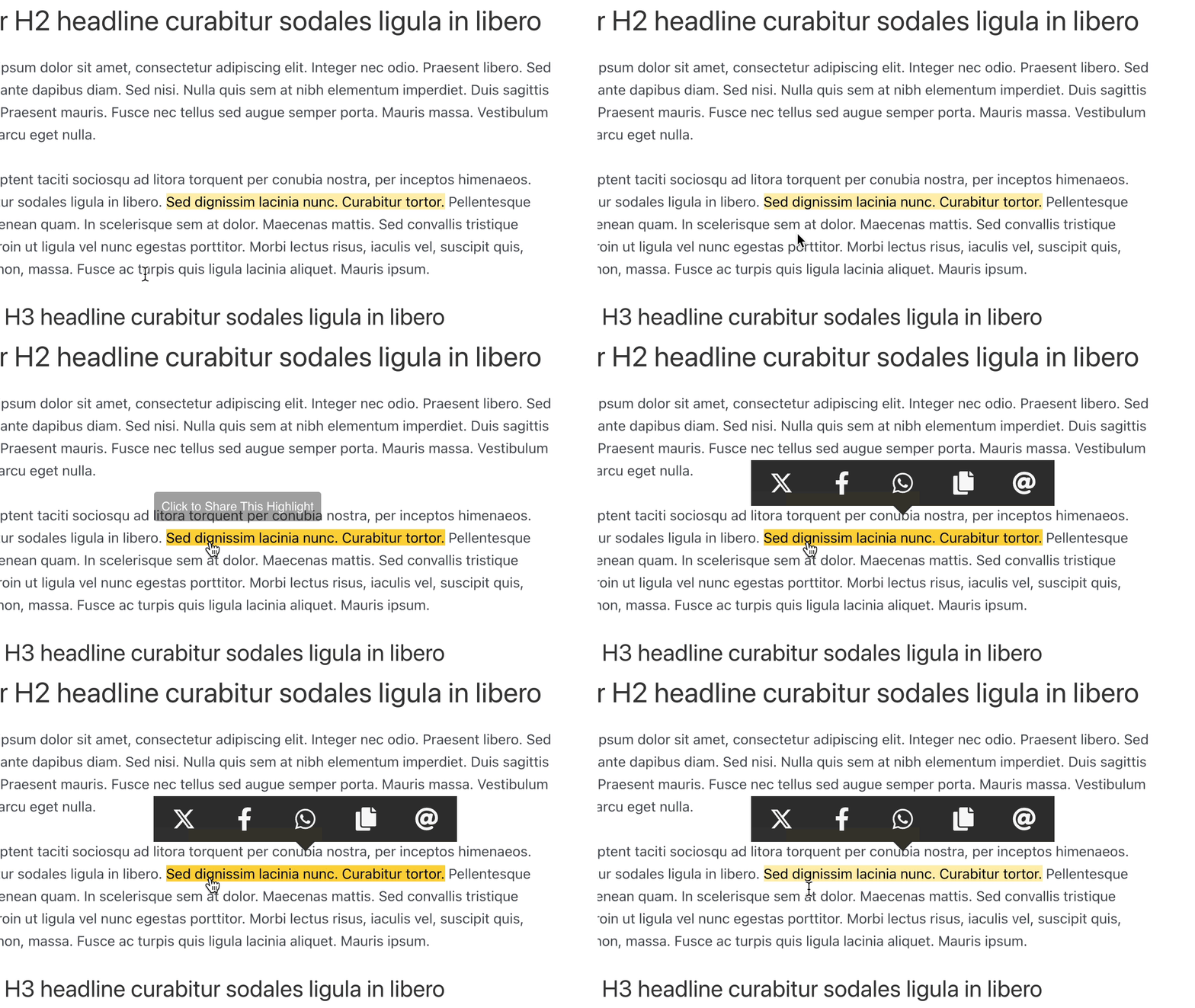
- Show social media networks upon text selection (a text highlighter). This provides an unobtrusive way to allow content highlighting without getting in a user's way. With shortcuts like Copy and Email, Highlight and Share can become part of an essential timesaving workflow for a user who needs quick shortcuts to common items like Web Share and other content highlighter shortcuts.
- Show Pinterest and Webshare on images. With image sharing enabled, Highlight and Share will seamlessly integrate Pinterest and Webshare on any found images. With features like skipping the leading image, you'll find that Image Sharing is intuitive and useful for your users.
- Show sharing options with headline sharing. Headline sharing allows users to bookmark certain headlines and revisit them later. Additional networks like Webshare or X can provide additional context such as sharing the headline itself.
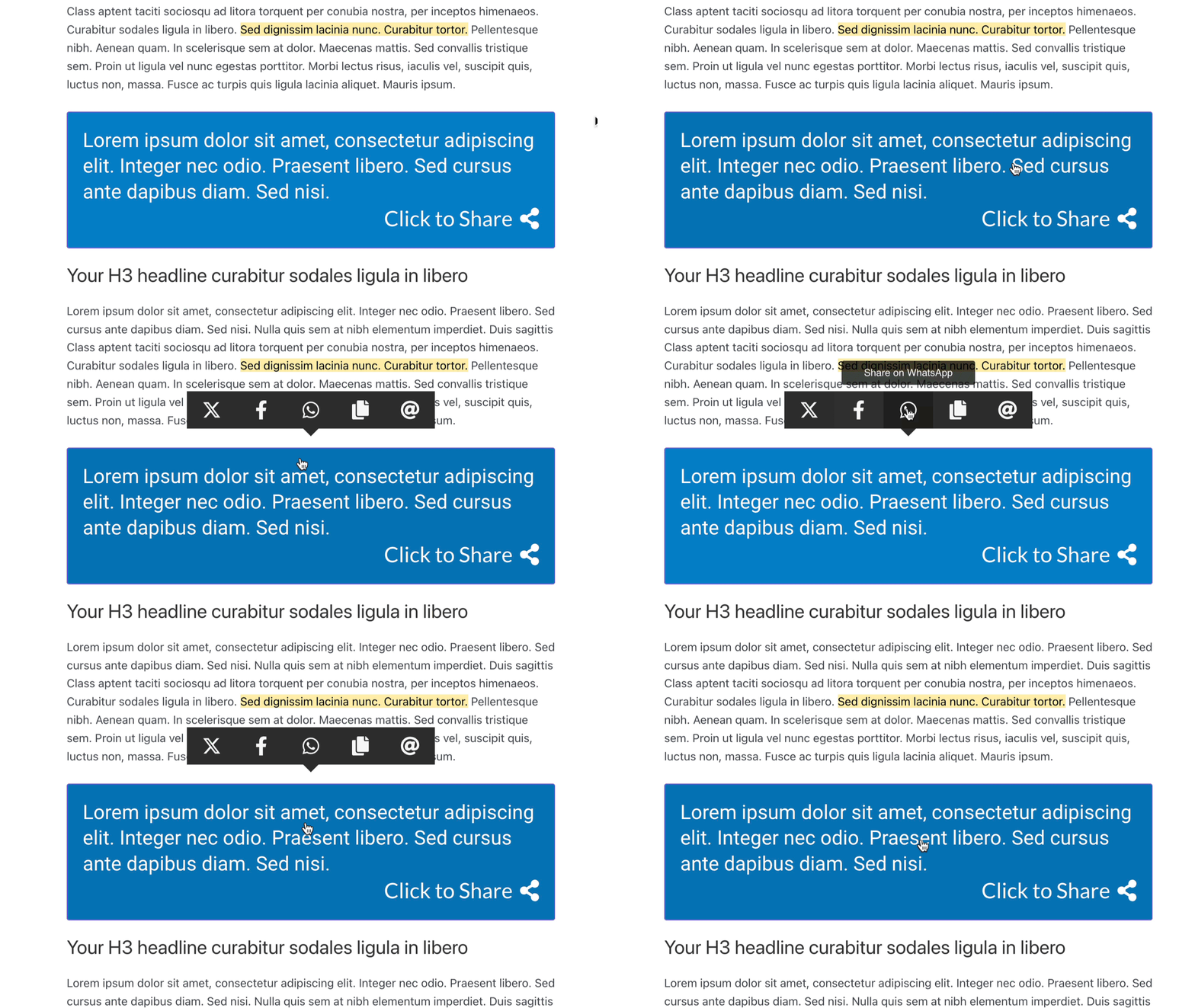
- A Click to Share Block/Shortcode is included. An easy-to-use Click to Share block is included, with setup available in seconds. The Content Sharing networks display above the share box when clicked, providing an easy way to share the quote.
- Set up email sharing with easy spam protection integration. Set up emails with spam protection from Akismet, Cloudflare Turnstile, and Google reCAPTCHA Enterprise.
Launch a free, fully-featured demo via InstaWP.
安装:
- Search Highlight and Share in the plugin's screen.
- Install and activate.
In-depth Documentation - Please check out our thorough documentation ❤️️
屏幕截图:



常见问题:
What is a text highlighter for WordPress?
Highlight and Share works as a text highlighter plugin for WordPress. When a visitor selects text on your site, a small sharing interface appears allowing them to share the selected text to social networks, copy it, or send it via email. This makes it easy for readers to highlight important quotes, statistics, or passages and share them instantly. Additional sharing features such as image sharing, headline sharing, and a Click to Share block/shortcode allow for more sharing options.
Can visitors share highlighted text from my articles?
Yes. Highlight and Share allows users to select and highlight text directly within your content. Once text is selected, social sharing options appear automatically. Visitors can then:
- Share the highlighted text to supported social networks
- Copy the text to their clipboard
- Send the text via email
- Use the Web Share API on supported devices
What is headline sharing?
Headline sharing allows visitors to share individual headings within your content. When enabled, a small link icon appears next to headings such as H2 or H3. Clicking the icon allows users to copy a link directly to that section or share the headline to social networks. This feature works especially well for long articles, tutorials, and documentation where users may want to reference a specific section.
Does this plugin support image sharing?
Yes. Highlight and Share includes image sharing support for Pinterest and the Web Share API. When enabled, sharing icons appear when users interact with images, allowing them to quickly share images from your content. You can control where image sharing appears, including:
- Post content
- Featured images
- Archive excerpts
What is the Click to Share block?
The Click to Share block allows you to add a shareable quote or message directly inside your content. When readers click the share box, they can instantly share the text to social networks or copy it to their clipboard. This is useful for quotes, key takeaways, statistics, or other shareable snippets. A shortcode version is also available if you prefer not to use the block editor.
Can I control where text highlighting works?
Yes. Highlight and Share includes advanced selectors and post type settings that allow you to control exactly where highlighting appears. You can:
- Enable highlighting only within post content
- Enable highlighting in comments
- Disable highlighting on specific post types
- Use custom selectors for page builders
Does Highlight and Share track user data?
Highlight and Share does not collect personal information or set tracking cookies. The plugin does allow for advanced stats tracking, which is opt-in and is designed for developers. Stats are compatible with GA4, GTM, and synthetic JS events.
Is this a Click to Tweet plugin?
Highlight and Share includes a Click to Share block that works similarly to traditional Click to Tweet plugins, but with additional flexibility, showing more than just one network. Instead of limiting sharing to a single network, users can choose from multiple social networks, copy the text, or share using the Web Share API.
What social networks does this plugin work with?
Highlight and Share works with the following networks:
- X (formerly Twitter) (allows text sharing)
- Threads (allows text sharing)
- WhatsApp (allows text sharing)
- Mastodon (allows text sharing)
- Bluesky (allows text sharing)
- Telegram (allows text sharing)
- Copy (allows text sharing)
- Email (allows text sharing)
- Pinterest (for image sharing only)
- Web Share API (allows text sharing)
How does Highlight and Share work?
Highlight and Share is designed to be unobtrusive and lightweight, with only advanced sharing features being opt-in such as image and headline sharing. Highlight and Share shows social networks as users interact with content on your site. This can be in the form of content highlighting, text selection, image sharing, headline sharing, or using the inline highlighting mechanism or Click to Share block/shortcode. Since Highlight and Share can provide some useful shortcuts, the plugin can provide your users with some useful shortcuts to enhance their reading and editing workflows.
How can I customize the look of Highlight and Share?
Higlight and Share is extremely customizable through a theming system and through custom CSS. In general, you can:
- Customize all the social networks as far as order, colors, size, and orientation.
- Customize all the image sharing features, such as Pinterest and Web Share. You can change how the icons appear, what colors they appear as, and for which images.
- Completely customize a Click to Share block/shortcode and use the customized icons to show the social networks to the user.
Will you be adding more sharing services?
If the social network has an endpoint, it can be added. Please see the available social networks and their specifications. Please request a new network via support.
I want to include my own CSS. How can I do that?
You can turn off the theme and include CSS in your own theme. See Customizing Highlight and Share through custom CSS
Does this plugin work on mobile devices?
Yes, Highlight and Share works well for mobile devices and also supports the Web Share API, which is one of the options of social sharing networks. Most mobile devices already have their own sharing features on text selection, but Highlight and Share works especially well for inline highlighting and the Click to Share block. Image Sharing and Headline sharing also make the plugin useful for mobile devices.
What Browsers Have You Tested This In?
So far, the latest versions of Chrome, Firefox, Safari, Edge, and IE9+. iOS Safari and Chrome work well, but the text selection is a bit different than on desktop browsers.
Where do I report security bugs found in this plugin?
Please report security bugs found in the source code of the undefined plugin through the Patchstack Vulnerability Disclosure Program. The Patchstack team will assist you with verification, CVE assignment, and notify the developers of this plugin.
更新日志:
- Released 2026-03-09
- New: Align headlines to the right. You can select inline positioning (link icon next to the last word) or absolute positioning (right of the headline).
- New: Auto-truncate headline anchors (off by default). This will prevent super long headline anchors.
- New: The sidebar options now reflect their state, even if a sharing option is disbabled, the post sidebar options win.
- Fix: The social network settings cogs could lose their state if clicking around too fast.
- Fix: Inline highlighting CSS wasn't specific enough, preventing overrides.
- Fix: Tooltips for social networks were overlapping.
- Fix: Image sharing positioning (top right, bottom right) now respect the image's dimensions.
- Released 2026-03-06
- New: Sharing tab reorganized, consolidating the sharing options into one tab, eliminating the Appearance and Block Editor tabs. Social Networks have been moved to a single panel, with advanced options tucked away for a cleaner appearance.
- New: All tabs support a global save bar, making saving and discarding options much more intuitive.
- New: Post sidebar for per-post disabling of Highlight and Share, including sharing, images, and headlines.
- New (Text Sharing): Added Post Type exclusions to selection sharing.
- New (Image Sharing): Can enable on archive excerpts and featured images.
- New (Stats): New stats system that dispatches events if stats service is found. This allows for layered opt-in to GA4, GTM, and synthetic events. No personal information or cookies are sent, so there's no need to update privacy policies.
- New (Stats): The plugin detects GA4, dispatching events if found.
- New (Stats): Google Tag Manager has been consolidated with GA4 and synthetic event firing.
- New (Stats): The plugin fires synthetic events per social network, allowing for listeners and third-party integrations.
- New (Stats): Filters
has_stats_enabledandhas_stats_enhancedcontrol behavior. Stats are enabled by default and just show social network and click type (selection, cta, highlight, headline).has_stats_enhancedcan be set to true to send page url, title, and text selection to stats tracking service. - New (Sharing Block): Theme system with built-in themes (Light, Dark, Bold, Royal, Legacy) replacing presets.
- New (Sharing Block): Removing third-party locally-hosted fonts in favor of third-party solutions, reducing the plugin bundle size by 75%.
- New (Sharing Block): Block variations let you insert a pre-themed Click to Share block (Light, Dark, Bold, Royal) from the inserter.
- New (Sharing Block): Theme overrides for color, typography, and dimensions in the block editor for the new themes.
- New (Sharing Block): Quick shortcut to the parent block from child blocks for quicker access to block settings.
- New (Sharing Block): Custom Fonts plugin support; Adobe fonts removed from plugin in favor of third-party plugins.
- New (Sharing Block): Core/Group allowed inside share content so any block can be nested via Group.
- New (Headline Sharing): Ability to enable headline sharing is now available. Show a link icon next to available headings and allow quick copying and sharing of headlines. This compliments content sharing and is compatible with TOC plugins.
- New (Headline Sharing): Select up to three social networks to share to in addition to copying.
- New (Headline Sharing): Customize per post type and per page how headlines are enabled.
- Bug fix (Sharing Block): Text alignment on mobile (align right).
- Bug fix (Image Sharing): Image sharing for Web Share would error out when sharing an image.
- Bug fix (Image Sharing): Improved page builder support and added loop detection to prevent timeouts.
- Bug fix (Image Sharing): Fixed hover and focus states, adding better reliability to image sharing display.
- Bug fix (Email Sharing): Emails can be enabled with only the mailto option if spam protection isn't available.
- Released 2025-12-17
- Bug fix: Responsive styles were not saving or setting correctly in the Click to Share block.
- Bug fix: Fixed sync values when changing screen size in the block editor iframe.
- Code improvement: Removed defaultProps from React components to clear up deprecation warnings.
- Released 2025-12-16
- Bug fix: Block.json was still set to version 2. This has been updated to version 3.
- Bug fix: Some build scripts werne't included. Apologies.
- Released 2025-12-16
- New: Click to Share block is now at verison 3 of the block.json API.
- Bug fix: Click to Share block would error out when switching responsive breakpoints in the block editor.
- Released 2025-11-25
- Security fix: Resolving Broken Access Control vulnerability in regards to email sending as reported by Patchstack.
- Bug fix: email sending now requires either reCAPTCHA Enterprise or Turnstile enabled.
- Released 2025-11-16
- Security fix: Resolving XSS vulnerability in the plugin as reported by Patchstack.
- Released 2025-07-24
- Fixing translations loading too soon error.
- Resolving PHP warnings when enabled for comments.
- Released 2025-04-29
- Added reCAPTCHA Enterprise to the emails tab to support the phasing out of reCAPTCHA 3.
- Added Cloudflare Turnstile to the emails tab for an alternate spam solution.
- New theme: Orbs.
- Released 2025-04-22
- Fixing a bug in email sending due to an invalid nonce value. = 5.0.2
- Released 2024-11-28
- Bug fix: translations were loading too early in the plugin.
- Released 2024-06-24
- Bug fix: shortlinks were returning empty for some custom post types.
- Bug fix: Image sharing was causing a few warnings if a parent node didn't exist.
- Bug fix: Other admin notices showing in HAS admin settings.
- Released 2024-06-22
- Named for Holly Jahangiri, who helped provide critical testing feedback.
- Please read the announcement: Highlight and Share 5.0 Released
- New feature: Comprehensive Click to Share shortcode, which can be used to create a Click to Share box wherever shortcodes are supported.
- New feature: Image sharing via Pinterest and the Web Share API.
- New feature: Comment section support has been added to the text selection settings.
- Released 2024-06-17
- Bug fix: hardcoded email address was present in the mailto settings for email.
- Bug fix: resolving unauthorized message for email modals.
- Bug fix: Adding URLs to the mailto email body.
- Released 2024-06-11
- New social network: Bluesky
- New feature: Escape key now closes the sharing popoer.
- Bug fix: Fixing the tabbed color responsive settings when setting custom colors.
- Bug fix: White theme was not showing the icons properly.
- Released 2024-06-11
- Bug fix: Email popover was saying "Invalid Request" because of heavy sanitization.
- Released 2024-06-05
- New social network: Threads
- Bug fix: Fixed the colorful circles theme as it was barely visible.
- Bug fix: Fixed popover width for the admin color pickers.
- Bug fix: Fixed custom colors not displaying properly in the admin under custom appearance.
- Released 2024-04-24
- Bug fix: Changing the WhatsApp endpoint was not saving correctly.
- Bug fix: Mastodon lightbox was not working if Emails were set to mailto instead of a form.
- New feature: Added option in WhatsApp for not showing the shared link (via user request).
- Released 2024-04-16
- Making it so the Click to Share block can be outputted via Shortcode in Pattern Wrangler.
- Refactoring script dependencies to significantly reduce the size of the admin JS and overall plugin size.
- Released 2024-04-13
- Huge bug fix: Highlight and Share now works great on mobile browsers including Safari.
- Re-worked selection JS to integrate Share This script.
- Released 2023-12-10
- Added Mastodon social network.
- Fixed popup in the Support tab for demo video.
- Released 2023-08-14
- Hot fix: JavaScript was returning fallback values by default, ignoring the user's settings and breaking shortlinks.
- Apologies about the error and for not cathing this one.
- Read the announcement post for more information.
- Released 2023-08-14
- Performance improvement: inlining critical styles and loading main styles in the footer for faster page rendering.
- Layout fix: the way Highlight and Share was added to the page content has been changed for better compatibility with themes, particularly block-enabled themes.
- Read the announcement post for more information.
- Released 2023-08-01
- Bug fix: The "X" icon hover background and fill color were incorrect for some themes.
- Please read the announcement post for more information: Highlight and Share 4.4.9
- Released 2023-07-31
- Renamed Twitter to X.
- Added copy compatibility check to Firefox/Mozilla as copying doesn't work natively in that browser.
- Ensuring WordPress 6.3 compatibility.
- Released 2023-05-15
- Bug fix: HTML tags werne't closed properly. Props @harrinsonmb for the fix.
- Released 2023-04-27
- New feature: customize the Click to Share block's colors with new intuitive controls.
- New feature: responsive controls for the Click to Share section in the Click to Share block.
- New feature: presets have been updated to be more responsive and customizable in the Click to Share block.
- New feature: transforms have been added to the Click to Share block.
- New feature: responsive controls for the Click to Share block including icon size, maximum width, font families, and more.
- New feature: you can now customize the share icon in the Click to Share block.
- Bug fix: preset previews no longer jump all over the page.
- View the announcement post for more details.
- Released 2023-04-07
- New feature: Save your own custom presets in the Click to Share Block
- New feature: Enable the Web Share API for mobile devices.
- View the announcement post for more details.
- Released 2023-03-26
- New Feature: Set tooltips for inline highlighting, including the ability to customize the label, bakground color, and text color.
- New Feature: Customize the email subject, email body, and modal title when sending emails.
- New Feature: Customize the share text using a new toolbar option in the Click to Share block.
- Bug fix: Legacy Click to Share output was returning null or empty on the frontend.
- Bug fix: The Click to Share block was not showing the share text.
- View the announcement post for more details.
- Released 2023-03-21
- New Feature: Can set the wrapper CSS classes to avoid layout issues.
- Released 2023-03-21
- Bug fix: Remove the RichText component and switched to innerblocks as RichText multiline will be deprecated in WP 6.3.
- Bug fix: Fix the Block Editor tab that wasn't saving when Adobe Fonts was disabled.
- New Feature: Added 6 presets to the Click to Share block for easy configuring.
- Released 2023-02-14
- Fixed WhatsApp endpoint URL to point to the correct web/app endpoint.
- Released 2023-01-07
- Feature: Add the Tumblr social network.
- Feature: Customize the appearance of the Tooltips (text, background color).
- Feature: Add mailto to emails instead of a modal.
- Feature: Customize the from email and name when sending emails as a form modal.
- Bug fix: Remove customizing the from email and name to emails to prevent spoofing.
- Bug fix: Prefix/Suffixes we not being stripped of slashes.
- Bug fix: Vertical orientation is much more reliable and polished.
- Released 2022-12-12 (Plot Bunny)
- Fixing JS bug when custom selectors are used to show Highlight and Share.
- Props Holly for spotting the bug and naming this release.
- Released 2022-12-12
- Added nofolllow to social links.
- Added copy state to tooltip when copying text.
- Released 2022-12-02
- The plugin has been completely re-written, but should for the most part be backwards compatible.
- Re-designed admin panel, with a better and usable appearance splitting out most applicable sections.
- Feature: reorder the social networks.
- Feature: customize the look of Highlight and Share on the frontend.
- Feature: edit individual icon colors.
- Feature: new vertical orientation.
- Feature: customize the look of inline highlighting on the frontend.
- Feature: email spam protection via Akismet and reCAPTCHA 3.
- Feature: completely rewritten Click to Share block with a ton of customization options.
- Feature: tooltips. Show a contextual tooltip when hovering over a social network.
- Feature: modify the labels and tooltips per social network.
- Feature: new advanced selectors for those with pagebuilders.
- Bug fix: fixing Highlight and Share social network positioning so it always loads in a predictable location (up top)
- Feature: local storage of Google Fonts and an Adobe Fonts option for customizable typography in the Click to Share block.
- Feature: Completely rewritten JavaScript. No longer relies on jQuery.
- Released 2022-10-25
- Removed Facebook App ID requirement (Facebook does not allow text sharing anymore).
- Fixed the Facebook dialogue for no App ID requirements.
- Added descriptions to the admin settings on which social networks have text sharing available.
- Released 2022--10-11
- Updated WhatsApp to have configurable endpoints.
- Released 2022-06-23
- Fixing typo that caused two Twitter buttons to show up when icons are off, the default theme is used, and a user has added their Facebook App ID.
- Released 2022-06-13
- Released new documentation
- Refreshed the admin panel.
- Replaced Fancybox with Photoswipe.
- Released 2022-04-09
- Fixed WhatsApp sharing. The text wasn't sharing correctly on desktop/mobile.
- Fixed inline highlighting and Click to Share from not being able to share on Twitter.
- Released 2022-03-26
- Fixed LinkedIn sharing (only URL is supported by LinkedIn now).
- WordPress 5.9 compatibility testing.
- Released 2021-06-18
- Added Hashtag support for Twitter.
- See https://mediaron.com/highlight-and-share-now-supports-hashtags/ for more details.
- Released 2021-05-30
- Adjusting glass styles to be more inline with glassmorphism.
- Released 2021-05-29
- Added two new themes: circular, and circular glass.
- Added two new social networks: Odnoklassniki and VKontakte.
- Fixed SVG bug on the front-end where it could cause extra space at the bottom of a theme.
- Released 2021-04-08
- Fixing email JavaScript bug preventing email options from showing.
- Released 2021-02-12
- Tested with WordPress 5.7.
- Updating Gutenberg functionality to fix deprecations.
- Added a prefix/suffix you can use to add quotations or other text around a text share.
- Released 2021-01-31
- Fixing typo in the Dark CSS theme.
- Released 2021-01-30
- Documentation update.
- Released 2020-12-01
- Fixing undefined notice errors in logs and JavaScript.
- Released 2020-11-16
- Added Reddit sharing option.
- Added Telegram sharing option.
- Added purple theme.
- Released 2020-11-09
- Removed Font Awesome requirement.
- Improve a little performance around the blocks and scripts.
- Remove Pinterest. It stopped working a long time ago.
- Removed icons from customizer and admin panel.
- Added SVG sprite for icon retrieval.
- Ensures all the themes were correct for the new icons.
- Fixed a few small errors in the Click to Share/Click to Tweet block.
- More changes coming soon: https://mediaron.com/highlight-and-share/
- Released 2020-05-10
- Adjusting styles (particularly for Elementor Pro) to be more specific in intention of what the colors of the highlighting interface is.
- Released 2020-04-29
- Fixed compatiblity issues with Page Builders.
- Released 2020-02-24
- Fixing inline highlighting on mobile devices.
- Released 2020-02-16
- Added inline highlighting formatting option in Gutenberg.
- Released 2019-10-20
- Code cleanup and smaller footprint for Gutenberg block.
- Released 2019-07-10
- Prevent HAS from showing in the admin area.
- Released 2019-06-13
- Fixing infinite loop issue with JS errors when clicking on the buttons.
- Released 2019-05-11
- Removing show service on hover (was conflicting on smaller screens)
- Adding Cyan theme (icons only)
- Fixing highlight position on desktop/mobile to it doesn't go off screen
- Fixing highlight position on Gutenberg block so that it's centered above the block
- Released 2019-04-07
- Show service on hover.
- Released 2019-03-30
- Fixing bug in Click to Share email functionality and honering margins on Click to Share block.
- Released 2019-03-03
- Hot fix for undefined JavaScript error in email popup
- Released 2019-03-03
- Resolving undefined error in email popup
- Released 2019-03-03
- Fixing email JavaScript error
- Released 2019-02-01
- Fixed copy functionality when Gutenberg block is present
- Fixed copy styling in default theme
- Fixed URL shortening error when URL shortening is enabled
- Released 2019-01-17
- Hotfix: Regular text was not showing all icons
- Released 2019-01-17
- Fixing issue when email addresses use an alias
- Released 2019-01-17
- Fixing multiple HAS interfaces showing in Gutenberg block.
- Released 2019-01-16
- Added copy functionality.
- Added Click to Share Gutenberg block.
- Released 2018-12-12
- Highlighted text now shows in email notifications
- Released 2018-12-10
- Ensuring undefines do not show up when emailing
- Released 2018-10-02
- Added modal to emails for better mobile compatibility
- Released 2018-09-05
- Fix: Facebook App ID uses a different sanitzation technique to prevent App ID errors.
- Released 2018-09-02
- New theme: Brand Colors (icons only).
- Enhancement: You can now customize Highlight and Share through the customizer.
- Released 2018-08-28
- Hotfix: Email styles failed to commit.
- Released 2018-08-26
- Reworked email so it doesn't pop up in a new window and is shown inline very similar to JetPack's email functionality.
- Released 2018-08-20
- Bug fix: some settings weren't being saved correctly.
- Released 2018-08-19
- Added the ability to select themes. No more need for custom CSS.
- Added the ability to change FontAwesome classes for compatibility with FontAwesome 5.
- Released 2018-07-27
- Added support for WhatsApp
- Released 2018-02-11
- Added support for XING
- Added better support for emailing
- Released 2018-02-10
- JS Related bug where the wrong text was showing for Twitter sharing.
- Released 2017-11-15
- CSS adjustment for better theme compatibility.
- Released 2017-02-12
- Fixing iOS/Android issue with highlighted text being only the initial selection.
- Released 2017-01-11
- Sharing via Facebook is now possible if you create a Facebook application ID.
- Released 2016-10-20
- Fixing %text% issue in iOS10.
- Released 2016-05-21
- Enhancement: Added LinkedIn, Pinterest, and E-mail buttons
- Enhancement: Allow icons only view.
- Released 2015-11-08
- Fixing polish translation
- Released 2015-11-08
- Added Polish translation
- Added minified scripts
- Updated 2015-10-29
- Testing for WordPress 4.4
- Added German translation
- Updated 2015-09-07
- Fixed loading order of initial filters to be better overridable in the context of a WordPress query
- Fixed typo in the admin section
- Added filter to change content URL
- Updated 2015-08-20 - WordPress 4.3 compatibility
- Released 2015-04-19
- Fixing issue with multiple twitter popups.
- Ensuring WordPress 4.2 compatibility.
- Released 2015-03-18
- Added filter for customizing the jQuery selectors
- Released 2015-03-16
- Added option for shortlink in the settings
- Removed the requirement for having to set a Twitter handle
- Updated 2014-12-11 - Ensuring WordPress 4.1 compatibility
- Released 2014-12-03
- Initial release on WordPress.org