
ice Scanner Security
| 开发者 | icecodero |
|---|---|
| 更新时间 | 2026年11月2日 19:41 |
| PHP版本: | 7.4 及以上 |
| WordPress版本: | 7.1 |
| 版权: | GPLv2 or later |
| 版权网址: | 版权信息 |
详情介绍:
- WordPress core – every core file is compared with the official WordPress.org checksums for your version and language. Modified files and unknown PHP files inside wp-admin and wp-includes are reported.
- Plugins – plugins hosted on WordPress.org are compared with their official checksums. Premium or custom plugins are checked with code heuristics.
- Themes – theme files are checked with code heuristics; inactive themes are listed so you can remove them.
- Hidden code – code executed from encoded or user-supplied data, chained decoding, very long encoded strings, PHP code hidden in images or .ico files, code that creates administrators.
- Uploads folder – PHP or other executable files, images containing PHP, SVG files with scripts, and whether running PHP from uploads is blocked.
- Outside WordPress – unknown folders, public archives, database dumps and logs that anyone could download, leftover installers.
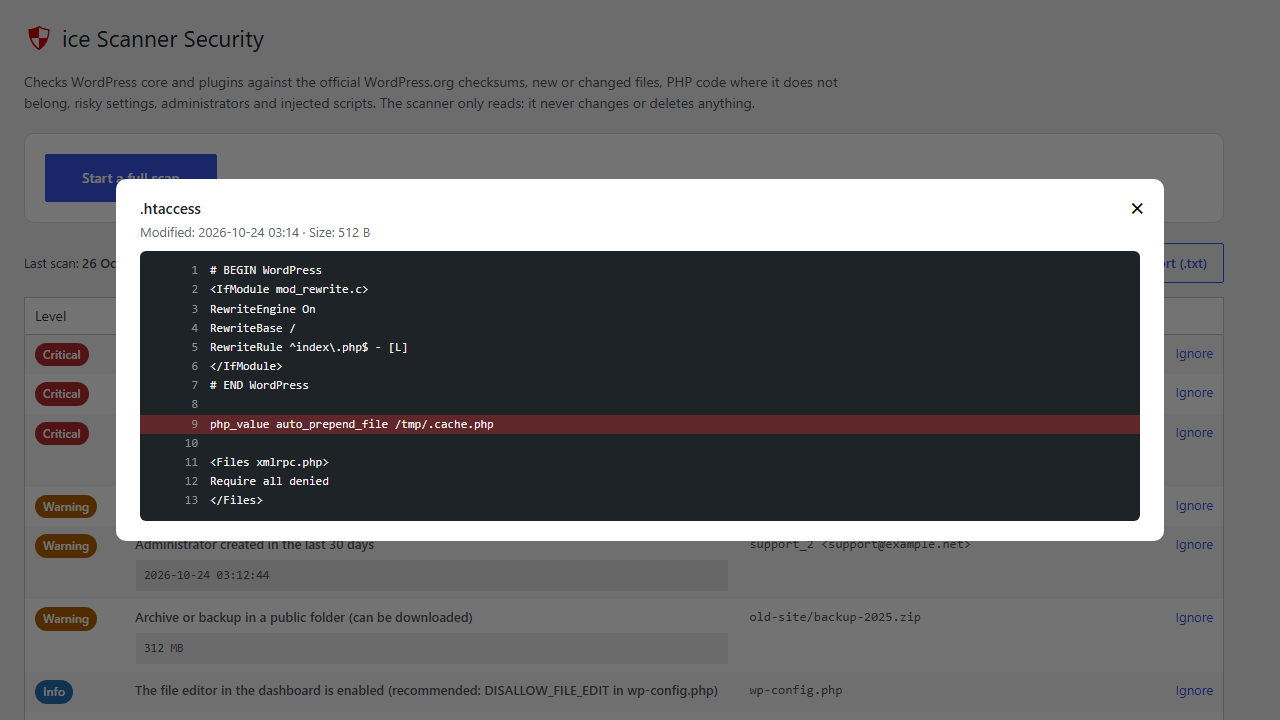
- Configuration – .htaccess, .user.ini and php.ini rules that load PHP on every request, run images as PHP or redirect search engine visitors; drop-ins, must-use plugins, the file editor and WP_DEBUG.
- Database – administrators (new ones are highlighted), open registration with a high default role, scripts or iframes saved in options and posts.
- Changes – new or changed files since the previous scan.
- Results are grouped as Critical, Warning and Info.
- Every finding shows the file and, for code, the line – click "View" to see the code around it.
- "Ignore" findings you have checked; they stay ignored in future scans.
- Download the report as a text file.
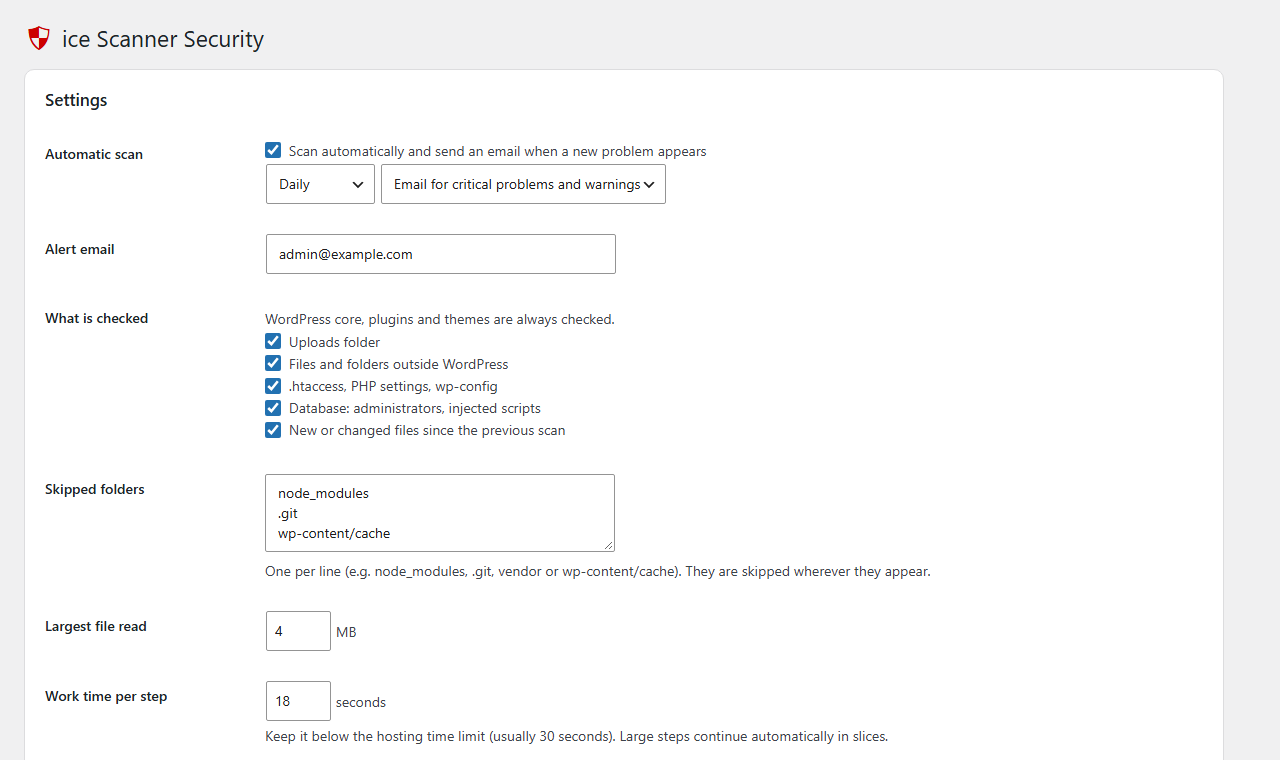
- Optional automatic scan (twice a day, daily or weekly) with an email only when new problems appear.
安装:
- Install the plugin from Plugins → Add New (search for "ice Scanner Security"), or upload the folder to
/wp-content/plugins/. - Activate it.
- Go to ice Scanner Security in the dashboard menu and click Start a full scan.
- Optional: enable the automatic scan in the settings below the report.
屏幕截图:
常见问题:
Does the scanner change or delete files?
No. Every check only reads files and the database. Fixing a problem is always your decision.
What does "Critical", "Warning" and "Info" mean?
Critical: very likely a hack or a dangerous setting, check it now. Warning: suspicious, worth checking. Info: useful to know (for example, the list of administrators).
A finding is a false positive. What can I do?
Click "Ignore" next to it. It will stay ignored in future scans; you can restore it from the "Ignored" filter.
My hosting antivirus removed the plugin files. Why?
A security scanner contains the code patterns it searches for, so some hosting antivirus tools (for example Imunify360 or cPGuard) may flag it. Add the folder wp-content/plugins/icecodero-security-scanner to the antivirus exceptions (allowlist) in your hosting control panel:
- cPGuard: cPanel → Security → cPGuard → Settings → Virus Scanner → Whitelist Files.
- Imunify360: the detected files are listed in cPanel → Imunify360; ask your hosting provider to add the folder to the Imunify360 ignore list.
The scan stops on a large site.
Lower "Work time per step" in the settings (for example to 10 seconds) if your hosting has a short time limit, and add large folders that do not need checking (backups, caches) to "Skipped folders".
Does it slow down my site?
No. The scanner runs only when you start it or when the optional automatic scan runs. It adds nothing to the pages your visitors see.
更新日志:
- First public release on WordPress.org.
- Versions use the format MAJOR.YY.MM.N (year, month and the number of the release in that month).