
Icegram Mailer – Reliable Email Deliverability, No-Code SMTP Replacement & Email Logs for WordPress
| 开发者 |
icegram
niravmehta sandhyam kishanranawat |
|---|---|
| 更新时间 | 2026年10月27日 00:07 |
| 捐献地址: | 去捐款 |
| PHP版本: | 7.0 及以上 |
| WordPress版本: | 7.1.3 |
| 版权: | GPLv3 or later |
| 版权网址: | 版权信息 |
详情介绍:
wp_mail() servers — send transactional and marketing emails reliably with a built-in sending service, real-time email logs, open tracking, and one-click resend.
Icegram Mailer is a zero-code SMTP replacement and dedicated email sending service built for WordPress and WooCommerce. Unlike traditional SMTP connector plugins that still force you to register external AWS SES, SendGrid, Mailgun, or Google Cloud OAuth accounts, Icegram Mailer includes its own high-deliverability sending infrastructure right out of the box.
Install the plugin, activate your Free Plan (200 free emails every month, resetting monthly) in under 2 minutes, and ensure every order receipt, password reset, contact form alert, and newsletter lands in the inbox.
- Explore Features & Plans: Icegram Mailer Official Page
- Compare Solutions: See how Icegram Mailer stacks up against WP Mail SMTP, Post SMTP, Site Mailer, and SMTP Mailer.
- Built-In Email Sending Service (No External SMTP Setup): Skip SMTP hosts, ports, and third-party API consoles. Connect directly to Icegram's authenticated sending infrastructure in one click.
- 200 Free Emails Every Month: Start free with 200 emails/month (automatically resetting every month in your site's local timezone) and scale seamlessly as your store or newsletter grows.
- Free Email Logs, Source Detection & 1-Click Resend: View sent and failed emails, see which plugin generated each email (WooCommerce, Contact Form 7, Icegram Express, WPForms, etc.), search/filter logs, and resend any email in one click — features other SMTP plugins lock behind Pro paywalls.
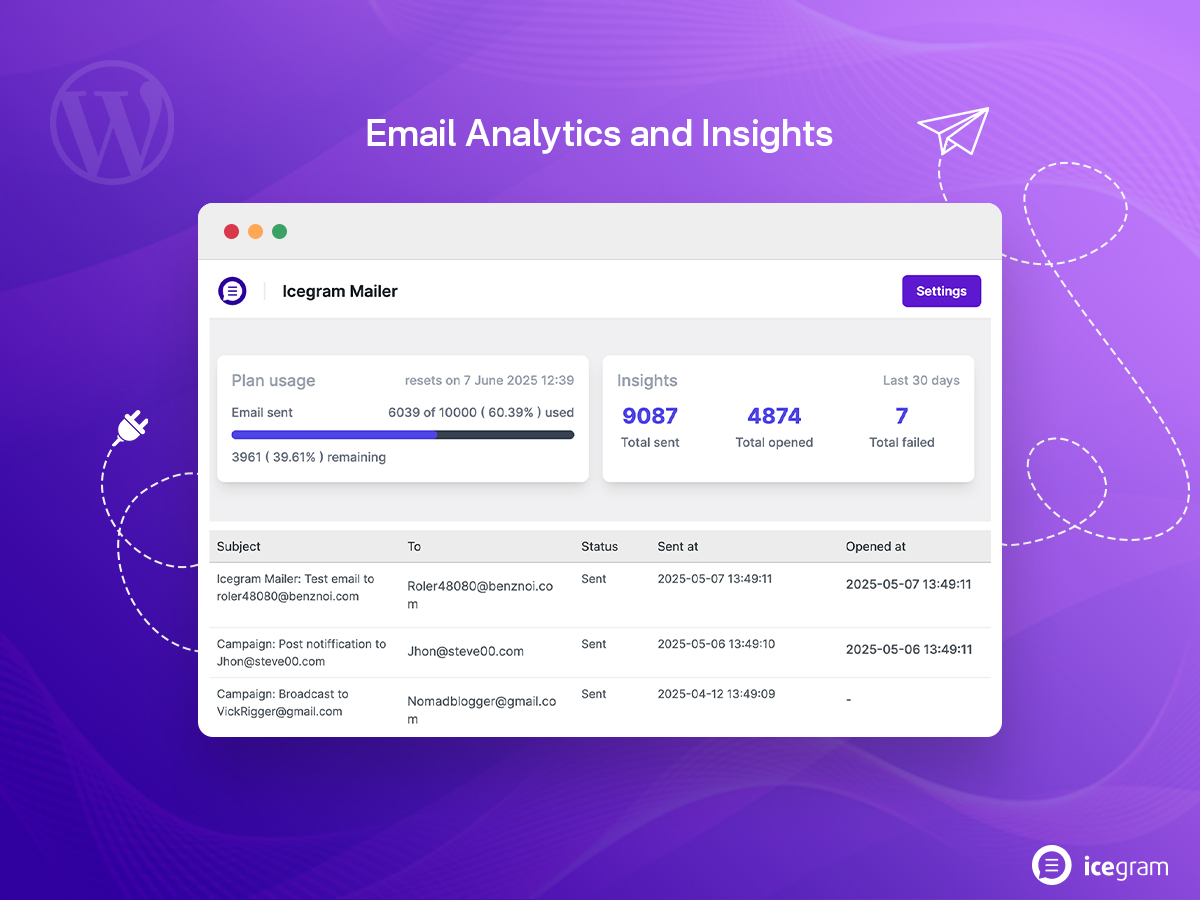
- Real-Time Open Tracking & Delivery Insights: Monitor sent counts, open rates, and failed deliveries directly from your WordPress dashboard, plus receive monthly summary reports.
- Custom
Reply-ToHeader Support: Set a customReply-Toemail address or let your contact forms pass visitor reply addresses cleanly — never breaking form replies. - Proactive Admin Failure & Quota Alerts: Receive automatic admin notifications if an email fails to send or when your site approaches its monthly sending limit.
- Email Source Detection & Filtering (v1.0.14): Instantly identify which WordPress plugin triggered every outgoing email and filter your Email Logs by source.
- Enhanced Email Log Management (v1.0.11): Search logs by recipient or subject, delete old logs, and customize your
Reply-Toaddress. - One-Click Email Resend (v1.0.9): Retry failed deliveries or resend any logged transactional email directly from the Email Logs screen.
- Admin Failure Alerts & Monthly Summaries (v1.0.10 – v1.0.12): Get notified immediately when delivery issues occur or quotas are reached, with accurate local-timezone reset dates.
- Multilingual Support in 7 Languages (v1.0.7): Available in English, Dutch, German, Spanish, French, Italian, and Portuguese.
wp_mail():
- WooCommerce & eCommerce Transactional Emails: Order confirmations, customer invoices, shipping updates, digital download links, and abandoned cart recovery emails.
- Marketing & Newsletter Campaigns: Blog post notifications, weekly digests, and promotional broadcasts sent via Icegram Express, MailPoet, Newsletter, or FluentCRM.
- Contact Form & Lead Alerts: Instant inquiry notifications from Icegram Collect, Contact Form 7, WPForms, Forminator, Ninja Forms, and Formidable Forms.
- WordPress System & Membership Emails: Password resets, new user registration confirmations, two-factor authentication codes, LearnDash course updates, and BuddyBoss alerts.
- Email Marketing & CRM Plugins: Icegram Express (Email Subscribers), MailPoet, FluentCRM, Mailchimp, Constant Contact, ActiveCampaign, The Newsletter Plugin.
- eCommerce Stores: WooCommerce, Easy Digital Downloads (EDD).
- Form Builders: Icegram Collect, Contact Form 7 (CF7), WPForms, Forminator, Ninja Forms, Formidable Forms, Gravity Forms, Elementor Forms.
- Membership, LMS & Community Plugins: WooCommerce Memberships, LearnDash, Ultimate Member, Paid Memberships Pro, MemberPress, BuddyBoss.
"Very fast resolution to my email problem." – Dr. Cecil W. Thorn "Works flawlessly and also with PHP Mailer." – Fenix71 "Best email sending service so far." – Shashank2910 "I have been using so many plugins and WordPress websites. However, I will point out the support. They helped me so quickly, answered my questions and solved my problems in an instant. Thank you again for such a great plugin!" – merajulbdc "Very easy to use and very effective. ICEGRAM for life." – vginasandsAvailable in 7 Languages Icegram Mailer is translated into English (US), Dutch, German, Spanish, French, Italian, and Portuguese, and includes a
.pot file for easy localization into any language.
Other Popular Plugins from the Icegram Team
- Email Subscribers & Newsletters (Icegram Express) – Complete self-hosted email marketing, newsletters, post notifications, and WooCommerce automation.
- Icegram Engage – High-converting popups, welcome bars, slide-ins, opt-ins, and lead generation campaigns.
- Icegram Collect – Easy contact forms, subscription forms, and lead capture with database storage.
- Temporary Login Without Password – Create self-expiring admin login links for developers and support teams.
- Duplicate Pages and Posts – One-click clone WordPress posts and pages into drafts.
- Icegram Cookie Manager – Fast, free GDPR and CCPA cookie consent banner for WordPress.
- Smart Manager – Bulk-edit WooCommerce products, orders, coupons, and WordPress posts in an Excel-like spreadsheet.
安装:
- Log in to your WordPress Admin Dashboard and navigate to Plugins > Add New.
- Search for Icegram Mailer.
- Click Install Now next to Icegram Mailer – Reliable Email Deliverability, No-Code SMTP Replacement & Email Logs for WordPress, then click Activate.
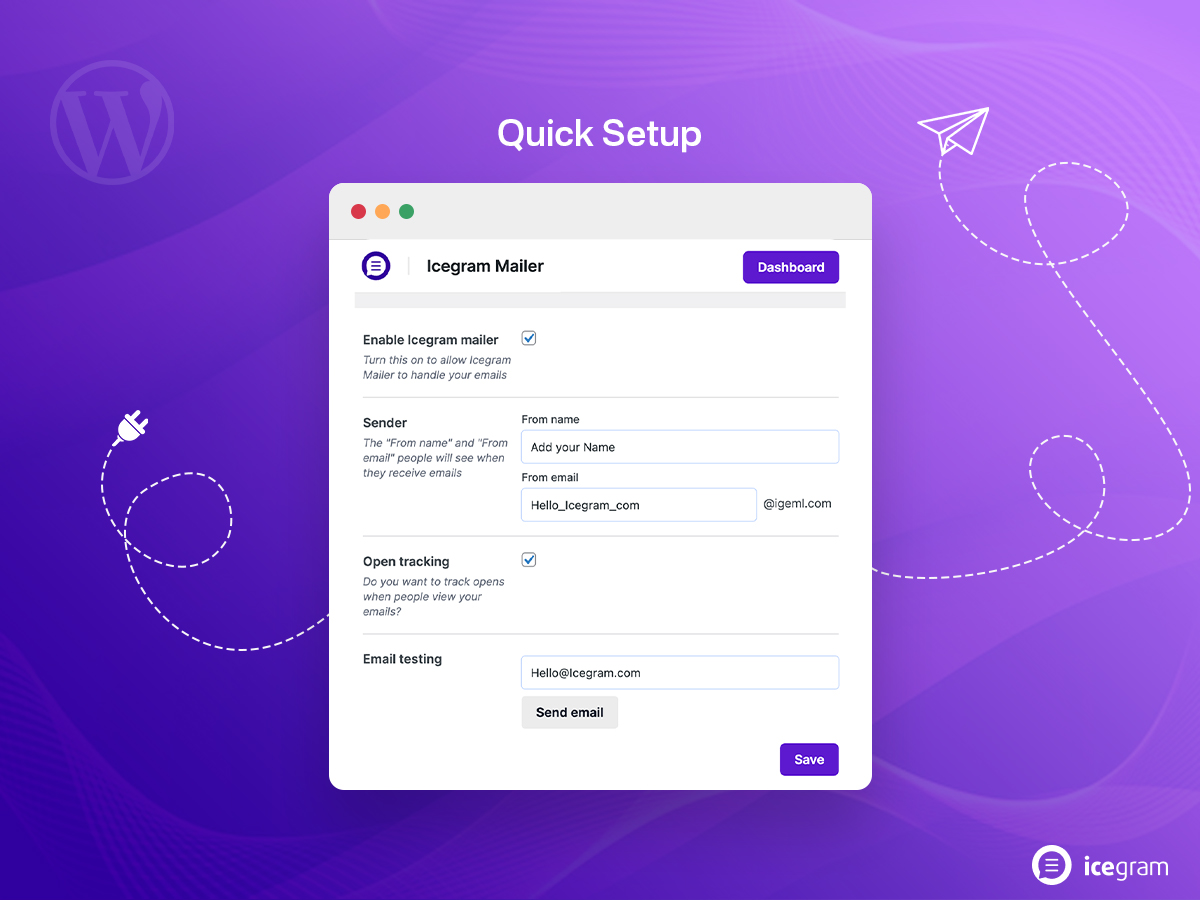
- Open Icegram Mailer in your WordPress admin menu, connect your free account in one click to activate your 200 free emails/month, configure your sender details, and send a test email.
- Download the
icegram-mailer.ziparchive from the WordPress.org plugin page. - In your WordPress Admin Dashboard, go to Plugins > Add New > Upload Plugin, select
icegram-mailer.zip, click Install Now, and click Activate Plugin. - Follow the quick setup screen under Icegram Mailer to start sending emails immediately.
屏幕截图:
常见问题:
What is Icegram Mailer and how is it different from WP Mail SMTP or FluentSMTP?
Traditional SMTP plugins like WP Mail SMTP, FluentSMTP, or Post SMTP require you to sign up for a separate third-party email provider (such as Amazon SES, SendGrid, or Mailgun) and configure API keys or SMTP ports manually. Icegram Mailer includes a built-in email sending service right inside the plugin — so you can fix WordPress email deliverability, track opens, and inspect email logs in minutes without managing external SMTP accounts.
How many emails can I send on the Free Plan?
The Free Plan includes 200 free emails every month (resetting automatically each month in your site's local timezone), along with full access to Email Logs, Email Source Detection, Open Tracking, and One-Click Email Resending. As your email volume grows, you can upgrade to a higher monthly sending plan anytime.
Are Email Logs, Open Tracking, and Resending Emails included for free?
Yes. Unlike WP Mail SMTP and Easy WP SMTP (which lock email logging, open tracking, and resending behind paid Pro plans), Icegram Mailer includes real-time Email Logs, Email Source Detection (showing which plugin sent each message), Open Tracking, and One-Click Resend on every plan, including Free.
Will Icegram Mailer override my Contact Form Reply-To addresses?
No. Icegram Mailer respects Reply-To headers and includes a dedicated setting (added in v1.0.11) to customize your default Reply-To email address, ensuring that when you hit "Reply" on a Contact Form 7, WPForms, or Icegram Collect inquiry, your reply goes directly to the visitor.
Is Icegram Mailer compatible with WooCommerce and newsletter plugins?
Yes. Icegram Mailer works seamlessly with WooCommerce, Easy Digital Downloads, Icegram Express, MailPoet, FluentCRM, The Newsletter Plugin, and any WordPress plugin that sends emails through wp_mail().
How do I know if an email fails to send or if I reach my monthly limit?
Icegram Mailer automatically notifies the site administrator when an email fails to deliver or when your account approaches its monthly sending quota. You can also check your live usage counter, next monthly reset date, and delivery status at any time in the Icegram Mailer dashboard.
Can I resend a failed or previously sent email?
Yes. Navigate to Icegram Mailer > Email Logs, search or filter by status or source plugin, and click Resend next to any logged email to dispatch it again immediately.
Will Icegram Mailer slow down my WordPress website?
No. Icegram Mailer separates frontend and backend processing so your public pages stay fast and cache-friendly while outgoing emails are dispatched over Icegram's high-speed cloud API.
更新日志:
- Update: Tested up to WordPress 7.1.3
- Fix: Subscriber keywords were not replaced in emails sent via Icegram Express
- New: Added email source detection and filtering in Email Logs
- Enhancement: Improved query sanitization while filtering email logs
- Update: Tested up to WordPress 7.0
- Fix: Next reset date now displays in the site's local time
- Fix: Corrected failed email count in monthly summary emails
- Fix: Resolved email sending issue with multiple recipients
- Improvement: Added option to customize "Reply-To" email address
- Improvement: Enhanced email logs management with search, resend, and delete options
- Improvement: Added option to fetch email usage data
- Improvement: Notify admin when email sending fails or sending limit is reached
- Fix: Resolved PHP warning "Unsupported value type"
- Improvement: Added option to "Resend" emails
- Fix: Resolved "API key is empty" error when sending emails in some cases
- Update: Tested up to WordPress 6.9
- New: Added translations for Spanish, French, Portuguese, Italian, German
- Update: Added POT file for translations
- Improvement: Separation between frontend and backend processes for improved performance and flexibility
- Update: Tested up to WordPress 6.8
- Fix: Email stats calculation issue on some sites
- Fix: Registration error when site title is empty
- Fix: Signup error when Icegram email sending service is already being used in Icegram Express plugin
- Fix: Incorrect "Reply-To" email in some cases
- Update: UI improvements
- Initial release