
Image Watermark
| 开发者 | dfactory |
|---|---|
| 更新时间 | 2026年10月20日 23:12 |
| 捐献地址: | 去捐款 |
| PHP版本: | 7.3 及以上 |
| WordPress版本: | 7.1 |
| 版权: | MIT |
| 版权网址: | 版权信息 |
标签
下载
详情介绍:
- Watermark Types: Choose from image-based or text-based watermarks with full customization.
- Flexible Application: Automatic watermarking on uploads, manual/bulk apply/remove via Media Library.
- Advanced Customization: Position watermarks precisely, adjust sizes, opacity, and more.
- Small Image Rules: Skip watermarking for images below configurable minimum width and height thresholds.
- Backup & Restore: Optional backups support watermark removal when a validated clean backup is available.
- Image Protection: Browser-side right-click, drag-and-drop, and developer-tools deterrents.
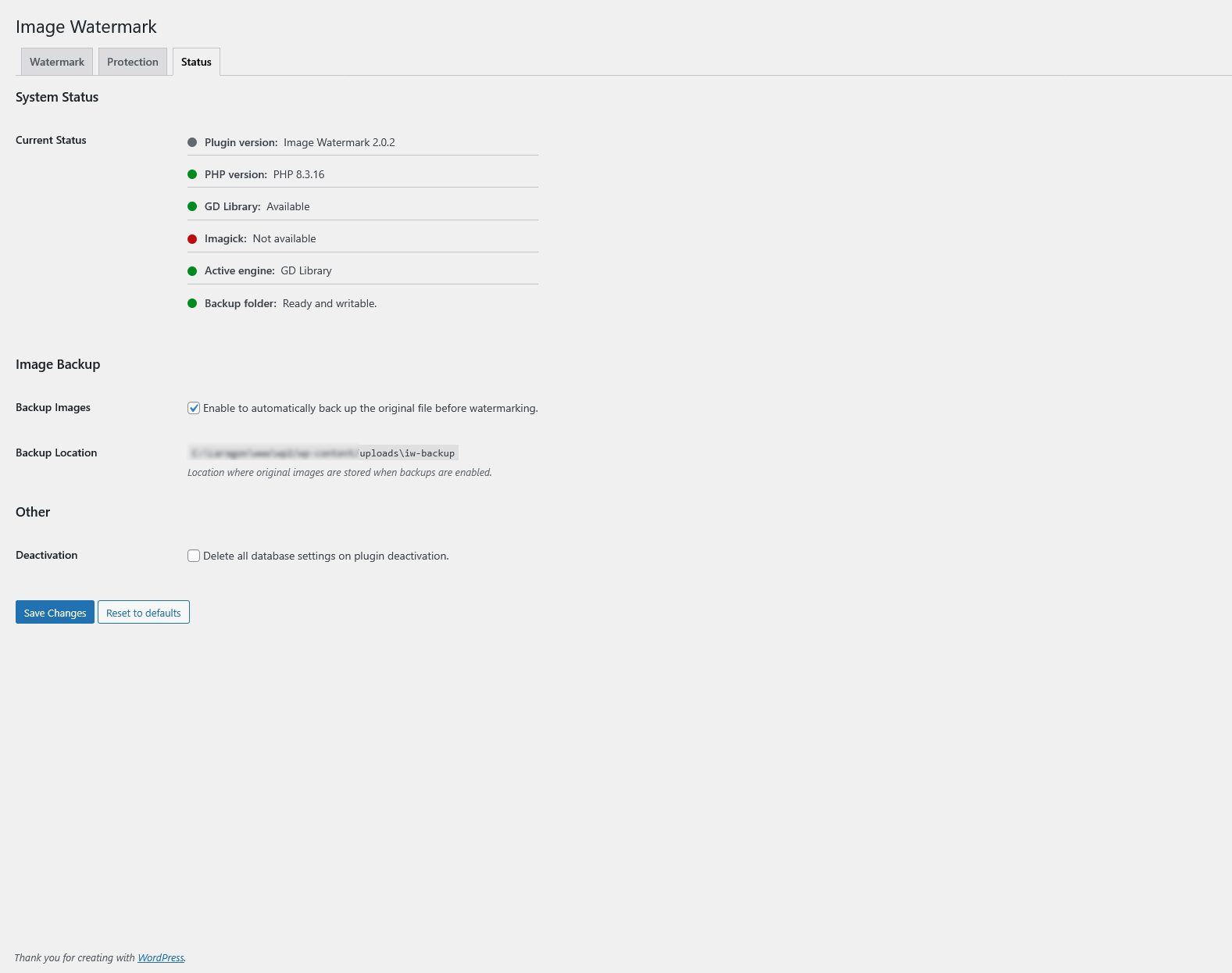
- Status & Diagnostics: Review PHP, image engine, and backup-folder readiness from the built-in Status tab.
- Technical Excellence: Supports JPEG, PNG, WebP; ImageMagick/GD engines; preserves metadata.
- Support for image-based watermarks (upload custom images as watermarks)
- Support for text-based watermarks (customizable fonts, colors, and sizes)
- Automatic watermarking on new uploads to the Media Library
- Manual and bulk watermarking for existing images (apply or remove via Media Library actions) Customization & Settings:
- Flexible watermark positioning (9 alignment options with pixel or percentage-based offsets)
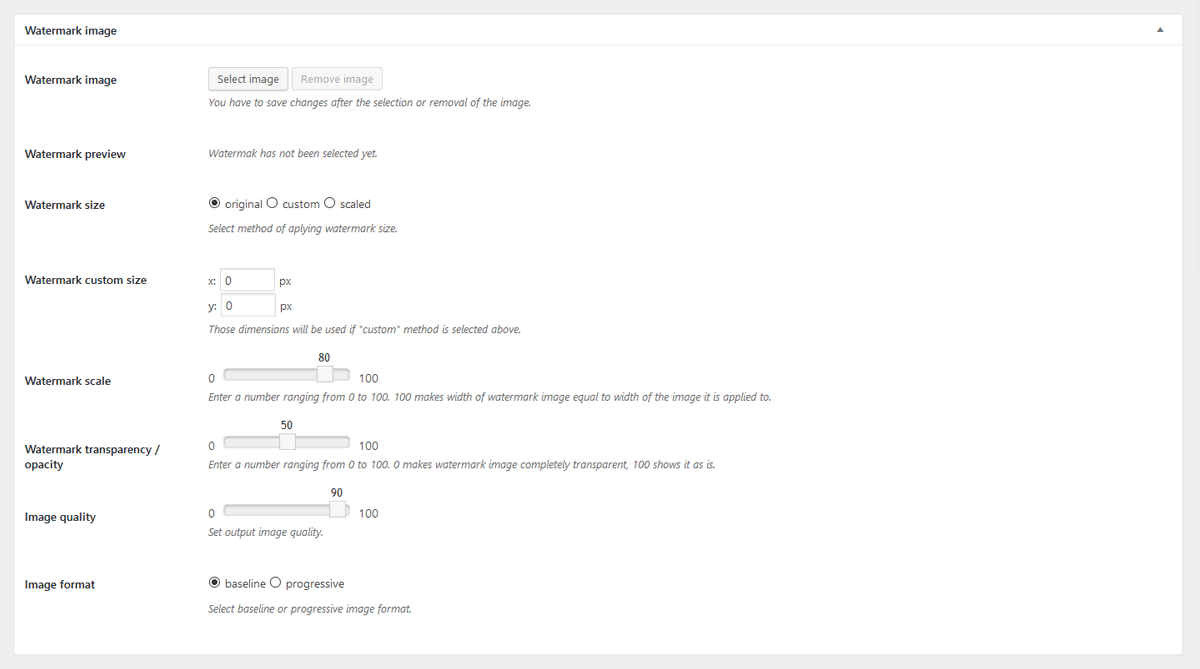
- Three watermark size modes: original, custom dimensions, or scaled to image size
- Adjustable watermark transparency and opacity
- Watermark preview support for image and text watermark modes
- Optional skip rules for small images based on minimum width and height thresholds
- Selective application: Choose specific post types or enable everywhere (including frontend uploads)
- Image format selection (baseline or progressive JPEG)
- Configurable image quality settings Backup & Management:
- Automatic image backup functionality (stores originals for easy restoration)
- Option to remove watermarks (restores from backups when available)
- Optional preservation of file timestamps during backup and restore
- Backup storage follows the configured uploads location; server-level access controls must be verified by the site administrator Image Protection:
- Disable right-click context menus on images
- Prevent image copying via drag-and-drop
- Block access to developer tools for image inspection
- Customizable protection notice/toast message displayed to users attempting to copy images Technical Information:
- Support for JPEG, PNG, and WebP image formats
- Dual image processing engines: ImageMagick (preferred) with GD library fallback
- EXIF and IPTC metadata preservation (where supported)
- Cache-busting for immediate thumbnail updates after watermark changes
- Built-in Status tab for PHP, engine, and backup-folder diagnostics
- Translation-ready with included .pot file
安装:
- Install the Plugin:
- Via WordPress.org: Go to Plugins > Add New, search for "Image Watermark," and click Install Now.
- Manual Upload: Download the plugin ZIP from WordPress.org, then upload it via Plugins > Add New > Upload Plugin.
- Activate the Plugin:
- After installation, activate Image Watermark through the 'Plugins' menu in WordPress.
- Configure Settings:
- Navigate to Settings > Watermark in your WordPress admin dashboard.
- Choose your watermark type (image or text) and upload/select a watermark image if using image-based.
- Adjust positioning, size, opacity, and other options as needed.
- Select post types for automatic watermarking or enable for all uploads.
- Enable and Test:
- Toggle the plugin on to start automatic watermarking for new uploads.
- For existing images, go to Media Library > Bulk Select, choose images, and use the "Apply Watermark" bulk action.
- Preview watermarks in the settings page and test on a sample image to ensure everything works.
屏幕截图:
常见问题:
Can I remove a watermark later?
Yes. Watermark removal restores the original file from a validated clean plugin backup. Keep backup creation enabled before applying watermarks if you want removal to remain available later. Existing valid backups remain usable even if new backup creation is later disabled.
Which image formats and libraries are supported?
Image Watermark supports JPEG, PNG, and WebP uploads. The server needs either ImageMagick or GD available, and the Status tab shows which engine is active.
Can I skip very small images?
Yes. Enable the small-image threshold option in the Watermark settings and set a minimum width and/or height. Images below the configured limit are skipped.
Does frontend image protection fully secure my images?
No. The right-click, drag-and-drop, and developer-tools protections are browser-side deterrents. They help discourage casual copying but should not be treated as absolute protection.
更新日志:
- Fix: Distinguish missing backups from invalid or inaccessible backup paths
- Tweak: Speed up Media Library watermark controls by avoiding full backup image decoding
- Fix: Apply automatic watermarks safely when WordPress 7.1 finalizes client-side media uploads
- Fix: Save scaled watermark size, opacity, and small-image thresholds correctly
- Fix: Preserve the original JPEG file permissions when watermarking rewrites image metadata
- New: Watermark rotation (0-360 degrees clockwise) for image and text watermarks with live preview
- Fix: Recover interrupted watermark operations and safely retry after concurrent requests
- Fix: Require a validated clean backup before apply or remove changes live images
- Fix: Remove only the mapped backup and owned temporary files when an attachment is deleted
- Tweak: Expanded Status tab diagnostics and clearer skipped-operation reasons
- Tweak: Minimum requirements raised to WordPress 6.3+ and PHP 7.3+
- New: Trust diagnostics for watermark readiness in the Status tab
- Fix: Imagick detection and text metrics compatibility
- Fix: Detect Imagick support correctly on servers exposing camelCase methods
- Fix: Prevent false-success apply responses when watermarking fails
- Fix: Read small-image thresholds from the actual image dimensions
- New: Add small-image threshold controls for watermark eligibility
- Fix: Gutenberg auto-watermarking for admin media uploads
- Fix: Admin media frame state guard on post editor screens
- Tweak: Add WordPress PHPUnit coverage and unified test command
- New: Optional preservation of file timestamps for backup and restore
- Fix: GD text alpha cast issue in watermark rendering
- Fix: Text watermark validation blocking legitimate inputs
- Tweak: Shared watermark validation and improved error handling
- Tweak: Enhanced nav tab styling with slug-specific classes
- Fix: "You are not allowed to perform this action" errors with specific validation messages
- Fix: False-positive success responses for apply/remove watermark failures
- Fix: Error message display bug in single-image watermark actions
- Tweak: Enhanced error messages (backup not found, unsupported file type)
- Tweak: Added debug logging capability for watermark actions (WP_DEBUG_LOG)
- Fix: Persist review notice dismissal in options sanitizer to prevent notice reappearing
- New: Apply Watermark To radio control for better UI clarity
- Fix: Settings persistence issue with checkbox options
- Fix: JavaScript scope pollution in settings page
- New: Improved settings UI
- Fix: Apply/remove watermark for post media modal
- Fix: Improve media modal watermark actions UI and messaging
- Tweak: New color picker and switch field type in settings.
- Fix: Preserve PNG transparency when applying watermark using GD library.
- Fix: Prevent applying watermark during watermark image upload
- Fix: Migrate legacy watermark image setting into 2.0.x options
- Fix: Settings save issue for unchecked options and CPT scope
- New: Text watermark support
- New: Enhanced watermark preview with real-time updates.
- New: Support for additional watermark alignment options and percentage-based scaling.
- Tweak: Improved user interface for settings page with modern design elements.
- Tweak: Optimized image processing for faster bulk operations.
- Fix: Enhanced error handling for unsupported image formats.
- New: Bulk Apply/Remove Watermark buttons in Media Library grid view with native styling.
- Fix: Cache-busting for thumbnails and attachment details so watermark changes show immediately.
- Fix: Bulk actions now ignore unsupported/non-image files for safer processing.
- Fix: Watermarked image not refreshing in attachment edit screen after watermark is applied or removed
- Fix: Updated image reload selectors to support modern WordPress attachment details page structure
- Tweak: Complete modern rewrite of Right click blocking feature
- New: WebP image files support
- Fix: Potential security issue with capability check - props WordFence
- Fix: Saving post types settings issue
- Tweak: WordPress 6.5 compatibility
- Tweak: WordPress 6.2 compatibility
- Tweak: PHP 8.2 compatibility
- Fix: Missing admin-media.js file
- Fix: Watermark option not available in Media Library
- Tweak: WordPress 5.9 compatibility
- Tweak: PHP 8.x compatibility
- Tweak: PHP 7.3 compatibility
- Fix: Improved support for PHP 7 and above
- Fix: Backup folders handling of date based organized uploads
- Fix: Transparent PNG issues with ImageMagick library
- Fix: The plugin directory upload fix.
- Fix: PNG files watermarking issue
- New: Option to select watermark offset unit - pixels or percentages
- Tweak: Added values to slider settings fields
- Fix: Minor bug with AJAX requests, thanks to JoryHogeveen
- Fix: Prevent watermarking the watermark image, thanks to JoryHogeveen
- Tweak: Code cleanup
- New: Image backup functionality, thanks to JoryHogeveen
- New: Option to remove watermark (if backup is available)
- New: PHP image processing library option, if more than one available.
- Fix: Manual / Media library watermarking not working.
- Fix: Image sizes not being generated properly in GD library.
- Fix: Determine AJAX frontend or backend request
- Tweak: Remove Polish and Russian translations, in favor of GlotPress
- Fix: Use of undefined constant DOING_AJAX
- New: ImageMagic support
- Tweak: Switch from wp_get_referer() to DOING_AJAX and is_admin().
- New: Introducing plugin documentation
- Tweak: Improved transparent watermark support
- Tweak: Plugins setting adjusted to WP settings API
- Tweak: General code cleanup
- Tweak: Added Media Library bulk watermarking notice
- New: Hungarian translation, thanks to Meszaros Tamas
- New: Option to donate this plugin :)
- New: Russian translation, thanks to Sly
- New: Chinese translation, thanks to xiaoyaole
- Fix: Option to disable right click on images not working
- Tweak: Manual watermarking now works even if selected post types are selected
- Tweak: UI improvements for WP 3.8
- Fix: Image protection options not saving properly
- New: German translation, thanks to Matthias Siebler
- New: Frontend watermarking option (for front-end upload plugins and custom front-end upload code)
- New: Introducing iw_watermark_display filter
- New: Option to delete all plugin data on deactivation
- Tweak: Rewritten watermark application method
- Tweak: UI enhancements for settings page
- New: Arabic translation, thanks to Hassan Hisham
- New: Introducing API hooks: iw_before_apply_watermark, iw_after_apply_watermark, iw_watermark_options
- Fix: Wrong watermark watermark path
- Fix: Final fix (hopefully) for getimagesize() error
- New: Image quality option
- New: Image format selection (progressive or baseline)
- Fix: Error when getimagesize() is not available on some servers
- Tweak: Files & class naming conventions
- New: Added option to enable or disable manual watermarking in Media Library
- Fix: Apply watermark option not visible in Media Library actions
- Fix: Warning on full size images
- New: Bulk watermark - Apply watermark in Media Library actions
- New: Watermark images already uploaded to Media Library
- Fix: Error during upload of file types other than images (png, jpg)
- Fix: Limit watermark file types to png, gif, jpg
- Tweak: Validation for watermark size and transparency values
- Tweak: Remove unnecessary functions
- Tweak: Code cleanup
- Tweak: Added more code comments
- Tweak: Small css changes
- New: Add watermark to custom image sizes registered in theme
- Tweak: Admin notices on settings page if no watermark image selected
- Tweak: JavaScript enqueuing on front-end
- Tweak: General code cleanup
- Tweak: Changed label for enabling image protection for logged-in users
- Fix: Using image ID instead of image URL during image upload