
Publish kintone data
| 开发者 | tkc49 |
|---|---|
| 更新时间 | 2026年10月23日 19:57 |
| PHP版本: | 7.4 及以上 |
| WordPress版本: | 7.1 |
| 版权: | GPLv2 or later |
| 版权网址: | 版权信息 |
标签
下载
1.0.4
1.0.5
1.1.0
1.2.0
1.2.1
1.2.2
1.2.3
1.2.4
1.2.5
1.2.6
1.2.8
1.3.0
1.4.0
1.5.0
1.5.1
1.6.0
1.6.1
1.7.0
1.7.1
1.7.2
1.7.3
1.8.0
1.8.1
1.8.2
1.8.3
1.9.0
1.9.1
1.9.2
1.0.3
1.10.0
1.12.2
1.2.9
1.7.4
1.9.3
1.9.4
1.9.5
1.9.6
1.0.1
1.14.1
1.14.2
1.0.2
1.15.0
1.11.0
1.13.0
1.13.1
1.14.0
1.15.1
1.16.2
1.9.7
1.12.1
1.16.1
1.16.3
1.0.0
1.12.0
1.16.0
1.16.4
详情介绍:
Publish kintone data turns a kintone app into WordPress content. Each record in
the app becomes a post, and the field values become the post title, the post
content, taxonomy terms, the featured image and custom fields, following the
mapping you set up on the settings screen.
It is aimed at the case where the business data already lives in kintone and the
website needs to show it: product catalogues, member directories, event listings,
property listings and the like. Staff keep editing records in kintone, which they
already know how to use, and the site follows.
One-way, with kintone as the source of truth
The sync only ever runs from kintone to WordPress. Nothing is written back.
If someone edits a synced post in the WordPress admin and saves it, the plugin
fetches that record from kintone again and overwrites the post with the kintone
values. This is deliberate: it keeps the two sides from drifting apart, and it
means kintone is always the place to make a correction.
Three ways data reaches WordPress
- Webhook — kintone notifies WordPress the moment a record is added, updated or deleted, and only that record is synced. This is the normal way to run it. The settings screen shows the URL to register in your kintone app.
- Saving a post — saving a synced post in the WordPress admin re-fetches that record, as described above.
- Bulk update — a button on the settings screen walks the whole app and
reflects every record. Use it for the first import, or after changing the field
mapping. It runs in small batches with a progress bar, and can be stopped and
resumed.
batch/run-bulk-update.phpdoes the same thing from the command line, for cron.
- FILE — the file is downloaded and added to the media library. The custom field holds the attachment ID. Point the featured image setting at a file field to use it as the post thumbnail.
- USER_SELECT and SUBTABLE — stored as arrays. When a user field is mapped to a taxonomy, the user names become the terms.
- CREATOR and MODIFIER — split into two custom fields,
<key>_codeand<key>_name. - DATETIME — stored as
Y-m-d H:i, shifted by nine hours from UTC. - Anything else — stored as text. Fields that hold several values, such as checkboxes and multi-select, are joined with commas.
get_post_meta() as usual, or placed in
post content with the shortcode:
[publish_kintone_data custom_field_key="your_meta_key"]
format="number_format" adds thousands separators. Any other value is treated as
a date format and passed to date_i18n(), so the stored value has to be a Unix
timestamp:
[publish_kintone_data custom_field_key="price" format="number_format"]
[publish_kintone_data custom_field_key="opened_at" format="Y-m-d"]
Before you start
- A kintone API token for the app, with permission to view records. Add permission to add, update and delete records as well if you want the webhook to fire.
- A post type to reflect the app into. The built-in Posts and Pages both work, and so does any public custom post type.
- Posts are created as drafts. Publishing them is left to the site, so that a new record does not appear on the front page before anyone has looked at it. See below for how to change that.
import_kintone_insert_post_data and
import_kintone_update_post_data before a post is created or updated. This is
where to set post_status if you want records published automatically, and
returning an empty array skips the write entirely.
Every setting is read through a filter named publish_kintone_data_*, with the
kintone payload as the second argument, so the connected app, the target post type
and the field mapping can all be swapped per record. That is how one WordPress
site can serve several kintone apps.
What is kintone?
It is a cloud service that can make the business applications with non-programming provided by Cybozu.
Collaborate with team members and partners via apps and workspaces.
- Information in Japanese : https://kintone.cybozu.com/jp/
- Information in English: https://www.kintone.com/
安装:
- Install the plugin through the Plugins screen in WordPress, or upload the
import-kintonefolder to/wp-content/plugins/. - Activate it through the Plugins screen.
- Go to Settings > Publish kintone data. Enter your kintone subdomain, an API token for the app and the app ID, choose the post type to reflect the app into, and save. The field list is fetched from kintone at this point.
- Map the kintone fields to the post title, post content, taxonomies, the featured image and your custom field keys, then save again.
- Copy the webhook URL shown on the settings screen into the webhook settings of your kintone app, so that changes are reflected as they happen.
- Press Bulk Update to bring the records that already exist in the app across.
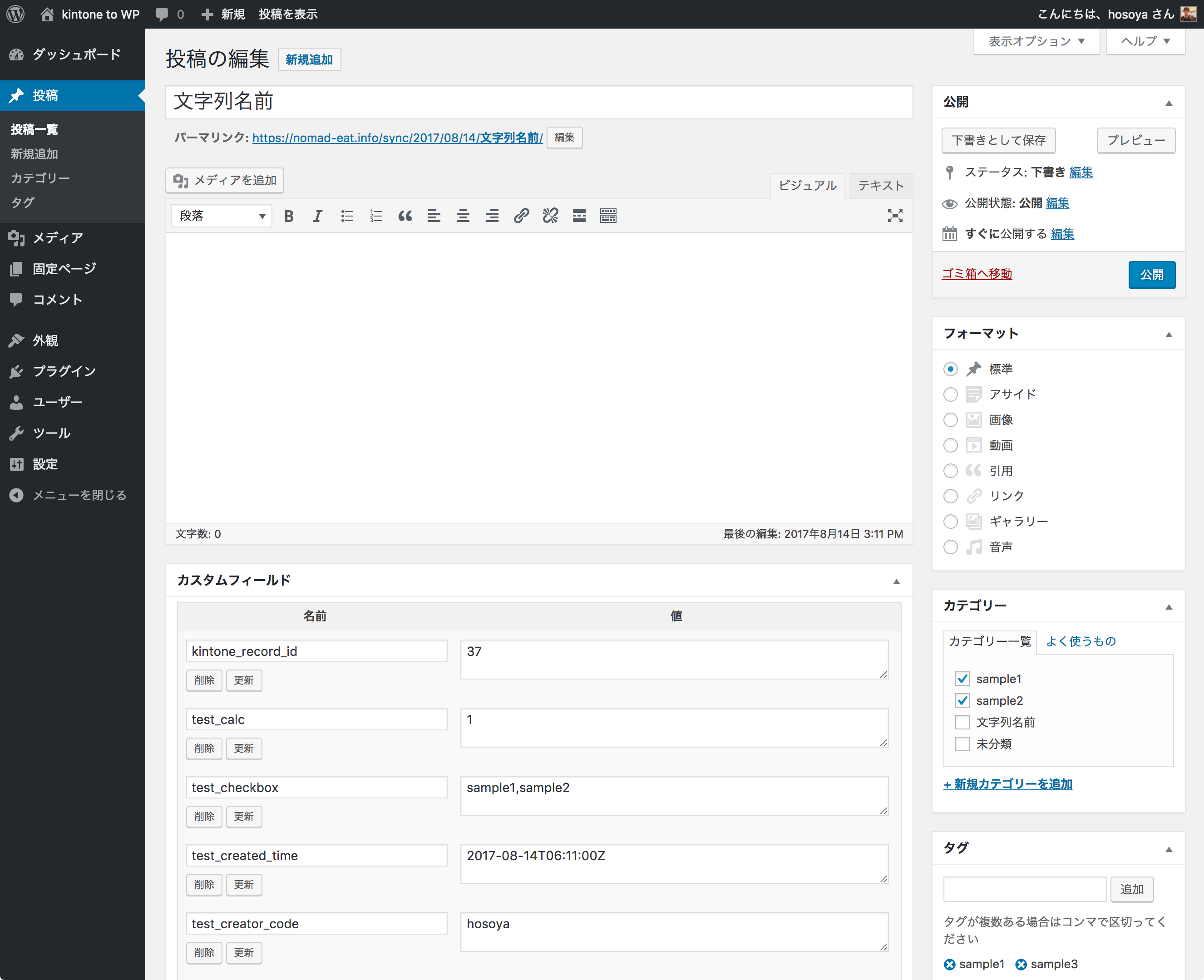
[publish_kintone_data custom_field_key="your_meta_key"]屏幕截图:
常见问题:
Any field it can not be associated?
"The fields it can not be associated." in the below web page can not be associated to WordPress even if put in kinote. https://cybozudev.zendesk.com/hc/ja/articles/201941834 (Sorry, only in Japanese) If you have questions about WordPress to kintone, please contact the following e-mail address. support@ht79.info For the operation of kintone, the above contact can't handle. Please contact Cybozu. https://www.cybozu.com/jp/inquiry/
更新日志:
1.16.4 (2026-10-23)
- [Fixed] A delete notification sent through
kintone.proxydid not delete the WordPress post.kintone.proxyalways sends a request body, so the notification arrived with an empty{}body. The plugin only readtypeandrecordIdfrom the query string when the body was missing, so it skipped the deletion and returned success. It now uses the query string whenever the body is empty. Delete notifications from kintone's standard webhook were not affected
- [Fixed] When kintone returned a file WordPress does not accept (a
.phpfile, for example), the import created an empty attachment and deleted the one already attached. It now skips the file and keeps the existing attachment - [Fixed] Error messages returned by the kintone API were printed on the admin screen without escaping
- [Changed] Files are now imported through
wp_handle_sideload()instead ofwp_handle_upload(). If another plugin on your site hooks intowp_handle_sideload_prefilter,wp_handle_sideload_overridesor thesideloadcontext of thewp_handle_uploadfilter (image optimizers, file renamers, security scanners and the like), it now runs on files imported from kintone too. Before this release those hooks were not called, and thewp_handle_uploadfilter received theuploadcontext - [Changed] The temporary file is now written to the system temp directory. The plugin no longer creates
wp-content/uploads/import_kintone/with 0777 permissions. A directory left there by an earlier version is no longer used and can be deleted
- [Fixed] Importing a kintone file slowed down as more attachments shared the same file name. The attachment slug was built from the kintone file name, so on sites where every file is called something like
thumbnail.jpgWordPress had to try numbered slugs one by one until it found a free one. The slug now starts with the post ID. The attachment title, file name and file URL do not change, and attachments that were already imported are left as they are
- [Changed] Rewrote the plugin description. It was a single sentence and did not say which way the sync runs, what the field values turn into, or that records arrive as drafts
- [Fixed] Removed an unrelated paragraph that had been pasted into the installation steps, and replaced them with the actual setup: API token, field mapping, webhook URL and the first bulk update. The folder name given there was also the old one
- [Fixed] The text domain did not match the plugin slug, so translations were never loaded. WordPress.org ships language packs named after the slug (
import-kintone), but the code declaredkintone-to-wp. Nothing was translated before this release, so no existing translation breaks - [Fixed] Added the direct file access check to the main plugin file and to the shortcode file. Both run code at the top level
- [Changed] The bulk update panel is now written in English, like the rest of the admin screens. Eleven of its messages were not run through a translation function at all
- [Changed]
Tested up tois now 7.1, backed by a CI matrix that installs WordPress 7.1, 7.0.4, 6.9.7, 6.8.8 and nightly on PHP 7.4 through 8.4 and runs the test suite on each - [Added]
Requires PHP: 7.4. The header was missing, so WordPress.org could not warn users on an unsupported PHP version - [Removed]
load_plugin_textdomain()and theDomain Pathheader. WordPress loads translations for WordPress.org plugins automatically since 4.6, and the folder the header pointed to did not exist
- [Security]
batch/run-bulk-update.phpnow refuses to run outside the CLI. The file sits underplugins/and was reachable over HTTP, so anyone could trigger a full kintone sync with no authentication and no nonce - [Changed] Renamed
batch/run-update-books.phptobatch/run-bulk-update.php. The "books" in the old name referred to a post type this plugin does not have; the sync target is chosen with thekintone_to_wp_reflect_post_typesetting. If you call the old path from cron or a shell script, update it - [Changed] Documented why the CLI script exists. Since 1.15.0 the admin screen no longer times out, so the script is now for running a bulk update without a browser (cron and the like)
- [Changed] Bulk update now runs in chunks over AJAX, so it no longer times out on apps with many records. The settings screen shows the progress and lets you stop and resume
- [Changed] Bulk update no longer drafts every post before it starts. It marks each post as it syncs, and only after every kintone record has been fetched does it draft the posts that were not marked. An interrupted run now leaves the posts published instead of hiding the whole site
- [Changed] If your site does not set
post_statusthrough theimport_kintone_update_post_datafilter, published posts now stay published after a bulk update. They used to all become drafts - [Fixed] Bulk update now drafts the posts whose kintone record was deleted. This was the long-standing @todo in the code
- [Fixed] Suspend the save_post sync with a flag instead of remove_action(). The callback comparison never matched when Admin was instantiated separately, as batch/run-update-books.php does, so bulk update re-fetched every record one by one
- [Fixed] URL-encode the query string sent to kintone
- [Added] Filters
import_kintone_bulk_update_chunk_size(default 100) andimport_kintone_bulk_update_sweep_chunk_size(default 100). Note thatimport_kintone_change_bulk_update_querynow receiveslimit 100instead oflimit 500
- [Fixed] Stop the sync instead of crashing when the kintone request fails. A WP_Error was used as an array, which caused a fatal error after the post had already been saved
- [Fixed] Do not overwrite post meta when the response cannot be parsed as a record. It used to wipe every mapped custom field, or create an empty post
- [Fixed] Leave post meta untouched for mapped fields that are missing from the record. It used to store SQL NULL, which matches neither
=norNOT EXISTSin a meta_query, so the post silently disappeared from filtered lists - [Fixed] Store an empty string for an empty DATETIME field. It used to store 1970-01-01 09:00
- [Fixed] Fetch the kintone records before drafting the posts in bulk update. A failed request used to leave every post as a draft
- [Fixed] Re-add the save_post callback after removing it, and skip the per-post sync while bulk update drafts the posts
- Fixed a bug where the original title would disappear when not linked with kintone
- [Added] Support executing bulk update from PHP command line
- Code forma
- [Fixed] Fixed bulk update issue.
- [Changed] Change the name of the button on the admin page.
- [Added] Add page to selectable post_type.
- [Changed] Changed to draft all target articles when batch updating.
- [Fixed] Modified to return if there is an error when a record in kintone is deleted.
- [Added] Fillter hook 'import_kintone_update_post_data'
- [Fixed] Fixed some
- [Added] Fillter hook 'import_kintone_insert_post_data'
- [Deprecated] Fillter hook 'import_kintone_insert_post_status'
- [Deprecated] Fillter hook 'import_kintone_insert_post_author'
- [Fixed] Typo
- [Add] Support for using shorts to display data
- [Add] Support for passing data via kintone.proxy
- [Fixed] If the size of the attachment is 0 bytes, don't process the registration to WordPress.
- [Added] Added app.id to filter hook parameter of kintone_to_wp_kintone_data when clicked bulk update button.
- [Changed] Changed directory structure
- [Add] Add the following filter hooks ・ publish_kintone_data_kintone_api_token ・ publish_kintone_data_reflect_post_type ・ publish_kintone_data_kintone_field_code_for_featured_image ・ publish_kintone_data_kintone_field_code_for_post_title ・ publish_kintone_data_kintone_field_code_for_post_contents ・ publish_kintone_data_kintone_field_code_for_terms ・ publish_kintone_data_setting_custom_fields
- [Fixed] Fixed a bug that when you set a thumbnail, saving it from draft to public increases the number of images
- [Fixed] Fixed a bug that caused tags to be removed when updating with Webhook from kintone
- [Fixed] Typo
- [Fixed] Fixed the name of import_kintone_insert_post_auhor hook
- [Added] Add hook import_kintone_insert_post_status
- [Updated] Refactoring
- 1.8.3 - Change the display logic of the taxonomy configuration field.
- 1.8.2 - Add parameter of $kintone_data to after_insert_or_update_to_post of action hook.
- 1.8.1 - Change version of Tested up.
- 1.8.0 - New action hooks: 'after_insert_or_update_to_post'.
- 1.7.4 - FIx doesn't post to wordpress when $kintone_data is empty.
- 1.7.3 - Fix can not delete post when use kintone appcode.
- 1.7.2 - Fix can not publish post when use kintone appcode.
- 1.7.1 - Fix can not save taxonomy when selected custom post type.
- 1.7.0 - Add function to Post content.
- 1.6.1 - Fixed notice & warnign error.
- 1.6.0 - Add function to Featured image.
- 1.5.1 - Fix Can not import subtable data.
- 1.5.0 - Fix Custom Taxonomy can't sync if not set category or tags.
- 1.4.0 - Add 'import_kintone_insert_post_status' filter hooks
- 1.3.0 - Addition of CFS's corresponding processing
- 1.2.9 - Changed to delete WordPress posts
- 1.2.8 - Fix
- 1.2.7 - Add processing to fetch kintone data again when saving WordPress and fix some bug
- 1.2.6 - change plugin's icon
- 1.2.5 - change plugin's icon
- 1.2.4 - add contributer
- 1.2.3 - add contributer
- 1.2.2 - fix bug
- 1.2.1 - fix typo
- 1.2.0 - New filter hooks: kintone_to_wp_kintone_data
- 1.1.0 - add tempfile
- 1.0.5 - add esc_*
- 1.0.4 - fix not working post_type
- 1.0.3 - change plugin's url
- 1.0.2 - change menu name
- 1.0.1 - add uninstall.php
- 1.0.0 - First Release