
Inclusive Forge – Accessibility Statement for WooCommerce
| 开发者 | avakodeforge |
|---|---|
| 更新时间 | 2026年11月6日 03:44 |
| PHP版本: | 7.4 及以上 |
| WordPress版本: | 7.1 |
| 版权: | GPLv2 or later |
| 版权网址: | 版权信息 |
详情介绍:
- Proves you own the site. It adds a
<meta name="inclusiveforge-verify" content="…">tag to your<head>. Our scanner reads that tag before it audits anything, so a site is never scanned on the word of whoever filled in a form. - Publishes your accessibility statement. The
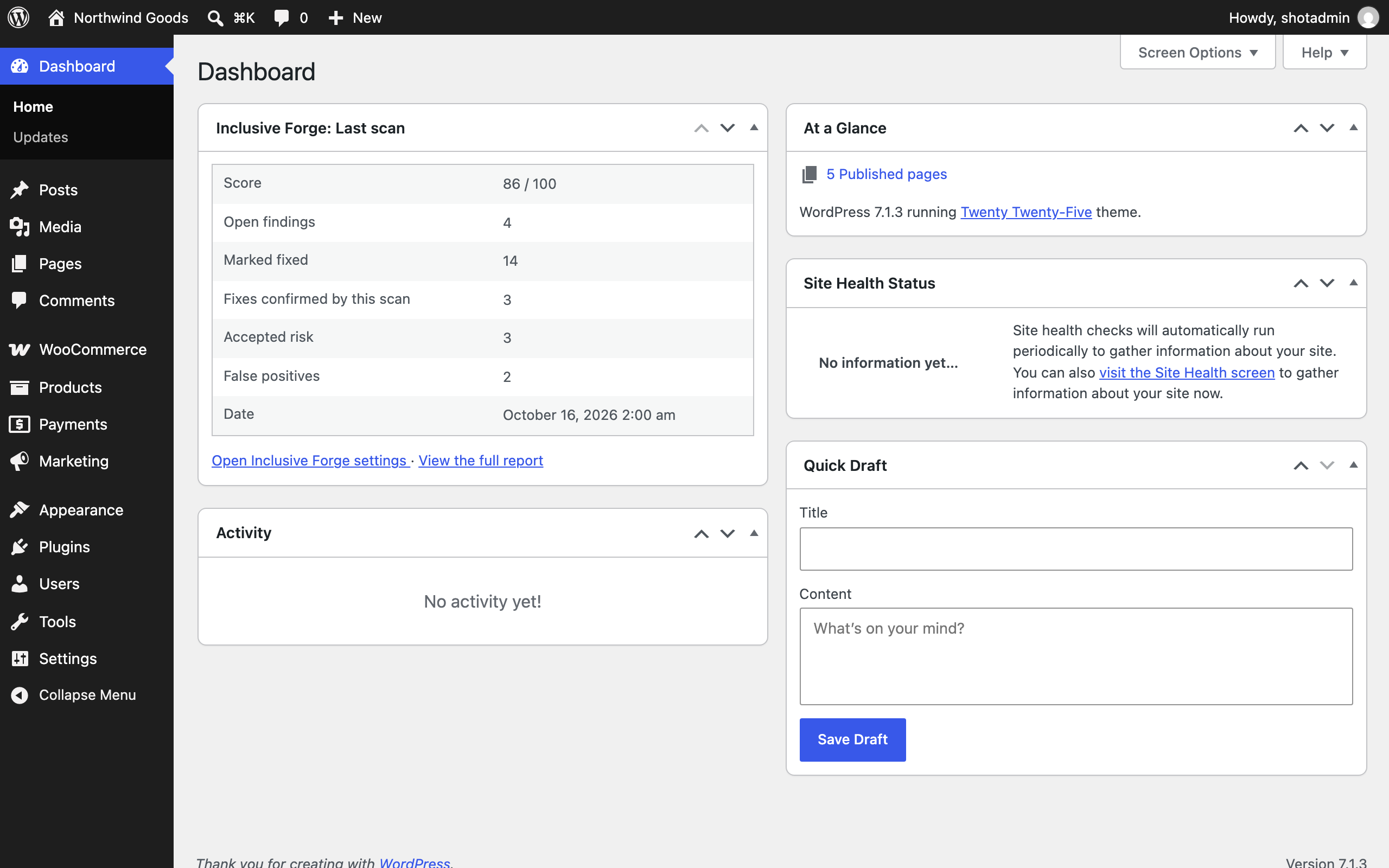
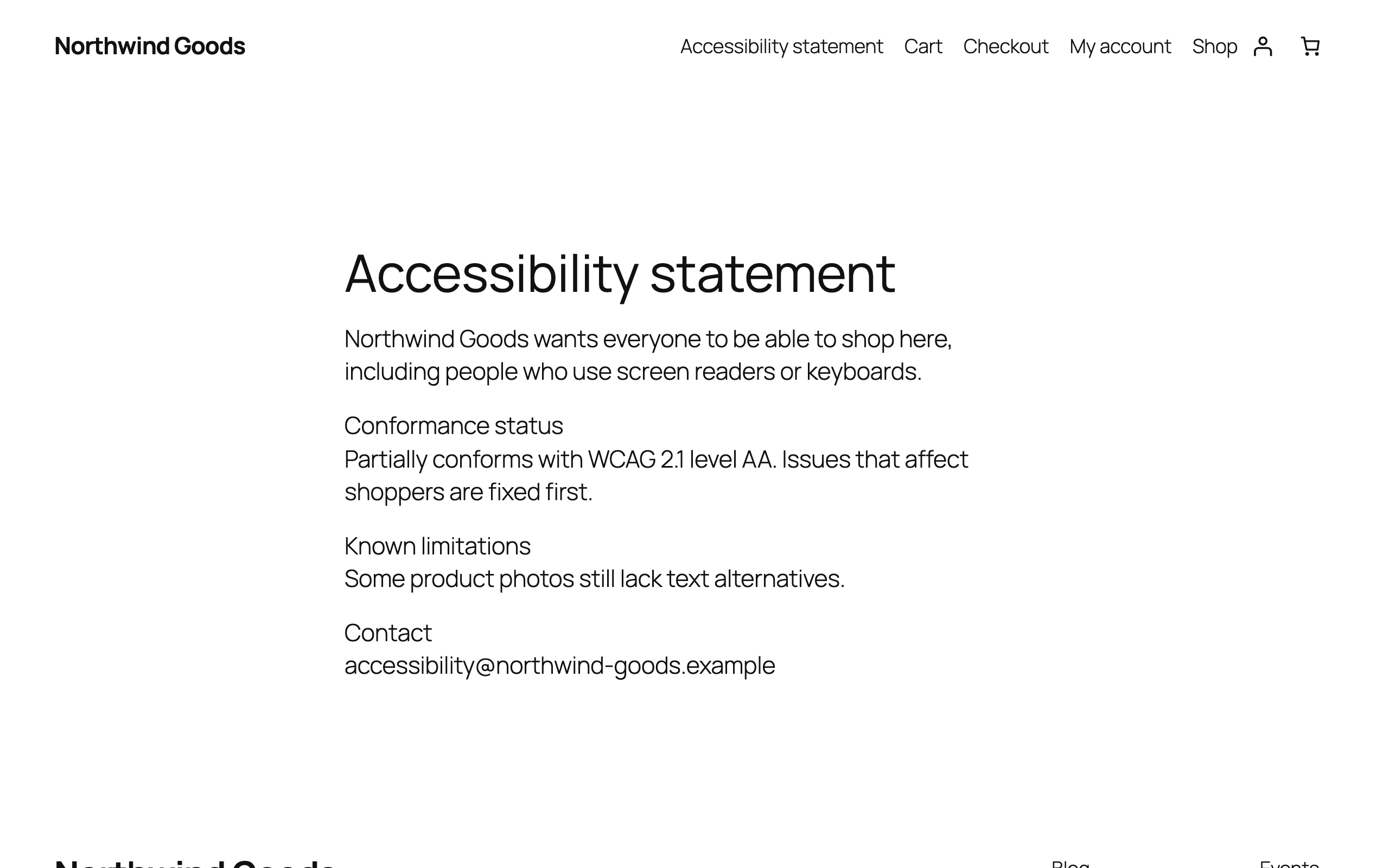
[inclusiveforge_statement]shortcode and the matching block render the statement you published in Inclusive Forge. English, German and French are available. The document is fetched over HTTPS and cached locally for 12 hours; the request times out after five seconds. - Shows your last scan in wp-admin. A "Last scan" card on the settings screen and a dashboard widget show the score, open and closed findings and the date, filled in automatically when a scan finishes.
- Lets you ask for a re-test. The "Re-test now" button asks Inclusive Forge to scan the site again. Your account's monthly allowance is enforced by Inclusive Forge, and the button tells you how many re-tests you have left.
- Checks that verification really works. The settings screen fetches your own home page and confirms the verification tag is there, and it lists known cache and optimisation plugins that sometimes strip it.
- No overlay. It never modifies, re-labels or "corrects" your pages in the browser. Real fixes belong in your theme and templates, and Inclusive Forge reports them there.
- No JavaScript and no CSS on your storefront. The statement is plain server-rendered HTML that inherits your theme. The only JavaScript in this plugin runs in the block editor.
- No scanning from inside your site. Nothing crawls your pages from your own server, and no background job competes with your store.
- No tracking and no analytics.
inclusiveforge/scan_completed action every time a signed scan-completed notice is verified and stored, with the score, the finding counts, the finish date and the report URL.
Documentation: https://inclusiveforge.com/docs/
安装:
- Upload
inclusiveforgeto/wp-content/plugins/, or install it from Plugins → Add New. - Activate the plugin.
- Go to Settings → Inclusive Forge. Paste the site token and the webhook secret from your Inclusive Forge dashboard (Accessibility statement, then Connect the companion plugin).
- Start the verification check from your Inclusive Forge dashboard. The status on the settings screen turns green when it passes.
- Add
[inclusiveforge_statement]to your accessibility statement page, or insert the Accessibility Statement block.
屏幕截图:


常见问题:
Is this a plugin or a service?
Both. The scanning and monitoring run as a service, in your Inclusive Forge portal. This plugin connects your store to it: you paste the site token and the webhook secret from your portal into its settings. It prints the ownership tag the scanner checks for, publishes your accessibility statement and shows your last scan in wp-admin. It adds nothing else to your storefront: no scripts, no styles.
Do I need an Inclusive Forge account?
Yes. The plugin is a companion to the Inclusive Forge service: it verifies your site and displays a statement produced there. On its own it has nothing to show.
Does this plugin make my site accessible?
No, and be wary of any plugin that says it does. Accessibility is fixed in your theme, templates and content. Inclusive Forge finds issues, tracks them until they are fixed, and documents the process; the fixes are real changes to your site.
Is this an accessibility overlay?
No. Nothing from this plugin runs in your visitors' browsers. It adds one meta tag and, on the page where you place it, the HTML of your statement.
Will it slow down my store?
No. The statement is cached for 12 hours in a WordPress transient, and a failed request is cached for 15 minutes, so only the page view that refreshes the cache waits on our API, and that request times out after five seconds. Pages without the shortcode or block make no request at all.
What happens if your API is unreachable?
It depends on why. If your site token and language are fine but our servers did not answer, visitors see a plain link to your statement on our own domain instead. If the problem is a configuration one (no token, site not verified, an unrecognised token or language), visitors see nothing at all, no error and no empty box, and a logged-in administrator sees a short note explaining what is wrong.
Can I connect a local or staging site?
No. Inclusive Forge audits public storefronts, and a local or staging address is not reachable from the internet. Connect the plugin on the live store.
Where does the statement HTML come from?
From the statement you published in Inclusive Forge, for the language you selected. It is filtered through wp_kses_post() when it arrives and again before it is printed, so it cannot introduce scripts into your site.
What is deleted when I remove the plugin?
The site token, the webhook secret and the cached statements are always removed, so you would have to connect the site again. The statement language and the last-scan summary stay unless you tick "Delete Inclusive Forge data on uninstall" in Settings → Inclusive Forge before deleting the plugin. On a multisite network every site of the current network is cleaned. Your Inclusive Forge account, scans and evidence log are untouched; delete those from your dashboard.
更新日志:
- Uninstalling now keeps your settings and last scan summary unless you tick "Delete Inclusive Forge data on uninstall".
- A delayed older scan notice no longer replaces the latest scan summary or repeats its completion action.
- Statement requests are signed correctly, and re-test failures explain the reason on the settings screen.
- Removing the plugin clears connection secrets and cached entries from every site in the current network, leaving other networks untouched.
- Local network addresses that could bypass the statement fetch safety check are now rejected.
- Removed: the optional key field on the settings screen and the account-status lines that came with it (added in 1.3.0). Stores that were connected with it stay connected: the site token and webhook secret were saved on their own. Connect a new store by pasting the site token and webhook secret from the Inclusive Forge dashboard.
- Change: the statement HTML is filtered when it arrives, before it is cached, as well as when it is printed.
- Change: the "cache cleared" and "re-test" notices on the settings screen no longer depend on a flag in the address.
- Change: removing the plugin deletes exactly the options and cached entries it created, by name, and no longer flushes the site's object cache.
- Change: the readme says the plugin works on any WordPress site and is built for WooCommerce stores, describes the statement cache and the home-page check as the code does, and lists the link visitors may see in "External services".
- Internal: removed a helper class nothing called.
- Fix: the Accessibility Statement block now appears in the block editor's inserter. Its editor script used to register the block under an old product name, so the block could not be added from the editor. The
[inclusiveforge_statement]shortcode was not affected. - Change: the "External services" section says exactly when the plugin contacts Inclusive Forge and no longer names a service the plugin itself never contacts.
- Change: the translation template now includes the block editor's strings.
- Change: the readme no longer says a visitor never waits for the statement. The page view that refreshes the 12-hour cache does.
- Internal notes removed from the code comments. No change in behaviour.
- New: an optional key field on the settings screen that connected the store for you and filled in the site token and webhook secret (removed in 1.3.2).
- Fix: a verified site with no published statement yet no longer reads as "Could not reach Inclusive Forge" on the settings screen; it says the statement is still to be published.
- Change: the "Last scan" card and the dashboard widget no longer show one "Closed findings" number. Closed findings are three different facts about a store — marked fixed, accepted risk, false positives — and a single total read as "all of this is fixed". The
inclusiveforge/scan_completedcounts array carries the same three keys;closedstays as their sum. - Fix: the webhook secret now has somewhere to come from. Open "Accessibility statement" in your Inclusive Forge dashboard and click "Connect the companion plugin" to generate it, then copy it (and the site token next to it) into the field below — 1.2.0 shipped the field with no way to get a value for it.
- Fix:
inclusiveforge/scan_completedno longer fires a second time for the same scan when the portal has to retry a delivery that timed out or was lost. - Fix: the verification health check no longer re-fetches your home page on every visit to the settings screen (the answer is now cached for a few minutes) and no longer follows a redirect while checking it, so a redirecting home page cannot report a stale "visible" result.
- New: signed "scan completed" notice from Inclusive Forge — drops the statement cache and stores a "last scan" summary (score, open/closed findings, date) the moment a scan finishes.
- New: "Last scan" card on the settings screen and a matching wp-admin dashboard widget, both reading that same summary.
- New: "Re-test now" button on the settings screen. Inclusive Forge alone decides whether the monthly allowance of your account permits it; this plugin only shows the answer, including how many re-tests are left this month.
- New: verification health check on the settings screen — fetches your own home page to confirm the verification tag is actually there, and flags known cache/optimisation plugins that can strip it.
- New:
inclusiveforge/scan_completedaction for other plugins to hook. - New: a "Webhook secret" field, alongside the site token, authenticating the scan-completed notice and the re-test request in both directions.
- New: if the plugin's own fetch to Inclusive Forge fails but your site token is fine, visitors now see a plain link to the hosted statement on inclusiveforge.com instead of nothing at all.
- Fix: an unrecognised configured language or a blocked API address now show the administrator-only setup note instead of a link that would 404 for visitors.
- Initial release: verification meta tag,
[inclusiveforge_statement]shortcode, Accessibility Statement block, and the settings screen.