
IndexMachine - Auto Indexer
| 开发者 | indexmachine |
|---|---|
| 更新时间 | 2026年8月12日 13:06 |
| PHP版本: | 7.4 及以上 |
| WordPress版本: | 7.0 |
| 版权: | GPLv2 or later |
| 版权网址: | 版权信息 |
详情介绍:
- Add your IndexMachine API key and see your live credit balance right in WordPress.
- Automatically submit new content to IndexMachine when it is published.
- Optionally re-submit when a published item is updated.
- Choose the processing tier (Standard / Priority / Maximum) and an optional scheduled-release window (spread submissions over up to 30 days).
- Submit any published post or page manually from its editor, and see the last submission status in a column in your posts list.
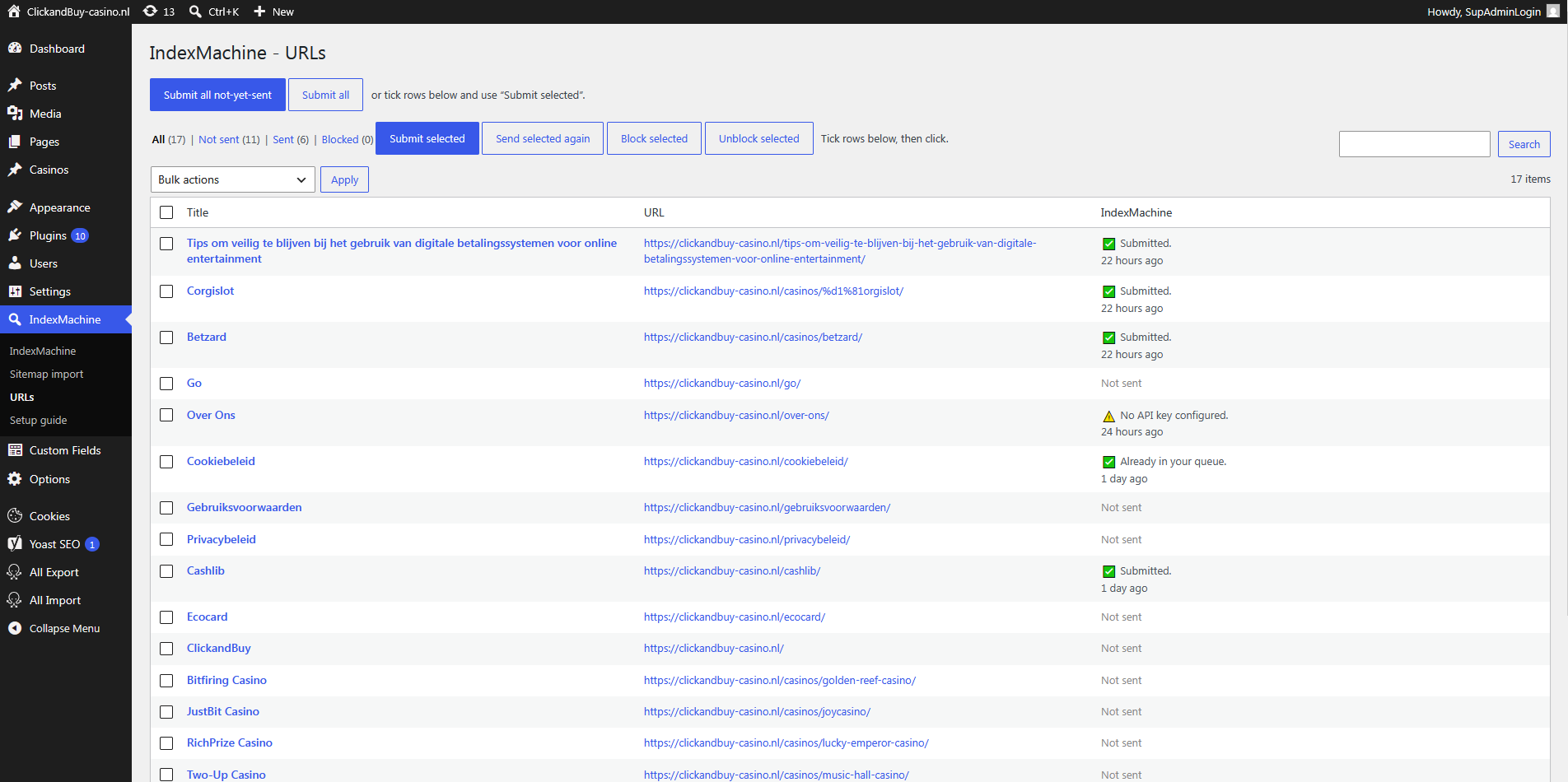
- A URLs screen listing your published content with Sent / Not-sent filters, pagination, and per-row selection - submit selected, submit all, or just the not-yet-sent ones.
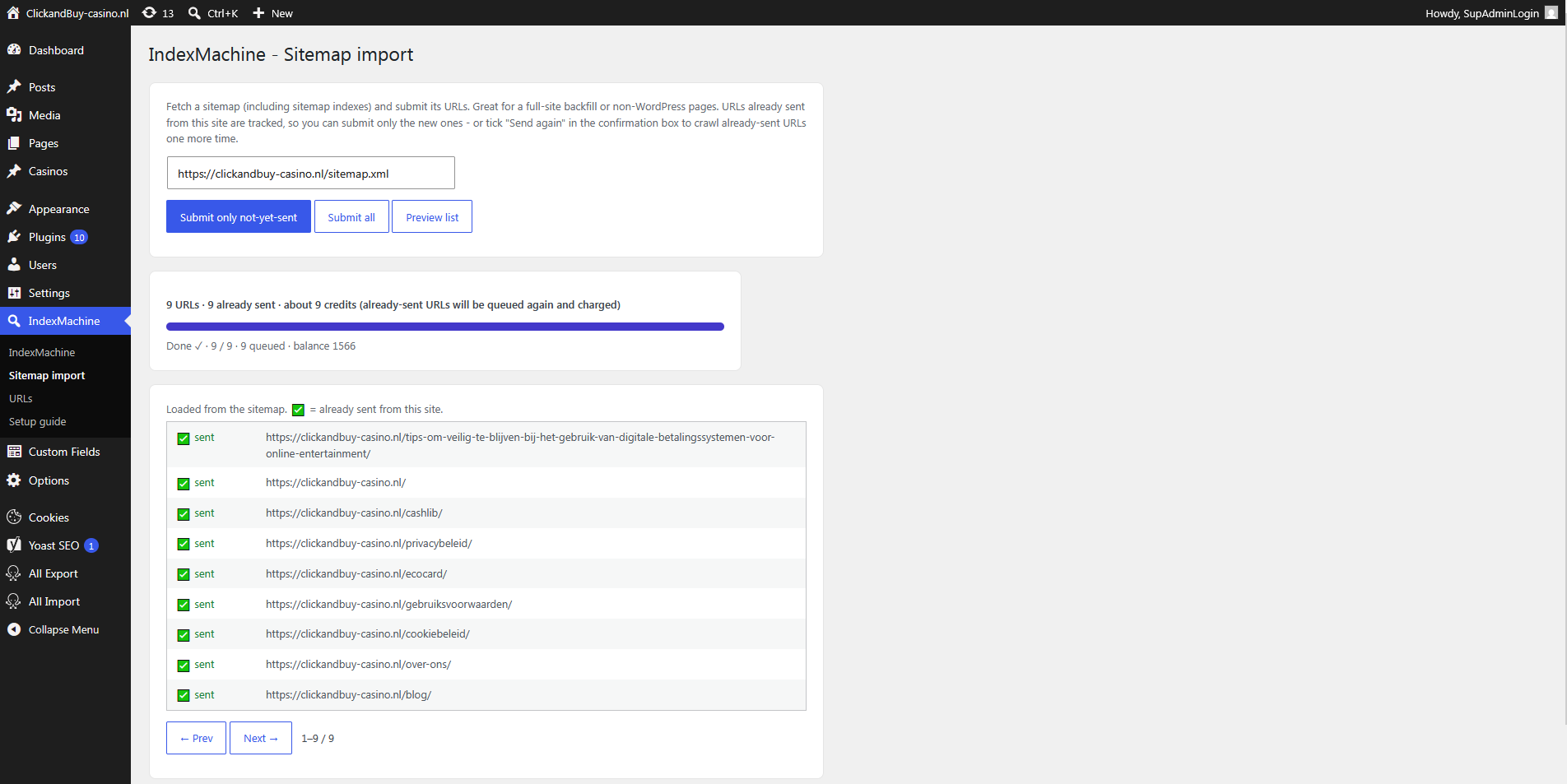
- Import URLs from a sitemap (including sitemap indexes) and submit them - with an upfront credit-cost estimate and a progress bar. Sent URLs are tracked, so you can submit only the not-yet-sent ones and preview which are already sent.
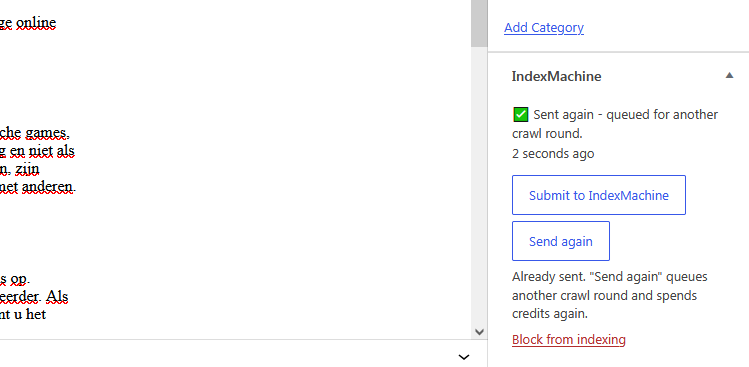
- Send again: URLs already in your queue are normally skipped and cost nothing - tick "Send again" to deliberately queue another processing round for them.
- Block any post or page so it is never submitted - not even automatically.
- A built-in Setup guide and a link to full instructions when the API key isn't set yet.
- Optional daily limit: cap how many URLs are sent per day, with a configurable reset hour (default: unlimited).
- Pick which content types are eligible.
安装:
- Install and activate the plugin.
- Go to IndexMachine in the admin menu.
- No account yet? Create one at https://indexmachine.net - it's free, no credit card required, and you get 50 free credits to try it out.
- Paste your API key (from your IndexMachine dashboard → API). Your balance appears when the key is valid.
- Choose your processing tier, optional scheduled release, and whether to submit automatically on publish.
- Save. New published content is now sent to IndexMachine (or submit items manually from the editor).
屏幕截图:

常见问题:
Is it free to try?
Yes. Creating an account is free, takes a minute, and needs no credit card - you get 50 free credits, enough to index 50 URLs. Buy more only when you run out.
Where do I get an API key?
Create an account at https://indexmachine.net and open your dashboard → API to generate a personal key.
I submitted the same URLs again and nothing happened. Why?
By default the service skips URLs that are already in your queue, so nothing is added and no credits are spent - that is the safety net against paying twice for the same page. If you genuinely want another processing round for those URLs, tick Send again in the confirmation box (Sitemap import / URLs screen), use the Send again button in the post's IndexMachine box, or pick the "Send again to IndexMachine" bulk action. It charges credits again.
Does it cost credits?
Yes - each submitted URL spends credits according to the selected tier (Standard = 1 credit, Priority = 1.5, Maximum = 2). Watch your balance; automatic submission spends credits as you publish.
Does it send my content?
No. Only the public URL of the item is sent, plus your API key for authentication.
What is scheduled release?
Instead of submitting everything at once, you can spread submissions over 1-30 days. It's handy for pacing a large backlog and for spreading your credit spend.
更新日志:
- Clearer names for what you are actually choosing. The indexing modes are now called Standard, Priority and Maximum, and they describe what each URL gets - how much processing - rather than a bot count. "Drip-feed" is now "Scheduled release". Nothing about how the plugin works has changed and it sends the same values to the API, so your existing settings carry over untouched.
- The IndexMachine box in the editor now shows one action instead of two: "Submit to IndexMachine" for content that hasn't been sent, "Send again" for content that has. It also switches over straight after a save, without reloading the page.
- API keys pasted with a stray space or line break are now cleaned on save and on use. Such a key made the edge reject the request with a bare "HTTP 400" that looked like a service outage.
- Failures now say what went wrong instead of showing a count of zero: a rejected key, a rate limit, an unreachable service and a malformed key each get their own message, on the settings screen, the URLs screen, the sitemap import and the posts-list bulk action.
- Housekeeping: the remaining Plugin Check notices about the custom table and the upgrade routine are now annotated where they actually occur.
- The content query no longer suppresses filters, so multilingual and other plugins can scope it.
- Renaming post meta during the upgrade now flushes the object cache, so a site with persistent caching can't keep serving the old keys.
- All scripts are now registered and enqueued through the WordPress asset API instead of being printed inline, and live in their own files under assets/js/.
- Every declaration, option, transient, post meta key, AJAX action, nonce and database table now carries the full
indexmachine_prefix instead of the old two-letterim_. Existing installs are migrated automatically on upgrade: sent/blocked states, submission results and the sent-URL registry are all carried over.
- New: Send again. Previously, re-submitting URLs the service already had was silently skipped - nothing was queued and no credits were spent, with no obvious way to ask for another processing round. You can now opt in explicitly: a "Send again" checkbox in the bulk confirmation box (Sitemap import and the URLs screen), a "Send again" button in the post's IndexMachine box, a "Send again to IndexMachine" bulk action in the posts list, and a "Send selected again" button on the URLs screen. Re-sending spends credits again and asks for confirmation first.
- The bulk progress line now shows how many URLs were actually queued, and says plainly when everything was already in the queue (so a run that adds nothing no longer looks like a silent success).
- The estimated cost shown before a run now accounts for already-sent URLs, and updates when you tick "Send again".
- Clearer first-run screen: when no API key is set yet, the plugin explains that an account is free, needs no credit card, and comes with 50 free credits - with a direct "Create a free account" button. Same note added to the Setup guide.
- Use plain hyphens instead of em dashes throughout (including the plugin name).
- Optional daily submission limit with a configurable reset hour (site time). Manual, automatic, and bulk submissions all count toward it; default is unlimited.
- Security hardening: the sitemap fetcher rejects non-http(s) and loopback/private/link-local hosts (SSRF defense-in-depth).
- Explicit "Submit / Block / Unblock selected" buttons on the URLs screen for ticked rows. When the API key is invalid, the settings screen now links to the setup guide and instructions.
- The post's IndexMachine status now updates live in the block editor after saving - no page reload needed.
- Block posts/pages from ever being indexed (meta box, bulk actions, "Blocked" filter). Blocked items are skipped by manual, automatic, and bulk submission.
- Fix: the "Sent" filter now counts items submitted by earlier versions too.
- New in-admin Setup guide + a link to it when the API key isn't configured.
- Sent-URL registry: every submission is recorded so the Sitemap import can submit only not-yet-sent URLs and preview which are already sent (works for non-WordPress URLs too).
- New "URLs" screen: list published content with Sent / Not-sent filters, pagination, per-row selection, and "Submit selected / all / not-sent" actions. Sitemap import moved to its own screen. Clearer credit estimates.
- Bulk tools: submit all existing published content, and import URLs from a sitemap (with cost estimate + progress). Bulk action in the posts list.
- Initial release: API key + balance, auto-submit on publish, manual submit, indexing modes, drip-feed, status column.