
Init Void Shield – Zero-DB, Honeypot, Anti-Spam
| 开发者 | brokensmile.2103 |
|---|---|
| 更新时间 | 2026年9月24日 00:55 |
| PHP版本: | 7.4 及以上 |
| WordPress版本: | 7.1 |
| 版权: | GPLv2 or later |
| 版权网址: | 版权信息 |
详情介绍:
- Dynamic field names — derived from context + site salt (plus an optional custom prefix) so bots cannot hardcode field names.
- CSS-clipped honeypots — a text field and a checkbox hidden with rotating CSS techniques (never
display:noneorvisibility:hidden, the two patterns CSS-aware bots specifically look for and skip) that bots fill but humans never see. The text field is also markedreadonly, so browser and password-manager autofill (Chrome, saved-password prompts, and similar) never writes into it either — bots that scrape the raw HTML or drive a headless browser still fall for it exactly the same. - Signed time tokens — each form carries a timestamp + HMAC hash verified server-side with
hash_equals()to prevent timing attacks. Submissions under the minimum threshold are rejected; login/registration/other account-style forms use their own, shorter threshold by default (see Account Forms Minimum Submit Time), since a browser autofilling saved credentials lets a genuine visitor submit faster than someone typing a comment from scratch. - JavaScript + headless-browser verification — a signed, per-form JS proof is injected after a configurable delay (plus a small random jitter, so the exact wait can't be read from the page source and timed around), and the script flags common automation signals (
navigator.webdriver, a zero-size browser window, HeadlessChrome/PhantomJS, Selenium/ChromeDriver traces) picked up from real Selenium/Puppeteer/Playwright sessions. The proof is bound to the form's own time token and never appears in plain text in the page, so a bot that scrapes the HTML and replays hidden values can't produce it. Static crawlers, instant bots, and unmasked headless browsers all get caught; real users don't. - Submit Hold — on login, registration, comment, and other forms that submit without AJAX, a visitor who clicks submit before the guard is ready (typically right after the browser autofills a saved password) is held for a moment and submitted automatically once it is, instead of being rejected. Nothing is relaxed server-side.
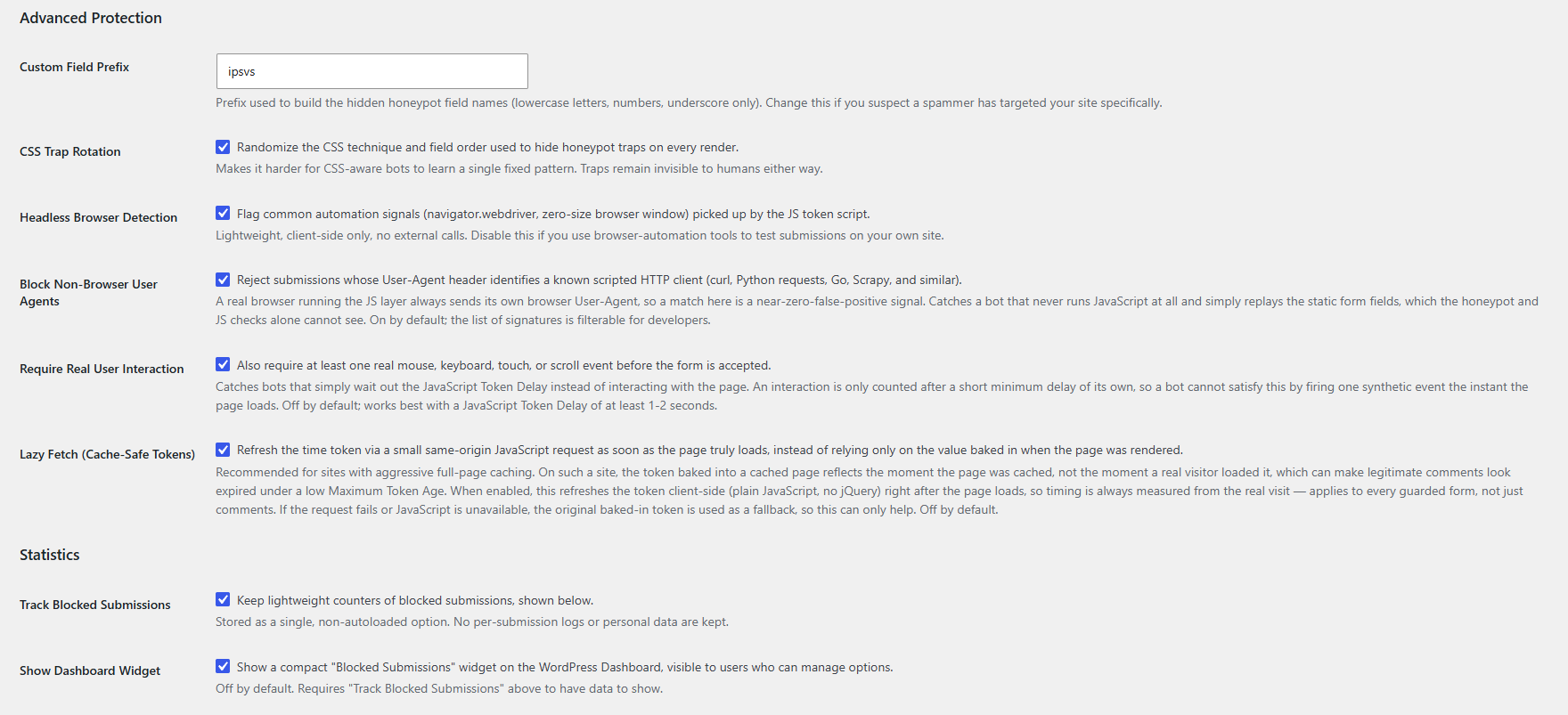
- Non-browser User-Agent detection — rejects submissions whose User-Agent identifies a scripted HTTP client (curl, Python requests, Go, Scrapy, and similar) rather than a real browser, catching bots that skip JavaScript entirely and simply replay the static form fields. On by default; the signature list is filterable.
- Block Cross-Site Submissions — rejects a submission the browser itself reports as sent from a different website (
Sec-Fetch-Site: cross-site), a header page scripts cannot forge and privacy extensions don't strip. A request without the header is never rejected by this check. On by default. - Block REST API Comments (optional) — rejects comments posted directly through the
wp/v2/commentsREST endpoint, which the classic form-based layers cannot cover since those requests never carry the honeypot fields or tokens. - Require Same-Site Referer (optional) — rejects a comment submission whose Referer header is missing or points elsewhere, catching bots that post directly to the comment endpoint. Off by default and disclosed as a trade-off, since some privacy-focused browsers strip Referer even on genuine same-site submissions.
- Comment content filters (optional) — a maximum number of links per comment, BBCode link blocking, and blocking web addresses in the author name. Unlike the behavioral layers, these read what was actually written, so they also catch spam posted by a real person or a real browser — including wpDiscuz comments, which the honeypot layers can't see.
- No database clutter (zero tables, zero rows; stats use a single non-autoloaded option)
- No external JS/CDN calls
- No CAPTCHA, no puzzles, no user interruption
- Logged-in users are bypassed automatically on the comment form (optional override in settings)
- Every guard beyond the core comment form is opt-in — no new form is silently guarded when you update
- Bots receive HTTP 200 OK on the comment form so they think they succeeded and move on
安装:
- Upload the plugin folder to
/wp-content/plugins/ - Activate via Plugins → Init Void Shield
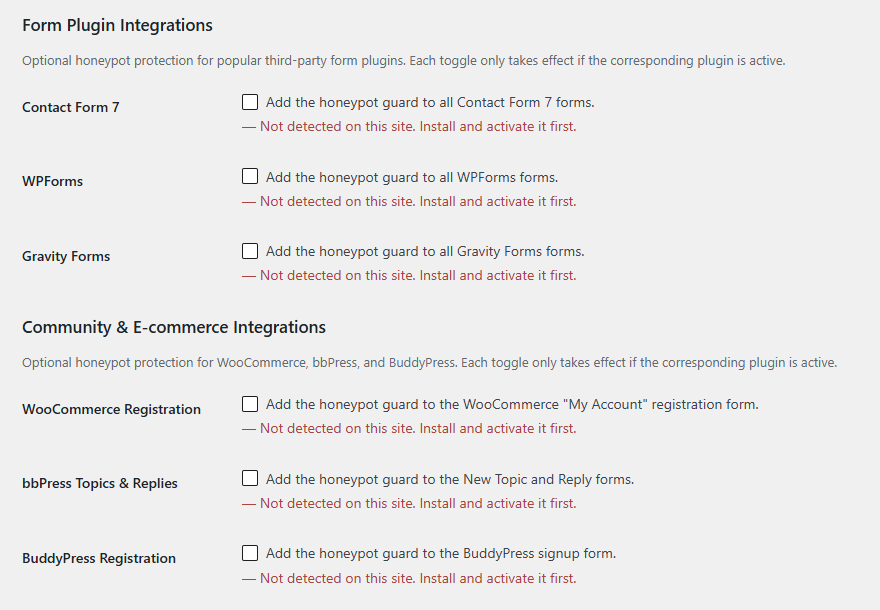
- Go to Settings → Init Void Shield to review or adjust thresholds, and to opt in to the WordPress core form guards or any form plugin integrations you use
屏幕截图:
常见问题:
Does this work with page builders or custom comment forms?
The plugin hooks into comment_form_after_fields. If your theme uses a custom form, you may need to adjust the hook or manually call the render function.
Can I use this alongside Akismet or other anti-spam plugins?
Yes. Init Void Shield acts as the first line of defense. Other plugins can serve as a secondary layer.
Will this block legitimate users?
No. Logged-in users are bypassed by default on the comment form. Guests only need to wait a few seconds between page load and submit — something every human naturally does.
Can I force verification for logged-in users too?
Yes. Enable Apply to Logged-in Users in the settings if your site has open registration or untrusted members.
Does this protect comments submitted through the REST API?
Not by default. The core layers only run on the classic comment form (preprocess_comment); comments posted directly to wp/v2/comments never carry a honeypot or JS token, so those checks don't apply. The optional "Block REST API Comments" setting is available to close that endpoint entirely if you do not use a headless app or other legitimate REST client for comments.
Are the WordPress login/registration/lost-password guards enabled by default?
No, all three are off by default since they guard authentication itself. Turn them on individually under WordPress Core Forms in the settings, and confirm your own login flow still works afterward. Each covers WordPress's own default form markup at wp-login.php, and the login guard also covers wp_login_form() when used on the front end (e.g. a widget or theme template), unless you set Login Guard Scope to "wp-login.php only" — see the next question. A custom login page/plugin, or Multisite's wp-signup.php registration flow, renders different markup and isn't covered. Each guard can also be force-disabled per request with a dedicated filter (init_plugin_suite_void_shield_skip_login_verification, ..._skip_register_verification, ..._skip_lostpassword_verification), which takes priority over the settings-page toggle.
What is Login Guard Scope?
By default ("Everywhere"), the Login Guard protects both the native wp-login.php form and any front-end wp_login_form() usage (e.g. a custom login page, widget, or modal). If that front-end form lives on a page your cache plugin might serve stale, switch the scope to "wp-login.php only" to leave it entirely unguarded rather than risk a real visitor's login being rejected — the native wp-login.php form stays fully protected either way. This uses the Referer header as a heuristic to tell the two forms apart, which a determined bot could spoof, so it's a deliberate trade-off: only switch away from "Everywhere" if you've hit this specific caching situation.
Are the Contact Form 7 / WPForms / Gravity Forms integrations enabled by default?
No. Each is off by default and only takes effect if the matching plugin is active — the settings page shows a "detected / not detected" status next to each toggle.
Are the WooCommerce / bbPress / BuddyPress integrations enabled by default?
No, same as the other integrations: each is off by default and only takes effect if the matching plugin is active. WooCommerce guards the "My Account" registration form, and optionally the WooCommerce login form (My Account and the checkout login prompt) and lost-password form; bbPress guards the New Topic and Reply forms; BuddyPress guards the registration (signup) form. The Multisite signup guard (wp-signup.php) only has an effect on a Multisite install and is also off by default.
Why aren't Ninja Forms or Forminator supported?
Both build their forms client-side and collect submitted data through their own JavaScript field model rather than serializing the whole <form> element, so a honeypot field simply appended to the page would not reliably be sent to the server — it would look like protection without actually doing anything. Both also already ship their own built-in honeypot field. Support may be reconsidered if a reliable hook becomes available.
Does this work with wpDiscuz?
wpDiscuz builds its comment submissions from a fixed set of fields rather than serializing the whole form, so this plugin's checks can never see or verify them. When wpDiscuz is detected active, its comments are automatically exempted from verification instead of being rejected — a compatibility bypass, not an added layer of protection.
What is the Maximum Token Age setting?
Each guard issues a signed token good for a limited time window: too fast (below Minimum Submit Time) and too old (above Maximum Token Age) are both rejected. The ceiling exists so a token cannot be captured once and replayed indefinitely; the default of 1 hour is generous enough for a visitor who takes their time filling out a form. Increase it (up to 30 days) if legitimate visitors on your site routinely take longer than that, or if your site uses full-page caching — see the next question.
My site uses aggressive full-page caching and legitimate comments are being rejected as "expired" — what do I do?
On a cached page, the time token baked into the HTML reflects the moment the page was cached, not the moment a real visitor loaded it. If your cache lifetime is long, that gap can exceed the Maximum Token Age. Two options, either works on its own: raise Maximum Token Age to comfortably cover your cache lifetime, or enable Lazy Fetch under Advanced Protection, which refreshes the token client-side right after the page truly loads, so timing is always measured from the real visit regardless of cache age.
What does Lazy Fetch do, and is it safe?
When enabled, a small same-origin JavaScript request (no jQuery, no external service) fetches a fresh, correctly signed time token right after the page loads, and overwrites the one baked in at render time. It's stateless — the endpoint only recomputes the same signed hash the page would already have shown, and is only registered at all while Lazy Fetch is enabled. If the request fails, or JavaScript is unavailable, the original baked-in token is used as-is, exactly like before Lazy Fetch existed — so enabling it can only help, never introduce a new failure mode. Off by default; applies to every guarded form, not just comments.
I updated from an older version and my Minimum Submit Time / JS Token Delay no longer behaves the way I remembered — why?
Versions before 1.4 had a bug where these two settings were saved correctly but never actually read back during verification, so the plugin always silently enforced the defaults (3 seconds / 1000ms) no matter what was configured. 1.4 fixes this, so a custom value you set earlier may now be enforced for the first time. This is a bug fix, not a new restriction — just double-check both values on the settings page after updating.
What does "Require Real User Interaction" do?
When enabled, a submission is only accepted if the browser recorded at least one real mouse, keyboard, touch, or scroll event before the JS token fires — and that event only counts once a short minimum delay of its own has passed, so a bot can't satisfy it by firing one synthetic event the instant the page loads. It targets bots that wait out the JavaScript Token Delay instead of a real page visit. It's off by default and works best paired with a JS delay of at least 1-2 seconds.
What does "Block Non-Browser User Agents" do, and is it safe to leave on?
It rejects any submission whose User-Agent header identifies a scripted HTTP client — curl, Python's requests library, Go's default client, Scrapy, PostmanRuntime, and similar — rather than a real browser. It's on by default and is one of the safest checks in the plugin: every real browser, including all the major ones and their mobile variants, sends its own distinct browser User-Agent, never one of these library defaults. It specifically catches a bot that never runs JavaScript at all — one that parses the static HTML, avoids the honeypot fields, and replays the baked-in time/hash token — which the honeypot and JS layers can't see on their own. If you run your own legitimate script against your comment form (e.g. an internal test tool), either give it a normal browser User-Agent or use the init_plugin_suite_void_shield_skip_verification filter for that request.
What does "Require Same-Site Referer" do?
When enabled, a comment submission is rejected if its Referer header is missing or points to a domain other than your own — this catches a bot that posts directly to the comment endpoint without ever actually loading the page. It's off by default and disclosed as a trade-off, same as Login Guard Scope's Referer heuristic: some privacy-focused browsers and extensions strip the Referer header even on a genuine same-site submission, and this check cannot tell that apart from a bot. Only enable it after confirming it doesn't affect real commenters on your site, and treat it as one more layer on top of the others rather than a replacement for them. A init_plugin_suite_void_shield_referer_exempt filter is available if you need to exempt specific requests (e.g. a proxy or caching setup that legitimately strips Referer).
Can I change the honeypot field names?
Yes. Set a Custom Field Prefix under Advanced Protection. Field names are still dynamically derived per context and site salt on top of that prefix.
Does the headless-browser detection call any external service?
No. It only reads a handful of properties on the visitor's own device (navigator.webdriver, the browser window size, the User-Agent string, and globals/markers that only automation frameworks inject) — no external requests, no tracking.
What does the statistics feature store?
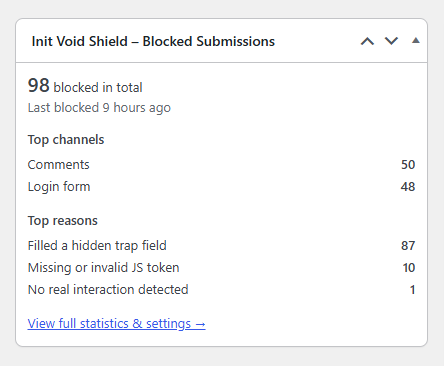
Only aggregate counters (a total, a breakdown by channel, a breakdown by block reason, and a last-blocked timestamp) in one non-autoloaded option. No per-submission logs, IP addresses, or personal data are recorded. It can be turned off or reset from the settings page at any time.
Is the Dashboard widget on by default?
No. Enable Show Dashboard Widget under Statistics. It's only visible to users who can manage options, and only shows the same aggregate counters as the settings page (no per-submission data).
I see a JavaScript syntax error in the browser console near "lazyFetchEnabled", and every comment gets rejected — what's happening?
This was a bug fixed in 1.8: some environments (an HTML minifier, a multilingual plugin, a security/output-filtering plugin, or WordPress's own convert_chars()) rewrite a bare & in page output into &, which is safe for ordinary HTML text but breaks the literal JavaScript inside a <script> tag, since browsers never decode entities there. If you're on 1.8 or later and still see this, please report it along with your active plugins/theme so the specific source can be identified.
Why does logging in sometimes take about a second longer after updating to 1.11?
That's Submit Hold at work. If a visitor clicks "Log In" before the guard is ready — most often because the browser autofilled a saved password and they clicked right away — the submission is held for a moment (at most the JavaScript Token Delay or the Minimum Submit Time, whichever is longer) and then sent automatically. Before 1.11 such a login was rejected outright. It applies to forms that submit without AJAX: the WordPress core forms, comments, WooCommerce account forms, bbPress, and BuddyPress. Contact Form 7, WPForms, and Gravity Forms send their forms from their own scripts and are left unchanged.
After updating to 1.11, some submissions are blocked as "Invalid JS proof" — why?
1.11 replaced the fixed JS token value with a signed proof unique to each form render. A page served from a full-page cache built before the update still contains the old script, whose submissions now fail that check. Purge your page cache (and any CDN cache) once after updating. If the reason keeps appearing afterward, it is a bot.
What does "Block Cross-Site Submissions" do, and is it safe to leave on?
Modern browsers attach a Sec-Fetch-Site header to every request themselves; page scripts cannot set or change it. A genuine visitor submitting a form on your site always sends same-origin (or same-site from one of your subdomains). cross-site means the form was posted from a different website — a spam page auto-submitting a copy of your form, for example — which a real visitor never does. A request without the header (an older browser, or a plain script) is never rejected by this check, so it cannot produce a false positive on its own. The only setup that needs it off is one where a form on an unrelated domain legitimately posts to your site (e.g. a Multisite network with subsites on unrelated domains sharing one login form); the init_plugin_suite_void_shield_cross_site_exempt filter can exempt specific requests instead.
What do the comment content filters do?
Three independent, opt-in checks under Comments: Maximum Links per Comment (0 = off), Block BBCode Links (a complete [url]…[/url] or [link]…[/link] pair, which WordPress never renders anyway), and Block URLs in Author Name. They catch spam a real person or a real browser posts, which the behavioral layers can't, and they also apply to wpDiscuz comments. Pingbacks and trackbacks are never checked. Blocked comments get the same soft-kill response as the rest of the comment guard.
Can developers customize the behavior?
Yes. See the Filters section below for the full list, or the documentation on GitHub for more detail.
更新日志:
- Fixed: a real visitor could still be rejected on the Login form (and other account forms) when the browser autofilled a saved password and they clicked "Log In" within the first second. The JS token only existed after the JavaScript Token Delay had elapsed, and the Minimum Submit Time compares whole seconds, so such a click was flagged as "Missing or invalid JS token" or "Submitted too fast". Added Submit Hold: on forms that submit without AJAX (WordPress core forms, comments, WooCommerce account forms, bbPress, BuddyPress), an early submission is now held for a moment and sent automatically once the guard is ready, instead of being rejected. No server-side check was relaxed — the held submission simply arrives once it satisfies them. The clicked button's name/value is preserved, and repeated clicks while holding result in a single submission.
- Security: the JS token is no longer the fixed string
human_verified, which was identical on every site and could be posted by a bot without running any JavaScript. It is now a signed proof bound to the form's own time token and context, embedded in the page only in sealed form. A submission carrying a missing, static, or mismatched proof is rejected with the new "Invalid JS proof" block reason. Lazy Fetch now refreshes the proof together with the time token. Purge your page cache once after updating — pages cached with the previous script will fail this check. - Added Block Cross-Site Submissions under Advanced Protection (on by default): rejects a submission the browser itself reports as sent from another website (
Sec-Fetch-Site: cross-site). A request without the header is never rejected by this check. Exemptible per request viainit_plugin_suite_void_shield_cross_site_exempt. - Strengthened Headless Browser Detection: now also flags
HeadlessChrome/PhantomJSUser-Agents, PhantomJS/Nightmare/DOM-automation globals, and Selenium ChromeDriver markers. - Strengthened Block Non-Browser User Agents: added HeadlessChrome, PhantomJS, HTTPX, aiohttp, axios, undici, HTTPie, and Colly signatures.
- Added comment content filters under Comments (each opt-in, off by default): Maximum Links per Comment, Block BBCode Links, and Block URLs in Author Name. They also apply to wpDiscuz comments, which the honeypot layers cannot verify. New filters
init_plugin_suite_void_shield_skip_content_filtersandinit_plugin_suite_void_shield_comment_content_violation(for adding your own rules). - Added WooCommerce Login (My Account and the checkout login prompt) and WooCommerce Lost Password guards under Community & E-commerce Integrations, both off by default. Both use the Account Forms Minimum Submit Time and benefit from Submit Hold.
- Fixed: with Guard Lost Password Form enabled, every WooCommerce password-reset request was rejected, genuine ones included, since WooCommerce's reset handler runs the same core check but its form never carried the honeypot fields. The WooCommerce lost-password form is now always guarded while the core Lost Password guard is enabled, and each form is verified against its own context.
- Fixed: uninstalling the plugin left the Account Forms Minimum Submit Time, Require Same-Site Referer, and Block Non-Browser User Agents options behind.
- Stats: WooCommerce blocks are now grouped as "WooCommerce account forms", with new block reasons for the checks above.
- Updated the Vietnamese translation and the
.pottemplate for the new strings.
- Reorganized the Settings screen: moved Minimum Submit Time, Account Forms Minimum Submit Time, JavaScript Token Delay, and Maximum Token Age out of "Comments" into a new Timing & Token Engine section, since these are shared by every guarded form, not just comments. No setting names, values, or behavior changed.
- Updated the Vietnamese translation and the
.pottemplate for the new section strings.
- Fixed: a real visitor on an autofilled form (most often login) could be wrongly flagged "No real interaction detected" if the JS delay timer fired just before their submit click, even with Require Real User Interaction working as designed. The verdict is now re-checked at submit time and can only upgrade an already-stamped "no interaction" result to verified.
- Added a separate Account Forms Minimum Submit Time setting (default 1 second), used by the Login, Registration, Lost Password, Multisite Signup, WooCommerce registration, and BuddyPress registration guards instead of the general Minimum Submit Time — autofill lets a real visitor submit faster than someone typing a comment. Set to 0 to disable this check for account forms only. The
init_plugin_suite_void_shield_min_timeand_max_timefilters now also receive the guard context as a second argument. - Hardened the honeypot trap field with
readonly, so browser and password-manager autofill never fills it in; bot coverage is unaffected. - Updated the Vietnamese translation and the
.pottemplate for the new setting's strings.
- Fixed: a bare '&' inside the honeypot script could get HTML-entity-encoded by some environments (an HTML minifier, a multilingual plugin, a security/output-filtering plugin, or WordPress's own
convert_chars()), turning&&into the literal text&&on the page. Browsers never decode entities inside<script>content, so this broke JS parsing entirely and silently rejected every submission. The script no longer emits any bare&character. - Fixed: a genuine first-time visitor's comment could be wrongly rejected as unverified (succeeding only on a retry) on sites using a "delay JavaScript execution" optimization, since the script only listened for
DOMContentLoaded, which had already fired by the time such a delayed script ran. It now checksdocument.readyStateand runs immediately if the document is already past the loading state. - Added Non-Browser User-Agent detection (on by default): rejects submissions whose User-Agent identifies a scripted HTTP client (curl, Python requests, Go, Scrapy, and similar) rather than a real browser. Signature list is filterable via
init_plugin_suite_void_shield_blocked_user_agent_signatures. - Added JavaScript Token Delay jitter: a small random amount of extra time (up to 400ms, filterable) is now added on top of the configured delay so it can't be read from the page source and timed around.
- Strengthened Require Real User Interaction: an interaction event now only counts once a short minimum delay has passed since script init, closing a gap where a bot could satisfy the check with one synthetic event at page load.
- Added Require Same-Site Referer for comments (opt-in, off by default): rejects a submission whose Referer header is missing or points to a different site. Disclosed trade-off, same spirit as Login Guard Scope — some privacy-focused browsers strip Referer even on genuine submissions.
- Removed all comments from the inline honeypot script rendered on every guarded form, since it prints to public page source on every load. Rationale now lives only in the plugin's PHP source. Cuts the script's rendered size by roughly a third.
- Fixed: the shared checkbox sanitizer treated any present value as enabled, causing every unchecked checkbox to be saved as
1on the first save. Tightened to require an explicit'1'before treating a checkbox as on.
- Fixed: a setting could get permanently stuck at its saved value and silently refuse to change on Save — most noticeable on "Enable Init Void Shield", since a fresh install starts already at its default of checked. Caused by
register_setting()'sdefaultargument, which triggers a WordPress core edge case inupdate_option()once a setting's value matches that default. Removed from every setting in this plugin; displayed defaults are unaffected. - Added automatic wpDiscuz compatibility: wpDiscuz builds its comment submissions from a fixed set of fields rather than serializing its form, so this plugin's checks can never see or verify them. When wpDiscuz is detected active, its comments are now silently exempted from verification instead of being rejected.
- Fixed: comment verification now resolves the post ID from the value WordPress core has already parsed, instead of re-reading the raw
comment_post_IDPOST field — not every comment form sends it under that exact name.
- Added Login Guard Scope: a new "wp-login.php only" option for the Login Guard, which stops guarding a front-end
wp_login_form()usage (e.g. a custom login page, widget, or modal) entirely while keeping full protection on the nativewp-login.phpform. Intended for sites where that front-end form lives on a page a full-page cache might serve stale; uses the Referer header as a heuristic to tell the two forms apart (a disclosed trade-off, not a cryptographic guarantee). The default ("Everywhere") is unchanged and remains the strongest option. - Raised the Maximum Token Age ceiling from 24 hours to 30 days, so sites with long-lived full-page caching can set a value that comfortably covers their cache lifetime.
- Added Lazy Fetch (Cache-Safe Tokens) under Advanced Protection (off by default): refreshes the time token via a small same-origin
fetch()request (plain JavaScript, no jQuery, no external service) as soon as the page truly loads, instead of relying only on the value baked in at render time — which, on a cached page, reflects when the cache was generated rather than when a real visitor loaded it. Applies to every guarded form. Falls back to the original baked-in token if the request fails or JavaScript is unavailable, so enabling it can only help, never introduce a new failure mode. Its REST route is registered under theinitvoshi/v1namespace, matching the naming convention used across the Init Plugin Suite.
- Security: the signed time token is now bound to the specific guard context it was issued for (previously it was only a function of the timestamp, so a valid token captured from one form — e.g. a public comment form — could in theory be replayed against a different, more sensitive context, such as the login guard). Field names already differed per context, but the token itself did not.
- Security: added a Maximum Token Age setting (default 1 hour) so a token cannot be captured once and cached for an unlimited-time replay. Submissions carrying a token older than this are now rejected with a new
token_expiredblock reason. - Fixed: the Minimum Submit Time and JavaScript Token Delay settings on the settings page were not actually being read during verification/rendering — the code always used the filter defaults (3 seconds / 1000ms) regardless of what was saved. Both settings now take effect as expected; the corresponding developer filters still apply on top. Note for existing users: if you had previously changed either value away from the default, it silently had no effect before — after updating it will now be genuinely enforced, so it's worth revisiting both values on the settings page to confirm they're still what you want.
- Added an optional Require Real User Interaction check under Advanced Protection (off by default): also requires at least one real mouse, keyboard, touch, or scroll event before a submission is accepted, to catch bots that simply wait out the JS delay without interacting with the page.
- Added optional honeypot integrations for WooCommerce (My Account registration form), bbPress (New Topic and Reply forms), and BuddyPress (registration form) — each off by default, only activates if the matching plugin is active.
- Added an optional Multisite signup guard for
wp-signup.php(off by default, only has an effect on a Multisite install). - Added an optional Dashboard widget (off by default) showing a compact "Blocked Submissions" summary with the top blocked channels and reasons.
- Updated translation template (
.pot) and the Vietnamese translation for all new strings.
- Fixed: the login guard now also covers
wp_login_form()(used to place a login form anywhere on the front end, e.g. a widget or theme template). Previously only the native wp-login.php form was guarded; a front-endwp_login_form()submission carried no honeypot fields and was always rejected with "Invalid login attempt." once the login guard was enabled. - Added three developer filters —
init_plugin_suite_void_shield_skip_login_verification,init_plugin_suite_void_shield_skip_register_verification, andinit_plugin_suite_void_shield_skip_lostpassword_verification— to force-disable each WordPress Core Forms guard for a given request regardless of its settings-page toggle.
- Added optional honeypot guards for the default WordPress login, registration, and lost-password forms (each off by default; enable individually under WordPress Core Forms).
- Added optional honeypot integrations for Contact Form 7, WPForms, and Gravity Forms (each off by default; only activates if the corresponding plugin is active).
- Added a custom honeypot field-name prefix setting under Advanced Protection.
- Added CSS trap rotation: the inline hiding technique and trap field order are now randomized per render to make pattern-learning harder for CSS-aware bots.
- Added lightweight, opt-out statistics (total/by-channel/by-reason blocked-submission counters) stored in a single option with autoload explicitly disabled, plus a reset action on the settings page.
- Added client-side headless-browser detection (
navigator.webdriver, zero-size window) layered on top of the existing JS token check; no external calls. - Refactored the honeypot engine into a shared internal module reused by the comment form, the WP core form guards, and all three form-plugin integrations.
- Fixed a duplicate "Settings saved." admin notice on the settings page (WordPress core already prints this automatically for pages under the Settings menu; the plugin no longer prints it a second time).
- Changed: the
init_plugin_suite_void_shield_honeypot_htmlfilter's second parameter is now the generic guard context string (e.g.comment_123,login,cf7_4) instead of only a numeric comment post ID.
- Added an optional Layer 5: "Block REST API Comments" setting to reject comments posted directly through the
wp/v2/commentsREST endpoint, which the classic 4-layer honeypot cannot cover since it never sees those requests. - Removed the legacy pre-5.7 inline script fallback; the plugin now always uses
wp_get_inline_script_tag(), matching the existing "Requires at least: 5.7" requirement.
- Initial release
- 4-layer honeypot: dynamic fields, CSS-clipped traps, signed time tokens, JS verification
- Settings page: enable/disable, apply to logged-in users, min submit time, JS delay
- Full filter API for developers
- Zero database footprint
- Soft-kill with HTTP 200 to deceive bots