Inklatch - Email Gated Content
| 开发者 | ddoubs22 |
|---|---|
| 更新时间 | 2026年9月14日 05:25 |
| PHP版本: | 7.4 及以上 |
| WordPress版本: | 7.1 |
| 版权: | GPLv2 or later |
| 版权网址: | 版权信息 |
详情介绍:
- Wrap any content in
[inklatch]...[/inklatch] - Content is fetched after unlock — never present in the initial HTML
- Works correctly under full-page caching (WP Rocket, Cloudflare, host caches) because the cached page is identical for everyone
- Readers stay unlocked across your whole site via a signed session — no re-entering emails per page
- Captured emails stored locally; one-click CSV export, no lock-in
- Minimal, theme-inheriting form styling with CSS hooks
- No popups, no upsell machine in your admin
- Analytics: per-gate views, unlocks and conversion rate, counted so the numbers stay correct on a cached site
- Webhook out to Zapier, Make, n8n or your own endpoint, so captured addresses reach your mailing list
- Optional SEO mode: publish a short public excerpt and declare the rest with schema.org paywalled-content markup, so search engines can index gated posts without cloaking
- Gate markup is yours: write the locked-state HTML under Settings -> Appearance so it matches your theme
安装:
- Upload the plugin to
/wp-content/plugins/inklatch/, or install it from Plugins -> Add New. - Activate it through the Plugins screen.
- Wrap the content you want to gate in
[inklatch]...[/inklatch], or add the Inklatch block in the editor. - Visit Inklatch in the admin menu to set the form text, free-view allowance, and email templates.
屏幕截图:
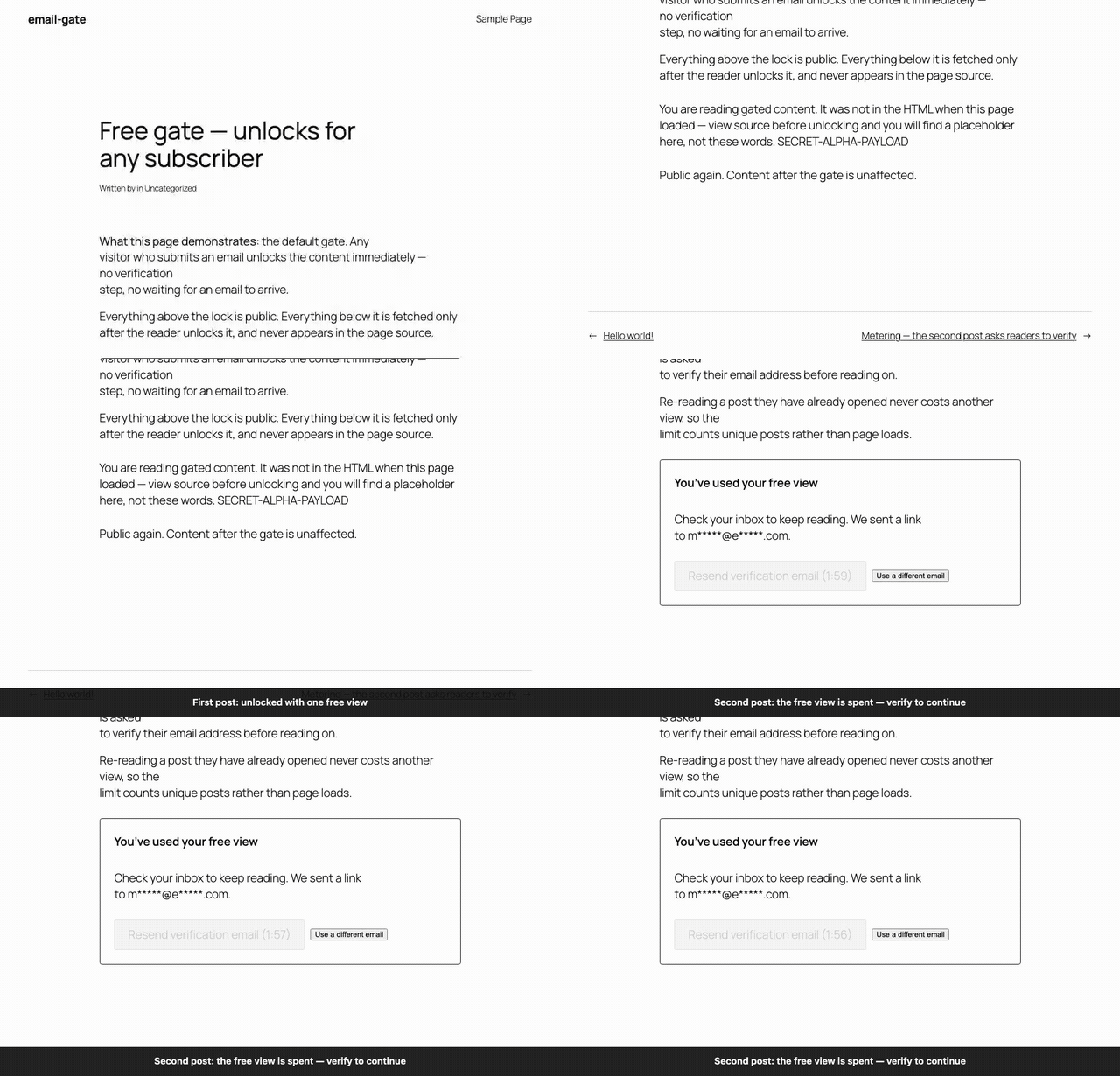


常见问题:
Is the locked content really invisible?
Yes. It is stripped before the page is served. View-source shows a placeholder, nothing more.
Does it work with caching plugins?
Yes, and you should leave caching on. Every visitor receives identical HTML, so your pages cache normally. The unlock decision happens in a separate request that is sent with standard no-store and Vary: Cookie headers, which virtually every cache respects without any configuration. If you run a CDN or a setup configured to cache everything regardless of those headers, use the caching self-check under Settings -> General to confirm in one click, and exclude /wp-json/inklatch/v1/ if needed.
Will gating my content hurt SEO?
By default search engines see the same placeholder every visitor sees, so a gated post has little indexable text. Turn on SEO mode (Settings -> General) and each gate publishes a short public excerpt, while the page declares the gated remainder with schema.org markup (isAccessibleForFree: false). Crawlers and readers see exactly the same words, which is what separates this from cloaking.
Does SEO mode expose my gated content?
Only the excerpt, and only when you switch it on. It is off by default. The excerpt is taken from the opening words of the gated content, so set an excerpt="..." attribute on a gate (or fill in the Public excerpt field on the block) to publish different text instead. Gates marked require_verified are never excerpted automatically.
Can I make the gate match my theme?
Yes. Settings -> Appearance holds the markup for both locked states, and you write the HTML. Tokens like {{email_input}} and {{submit_button}} become real, working elements wherever you place them — everything around them is yours, including wrappers and classes, so a modal triggered from your own button is just a different template. If a template is missing something readers need, the built-in markup is used instead.
Can I send subscribers to Mailchimp or ConvertKit?
Not natively yet, but the webhook under Settings -> General reaches them through Zapier, Make, n8n, or any automation tool that accepts a JSON POST. It fires when a reader submits an address, when they verify one, or both — verified is the safer feed for a mailing list, and is the default.
What happens when an email bounces?
Your mail provider knows an address does not exist, but WordPress never hears about it — so a dead address sits in your list and every resend fails silently. Enable bounce handling under Settings -> General, paste the URL into your provider's bounce webhook, and those addresses are marked and skipped. Only hard bounces count; a full mailbox is ignored.
Can I block throwaway email addresses?
Yes. Settings -> General has a blocked domain list — put one domain per line and addresses there are refused, along with any subdomain. It ships empty, because blocking a domain your readers legitimately use is worse than the occasional junk signup. Add domains as you see them.
Does it track my readers?
No. The Analytics tab counts how often each gate was shown and unlocked, as daily totals per gate. There is no per-visitor record, no identifier, and nothing leaves your site. You can switch it off entirely under Settings -> General.
Can I edit the emails?
Yes. Both the welcome and verification emails are HTML templates you can edit under Settings -> Emails, with merge tags for {{magic_link}}, {{site_name}} and {{email}}. Use inline styles — email clients ignore stylesheets. A plain-text version is generated from your HTML automatically and sent alongside it, so readers on text-only clients still get a working link.
更新日志:
- Fixed: the Emails tab's test-send read option names left over from the plugin's former prefix, so it ignored your saved templates and sent an empty subject, raising undefined-key warnings in the process (WP.org review finding)
- Changed: subscriber list queries pass table and column identifiers as placeholders, matching the rest of the plugin
- Added: prefix-hygiene checks to the pre-submission script, including the interpolated option names a plain search for the old prefix cannot find
- Changed: the plugin is now called Inklatch. The old name was too generic to be distinctive in the plugin directory. Everything the plugin stores has been renamed to match, and existing data is migrated automatically on upgrade.
- Changed: the shortcode is now
[inklatch]...[/inklatch]. - Fixed (security): the SEO structured-data block did not escape for its HTML context, so a post title containing a closing script tag could inject markup into the page. Reported during the WordPress.org plugin review.
- Changed: the site-wide mail and caching warnings can now be dismissed for two weeks. They return if the problem is still there, and reset as soon as it is fixed so a recurrence is not missed.
- Added (Pro): direct mailing-list connections for Mailchimp, Kit (ConvertKit), Brevo, and MailerLite. Enter an API key and the list to add subscribers to — no automation service in between.
- Added (Pro): a "Test connection" button for each service. If a key or list ID is wrong, most mailing-list services accept the request anyway and quietly drop the subscriber, so this reads back the real name and size of the list it is about to write to.
- Added: an Integrations tab, which now holds the webhook settings as well. Existing webhook settings are carried over untouched.
- Note: subscribers are sent when a reader confirms their address. Sending unconfirmed addresses is available but off by default — mailing addresses nobody has proven exist can damage your sending reputation.
- Changed: uninstall cleanup is registered in code instead of shipped as an uninstall.php file. A plugin-supplied uninstall.php overrides the one a bundled SDK needs to run, so this keeps licence cleanup working on the Pro package. Behaviour is unchanged: options are always removed, tables only if you opted in.
- Changed: minimum WordPress raised to 6.2, so every database query can pass its table name through $wpdb->prepare() with the %i placeholder rather than concatenating it.
- Hardening: bulk deletes now build one %d placeholder per id instead of interpolating a list, so every value goes through prepare().
- Changed: the expired-link page registers its script properly instead of printing a script tag.
- No functional changes — this release exists to pass the official Plugin Check cleanly.
- Added: optional blocked domain list under Settings -> General, for refusing throwaway addresses. Empty by default; matches subdomains too.
- Added: the caching self-check now runs once a day on its own and warns only if something is genuinely caching gated content — no notice on a healthy site.
- Fixed: readers now see why an address was refused. WordPress buries a validation message inside the response, so a blocked or malformed address showed only "Invalid parameter(s)".
- Fixed: addresses longer than the database column are refused with a clear message instead of failing at the database.
- Added: Settings, Docs and Get Pro links on the Plugins screen, and a Documentation link beside each settings section.
- Fixed: the free package had no route to Pro anywhere — the "Pro" badges beside gated features were inert text, so a customer who wanted to buy had nowhere to click.
- Added: live preview under every template editor — both emails and both gate templates — updating as you type, with sample values for the merge tags.
- Previews render inside a fully sandboxed iframe. Scripts cannot run, the frame cannot reach the admin page, and a template's own CSS cannot leak out and restyle wp-admin around it.
- Added: mail health warning. If your site's sending address is one mail servers reject, or the last email failed, the admin is told before readers find out — with a link to the test send. Clears itself once mail works.
- Added: bounce handling. Point your provider's bounce webhook at the URL under Settings -> General and addresses that do not exist stop being mailed, protecting your sending reputation. Postmark, SendGrid, Mailgun, Brevo and SES payloads are understood.
- Only hard bounces count — a full mailbox or temporary outage is ignored.
- Security: the bounce endpoint is closed until you generate a secret, compares it in constant time, is rate limited, returns the same response for known and unknown addresses, and can only ever mark an address undeliverable.
- Added: Analytics tab — views, unlocks, and conversion rate per gate, over 7/30/90 days.
- Counted at the REST layer rather than during page render, so the numbers stay correct on a fully cached site. Stored as daily rollups: a handful of rows per day rather than one per view, and it records that a gate was shown, never who saw it.
- Added: a Statistics toggle under General for anyone who would rather collect nothing.
- Added: caching self-check under Settings -> General. Fetches the plugin's own endpoints, reports whether the no-cache headers survived, whether a stored copy was served, and which caching plugin or CDN is active — with the specific setting to change in each.
- Security: gate responses now send
Vary: Cookie. They vary by the reader's session cookie but did not say so, and a cache keying on URL alone could have served one reader's unlocked content to another. - Changed: cache headers are set in one place (Inklatch_Rest::no_cache) instead of three, and now include no-cache/must-revalidate for caches that ignore no-store.
- Added: outgoing webhook. Send subscriber details to any URL that accepts JSON — Zapier, Make, n8n, or your own endpoint — with separate toggles for "submitted an address" and "verified an address".
- Added: a Send test payload button that reports the HTTP status your endpoint returned, so a misconfigured integration is visible rather than silent.
- Added:
inklatch_subscriber_verifiedaction andinklatch_webhook_payloadfilter for developers. - Note: delivery is non-blocking and best-effort — a slow or broken endpoint never delays or loses a subscription, but there is no retry queue.
- Added: configurable gate templates. Write the locked-state markup yourself under Settings -> Appearance so the gate matches your theme, using tokens ({{email_input}}, {{submit_button}}, {{resend_button}}, {{masked_email}}, ...) that are replaced with working elements when the gate renders.
- Added: two templates — the capture form, and the verification prompt shown to readers who have subscribed but not yet verified.
- Safety: a template missing a required token warns on save and falls back to the built-in markup at render time, so a broken template costs styling rather than signups.
- Fixed: uninstall left 10 of the plugin's 14 options behind, so deleting and reinstalling resurrected old settings.
- Changed: emails are now HTML. Both templates ship as editable HTML with a styled verify button, and every send is multipart — a plain-text alternative is generated automatically for clients that will not render HTML.
- Security: email addresses are validated at the storage layer, not only at the REST boundary, so no caller can store a malformed address. Invalid input is now rejected rather than stripped-and-accepted.
- Changed: addresses are normalized to lowercase, so
Reader@example.comandreader@example.comare one subscriber rather than two free views. - Security: merge tag values are escaped for HTML context.
{{email}}is reader-supplied, so it can never reach a template as live markup.
- Added: SEO mode - optional public excerpt per gate plus schema.org paywalled-content structured data (isAccessibleForFree: false), the supported alternative to hiding content with CSS
- Added:
excerpt="..."shortcode attribute and a Public excerpt field on the block, which override the automatic excerpt - Added: Settings -> General controls for SEO mode and excerpt length
- Note: SEO mode is off by default; with it on, the opening words of each gate become public by design. Verified-only gates are never excerpted automatically.
- Fixed: gates never loaded on sites using plain permalinks — the frontend appended a second query string to the REST URL and every request 404'd
- Fixed: a verification email that failed to send destroyed the link the reader already had in their inbox, leaving them locked out with no replacement
- Fixed: the resend cooldown counted milliseconds where the server sends seconds, so the button re-enabled after a second and the next click was rejected
- Fixed: a failed welcome email no longer counts against a new subscriber's send allowance
- Fixed: PHP 8.4 deprecation notice from fputcsv() during subscriber CSV export
- Added: local shakedown environment and end-to-end harnesses under tests/env/ (dev only, not shipped)
- Tabbed admin: General / Emails / Subscribers
- Email template editors with merge tags, missing-{{magic_link}} warning, and one-click test send with deliverability diagnostics
- Subscribers list table: search, verified/unverified filters, sortable columns, view counts, single and bulk delete (GDPR), CSV export
- Opt-in data deletion on uninstall
- Gutenberg block (inklatch/gate) with nested-block support and require-verified toggle
- Freemius SDK integration scaffold for Pro licensing
- Pro: magic-link email verification, metered free views, templated welcome/verify emails, resend with cooldown, change-email flow, origin-tab auto-unlock
- Initial release: shortcode gating, signed sessions, email capture, CSV export.