Integration for Zoho Campaigns - Contact Form 7, WPForms, Elementor, Gravity Forms and More
| 开发者 |
plugcrux
integrazo padmadev |
|---|---|
| 更新时间 | 2026年7月13日 12:48 |
| PHP版本: | 7.0 及以上 |
| WordPress版本: | 7.0 |
| 版权: | GPLv2 or later |
| 版权网址: | 版权信息 |
详情介绍:
安装:
- Go to Plugins > Add New in your WordPress dashboard.
- In the search bar, type Integrazo and locate this plugin.
- Click Install and then Activate.
- Go to the plugin settings to connect your Zoho Campaigns account and start syncing. Manual installation
- Upload the plugin ZIP file via Plugins > Add New > Upload Plugin.
- Activate the plugin.
- Go to the plugin settings and complete the setup.
屏幕截图:


常见问题:
Which WordPress form plugins does this support?
This plugin currently supports:
- Contact Form 7
- WPForms
- Elementor Forms
- Gravity Forms
- Formidable Forms
How do I integrate Contact Form 7 with Zoho Campaigns?
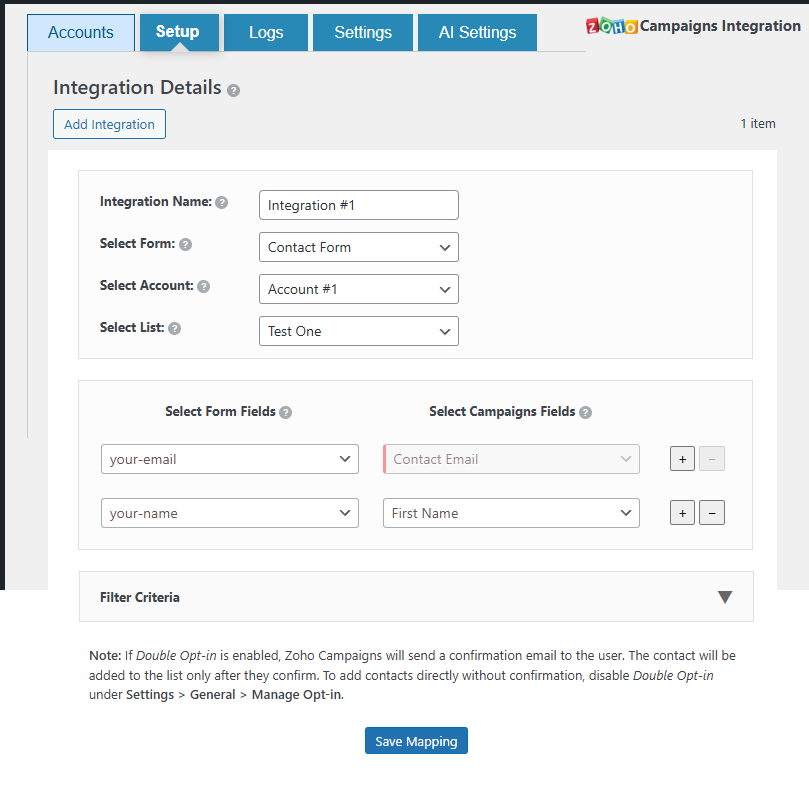
- Open the plugin and go to the Setup tab.
- Choose Contact Form 7 as the form type.
- Select the Zoho Campaigns list.
- Map the Contact Form 7 fields to Zoho Campaigns fields.
- Save the integration.
How do I integrate WPForms with Zoho Campaigns?
- Go to the plugin’s Setup section.
- Select WPForms as the form type.
- Choose the Zoho Campaigns list.
- Map WPForms fields to Zoho Campaigns fields.
- Save the integration.
Can I map custom fields in Zoho Campaigns?
Yes, you can map form fields to custom fields in Zoho Campaigns where available. This helps organize and segment your data more effectively.
What happens if a submission fails to sync with Zoho Campaigns?
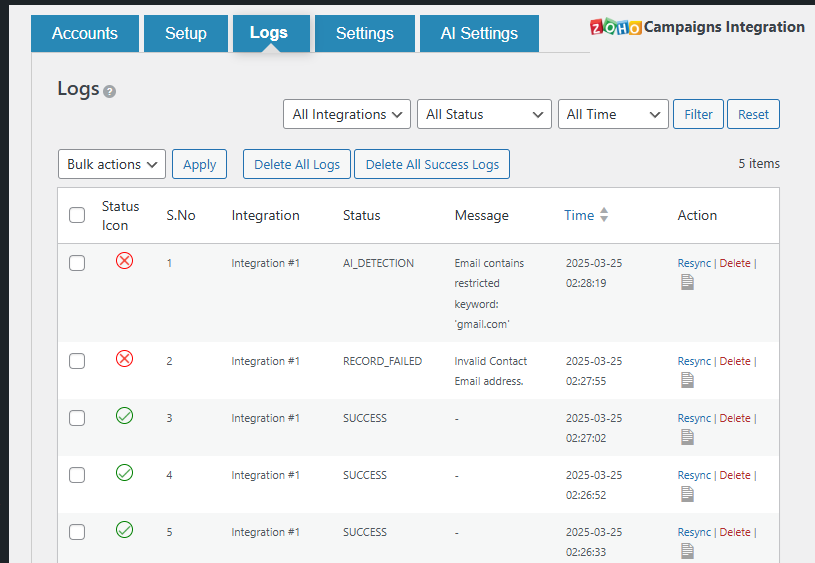
Failed submissions are:
- Recorded in the Logs section
- Shown with the error message returned by Zoho
- Available for manual or bulk resync, where supported
Does this plugin support real-time sync?
Yes. Form entries are sent to Zoho Campaigns immediately after submission, subject to API availability and configuration.
How can I troubleshoot integration issues?
If records are not being created as expected:
- Re-authenticate your Zoho account, if needed.
- Check that required fields are mapped correctly.
- Review the Logs page for error messages.
- Verify Zoho API limits and account-level restrictions.
- Contact support if the issue continues:\ https://integrazo.com/pages/contact
Do I need a Zoho Campaigns account to use this plugin?
Yes. You need an active Zoho Campaigns account to send data from your WordPress site to Zoho Campaigns.
Is data transfer secure between WordPress and Zoho Campaigns?
The plugin uses:
- OAuth 2.0 for authentication
- Communication over HTTPS (provided your site and Zoho endpoints use HTTPS)
Is this plugin an alternative to Uncanny Automator or Bit Integrations for Zoho Campaigns?
Yes. If you are looking for a dedicated Zoho Campaigns integration for WordPress forms — as an alternative to general automation plugins like Uncanny Automator, Bit Integrations, Zapier, Zoho Flow, WP Fusion, or Bit Flows — this plugin is built specifically for Zoho Campaigns. It connects Contact Form 7, WPForms, Elementor Forms, Gravity Forms, and Formidable Forms directly to Zoho Campaigns without needing a third-party automation service.
Can I use this instead of Zapier or Zoho Flow to send WordPress form data to Zoho Campaigns?
Yes. Instead of using Zapier, Zoho Flow, or Make (Integromat) to connect your WordPress forms to Zoho Campaigns, this plugin handles the integration directly on your WordPress site — no external automation service or monthly subscription needed.
更新日志:
- Fixed: Missing spacing between the add (+) and remove (−) buttons in the field mapping table.
- Security: Hardened admin AJAX endpoints with proper capability checks.
- Security: Improved data sanitization and output escaping across admin views.
- Fixed: base64_decode strict mode added for safer token handling.
- Fixed: JSON field mapping no longer corrupted on save.
- Added: Help dropdown in admin header for quick support access.
- Added: Deactivation feedback popup.
- Added: Form Filters sub-tab under Settings.
- Improved: Minor UI and code quality improvements.
- Checked: Tested and confirmed compatible with WordPress 7.0.
- Security: Added ABSPATH check to prevent direct file access across missing files.
- Security: Replaced wp_redirect() with wp_safe_redirect() for improved redirect safety.
- Fixed: License expiry notice now displays correctly for all expired licenses, regardless of how long ago the license expired.
- Fixed: Settings link in Plugins page now uses admin_url() for improved compatibility.
- Improved: Code hardening with stricter output escaping in admin views.
- Checked: Tested and confirmed compatible with WordPress 6.9.1.
- Improved: Readme content clarity and wording for better understanding of supported forms and Zoho integrations.
- Updated: Short description to clearly mention support for other form submissions.
- Improved: Minor UI text refinements across admin pages.
- Changed: Replaced transient-based account authentication storage with WordPress options for improved reliability.
- Improved: Account authentication flow stability during Zoho OAuth redirects.
- Improved: Better handling of authentication errors and session recovery.
- Improved: Data sanitization and validation in the Accounts and Setup pages.
- Fixed: Edge cases where account data could be lost during browser refresh or delayed redirects.
- Checked: Plugin tested and confirmed compatible with WordPress 6.9
- Updated: "Tested up to" value updated to 6.9 in readme.txt
- Updated: Readme file revised to follow WordPress.org guidelines.
- Updated: Description, tags, and sections rewritten for clarity and compliance.
- Changed: Updated Elementor Forms integration flow for improved setup.
- Improved: Reliability when mapping Elementor Forms fields.
- Added: FAQ entry about disabling specific integrations.
- Fixed: All known error notices reported by WordPress debug logs.
- Checked: Tested with WordPress 6.8.
- Fixed: Elementor Forms field-loading issue.
- Added: Improved validation and sanitization.
- Fixed: Issue causing a blank page when selecting a list.
- Added: Compatibility with WordPress 6.8.
- Fixed: Removed unnecessary use of
$wpdb->prepare()for static table names. - Fixed: i18n issue by removing an empty
__()string inget_columns().
- Initial release with:
- Support for Contact Form 7, Gravity Forms, WPForms, Elementor Forms, and Formidable Forms.
- Error logging and resync options for failed submissions.
- Email notifications for integration failures.