Integration for WooCommerce - Zoho CRM, Books, Invoice, Inventory, Desk, Campaigns, Bigin
| 开发者 |
integrazo
plugcrux |
|---|---|
| 更新时间 | 2026年8月28日 18:47 |
| PHP版本: | 7.0 及以上 |
| WordPress版本: | 7.1 |
| 版权: | GPLv2 or later |
| 版权网址: | 版权信息 |
详情介绍:
- Select WooCommerce as your data source
- Choose a Zoho Product — Zoho CRM, Books, Invoice, Inventory, Desk, Campaigns, or Bigin
- Authenticate — Securely connect your Zoho account using OAuth 2.0
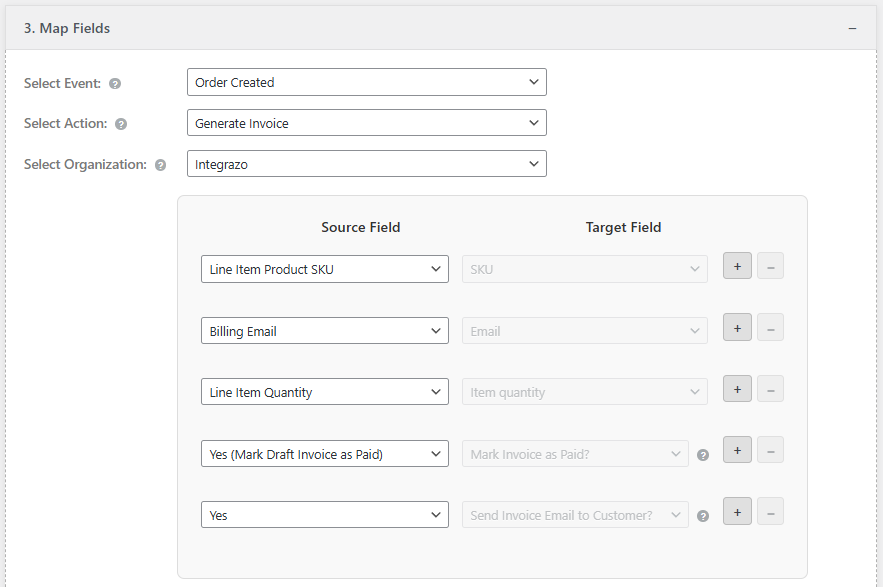
- Map Fields — Match WooCommerce data to Zoho module fields
- Go Live — Enable the integration and every new order syncs automatically
- OAuth 2.0 authentication — your Zoho credentials are never stored
- All admin actions protected with WordPress nonces and capability checks
- ABSPATH direct-access guards on all PHP files
- No data stored on external servers — everything stays on your WordPress site
安装:
- Go to Plugins → Add New in your WordPress dashboard.
- Search for Integrazo.
- Click Install Now, then Activate. Manual Installation
- Download the plugin ZIP file.
- Go to Plugins → Add New → Upload Plugin.
- Upload the ZIP file and click Install Now.
- Activate the plugin. Quick Start
- Navigate to the Integrazo menu in WordPress admin.
- Click Add Integration on the Setup page.
- Select a Zoho product as the destination.
- Authenticate with your Zoho account.
- Map your WooCommerce fields and save — your integration is live.
屏幕截图:
常见问题:
Which WooCommerce data can be synced to Zoho?
You can sync WooCommerce orders, customers, and products — including billing details, shipping details, line items, taxes, totals, and order status — to any supported Zoho product.
Can I sync WooCommerce orders to Zoho CRM?
Yes. WooCommerce orders and customers can be synced to Zoho CRM as Leads, Contacts, Accounts, Deals, or Sales Orders. You control exactly how fields are mapped.
Can I sync WooCommerce orders to Zoho Books?
Yes. WooCommerce orders are sent to Zoho Books as Contacts, Sales Orders, or Invoices — with full line items, taxes, shipping, and customer details.
Can I sync WooCommerce orders to Zoho Invoice?
Yes. WooCommerce orders can automatically create Customers and Invoices in Zoho Invoice, including product line items and tax data.
Can I sync WooCommerce orders to Zoho Inventory?
Yes. Sync WooCommerce orders and products to Zoho Inventory as Contacts, Items, or Sales Orders based on your setup.
Can I sync WooCommerce customers to Zoho Desk?
Yes. WooCommerce order or customer data can create Tickets or Contacts in Zoho Desk, automating your support workflows.
Can I add WooCommerce customers to Zoho Campaigns?
Yes. Automatically add WooCommerce customers to Zoho Campaigns mailing lists when they place an order.
Can I push WooCommerce data to Zoho Bigin?
Yes. WooCommerce customers and orders can be pushed to Zoho Bigin as Contacts, Companies, or Deals.
Can I create multiple integrations for different Zoho products?
Yes. You can create unlimited integrations. For example, sync orders to Zoho CRM as deals AND to Zoho Books as invoices simultaneously.
Does the plugin support all Zoho data centers?
Yes. Integrazo supports all Zoho data centers: zoho.com (US), zoho.in (India), zoho.eu (Europe), zoho.com.au (Australia), zoho.jp (Japan), and zohocloud.ca (Canada).
What happens if a sync fails?
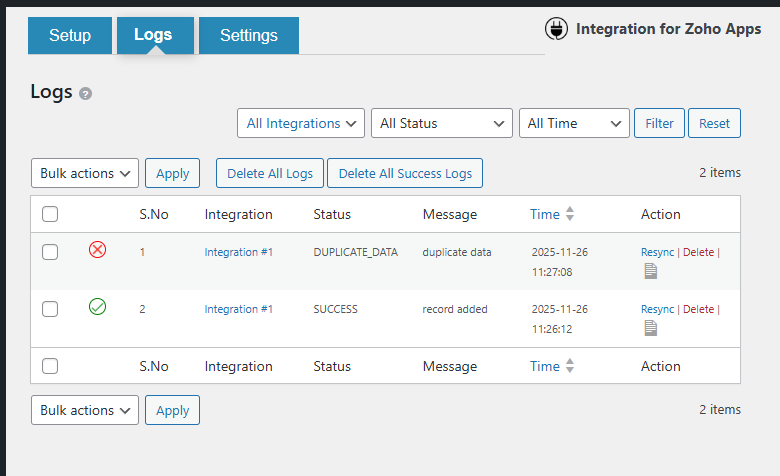
Failed records are stored in the Logs page with the full Zoho API error response. You can review the reason, fix the issue, and retry with one click. Email notifications can also alert you immediately.
Can I disable an integration without deleting it?
Yes. Each integration has an enable/disable toggle on the Setup page. Disabled integrations stop syncing but retain all settings and field mappings.
Does this plugin slow down my store?
No. Integrazo processes syncs efficiently so your WooCommerce checkout and order processing remain fast.
Is my Zoho account data safe?
Yes. Authentication uses Zoho's official OAuth 2.0 flow. Your Zoho credentials are never stored in the plugin. All API calls use HTTPS. No data is sent to third-party servers.
Do I need coding skills?
No. Setup is done entirely through a visual interface — select source, destination, map fields, and save. No code required.
Does this plugin work with WordPress Multisite?
Yes. Integrazo is compatible with WordPress multisite installations.
更新日志:
- Checked: Tested and confirmed compatible with WordPress 7.1.
- Improved: The destination card in Connect Service now shows a "Start here" pointer above it, so a first-time user has one clear place to click.
- Improved: An empty destination card uses a dashed outline and goes solid once an app is chosen, matching the WooCommerce card beside it.
- Improved: Replaced the description text and animated connect hint with a cleaner "Destination" badge and a simple "Click to select" prompt.
- Improved: "Save and Next" is now visibly greyed out while a destination is still missing.
- Removed: The "Select a destination app before continuing" warning line, now that the card itself shows what to do next.
- Fixed: Admin notices outside the Setup tab could render their links as literal HTML text instead of clickable links.
- Improved: Field mapping dropdown now lists "Custom Value" first, followed by WooCommerce fields, for easier discovery.
- Improved: Renamed the "Form Fields" dropdown group to "WooCommerce Fields".
- Improved: Redesigned the Step 1 destination selection — the entire box is now clickable with a clearer connect icon and animated hints.
- Improved: General refinements across the Setup flow, filters, logs, and account handling.
- Added: 24-hour free trial access to Pro features directly from the admin page.
- Improved: Compatibility tested up to WordPress 7.0.
- Improved: Verified all global variables and constants follow consistent plugin prefixing.
- Improved: Admin notice display and positioning across all admin pages.
- Improved: Internal code optimization for better reliability.
- Security: Added capability checks across all admin action handlers
- Security: Added ABSPATH direct-access guards to all PHP files
- Security: Fixed path traversal vulnerability in admin tab loading
- Security: Replaced wp_redirect with wp_safe_redirect for internal redirects
- Improved: Orderby parameter validation with whitelist approach
- Improved: Internationalization for all user-facing strings
- Improved: Sanitized external API response before display
- Improved: Removed dead code and cleaned up production files
- Improved: Clean filter parameter handling without superglobal manipulation
- Improved: Updated readme with better SEO and documentation
- Initial release
- WooCommerce integration with Zoho CRM, Books, Invoice, Inventory, Desk, Campaigns, and Bigin
- OAuth 2.0 authentication with multi-data center support
- Flexible field mapping with custom values
- Sync logs with one-click retry
- Email notifications for failed syncs