
IPGeolocation.io – Geo Redirects & Content Control
| 开发者 | ipgeolocation |
|---|---|
| 更新时间 | 2026年9月30日 18:21 |
| PHP版本: | 7.4 及以上 |
| WordPress版本: | 7.1 |
| 版权: | GPLv2 or later |
| 版权网址: | 版权信息 |
详情介绍:
- Country-based redirects (entire site, specific pages, or URL patterns)
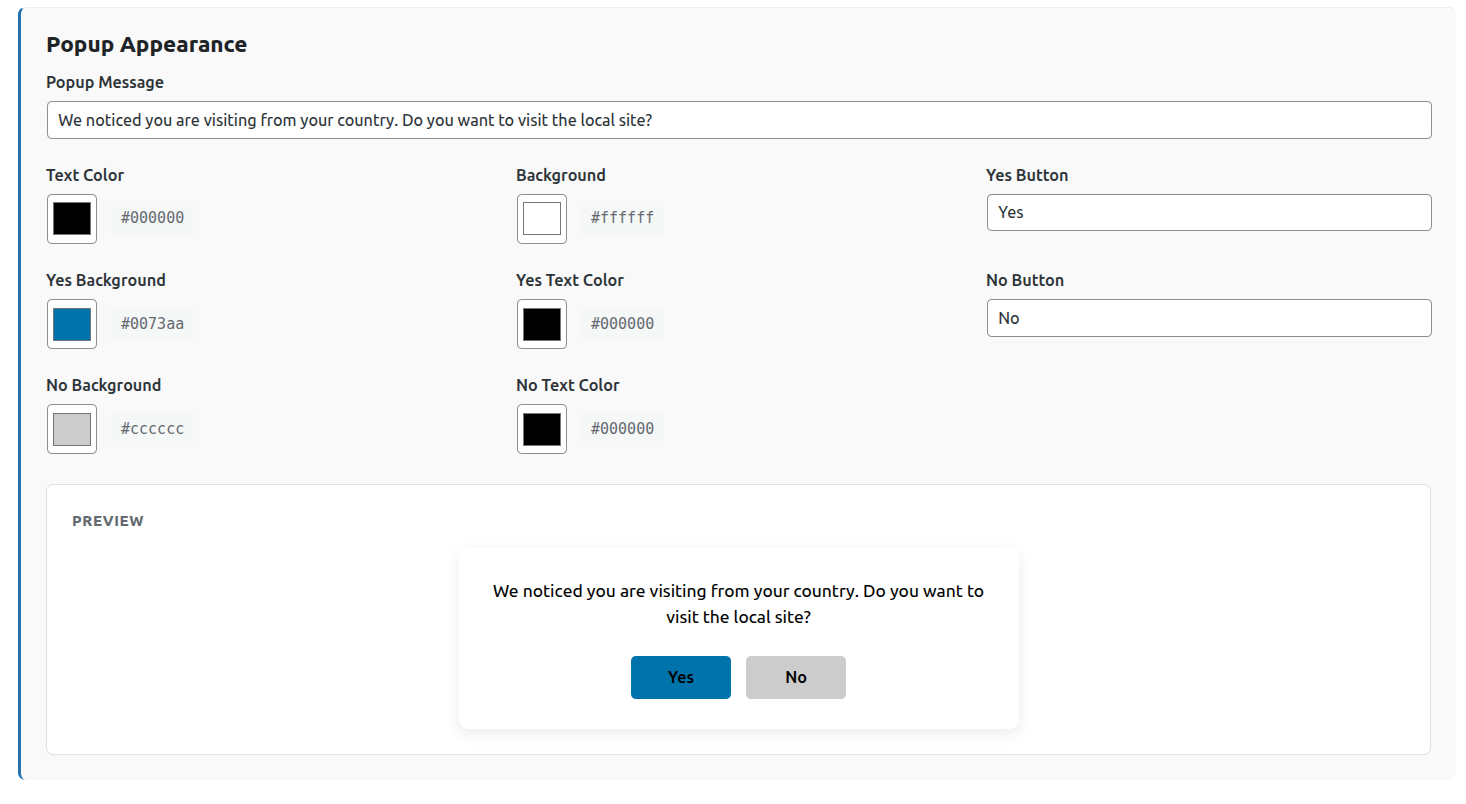
- Optional popup confirmation before redirect
- IP address blocking, with separate rules for your website and your login page
- Address lists that accept single addresses, ranges, wildcards, IPv4 and IPv6
- Safe list of addresses that are never blocked by any rule
- Protection against locking yourself out, with a recovery option
- Country-level access control (allow or block)
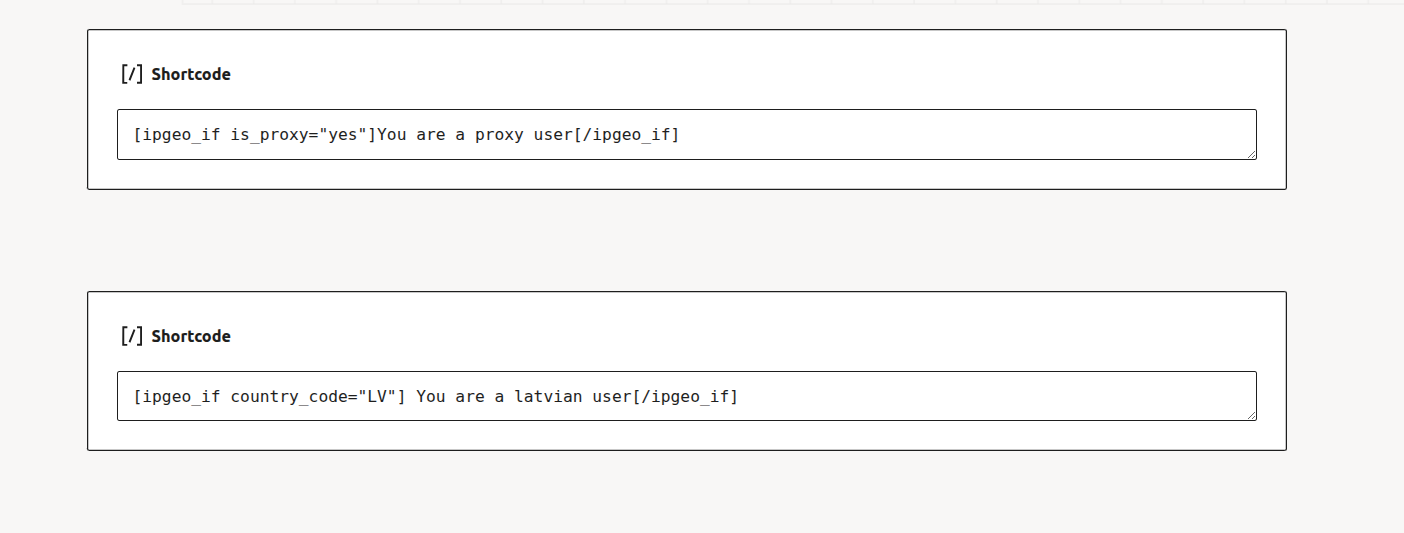
- Conditional content shortcodes
- Output visitor geolocation data via shortcode
- Page and query-string exclusions
- Redirect bypass and reset via URL parameters
- Bot detection (search engines and social crawlers excluded from redirects)
- Administrator-safe (admins are never redirected)
- IP response caching using WordPress transients
- Who can visit your website
- Who can reach your login page
安装:
- Upload the plugin folder to
/wp-content/plugins/. - Activate the plugin via Plugins → Installed Plugins.
- Enter your ipgeolocation.io API key in the plugin settings.
- Configure redirect rules, exclusions, country access rules, or IP rules.
屏幕截图:


常见问题:
Does this plugin redirect logged-in administrators?
No. Administrators are automatically excluded from redirects, and by default they are never blocked by IP rules either. You can change that in Advanced settings.
Are bots and search engines redirected?
Known bots (Google, Bing, Facebook, X and others) are excluded from country redirects. IP rules do not skip them, because any browser can claim to be a search engine. To exempt a crawler from an IP rule, add its addresses to your safe list.
Does the plugin cache API responses?
Yes. IP data is cached for 24 hours per IP.
Does it work with Cloudflare?
Yes. Choose the Cloudflare option under Advanced settings. The plugin only trusts Cloudflare's headers when the request genuinely came from a Cloudflare server, so nobody can pretend to be at a different address.
Will this slow down my site?
No. API results are cached, and IP rules are a simple local check with no lookup involved.
Do I need an API key to block IP addresses?
No. Blocking by IP address works without a key. Country features need one.
How do I find my own IP address?
The settings screen shows it at the top of the IP section, with a button that adds it to your safe list.
The plugin shows the wrong IP address for me. Why?
Your site is probably behind a CDN or proxy, which replaces the address your server sees. Open Advanced settings and choose the option that matches your setup, then check the address again after saving.
I locked myself out of my login page. How do I get back in?
Add this line to your wp-config.php file, log in, fix the rule, then remove the line:
define( 'IPGEO_DISABLE_IP_ACCESS', true );
The plugin normally refuses to save a rule that would lock you out, so this should be rare.
Does it work with a caching plugin or CDN?
Yes, since 1.3.0. A page cache serves a stored copy of a page without running WordPress, so a visitor's country cannot be checked while the page is built. With "Cached page support" on (the default), every page carries a small script that asks your site what to do for each new visitor, using the same rules the server uses, and then remembers the answer. It works with WP Rocket, LiteSpeed Cache, W3 Total Cache, WP Super Cache, Cloudflare, Varnish, and host caches alike. Visitors on uncached pages are still redirected instantly by the server.
Can I block countries or IP addresses on a cached site?
Only if blocked visitors are never served a cached copy. While visitor blocking rules are active, the plugin stops public pages from being cached (Settings > Page caching). If you would rather keep caching, enforce the block at your CDN instead, for example with a Cloudflare WAF rule, and turn that option off. Sites that already had blocking rules active when they updated to 1.3.0 keep their previous behaviour until they turn it on.
Why was a visitor not redirected?
Use "Test a visitor" at the bottom of the settings page, or define IPGEO_DEBUG as true in wp-config.php: every response then carries an X-IPGeo-Decision header naming the reason, such as excluded, already_redirected or no_rule_for_country.
Can one rule cover several countries?
Yes. Enter the codes separated by commas, for example GR, CY.
How often is the same visitor redirected?
You choose, above the redirect rules: every visit (the default for new installs), once per browser session, once per hour or once per day. Each rule can override it under How Often, for example every visit for your local store and once per day for a promotion. Sites that used the plugin before 1.4.0 keep once per hour, the earlier behaviour, until they change it. Visitors who choose to stay, through a ?geo_bypass=1 link or by answering "No" to a popup, are never redirected for 30 days.
What does a popup remember?
The answer, for 30 days. "Yes" sends the visitor to the other site automatically on later visits, "No" keeps them on this one. If you change the destination of the rule, visitors are asked again. Closing the popup without answering asks again in the next browser session.
Why does ?ipgeo_from=1 appear in the address after a redirect?
It is added when a visitor is sent to another site. If that site also runs this plugin, it stops the two sites from sending the visitor back and forth, and the plugin there removes it from the address bar. If the other site does not run this plugin, nothing can remove it there: switch off "Add ?ipgeo_from=1 when sending visitors to another site" above the redirect rules.
How do I test redirects with a VPN?
Use a private browser window, and open a new one after changing location. Or add ?geo_reset=1 to the address, which clears everything the plugin remembers about you.
更新日志:
- New: choose how often the same visitor is redirected: every visit, once per browser session, once per hour or once per day, site-wide and for each rule. New installs redirect on every visit; existing sites keep once per hour until they change it
- New: popups remember the answer for 30 days. "Yes" redirects automatically on later visits, "No" keeps the visitor on this site. Closing the popup asks again in the next browser session
- New: a visitor sent here by another site running this plugin stays for the rest of the browser session, so two sites can never bounce a visitor between them
- Improved: the popup keeps keyboard focus inside itself and closes on a click outside it
- New: a setting to stop adding ?ipgeo_from=1 to redirects, for destinations that do not run this plugin
- Improved: ?ipgeo_from, ?geo_bypass and ?geo_reset are removed from the address bar once read, on any site running this plugin, including one with no rules of its own
- Improved: ?geo_reset=1 also forgets popup answers
- Improved: spacing on the settings screen
- Fixed: country redirects to another domain (for example https://gr.example.com/) sent visitors to wp-admin instead, then stopped redirecting them for an hour
- Fixed: redirects, popups, conditional content and blocking are now correct on sites with page caching. Cached pages ask the site for each new visitor's decision, popups and country-specific content are no longer stored in the cache, and page caches are cleared when settings change
- Fixed: rules never matched pages with non-English addresses such as Greek slugs, and non-English search terms were erased from forwarded query strings
- Fixed: 301 redirects were always sent as 302
- Fixed: an error from the location API (invalid key, rate limit) was cached for 24 hours as if it were a real result. Errors are now retried after five minutes, and the settings page shows the API status
- Security: a user agent claiming to be a search engine no longer bypasses country blocking; crawlers must pass a reverse DNS check
- Security: an IP block destination on another site could let blocked visitors read the page with the same path on this site
- Fixed: ?geo_reset=1 did not undo an earlier redirect
- Fixed: form submissions, feeds and robots.txt were redirected; checkout, cart and account pages are now never redirected
- Fixed: subdirectory installs matched rules against the wrong path
- Fixed: the popup Yes button text colour was lost on save
- Fixed: the admin screen could keep running an outdated script after an update
- New: one rule can target several countries (GR, CY)
- New: "/products/*" also matches /products itself
- New: "Test a visitor" tool, and an X-IPGeo-Decision debug header with IPGEO_DEBUG
- New: [ipgeo_if] accepts true/false and 1/0 as well as yes/no, and render="browser" or render="server"
- Accessibility: the redirect popup is a proper dialog, keyboard focusable and closable with Escape
- Added IP access control: block or allow visitors by IP address, with separate rules for your website and your login page
- Address lists accept single addresses, ranges such as 203.0.113.0/24, wildcards such as 192.0.2.*, and IPv6
- Added a safe list of addresses that are never blocked by any rule
- The settings screen now shows your own IP address and how it was detected
- The plugin refuses to save a login rule that would lock you out, with a wp-config.php recovery option
- Security: visitor IP addresses can no longer be faked using request headers. If your site is behind a CDN or proxy, choose the matching option under Advanced settings
- Fixed an empty redirect URL in Country Access Control causing an endless redirect loop
- Fixed blocked visitors being redirected twice
- Fixed cached location data not being reused within the same page load
- Upgraded internal API from v2 to v3
- Simplified plan types: Developer and Paid Plan only
- Standard, Advanced, and Security plans auto-migrated to Paid Plan
- Rename the plugin
- Initial public release
- Country redirects with popup support
- Country access allow/block rules
- Conditional shortcodes
- Bot detection and caching