Iris AI – AI Homepage, Chatbot & Site Assistant
| 开发者 | zephyrwp |
|---|---|
| 更新时间 | 2026年8月3日 07:41 |
| 捐献地址: | 去捐款 |
| PHP版本: | 8.0 及以上 |
| WordPress版本: | 7.0 |
| 版权: | GPLv2 or later |
| 版权网址: | 版权信息 |
详情介绍:
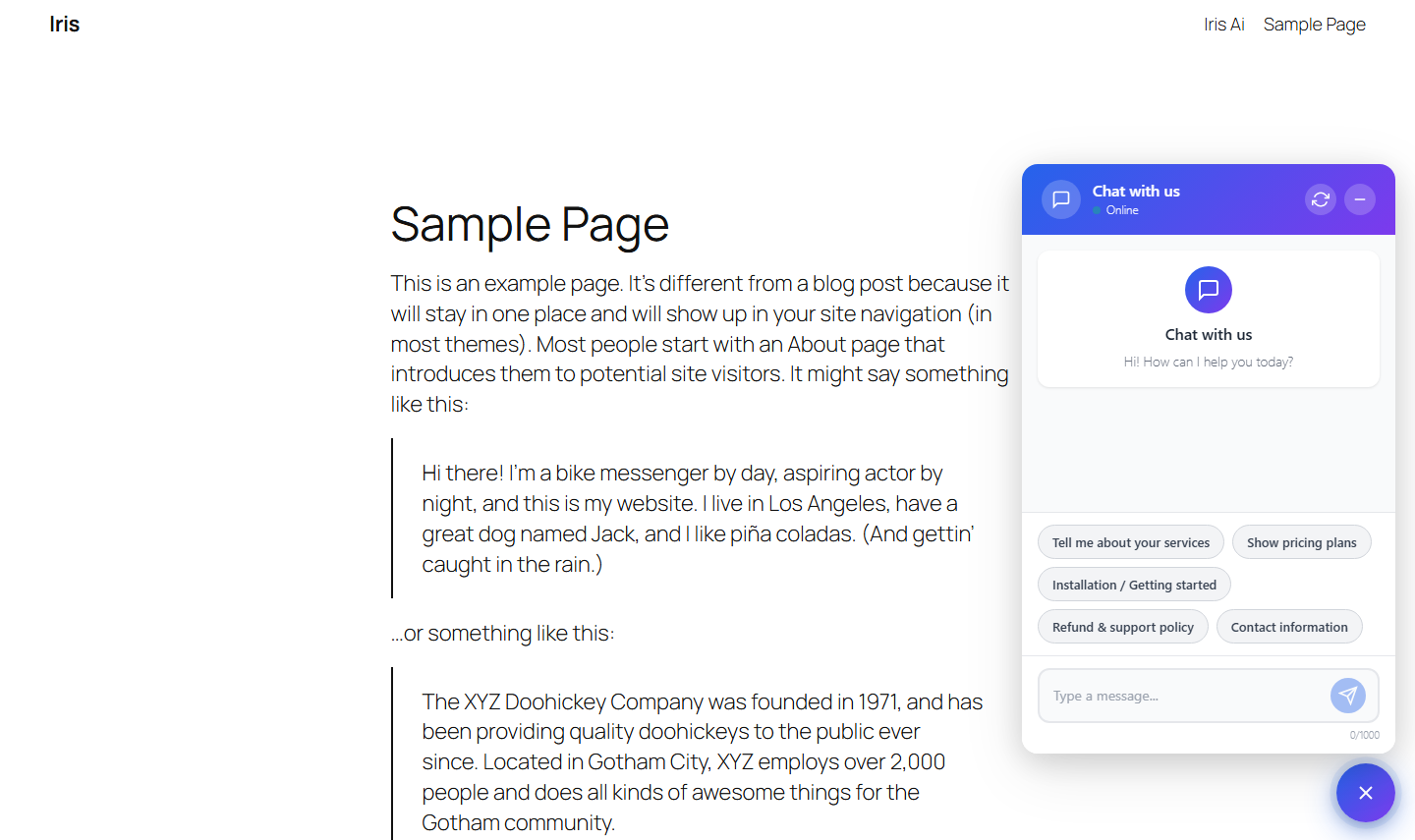
- Dual Interface Options - Full-page chat with hero section and wave animations, or floating chat widget with customizable positioning
- Vector Search (RAG) - Semantic search of your content using embeddings with automatic source citations
- Flexible Connection Modes - Proxy Mode (IrisAI hosted service) or BYO Mode (bring your own OpenAI API key)
- Complete Customization - Custom system prompts, configurable AI models, adjustable token limits, brand colors
- Privacy & Security - API keys never exposed to frontend, all requests server-side, GDPR compliance features
- Features - Multi-site support, chat history, auto-inject widget, rate limiting protection
- Customer support automation
- Website FAQs and knowledge base
- E-commerce product assistance
- Educational content interaction
- Documentation search
- Internal company wikis
- Connect - Choose Proxy or BYO mode and enter credentials
- Index - Select content types and start vector indexing
- Deploy - Add shortcode or enable auto-inject widget
- Customize - Adjust colors, prompts, and behavior to match your brand
- sine-waves.min.js - MIT License - Wave animation effects (https://github.com/isuttell/sine-waves)
- three.min.js - MIT License - 3D graphics library (https://github.com/mrdoob/three.js)
安装:
- Log in to your WordPress admin panel
- Go to Plugins > Add New
- Search for "IrisAI"
- Click "Install Now" then "Activate"
- Go to Settings > IrisAI to configure
- Download the plugin ZIP file
- Go to Plugins > Add New > Upload Plugin
- Choose the ZIP file and click "Install Now"
- Activate the plugin
- Go to Settings > IrisAI to configure
- Go to Settings > IrisAI > General tab
- Select "Proxy Mode"
- Enter Proxy Base URL:
https://api.irisai.cloud - Enter your Proxy API Key (from irisai.cloud dashboard)
- Select AI model (GPT-5.6 Terra recommended)
- Click "Save Changes"
- Go to Settings > IrisAI > General tab
- Select "BYO Mode"
- Enter your OpenAI API key
- Enter model name (e.g.,
gpt-5.6-terra) - Click "Save Changes"
- Go to Knowledge Index tab
- Select content types to index (Posts, Pages, etc.)
- Click "Start Indexing"
- Wait for completion (background process)
- Create a new page (e.g., "AI Assistant")
- Add shortcode:
[irisai_chat] - Use a full-width template for best results
- Publish and add to navigation
- Go to Widget tab
- Enable "Auto-inject Widget"
- Choose position (bottom-right, etc.)
- Save Changes
[irisai_widget] to any page屏幕截图:

常见问题:
Is RAG (Vector Search) available in both modes?
Yes! Both Proxy and BYO modes support full vector search capabilities with semantic matching and source citations.
Do I need an OpenAI account?
Not if you use Proxy Mode. With Proxy Mode, you use IrisAI prepaid tokens. For BYO Mode, you'll need your own OpenAI API key.
Are API keys visible in the browser?
No, never. All API keys are stored securely in your WordPress database and all AI requests are processed server-side only.
Can I use both interfaces at the same time?
Yes! You can have the full-page chat on a dedicated page and the floating widget on all other pages. This is actually the recommended setup.
How much does it cost?
The plugin itself is 100% free with no limitations. You only pay for Proxy Mode prepaid tokens or OpenAI API usage in BYO Mode.
How often should I re-index my content?
Enable "Auto Re-index" in Knowledge Index settings to automatically re-index when posts are saved. For manual indexing, re-index after significant content updates.
What AI models are supported?
Proxy Mode: GPT-5.6 (Sol, Terra, Luna), Claude Sonnet 5, Gemini 3.6 Flash, and more BYO Mode: Any OpenAI model
Can I customize the AI's behavior?
Absolutely! You can write custom system prompts, set maximum response length, add custom suggestion prompts, and define brand personality and tone.
Is it GDPR compliant?
IrisAI includes GDPR-ready features including privacy mode to disable query logging, user consent checkbox, and data minimization options.
Does it work with caching plugins?
Yes, IrisAI is compatible with popular caching plugins. Vector search results are cached separately for optimal performance.
Can I use it on multiple sites?
BYO Mode: Yes, unlimited sites with your OpenAI key Proxy Mode: Up to 5 domains per IrisAI account
What about mobile devices?
Both interfaces are fully responsive. Chat page has optimized layout for all screen sizes, and widget becomes fullscreen on mobile devices.
Can I translate the plugin?
Yes! IrisAI is fully translation-ready.
What happens if my credits run out in Proxy Mode?
The chat will stop working and show your custom error message. Top up credits via your irisai.cloud dashboard.
Does it work with page builders?
Yes, both shortcodes work with all major page builders including Elementor, Divi, Beaver Builder, WPBakery, and Gutenberg.
更新日志:
- Instant Connect — "Start Free with IrisAI" connects your site to the hosted IrisAI service in one click from Settings or the setup wizard. Account, API key and free trial credits are provisioned automatically; no signup or copy-pasting keys.
- New Account tab showing your plan, remaining credits, Site ID, connected-since date, lifetime usage totals (requests, tokens, credits) and your most recent usage records.
- Editable account details (site name, admin email, owner email) that sync back to your IrisAI account.
- One-click "Buy credits / Manage billing" button that opens the IrisAI billing portal through a secure one-time login link, plus a Disconnect button that clears stored credentials.
- New Search Eval page — run a saved list of test questions against retrieval only (no AI calls) to see the top match, similarity score, keyword boost, final score and whether the assistant would answer or decline.
- Retrieval diagnostics in the admin chat debug panel: how many chunks cleared the similarity floor, the answerable decision, the top three matches with scores, and how much context was sent to the model.
- Chat placement choice in the setup wizard — floating widget site-wide, or manual shortcode placement.
- Setup wizard reduced from six steps to two (Connect → Index) with a new visual theme and step indicator; content-type selection and completion are folded into the indexing step with per-type item counts.
- Content is now chunked at heading boundaries instead of as one flat stream, with each chunk's heading trail embedded alongside its text — far fewer mixed-topic chunks, better matches on mid-page passages, and fewer embedding calls.
- Retrieval now runs a semantic branch alongside the keyword prefilter, so paraphrases and synonyms ("staff" vs "our team") can match a page that never uses the query's exact words.
- New answerable gate — when nothing retrieved is strong enough, the assistant says it doesn't have those details and points to your contact page instead of answering from general knowledge. Sources are no longer attached to "I don't know" replies.
- Similarity thresholds raised and made filterable via
irisai_similarity_thresholdsandirisai_is_answerable. - Citations now list only the passages actually shown to the model.
- Default system prompt tightened: never state prices, dates, names, phone numbers, emails or addresses that aren't in your site content, and reply in the visitor's language.
- Larger context budget for GPT-5 models plus new model-family fallbacks, and token estimation that adapts to CJK, Cyrillic and Arabic text.
- Lower reasoning effort for site Q&A, cutting visitor wait time.
- Much lower memory use during chat on large sites — vector search now scores results in bounded pages instead of loading everything at once.
- Search-result cache key now includes the model, system prompt and index version, so changing the prompt, switching models, re-indexing or deleting a post retires stale answers immediately.
- Rate limiting extended beyond chat to the summarize, public search, reading path, author voice, quiz, fact-check, compare, translate and explain endpoints.
- The floating chat widget now defaults to on, matching what the setup wizard offers.
- BYO provider switching now updates the API Base URL to the new provider's endpoint, and the Proxy Base URL field shows its default as a placeholder instead of appearing pre-configured.
- Fixed chat failing with "Model not found" after OpenAI retired GPT-5.1. The model list is updated to the current OpenAI, Anthropic and Google line-ups, and sites saved on a retired model are moved to the closest current equivalent automatically — same provider, similar cost and speed.
- Fixed chat failing with a 502 on Claude Sonnet 5 and Opus 5, which reject the
temperatureparameter Anthropic has deprecated on those models. It is no longer sent to them; every other model keeps it. - Claude models that support it now run at low effort in BYO mode, which Anthropic recommends for chat — faster replies at lower cost than the default.
- Fixed the reasoning-effort hint being sent in the wrong shape to OpenAI in BYO mode, and being applied to only one model instead of the whole GPT-5 family.
- Fixed the context-window hint being pinned at 4096 tokens, below the amount of content actually being sent, which could silently truncate retrieved context.
- Fixed embeddings being stored against the wrong chunks — a single missing vector previously shifted every later embedding by one position.
- Fixed re-indexing never removing content, so a page that shrank kept stale, permanently retrievable chunks.
- Fixed deleting a post not removing its indexed chunks.
- Fixed only one passage per page ever reaching the model, and fixed the heading trail never being passed through.
- Fixed contact details being mangled in context — boilerplate stripping no longer chops text out of the middle of lines.
- Fixed page descriptions and keywords being copied onto every chunk of a post.
- Fixed blank replies on GPT-5 models, where reasoning tokens consumed the visible answer budget.
- Fixed chunking looping indefinitely when the chunk-size option was left blank.
- Fixed indexing reporting success when embeddings had actually failed, and fixed a repeated dimension-mismatch warning that wrote thousands of log lines per chat message.
- Fixed the import worker stalling and re-reading the same chunks when some had no embedding.
- Fixed anonymous access to draft, private and password-protected content through the quiz, translate, explain, related and summarize endpoints, and capped prompt input length on the fact-check, translate and explain endpoints.
- Fixed a missing nonce check and unescaped error output in the setup wizard, a redirect loop caused by a wrong page slug, and content-type cards toggling twice per click.
- Fixed saving an empty content-type list, which left nothing to index.
- Fixed the "Copy shortcode" button destroying its own icon.
- Fixed sites that were already using a manually entered Proxy API Key being shown as "not connected" and invited to click "Start Free with IrisAI". They now show a "Manually configured" confirmation, and connecting anyway asks first, since it replaces the saved key.
- Fixed the Account tab reporting "Not connected" on working sites. Sites using a manually entered API key now see their real plan, credits and usage; BYO sites see figures qualified to the proxy-billed features the key actually covers.
- Your API key is only ever used to look up account data when your Proxy Base URL points at IrisAI. Point it at a self-hosted or third-party endpoint and the key stays with that endpoint, with the Account tab explaining why the lookup is unavailable.
- Fixed saving the settings page overwriting a freshly connected credential with the key the page happened to be rendered with — credential fields are now fingerprinted at render time so an untouched field can't replay a stale value.
- Fixed Disconnect leaving the mirrored API key behind, which made a disconnected site look manually configured and kept a revoked credential in the database.
- Fixed API keys containing &, ", < or > being saved back double-escaped and corrupted.
- Fixed PDF/OCR indexing reporting chunk counts that included chunks never actually stored.
- Added the shared model-call layer used by Theme Kit features in both Proxy and BYO modes.
- Added configurable task prompts for summaries, reading paths, author voice, contact polishing, service briefs, and team voice.
- Added REST endpoints for post summaries, semantic search, curated reading paths, and author voice.
- Added editor-only tools for article outlines, rephrasing, attachment alt text, SEO metadata, and schema suggestions.
- Added Iris block-theme endpoints for helpful feedback, saved chats, smart subscribe, quizzes, fact checks, comparisons, translation, explanations, related posts, personalized picks, and smart 404 suggestions.
- Added database setup for saved chats, helpful feedback, and smart-subscribe leads.
- Preserved the stable 3.0.3 settings experience without adding experimental admin tabs or changing the existing chat workflow.
- Fix: chat-history table now auto-creates after upgrading existing installs, so admin chat logs work without re-activation.
- Fix: uninstall routine removes the
irisai_chat_historytable together with other plugin data. - Tweak: Knowledge Index naming and warnings updated across the UI for a more consistent setup experience.
- Added support for additional AI models, including more ChatGPT options and models from Anthropic (Claude) and Google Gemini
- PDF indexing support, enabling AI-powered search over uploaded documents
- New Knowledge Index tab with an in-dashboard knowledge base view, document stats, and indexing controls
- Added chat history storage plus an admin chat-history tab with filters, pagination, and a conversation viewer
- Added admin debug mode: logged-in admins can enable a debug panel in the chat widget showing request details, response times, and error info
- Performance and speed improvements for faster AI responses
- Improvement: Improved REST nonce handling to avoid "Security token expired" errors on cached pages.
- Improvement: Better compatibility with caching plugins and CDN caching.
- Added YouTube demo video to plugin description.
- Introduces the new Setup Wizard.
- Responsive style fixes
- Improved compatibility with block themes by safely replacing the theme hero block with the live chat on the front-end while preserving the editor preview
- Simplified chat interface by removing unused empty-state card markup to improve performance and reduce unnecessary HTML output
- Initial public release
- Full-page chat interface with [irisai_chat] shortcode
- Floating widget with [irisai_widget] shortcode
- Dual connection modes (Proxy and BYO)
- Vector search with RAG capabilities
- Source citations and reference links
- Customizable wave animations
- Brand color customization
- Chat history with localStorage
- Auto-inject widget option
- Privacy mode and GDPR features
- Rate limiting protection
- Multi-language support
- Responsive mobile design
- Complete admin documentation
- Background indexing system
- Cache management
- Clean uninstall option