
itdatex E-Invoice Output
| 开发者 | itdatex |
|---|---|
| 更新时间 | 2026年10月5日 22:09 |
| PHP版本: | 8.1 及以上 |
| WordPress版本: | 7.1 |
| 版权: | GPL-2.0-or-later |
| 版权网址: | 版权信息 |
详情介绍:
- Issues invoices in three formats:
- XRechnung 3.0.2 UBL — the standard B2G format used via Leitweg-ID
- XRechnung 3.0.2 CII (UN/CEFACT) — the EN 16931 syntax also used by ZUGFeRD and Factur-X
- ZUGFeRD-PDF — a hybrid PDF/A-3 with both a human-readable invoice and the embedded CII XML
- Pre-validates the generated XML against the EN 16931 XSD schema before saving
- Stores each issued invoice with a random filename in a protected upload directory and chains every file's SHA-256 with the previous one
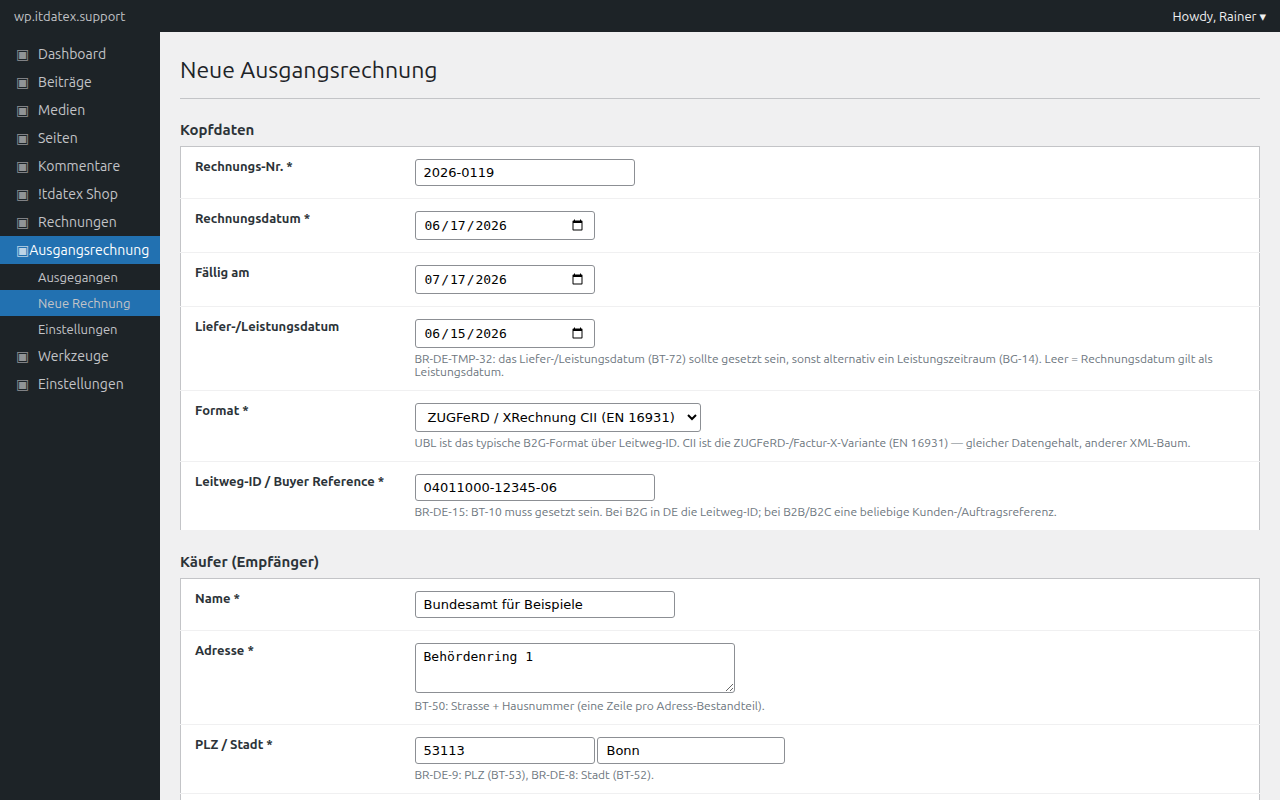
- Provides an admin form with built-in checks for KoSIT-mandatory fields (BR-DE-*, R010/R020 electronic address, BT-10 buyer reference, BR-DE-9 postal code, BR-DE-15 buyer reference)
- Catches SHA-256 duplicates: re-issuing the exact same draft returns the existing invoice id instead of creating a second row
- Logs every action (issue, download) in a dedicated audit table
- Ships a WP-CLI command
wp ausrg issue --from=draft.json [--format=cii]for scripted issuing
tools/e2e-validate.php) that you can run against a local KoSIT Validator instance to verify this on your own server.
Privacy by design
The free version performs all generation locally on your own server. No invoice data leaves your WordPress installation. There is no telemetry, no automatic update check against a third party, no analytics, no external font or asset loading.
A separate Pro version (sold via wp.itdatex.support, not part of this free plugin) adds optional cloud-assisted features — KoSIT deep validation via API, AI-based KoSIT-error explanations in plain German, e-mail dispatch — and is opt-in only.
GoBD-supporting, not GoBD-certified
The plugin supports GoBD-conformant processes through immutable storage, SHA-256 hash chaining and a complete audit trail. As with any tooling: software cannot be "GoBD-certified" — conformity is a property of your process. Consult your tax advisor.
Sister plugin
If you also need to receive incoming e-invoices, install itdatex E-Invoice Intake alongside this plugin. The two plugins share the same database schema and upload directory, so incoming and outgoing invoices live in the same hash chain. Either plugin works standalone; if both are installed, the order of activation does not matter.
Open source
The full source code is released under GPL-2.0-or-later. You can verify, audit and adapt the plugin yourself. Dependencies (josemmo/einvoicing for UBL, horstoeko/zugferd for CII/ZUGFeRD-PDF, setasign/fpdf for the PDF layout) are vendored with prefixed namespaces so they cannot conflict with other plugins in the same WordPress installation.
安装:
- Upload the plugin folder to
/wp-content/plugins/itdatex-e-invoice-output/, or install via the Plugins screen. - Activate the plugin.
- Open Ausgangsrechnung → Einstellungen in the admin sidebar and fill in your seller data (company name, VAT ID, address, contact phone/email, electronic address) and default payment terms (IBAN, BIC, payment text). All KoSIT-mandatory seller fields are validated on save.
- Use Ausgangsrechnung → Neue Rechnung to issue your first invoice.
*_reing_invoices, *_reing_files, *_reing_audit_log) and a protected upload directory under wp-content/uploads/itdatex-e-invoice-{random}/. If the sister plugin "itdatex E-Invoice Intake" is already installed, the existing tables and upload directory are reused — no duplicate storage.
On uninstall, invoice data and files are NOT deleted by default because of statutory retention requirements (8 to 10 years under German tax and commercial law).屏幕截图:


常见问题:
Which format should I choose?
For B2G invoices to German authorities (Bund, Länder, Kommunen): XRechnung UBL with a Leitweg-ID in the Buyer Reference. For B2B invoices: ZUGFeRD-PDF is the most polite choice — the recipient sees a normal PDF, machine-readable systems extract the XML. CII is useful when the recipient expects the EN 16931 CII payload without a PDF carrier (e.g. via PEPPOL).
What about Kleinunternehmerregelung (§ 19 UStG) and reverse charge?
In the position editor, set the VAT category to E (exempt — Kleinunternehmer) or AE (reverse charge) and the VAT rate to 0. The plugin generates the correct EN-16931 tax breakdown.
Why does the plugin demand a "Leitweg-ID" even for B2B invoices?
It does not. The field is labelled "Leitweg-ID / Buyer Reference" because BT-10 (BR-DE-15) is XRechnung-mandatory but its content is up to you: in B2G that is the official Leitweg-ID; in B2B you can use a customer- or order-number. The plugin does not validate the format against the Leitweg pattern.
Does the plugin send anything to your server?
The free version makes no external HTTP calls. All generation, validation and storage happens locally. You can verify this by inspecting the source — the only network code path would be the optional Pro upgrade, which is not part of this free plugin.
Can I use the plugin without the sister "Intake" plugin?
Yes. The plugin creates its own tables and upload directory on activation. If you later install the Intake plugin, both plugins share the existing schema — no migration needed.
How does the duplicate detection work?
Every issued file is hashed (SHA-256) and compared against the file table. Re-running the same draft (same numbers, same VAT, same line items) produces an identical XML/PDF byte sequence and triggers a duplicate response with the existing invoice id. This is intentional: invoice numbers should be re-used at the invoice level, not at the file level. To re-issue a corrected version, change at least one byte (e.g. the issue date or the buyer reference).
Does this work behind nginx?
Yes. The protected upload directory uses both .htaccess (Apache/LiteSpeed) and a randomized directory name so that path guessing fails. File downloads always go through a capability-and-nonce-checked endpoint, never via a direct URL.
How do I issue invoices from a script?
wp ausrg issue --from=draft.json --format=ubl|cii|zugferd-pdf reads a JSON draft and runs the same pipeline as the admin form. Useful for migrations from a different billing system. The seller data falls back to the plugin Settings if not present in the JSON.
更新日志:
- Housekeeping release. No functional changes; re-affirms compatibility with WordPress 7.1.
- Compatibility metadata bump: tested up to WordPress 7.1. Plugin icon and banner refreshed to use the itdatex agent-head mark shared by the plugin family. No code changes.
- Initial release: UBL, CII and ZUGFeRD-PDF builders; admin form with KoSIT-mandatory field validation; seller-data settings; WP-CLI command; secure download endpoint; SHA-256 hash chain; audit log; standalone activation (own schema + upload dir, or shared with the sister Intake plugin).