
ITX UserOps — User Management, Login Activity, Sessions & Audit Log
| 开发者 | nanosani |
|---|---|
| 更新时间 | 2026年10月16日 20:38 |
| PHP版本: | 7.4 及以上 |
| WordPress版本: | 7.1 |
| 版权: | GPLv2 or later |
| 版权网址: | 版权信息 |
详情介绍:
- An administrator who exists in the database but is hidden from the Users screen, or one created by code running on the server with nobody signed in — the file that did it is named
- A plugin hidden from the Plugins screen, one running while the Plugins screen calls it inactive, and a plugin, must-use plugin or drop-in that appeared without being installed through WordPress
- Code printed in front of your pages or REST responses. The plugin's own screens read past it and keep working, and show what was added
- An administrator signed in without the login form — a login cookie issued with no sign-in, so no password, two-factor or lockout was ever checked
- A file inside wp-content that starts WordPress by itself when its address is requested — how backdoor endpoints run. The first week is spent learning what is normal on your site
- Each finding says what happened and what to do. It is logged as Critical, emailed to the site's admin address, sent to connected phones, and shown at the top of the WordPress Dashboard until it is dealt with
- Management tools that hide on purpose (MainWP Child, ManageWP Worker, InfiniteWP, iThemes Sync) are left alone, and changing your own password or using View as is recognised
- The Overview: anything that needs an administrator now, who is online, the last 20 things that happened (filter by sign-ins, account changes or warnings) and fourteen days of sign-ins
- Tiles for online now, logins today, failed logins, new users, disabled accounts, inactive accounts and security alerts — each opens the matching filtered view
- Anything urgent also reaches the WordPress Dashboard as a notice, until it is dealt with or hidden until something new happens
- Alerts that may not arrive are said out loud: when an email from UserOps cannot be sent, that is logged and the Dashboard says so, and it says when security email goes out over the server's PHP mail with no phone connected to carry alerts instead
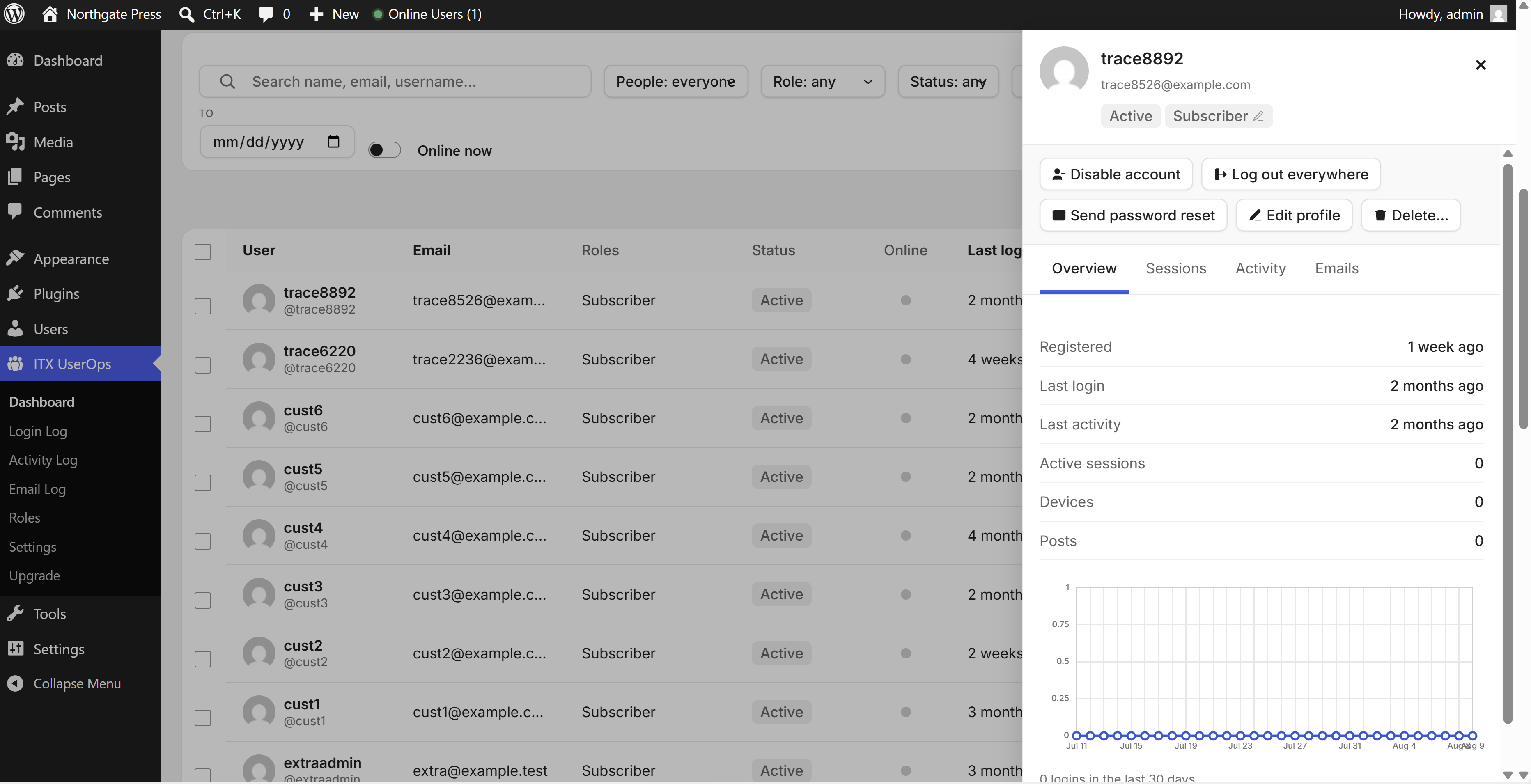
- Every user in one table: online-now indicator, last login, last activity, devices, role, status, registered date, post count
- Server-side search, sorting and pagination — stays fast at 100,000+ users
- Quick filters that combine: role, status, online now, last login (today / 7 / 30 / 90 days / never), registered date range, inactive 30/60/90 days
- Toggleable columns, per-admin, and CSV export
- One click disables an account: the user can no longer log in on any channel — wp-login, XML-RPC, REST, application passwords — and every active session is destroyed instantly
- Content, comments and history stay intact
- Customizable "account disabled" message
- Safety rails: you can never disable yourself or the last administrator
- See every active session per user: browser, OS, device, IP, signed-in time, last activity
- Terminate any single session, log a user out everywhere, or log all users out (your own session survives)
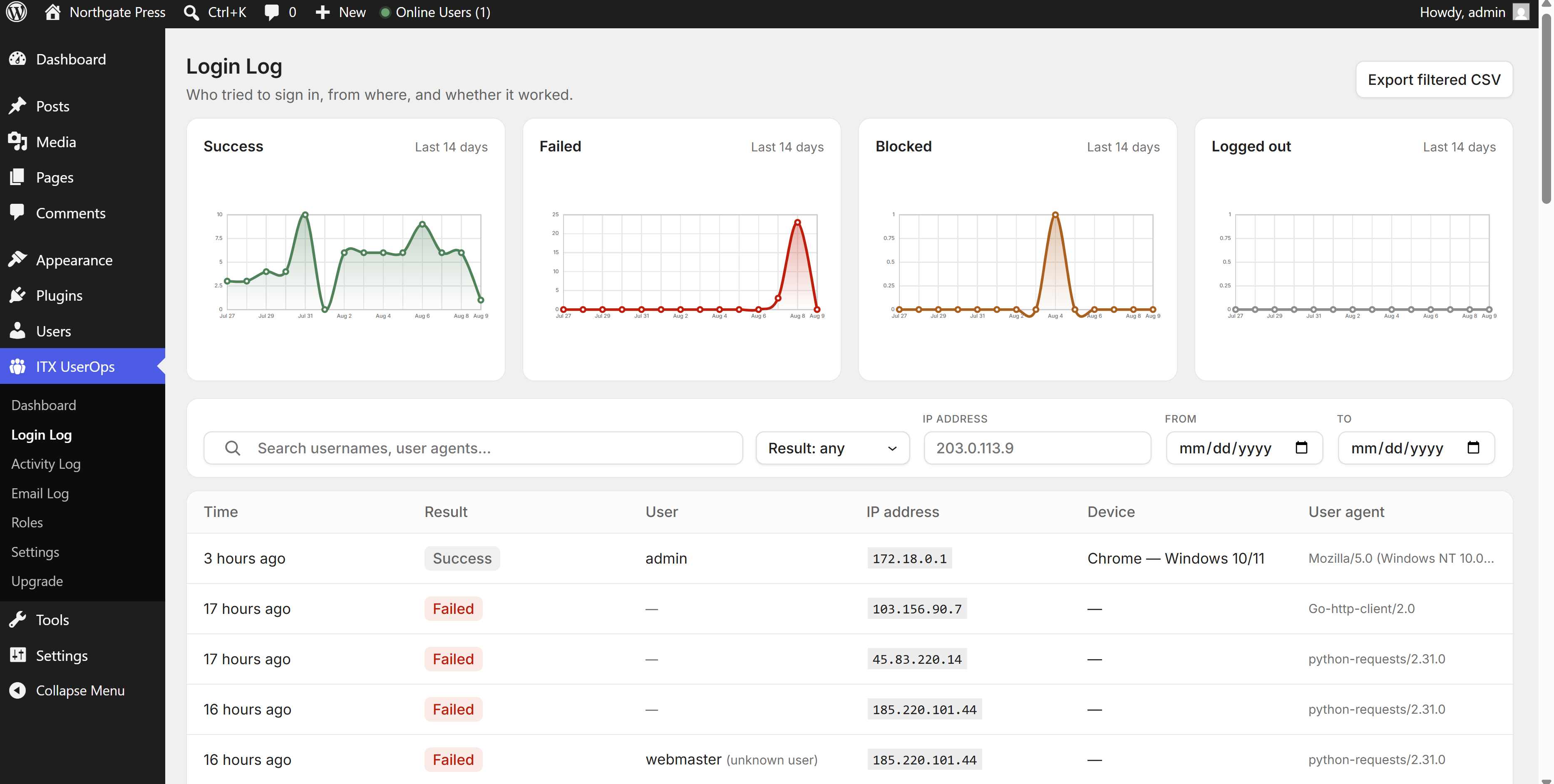
- Login activity: every sign-in attempt — success, failed or blocked — with user, IP, device, user agent, and which door it came through (login form, XML-RPC, REST API or WP-CLI)
- Records logins, failed logins (with attempted username), logouts, blocked logins, registrations, deletions, role changes, password changes/resets, email and profile changes, application passwords, and bulk actions
- Site visibility: content published/updated/trashed/deleted (with author and actor), plugin installs, updates, activations, deactivations and deletions (with where each plugin gets its updates: WordPress.org, a vendor, or nowhere), theme switches and WordPress core updates
- Every change to the plugin's own settings, one entry per save — what changed, from what to what, and from where (a screen, WP-CLI, a scheduled task, the mobile app or an API key)
- Four severity levels — Info, Notice, Warning and Critical — charted over the last 14 days
- Tamper-evident: each entry is chained to the one before it, so database-level tampering — an edited dump, SQL injection, a rogue database user — is detectable
- Filter by event, user, actor, IP, severity and date; full-text search; CSV export
- Configurable retention (30 days up to keep-forever) with daily auto-purge
- Brute-force flood protection: failed-login noise is aggregated, never table-flooding
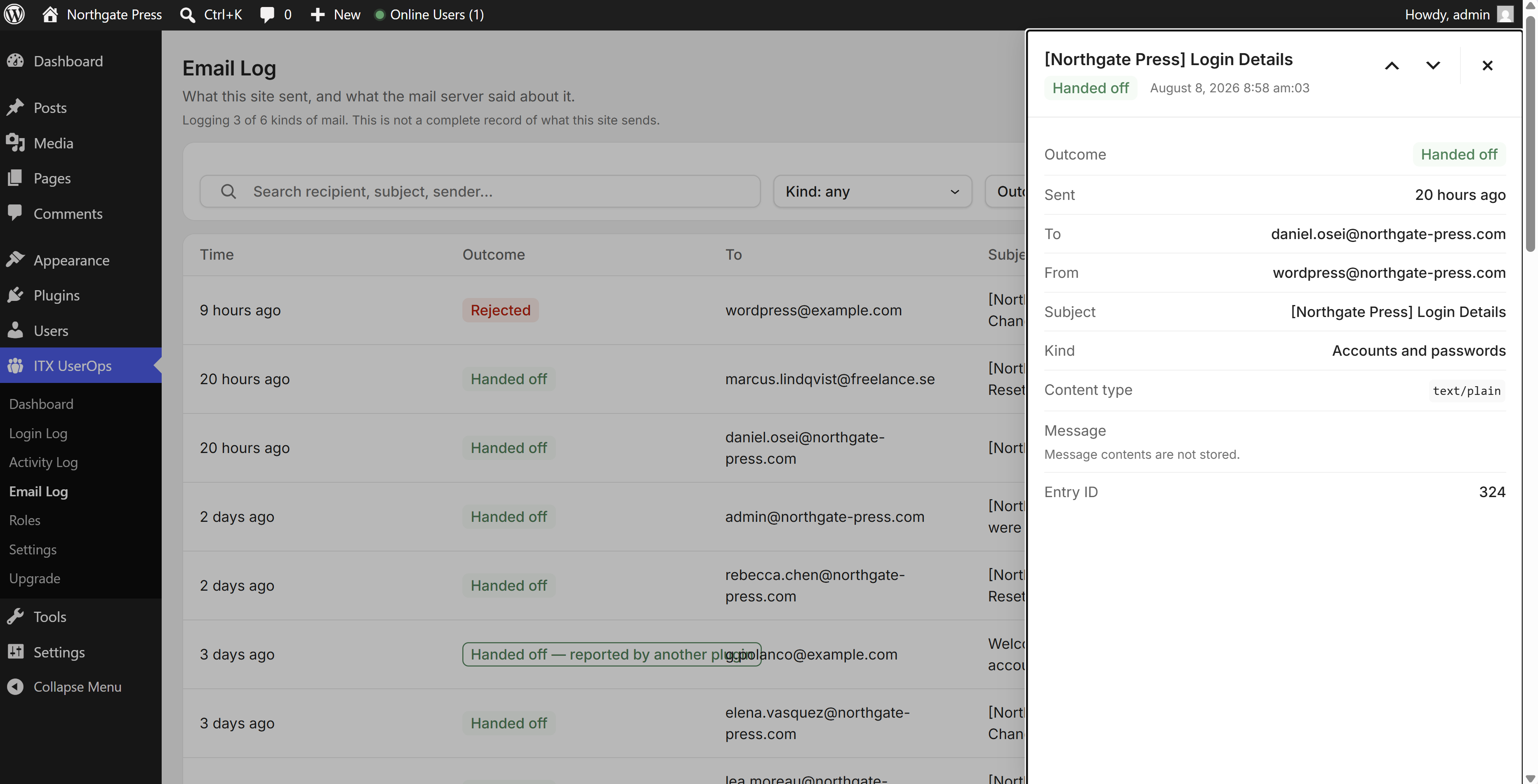
- Every message WordPress hands to the mail server, recorded at the moment of hand-off: recipient, subject, timing, and what the server said back
- Honest states: nothing is labelled "Delivered" or "Sent", because your site cannot observe either. The good state is Handed off, failures carry the server's error, and results another plugin merely claimed are shown as reported rather than observed
- You choose which kinds of mail are logged — account mail on by default, high-volume kinds off — which is what keeps the log small on a busy store
- Message contents are not stored unless you switch it on — and when you do, password reset links, one-time codes and application passwords are stripped before anything is written, so the log cannot become a way in
- Its own retention setting with no "keep forever", and one-click deletion of stored message contents
- WordPress permissions as a grid of areas (Posts, Pages, Media, Comments, Users, Site settings, Plugins & themes) against levels (None, View, Contribute, Manage) — instead of sixty raw checkboxes. Custom post types get their own row automatically
- Start a new role from a template — Site Manager, Content Reviewer, Support Agent, and SEO Manager or Order Handler where Rank Math, Yoast or WooCommerce is installed — or from a blank role
- Draft-first: every edit collects into a draft and nothing touches the live role until you press Publish
- A Plain English view of the role as toggleable statements, side-by-side role comparison, and people management — add someone to a role, move people out, reassign between roles
- Capabilities the grid does not manage are never touched, and a role the grid cannot describe shows the exact difference instead of quietly rewriting it on save
- "Restore WordPress defaults" puts the five built-in roles back exactly as WordPress ships them
- Guardrails enforced on the server, not merely hidden in the screen: you cannot grant access you do not hold, change your own role, or demote the last administrator — and nobody but an administrator can edit an account with more access than their own
- Click anyone for an Entra-ID-style panel: an overview with a 30-day sign-in chart, live sessions, that person's complete activity trail, and the mail sent to them — without leaving the page
- Act from the same panel: disable the account, log them out everywhere, send a password reset, or view the site as them
- Multi-select users → change role, disable, enable, log out, send password reset, delete with content reassignment, export to CSV
- Runs in batches with a progress bar — no timeouts on large sites
- One switch in Settings stops PHP files in wp-content/uploads from being run by visiting their address — the way a backdoor dropped there is used
- Plugins that keep PHP in uploads and load it from inside WordPress are not affected, and nothing is deleted
- On Apache and LiteSpeed the rule is written for you and then proved with a harmless test file, so the screen says whether your server actually obeys it; on nginx it shows the rule to give your host
- Behind a CDN, load balancer or reverse proxy, logs normally record the proxy's address instead of the visitor's. Name your proxy (Cloudflare's ranges are built in) and the real client IP is recorded instead
- Forwarding headers are only trusted when the request genuinely arrives from a configured range, so they cannot be forged
- GDPR mode zeroes the last part of every captured IP before it is stored
- Log retention is capped and auto-purged; email bodies are opt-in and redacted
- Uninstalling can remove every trace of plugin data — your choice, off by default
- Live "online users" count in the admin bar and a user-overview dashboard widget
- Online status and a UserOps details link right in the native Users screen
- Works on multisite — each subsite gets its own console (multisite notes →)
安装:
- WordPress 6.6 or newer
- PHP 7.4 or newer
- Works on single sites and multisite networks
- The mobile app needs the site to be served over HTTPS
- Sign in to your WordPress admin and go to Plugins → Add New Plugin
- Search for ITX UserOps
- Click Install Now, then Activate
- Download the plugin zip from this page
- In your WordPress admin, go to Plugins → Add New Plugin → Upload Plugin
- Choose the zip, click Install Now, then Activate
wp-content/plugins/ over SFTP and activate from the Plugins screen.
Installation guide →
After activation
Activation changes nothing on your site: no role is edited, no existing data is touched. The console appears as ITX UserOps in the admin menu — open Overview or People and your users and sessions are already there; logging starts from the moment the plugin is active. The break-in checks start straight away too, and spend their first week learning which files on your site normally start WordPress by themselves.
A guided tour of what to look at first — the overview, login activity, retention settings, and proxy configuration if you are behind Cloudflare — is in Your first hour →
Updating
Update from the Plugins screen like any other plugin. Database schema upgrades run automatically and every step is additive — existing log entries stay readable.
Uninstalling
Deactivating stops all recording and clears the plugin's scheduled tasks. Uninstalling keeps your data by default; if you want a complete removal, enable Delete all plugin data on uninstall in ITX UserOps → Settings first, and uninstalling then removes every table, option and user-meta entry the plugin ever created.屏幕截图:





常见问题:
How do I disable a WordPress user without deleting them?
Open ITX UserOps → People, click the person, and choose "Disable account". They immediately lose access on every login channel while their content and history remain untouched. Re-enable them any time.
How do I log out all WordPress users at once?
ITX UserOps → People → "Log out all users". Every session on the site is destroyed except your current one.
How can I see who is currently online?
The Overview lists everyone online now, and on the People screen the "Online" column shows a live indicator for every user with activity in the last 5 minutes; the "Online" switch lists exactly who is connected.
What happens when it finds signs of a break-in?
The finding is logged as Critical with what happened and what to do, emailed to the site's admin address, sent to any phone connected to the mobile app, and shown at the top of the WordPress Dashboard and the UserOps Overview until it is dealt with. Nothing on your site is changed automatically.
Is it a malware scanner?
No. It does not scan files for known malware. It watches WordPress itself for the things a break-in has to do to stay in — hide an administrator or a plugin, put an account in without the login form, run code from a file in wp-content, print script into your pages — which a scanner looking for known code can miss. It works well alongside one.
Does it slow down my site?
No. Visitors trigger zero extra queries. Logged-in users trigger at most one tiny indexed write per minute. All heavy lifting happens only on the plugin's own admin pages and scheduled tasks.
Is it GDPR friendly?
Yes. Enable "Anonymize IP addresses" and the last octet of every captured IP is zeroed before storage. Log retention is capped and auto-purged, and uninstalling can remove every trace of plugin data.
Does it work on multisite?
Yes — each subsite gets its own console, log and settings. Subsite admins cannot disable super admins or change their role.
Where is the audit log stored?
In its own indexed database table — not in wp_options or postmeta — so a busy log never slows down the rest of your site.
更新日志:
- Fixed: with a two-factor plugin that asks for its code during sign-in (XO Security is one), every administrator sign-in was reported as "Administrator signed in without the login form". Those plugins take over the sign-in on WordPress's wp_login step and end the request with their code form before this plugin heard the sign-in. It now hears every sign-in first, and a login cookie withdrawn again in the same request — as those plugins do before asking for the code — is not counted.
- Fixed: on a site behind Cloudflare or another firewall, a page the firewall sent in place of the plugin's data was reported as "Code injected into the site's pages", with a banner saying the site may be compromised. Part of that page's own script read as data, and the rest looked injected. A web page that answers instead of WordPress is no longer read as data or reported as an attack, and the screen now says who answered — "Cloudflare blocked this request before it reached WordPress", for example.
- New: signs of a break-in that hides from wp-admin. Written from a real case: a site running this plugin was held for weeks by attackers whose plugins hid themselves from the Plugins screen, whose administrators were hidden from the Users screen, and whose script was printed in front of every page. Each of those is now checked for, on the site itself:
- An administrator who exists in the database but is hidden from the Users screen. The plugin reads the accounts straight from the database and compares them with what WordPress lists; a difference means code on the site is hiding someone.
- An administrator created by code running on the server with nobody signed in — by a scheduled task, an ordinary request, or a file inside wp-content that loads WordPress itself (the shape of a backdoor). The file is named in the log. One made from WP-CLI is noted as a warning.
- A plugin hidden from the Plugins screen, or one that is running while the Plugins screen calls it inactive. Management tools that hide on purpose (MainWP Child, ManageWP Worker, InfiniteWP, iThemes Sync) are left alone while they update from WordPress.org.
- A plugin, must-use plugin or drop-in that appeared without being installed through WordPress — by FTP, a file manager or a backdoor — and a folder in wp-content/plugins that is not a plugin at all.
- Code printed in front of the site's pages or its REST responses. The plugin's screens now read past it and keep working, show what was added in a red banner, and record it; once a day the site also checks its own front page and REST index.
- An administrator signed in without the login form — a login cookie issued with no sign-in, so no password, two-factor or lockout was checked. Critical when a file inside wp-content did it. Changing your own password, View-as, and the User Switching plugin are recognised.
- A file inside wp-content that starts WordPress by itself when its address is requested — how backdoor endpoints run. For the first week after install these are learned quietly (some plugins have one); after that a new one is reported, then at most once a day while it keeps being used. A file in uploads, in a folder that is not a plugin, or in a hidden plugin is reported even in the first week. Mark a file you recognise as expected from its entry in the activity log.
- New: plugin installs, updates and deletions are logged, with where each plugin gets its updates (WordPress.org, a vendor, or nowhere).
- New: alerts that may not arrive. When an email from UserOps (an alert, a sign-in code) cannot be sent, that is logged — once an hour at most — and the WordPress Dashboard says so. The plugin also works out how this site sends mail (an SMTP plugin, a mail service, or the server's own PHP mail — including FluentSMTP installed with no connection set up), and the Dashboard says plainly when security email goes out over PHP mail with no phone connected to carry alerts instead.
- New: a Critical level in the activity log, above Warning, for signs of a break-in only. Critical events are emailed to the site's admin address and sent to connected phones as "Signs of a break-in", and they are listed on the WordPress Dashboard until dealt with. Each one says what happened and what to do.
- The admin-bar online counter keeps updating on a site that injects code in front of REST responses.
- Fixed: times shown to the second in the activity and email logs read "5:19 pm:03" on sites using a 12-hour clock (WordPress's default). They now read "5:19:03 pm".
- Fixed: on the 30-day sign-in chart in a person's profile, the last two dates were printed on top of each other.
- Fixed: in the email log, "Handed off — reported by another plugin" ran into the next column instead of wrapping.
- What these checks cannot see: code that loads before this plugin (a must-use plugin, or a db.php drop-in) can hide from any check made inside WordPress, and a file that never loads WordPress is invisible to it. A new must-use plugin or drop-in is reported when it appears.
- Released alongside ITX UserOps Premium 3.6.1, so the two stay in step. Everything new since 2.4.0 is listed under 2.6.0 below.
- New: the mobile app is free. ITX UserOps → Mobile app shows what it does, connects a phone in three steps — scan a code drawn on this screen, approve the phone on your site, allow notifications — and lists the phones connected. Before you start, it checks HTTPS, application passwords, whether your server passes the app's sign-in on, and whether it can send notifications. The app shows who is online, sign-ins, recent activity and people, and lets you disable or re-enable an account, sign someone out everywhere, or send a password reset.
- New: four alerts on connected phones, each switchable per phone — an administrator account is created, someone is made an administrator, sign-ins fail in a burst, or an account is disabled or re-enabled by someone else.
- New: the Overview is a dashboard — who is online now, the last 20 things that happened (filter by sign-ins, account changes or warnings), and fourteen days of sign-ins, each loading on its own.
- New: what needs an administrator now reaches the WordPress Dashboard — a notice at the top for anything urgent (until it is dealt with, or hidden until something new happens) and a list at the top of the UserOps dashboard widget — as well as the Overview.
- New: every change to the plugin's settings is written to the activity log as one entry per save — what changed, from what to what, and from where (a screen, WP-CLI, a scheduled task, the mobile app or an API key). Secrets are never written; their entries say "changed".
- Security: the Settings screen and its settings, and viewing the site as another user, now ask whether you may manage the site and that account — not only whether you can open the UserOps console. That matters wherever another plugin or role gives the console to someone who is not an administrator.
- Security: on multisite, a site's own administrator can no longer change or remove a super admin's role on that site.
- Security: a connected phone's notifications can no longer be moved to another account's device by someone who learns its push address.
- Fixed: an old link to the Login log (a bookmark, an email) now keeps its filters, and the Overview's login tiles open the log already filtered.
- Fixed: plugin upgrades no longer log invalid database statements; a comment inside a table definition was being read as a column.
- Fixed: a plugin upgrade no longer re-applies the type of every column in the plugin's tables — up to 191 database statements on MariaDB, or on WordPress before 6.9. It now changes only what the new version changes.
- Fixed: an IP range written with a malformed prefix length (10.0.0.0/nope) now matches nothing, instead of every address.
- Fixed: on servers without mbstring, a stored email body cut at the size limit could end in half a character.
- Exported files are named for the plugin: itx-userops-users-….csv, itx-userops-activity-….csv.
- The Mobile app screen keeps its margin on the right, and its list of phones scrolls on a phone instead of spilling out of the card.
- External services: connecting a phone to the mobile app uses app.itxuserops.com (in the phone's browser) and, once the phone allows notifications, the browser maker's Web Push service. Nothing is contacted until you connect a phone. See External services.
- New: Settings → PHP in uploads. One switch stops PHP files in wp-content/uploads from being run by visiting their address — the way a backdoor dropped there is used. Files are not removed, and plugins that keep PHP in uploads (WPML's template cache, a theme's saved settings) are not affected, because they load it from inside WordPress. On Apache and LiteSpeed the rule is written to uploads/.htaccess, next to whatever else is there, and then proved by requesting a harmless test file; the screen says whether the server actually obeys it. On nginx the screen shows the rule to give your host. Uninstalling removes the rule.
- Fixed: 2.4.0 did not actually keep the Bing Webmaster Tools and IndexNow bundles off the plugin's screens. Both plugins give WordPress their file addresses in a roundabout form ("admin/../static"), and 2.4.0 compared the addresses as written instead of as the browser requests them. No other change.
- New: role templates. "New role" now offers a starting point as well as a blank role — Site Manager (runs the site day to day without plugins, themes, code or settings), Content Reviewer (edits anyone's drafts, cannot publish or delete), Support Agent (helps customers and subscribers with their accounts) and, where the plugin is installed, SEO Manager (Rank Math or Yoast) and Order Handler (WooCommerce). A template only sets where a role starts; it is an ordinary role afterwards.
- Security: nobody but an administrator can now edit, delete or change the role of an account with more access than their own, or hand out a role with more access than their own. WordPress lets anyone holding edit_users edit any account, administrators included — harmless while only administrators hold it, an account takeover the moment a role editor gives it to anyone else. This also narrows delegated administrators in the same way.
- WooCommerce no longer sends people whose work is in wp-admin but not in posts — order handlers, support staff, the read-only plugins list — to My Account.
- Fixed: on sites running LiteSpeed Cache with "Cache REST API" and "Cache Logged-in Users" switched on, the role list kept showing an old copy for up to half an hour — a new role was created but never appeared, and each further click created another "Custom role 1". The plugin's screens now tell LiteSpeed not to cache them.
- Fixed: two roles can no longer end up with the same name; a repeated name is numbered.
- Faster screens where Bing Webmaster Tools or IndexNow is installed: both load their whole app on every admin page, re-downloaded on every visit, and the plugin's own screens no longer carry it.
- Fixed: "View" on the Plugins & themes row of the role grid is now genuinely read-only. It used to grant the ability to switch the site's active theme and to edit menus, widgets and the Customizer, and it showed no plugins at all. WordPress has no read-only capability for plugins or themes, so View now grants this plugin's own and opens a new read-only Plugins & themes screen: every plugin and theme, its version, whether it is active, and whether an update is waiting — with nothing on it that changes anything.
- New: an Appearance row in the role grid for menus, widgets and the Customizer, so giving an editor the menus no longer means giving them the theme.
- On upgrade, roles the grid had put on the old View are corrected to the read-only one, and administrators are told which roles changed. Roles arranged any other way — including one that was also given activate_plugins by hand — are left exactly as they are.
- Fixed: "Duplicate Administrator" was refused with "You cannot grant access you do not have yourself" on most sites. WordPress switches some of the administrator's capabilities off at run time (file editing when DISALLOW_FILE_EDIT is set, the Links manager, unfiltered uploads), and WooCommerce stores per-item ones, and the role editor read all of those as not held. Capabilities your own role grants can now be copied. No other change.
- Fixed: 2.2.0 as published was missing two files, and sites that updated to it stopped loading with a "Class not found" error for the DNS Toolbox integration. This release contains them. No other change.
- Changed: the console is reorganised into sections that match the job rather than the feature list. Overview, People, Access, Activity, Settings. Nothing has been removed and nothing has moved out of reach — the Login Log, Activity Log and Email Log are now tabs of Activity, and the role editor is a tab of Access.
- Changed: the dashboard is split in two. Overview answers "is anything wrong" and every figure on it is a link into the exact filtered list that explains it; People is the account directory and everything you do to one person. Previously the same screen tried to be both, and clicking a summary figure filtered a table further down the page rather than taking you anywhere.
- Every page now says in one line what it answers, because this is a console people open weeks apart and a bare noun heading is decoded from scratch every time.
- Every tab has its own address. Links into the console — from a bookmark, from documentation, or from an alert — open the exact tab they name, and the address bar follows the tab you are on so you can copy what you are looking at.
- Old bookmarks keep working: every retired page address resolves to the tab that now holds what it used to show.
- New: DNS Toolbox integration. When the DNS Toolbox connector (dnstoolbox.app) is on the site, the console's site card shows a "Users & logins" summary from this plugin — users, administrators, who is online, sign-ins and failed sign-ins over a day and a week, the last event — and merges the activity log into the site's timeline, with IP addresses anonymised and no user agents. Premium adds two-factor coverage and the posture score. Nothing new is exposed: the connector asks in-process through one filter (
dntc_companions), on its own signed request, and this plugin never sends anything anywhere.
- New: WordPress 7.1 support. The minimum WordPress version is now 6.6 — every release from 6.6 to 7.1 is exercised by the test suite on each change, so "tested up to" is measured rather than asserted.
- New: saved segments. A filter set you use often can be named and kept — "Dormant admins", "Never signed in" — and reopened from a row of buttons above the table. A segment saves the QUESTION rather than a list of people, so whoever matches next month appears in it without anyone touching it. Segments are shared with everyone who can open the console, and they record who created them.
- New: view a customer's site as they see it. A time-boxed, read-only session — fifteen minutes, and while it runs nothing can be bought, submitted or changed, so it cannot be used to act on somebody's behalf by accident. A banner on every page names who is viewing and whose account it is, with a one-click exit. You can only ever view "downward": an account holding administrator capabilities cannot be viewed as at all. Every session, and every ending, is written to the tamper-evident activity log with who, whom and for how long.
- Changed: the dashboard is reorganised. The twelve filter controls that wrapped onto three lines are now one toolbar attached to the table, with the less-reached filters behind a "More filters" button that shows how many of them are active — so a filter you cannot see can never be quietly in force. What you are filtering by is spelled out as removable chips beneath it, alongside your saved views.
- Changed: the ten summary figures are one strip instead of ten boxes, and the three panels below them are shorter. Same numbers, same click-to-filter behaviour, about a third of the height — the user list now starts above the fold on a laptop.
- New: "Last activity" can be sorted. Accounts that have never been seen stay in the list, sorted to the end, rather than disappearing from it.
- Sortable columns now show a faint arrow at rest, so it is possible to tell which headings can be clicked without clicking them. Reported by an administrator who read the unsorted columns as unsortable — which, with no marking, was the reasonable reading.
- Changed: the console works on a phone. Every wide table now scrolls inside its own card instead of forcing the whole page sideways, headers and filters stack rather than wrap into a wall, and touch targets are sized for a thumb. The breakpoint is WordPress's own 782px, so the console folds at the same width the surrounding admin does.
- Fixed: the Role and Status filters drew two borders on top of each other on mobile, because the field inside the control was being given the same outline as the control around it.
- Changed: on a store, the Purchases / Spent / Last order filters moved into "More filters" with the rest of the less-reached ones, and now count towards the number on that button.
- Fixed: the Email Log wrote a PHP notice on every unfiltered page load, because the query was prepared with no values to substitute.
- New: Roles. WordPress permissions described the way people think about them — a grid of areas (Posts, Pages, Media, Comments, Users, Site settings, Plugins & themes) against levels (None, View, Contribute, Manage) instead of sixty raw checkboxes. Custom post types get their own row automatically.
- Roles is draft-first: every edit collects into a draft, a bar counts the changes, and nothing touches the live role until you press Publish. Leaving with a draft open prompts you like any unsaved form.
- Alongside the grid: a Plain English view of the role as toggleable statements, side-by-side role comparison with differences highlighted, people management (add someone to a role, move people out, reassign between roles), create/duplicate/rename/delete, and "Restore WordPress defaults" for the five built-in roles.
- Capabilities the grid does not manage are never touched — if WooCommerce or a membership plugin added something to a role, saving leaves it byte-for-byte. A role the grid cannot describe reads "Custom" and shows the exact difference instead of quietly rewriting it on save.
- Role guardrails are enforced on the server, not merely hidden in the screen: you cannot grant access you do not hold yourself, change your own role, or demote the last administrator. The administrator role is visible but not editable. Activation changes nothing until you choose to change it.
- New: an Email Log. Every message WordPress hands to the mail server is recorded — recipient, subject, timing, and what the server said back. Nothing is labelled "Delivered" or "Sent", because your site cannot observe either: the good state is "Handed off", failures carry the server's error, and results another plugin merely claimed are shown as reported rather than observed.
- You choose which kinds of mail are logged; account mail and the plugin's own mail are on by default, high-volume kinds are off. Message contents are not stored unless you switch it on — and when you do, password reset links, one-time codes and application passwords are stripped before anything is written, so the log cannot become a way in. Stored contents can be deleted again in one click.
- New: client IP detection behind Cloudflare, a load balancer or another reverse proxy (Cloudflare's ranges are built in). Forwarding headers are only trusted when the request genuinely arrives from a configured range, so they cannot be forged.
- New: the activity log is tamper-evident. Each entry is chained to the one before it, so database-level tampering — an edited dump, SQL injection, a rogue database user — is detectable, and legitimate retention deletion records itself so it is never mistaken for interference.
- New: the activity log records which door a sign-in attempt came through — the login form, XML-RPC, the REST API or WP-CLI — shown as "Signed in via" in the event details.
- New: each user's profile panel gains an Emails tab beside Overview, Sessions and Activity; log rows on every screen open a keyboard-accessible side panel; every dashboard overview tile drills into its matching filtered view.
- Fixed: repeat login lockouts now double in length as intended — the record the escalation counted from was being deleted the moment a lock expired, so an attacker could simply wait out the shortest lockout and go again.
- Fixed: changing roles from the bulk actions bar, which failed on every site, and bulk-action failures that closed the toolbar without saying why.
- Performance: the online-users counter, dashboard counts and activity-log totals are cached instead of recomputed on every admin page load, session cleanup and IP searches are indexed, and the dashboard no longer counts every user account per visit.
- Database schema upgrades from version 1 to 6 run automatically on update; every step is additive and existing entries stay readable.
- Initial release: unified user dashboard, enable/disable accounts, device-grouped session management, activity & login audit log, profile drawer, bulk actions with CSV export, admin-bar online counter, user-overview dashboard widget, and native Users-screen integration.