
Jessore Find & Replace
| 开发者 | sadathossainwp |
|---|---|
| 更新时间 | 2026年9月3日 12:56 |
| PHP版本: | 7.4 及以上 |
| WordPress版本: | 7.1 |
| 版权: | GPLv2 or later |
| 版权网址: | 版权信息 |
详情介绍:
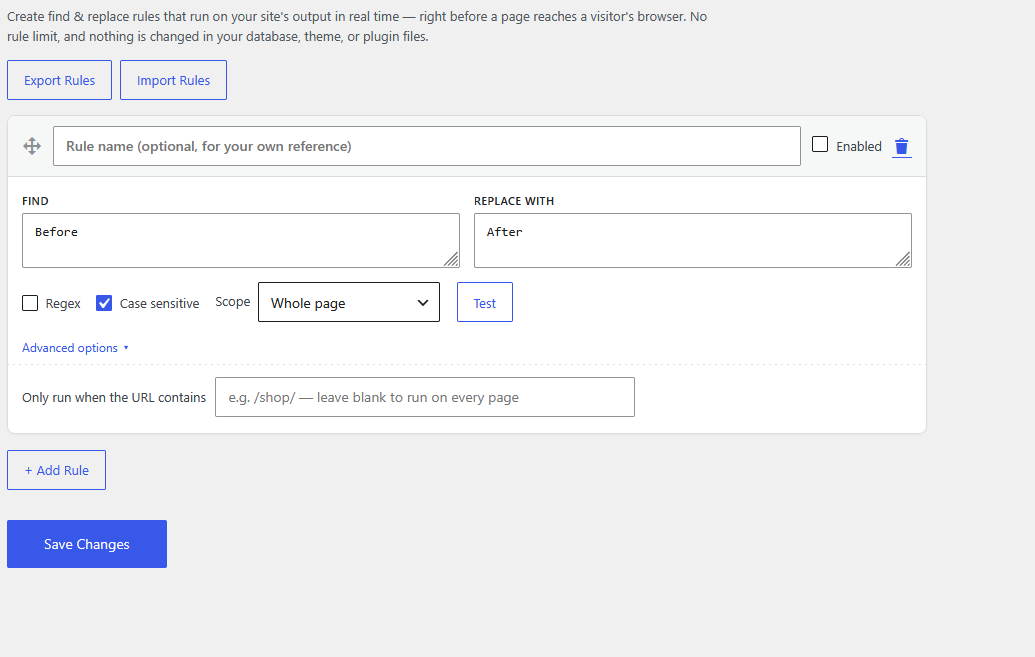
- Unlimited rules — no cap on how many find & replace rules you can create.
- Plain text or Regex matching — simple literal replacement, or full PCRE regular expressions.
- Case-sensitive toggle — match exact case, or ignore it, per rule.
- Scope targeting per rule — whole page, post/page content only, or post/page titles only.
- URL targeting — restrict a rule to URLs containing a given path or string.
- Enable/disable per rule without deleting it.
- Drag-and-drop reordering.
- Rule labels to keep a long list organized.
- Live "Test" button — see match count on your homepage before saving.
- Import/Export rules as JSON.
- Link (href) replacement — matching runs on raw HTML, so it works inside an
<a href="...">attribute, not just visible text. - Translation-ready and cleanly uninstalls (including on every site of a multisite network).
- Swap out text a theme or plugin outputs, without editing theme/plugin files.
- Remove or change footer credits, badges, or notices from a theme.
- Adjust wording on a shop or checkout page from a plugin you don't want to modify directly.
- Update an outdated link (including affiliate or tracking URLs) sitewide without a find-in-files edit.
安装:
- Upload the
jessore-find-replacefolder to/wp-content/plugins/, or install the zip via Plugins → Add New → Upload Plugin. - Activate the plugin through the 'Plugins' menu in WordPress.
- Go to Settings → Jessore Find & Replace to add your rules.
- Click "+ Add Rule" to add as many rules as you need, then Save Changes.
屏幕截图:
常见问题:
Where is my data stored?
In a single option in the wp_options table, no matter how many rules you add.
Is there a limit on the number of rules?
No — add as many as you like.
What does the Regex checkbox do?
Leave it unchecked for a plain, literal text match (the Case sensitive checkbox controls whether letter case matters). Check it to use a PHP-compatible regular expression (PCRE) pattern instead — remember to include delimiters and any modifiers yourself, e.g. /hello/i.
Can I replace a link's URL without changing the visible link text?
Yes. Matching happens on the raw HTML, so a rule can target the URL inside an href="..." attribute independently of the text between the <a> tags.
What does "Scope" do?
"Whole page" matches anywhere in the final HTML. "Post/page content only" and "Post/page titles only" restrict matching to just those parts, so a common word doesn't get replaced somewhere you didn't intend.
The "Test" button says it failed or times out
Some hosts block "loopback" requests (the server calling its own site). If Test consistently fails, ask your host to allow loopback connections, or save the rule and check it on the live page directly.
Does this send any data outside my site?
No. The optional "Test" button sends a request from your own server to your own site's homepage — nothing is sent to any third-party service.
更新日志:
- Fixed: a plain-text (non-regex) rule could silently fail to match if "Find" contained &, <, >, or a quote character. Themes commonly output such text as HTML entities (e.g. "&" becomes "&" in the actual page source), which a literal match would miss even though the visible text looked identical. Plain-text rules now also try the HTML-escaped form of "Find" automatically.
- Fixed: "Whole page" scope still did not run in real-world testing on a live WordPress 7.x site, even after the 1.0.1 fix. The underlying WP 6.9 buffering API turned out to depend on WordPress being able to positively detect a text/html response header, which common caching/optimization setups can interfere with — so the feature was rebuilt on a plain, manually-started output buffer instead. That buffer is deliberately left for WordPress core's own long-standing wp_ob_end_flush_all() (hooked to 'shutdown' since the PHP 5.2 era) to close, rather than closed by any custom logic in this plugin, which is what makes it safe even if another plugin or theme also opens buffers during the same request. "Whole page" scope now works on any WordPress version.
- Fixed: "Whole page" scope never actually ran, on any WordPress version — the check for whether WP 6.9's buffering API was available ran too early in the request (before WordPress had loaded the file that defines it) and always came back negative, so the rule was silently skipped. The feature-detection now only happens at a safe, later point; the filter itself registers unconditionally, which is harmless on older WordPress since nothing there ever calls it.
- Initial release: unlimited find & replace rules, plain text or regex matching, case-sensitive toggle, scope targeting (whole page / content / title), URL targeting, per-rule enable/disable, drag-and-drop reordering, rule labels, live "Test" match preview, and JSON import/export.