
Joolweb Sessions Pro
| 开发者 | regeman |
|---|---|
| 更新时间 | 2026年10月5日 20:51 |
| PHP版本: | 7.4 及以上 |
| WordPress版本: | 7.1 |
| 版权: | GPLv2 or later |
| 版权网址: | 版权信息 |
详情介绍:
- Clients: create, edit, and import (CSV); each client gets a WordPress account for a private area
- Sessions: create, edit, cancel, statuses, location or video
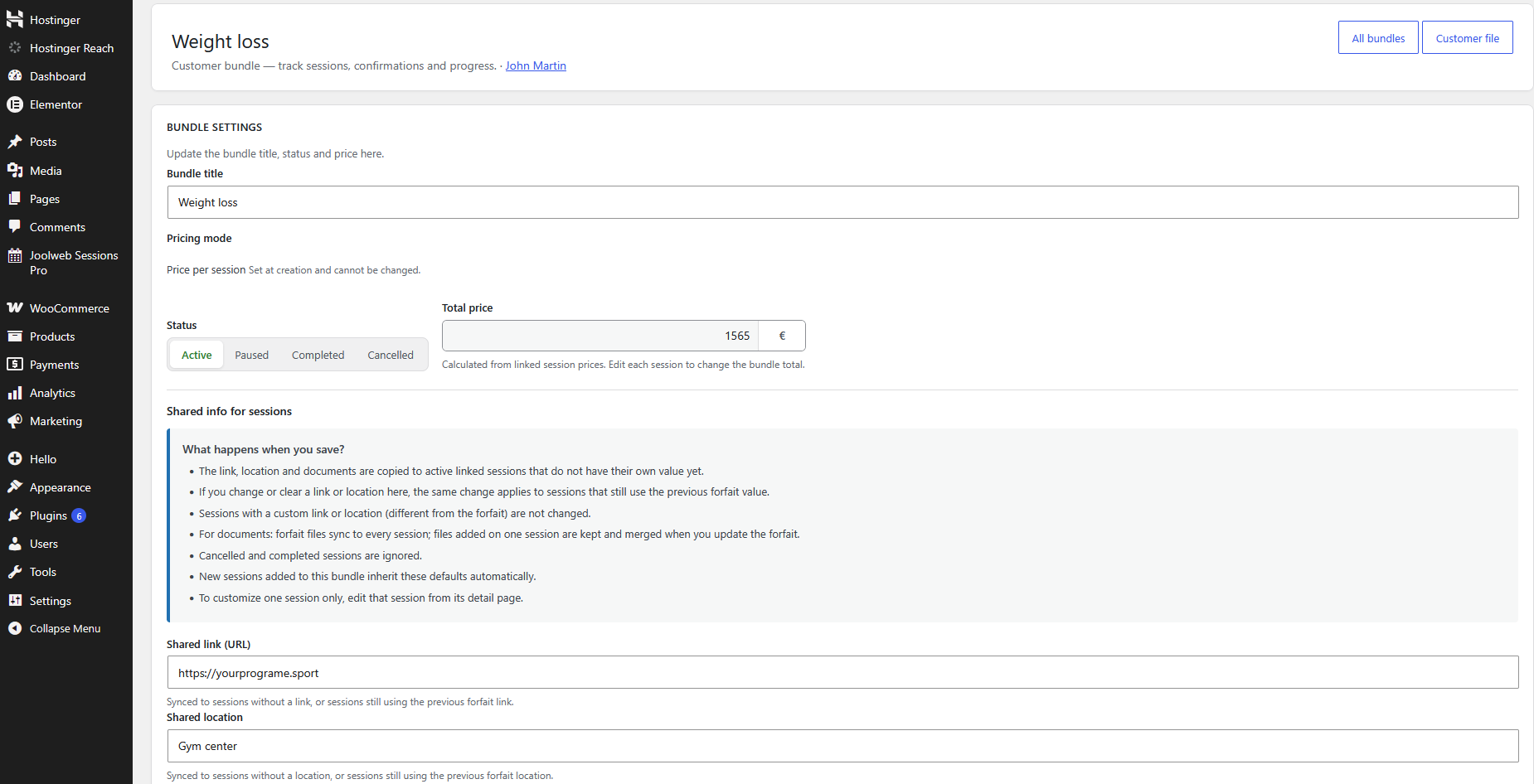
- Bundles: reusable models (for example a 10-session pack) and per-client progress
- Payments: manual status on each session (paid / pending / refunded)
- Emails: confirmation, updates, cancellation, and automatic reminders (for example 24 hours before)
- Schedule: admin dashboard (today / this week), session list, and .ics files in client emails
- Settings: cancellation delay, email header, appearance
fr_FR) translations are included in the plugin package (languages/joolweb-sessions-pro-fr_FR.mo) for the admin and front-end UI when your site or user locale is French.
安装:
- Download the plugin
- Upload the folder to
/wp-content/plugins/ - Activate the plugin in the Plugins menu
- Follow the Setup wizard (Joolweb Sessions Pro → Setup wizard): check your environment, set the site timezone, confirm coach and client pages, then configure reminders and email. You can reopen the wizard anytime from the admin menu.
- Fine-tune options under Joolweb Sessions Pro → Settings (emails, appearance, coach permissions). Documentation: sessionspro-app.com
屏幕截图:


常见问题:
Can anyone on my website book an appointment?
No. Sessions Pro is built for coaches who manage existing clients, not for public self-service booking. You create clients and sessions from the WordPress admin. Clients sign in to a private area to see their sessions and payment status. A separate premium add-on can let those clients request a remaining bundle slot; you still approve the request.
How do I get premium features?
Premium add-on features are available separately (see sessionspro-app.com).
Why does the plugin create WordPress users?
Because the plugin provides a private client area with authenticated access. Each client needs a WordPress account to access personal sessions, files, and profile data with role-based permissions.
Who can create, edit, or delete client accounts?
Only authorized users with the required capabilities (or administrators). All related requests are protected by nonce checks and server-side capability checks.
Does the plugin bypass WordPress authentication?
No. The plugin relies on WordPress native authentication and user APIs, and does not bypass standard authentication flows.
Is Sessions Pro compatible with WordPress 7?
Yes. The plugin is tested with WordPress 7.1. Keep WordPress and PHP updated for security.
Does Sessions Pro work on PHP 8.5?
Yes. PHP 7.4+ is required; the plugin is ready for PHP 8.5 (verified on staging). Older PHP versions remain supported down to 7.4.
Does the plugin send data to external servers?
Not by default. Optional anonymous usage telemetry is available for site administrators only, with explicit opt-in under Settings → Privacy. See the "Privacy and optional telemetry" section above and https://sessionspro-app.com/privacy
更新日志:
- Feature:
create_standalone_session()so Premium can request a session with no bundle. - Feature: confirmation email can show a price via
joolwebsp_session_booked_client_email_data(used for hors-forfait requests). - Fix: pending client booking requests stay in upcoming sessions, not history.
- Fix: admin-created clients are assigned to the sole site coach when none is set.
- Fix: attaching a session .ics to reminder emails no longer fatals outside wp-admin (
wp_tempnamwas not loaded on cron, REST tick, or AJAX). - Fix: one failed reminder send no longer aborts the rest of the batch.
- Fix: session reminder emails are no longer sent several times at once when the visit tick, batch cron, and per-session cron overlap.
- Fix: the session email log keeps one entry per send under concurrent writes.
- Fix: duplicating a session no longer copies its email log or “already sent” reminder/confirmation flags.
- Fix: duplicating a session resets status to Booked (if it has a date) or To schedule, and payment to pending.
- Manual send / resend of confirmations and reminders is unchanged.
- Fix:
is_coach_or_admin()now checks the given user (Google Calendar can fetch the Premium iCal feed for WordPress admins). - Fix: forfait session confirmation emails send/resend from the bundle table; batch no longer dates unscheduled sessions.
- Fix: bundle installment (versement) save accepts European dates.
- Feature: completed bundles stay visible in the client area with a Terminé badge; remaining balance still shows in Payments.
- Feature: admin sessions list can be filtered by client.
- i18n: French overlay for recent settings and client-area strings.
- Plugin Check:
Tested up toset to WordPress 7.1. - Plugin Check: pagination links copy query args from the base URL (no raw
$_GETscan). - Plugin Check: CSV upload
tmp_namesanitized beforeis_uploaded_file(). - Plugin Check: bundle session-date helper re-checks the AJAX nonce before reading
$_POST. - Security (WordPress.org review): session notes AJAX uses a single
check_ajax_referer()(no$stop = false). - Security: output buffering removed from client/notes modals;
wp_editor()is echoed directly in the footer. - Security: tighter sanitization for settings arrays, CSV uploads, session-date JSON, query args, and meta box fields.
- Security: public client registration handler no longer creates users (coach-created accounts only).
- Feature: client emails (confirmation, reminder, reschedule) now include an .ics calendar attachment and an "Add to Google Calendar" button so clients can save the session in their personal agenda.
- Removed: front-end calendar page (
[joolwebsp_calendar]/ FullCalendar) — planning is handled via admin (future) or iCal sync (Premium). ~285 KB of vendor JS removed from the package. - Removed: Stats tab from the coach dashboard front (data available in admin dashboard only).
- Removed: "Add to my calendar" subscribe button from the coach dashboard (Premium iCal subscription available in Settings → Calendar).
- Fix (Premium): "sessions left to book" badge no longer clips the bottom border.
- Security (WordPress.org review): admin client form verifies nonce before reading POST; coach client ownership validated via
assert_editable_client_target()beforewp_update_user(). - Security: AJAX handlers call core
check_ajax_referer()at the start of each method (before reading$_POST).
- Fix: load plugin bootstrap and role checks on
init(WordPress 6.7+_load_textdomain_just_in_timenotice for domainjoolweb-sessions-pro). - Fix: role display names and activation page titles no longer call translation functions before
init.
- Security (WordPress.org review): dashboard HTML output uses core
wp_kses()with a documented allowlist (joolwebsp_get_dashboard_allowed_html()). - Security: Select2 vendor assets updated to 4.1.0; pagination nonce fail-early; bundle/program email sends require
edit_programsplus client ownership. - UX: past-session pagination keeps the Past panel active; client email log layout clarified (type, session, meta, status).
- Security (WordPress.org review): AJAX handlers use explicit
check_ajax_referer(); admin forms and CSV import verify nonces before processing. - Security: client welcome email sends a password-set link instead of a plaintext password.
- Security: client session booking AJAX is registered only when the booking feature is enabled.
- Privacy: suggested privacy policy content registered via
wp_add_privacy_policy_content(). - Data: user phone meta migrated to prefixed key
joolwebsp_phone(legacyphoneread on upgrade). - i18n: French (
fr_FR).moincluded in the distribution package. - Packaging: development-only premium helpers and CLI tools excluded from the WordPress.org archive.
- Code quality: Plugin Check annotations for
joolwebsp_esc_dashboard_html()output in admin list columns and client financial/overview sections.
- Security hardening: pagination links on coach client pages and coach clients list now include nonce verification.
- Security hardening: admin badges and email status labels wrapped with
joolwebsp_esc_dashboard_html()at output. - Security hardening: boolean HTML data attributes use
esc_attr()(bundle recap, welcome email buttons).
- WordPress.org review compliance: fixed Author URI (
sessionspro-app.com); wp-cron helper URL now usessite_url()instead ofhome_url(). - Security: explicit nonce verification on setup wizard settings save; capability checks on admin customer file (create/edit).
- Security: late output escaping on admin customer views, client page template, setup wizard, and session list modals (
joolwebsp_esc_dashboard_html()). - Fix: session notes modal output moved to
wp_footerforwp_editorcompatibility while keeping the client page buffer safely escaped.
- Optional anonymous usage telemetry (opt-in only): Settings → Privacy and setup wizard; weekly reports to sessionspro-app.com when enabled.
- Privacy section added to readme; no external calls unless the site administrator opts in.
- Fix: telemetry payload includes all required feature flags (
csv_import_used); fixes HTTP 400invalid_payload. - Fix: plugin upgrade reports use
heartbeat(notupgraded) to avoid HTTP 401; installation_id kept across updates (new id only after opt-out).
- Internal: rename legacy
RGSM_*PHP classes toJoolwebsp_*(pre-release cleanup). - Admin menu slug:
joolwebsp(redirect from legacywp-sportadmin URLs). - Internationalization: updated translation template; French (
fr_FR) language files included in the plugin package. - Admin: clearer test-email failure hints (SMTP / local mail); client welcome flow without displaying passwords in the UI.
- WordPress 7.0 and PHP 8.5 compatibility (tested).
- Setup wizard: dedicated timezone step; session and email log times use site timezone (
wp_date). - Admin: maintenance screen removed; legacy cleanup remains available via WP-CLI on staging.
- Admin menu icon: calendar (dashicons-calendar-alt).
- WordPress.org compliance update and release packaging refresh.
- Premium split: Stripe SDK dependency moved to the premium add-on package.
- Dependencies: Select2 switched from
4.1.0-rc.0to stable4.0.13. - Internationalization: fixed
translators:comments for placeholder strings (correct placement immediately above__()insprintf()contexts). - Translation loading: removed manual
load_plugin_textdomain()call (WordPress.org language packs are loaded by core). - Code quality: refined PHPCS annotations for AJAX nonce-validated
$_POSTreads and narrowed SlowDBQuery suppressions for program-linked session queries. - Internal cleanup: renamed field map key from
meta_keytopost_meta_keyto avoid false positives from meta query sniffs.
- Security hardening and review readiness improvements:
- Added and enforced nonce/capability checks on sensitive operations.
- Improved output escaping across admin and frontend rendered content.
- Updated packaging rules and distribution archive exclusions for WP.org compliance.
- Updated dependencies:
- Stripe PHP SDK updated to v20.0.0.
- Chart.js updated to v4.5.1.
- Frontend build dependencies updated (including webpack-cli, css-loader, style-loader).
- Session update notification improvements:
- Client email wording changed from "rescheduled" to "updated".
- Client email now includes location/link update context when session details change.