
Kayzart — AI Landing Page Builder with Real HTML
| 开发者 | ksartoffice |
|---|---|
| 更新时间 | 2026年10月5日 13:10 |
| PHP版本: | 7.4 及以上 |
| WordPress版本: | 7.1 |
| 版权: | GPL-2.0-or-later |
| 版权网址: | 版权信息 |
详情介绍:
- Describe a page from Kayzart > Add new and have the AI build it as the editor opens
- Edit your page with AI in plain language — it changes the actual HTML and CSS, inside WordPress
- Keep JavaScript AI-safe: the AI reads your JS for context but never edits it
- Point the AI at a selected preview element to refine just that part
- Let the AI style with fonts your site actually has — your theme's and Font Library families, plus system stacks
- Watch each AI edit run as a background job with a live activity log, and cancel any time
- Review AI changes in the editor before you save — nothing is published automatically
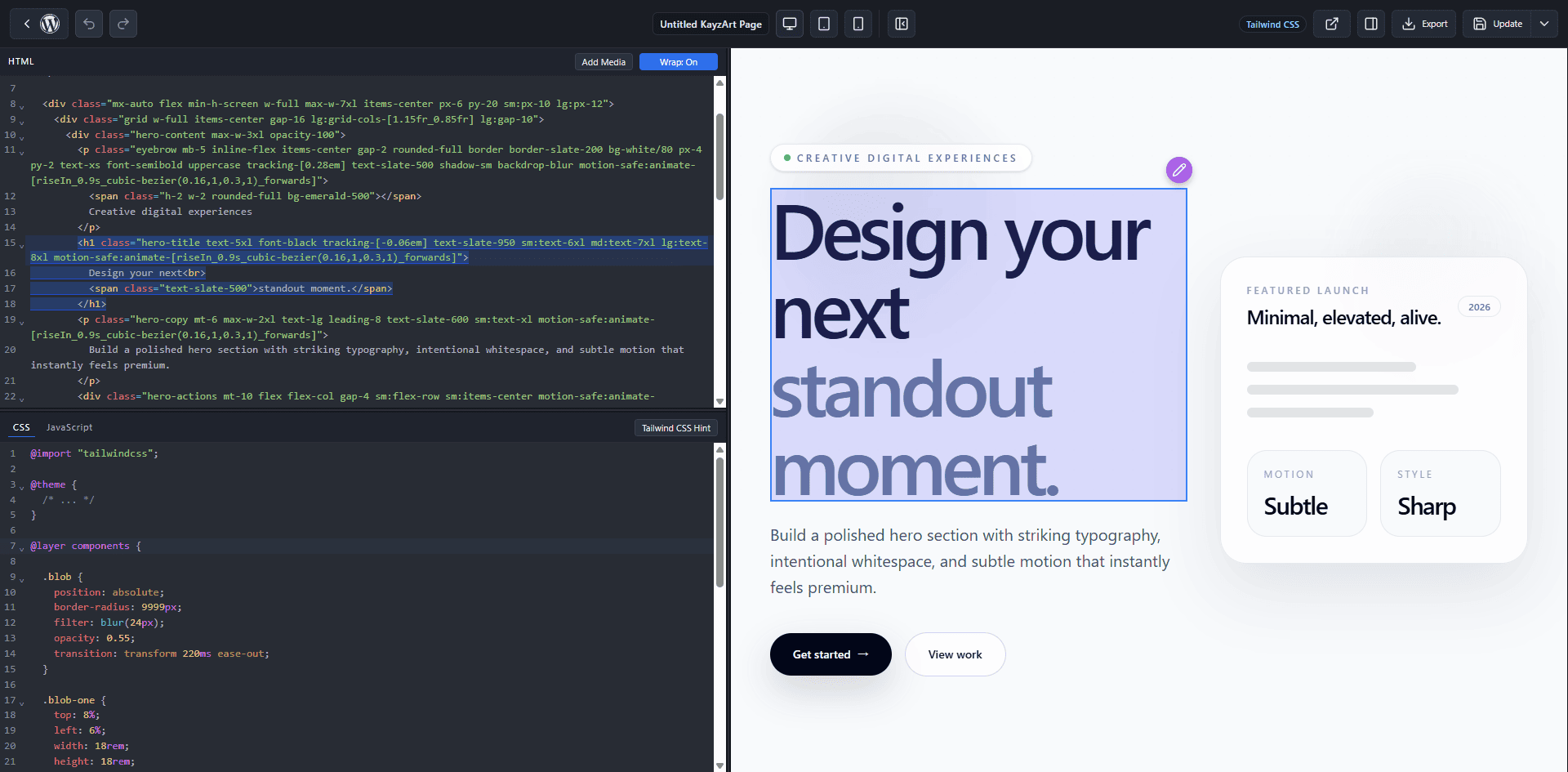
- Edit everything live with a CodeMirror 6 editor and instant iframe preview
- Click an element in the preview to jump to its code (real-time DOM selection)
- Keep the page theme-independent in Standalone mode, or render inside your theme in Theme mode
- Use plain CSS or TailwindCSS (auto-compiled) per page, and switch a page between the two later
- Run modern JavaScript (Classic script or ES Module)
- Bring a full HTML/CSS/JS page from anywhere and run it as-is
- Open Kayzart straight from the block or classic editor, which shows a Kayzart card instead of the usual content area
- Duplicate an existing landing page as a draft from the page list
- Write site-wide AI instructions once — text and background colors, fonts, tone of voice — and every AI request follows them
- Tune AI editing site-wide: default model, maximum turns per request, and maximum instruction length Works great with Bring HTML from anywhere — hand-written, a template, a designer, or an AI tool like ChatGPT, Claude, Gemini, or v0 — then keep editing it with the AI built into Kayzart. Whether the code starts as a paste from a chatbot or a hand-written draft, Kayzart is where it becomes a real, publishable WordPress page you can refine by hand or by prompt.
npm install and composer install, then run npm run build to generate the bundled assets. npm run plugin-zip produces the distributable package.
安装:
- Install and activate Kayzart from Plugins.
- To use AI on WordPress 7.0+, configure a provider in Connectors. On WordPress 5.9–6.9, add your OpenAI API key in Kayzart > Settings. The same settings screen shows whether AI editing is ready. AI editing is available by default to administrators and editors.
- Go to Kayzart > Add new. Enter an optional title and describe the page you want. Page type and CSS mode are set in Page settings on the same screen.
- Choose Generate with AI. The editor opens with the AI panel ready while the page is built; watch the activity log and review the result. To work from your own code instead, choose Start with a blank page.
- Keep refining by prompt or by hand — or paste your own HTML/CSS/JS from any source — while the live preview renders as you edit.
- Publish or update. Use Standalone mode for a clean, theme-free landing page.
- For an existing page, open Pages and choose Edit with Kayzart, or open the page in the block or classic editor and use the Kayzart card.
- Optional: Kayzart > Settings to enable Kayzart for posts or custom post types, and to set the default AI model, site-wide AI instructions, maximum AI turns, and maximum instruction length.
屏幕截图:


常见问题:
What is Kayzart and what can I build with it?
Kayzart is an AI-assisted, live HTML/CSS/JavaScript editor for WordPress. You build clean, theme-independent landing pages: describe the page and let the AI write it, or write and paste your own HTML, CSS, and JavaScript — then watch the live preview render as you edit, and publish. No drag-and-drop builder, no child theme, no build pipeline. Use Standalone mode to keep the page free of your theme's header, footer, and styles, or Theme mode to render inside your theme.
How do I create a page with AI from scratch?
Go to Kayzart > Add new, enter an optional title, and describe the page you want in plain language — for example, a landing page for a new service with a hero section, features, pricing, and a contact form. Choose Generate with AI: the page is created, the editor opens with code hidden and the AI panel visible, and the AI begins building immediately. You review the result and nothing is published until you save.
How does Kayzart remember the editor layout?
When you open an existing Kayzart page, Kayzart restores your last code visibility, tools-panel state, selected tab, and panel width for that site, WordPress user, browser, and screen size. An AI-created page opens with code hidden and the AI panel visible; a blank page opens with code visible and the tools panel closed. Those entry-specific starting states do not overwrite your saved preference. Compact screens keep a separate layout and start with the tools panel closed until you choose otherwise.
I already have HTML/CSS/JS (hand-written, a template, or from an AI tool). How do I use it in WordPress?
Create a landing page, then paste the HTML, CSS, and JavaScript into their tabs. You can also convert an existing WordPress page from the page list or edit screen; Kayzart keeps the existing post content as the initial HTML. If you have one complete HTML document, use the full HTML import feature to split it into the right fields. The live preview renders it immediately, and you can keep editing before you publish.
Can AI edit the page for me, right inside WordPress?
Yes. In the editor's AI tab, describe the change you want and the AI edits your page's HTML and CSS directly — you don't copy code back and forth from a chatbot. You can also select an element in the preview and ask the AI to change just that part. Each request runs as a background job you can watch or cancel, and the result is applied to your editor tabs for you to review. Nothing is published until you save. For safety, the AI edits markup and styles only and treats your JavaScript as read-only context, so it can't add or rewrite scripts. AI editing works on every supported WordPress version after an AI connection is configured.
How do I set up AI editing? What does it cost?
On WordPress 7.0 and later, configure a provider such as OpenAI, Anthropic, or Google through WordPress Connectors. On WordPress 5.9–6.9, enter an OpenAI API key in Kayzart > Settings; it is stored as a non-autoloaded WordPress option unless you provide KAYZART_OPENAI_API_KEY as an environment variable or PHP constant. WordPress 7.0 does not offer the direct key field, because Connectors holds one provider for every plugin on the site. A key saved before the upgrade keeps running your edits until a Connector is ready, and can be replaced or removed in Kayzart > Settings; once removed it cannot be entered again. There is no Kayzart account, per-edit Kayzart fee, or Kayzart server in the loop; you pay your selected provider for usage.
Who can use AI editing, and can I turn it off?
Access is controlled by a dedicated capability. Administrators and editors receive it on activation. Sites using standard WordPress capability-management tools can grant or remove it for other roles or individual users. Users without permission don't see the AI features at all. Site owners can also disable the feature entirely with a filter.
Which AI model does it use?
Connector-based editing follows the models exposed by the configured WordPress provider and can use Auto or a selected model. Direct OpenAI editing uses gpt-6-sol; developers can switch it with the kayzart_ai_openai_model filter. A replacement model must support Responses API function calling and strict JSON-schema output.
Which fonts will the AI use?
Only fonts your site can really render. Kayzart passes the AI the font families registered on your site — those defined by your theme (theme.json) and any added through the WordPress Font Library — along with three system font stacks that need no download. That is why AI-styled pages keep their typography for visitors instead of falling back to the browser default. The AI cannot load remote fonts or external stylesheets. If you want a specific typeface, add it to the Font Library first and it becomes available to the AI.
Can I control how much the AI does per request?
Yes. Kayzart > Settings has a maximum number of AI turns per request — the AI works in steps, and this caps how many steps one request may take — and a maximum instruction length in characters. The same screen reports the selected AI backend, connection state, Action Scheduler, and required PHP extensions.
Do I have to repeat my colors and style rules in every AI instruction?
No. Write them once in Site-wide AI instructions under Kayzart > Settings — for example your text and background colors, preferred fonts, or tone of voice — and they are added to every AI request on the site, for new pages and edits alike. When an individual instruction says otherwise, that instruction wins, and on an existing page the AI applies them to what it creates or changes rather than restyling the rest of the page. They never override Kayzart's security rules.
What happens when I open a Kayzart page in the block or classic editor?
Instead of the usual content area you get a Kayzart card, so the page's HTML is never edited in two places at once. You can still change the page title and all the normal WordPress page settings there, view the page, or jump straight into the Kayzart editor from the card.
Do I need to know how to code?
No, not to get a page. Describe what you want from Kayzart > Add new and the AI writes the HTML and CSS for you, then keep asking for changes in plain language or edit text, links, and images visually from the Elements panel. Basic familiarity with HTML/CSS helps when fine-tuning, and Kayzart gives you that full control the moment you want it — the code is right there, and it is yours.
Can I use shortcodes?
Yes. You can place WordPress shortcodes directly in the HTML editor. They are not expanded inside the live preview iframe, but they are processed normally on the published page or front-end view.
Can I duplicate an existing landing page?
Yes. From the Pages list, choose Duplicate with Kayzart for a Kayzart-managed page. Kayzart creates a new draft copy with the page content, Kayzart settings, featured image, and taxonomy terms carried over.
Can I use TailwindCSS?
Yes, and it is the recommended mode — the AI reads and edits utility classes more reliably than long custom stylesheets. Choose TailwindCSS when you create a page or when you first open an existing page with Kayzart, and Kayzart compiles the utility classes for you. You can also switch a page between Normal HTML/CSS and TailwindCSS later from the editor settings panel. It uses TailwindCSS v4, so the latest utility syntax works out of the box.
What is Standalone mode?
Standalone mode renders your landing page without the active theme's layout — the theme's header, footer, content template, styles, and scripts are not loaded, so your page isn't affected by theme CSS or JavaScript. Kayzart's own styles and scripts (and your page's CSS/JS) are still loaded, so the editor runtime and your page behave as expected. Use it when you want a clean, theme-independent landing page.
What is Theme mode?
Theme mode renders your Kayzart content inside the active theme's template, so the page keeps your theme's header, footer, and styling.
Where is the code stored?
HTML is stored in the post content; CSS, JavaScript, Tailwind/template modes, and other Kayzart settings are stored in post meta.
Does Kayzart send usage data to its own servers?
No usage data is sent automatically. Kayzart includes an optional administrator survey under Kayzart > Settings > Feedback. Every question in it is optional, and answers are sent to Kayzart only when an administrator presses Send feedback to Kayzart. The survey does not include the site URL, administrator email address, page content, or an installation identifier. AI editing also does not pass through a Kayzart server; it continues to use the AI connection configured by the site.
更新日志:
- Add: Include a URL in an AI instruction, such as "use this site as a reference" or "add this article to the page", and Kayzart reads that page first, so the AI works from what the page actually says. Up to three pages per instruction; administrators can turn this off with the new Linked pages setting in Kayzart > Settings.
- Improve: Optimize AI page creation.
- Change: Direct OpenAI editing (WordPress 5.9–6.9) now uses gpt-6-sol for higher-quality pages. It costs more per edit than gpt-5.6-luna.
- Add: The
kayzart_ai_openai_modelfilter lets developers choose the model used for direct OpenAI editing. - Fix: On WordPress 5.9–6.9, the Default AI model setting shows the OpenAI model before an API key is entered, instead of pointing to Connectors, which these versions do not have.
- Add: After you have saved Kayzart pages a few times over at least a week, administrators see a one-time invitation to review Kayzart on WordPress.org. It can be postponed once or turned off, and nothing is sent from your site.
- Add: Support and review links on the Plugins screen and in the footer of Kayzart's own screens.
- Add: Site-wide AI instructions in Kayzart > Settings — write your text and background colors, fonts, or tone of voice once, and every AI request, for new pages and edits alike, follows them. An individual instruction still takes precedence.
- Improve: Update the Tailwind compiler to TailwindCSS 4.3.3 support.
- Note: The default sans-serif font stack now matches TailwindCSS 4.3.
- Improve: Update CodeMirror, Emmet, and HTML parsing dependencies for improved editor stability.
- Maintenance: Remove unused frontend dependencies.
- Improve: Add a button inside the code panel to collapse it directly.
- Add: AI editing inside WordPress — describe a change in plain language and the AI edits your page's HTML and CSS directly.
- Add: Create a page from a prompt. Describe the page on Kayzart > Add new and the AI starts building it as soon as the editor opens.
- Add: Point the AI at a selected preview element to refine just that part.
- Add: Offer the AI the fonts your site can actually render — theme.json and Font Library families plus system font stacks — so AI-chosen typography no longer falls back to the browser default.
- Security: AI editing treats JavaScript as read-only context and never modifies it, so it can't inject or rewrite scripts.
- Add: Run AI edits as background jobs with a live activity log, cancel support, and a per-page edit history; results are applied for review and never published without saving.
- Add: Use WordPress AI Client/Connectors on WordPress 7.0+, or connect directly to OpenAI on WordPress 5.9–6.9.
- Security: Protect AI editing with a dedicated capability, available by default to administrators and editors.
- Infrastructure: Support WordPress 5.9+ and run AI editing with an Action Scheduler job runtime.
- Add: Settings for AI editing — default model, maximum AI turns per request, and maximum instruction length — alongside a requirements checklist that reports whether AI editing can run on your site.
- Add: A Kayzart menu in the admin sidebar that opens the create screen directly.
- Add: Switch a page between Normal HTML/CSS and TailwindCSS after it was created, from the editor settings panel.
- Improve: Compile TailwindCSS reliably on large HTML documents.
- Change: Show a Kayzart card in the block and classic editors for Kayzart-managed pages, with the page title, a view link, and a way into the Kayzart editor.
- Change: Rename the plugin to Kayzart — AI Landing Page Builder with Real HTML.
- Change: Make Add new AI-first with Generate with AI and Start with a blank page actions, with page type and CSS mode grouped under Page settings.
- Change: Open AI-created pages with code hidden and the AI panel visible, and blank pages with code visible and the tools panel closed. Normal visits restore each user's last desktop or compact layout.
- Change: Remove the site-wide Default editor layout setting while retaining its saved value as an upgrade fallback.
- Improve: Add accessible panel and tab semantics, keyboard tab navigation, compact Escape handling, focus restoration, and keyboard panel resizing.
- Change: Creating a page no longer happens the instant you click a menu item. Choose the title, AI instruction, and the page settings first, then create — so the editor opens ready to use and stray drafts are not left behind.
- Change: Move Kayzart settings from Settings to the Kayzart menu.
- Change: Rename the page list actions to Edit with Kayzart, Add with Kayzart, Duplicate with Kayzart, and Start editing with Kayzart, and show them ahead of the default row actions. Opening an existing page with Kayzart shows a confirmation screen that states the page content is kept.
- Change: Mark Kayzart-managed pages in the page list with a Kayzart label.
- Add: Keep full-page revision history for HTML, CSS, JavaScript, and page settings.
- Add: Load complete saved versions from the editor settings.
- Add: Duplicate an existing landing page as a draft from the page list.
- Add: Show placeholders for shortcodes in the live preview.
- Add: Edit preview images from the Elements panel.
- Fix: Keep nested text edits stable.
- Add: Show link and button editing in the Elements panel.
- Add: Let admins hide code panels by default.
- Improve: Make Elements text editing easier for non-coders.
- Fix: Apply element inner HTML edits to the live preview safely.
- Add: Convert existing posts into landing pages.
- Add: Format HTML, CSS, and JavaScript from the editor.
- Add: Replace preview images from the media library.
- Improve: Reduce preview flicker and preserve scroll position.
- Fix: Resolve front page preview returning a 404.
- Add: Export full HTML from the editor.
- Improve: Refine element attribute field layout.
- Add: Select parent elements from the preview tools.
- Fix: Bug fixes and stability improvements.
- Update: Rename visible brand text to Kayzart.
- Add: Show unsaved changes in the editor gutter.
- Fix: Bug fixes and stability improvements.
- Fix: Bug fixes and stability improvements.
- Refresh: Rebuilt the landing page editor for a simpler workflow.
- Improve: Streamlined page creation, editing, preview, and settings.
- Update: Cleaned up legacy features and internal structure.
- Update: Minor changes.
- Docs: Add screenshots section.
- Update: Dependency maintenance.
- Improve: Add resizable settings panel with width persistence.
- Add: Introduce preview override action events.
- Security: Security update and hardening improvements.
- Fix: Bug fixes and stability improvements.
- Introduce CodeMirror 6 editor runtime and remove legacy bundled loader assets.
- Fix: Minor internal code cleanup
- Add JavaScript execution mode selector (Classic script / Module) in the JavaScript tab.
- Add ES Module runtime contract support with context injection (
root,document,host,onCleanup).
- Fix: Bug fixes and stability improvements.
- Security: Security update and hardening improvements.
- Security: Implemented security-related improvements and hardening updates.
- Add external embed allowlist settings.
- Other: Internal improvements and maintenance updates.
- Initial release.